Sooner or later every site changes shape. You rebuild, you merge two thin service pages into one good one, you move to HTTPS, you rebrand, you restructure city pages after adding a location. Each of those breaks URLs that Google has already indexed and that other sites have already linked to. A 301 redirect is what turns a breaking change into an invisible one. Skip it and you hand visitors a 404 and hand Google a reason to drop pages you spent years earning.
Why 301 redirects matter for local SEO
Local businesses tend to accumulate URL debt quietly. A practice adds a second location and the original service pages need new homes. An agency inherits a client site built across three agencies and finds four near-identical “emergency plumbing” pages competing with each other. A restaurant changes its name.
In every one of those cases the old URLs hold real value, links from the local paper, a chamber of commerce listing, a directory profile, bookmarks. A 301 moves that value across. A 404 throws it away.
There is one local-specific trap worth naming. If the website field on your Google Business Profile points at a URL you have redirected, update it. The redirect will work, but you are adding a hop to the single most important click in your local presence, and it is easy to forget when the page still loads fine.
- Transfers the old URL's ranking signals to the new one
- Keeps existing visitors, bookmarks and directory links landing on a real page
- Prevents two URLs competing for the same query
- Consolidates split link equity onto one canonical page
How a 301 redirect works
When a browser or crawler requests the old URL, the server replies with a 301 Moved Permanently status and a Location header naming the new URL. The client follows it automatically. Google does the same, updates its index over time, and shifts the ranking signals across.
The “permanent” part is what distinguishes it from a 302. A 302 tells Google the move is temporary and to keep showing the original URL in results. Use one by mistake for a permanent move and you delay everything.
Where you configure it depends on your stack. The method matters far less than the outcome: a single-hop 301 pointing straight at the final destination.
- Apache, rules in .htaccess
- Nginx, directives in the site config
- WordPress and most CMS platforms, a redirect plugin or a built-in tool
- Managed platforms (Shopify, Squarespace, Webflow, Wix), a redirects panel in settings
Google's documentation on redirects and Search covers how each redirect type is interpreted, including the client-side and meta refresh methods you should generally avoid.
How to set one up and check it
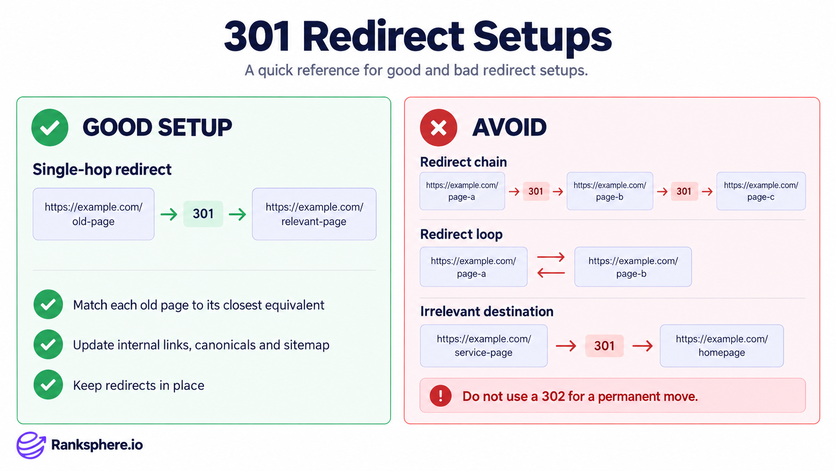
Map before you migrate. Every old URL gets matched to its closest equivalent on the new site, one to one. Dumping everything on the homepage feels efficient and is the single most common way to lose rankings in a rebuild, Google reads a redirect to a non-equivalent page as a soft 404 and passes nothing.
- Build a spreadsheet: old URL to new URL, one row per page, before launch
- After launch, confirm each returns an actual 301 and resolves in one hop
- Follow every chain end to end, and check on mobile and desktop
- Update internal links, canonical tags and your XML sitemap to the new URLs
- Resubmit the sitemap in Google Search Console and watch the Pages report for errors
A crawl is the only realistic way to verify this at any scale. Ranksphere's website audit will find redirect chains and broken internal links across the site so you are not spot-checking by hand.
Common mistakes
Almost every 301 problem is a setup problem, not a redirect problem.
- Chaining, A to B to C instead of A straight to C. Every hop is latency for the user and crawl waste for Google.
- Looping, two URLs redirecting to each other. The page becomes unreachable entirely.
- Sending everything to the homepage, treated as a soft 404, passes nothing
- Using a 302 for a permanent move, keeps the old URL indexed and stalls the transfer
- Leaving internal links pointing at old URLs, your own site should not rely on redirects to navigate itself
- Removing the redirects too early, the signals have not finished moving
Best practices
- Redirect at the URL level: one old page to one relevant new page
- Keep 301s live for at least a year. Google's Change of Address tool requires a 180-day minimum, longer is safer, and there is rarely a good reason to remove them at all
- Update internal links, canonicals and sitemaps so they point at the final URL directly
- Monitor Search Console's Pages report and crawl stats for several weeks after launch
- For a full domain move, use the Change of Address tool in Search Console in addition to the redirects, not instead of them
Example
“Northside Family Dental ran two pages for the same service: example.com/custom-dental-implants and example.com/implant-dentistry-services. Both ranked on page two, each holding a handful of links, neither strong enough to break into the local pack.
They picked example.com/custom-dental-implants as the survivor, 301'd the second page to it, rewrote the menu and blog links to point at the keeper, and resubmitted the sitemap. Within about six weeks Google dropped the duplicate from its index, combined the signals onto the remaining URL, and the page moved into the local pack for “dental implants” searches across most of their service area.
The redirect did not create anything. It stopped two pages competing for the same job.”
See also
- 302 redirect, a temporary move that keeps the original URL indexed
- Canonical tag, signals a preferred version of similar pages without redirecting
- 404 error, a page that no longer exists, with nothing forwarding
- Soft 404, a page that returns success but has no real content, or a redirect to an irrelevant destination
- HTTP status codes, the family of server responses a 301 belongs to
- Redirect chain, two or more redirects stacked between the request and the destination