A 404 error is an HTTP status code returned when a server cannot find the requested page or resource.
In many cases, that is exactly the correct response.
If a page has been permanently removed and there is no relevant replacement, returning a 404 tells browsers and search engines that the URL no longer contains the requested content.
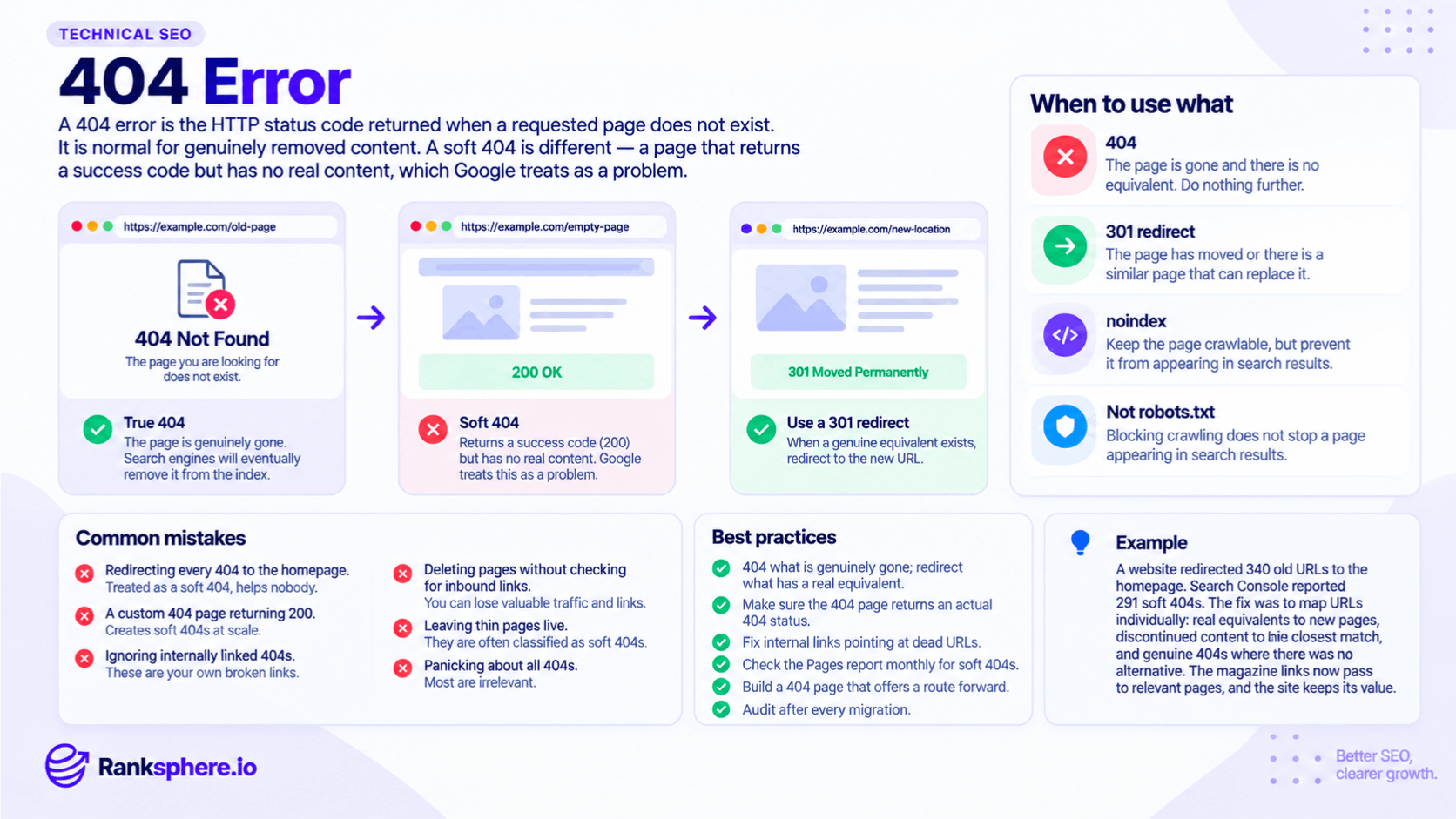
A soft 404 is different. It happens when a page appears to be missing or effectively empty, but the server returns a normal success response — often 200 OK — or redirects the visitor somewhere that does not meaningfully replace the original page.
The important question is not whether a website has 404s.
It is which URLs return them, why they return them and whether those URLs still have value.
Are 404 errors bad for SEO?
Not automatically.
A normal 404 on a genuinely removed page is part of maintaining a website.
Pages are deleted. Products disappear. Jobs expire. Events finish.
Search engines expect this.
A 404 becomes worth investigating when the URL:
- Is still linked from your own website
- Previously received organic traffic
- Has valuable external links pointing to it
- Was moved rather than removed
- Represents content that should still exist
- Appears because of a migration or broken site structure
A random 404 created by a typo or an invalid external URL may need no action at all.
The goal is not to eliminate every 404.
The goal is to make sure important visitors and search engines are not being sent to dead ends unnecessarily.
When is a 404 the correct response?
A 404 is appropriate when the requested content genuinely no longer exists and there is no useful equivalent.
Examples include:
- A permanently removed page with no replacement
- An expired job listing
- A finished event that no longer needs a permanent page
- A discontinued product with no meaningful alternative
- A malformed URL that never represented a real page
- A typo in an external link
In these situations, you do not need to create an unrelated redirect simply to avoid showing a 404.
Google can eventually remove the unavailable URL from its index.
That is the expected outcome.
When should you use a 301 redirect instead?
A 301 redirect is usually more appropriate when the old URL has a clear replacement.
Examples include:
- A page moved to a new URL
- Two pages combined into one
- A service renamed but still offered
- An old product replaced with a genuinely similar product
- A redesigned site using a new URL structure
The easiest test is to think about the visitor.
If someone clicks the old URL, would the new page genuinely satisfy what they were expecting?
If yes, redirecting makes sense.
If not, a proper 404 may be better than sending them somewhere unrelated.
Why you should not redirect every 404 to the homepage
Blanket redirects are a common migration mistake.
For example:
/old-kitchen-project/
redirects to:
/
The homepage may be live and useful, but it is not necessarily a replacement for that specific kitchen project.
Google may interpret redirects to unrelated destinations as soft 404s because the destination does not satisfy the original request.
Visitors also have a poor experience.
They clicked expecting one thing and suddenly arrive on a generic homepage with no explanation.
Redirect only when you have a genuinely relevant destination.
If no useful replacement exists, a clear 404 page is often the cleaner solution.
What is a soft 404?
A soft 404 occurs when a URL behaves like a missing page but does not return an appropriate not-found status.
A common example is a page that says:
“Sorry, this page could not be found.”
but returns:
200 OK
To the browser, the request succeeded.
To the visitor, the content is missing.
Search engines have to identify that mismatch themselves.
Google can classify these URLs as soft 404s in Google Search Console.
Common causes of soft 404s
Soft 404s can appear for several reasons.
Custom 404 pages returning 200
A site may have a beautifully designed error page but send the wrong HTTP status.
The content says the page is missing, while the server says everything is fine.
The fix is usually straightforward: make sure the error template returns a genuine 404 response.
Irrelevant redirects
An old product, article or service URL may redirect to:
- The homepage
- A generic category
- An unrelated service page
If the destination does not meaningfully replace the original page, Google may treat the result as effectively not found.
Use redirects only where the destination is genuinely relevant.
Empty category or search pages
A category page containing no products or an internal search page returning no useful results may look like a missing page despite returning 200 OK.
Decide whether the page should:
- Gain useful content
- Return a genuine error
- Be excluded from indexing
- Redirect somewhere relevant
The correct option depends on why the URL exists.
Very thin pages
Some pages technically contain content but offer so little useful information that they resemble empty results.
This does not mean every short page is a soft 404.
But pages containing little more than a heading, generic sentence and contact form deserve review.
Expired or out-of-stock pages
Removing all useful information from an expired page while leaving the URL live can create an awkward middle ground.
For a permanently unavailable product or service, decide whether there is:
- A relevant replacement
- Historical value in keeping the page
- A reason to return a 404 or 410
- A better category page to redirect to
Avoid leaving an empty shell simply because the URL once ranked.
404 vs soft 404
The distinction is mostly about the response the server gives.
Normal 404
The server says:
404 Not Found
and the content explains that the page is unavailable.
This is clear and technically correct.
Soft 404
The page behaves as though the content is missing, but the server says:
200 OK
or sends the visitor to a destination Google considers an unsuitable replacement.
The first is an explicit not-found response.
The second forces search engines to infer that the content is effectively gone.
How to find 404 errors
There are several useful ways to identify them.
Google Search Console
Check the Pages report in Google Search Console.
Look for categories such as:
- Not found (404)
- Soft 404
Search Console is particularly useful because it shows URLs Google has actually encountered.
Website crawling
Run a technical crawl to find internal links pointing to missing pages.
An internally linked 404 is usually worth fixing because the broken link originates on your own website.
External backlinks
Check whether important 404 URLs still have external links pointing to them.
If a valuable old page has backlinks and a genuinely relevant replacement exists, a 301 redirect may preserve more of that value and give visitors somewhere useful to go.
Ranksphere's website audit finds broken internal links and dead URLs across a site, making it easier to separate useful fixes from harmless 404 noise.
How to prioritise 404 errors
Not every 404 deserves equal attention.
A useful priority order is:
- Broken internal links
- Previously important pages with a relevant replacement
- 404 URLs with valuable external links
- URLs still receiving traffic
- Migration-related errors
- Low-value invalid URLs with no links or traffic
For example:
A broken internal link from your homepage to an old service page is important.
A random URL such as:
/abcxyz123/
that never existed and has no links is usually not.
Fix what affects visitors, crawling or existing value.
Fixing broken internal links
If your own website links to a 404 URL, update the link.
Do not leave the broken link in place simply because the dead URL also redirects.
For example:
Instead of:
Service page → old URL → 301 → new URL
update the internal link so it goes directly to:
Service page → new URL
This creates a cleaner experience for visitors and crawlers.
Broken internal links are particularly common after:
- Website redesigns
- URL changes
- Migrations
- Content deletion
- Service restructuring
What should a good 404 page contain?
A useful 404 page should still return an actual 404 HTTP status.
After that, focus on helping the visitor recover.
A good custom 404 page can include:
- A clear explanation that the page cannot be found
- A link back to the homepage
- Main service or category links
- Site search
- Contact information
- Normal website navigation
- Your usual branding
For a local business, a visible phone number or contact option can also be useful.
Someone who reaches a dead URL may still be a potential customer.
The goal is to give them an easy route forward rather than simply displaying:
404 — Page Not Found
with nowhere else to go.
404 errors after a website migration
Migrations are one of the most common times for important 404 problems to appear.
When URLs change, create a redirect map before launch.
Old URLs should be reviewed individually or in sensible groups.
For each one, decide whether it should:
- Redirect to a direct replacement
- Redirect to a genuinely relevant equivalent
- Return a proper 404
- Remain unchanged
Do not automatically send everything to the homepage.
After launch, crawl the website and review Search Console to find missing redirects and broken internal links.
Should an expired page return 404 or 410?
A 410 Gone status can also be used when a resource has been permanently removed.
Both 404 and 410 tell search engines that the requested content is unavailable.
For most everyday websites, a correct 404 is perfectly acceptable.
You do not need to change every permanently deleted URL to 410 purely for SEO.
The more important decision is whether the URL should be removed at all or redirected to a relevant replacement.
404 errors and indexing
When Google repeatedly encounters a genuine 404, the URL can eventually be removed from its index.
This is normal.
You do not need to block the page in robots.txt simply because it returns 404.
Doing so can make diagnosis more confusing because Google can no longer fetch the URL and confirm its status.
Let the server return the correct status.
See indexing for more on how URLs enter and leave Google's index.
Common 404 mistakes
- Redirecting every missing URL to the homepage. Only redirect where there is a relevant replacement.
- Returning 200 on a custom 404 page. A not-found page should return the appropriate status.
- Trying to eliminate every 404 on the website. Some are completely normal.
- Ignoring broken internal links. These are problems you control directly.
- Deleting valuable pages without checking backlinks or traffic.
- Leaving empty pages live simply because they once ranked.
- Using unrelated redirects to “save SEO value.” Relevance matters.
- Blocking 404 URLs in robots.txt. Let search engines see the correct response.
- Assuming every Search Console 404 needs fixing. Investigate whether the URL ever mattered first.
404 error best practices
- Return a genuine 404 when content is permanently gone and has no replacement.
- Use a 301 redirect when a relevant replacement exists.
- Avoid blanket redirects to the homepage.
- Make sure custom 404 pages return a 404 status.
- Fix broken internal links promptly.
- Check valuable old URLs for external backlinks before deleting them.
- Review Search Console for soft 404s.
- Build a useful custom 404 page with clear navigation.
- Audit 404s after migrations and redesigns.
- Prioritise errors according to traffic, links and user impact.
Example
“Halloway Kitchens moves its website to a new platform.
The old site contained hundreds of project pages, product ranges and informational URLs.
To keep things simple, the migration sends every old URL to the homepage.
Nothing technically breaks.
Visitors reach a working page, and the server returns a successful redirect.
But Search Console begins reporting many of the old URLs as soft 404s because the homepage does not meaningfully replace the specific content people requested.
Some of those old URLs also have valuable external links pointing to them.
The redirect strategy is reviewed properly.
Old project pages are mapped to their new project equivalents.
Renamed product ranges are redirected to the closest relevant current pages.
Pages with no suitable replacement are allowed to return a genuine 404.
The business ends up with more 404s than it had under the blanket redirect setup.
That is not a problem.
The redirects now make sense, visitors land on relevant content, and genuinely retired URLs accurately report that they are gone.
That is the right way to handle 404 errors: do not try to remove every error code. Make sure every old URL gives the most useful and technically accurate response possible.”
See also
- 301 redirect — the right option when a relevant replacement exists
- Soft 404 — when a URL behaves like a missing page without returning the correct status
- HTTP status codes — the wider set of server responses
- Indexing — how unavailable URLs are handled in search
- Technical SEO — the wider discipline covering crawling and site health
- Thin content — low-value pages that can sometimes resemble soft 404s