A table of contents (TOC) is a list of links that helps visitors navigate to specific sections of a webpage. It usually appears near the beginning of a long article or guide, allowing readers to jump directly to the information they need without scrolling through the entire page.
For example, a dental practice might publish a detailed guide about dental implants, covering treatment costs, the procedure, recovery, and frequently asked questions.
Instead of scrolling through every section, visitors can use the table of contents to go straight to the topic they're interested in.
A table of contents can improve navigation and make longer content easier to use. It may also help search engines understand the organisation of a page through its headings and links.
However, adding a table of contents doesn't automatically improve Google rankings.
For SEO, the main benefit is usability. A well-designed table of contents helps readers find information quickly, particularly on lengthy pages.
How Does a Table of Contents Work?
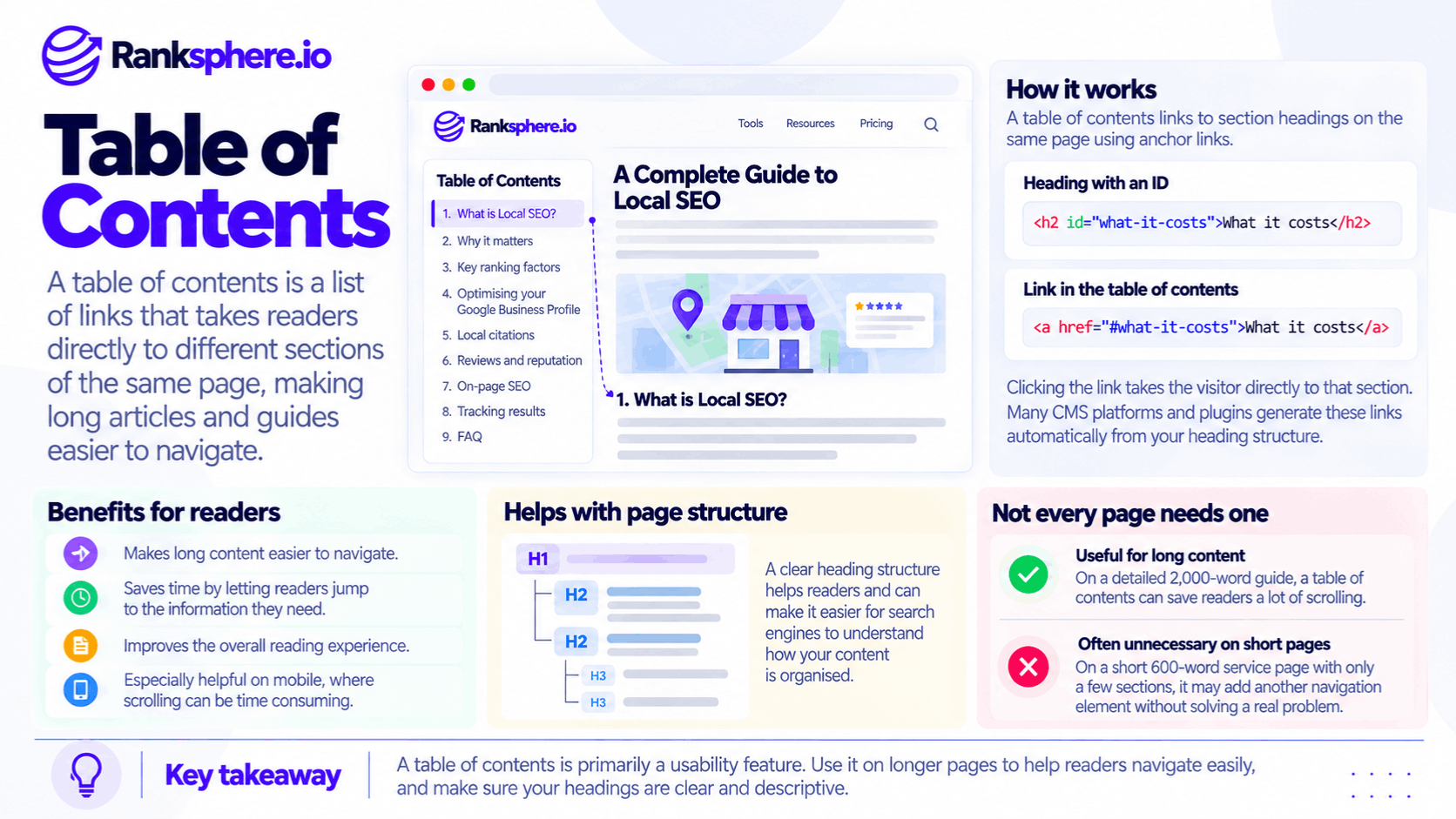
A table of contents uses internal links that point to specific sections of the same webpage.
These are commonly called anchor links or jump links.
For example, a detailed service guide might contain these sections:
- What Is the Treatment?
- How Much Does It Cost?
- What Happens During the Procedure?
- How Long Does Recovery Take?
- Frequently Asked Questions
Each item in the table of contents links to the corresponding section.
When someone clicks "How Much Does It Cost?", their browser moves directly to that part of the page.
How Anchor Links Work
Anchor links use an identifier assigned to a page element, commonly a heading.
For example, a heading about treatment costs might have the identifier treatment-costs.
The table of contents then links to that identifier using #treatment-costs.
This allows visitors to jump directly to the relevant section.
It also creates a shareable URL that points to a particular part of the page.
For example:
https://example.com/dental-implants#treatment-costs
Someone opening that URL can be taken directly to the treatment costs section.
How Tables of Contents Are Generated
Many content management systems and website plugins can generate a table of contents automatically.
They usually identify headings within the content and turn them into navigation links.
This is one reason a clear heading structure matters.
If headings are organised logically, the resulting table of contents is generally easier to understand.
For example, an article with descriptive H2 headings can produce a simple navigation list.
An article with inconsistent headings may produce a confusing or unnecessarily long table of contents.
When Should You Add a Table of Contents?
A table of contents is most useful when a page contains enough information that visitors may need help finding a particular section.
There isn't a fixed word count that determines whether one is necessary.
However, it is often worth considering for longer articles, detailed guides, and reference content.
Long-Form Articles and Guides
A comprehensive article covering several related topics can benefit from a table of contents.
For example, a 2,000-word guide about local SEO might explain:
- Google Business Profile optimisation
- Local keyword research
- Business citations
- Customer reviews
- Local ranking tracking
- Performance reporting
Readers may already understand some of these topics and want to skip directly to another section.
A table of contents makes that easier.
Pages Covering Several Questions
Some pages answer multiple related questions.
For example, a dental implants guide might cover:
- Who is suitable for treatment?
- How much does treatment cost?
- How long does the procedure take?
- What is the recovery process?
- What are the possible risks?
A table of contents allows visitors to choose the question that matters to them.
This can be especially useful when readers arrive from Google with a specific concern.
Reference Content
Reference pages are often used differently from ordinary articles.
Someone may return to the same page several times to check a specific explanation.
For example, a technical SEO guide may cover multiple concepts that readers want to revisit individually.
A table of contents provides a convenient way to navigate between those sections.
Detailed Educational Content
Tutorials and step-by-step guides can also benefit from a table of contents.
For example, a guide explaining how to optimise a Google Business Profile may include several distinct tasks.
Readers who have already completed the first steps can jump ahead without searching through the entire article.
However, if the tutorial needs to be followed in a strict sequence, the navigation should still make that order clear.
When Is a Table of Contents Unnecessary?
Not every webpage needs a table of contents.
On shorter pages, it can introduce unnecessary navigation and push useful information further down the screen.
Short Service Pages
Consider a plumbing service page containing 600 words and four short sections.
If the page is already easy to scan, adding a table of contents may not help.
Visitors can quickly move between the sections without additional navigation.
For a local service page, a clear heading, service explanation, and contact option may be more useful than a list of section links.
Pages with Only a Few Sections
A page containing two or three short sections generally doesn't need separate navigation.
For example, a simple contact page might include:
- Contact Details
- Opening Hours
- Find Us
A table of contents would add little value because all three sections are already easy to locate.
Content Intended to Be Read in Order
Some content follows a narrative or sequence where each section builds on the previous one.
In these cases, encouraging readers to jump between sections may not improve the experience.
A table of contents can still be useful for longer instructional material, but it shouldn't be added automatically.
Pages Where It Pushes Important Content Too Far Down
On mobile devices, a long table of contents can occupy much of the first screen.
For example, imagine a local service page where visitors first see:
- The navigation header
- The page title
- A table of contents containing eight links
The service description and contact button may be pushed below the visible area.
This can make the page less useful for someone who wants an answer or needs to contact the business quickly.
As explained in above the fold, the first visible section should help visitors understand the page and find their next step.
A table of contents should support that experience rather than get in the way.
Does a Table of Contents Help SEO?
A table of contents can support SEO indirectly by improving page navigation and making content easier to use.
However, there is no confirmed direct Google ranking benefit simply from including one.
Its main SEO-related value comes from the structure and accessibility of the content.
Helping Readers Find Relevant Information
A well-organised table of contents allows visitors to navigate to specific topics.
For example, someone reading a detailed guide about roof repairs may want to find the section covering repair costs.
Instead of scrolling through several pages of information, they can jump directly to that section.
This improves usability, but it shouldn't be presented as a guaranteed way to increase rankings or engagement.
Supporting a Clear Heading Structure
Tables of contents are commonly generated from page headings.
When those headings are descriptive and logically organised, they make the content easier to navigate.
For example:
H2: How Much Does Roof Repair Cost?
H2: What Causes Roof Leaks?
H2: When Should You Replace a Roof?
These headings communicate the purpose of each section more clearly than generic labels such as "Information" or "More Details."
However, the benefit comes from clear organisation and useful content, not from the table of contents itself.
Creating Shareable Section Links
Anchor links allow visitors to share specific parts of an article.
For example, a customer may send someone a link directly to the section explaining treatment costs.
This can make long-form content more convenient to use and share.
It also helps visitors return to the relevant information without navigating through the entire page again.
Can a Table of Contents Create Jump Links in Google Search?
Google sometimes displays links to specific sections of a webpage within search results.
These may appear as sitelinks or other navigation features.
Google can also direct users to a relevant passage of a page, depending on the search result and supported browser behaviour.
However, adding a table of contents does not guarantee that Google will display jump links.
Google determines which search result features to show using its own systems.
There isn't a special table of contents markup requirement that guarantees these links.
What Helps Google Understand Page Sections?
Clear page structure can make content easier for search engines to interpret.
Useful practices include:
- Using descriptive headings
- Maintaining a logical heading hierarchy
- Giving important sections stable identifiers
- Creating functional anchor links
- Keeping content accessible without unnecessary interaction
However, these practices don't guarantee that section links will appear in search results.
Treat any additional search result navigation as a possible benefit, not the primary reason to add a table of contents.
How to Create an SEO-Friendly Table of Contents
A good table of contents should be easy to use, particularly on mobile devices.
1. Generate It from the Heading Structure
Where possible, use your content management system or a reliable plugin to generate the table of contents from headings.
This reduces the risk of links becoming outdated when content changes.
For example, adding a new H2 section may automatically add a corresponding entry.
However, check the generated navigation before publishing.
Automatic tools can still include unnecessary headings or create confusing labels.
2. Use Descriptive Section Names
Each entry should clearly explain what the linked section covers.
For example:
Better: How Much Does Dental Implant Treatment Cost?
Less useful: Pricing Information
The first heading provides more specific context.
Readers should be able to understand the sections without having to open each one.
3. Limit the Number of Heading Levels
A table of contents doesn't need to include every heading on the page.
For many articles, using H2 headings is sufficient.
On more detailed guides, including selected H3 headings may also help.
However, displaying every H2, H3, and H4 can produce an unnecessarily long navigation list.
The goal is to help readers move between important sections, not reproduce the entire document structure.
4. Consider a Collapsible Table of Contents on Mobile
A collapsible table of contents can be useful when a long navigation list would otherwise occupy too much space.
For example, a mobile page might show a short "On This Page" heading that visitors can expand.
This gives readers access to section navigation without pushing the main content too far down.
However, the control should be clearly labelled, keyboard-accessible, and easy to operate.
5. Keep Anchor IDs Consistent
Anchor identifiers become part of shareable URLs.
For example, a link ending in #treatment-costs depends on that identifier remaining available.
If the identifier changes, older shared links may stop taking visitors to the intended section.
Try to keep established anchor IDs stable when updating content.
This is particularly important for reference articles that people may bookmark or link to.
6. Check the Mobile Layout
After adding a table of contents, open the page on a real mobile device.
Check whether:
- The page heading remains easy to find
- Important introductory information is visible
- The table of contents takes up too much space
- Section links work correctly
- Linked headings remain visible after navigation
- Sticky headers cover the destination heading
The last issue is easy to overlook.
Some websites have sticky navigation headers that can cover the heading when a visitor clicks an anchor link.
Appropriate scroll spacing can help prevent this.
7. Review the Heading Structure
An automatically generated table of contents depends on the page's heading hierarchy.
If headings skip levels unnecessarily or are used only for visual styling, the navigation may become confusing.
Ranksphere's website audit tool helps identify technical and structural website issues, including heading-related problems.
A clear heading hierarchy benefits both the page itself and any navigation generated from it.
Common Table of Contents Mistakes
Several implementation mistakes can make a table of contents less useful.
- Adding one to every page. Short pages may not need additional navigation.
- Letting it dominate the mobile first screen. A long list of links can push important content further down.
- Including every heading level. Too many nested entries make navigation harder to scan.
- Maintaining links manually without checking them. Headings may change while anchor links remain outdated.
- Expecting guaranteed jump links in Google Search. Search result features are controlled by Google.
- Changing anchor IDs unnecessarily. Existing shared links may stop working as intended.
- Using vague heading names. Readers can't navigate effectively if section labels don't explain the content.
- Failing to test mobile anchor navigation. Sticky headers and layout issues can interfere with navigation.
Table of Contents Best Practices
To make tables of contents useful:
- Add them when the length and structure of a page justify them.
- Prioritise long guides and reference articles.
- Avoid unnecessary tables of contents on short service pages.
- Generate navigation from a logical heading structure.
- Use clear, descriptive section names.
- Include only the heading levels readers need.
- Consider collapsible navigation on smaller screens.
- Keep anchor identifiers stable.
- Make sure section links work correctly.
- Test mobile layouts and sticky header behaviour.
- Review the table of contents whenever the article changes.
The objective isn't to add another SEO element to the page.
It's to help readers reach the information they need with less effort.
Example of a Table of Contents on a Local Business Website
Consider a hypothetical physiotherapy practice called Ravensworth Physiotherapy.
The clinic publishes several detailed educational guides alongside its main treatment pages.
To improve navigation, the website team installs a table of contents plugin.
However, the plugin is configured to add a table of contents to every page containing more than 300 words.
What Happens?
The two long educational guides benefit from the change.
Readers can jump between sections covering symptoms, treatment options, recovery, and frequently asked questions.
However, the plugin also adds a table of contents to eleven shorter service pages.
Most of those pages contain around 700 words and only four main sections.
On mobile devices, the table of contents takes up much of the initial screen.
Visitors arriving from Google see a list of section links before reaching the service explanation or booking option.
The navigation isn't broken, but it adds an unnecessary step to pages that were already easy to scan.
How the Clinic Improves the Setup
The website team reviews where the table of contents is genuinely useful.
Instead of applying a strict rule based only on word count, it considers the length, structure, and purpose of each page.
It keeps the table of contents on the two long educational guides.
The shorter service pages no longer display one unless their structure provides a clear reason for it.
The team also checks that the remaining tables of contents work correctly on mobile.
Example Shows
“A table of contents can improve navigation on a detailed guide while adding unnecessary clutter to a short service page.
The feature itself isn't the problem.
The issue is applying it without considering how visitors use each page.
The clinic can monitor engagement and conversion behaviour after making the changes, but it shouldn't assume that removing the table of contents will automatically improve enquiries.
A table of contents is most useful when it helps readers navigate content that would otherwise take time to find.
For SEO, the priority should be a clear heading structure, useful content, and navigation that matches the page's purpose.”
See Also
- Heading Tags — Organising webpages with a logical heading hierarchy.
- Above the Fold — Understanding what visitors see before scrolling.
- On-Page SEO — Improving individual webpages for search engines and readers.
- Readability — Making written content easier to understand.
- Featured Snippet — Understanding how Google may display concise answers in search results.
- Semantic HTML — Using meaningful HTML elements to describe content and page structure.