
Breadcrumb navigation is a secondary navigation system that shows where a page sits within a website's hierarchy.
It usually appears as a short trail of links near the top of a page, starting with the homepage and moving through the relevant sections to the current page.
For example:
Home → Services → Roofing → Flat Roof Repair
Breadcrumbs help visitors understand where they are, move back to broader sections of the site and see how the current page fits into the wider structure.
When combined with BreadcrumbList structured data, they can also give search engines clearer information about the page's position within the site.
What do breadcrumbs look like?
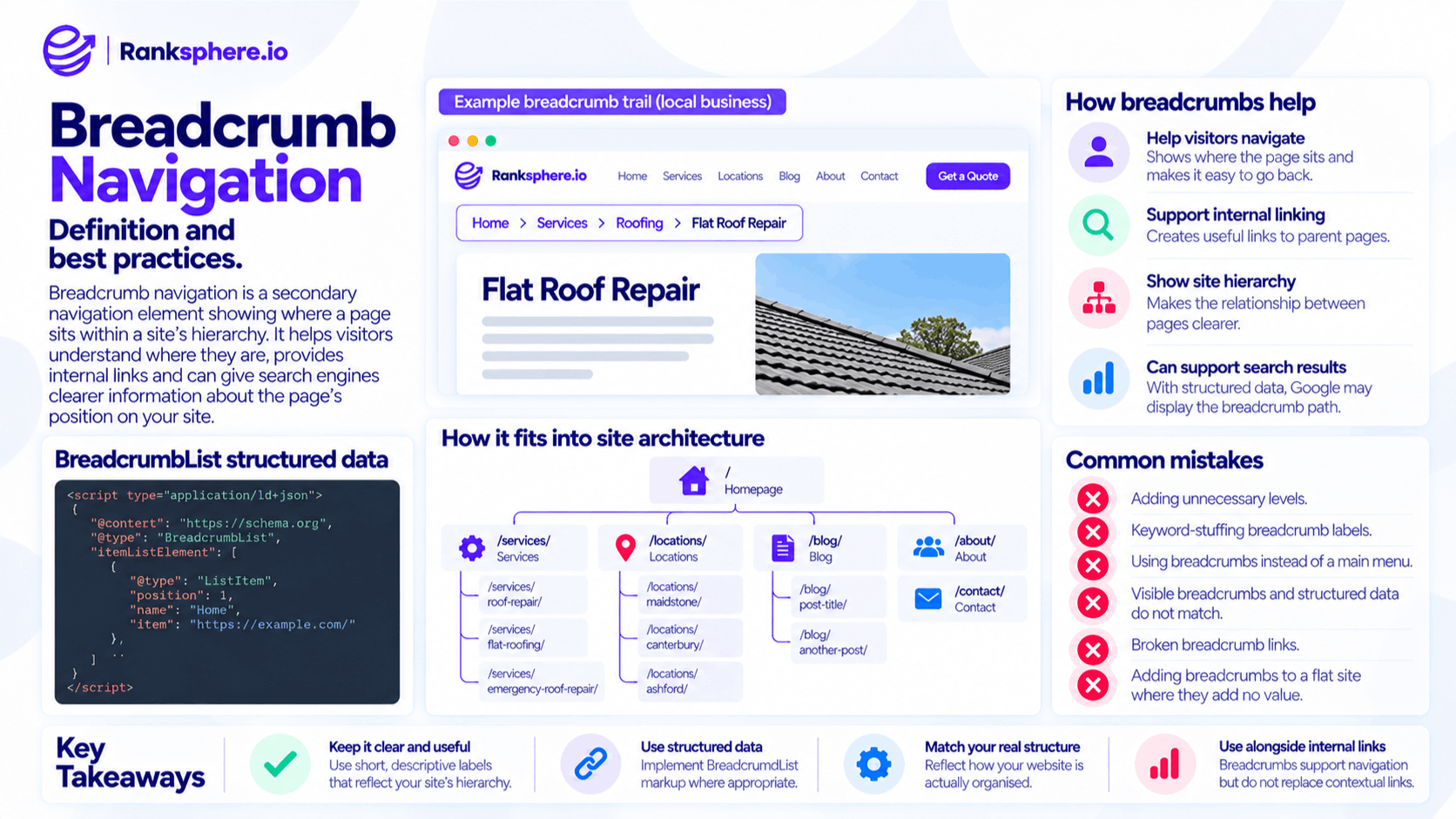
A typical breadcrumb trail might look like this:
Home > Services > Roofing > Flat Roof Repair
Each step usually represents a level in the site's hierarchy.
For example:
- Home — the homepage
- Services — the main service section
- Roofing — a service category
- Flat Roof Repair — the current page
The earlier items are normally clickable links.
The current page is often shown as plain text because the visitor is already there.
Breadcrumbs are usually placed near the top of the page, often above the main heading.
They are intended to support the primary navigation rather than replace it.
Why breadcrumb navigation matters
Breadcrumbs provide several useful benefits without adding much complexity to a website.
They help visitors understand where they are
Someone arriving directly from Google may land several levels deep in a website.
Without context, they may not know:
- Which section they are in
- What broader category the page belongs to
- Where to go next
A breadcrumb trail gives them an immediate route back through the hierarchy.
For example:
Home → Services → Heating → Boiler Repair
tells the visitor much more than simply landing on a page titled Boiler Repair.
They support internal linking
Breadcrumbs also create internal links between child pages and their parent sections.
A product page may link back to its category.
A service page may link back to the services hub.
A location page may link back to the main locations section.
These links help visitors navigate and reinforce the relationship between different levels of the site.
They make site hierarchy clearer
Good breadcrumbs reflect the website's site architecture.
For example:
Home → Services → Roofing → Flat Roof Repair
clearly indicates that Flat Roof Repair belongs within Roofing, which belongs within Services.
That structure can help both visitors and search engines understand how the site's content is organised.
They can support search-result presentation
Breadcrumb structured data gives Google additional information about a page's position within the website.
Google may use breadcrumb information when interpreting or presenting a page in search results.
The exact appearance is not guaranteed and can vary by device, query and search feature.
So breadcrumbs should primarily be implemented because they improve navigation and structure, with search presentation treated as an additional benefit.
Breadcrumb navigation and SEO
Breadcrumbs do not provide a direct shortcut to higher rankings.
Their SEO value comes from supporting the wider structure of the website.
They can help with:
- Internal linking
- Crawlable navigation
- Clear page relationships
- Site hierarchy
- User navigation
- Structured data
For larger sites, these benefits can become particularly useful because one breadcrumb system can connect hundreds or thousands of child pages back to their appropriate categories.
Breadcrumbs and internal linking
Every breadcrumb link is an internal link.
For example:
Home → Services → Roofing → Flat Roof Repair
the Flat Roof Repair page may contain internal links to:
- The homepage
- The Services section
- The Roofing category
That gives search engines and visitors additional routes through the website.
However, breadcrumbs should not replace contextual internal linking.
A service page should still receive relevant links from:
- Related services
- Useful guides
- Location pages
- Other appropriate content
Breadcrumbs reinforce the hierarchy.
Contextual links explain relationships between individual pieces of content.
A strong website can use both.
Breadcrumbs and site architecture
Breadcrumb navigation works best when the underlying site architecture is already logical.
If your breadcrumb trail is:
Home → Department → Division → Category → Group → Services → Roof Repair
the problem may not be the breadcrumb itself.
The site may simply contain too many unnecessary levels.
Breadcrumbs expose hierarchy; they do not repair a poor one.
A useful breadcrumb trail should reflect how a visitor would reasonably understand the website.
For a local business, that might be as simple as:
Home → Services → Roof Repair
or:
Home → Locations → Maidstone
There is no benefit in creating extra categories solely to make the breadcrumb appear more substantial.
BreadcrumbList structured data
Breadcrumbs can be marked up using BreadcrumbList from Schema.org.
A JSON-LD implementation might look like this:
<script type="application/ld+json">
{
"@context": "https://schema.org",
"@type": "BreadcrumbList",
"itemListElement": [
{
"@type": "ListItem",
"position": 1,
"name": "Home",
"item": "https://example.com/"
},
{
"@type": "ListItem",
"position": 2,
"name": "Services",
"item": "https://example.com/services/"
},
{
"@type": "ListItem",
"position": 3,
"name": "Roofing",
"item": "https://example.com/services/roofing/"
},
{
"@type": "ListItem",
"position": 4,
"name": "Flat Roof Repair"
}
]
}
</script>
Each item is represented as a ListItem.
The main properties are:
- position — the item's place in the breadcrumb trail
- name — the label displayed for that step
- item — the URL associated with that step
The positions should follow the breadcrumb order.
The final item can represent the current page without needing to link elsewhere.
Google's breadcrumb documentation covers the implementation requirements in more detail.
Ranksphere's schema generator produces valid structured data, helping create structured markup without manually writing the JSON-LD.
Should breadcrumbs match the URL structure?
Not necessarily.
Breadcrumbs should represent the logical hierarchy of the website rather than mechanically copy every folder in the URL.
Suppose the page URL is:
/services/roofing/flat-roof-repair/
A sensible breadcrumb might be:
Home → Services → Roofing → Flat Roof Repair
That works naturally.
But if a CMS creates an awkward URL path, you do not need to reproduce every technical folder as a breadcrumb level.
Breadcrumbs should help people understand where the page belongs.
Breadcrumbs for local business websites
Breadcrumbs can be useful on local business websites when there is a genuine hierarchy.
For example:
Home → Services → Boiler Repair
or:
Home → Locations → Canterbury
A more detailed site might use:
Home → Services → Roofing → Flat Roof Repair
They become particularly useful when a business has:
- Several service categories
- Multiple locations
- Product categories
- A large knowledge base
- Deep blog or resource sections
A five-page brochure website may not need them at all.
Breadcrumbs for multi-location websites
A multi-location website can use breadcrumbs to show where each location sits.
For example:
Home → Locations → Maidstone
or:
Home → Clinics → London → Chelsea
The exact structure should reflect the way the business actually organises its locations.
Do not invent hierarchy purely for SEO.
If all locations sit at the same level, the breadcrumb can remain simple.
Breadcrumbs for ecommerce websites
Breadcrumb navigation can be particularly useful on ecommerce websites because products often sit inside categories and subcategories.
For example:
Home → Outdoor Furniture → Garden Tables → Oak Dining Table
This lets visitors move back to broader product categories without reopening the main menu.
It also creates a consistent internal-link structure between products and their parent categories.
For large ecommerce sites, that structural benefit can be significant.
Breadcrumbs for blogs
Blogs can also use breadcrumb navigation when their categories provide a meaningful hierarchy.
For example:
Home → Guides → Roofing → How to Repair a Flat Roof
If the blog is completely flat and categories have little value, a simpler trail may be better.
Do not add unnecessary breadcrumb levels purely to include more keywords.
Where should breadcrumbs appear?
Breadcrumbs are commonly placed near the top of the page.
A typical layout might be:
Breadcrumbs
H1 page title
Page content
This gives visitors context before they start reading.
There is no SEO requirement that breadcrumbs must sit in one exact pixel position, but they should be:
- Easy to find
- Consistent across similar pages
- Separate from the primary navigation
- Usable on mobile devices
On smaller screens, make sure long trails remain readable rather than wrapping awkwardly across several lines.
Breadcrumb labels
Breadcrumb labels should be short and descriptive.
For example:
Home → Services → Roofing → Flat Roof Repair
is clearer than:
Home → Our Professional Services → Roofing Solutions for Customers → Professional Flat Roof Repair Services
Breadcrumbs are navigation, not a place to stuff keywords.
Use labels people understand immediately.
They do not always need to reproduce the full H1 word for word, but they should accurately represent the destination.
Should the current page be linked?
The final breadcrumb usually represents the page the visitor is already viewing.
For that reason, it normally does not need to be clickable.
For example:
Home → Services → Roofing → Flat Roof Repair
where:
- Home is linked
- Services is linked
- Roofing is linked
- Flat Roof Repair is plain text
Linking the current page to itself is generally unnecessary.
The important thing is that the breadcrumb remains clear and usable.
When are breadcrumbs worth using?
Breadcrumbs are particularly useful when a site has meaningful hierarchy.
They are often worth considering for:
- Ecommerce websites
- Categorised service sites
- Multi-location businesses
- Large blogs
- Resource centres
- Knowledge bases
- Websites with several levels of content
They may add little value to a very small site where every page already sits directly beneath the homepage.
For example:
Home → Contact
does not tell the visitor much that was not already obvious.
Add breadcrumbs because they clarify navigation, not simply because they appear on an SEO checklist.
Common breadcrumb navigation mistakes
- Creating breadcrumbs that do not reflect the real site hierarchy.
- Adding unnecessary levels purely for SEO.
- Using breadcrumbs instead of a proper main navigation.
- Keyword-stuffing breadcrumb labels.
- Using misleading structured data.
- Allowing the visible breadcrumb and structured data to describe different hierarchies.
- Creating broken breadcrumb links.
- Adding breadcrumbs to a completely flat site where they provide no useful context.
- Assuming BreadcrumbList markup guarantees a particular Google search appearance.
- Ignoring mobile usability when breadcrumb trails become long.
Breadcrumb navigation best practices
- Make the trail reflect the real site hierarchy.
- Keep breadcrumb labels short and descriptive.
- Place breadcrumbs consistently on similar page types.
- Link parent levels to their real destination pages.
- Usually leave the current page as the final non-linked item.
- Use BreadcrumbList structured data where appropriate.
- Keep the structured data aligned with the visible breadcrumb trail.
- Validate the markup after implementation.
- Keep breadcrumbs usable on mobile.
- Use them alongside contextual internal links, not instead of them.
- Skip them when they do not genuinely improve navigation.
Example
“Harbourgate Supplies sells products across a number of categories.
A product page may sit within:
Marine → Fastenings → Stainless Steel Fasteners
Originally, customers landing directly on a product page have to reopen the main menu to return to the wider category.
The company adds breadcrumb navigation:
Home → Marine → Fastenings → Stainless Steel Fasteners
Now a customer can move back to the Fastenings category with one click.
The change also creates consistent internal links from product pages back to their relevant parent categories.
BreadcrumbList structured data is added at the same time so the website's hierarchy is expressed clearly in machine-readable form.
Nothing about the individual product content changes.
The improvement is structural.
Visitors can see where they are, category pages gain useful links from their child products, and search engines receive a clearer picture of how the site is organised.
That is the real value of breadcrumb navigation: a small navigation feature that makes a larger website easier to understand and move through without adding unnecessary complexity.”
See also
- Site architecture — the hierarchy breadcrumbs help express
- Internal linking — the links that connect parent and child pages
- Schema markup — the structured data used for BreadcrumbList
- Rich result — enhanced search appearances supported by structured data
- Click-through rate — the percentage of search impressions that produce clicks
- On-page SEO — the wider optimisation of individual webpages