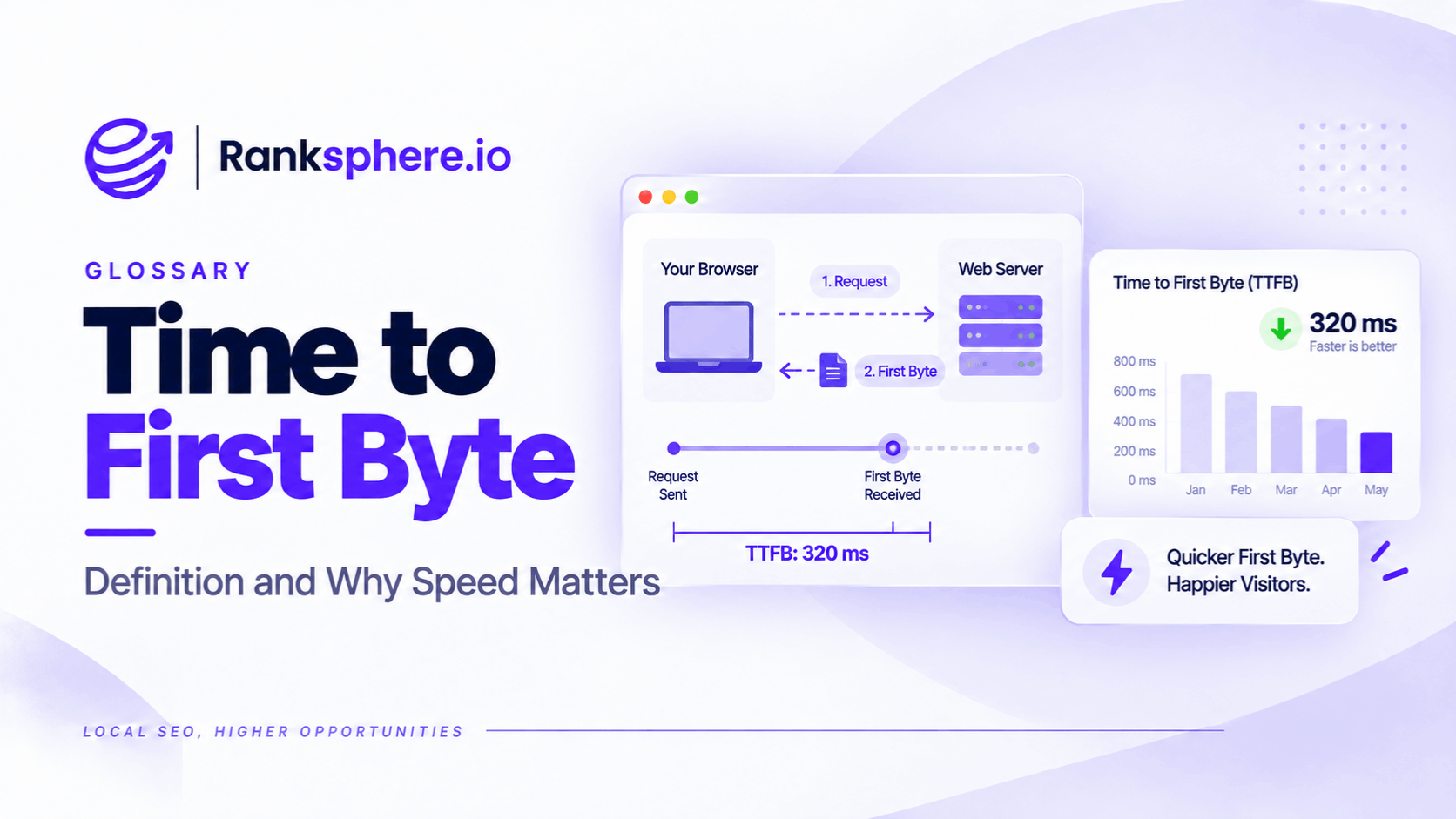
Time to First Byte (TTFB) measures how long a browser waits before receiving the first byte of a response from a website's server. It is an important website performance metric because it helps identify delays that happen before a page begins loading.
When someone visits a website, their browser sends a request to the server. Before the page can appear, the browser must establish a connection, send the request, and wait for the server to respond.
TTFB measures that initial waiting period.
A high TTFB can delay the loading process, even when the website's images, scripts, and other resources are well optimised.
Although TTFB is not one of Google's Core Web Vitals, it can affect Largest Contentful Paint (LCP), which measures how quickly the main content of a page becomes visible.
For local businesses, a slow TTFB may point to problems with hosting, caching, server processing, or the distance between visitors and the website's server.
What Does Time to First Byte Measure?
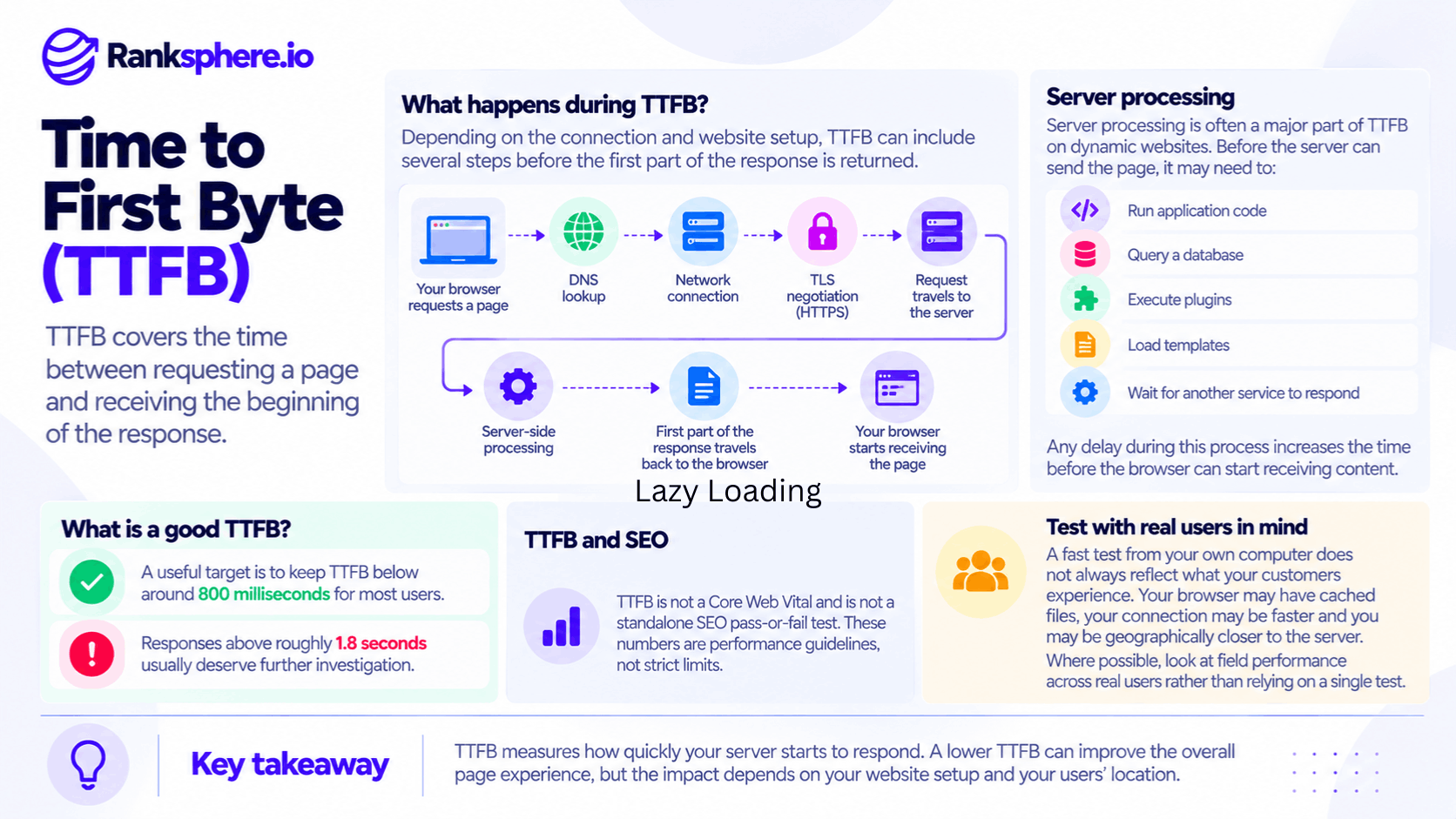
TTFB includes the time spent establishing a connection, sending a request, processing it, and receiving the first byte of the response.
Several steps can contribute to that delay.
DNS Lookup
Before contacting a website's server, the browser may need to look up the IP address associated with its domain name.
This is called DNS resolution.
If the information is already cached, the lookup may be very fast. Otherwise, DNS resolution adds time to the request.
Connection Establishment
The browser establishes a network connection to the server.
Depending on the protocol, this may involve TCP connection setup and TLS negotiation for HTTPS.
Modern browsers can reuse existing connections, so these steps don't necessarily happen for every request.
Network Latency
The request needs to travel from the visitor's device to the server.
The time this takes depends partly on geographic distance, network routing, and connection quality.
For example, a visitor in London may experience more latency when accessing a server in the United States than one hosted nearby.
Server Processing
Once the request reaches the server, the website may need to generate a response.
For a WordPress website, this could involve loading application code, running plugins, querying a database, and generating the requested page.
Some websites also make requests to third-party services before returning content.
If any of these operations take too long, the browser spends more time waiting.
Receiving the First Byte
TTFB ends when the browser receives the first byte of the response.
The rest of the page may still need to download and render.
This distinction matters because a website can have a fast TTFB but still load slowly due to large images, heavy JavaScript, or other front-end problems.
What Is a Good TTFB?
Google's web performance guidance recommends aiming for a TTFB of 800 milliseconds or less.
The commonly used thresholds are:
| TTFB | Performance assessment |
|---|---|
| 800 ms or less | Good |
| Above 800 ms to 1,800 ms | Needs improvement |
| Above 1,800 ms | Poor |
These thresholds are useful for diagnosing performance. However, TTFB is not a standalone Core Web Vital.
Unlike LCP, INP, and CLS, TTFB isn't one of the three metrics used in Google's Core Web Vitals assessment.
Why Real-User Data Matters
TTFB can vary considerably between visitors.
A page may respond quickly when tested from your own computer but perform differently for someone using a mobile network in another region.
Caching also affects the result.
For example, your browser may receive a cached response while another visitor triggers a request that requires more server processing.
That's why real-user measurements are important.
When reviewing field data, use the 75th percentile to understand performance across actual visits.
A 75th-percentile TTFB of 1.2 seconds means approximately 75% of measured experiences had a TTFB of 1.2 seconds or less.
A single fast test isn't enough to conclude that everyone receives the same performance.
What Causes a Slow Time to First Byte?
Several issues can increase TTFB. The most useful approach is to identify which part of the request is responsible before making changes.
1. Slow Website Hosting
Hosting performance can affect how quickly a server responds.
Some low-cost shared hosting plans provide limited resources, particularly when many websites use the same infrastructure.
If the server becomes overloaded, requests may take longer to process.
However, shared hosting isn't automatically slow, and upgrading to a more expensive plan doesn't guarantee better performance.
Check the server's actual response times, resource usage, and workload before deciding whether hosting is the problem.
2. Missing Page Caching
Without page caching, a website may need to generate the same page repeatedly.
For example, when someone visits a plumbing company's service page, WordPress may run PHP code, query the database, and build the page before returning it.
If full-page caching is enabled, the server may be able to return a previously generated version instead.
This can considerably reduce processing time.
For many small business websites, checking whether page caching is enabled is a sensible starting point.
However, not every page should be cached in the same way. Personalised pages and certain dynamic features require appropriate exclusions or other caching rules.
3. Inefficient Plugins
Plugins add features to a website, but some can also increase server processing time.
For example, a plugin may:
- Run unnecessary database queries
- Load code on pages where it isn't needed
- Make slow external requests
- Perform expensive operations during every page load
The number of plugins alone isn't the problem.
A website with twenty well-optimised plugins may respond faster than one with five inefficient plugins.
Instead of removing plugins indiscriminately, identify which ones contribute to the delay.
4. Slow Database Queries
Websites that rely heavily on databases may experience slow responses when queries are inefficient.
Possible causes include missing database indexes, unnecessary requests, or overloaded database infrastructure.
This can become more noticeable as a website grows and accumulates content.
A developer may need to review slow queries and improve how the website retrieves information.
5. Third-Party API Delays
Some websites contact external services before returning a page.
For example, a clinic's booking system may retrieve appointment information from another platform.
If the website waits for that service to respond before generating the page, the delay can increase TTFB.
Depending on the setup, caching data or changing when it loads may help.
6. Geographic Distance
The physical distance between visitors and the hosting server can affect network latency.
For example, a local business serving customers in Manchester may discover that its website is hosted in another country.
In that situation, a content delivery network (CDN) may help by delivering eligible cached content from locations closer to visitors.
However, a CDN won't necessarily solve slow server-side processing for requests that still need to reach the origin.
7. Redirect Chains
Redirects can also delay the start of a page load.
For example, someone visiting an old URL may be redirected to another address before reaching the final page.
Each additional redirect can introduce another request and response.
Unnecessary redirect chains should be reviewed and simplified.
This applies to both permanent redirects and temporary redirects, including 302 redirects.
How to Improve Time to First Byte
Improving TTFB isn't always about buying faster hosting.
The right solution depends on whether the delay comes from server processing, caching, redirects, or network conditions.
1. Enable Full-Page Caching
For websites that generate public pages dynamically, full-page caching can make a significant difference.
Instead of rebuilding the same page for every visitor, the server can return a cached response.
This reduces unnecessary application and database processing.
For a typical local business website, start by checking whether caching is already enabled and working correctly.
Also confirm that updated content appears when the cache is refreshed.
2. Check Your Hosting Performance
If TTFB remains high, investigate the hosting environment.
Look at:
- Server resource usage
- Response times under normal traffic
- Database performance
- Server location
- Caching configuration
- CPU and memory limits
If the hosting environment is consistently overloaded or unsuitable for the website, upgrading may help.
However, avoid assuming the hosting provider is responsible without checking the data.
3. Audit Plugins and Server-Side Processing
Review plugins and code that run when the server processes a request.
Remove features that are no longer needed and investigate unusually slow operations.
A plugin performance audit can help identify whether a particular component is delaying responses.
4. Use a CDN Where It Makes Sense
A CDN can reduce network latency and improve response times for cached content.
This may be useful when a website serves visitors across multiple regions or its hosting server is far from its audience.
However, if the main problem is slow application processing, the underlying issue may need to be resolved at the origin.
5. Remove Unnecessary Redirects
Where possible, update internal links and important entry-point URLs so they go directly to the final destination.
This avoids making visitors pass through multiple redirects before reaching the requested page.
6. Optimise Database Queries
If database operations are contributing to the delay, review which queries are taking the most time.
Improvements may include optimising queries, adding appropriate indexes, and reducing unnecessary database activity.
These changes can improve response times, particularly on larger or more complex websites.
7. Measure Performance Again
After making improvements, test the same pages under comparable conditions.
Use laboratory testing to investigate specific delays and real-user data to understand how visitors experience the website.
Keep in mind that field data may take time to reflect a change because it represents activity collected over a reporting period.
Ranksphere's website audit tool helps identify technical and website performance issues that may need attention, so businesses can prioritise relevant improvements instead of making changes based on assumptions.
How Does TTFB Affect Core Web Vitals?
TTFB matters because it affects when the browser can begin receiving the requested page.
This is particularly important for Largest Contentful Paint.
TTFB vs Largest Contentful Paint
TTFB measures how quickly the initial response starts arriving.
Largest Contentful Paint measures when the largest qualifying content element becomes visible on the screen.
That element might be a hero image, heading, or another prominent section of the page.
LCP depends on several factors, including:
- TTFB
- Resource discovery
- Resource loading time
- Rendering delays
A slow initial response can delay everything that follows.
For example, if a browser waits 1.5 seconds for the first byte, that time is already part of the loading experience before the page can finish rendering.
However, a TTFB of 1.5 seconds doesn't automatically mean LCP will fail.
Google considers LCP of 2.5 seconds or less good at the 75th percentile.
A page could still meet that threshold if the remaining loading and rendering work finishes quickly enough.
Why TTFB Shouldn't Be Ignored
Imagine an agency spending weeks compressing images and reducing JavaScript.
The website becomes lighter, but the server still takes nearly two seconds to begin responding.
The improvements may help, yet visitors continue waiting for the initial response.
In that situation, addressing the server delay may deliver a larger improvement than continuing to optimise minor front-end resources.
The key is to evaluate the full loading process.
TTFB, images, scripts, and rendering all contribute to what visitors experience.
Common TTFB Mistakes
Several mistakes can prevent businesses from improving their website's initial response time.
- Optimising only the front end. Faster images and scripts won't eliminate delays caused by slow server responses.
- Testing only from your own browser. Local connections and warm caches may not represent actual visitor conditions.
- Adding a CDN without identifying the bottleneck. A CDN may not solve slow origin processing.
- Ignoring hosting performance. Limited server resources can continue affecting response times.
- Treating TTFB as a Core Web Vital. It influences performance but isn't one of Google's three Core Web Vitals.
- Relying only on laboratory tests. Field measurements provide important context about real visitors.
- Counting plugins instead of evaluating them. The impact of each plugin matters more than the total number installed.
- Leaving unnecessary redirect chains in place. Each additional redirect can delay the final response.
TTFB Best Practices
To improve and maintain healthy server response times:
- Measure TTFB using both field and laboratory data.
- Identify whether the delay comes from the network, server, or redirects.
- Enable appropriate page caching.
- Monitor hosting and server resource usage.
- Investigate slow plugins and database queries.
- Avoid unnecessary server-side API requests.
- Use a CDN when caching or geographic distribution provides a measurable benefit.
- Remove unnecessary redirect chains.
- Review TTFB alongside LCP rather than in isolation.
- Retest after major hosting, caching, or website changes.
There is no single solution that works for every website.
The best results come from identifying the actual cause of the delay and fixing it rather than optimising parts of the website that aren't responsible.
Example of TTFB Affecting a Local Business Website
Consider a hypothetical veterinary practice whose website has poor mobile loading performance.
The agency begins by improving the front end.
It compresses images, converts photographs to modern formats, defers unnecessary scripts, and improves font loading.
The changes help, but the website's LCP remains slower than expected.
What the Agency Finds
Further testing shows that TTFB is approximately 1.9 seconds at the 75th percentile.
The website runs on a budget shared hosting plan without full-page caching.
Several plugins also perform unnecessary work during page requests.
As a result, the browser spends a substantial amount of time waiting before receiving the page response.
The front-end improvements were useful, but they hadn't addressed the initial delay.
How the Agency Fixes the Problem
The team investigates the hosting configuration and makes several changes:
- Enables full-page caching for eligible pages
- Removes unnecessary server-side processing
- Reviews plugin performance
- Optimises slow database operations
- Moves the website to a more suitable hosting environment
For illustration, these changes could reduce TTFB from approximately 1.9 seconds to 400 milliseconds.
Combined with the earlier front-end work, they could also improve LCP substantially.
The exact results would depend on the website's configuration, visitor conditions, and other performance factors.
Example Shows
“The agency's initial image and JavaScript improvements weren't wasted.
Those changes made the page more efficient once the browser began receiving its content.
However, the website also needed improvements to server responsiveness.
The example illustrates why website performance should be evaluated as a complete process rather than a collection of isolated scores.
A faster server response gives the browser more time to load and display the content visitors actually need.
For local businesses, TTFB is a useful diagnostic metric because it helps identify delays that may otherwise be overlooked during website speed optimisation.”
See Also
- Core Web Vitals — Measuring loading performance, responsiveness, and visual stability.
- Page Speed — Understanding overall website loading performance.
- Content Delivery Network (CDN) — Reducing latency and delivering cached content.
- Crawl Budget — Understanding how server responsiveness can affect crawling efficiency.
- Technical SEO — Improving the technical foundations of a website.
- 302 Redirect — Understanding temporary redirects and unnecessary redirect chains.