Core Web Vitals are three performance metrics Google uses to measure important parts of the real-world experience people have when using a webpage.
They focus on three areas:
- Largest Contentful Paint (LCP) — loading performance
- Interaction to Next Paint (INP) — responsiveness
- Cumulative Layout Shift (CLS) — visual stability
Unlike a one-off speed test, Core Web Vitals are designed around real user experience. Google uses field data collected through the Chrome User Experience Report, or CrUX, to understand how pages perform for actual visitors over time.
That distinction matters.
A page can perform extremely well in a Lighthouse test on a fast computer and still provide a poor experience for real visitors using slower devices or connections.
The three Core Web Vitals
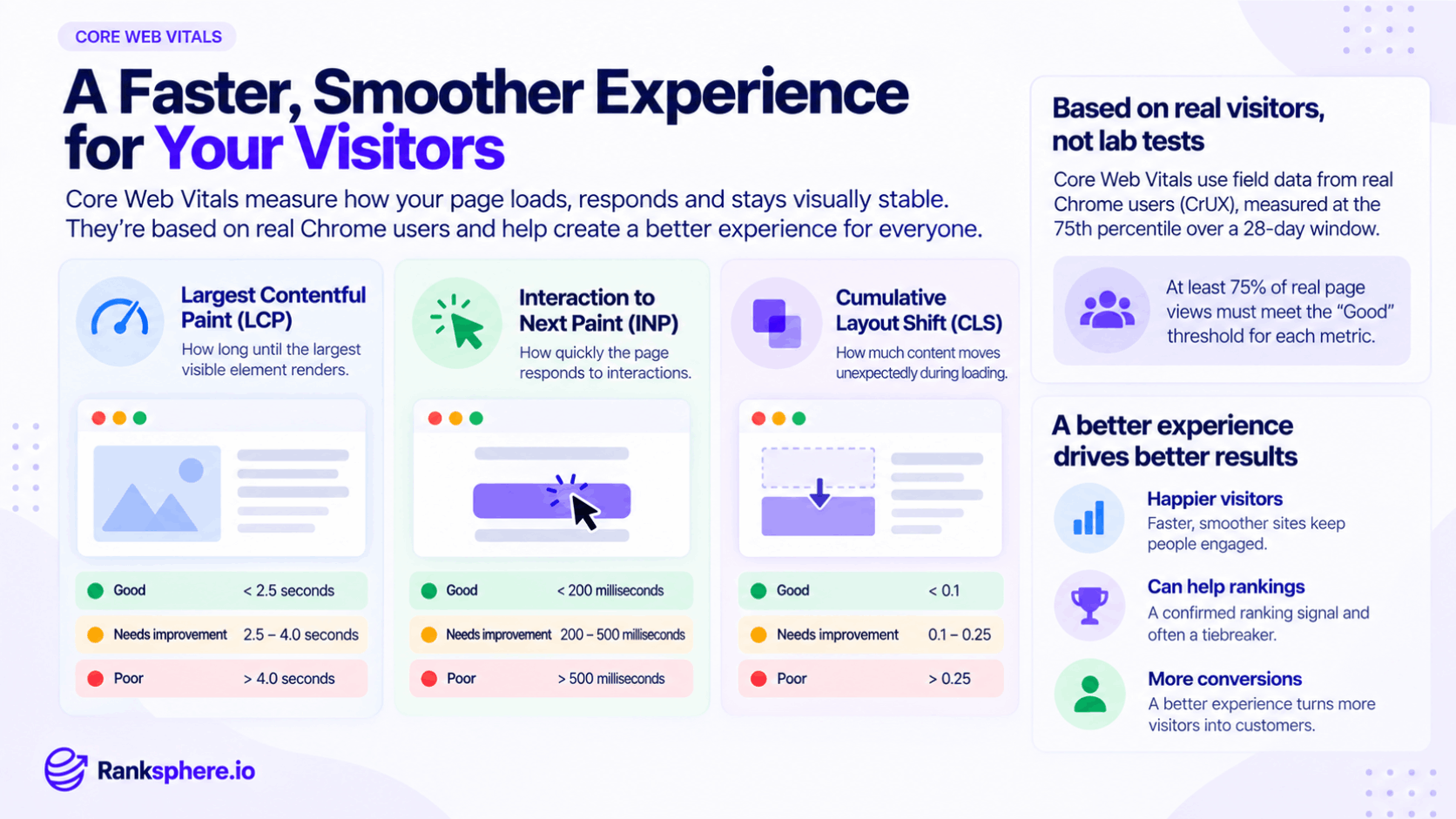
Each Core Web Vital measures a different part of the experience.
Largest Contentful Paint (LCP)
Largest Contentful Paint measures loading performance.
More specifically, it looks at how long it takes for the largest significant piece of visible content to appear in the viewport.
This is often:
- A hero image
- A large heading
- A banner
- A prominent content block
Google recommends an LCP of 2.5 seconds or less for a good experience.
Common causes of poor LCP include:
- Slow server response
- Large or poorly optimised images
- Render-blocking CSS or JavaScript
- Important resources being discovered too late
- Heavy third-party scripts
Improving LCP often starts with identifying the actual LCP element rather than applying generic speed fixes across the entire site.
Interaction to Next Paint (INP)
Interaction to Next Paint measures how responsive a page feels when someone interacts with it.
It looks at interactions such as:
- Clicking a button
- Opening a menu
- Selecting an option
- Tapping an interactive element
A good INP is 200 milliseconds or less, while values above 500 milliseconds are considered poor.
Slow INP is commonly linked to:
- Heavy JavaScript
- Long-running main-thread tasks
- Third-party scripts
- Complex event handlers
- Too much work happening after an interaction
INP replaced First Input Delay (FID) as a Core Web Vital in March 2024. Unlike FID, which focused on the delay before the browser began processing the first interaction, INP provides a broader view of responsiveness across qualifying interactions during the visit.
Cumulative Layout Shift (CLS)
Cumulative Layout Shift measures visual stability.
It tracks unexpected movement of visible elements while the page is being used.
For example, you might be about to click a button when an image loads above it and pushes the button further down the page.
A good CLS score is 0.1 or less.
Common causes include:
- Images without defined dimensions
- Embeds that load without reserved space
- Ads inserted after the page begins rendering
- Web fonts changing the size of text after loading
- Banners or widgets appearing unexpectedly
The goal is simple: content should stay where users expect it to stay.
How Core Web Vitals are measured
One of the most important things to understand about Core Web Vitals is the difference between field data and lab data.
Field data
Field data comes from real users.
The Chrome User Experience Report collects performance information from eligible Chrome users and aggregates it to show how pages perform under real-world conditions.
Search Console's Core Web Vitals report uses this type of data.
Lab data
Lab data comes from a controlled or simulated test.
Tools such as Lighthouse can load a page under predefined conditions and show performance problems.
Lab testing is extremely useful for diagnosis because it helps developers reproduce problems and test changes.
But it is not the same thing as seeing how real visitors experience the page.
A good way to think about it is:
Field data tells you whether users have a problem. Lab data helps you investigate why.
The 75th percentile
Core Web Vitals are assessed at the 75th percentile.
That means Google looks at the point where 75% of recorded experiences were at or better than that value. Google and web.dev recommend evaluating Core Web Vitals at this percentile so the experience is good for most users, rather than judging the page by its fastest or average visit.
This matters because website owners often test on:
- New laptops
- Fast broadband
- Powerful phones
- Warm browser caches
Their customers may be using something very different.
A site that feels instant in the office can still perform badly for a meaningful portion of real visitors.
The 28-day measurement window
Search Console and PageSpeed Insights use CrUX field data observed over the previous 28 days.
That means Core Web Vitals do not update like a live speed test.
If you improve the site today, the field data gradually changes as new visits replace older measurements.
You may begin seeing improvement before the full 28 days have passed, but it can take several weeks for the report to reflect a major performance change clearly.
This is why testing immediately after a fix can be confusing.
Lighthouse may show that the technical problem has disappeared while Search Console still contains real-user data from before the change.
What counts as passing Core Web Vitals?
For an overall good Core Web Vitals assessment, the recommended thresholds need to be met at the 75th percentile for all three metrics.
The commonly used thresholds are:
| Metric | Good | Needs improvement | Poor |
| LCP | ≤ 2.5 seconds | > 2.5 to 4 seconds | > 4 seconds |
| INP | ≤ 200 ms | > 200 to 500 ms | > 500 ms |
| CLS | ≤ 0.1 | > 0.1 to 0.25 | > 0.25 |
A page can therefore have excellent LCP and CLS while still needing work because INP performs poorly.
Core Web Vitals and Google rankings
Core Web Vitals are used by Google's ranking systems, but they are only one part of a much larger picture.
Google explicitly says that strong Core Web Vitals do not guarantee top rankings. Its ranking systems continue to prioritise relevant, helpful content, while page experience can contribute when there are multiple useful results available.
So Core Web Vitals should not be treated as:
“Get three green scores and rankings will increase.”
That is not how it works.
A technically excellent page that does not satisfy search intent is unlikely to outperform a much more relevant result simply because it loads faster.
For local businesses, the same principle applies.
Core Web Vitals support the website experience, but local ranking factors such as relevance, distance and prominence remain central to local search visibility.
Why Core Web Vitals still matter beyond SEO
The strongest reason to improve website performance is often not rankings.
It is the visitor.
A potential customer who reaches a slow, unresponsive or unstable website may leave before completing an enquiry.
Performance problems can interfere with:
- Contact forms
- Booking flows
- Product purchases
- Phone-number clicks
- Navigation
- Mobile usability
So even when the ranking effect is relatively modest, improving Core Web Vitals can make the site easier to use.
That matters whether someone arrived from Google, social media, an email campaign or a direct visit.
How to check Core Web Vitals
Start with Google Search Console.
Its Core Web Vitals report uses real-user data and groups URLs with similar performance characteristics.
Use it to identify:
- Poor URLs
- URLs that need improvement
- Which metric is causing the issue
- Groups of pages sharing the same problem
Then use diagnostic tools such as Lighthouse and PageSpeed Insights to investigate the underlying cause.
The workflow should be:
Measure with field data → diagnose with lab tools → fix → monitor field data again.
How to improve Largest Contentful Paint
If LCP is poor, first identify which element is being measured.
Common improvements include:
- Compressing oversized images
- Serving correctly sized responsive images
- Using efficient image formats where appropriate
- Improving server response time
- Reducing render-blocking resources
- Loading critical resources earlier
- Removing unnecessary scripts before the main content renders
If the LCP element is a hero image, make sure it is not being lazy-loaded unnecessarily.
Preloading can help in some cases when an important resource would otherwise be discovered late, but it should be used selectively rather than added to every large image.
How to improve Interaction to Next Paint
Poor INP usually means the browser is too busy when the visitor tries to interact with the page.
Look for:
- Large JavaScript bundles
- Long main-thread tasks
- Expensive event handlers
- Third-party scripts
- Complex menus or filters
- Chat and marketing widgets
Useful improvements can include:
- Reducing unnecessary JavaScript
- Breaking long tasks into smaller pieces
- Deferring non-essential work
- Reviewing third-party scripts
- Simplifying expensive interactions
Third-party tools deserve particular attention because marketing teams often add them gradually without reviewing their combined performance cost.
How to improve Cumulative Layout Shift
CLS problems usually happen because the browser does not know how much space an element will require until it loads.
Common fixes include:
- Setting width and height attributes on images
- Reserving space for embeds
- Reserving space for advertisements
- Avoiding banners that suddenly push content down
- Loading fonts in a way that reduces unexpected text movement
- Keeping dynamic content from appearing above existing content without reserved space
The easiest way to understand CLS is to use the page yourself.
If elements visibly jump while loading, the user is experiencing the same problem the metric is trying to measure.
Fix templates before individual pages
Core Web Vitals problems often originate in a shared template rather than one page.
For example, every service page may use:
- The same oversized hero image component
- The same JavaScript navigation
- The same chat widget
- The same font-loading setup
- The same layout container
Fixing the underlying template can improve dozens or hundreds of URLs at once.
This is usually more efficient than optimising individual pages one at a time.
Ranksphere's website audit combines technical and speed findings with the fixes, helping identify performance problems and the areas of the site that need attention.
Core Web Vitals on mobile
Mobile performance deserves particular attention for local businesses.
Local searches often happen while someone is away from a desktop computer, potentially using:
- Mobile data
- A mid-range phone
- A slower connection
- A busy network
That can expose performance problems that are difficult to reproduce on a developer's office computer.
When reviewing Core Web Vitals, do not assume a fast desktop experience represents every visitor.
Measure the environments your customers actually use.
Common Core Web Vitals mistakes
- Treating a Lighthouse score as the same thing as Core Web Vitals field performance. Lighthouse is useful for diagnosis; real-user data tells you what visitors experienced.
- Trying to reach 100 in Lighthouse purely for SEO. Google says perfect tool scores are not required for high rankings.
- Testing only on a fast desktop connection. Real visitors may experience the site very differently.
- Expecting Search Console to update immediately. Its Core Web Vitals data covers a rolling 28-day period.
- Fixing one page when the problem comes from a shared template.
- Ignoring third-party scripts. Chat, analytics and marketing tools can contribute significantly to performance problems.
- Treating Core Web Vitals as a guaranteed ranking improvement. They are part of a broader set of ranking and page-experience signals.
- Optimising without identifying the failing metric. LCP, INP and CLS have different causes and need different fixes.
Core Web Vitals best practices
- Use real-user field data to judge performance.
- Use Lighthouse and PageSpeed Insights to diagnose problems.
- Monitor LCP, INP and CLS separately.
- Fix poor metrics before chasing perfect scores.
- Prioritise shared templates and components.
- Test mobile performance as well as desktop.
- Review third-party scripts regularly.
- Allow enough time for the 28-day field-data window to reflect changes.
- Measure performance alongside conversions and user behaviour.
- Treat speed as a user-experience issue first and an SEO consideration second.
Example
“Oakfield Physiotherapy runs a Lighthouse test and receives a strong performance score.
From the office computer, the website feels fast.
Search Console tells a different story.
The Core Web Vitals report shows that mobile visitors are experiencing poor LCP.
When the team investigates the page, the main hero image is several megabytes in size and is being delivered at a much higher resolution than the screen needs.
On fast office broadband, the problem is difficult to notice.
On a phone using mobile data, the image takes much longer to appear.
The developer compresses the image, serves a more appropriate size and improves how the image is loaded.
Lab testing shows the improvement immediately.
The real-user data takes longer to reflect the change because Search Console is working with a rolling 28-day window.
That difference is the key to understanding Core Web Vitals:
a fast test is useful, but the real goal is a fast, responsive and stable experience for the people actually using the website.”
See also
- Technical SEO — the wider work involved in crawling, indexing and website performance
- Page speed — the broader subject of website loading performance
- Google Search Console — where Core Web Vitals field data is reported
- Mobile-first indexing — how Google primarily uses the mobile version of content for indexing
- Google algorithm update — changes to Google's ranking systems
- Local ranking factors — the signals that influence local search visibility