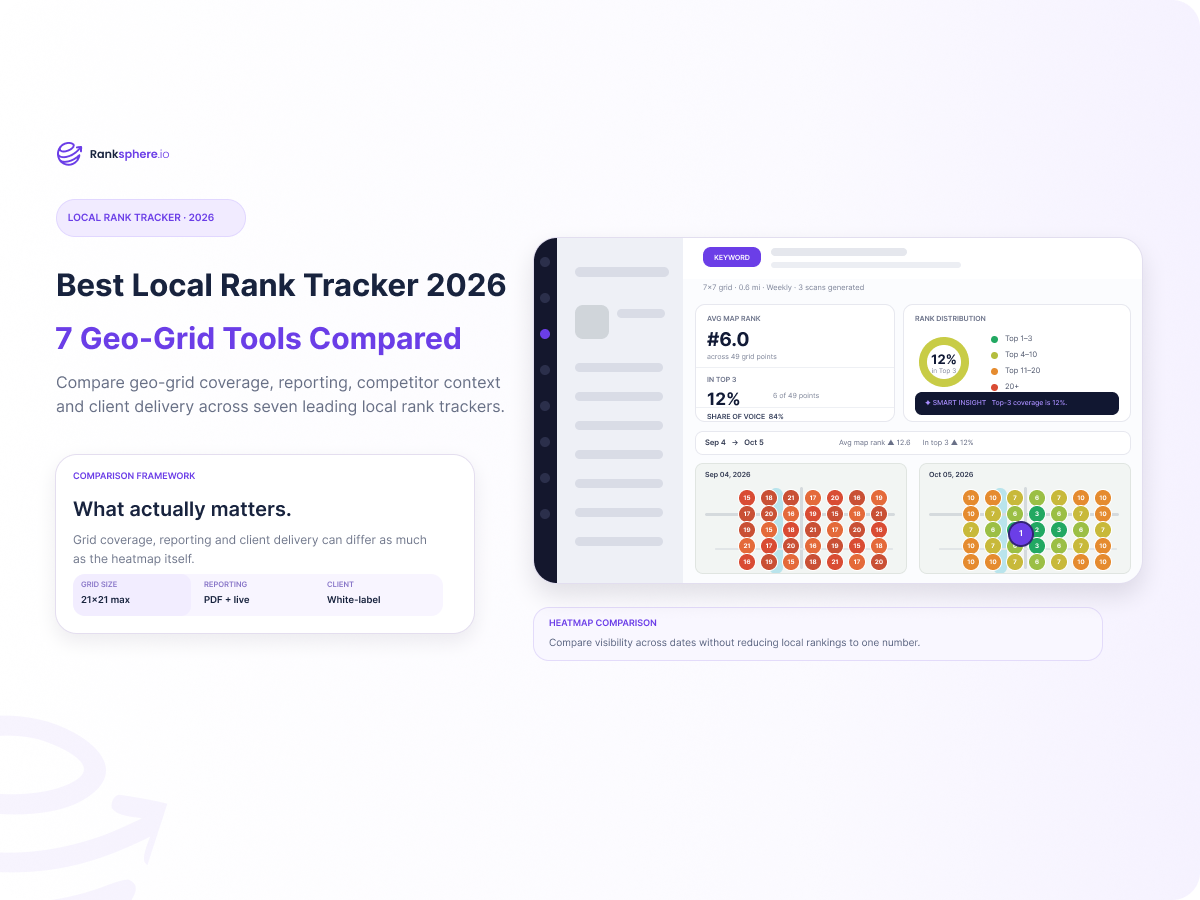
Local rankings do not look the same across an entire city. A business can rank in the top three near its address and fall out of the local pack a few miles away. A heatmap makes that pattern visible in a way a single ranking number cannot.
If you want the short answer, the best local rank tracker depends on how you plan to use the data.
- Ranksphere is the strongest fit if you want geo-grid tracking plus broader local SEO work and branded reporting in one platform.
- Local Falcon is a strong choice when deep geo-grid scanning is the main requirement.
- Localo stands out for branded client reporting, but it uses a smaller maximum grid.
- Whitespark Local Ranking Grids is the lowest-cost dedicated entry point in this group.
- BrightLocal, Semrush Local, and SE Ranking make more sense when rank tracking needs to sit inside a broader local SEO or SEO workflow.
Google says local results are mainly based on relevance, distance, and prominence. Distance is one reason the same business can appear in different positions depending on where the search is made. That is why geo-grid tracking is so useful: it shows where visibility is strong, where it weakens, and how far that visibility actually reaches.
Best local rank trackers in 2026
| Tool | Starting point | Geo-grid | GBP management | Reporting & exports | White-label / client delivery |
|---|---|---|---|---|---|
| Ranksphere | From $29/mo for a single business; 14-day trial | Up to 21×21 | Yes. Manage GBP activity alongside reviews, posts, citations, and other local SEO workflows. | Reports can be sent by email, downloaded as PDF, or shared through a live link. Live heatmap sharing is also supported. | Yes. Reports can use the agency's own design, logo, colors, and branding. Supported plans can use a white-label report subdomain such as reports.yourdomain.com. |
| Local Falcon | $24.99/mo; 100 free signup credits | Up to 21×21 | Yes, through Falcon Agent. It connects directly to GBP and can reply to reviews, publish posts, update profile data, and run recurring local SEO tasks. | Public report URLs; scan, campaign, competitor, trend, keyword, and location reports; map-image download; CSV and PDF exports. | Premium plan only. White-label reporting requires Premium ($199.99/mo). Public report URLs are supported, but no custom report domain. |
| Localo | $39/mo equivalent on annual billing ($49 monthly); 14-day trial | Up to 7×7 (49 control points) | Yes. Manage connected GBPs, posts, reviews, profile data, and optimization tasks. | Email, PDF, and shareable-link reports; reports can include clickable interactive Position Maps. | White-label reports available. |
| BrightLocal | From $31/mo on annual billing ($41 monthly for 1 location); 14-day trial | Up to 15×15 with available add-ons | Depends on plan. Track includes GBP Audit; Manage adds GBP posting and listings sync; Grow adds review management/generation. | External report URLs and PDFs for Local Search Grid and Local Rank Tracker; Local Rank Tracker also exports CSV. Scheduled report alerts are supported. | Yes. White-label branding can be applied to external URLs, PDFs, and report emails. External reports use a generic non-BrightLocal domain rather than an agency-owned custom domain. |
| Whitespark Local Ranking Grids | $10/mo; 200 trial credits | 4 to 225 points | Separate product. Ranking Grids surfaces GBP/competitor data; full GBP editing and update protection are available through Whitespark Local Platform ($1/location/mo billed annually). | Live shareable grid URLs, one-click screenshots, CSV and PDF exports, scheduled scans, and API access. | Yes. Ranking Grids supports live white-label share URLs. Whitespark offers custom agency domains for its separate Local Rank Tracker, not for Ranking Grids. |
| Semrush Local | $30/mo per location on annual billing; Map Rank Tracker also has a limited free tier | Configurable map grids | Yes. Local Base includes automated GBP management, AI posts, review auto-replies, and photo posting; Pro adds listings, review management/generation, and advanced GBP management. | Map Rank Tracker supports PDF and CSV exports and scheduled scans. Its data can also be used in Semrush My Reports. | Available through My Reports Pro, not the basic Local plan. Pro reports add branding/white-labeling, shareable online dashboards, and a custom domain. |
| SE Ranking | From $103.20/mo annually; 14-day free trial | 3×3 to 15×15 | Yes. Core includes three Plus Local Marketing locations, with GBP integration/profile management, GBP Posts, listings management, and review management. | Local Marketing overview exports PDF, CSV, or XLS; Local Rankings exports XLSX/CSV; Report Builder supports PDF, HTML, XLS, and scheduled email delivery. | Available with the separate Agency Pack. It supports white-label reports/platform branding, client seats, scheduled reports, and an agency-owned domain. |
The biggest differences are not limited to grid size. Reporting, Google Business Profile management, and client delivery vary just as much from one platform to another.
If you work with clients, it helps to separate PDF exports, live shareable reports, white-label branding, and custom report domains. They are not the same feature. A tool may offer branded PDFs but no live report, or a shareable link without letting you use your own domain.
Also check which plan includes the feature you actually need. Several platforms reserve white-label reporting or custom domains for higher tiers or separate agency add-ons.
Why a geo-grid local ranking tool gives you a better picture
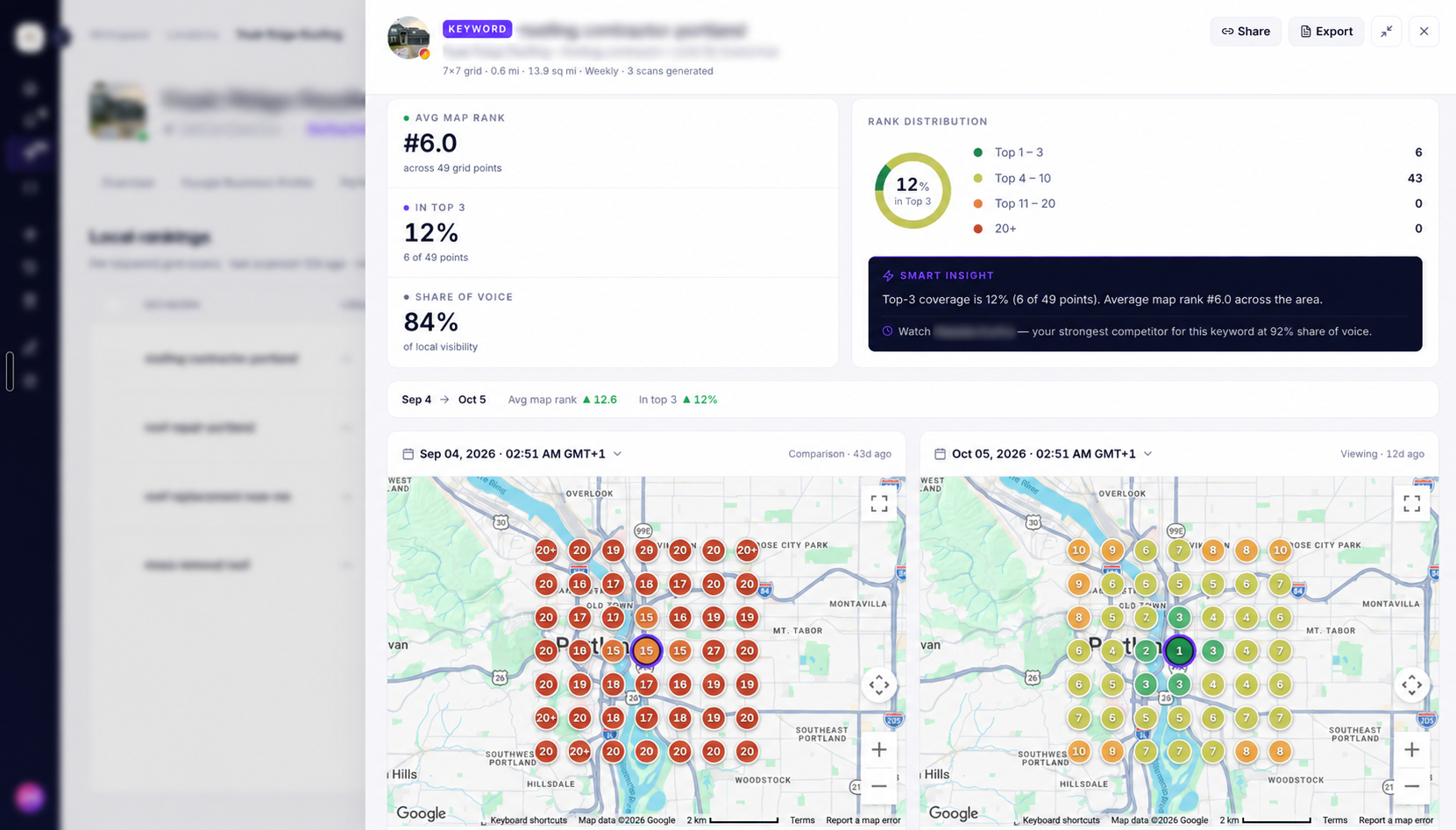
Imagine a dental practice checking “dentist near me” from its own office and seeing position #2. That looks good, but it says very little about the rest of the service area.
Run the same query one mile north, two miles west, and across the other side of the neighborhood and the results can look very different.
A geo-grid tracker handles this by checking the same keyword from multiple points around the target area. The heatmap shows the pattern: where the business holds strong positions, where rankings start to slip, and how far that visibility extends.
A 5×5 scan checks 25 points. A 7×7 checks 49. A 9×9 checks 81. At 21×21, you are looking at 441 points.Because distance is part of Google's local ranking framework, this geographic view is much more useful than treating a local ranking as one fixed position.
If you want a deeper explanation of what affects that visibility, Ranksphere’s guide to local ranking factors covers Google’s relevance, distance, and prominence framework.
Geo-grid tracking vs traditional local rank tracking
These two measurements solve related but different problems.
A traditional tracker might tell you that your business averaged position five for “emergency plumber” in a selected location this week. That is useful for trend reporting.
A geo-grid shows where that visibility exists.
For example, an average position of five could mean you rank fourth or fifth almost everywhere. It could also mean you rank first around your office and outside the top 15 across half your service area. Those situations call for very different analysis.For local SEO, the strongest setup is often one that preserves the map-level detail while still letting you compare performance over time.
How we evaluated the tools
This comparison looks at six practical areas:
- Geographic detail: Can you control grid size, spacing, and search area?
- Historical tracking: Can you compare scans instead of treating every heatmap as an isolated snapshot?
- Competitor context: Can you see which businesses occupy the areas where your visibility is weaker?
- Reporting: Can an agency share useful results without rebuilding them manually?
- Cost at realistic usage: A low entry price can become expensive once you multiply locations, keywords, grid points, and scan frequency.
- What happens after measurement: Does the software only tell you that rankings changed, or does it help you organize what to investigate next?
This article deliberately does not assign an “accuracy score.” Without controlled testing against the same locations and times, that would suggest a level of certainty the evidence does not support.
1. Ranksphere: best for combining geo-grid tracking with broader local SEO workflows
Ranksphere combines geo-grid rank tracking with other day-to-day local SEO functions in the same platform, including Google Business Profile management, review management, citations, Google Posts, reporting, and Smart Tasks.
Its Local Rank Tracker supports geo-grids up to 21×21, or 441 individual scan points. Users can choose smaller grids for routine monitoring or expand coverage when they need a more detailed view across a larger service area. The tracker also supports configurable scan distance, scheduled scans, historical heatmap comparisons, competitor analysis, and reporting.
The practical advantage is what you can do after the scan. If a section of the heatmap drops, the next step is usually to check competitors, GBP activity, reviews, citations, or the website itself. Having those workflows in the same platform means less switching between separate tools.
Ranksphere reporting and white-label delivery
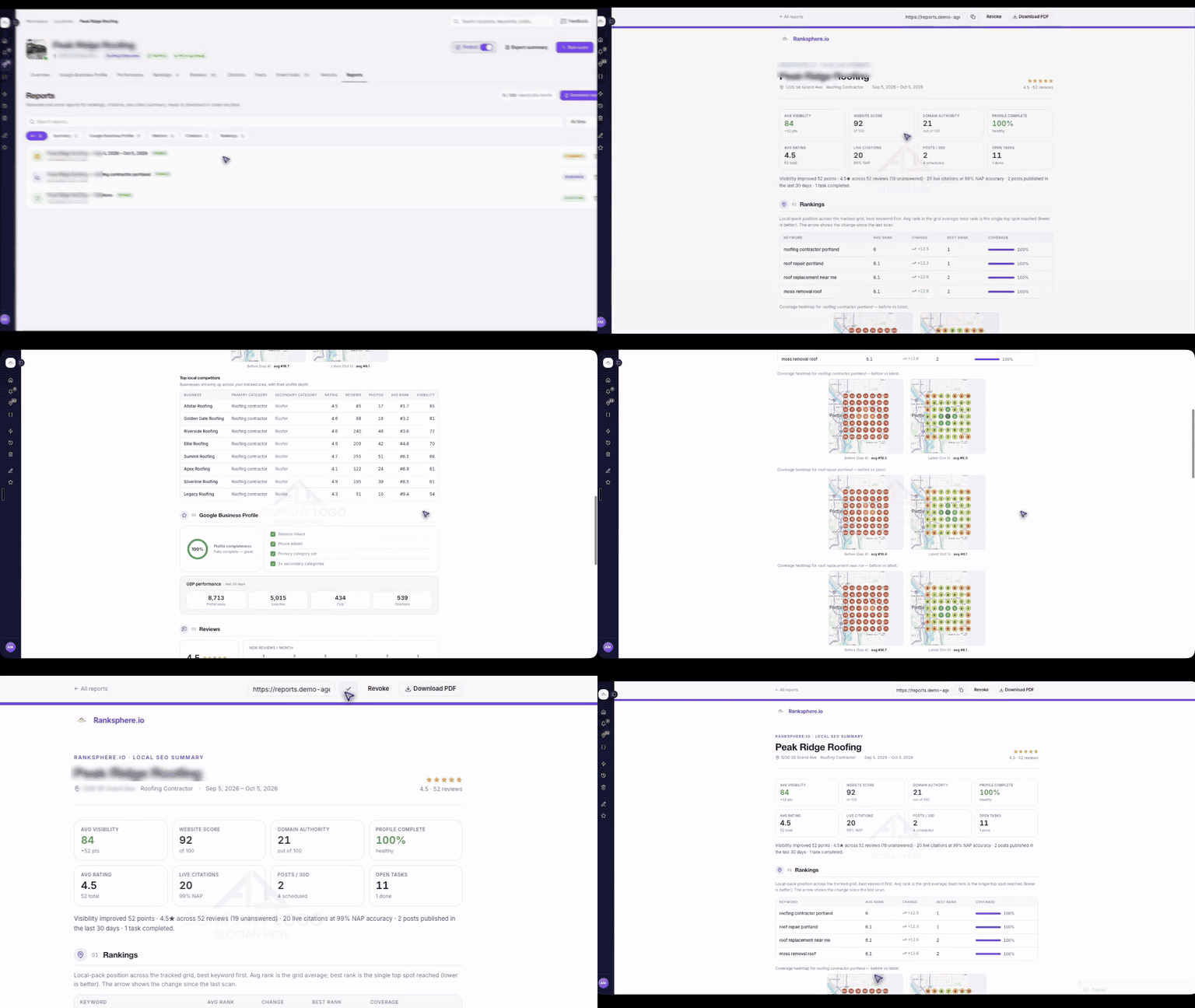
Ranksphere supports three practical ways to deliver client reports: email, downloadable PDF, and a shareable live link. Ranking heatmaps can also be shared separately, which is useful when a client wants the latest geographic ranking view without opening a full report.
The reporting experience can be white-labeled. Agencies can apply their own design, logo, colors, brand name, and other visual branding so the report looks like part of the agency rather than a third-party tool.
Supported plans can also use a white-label report domain. An agency can publish reports on a branded subdomain such as reports.yourdomain.com, so both the report itself and the URL the client sees match the agency brand.
Ranksphere pricing
Ranksphere starts at $29 per month for a single business. Higher plans expand capacity for agencies and multi-location teams, including additional locations, usage allowances, reporting, team access, and white-label options.
A scan credit represents one keyword checked from one grid point. A 5×5 grid for one keyword uses 25 credits, while a full 21×21 grid uses 441 credits per keyword.
The maximum grid size is useful for wide service areas and detailed competitive audits, but it should not be the default for every campaign. Larger grids consume more credits, so the grid should reflect the business’s market area and the level of geographic detail that is actually needed.
Best for: agencies, freelancers, and local businesses that want geo-grid tracking alongside broader local SEO management and client reporting.
Main limitation: businesses that only need occasional rank scans and none of the wider local SEO or reporting workflow may still find a lower-cost standalone grid tracker more economical.
2. Local Falcon: best dedicated geo-grid specialist
Local Falcon remains one of the clearest choices when geo-grid tracking itself is the primary job.
Its plans support scheduled scans, multiple report types, variable grid sizes, service-area-business scans, public report URLs, exports, competitor reporting, and integrations. Grid options currently run up to 21×21, or 441 map points.
Local Falcon is no longer only a measurement tool. Falcon Agent connects directly to Google Business Profile and can take actions such as replying to reviews, publishing posts, updating profile information, and running recurring local SEO tasks.
It also extends beyond Google rank tracking with Apple rank tracking and AI visibility tracking, which may be useful to teams broadening how they measure local discovery.
Local Falcon reporting
Local Falcon provides public report URLs plus PDF and CSV exports. Its report system includes scan, campaign, competitor, trend, keyword, and location views, and users can also download the grid map image.
White-label reporting is more restricted than the basic sharing features. It requires the Premium subscription level, which is currently $199.99 per month.
Local Falcon pricing
Starter costs $24.99 per month and includes 7,500 credits. Each grid point consumes one credit, so a 5×5 scan uses 25.
One budgeting detail matters: monthly package credits expire at the end of the billing period. Annual subscriptions let unused credits roll from month to month until the annual billing period ends, while separately purchased pay-as-you-go credits do not expire.
Best for: consultants and agencies that want flexible geo-grid tracking, large grids, strong report depth, and GBP automation through Falcon Agent.
Main limitation: the entry price is low, but white-label client reporting requires the $199.99/month Premium tier.
3. Localo: best for branded client reporting
Localo combines local rank tracking with Google Business Profile optimization, competitor monitoring, reviews, citations, posts, and client reporting.
For people searching specifically for local map pack tracking, the feature to look at is Localo's Position Map. Its Local Rank Tracker checks rankings from multiple search locations so you can see how a business appears across the local map area. Advanced Grid supports 3×3, 5×5, and 7×7 grids, with 7×7 as the maximum. You can adjust the scan area, move the center point, compare ranking changes over time, and review competitors from the map.
Localo reporting
Localo reports can include rankings, visibility changes, competitor data, Google Business Profile statistics, reviews, and completed activity.
Reports can be delivered by:
- Shareable link
Clickable Position Maps can also be included so clients can open the interactive map instead of relying on a static screenshot.
Localo also offers white-label reports, so agencies can add their own branding to client reports.
Localo pricing
The Single Business plan starts at about $39 per month when billed annually ($49 month to month). Pro starts at about $149 per month when billed annually and adds broader agency features such as Reports Manager and client access.
Localo allows tracking up to 10 keywords per Google Business Profile. That is a keyword limit, not a grid-size limit.
Best for: agencies and freelancers that want branded client reports, GBP management, and local rank tracking in one platform.
Main limitation: the Advanced Grid tops out at 7×7, which is smaller than the largest grids available from Ranksphere and Local Falcon.
4. BrightLocal: best mature all-in-one local SEO reporting suite
BrightLocal is less of a single-purpose rank tracker and more of an established local SEO toolkit.
Its Track plan includes both Local Rank Tracker and Local Search Grid, alongside citation tracking, Google Business Profile auditing, local SEO auditing, white labeling, and agency tools.
For agencies already running monthly audits, citations, GBP work, and reporting, that broader toolset can be more useful than a standalone grid tracker.
BrightLocal's traditional Local Rank Tracker supports up to 100 keywords and four competitors per location on the entry plan. Local Search Grid handles map-based visibility, with five grid keywords included and options for larger grids or additional keywords. BrightLocal supports grids up to 15×15 points.
BrightLocal pricing
For one location, the current Track plan is advertised from about $31 per month on annual billing. Manage and Grow add deeper listings, posting, and reputation features.
BrightLocal also offers a 14-day trial.
Best for: agencies that want grid rankings, traditional rank reports, audits, citations, and client-facing reporting in one established platform.
Main limitation: larger grids and more grid keywords can require add-ons, and location-based pricing becomes important when comparing costs for a larger client portfolio.
5. Whitespark Local Ranking Grids: best low-cost dedicated starting point
Whitespark has two separate rank tracking products, which can be easy to mix up.
Local Ranking Grids is the geo-grid tool. It checks the same keyword from multiple points on a map and turns the results into a heatmap. Plans start at $10 per month, include 200 trial credits, and support up to 225 grid points.
Local Rank Tracker is the traditional rank tracker. Instead of building a map grid, it follows selected keywords for specific locations over time and tracks visibility across local results, Google Maps, and organic search. Weekly tracking starts at $14 per month when billed annually or $17 month to month.
They are sold separately.
If you mainly want geo-grid heatmaps, Local Ranking Grids is the relevant product. If you want ongoing keyword tracking across local and organic results, Local Rank Tracker is the better fit. Some agencies may use both.
Best for: freelancers and local SEO specialists who want an affordable geo-grid tool without paying for a large bundled platform.
Main limitation: geo-grid tracking and traditional rank tracking are separate products, so using both means paying for both.
6. Semrush Local: best for teams already working in Semrush
Semrush Map Rank Tracker gives existing Semrush users a convenient route into geo-grid tracking without adopting an entirely separate ecosystem.
The tool checks rankings at multiple map points, supports scheduled scans, tracks competitors, and reports metrics such as average rank, share of voice, and rank distribution.
Semrush Local Base currently starts at $30 per month per location when billed annually and includes Map Rank Tracker credits alongside automated Google Business Profile features. Local Pro increases the included rank-tracking allowance and adds listing and reputation management.
There is also a limited free Map Rank Tracker option with one campaign and 50 credits, which is enough to experiment with the workflow before committing.
Best for: businesses already using Semrush and wanting local tracking close to their existing SEO data.
Main limitation: per-location pricing deserves close attention for agencies or brands managing a large portfolio.
7. SE Ranking: best when local tracking is one part of a broader SEO stack
SE Ranking combines a Grid Rank Tracker with conventional local rankings, business-profile management, listings, reviews, broader rank tracking, keyword research, backlink tools, audits, and content workflows.
Its grid editor supports odd-numbered grids from 3×3 through 15×15, configurable spacing, multiple keywords, individual tracking points, and the ability to deactivate irrelevant points.
Core currently begins at $103.20 per month on annual billing and includes three Plus Local Marketing locations plus 1,500 Local & Map Rank Tracker keywords. SE Ranking's Plus Local Marketing features include Google Business Profile integration and profile management, GBP Posts, listings management across 100+ directories, and expanded review management.
Reporting is also broader than the grid itself. The Local Marketing overview can be exported as PDF, CSV, or XLS, while the Report Builder supports PDF, HTML, and XLS reports with scheduled email delivery. Agencies that purchase the separate Agency Pack can add white-label reporting, client seats, branded platform access, and an agency-owned domain.
If all you need is a Google Maps heatmap, that starting price is difficult to justify. It makes more sense when the same team will also use SE Ranking for broader SEO research, site monitoring, content work, client reporting, and traditional rank tracking.
Best for: agencies and in-house teams that want local rank tracking inside a more comprehensive SEO platform.
Main limitation: it is comparatively expensive if your only requirement is a small number of geo-grid scans, and its most complete white-label agency experience requires the separate Agency Pack.
How to choose the best Google local rank tracker for your business
Do not begin by asking which tool has the largest grid.
Start with the decision you need the data to support.
If you run one local business
A smaller recurring grid is often enough.
You probably need a handful of commercially important searches and a consistent scan area rather than hundreds of keywords. Historical comparisons are more useful than constantly changing the grid.
Look for straightforward reporting, clear trends, and a price that does not force you into agency-level functionality.
If you run a local SEO agency
Model the cost before subscribing.
A common credit model looks roughly like this:
grid points × keywords × scan frequency × locationsTen keywords on a 7×7 grid means 490 data points for one full round of scans at one location.
Run that weekly across five locations and you are already near 10,000 points per month.
Move the same ten keywords to a 21×21 grid and one round becomes 4,410 data points for a single location. Large grids can be useful, but they should be used deliberately.
A low monthly price can become expensive quickly once you add real scan volume.
You also need to decide whether clients will receive screenshots, PDFs, public report links, dashboards, or white-labeled reports.
If you manage dozens of locations
Portfolio management becomes as important as the individual heatmap.
Ask whether you can spot locations losing visibility without opening them one by one. Consider team permissions, scheduled reporting, API access, location pricing, and whether credits can be shared across the account.
If your main problem is knowing what to fix
Choose a platform that connects measurement with diagnostic context.
A grid can tell you that the southwestern side of a city moved from position four to position 12.
It cannot, by itself, prove why.
You may need to examine the competitors that replaced you, Google Business Profile changes, reviews, website relevance, citations, categories, and other factors. Google describes local ranking as a combination of relevance, distance, and prominence rather than one isolated signal.
That is also why Ranksphere connects rank data with other local SEO tools and workflows rather than treating the heatmap as a standalone score.
What grid size should you use?
A larger grid is not automatically better.
Suppose a coffee shop serves customers mainly within a compact neighborhood. A huge 21×21 grid stretched across an entire metro area may consume considerably more credits while measuring places where the business is unlikely to compete meaningfully.
A service-area contractor may need a wider scan.
The grid should reflect the area the business actually serves.
A useful starting approach is:
- 5×5: quick checks, smaller markets, or frequent monitoring.
- 7×7 or 9×9: stronger geographic detail for most serious local campaigns.
- 11×11 to 15×15: broader service areas or denser competitive analysis.
- Up to 21×21: large service areas, detailed competitive audits, or cases where smaller grids leave meaningful geographic gaps.
Use the largest grid because the business case requires it, not because the software offers it.
Keep the center point, spacing, keywords, and grid dimensions consistent when comparing performance over time. Otherwise you can mistake a change in measurement for a change in rankings.
Ranksphere’s local rank tracking guide explains how map pins, grid sizes, heatmaps, average map rank, and top-three coverage work in practice.
How often should local rankings be checked?
Scanning more often does not automatically make the data more useful.
Daily scans can be worthwhile when you are investigating a sudden change, testing something specific, or watching a time-sensitive campaign. For normal tracking, weekly or biweekly scans are often easier to read and much cheaper to maintain.
What matters most is consistency. Keep the keywords, scan area, and schedule stable enough that you are comparing like with like rather than collecting a series of unrelated snapshots.
Can you use a free local rank tracker?
Yes, but “free” can mean different things.
Some platforms offer a small number of free grid credits. Others offer a time-limited full trial. There are also standalone free rank checkers designed for occasional scans rather than ongoing monitoring.
For one-off checking, that may be enough.
For ongoing SEO, the more important features are usually scan history, scheduling, consistent settings, competitor comparison, and reporting. A free checker that gives you one heatmap today cannot tell you whether the work you do next month improved the same area.
Which local rank tracker is best in 2026?
The best choice depends on how you plan to use the tracker.
Choose Ranksphere if you want a geo-grid tracker with up to 21×21 coverage, a $29 single-business starting point, broader local SEO workflows, and agency reporting that can include white-label share links and a custom report domain on supported plans.
Choose Local Falcon if geo-grid tracking is the main product you need, you value extensive grid control, and Falcon Agent's GBP automation is useful to your workflow, but note that white-label reports require Premium.
Choose Localo if client presentation matters as much as rank tracking and you want branded reports delivered by email, PDF, or shareable link.
Choose BrightLocal if you want rank reporting inside a mature agency-oriented local SEO suite.
Choose Whitespark Local Ranking Grids if you want a low-cost, modular geo-grid tool.
Choose Semrush Local if your business already relies on Semrush and you want local tracking in the same ecosystem.
Choose SE Ranking if local rank tracking is one part of a broader SEO program and you will use the rest of the platform.
Feature count is a poor way to choose a local rank tracker. The useful question is whether the tool gives you enough geographic detail, at a cost you can sustain, and makes the results easy to act on or report.
The heatmap is still only a measurement. The work is improving local visibility in the areas that matter to the business.
Frequently Asked Questions
What is the difference between a local rank tracker and a geo-grid tool?
A traditional local rank tracker follows keyword positions for a chosen location over time. A geo-grid tool checks the same keyword from many points across an area and shows the result on a map. Traditional tracking is useful for trend reporting. Geo-grid tracking is useful when you need to see where visibility is strong or weak across a service area.
What grid size is enough for most local SEO campaigns?
For many campaigns, a 5×5, 7×7, or 9×9 grid is enough. The right size depends on the business’s service area, how much geographic detail you need, and how many scan credits you can justify. A larger grid is helpful only when the extra points answer a real business question.
How often should I run local rank scans?
Weekly or biweekly scanning is enough for many ongoing campaigns. Daily scans make more sense when you are investigating a sudden change, testing a specific update, or watching a short-term campaign. The key is consistency: use the same keywords, center point, spacing, and schedule so you can compare like with like.
Can a free local rank tracker replace a paid tool?
It can be enough for a quick test or an occasional one-off scan. It is usually not enough for ongoing local SEO. Paid tools are more useful when you need history, scheduling, competitor comparison, stable scan settings, and reporting.
Can a local rank tracker improve rankings by itself?
No. A local rank tracker measures visibility. It does not improve rankings on its own. The value comes from using the data to decide what to investigate next, such as Google Business Profile issues, reviews, citations, competitors, or website relevance.
See where you rank on Google Maps
Track your rankings, Google Business Profile, reviews, and citations in one place. 14-day free trial, no credit card.