A Google Business Profile suspension happens when Google believes a profile may not meet its guidelines or when it cannot confirm that the business information is legitimate.
Depending on the situation, the business may disappear from Google Search and Maps or the owner may lose access to certain profile management features. In most cases, getting the profile back involves identifying the problem, correcting it and submitting an appeal with enough evidence for Google to review.
For a business that relies heavily on local search, a suspension can have an immediate impact. The difficult part is that Google does not always tell you exactly what caused it. Before making changes or submitting an appeal, it is important to review the profile carefully and work out what may have triggered the action.
Types of Google Business Profile suspension
The first thing to establish is what has actually happened to the profile.
A suspension can affect one listing, your ability to manage it or, in some cases, several profiles connected to the same account.
- Soft suspension, the listing may remain visible publicly, but your ability to manage it is restricted. You may be unable to edit information, respond to reviews or publish updates until the issue is resolved.
- Hard suspension, the Business Profile is removed from Google Search and Maps. The profile may still be visible within your account, but customers can no longer find the public listing.
- Account-level restriction, the issue affects the Google account or business group rather than a single location. This can be especially disruptive for businesses managing several profiles because multiple listings may be affected at once.
If several locations become unavailable at the same time, check the account or business group before assuming each individual profile has developed the same problem.
What can trigger a suspension?
Suspensions are often connected to information on the profile that does not accurately represent the real-world business.
Some industries also receive more scrutiny because they have historically attracted a higher level of spam and fake listings. That does not mean a legitimate business in one of those sectors will automatically have problems, but it makes accurate profile information particularly important.
Common issues include:
- Adding keywords to the business name. The profile name should match the real-world business name rather than being expanded with services, cities or promotional wording.
- Using an address that is not eligible. Mailboxes, virtual offices and other locations that do not meet Google's requirements can cause problems.
- Showing an address where customers are not actually served. A business that travels to customers may need to be configured as a service area business.
- Creating duplicate profiles. More than one listing for the same eligible business and location can lead to conflicts and enforcement.
- Using categories that do not accurately describe the business. Categories should reflect services genuinely provided.
- Making misleading changes to core business information. Names, addresses, phone numbers and categories should be updated because something has genuinely changed, not as an attempt to influence rankings.
- Manipulating reviews. Purchased, incentivised or improperly filtered reviews can create policy issues.
The exact cause is not always obvious, which is why reviewing the entire profile is usually more useful than immediately changing whatever field was edited most recently.
What to do after a Google Business Profile Suspension?
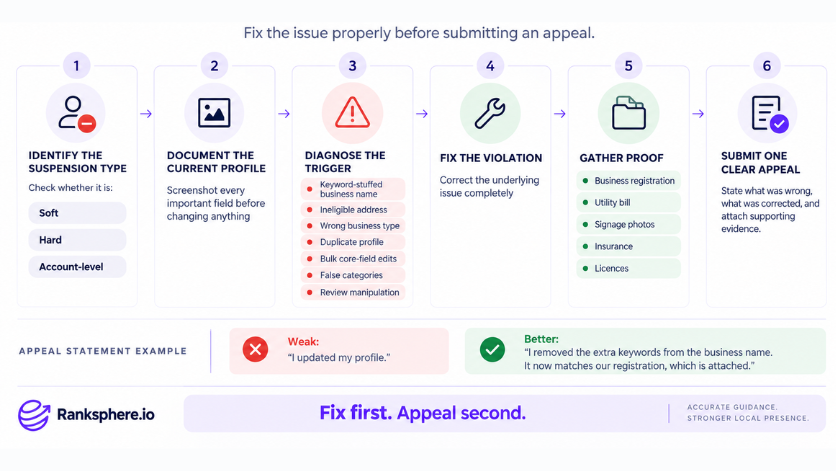
When a profile is suspended, resist the urge to start changing several things at once.
First, review the profile against Google's current guidelines and look for anything that does not accurately reflect the business.
A sensible process is to:
- Confirm whether the issue affects one profile or the wider account
- Take screenshots of the current profile information
- Review the business name, address, categories and other important fields
- Correct anything that does not meet Google's requirements
- Gather documents that support the business information
- Submit an appeal with a clear explanation of what was corrected
Supporting evidence may include business registration, licences, utility bills, insurance documents, photographs of signage or other material that connects the business to the information shown on the profile.
Keep the appeal straightforward.
Rather than saying:
“I updated the profile and everything is correct now.”
be specific:
“The additional service terms were removed from the business name. The profile now uses the registered name, Smith Plumbing, and the business registration is attached.”
That gives the reviewer something concrete to check.
Google's guidance on suspended profiles should be your reference for the current appeal process. Ranksphere's GBP management includes change monitoring and profile protection so unexpected profile changes can be identified before they become a larger problem.
What not to do
A suspension can make people rush into changes that create additional problems.
Avoid these common reactions:
- Do not immediately create another profile. If Google sees it as a duplicate, you can end up managing two problems instead of one.
- Do not delete the original listing. The existing profile contains its history, reviews and other information you want to preserve.
- Do not submit appeal after appeal without changing anything. If the first submission is unsuccessful, review the profile and your evidence before trying again.
- Do not keep editing the profile while an appeal is being reviewed. Unless Google specifically asks you to change something, avoid introducing more variables.
- Do not appeal before checking the profile. Correct obvious guideline problems first so the profile you are asking Google to reinstate is already compliant.
The aim is to make the situation easier for a reviewer to understand, not to create more activity around the profile.
How long does reinstatement take?
There is no single recovery time that applies to every suspended Google Business Profile.
Some cases are reviewed relatively quickly, while others take longer because Google requests additional evidence or the profile requires further verification.
If an appeal is unsuccessful, read the response carefully and review the profile again before submitting anything else. Additional documentation can help when the first submission did not provide enough evidence.
Repeatedly sending the same information is unlikely to improve the case. A second submission should address whatever may have been missing or unclear the first time.
How to reduce the risk of suspension
The safest approach is simple: make sure the profile reflects the real business as closely as possible.
- Use the genuine business name. Do not add services, cities or marketing phrases unless they are part of the real-world name.
- Use the correct business setup. If customers do not visit the address, configure the profile accordingly.
- Choose accurate categories. Only use categories that describe services the business actually provides.
- Keep supporting documents available. Business registration, licences and address documentation are much easier to organise before they are urgently needed.
- Follow Google's review policies. Avoid purchasing, incentivising or selectively filtering customer feedback.
- Review profile changes carefully. User-suggested edits and other updates can occasionally introduce incorrect information.
- Only make significant changes when there is a genuine reason. Stability and accuracy are more useful than repeatedly adjusting core profile fields for SEO.
Example
“Meridian Garage Doors notices that its Google Business Profile has disappeared from Search and Maps.
Instead of creating another listing, the owner first reviews the existing profile.
Two issues stand out. The business name contains additional service and location keywords, and the profile displays an address even though customers do not visit the premises.
The business corrects the name so it matches its registered trading name and changes the profile to the appropriate service-area setup with the address hidden.
Before appealing, the owner gathers documents showing the registered business name and operating address, along with photographs of the company's branded vehicles and equipment.
The appeal explains the two corrections clearly and includes the supporting evidence.
The important part is not how quickly the appeal is submitted. It is that the profile has been corrected first and the reviewer is given enough information to understand that the business is legitimate and now represented accurately.
That is usually the best way to approach a suspension: diagnose first, correct the problem, document the business and then appeal.”
See also
- Google Business Profile, the listing affected by a suspension
- Google Business Profile verification, verification may be required as part of restoring access
- Service area business, the correct setup when customers do not visit the business address
- Google Business Profile categories, categories should accurately reflect the services provided
- Review gating, review practices must follow Google's policies
- NAP consistency, keeping your business name, address and phone information accurate across the web