Google Business Profile hours tell customers when a business is normally open and when its schedule changes for holidays, events or particular services.
Depending on the business, Google can display:
- Regular weekly opening hours
- Special hours for temporary changes
- Additional service-specific hours
Accurate hours may look like a small part of a Google Business Profile, but they can directly affect whether someone knows they can visit, call or book at that moment.
For local businesses, that matters.
Someone searching for:
pharmacy open now
restaurant open Sunday
or:
dentist open Saturday
is not simply looking for a relevant business.
They are looking for one that is available at the right time.
What are Google Business Profile hours?
Business hours are the customer-facing operating times attached to a Business Profile in Google Search and Maps.
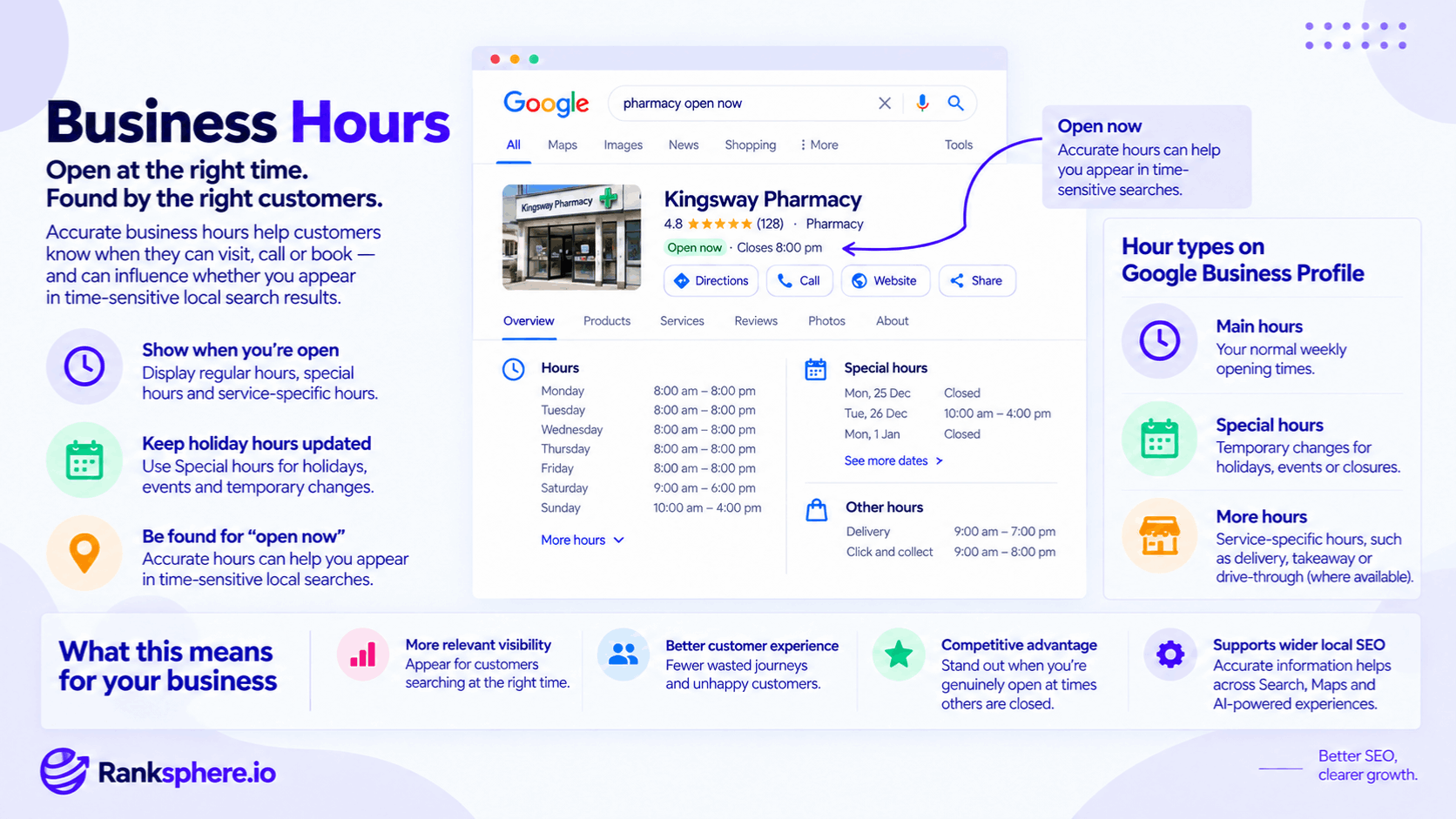
Google currently allows businesses to manage several kinds of hours, including main opening hours, Special hours and category-dependent More hours.
The right setup depends on how the business actually operates.
The goal is simple:
show customers when they can genuinely use the business.
Not when someone happens to be in the office.
Not when the owner checks email.
Not when the phone might occasionally be answered.
The hours should describe the customer-facing operation as accurately as possible.
Why business hours matter for local SEO
Opening hours are primarily customer information.
They help people answer questions such as:
- Is this business open now?
- Can I visit today?
- Is it open on Sunday?
- What time does it close?
- Is it open on the bank holiday?
This becomes especially important for high-intent local searches where timing is part of the decision.
A customer searching for an emergency pharmacy at 8pm cares about availability immediately.
An accurate profile helps Google present useful information and helps the customer avoid contacting or travelling to a business that is closed.
Business hours and “Open now”
Google Maps and local search experiences can allow users to narrow results according to current availability.
That makes accurate opening hours particularly important for searches where the customer wants a business they can use immediately.
However, avoid saying:
“If your profile says closed, Google removes you from all search results.”
That is too broad.
A business can still appear in ordinary local results while closed.
The stronger point is that if someone specifically restricts their search to businesses that are open, an incorrect closed status can make the business irrelevant to that particular search.
Incorrect hours create a customer problem
The SEO impact is only part of the issue.
Incorrect hours can create a poor real-world experience.
Imagine a customer who:
- Checks Google.
- Sees Open until 6pm.
- Drives twenty minutes.
- Arrives at 5:15pm.
- Finds the doors locked.
That frustration can lead to:
- Lost business
- Complaints
- Poor reviews
- Reduced trust
The profile did not simply contain an inaccurate field.
It sent a customer to a closed business.
Google Business Profile hour types
Google currently provides several ways to represent different schedules.
The three most important are:
Main hours
The business's normal customer-facing weekly schedule.
Special hours
Temporary exceptions to normal hours, such as:
- Public holidays
- Special events
- Short temporary closures
More hours
Additional schedules for particular services, such as:
- Delivery
- Takeaway
- Drive-through
Google advises businesses to use More hours when specific services operate on different schedules from the main business.
Regular business hours
Regular hours describe the business's normal week.
For example:
Monday: 9am–5pm Tuesday: 9am–5pm Wednesday: 9am–5pm Thursday: 9am–7pm Friday: 9am–5pm Saturday: 9am–1pm Sunday: Closed
These should represent the hours when customers can normally use the business.
If the schedule changes permanently, update the regular hours rather than repeatedly overriding them with Special hours.
Split opening hours
Some businesses close during part of the day.
For example:
9am–2pm
then:
5pm–10pm
Google allows more than one set of opening hours on the same day so these breaks can be represented properly.
Do not simplify this to:
9am–10pm
if customers cannot actually use the business between 2pm and 5pm.
Accuracy is more useful than making the opening period look longer.
24-hour businesses
If a business is genuinely open around the clock, use Google's dedicated:
24 hours
setting for each relevant day.
Do not try to approximate it with:
00:00–23:59
simply to make the profile appear continuously open.
Use the platform's actual 24-hour option.
Special hours
Special hours are temporary changes to the regular schedule.
Google specifically recommends them for situations such as:
- Holidays
- Special events
- Other exceptional circumstances
They can also be used when the business is temporarily closed for up to six consecutive days. Longer closures should generally use the temporary-closure status instead.
Public holidays
Public holidays are one of the most important reasons to maintain Special hours.
The business might be:
- Closed
- Open normally
- Open for reduced hours
- Open later than usual
Do not assume Google will always know.
Google recommends confirming official-holiday hours even when they are identical to the normal schedule, because that gives customers clearer information that the hours have been checked.
Confirm normal holiday hours too
Suppose a pharmacy normally operates:
9am–6pm
and stays open:
9am–6pm
on a public holiday.
It may still be worth confirming those holiday hours.
The point is not to create a different schedule.
It is to tell customers that the normal hours are intentional for that particular date rather than potentially outdated information.
Special hours need main hours
There is an important setup detail.
Google states that Special hours appear only when the Business Profile is configured as:
Open with main hours.
This matters for businesses that do not use regular opening hours.
Do not assume Special hours work in exactly the same way on every profile configuration.
Temporary closures
Special hours are intended for short exceptions.
If the business will be closed for:
seven days or longer
or for an unknown period, Google recommends using:
Temporarily closed
instead.
For example:
Suitable for Special hours
Closed Friday and Saturday for refurbishment.
More appropriate as Temporarily closed
Closed for three weeks during major building work.
Use the status that most accurately communicates what customers should expect.
More hours
More hours allow businesses to specify when particular services are available.
Google gives examples including:
- Delivery
- Takeaway
- Drive-through
and also references other service-specific schedules such as senior hours.
The options available depend on the business and profile type.
Main hours vs More hours
These fields should not be confused.
Imagine a restaurant that is open:
6am–9pm
but offers takeaway only:
10am–6pm.
The main opening hours describe the restaurant.
The More hours field can describe the takeaway service separately.
Google generally recommends treating More hours as a subset of the primary operating hours.
Seasonal hours
Businesses with regular seasonal operating patterns should make sure their profile reflects the current season.
For example, a tourism business might operate:
April–October
and close during winter.
Google's guidelines allow businesses to use current seasonal hours as regular hours while the business is operating.
Do not leave summer opening times displayed throughout winter if the business is actually closed.
By-appointment-only businesses
This is one area where common local SEO advice is often wrong.
Google's current Business Profile guidelines say certain businesses that operate only by appointment should not provide business hours.
That means the advice:
“Just list the hours you answer your phone.”
is not generally the right solution.
The profile can instead be set to:
Open with no main hours
where appropriate. Google currently provides this option in the Business Profile hours settings.
Appointment-required attributes
Where available for the business category, the appointment-required attribute can provide additional context.
A booking or appointment link may also help customers understand how to access the service.
But attributes and booking links do not change Google's underlying guidance about businesses that operate solely by appointment.
Represent the actual operating model rather than inventing conventional opening hours for SEO purposes.
Businesses with mixed appointment and walk-in hours
Some businesses are more complicated.
For example:
- Thursday–Saturday: open to walk-ins
- Monday–Wednesday: appointments only
Google does not provide a simple custom label inside regular hours that says:
“By appointment only”
for individual days.
In cases like this, prioritise accurate customer-facing information and use the available profile fields, booking options and website content to explain the arrangement clearly.
Do not list a business as normally open to the public during a period when nobody can visit without an appointment.
Emergency and out-of-hours services
An emergency service should not automatically list:
24 hours
simply because customers can submit an enquiry at any time.
Ask:
Can the customer actually reach and use the service 24 hours a day?
If yes, 24-hour hours may accurately represent the business.
If not, use the most accurate main hours and explain genuine emergency or out-of-hours offerings through appropriate services and website content.
Do not exaggerate availability to capture:
open now
searches.
Business hours and Ask Maps
Ask Maps allows people to ask practical questions about businesses conversationally.
For example:
Is this pharmacy open Sunday?
Can I go there now?
Accurate hours give Google's wider Maps ecosystem clear first-party information about when the business says it operates.
But avoid claiming that Business Profile hours are necessarily the only source Ask Maps uses for every answer.
The practical recommendation is simply:
keep the official business information accurate.
Google can update profile information
A verified profile does not mean every field remains permanently locked.
Google says it may update business information if it receives reports indicating that existing details are inaccurate. When that happens, the business receives a notification and an alert within the profile.
This is one reason businesses should continue monitoring their profile after setup.
User suggestions and other sources
Customers and other sources can contribute information that may lead Google to reconsider existing profile details.
That does not mean every suggested edit is automatically accepted.
Google evaluates available information and may update the profile if it believes the new information is more accurate.
So instead of saying:
“Anyone can silently change your hours.”
a more accurate description is:
Google can update business information when it receives credible evidence that the current details are wrong, so profile changes and notifications should be monitored.
Keep website hours accurate too
The Business Profile should not be the only place with current operating information.
Also review:
- Contact page
- Location pages
- Footer where hours are shown
- Booking pages
A customer should not see:
Google: closes at 7pm
and:
Website: closes at 5pm
and have to guess which one is correct.
LocalBusiness schema
Where appropriate, LocalBusiness schema can describe opening hours in structured website data.
Keep that information aligned with what the business actually does.
Schema does not override Google Business Profile information or force Google to display a particular schedule.
It simply gives search engines another structured representation of the business.
Consistency means factual agreement
Do not obsess over formatting.
These two descriptions:
09:00–17:00
and:
9am–5pm
mean the same thing.
The problem is:
Profile: 9am–5pm
Website: 10am–7pm
when both claim to describe the same normal schedule.
Focus on factual consistency.
Multi-location businesses
Opening hours should be managed per location.
Do not assume every branch of a chain has the same schedule.
One location might operate:
8am–6pm
while another closes at:
5pm
and a third opens on Sunday.
A group template can make management easier.
It should not overwrite legitimate branch differences.
Ranksphere's GBP management keeps hours consistent across locations and flags unauthorised changes, helping teams monitor profile information without forcing every branch into an identical schedule.
Review hours after staffing changes
Opening hours sometimes change because of:
- New staffing
- Recruitment gaps
- Extended trading
- Reduced trading
- Seasonal schedules
When the real operation changes, update Google at the same time.
Do not treat the profile as something that gets reviewed only once a year.
Review hours after a move or rebrand
A relocation or rebrand is another good time to audit:
- Main hours
- Special hours
- Website hours
- Location pages
- Schema
Operational information often gets overlooked during larger changes because teams focus on:
- Address
- Logo
- Website
- Signage
Hours deserve the same attention.
Do not list aspirational hours
A business should not list hours simply because it wants to take customers at those times.
For example:
Open until 9pm
is misleading if nobody routinely answers calls or serves customers after 6pm.
Profile data should describe reality.
It should not be treated as advertising copy.
Missed calls can reveal an hours problem
Suppose a business claims to be open:
8am–8pm
but nearly every call after 5pm is missed.
The SEO problem may not be ranking.
The operating information may be setting the wrong expectation.
Review whether the published hours genuinely reflect:
- Staffing
- Phone coverage
- Customer access
Local optimisation should improve the customer journey, not simply maximise the number of hours displayed.
Holiday planning
A useful workflow is to review known holidays in advance.
Check:
- Public holidays
- Christmas
- New Year
- Planned staff closures
- Business-specific events
Google allows businesses to create Special hours for holidays and other temporary schedule changes.
If the dates are already known, there is little reason to wait until the morning of the closure.
Don't rely entirely on Google's prompts
Google may surface upcoming dates for businesses to review.
Still, the business is responsible for keeping its profile correct.
Maintain your own operational calendar.
If you know that the practice closes every year between Christmas and New Year, put that into your profile-management process instead of waiting for Google to remind you.
Business hours are not a ranking trick
Do not extend your listed hours simply because competitors close earlier.
If you genuinely stay open later, that can be useful to customers searching at those times.
If you do not, false hours create a bad customer experience and inaccurate business information.
The right optimisation is:
be accurately available
not:
look available for longer.
Competitive value of accurate hours
There can still be a genuine competitive advantage when the business actually operates at times competitors do not.
For example:
Three pharmacies may normally close on a public holiday.
A fourth is genuinely open.
If its Special hours accurately confirm that opening schedule, people looking for a pharmacy that day have clearer information about the option that can actually serve them.
That is useful local optimisation because it reflects a real business difference.
Common Google Business Profile hours mistakes
- Never reviewing Special hours for holidays or temporary changes.
- Claiming that being marked closed removes a business from every type of local search.
- Listing hours when the business operates solely by appointment, despite Google's guidance for appointment-only businesses.
- Using phone-answering hours as though they were necessarily customer-facing business hours.
- Setting 00:00–23:59 instead of using the dedicated 24-hour option.
- Using regular hours for service-specific schedules that belong under More hours.
- Leaving temporary operating changes in place after they end.
- Publishing hours the business cannot actually support.
- Assuming user suggestions automatically and silently overwrite the profile.
- Ignoring Google notifications about business-information updates.
- Showing materially different hours on Google and the website.
- Applying one template to every location when branches have different schedules.
- Treating hours as a ranking trick rather than customer information.
Google Business Profile hours best practices
- Set accurate customer-facing main hours.
- Use Google's dedicated 24-hour option for genuinely 24-hour businesses.
- Use Special hours for holidays and temporary schedule exceptions.
- Confirm important holiday hours even when the business is operating normally.
- Use More hours for eligible services with different schedules.
- For appointment-only businesses, follow Google's guidance rather than inventing regular opening hours.
- Use relevant attributes and booking options where available.
- Keep website and LocalBusiness schema information accurate.
- Review profile notifications and Google-applied information updates.
- Update hours after staffing, seasonal or premises changes.
- Manage opening hours individually for locations that genuinely differ.
- Plan known holiday schedules in advance.
Example
“Kingsway Pharmacy normally operates seven days a week.
It also remains open on several public holidays when many nearby pharmacies close.
Its standard weekly schedule is correct, but nobody has reviewed the Special hours section.
Before the next bank holiday, the pharmacy audits the profile.
Rather than assuming Google will infer that its normal Monday schedule still applies, the team confirms the bank-holiday opening hours explicitly.
Christmas and New Year are different, so those dates receive the pharmacy's actual reduced schedule.
The website is updated to show the same information.
The team also creates a simple annual process:
Before each planned holiday period, confirm Google Business Profile hours, website hours and any relevant booking information.
Nothing about the pharmacy's physical operation has changed.
What has changed is the accuracy of the information customers see when timing matters most.
That is the role of Google Business Profile hours:
not to manufacture extra local visibility by appearing open for longer, but to make sure Google and potential customers know when the business can genuinely serve them.”
See also
- Google Business Profile — where main, Special and More hours are managed
- Google Business Profile attributes — appointment and service-related information where available
- Ask Maps — conversational questions about local businesses and places
- Near me search — where availability can affect which businesses a customer considers
- LocalBusiness schema — structured opening-hours information on the website
- Google Business Profile services — describing services that may operate differently from standard hours