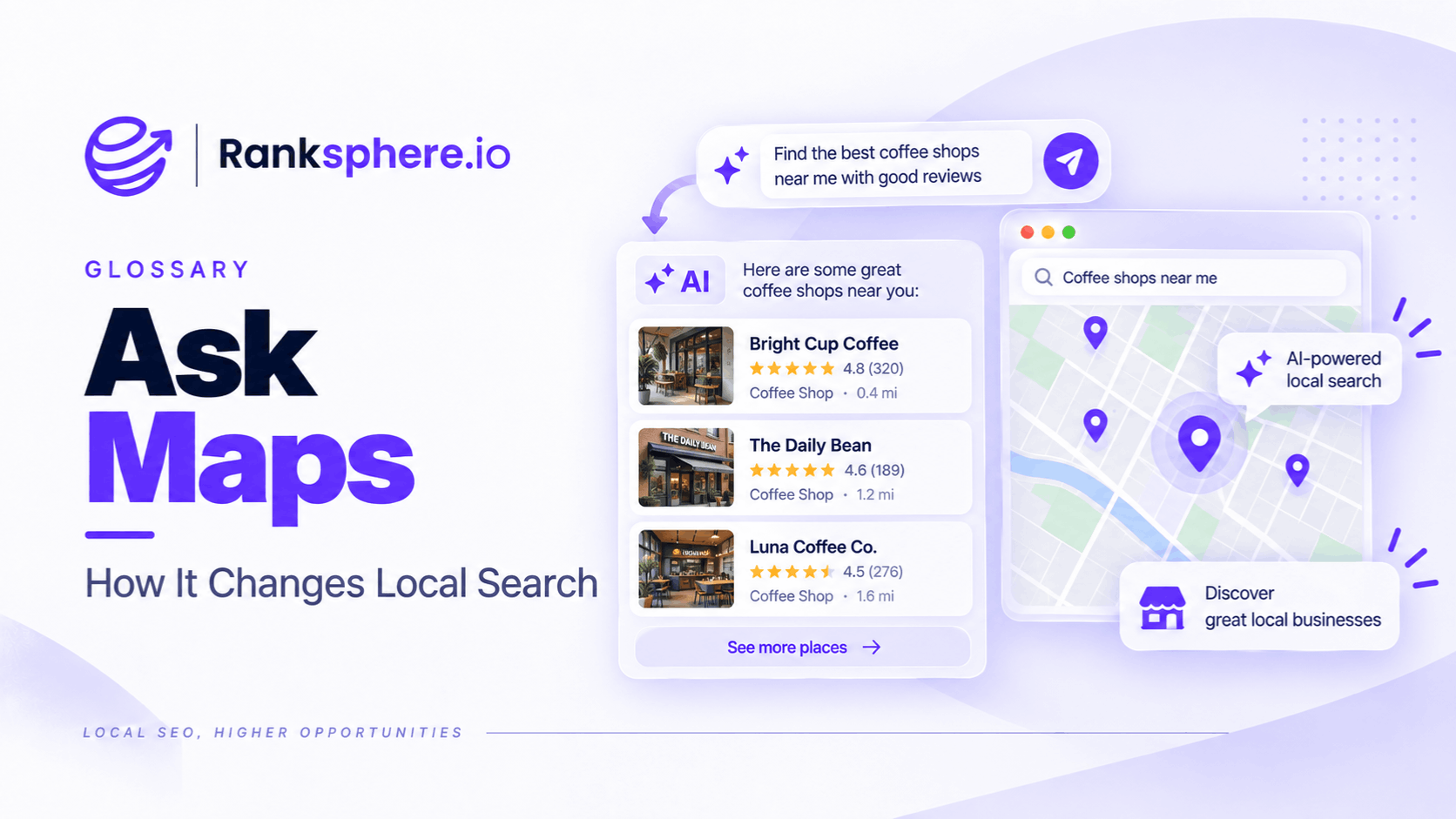
Ask Maps is Google's conversational AI experience inside Google Maps, powered by Gemini.
It allows people to ask natural-language questions about places, businesses, journeys and local recommendations instead of relying only on traditional search filters or scrolling through reviews.
Someone might ask:
Does this restaurant have outdoor seating?
Is there parking nearby?
Which cafés near me are quiet enough to work from?
Where can I charge my phone without having to buy anything?
Ask Maps can respond conversationally and allow follow-up questions.
For local businesses, the important change is that customer questions are increasingly being answered dynamically from Google's Maps information rather than through the old public question-and-answer format alone.
That changes the SEO task.
You have less control over the wording of the final answer.
So the priority becomes making the underlying business information as accurate, complete and useful as possible.
What is Ask Maps?
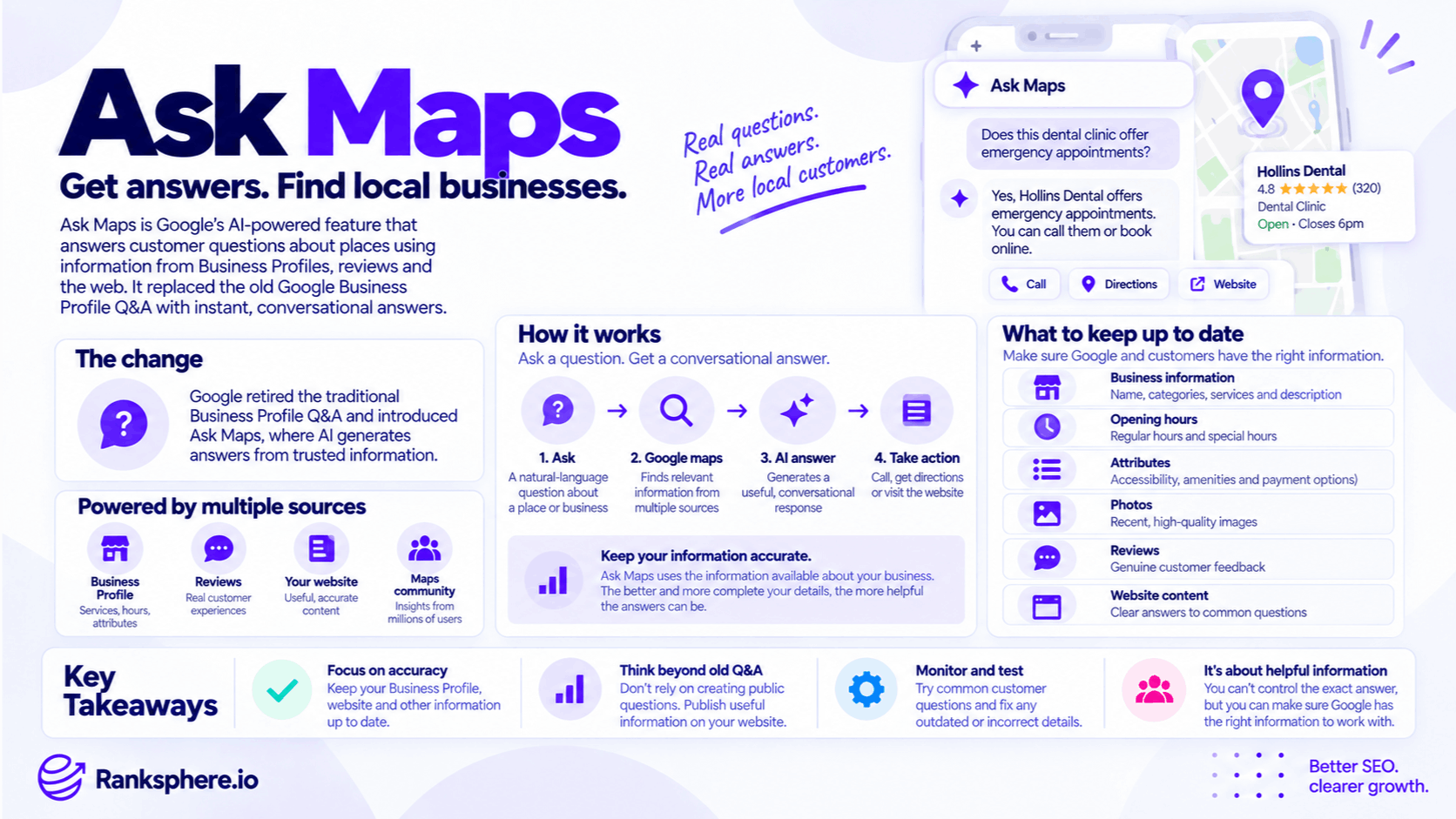
Ask Maps is an AI-powered search and discovery feature within Google Maps.
Google describes it as a conversational experience that combines Gemini with its Maps data to answer complex questions about the real world.
Instead of searching:
restaurants near me
and manually filtering the results, someone could ask:
Find a quiet Italian restaurant within 15 minutes that is open after 10pm and has vegetarian options.
Ask Maps can interpret the different requirements together and return relevant places.
Google says Maps draws on information about more than 300 million places and contributions from a community of more than 500 million people when powering these experiences.
Ask Maps and Google Business Profile Q&A
Ask Maps arrived at the same time Google was significantly changing the traditional Google Business Profile Q&A experience.
For years, businesses had a public Q&A section where people could:
- Ask questions
- Answer questions
- Read existing answers
Business owners could also contribute answers.
That led to a common local SEO tactic:
create useful questions yourself and answer them on the profile.
That advice now needs updating.
What happened to Google Business Profile Q&A?
Google began changing the Q&A system during 2025.
The clearest official timeline is:
15 September 2025 — Google announced that the My Business Q&A API would be discontinued.
3 November 2025 — the Q&A API was officially switched off. Businesses and software providers could no longer use it to programmatically read or post questions and answers.
3 December 2025 — Google publicly explained that it was changing the customer Q&A experience. Instead of requiring customers to scroll through existing questions or wait for someone to answer, users could ask questions directly in Google Maps and receive an instant response.
So the change is better described as:
traditional public Q&A being replaced and reworked into a more conversational Maps experience
rather than:
Q&A disappeared completely on one date.
Existing Q&A did not immediately become useless
Another important correction is that old Q&A content did not simply vanish from Google's systems.
Google said in December 2025 that Business Profile users could continue answering existing questions and that previously published questions and answers could continue contributing to Google's understanding of places and potentially appear in Maps.
That means businesses should not assume historical Q&A content suddenly became worthless.
But the old strategy of continually creating public questions and answers as a profile optimisation tactic is no longer the same opportunity it once was.
Businesses may receive aggregated questions
Google also introduced an important replacement workflow.
Rather than answering dozens of individual public questions, businesses may be asked to respond to aggregated questions based on what customers commonly want to know.
Google says those business-provided answers can then help respond to other customers asking similar questions in Maps.
That creates a different model:
Old model
Customer asks question → someone answers → public thread remains
Newer model
Customers ask similar questions → Google may aggregate the need → business provides useful information → Google can use that information when answering similar questions
This moves the focus from maintaining a public FAQ thread to maintaining reliable source information.
What Ask Maps does
Ask Maps allows users to ask complex questions about:
- Individual places
- Groups of businesses
- Routes
- Activities
- Local recommendations
People can also ask follow-up questions within the same conversation.
For example:
Find a dog-friendly café near the park.
Then:
Which of those stays open after 8pm?
Then:
Which one has outdoor seating?
That is very different from the old model of entering separate search queries and opening multiple business listings.
Ask Maps can answer questions about individual businesses
Ask Maps is not limited to broad recommendations.
Google also supports questions about specific places.
Someone looking at a restaurant might ask:
Does it have outdoor seating?
or:
Is it quiet enough for a date?
Google has been developing this kind of AI-powered place questioning for some time, using Gemini to summarise and interpret Maps information.
For local businesses, this means information that previously required a customer to:
- Visit the website
- Read ten reviews
- Call reception
may increasingly be summarised directly inside Maps.
Where does Ask Maps get its information?
Google does not publish a simple checklist saying:
Ask Maps uses source A + source B + source C for every answer.
Its documentation describes the system more broadly.
Ask Maps uses Google's Maps information about places and contributions from the Maps community. Google specifically references information such as reviews and tips from real people when explaining how Ask Maps generates recommendations and answers.
For the changing Q&A experience, Google has also specifically said that instant answers can use:
- Business-provided answers
- Relevant reviews
So it is safer to think in terms of Google's wider place information rather than assuming one fixed source hierarchy.
Google Business Profile information still matters
Your Google Business Profile remains one of the most important sources of factual information associated with a local business.
That includes information such as:
- Business category
- Services
- Attributes
- Hours
- Address or service area
- Contact information
If those details are wrong or incomplete, customers may encounter incomplete or inaccurate information throughout Google's local ecosystem.
That mattered before Ask Maps.
Conversational AI makes the quality of those underlying facts even more noticeable.
Reviews are increasingly useful as information
Reviews are not simply a star-rating system.
Review text can contain practical details about:
- Services
- Customer experience
- Accessibility
- Parking
- Waiting times
- Products
- Atmosphere
Google explicitly says Ask Maps can draw on insights from its Maps community, and its updated Q&A announcement specifically mentions relevant reviews when generating answers.
That gives review content an additional role:
customers are not the only audience reading it.
Google's systems can also use those contributions when helping other people understand a place.
Do not manufacture review wording
That does not mean businesses should tell customers:
“Please mention dental implants, emergency dentistry and Invisalign in your review.”
Reviews should remain genuine customer feedback.
A better approach is simply to make it easy for customers to leave detailed, honest reviews.
Useful reviews tend to contain specifics naturally.
A review saying:
The receptionist fitted me in for an emergency appointment the same afternoon
contains more useful information than:
Great service. Five stars.
But that detail needs to come from the customer's genuine experience.
Your website still matters
The business website remains important for local SEO and for giving customers authoritative information about:
- Services
- Pricing
- Policies
- Locations
- Accessibility
- Booking
- Common questions
But avoid saying:
“Ask Maps always reads your website and uses it to generate answers.”
Google has not documented the system that simply.
The stronger argument is that the website remains an important public source of clear business information across Google's wider search ecosystem.
It should contain answers that customers genuinely need.
FAQ content is still useful
The retirement of the old Q&A workflow does not mean FAQs are useless.
If customers regularly ask:
Is there parking?
Do you offer payment plans?
Do you treat nervous patients?
Can I book an emergency appointment?
those questions should probably be answered somewhere the business controls.
Depending on the question, that might be:
- Service page
- Location page
- Booking page
- FAQ section
The objective is not to recreate the old Google Q&A box on your website.
It is to publish useful information clearly.
What about FAQPage schema?
You can use appropriate schema markup when it accurately describes the content.
But do not add FAQPage schema because you expect:
Ask Maps to use it.
Google has not documented FAQPage markup as a requirement or special Ask Maps optimisation method.
Likewise, FAQ rich results are heavily restricted in Google Search and are not a realistic visual opportunity for most ordinary local businesses.
Use structured data because it accurately describes the page.
Not because you expect it to control Gemini's answer.
Profile completeness matters, but not as a ranking checklist
Ask Maps gives businesses another reason to maintain accurate profile information.
For example:
If a customer asks:
Is this place wheelchair accessible?
and the relevant attribute is accurately maintained, Google has clearer structured information available about that feature.
If the field is missing, that does not automatically mean Google will give a wrong answer.
It may have other information.
But leaving important business details incomplete creates unnecessary ambiguity.
Business hours are particularly important
Business hours are a good example of information that needs active maintenance.
A customer may ask:
Is this clinic open after 6pm today?
That answer needs current information.
Review:
- Standard hours
- Special hours
- Holiday hours
- Temporary closures
Do not rely on an old website footer or a review from two years ago to explain when the business is open.
Services should be accurate
Google Business Profile services should reflect what the business actually offers.
For example, if a dental practice provides:
- Dental implants
- Emergency dentistry
- Sedation
- Hygiene appointments
those services should be represented accurately where appropriate.
Do not add unrelated services simply to create more potential Ask Maps answers.
Completeness should never override accuracy.
Attributes can answer practical customer questions
Google Business Profile attributes can provide useful information about a place.
Depending on the business category, they may describe areas such as:
- Accessibility
- Amenities
- Service options
- Payment options
These details can matter when customers ask highly practical questions.
Treat attributes as useful customer information rather than as SEO boxes that need filling for their own sake.
Ask Maps is personalised
Another important difference from the old Q&A system is that Ask Maps can personalise recommendations.
Google says results can use information such as places a person has:
- Searched
- Saved
- Previously interacted with
where the relevant personalisation settings are enabled.
That means two people can potentially receive different recommendations or emphasis.
There may no longer be one static:
“answer shown for this business.”
AI answers can be wrong
Google explicitly warns that AI-powered Maps answers can sometimes be incorrect and recommends checking important information against additional sources.
That matters for local businesses.
Do not assume:
Google said it, therefore our profile must contain it.
An answer may involve:
- Old information
- Misinterpreted information
- Conflicting sources
- AI error
When you find an inaccurate answer, investigate the underlying business information first.
Can a business edit an Ask Maps answer?
Not in the same way that an owner could write a public Q&A response.
Ask Maps generates responses dynamically.
There is no general business-owner field where you simply type:
Replace the AI answer with this sentence.
Instead, businesses should ensure the underlying information they control is accurate.
Customers can also give feedback on AI-powered Maps answers using the thumbs-up or thumbs-down feedback controls.
Correct the underlying information first
Suppose Ask Maps incorrectly says:
The clinic closes at 5pm.
but the clinic closes at:
7pm.
Check:
- Google Business Profile hours
- Special hours
- Website
- Other important public business information
If the underlying information is wrong, fix it there.
If the source information is already correct but Ask Maps still gives an incorrect response, use Google's available feedback mechanisms.
Do not assume every AI error can be solved by changing one profile field.
Ask Maps and customer contributions
Google is also expanding conversational contributions through Maps.
Its newer Tell Maps experience allows users to contribute information such as:
- Updated hours
- Place attributes
- Local tips
- Photos
Some contributions can begin directly from an Ask Maps conversation.
That means local information continues to be influenced by:
- Businesses
- Customers
- Google's systems
- The wider Maps community
Profile monitoring remains important.
Ask Maps rollout
Ask Maps launched broadly as a conversational Maps experience in March 2026, initially rolling out in the United States and India on Android and iOS.
By August 2026, Google announced expansion into additional markets including:
- Australia
- Brazil
- Canada
- Indonesia
- Japan
- Mexico
and said Ask Maps was also rolling out across more than 150 countries and territories in English.
Google's current help documentation also describes Ask Maps on desktop.
Availability and exact functionality can still vary by:
- Country
- Language
- Device
- Account
- Rollout stage
So do not assume every client or customer sees exactly the same interface.
What Ask Maps changes for local SEO
The biggest change is not:
“There is a new ranking factor.”
It is:
Google can answer more customer questions without requiring the customer to manually inspect every source.
That makes information quality more important.
Local SEO increasingly needs to consider whether Google has enough reliable information to answer practical questions about:
- Services
- Hours
- Accessibility
- Location
- Customer experience
But there is no documented:
Ask Maps optimisation score
or special schema that guarantees inclusion.
You have less control over the final wording
The old Q&A format let a business owner write a specific answer.
For example:
Do you have parking?
Yes. We have six customer parking spaces behind the clinic.
Ask Maps may phrase the information differently.
The business controls some of the underlying facts.
Google controls the generated response.
That makes accuracy more important than carefully crafting one particular sentence for the search interface.
Think source quality, not answer manipulation
The wrong approach is:
How do we make Gemini say this exact sentence?
A better approach is:
Is this fact clearly and consistently represented in the sources we actually control?
That includes ensuring that:
- Profile fields are accurate
- Hours are current
- Services are represented properly
- Website information is clear
- Reviews are monitored
- Incorrect listings are corrected
The job moves upstream.
Review your old Q&A content
If useful historical Q&A content is still available to you, review it.
Look for questions that answer genuine customer concerns.
For example:
- Parking
- Payment options
- Accessibility
- Emergency appointments
- Returns
- Booking
- Service areas
If those answers exist only inside an old Google Q&A thread, consider adding the useful information to an appropriate page on your own website.
Do not copy everything blindly.
Keep the questions that customers genuinely need answered.
You do not need to recreate every old question
An old profile might contain:
Can I bring my dog?
Can dogs come inside?
Are pets allowed?
You probably do not need three separate FAQ entries.
Consolidate overlapping questions into useful content.
The goal is information coverage.
Not recreating the old Q&A database word for word.
Test Ask Maps carefully
It can be useful to ask the kinds of questions your customers commonly ask.
For example:
Does this clinic offer emergency appointments?
Is there wheelchair access?
Can I park nearby?
Do they treat children?
Then compare the response with the facts you know to be correct.
This can help expose:
- Missing information
- Outdated business data
- Conflicting public information
- AI errors
But do not treat one Ask Maps response as a permanent search result.
Generated answers can vary.
Do not turn testing into a ranking metric
There is currently no reason to create a dashboard saying:
Ask Maps score: 8/10
unless you have defined exactly what that proprietary metric means.
Ask Maps is still evolving.
Manual testing can be useful for quality assurance.
It should not be presented as an official Google visibility score.
There is no standard Ask Maps reporting dashboard for businesses
Google does not currently provide a conventional Business Profile report showing something like:
- Questions asked
- Ask Maps impressions
- Answers generated
- Click-through rate from AI answers
That limits measurement.
Businesses can evaluate the experience manually and continue tracking broader outcomes such as:
- Profile interactions
- Local visibility
- Calls
- Bookings
- Website activity
Do not invent attribution where Google does not provide it.
Ask Maps and reputation management
Ask Maps also makes reputation management more relevant.
Customer reviews may provide information that influences how a place is described.
That means businesses should pay attention to recurring themes.
For example, if several genuine reviews say:
parking is difficult
that may become important context for future customers.
The answer is not to suppress those reviews.
It may be to:
- Improve parking instructions
- Explain alternatives
- Update the website
- Add accurate relevant attributes
Customer feedback can expose missing information.
Ask Maps and AI Overviews
Ask Maps reflects a broader shift also visible in AI Overviews.
Traditional search often required the user to:
- Search.
- Open results.
- Gather information.
- Compare sources.
Generative interfaces can increasingly perform some of that synthesis first.
But the two products should not be treated as identical.
Ask Maps is built around places, geography and Maps information.
AI Overviews operate within Google Search across a much wider range of queries and web information.
Both make clear, accurate underlying information increasingly useful.
Ask Maps is not a new ranking shortcut
There is currently no documented tactic such as:
- Add FAQ schema
- Get more reviews
- Add ten services
- Publish a specific number of FAQs
that guarantees an Ask Maps mention or answer.
The same basic rule applies:
represent the business accurately and provide useful information.
Do not turn a new AI interface into another checklist of supposed ranking hacks.
Common Ask Maps mistakes
- Still treating the old public Q&A strategy as unchanged. Google's Q&A experience was substantially reworked during 2025.
- Saying all Q&A content disappeared on one fixed date. The transition was gradual, and Google said existing questions and answers could continue contributing to Maps.
- Claiming businesses can no longer answer anything. Google introduced aggregated business questions as part of the updated workflow.
- Assuming Ask Maps uses only Google Business Profile, reviews and the website. Google describes a broader Maps data and community ecosystem.
- Leaving important Business Profile fields inaccurate or incomplete.
- Treating reviews purely as a ranking metric. Review content can also provide useful place information.
- Telling customers what keywords to put in reviews.
- Adding FAQPage schema specifically to influence Ask Maps. Google has not documented it as an Ask Maps requirement.
- Trying to control the exact wording of generated answers.
- Assuming every AI answer is correct.
- Treating one test response as permanent.
- Assuming Ask Maps availability is identical in every country and on every device.
- Following an old local SEO playbook without checking whether its Q&A advice still applies.
Ask Maps best practices
- Keep Google Business Profile information accurate and current.
- Use services that accurately reflect what the business offers.
- Maintain relevant attributes.
- Keep business hours and special hours up to date.
- Monitor genuine customer reviews for recurring questions and incorrect assumptions.
- Publish clear answers to important customer questions on the appropriate website pages.
- Use schema markup accurately, but not as an Ask Maps shortcut.
- Review useful historical Q&A content and preserve valuable information on assets you control.
- Respond accurately if Google presents aggregated business questions.
- Test common customer questions periodically where Ask Maps is available.
- Correct inaccurate source information first.
- Use Google's feedback controls when an AI answer remains incorrect.
- Expect the feature to continue changing.
Ranksphere's GBP management keeps profile fields complete and monitored across locations, helping businesses maintain the underlying local information that Google and customers rely on across Search and Maps.
Example
“Hollins Dental had spent several years maintaining useful questions and answers on its Google Business Profile.
The old Q&A covered practical concerns such as:
- Parking
- Payment plans
- Nervous patients
- Emergency appointments
As Google's Q&A experience changed, the practice realised that relying on those old public threads was no longer a sensible information strategy.
Instead of trying to recreate the old system, it audits where each answer should actually live.
Parking information is checked against the practice's current profile information and website.
Payment options are explained clearly on the appropriate treatment and payment pages.
The practice's services are reviewed to make sure they accurately reflect what is offered.
Frequently asked questions about nervous patients and emergency appointments are added naturally to the relevant website pages.
The team also reads recent reviews to see what customers repeatedly mention.
Then it tests Ask Maps using the kinds of questions reception receives regularly.
One response contains outdated information about opening hours.
The practice checks the underlying sources and finds that special hours had not been updated correctly.
Those are fixed.
Another answer is incomplete even though the profile information appears correct, so the team submits feedback rather than repeatedly changing accurate information in an attempt to manipulate the
generated response.
The important change is not that Hollins Dental discovered a new AI optimisation trick.
It changed where it places its effort.
Under the old system, the practice could spend time crafting individual public Q&A entries.
Under the newer Maps experience, it focuses on maintaining accurate business information, useful customer-facing content and reliable source data.
That is the practical SEO lesson from Ask Maps:
you have less control over the exact answer Google generates, so the information Google and customers can rely on needs to be clearer, more accurate and better maintained.”
See also
- Google Business Profile — an important source of local business information
- Google Business Profile attributes — structured details about a place
- Online review — customer information that can help describe real-world experiences
- AI Overviews — Google's generative experience in broader web search
- Schema markup — machine-readable information that describes website content
- Reputation management — maintaining and understanding how a business is represented online