On Google, these businesses can hide their street address and show the service areas they serve instead. This is particularly important for home-based businesses, where customers are not expected to visit the address.
The important part is choosing the setup that reflects how the business actually operates.
Why the distinction matters
If customers cannot visit your address during your stated opening hours, that address generally should not be displayed publicly on your Google Business Profile. Getting the setup wrong can create compliance issues and, in some cases, contribute to a suspension.
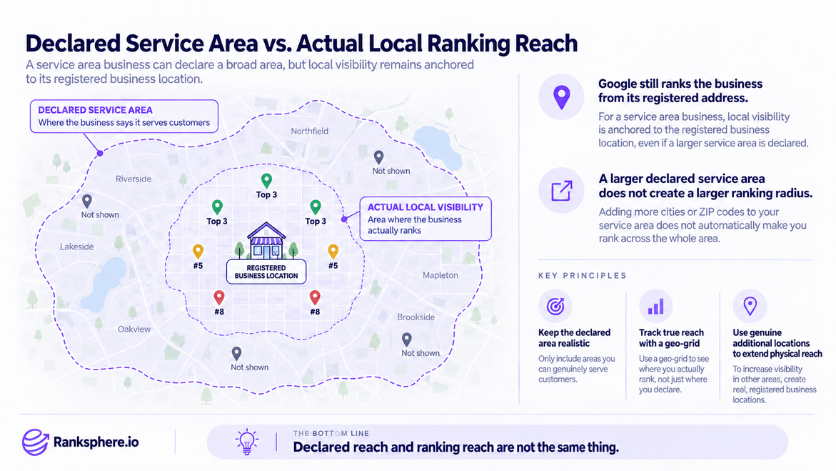
Hiding the address does not mean Google stops using your actual business location. Your underlying location still matters when Google determines where the business is relevant in local search.
That is why adding more towns or postcodes to the service area does not automatically increase your local visibility.
A correct service area setup helps you:
- Keep a private or home address off the public profile
- Make it clear that you travel to customers
- Represent the business accurately on Google
- Set realistic expectations about where you operate
What it does not do is guarantee rankings across every location listed in your service area.
The three business types
Google Business Profiles generally fall into one of three setups.
- Storefront, customers visit your business at a staffed, public-facing address during your stated hours.
- Service area, you travel to customers and do not receive them at your business address.
- Hybrid, customers can visit your location, but you also travel to serve customers elsewhere.
The distinction is fairly simple: if someone followed the address on your profile during opening hours, could they genuinely walk in and be served?
If the answer is no, a service area setup is usually the better fit.
How to set up Google Business Profile
Google may still require your real business address during setup or verification even when that address will not appear publicly.
When setting up the profile:
- Enter the genuine location where the business is based
- Hide the address if customers are not served there
- Add the cities, regions or postcodes you actually cover
- Keep the service area realistic for your day-to-day operation
- Choose the most accurate primary category
- Complete verification using the method Google provides
Google advises businesses to keep their service area within a practical distance from their base, generally no more than around two hours of driving time.
Verification requirements can vary. If Google asks for video verification, be prepared to show evidence that the business is genuine and operates from the location provided. This may include your vehicle, tools, equipment, workspace, business documents or other proof that you manage the operation.
Google's help documentation on service areas explains the current setup requirements. Ranksphere's GBP management tools keep service area settings consistent across every location you manage.
Common mistakes
- Showing a home address when customers do not visit. If the location is not genuinely customer-facing, the address should normally be hidden.
- Using a virtual office or mailbox as the business location. These generally do not meet Google’s eligibility requirements for a genuine business location.
- Listing every town you would be willing to travel to. Your service area should reflect where you realistically operate, not the widest possible territory.
- Choosing a hybrid setup just to keep the address visible. A hybrid business needs a real location where customers can actually receive service.
- Expecting the service area to control rankings. Adding a town to the profile does not guarantee visibility there.
- Creating profiles for places where you do not have a genuine business location. Serving a city is not, by itself, enough reason to create another profile.
- Making unnecessary changes to core business information. Address, business name, category and service-area changes should be made carefully and only when the information genuinely needs updating.
Best practices
- Choose the right business type from the start. If customers do not visit your location, hide the address.
- Keep the service area realistic. Add the places you genuinely serve rather than trying to cover as much territory as possible.
- Keep your business information consistent. Categories, services, hours and contact details should accurately reflect the business.
- Create useful location content on your website. If certain towns are important to the business, build pages around the services you actually provide there rather than producing near-identical city pages.
- Measure visibility from different locations. Local rankings change by searcher location, so one search from your office will not tell you how visible the business is across its service area.
- Prepare for verification. Keep the evidence Google may request, such as vehicles, equipment, signage and business documentation, easy to access.
- Avoid changing core profile details without a reason. Accurate, stable information is better than repeatedly adjusting the profile in an attempt to influence rankings.
Example
“Copperline Electrical operates from the owner’s home and serves customers across the surrounding towns. Customers never visit the house, so showing the residential address publicly would not accurately represent how the business works.
The profile is set up as a service area business, with the address hidden and only the areas the company regularly covers added to the service area.
The owner then checks local rankings from different points around the area rather than assuming the business is equally visible everywhere. The results show strong visibility close to the business but weaker coverage further out.
That information is much more useful than the service-area list alone. It shows where local search is already bringing in opportunities and where the business may need to rely on other channels or strengthen its local presence over time.
For the towns that matter most, the company also creates useful service pages based on the work it genuinely carries out there instead of producing dozens of near-identical location pages.”
See also
- Google Business Profile, where your business type and service area are configured
- Google Business Profile verification, how Google confirms that the business is legitimate
- Google Business Profile suspension, what can happen when a profile does not meet Google’s guidelines
- Local ranking factors, why listing an area does not guarantee rankings there
- Geo-grid rank tracking, measuring local visibility from different search locations
- Multi-location SEO, for businesses with genuine additional locations