Google Business Profile verification confirms that a business is genuine and that the person managing the profile is authorised to do so. Google decides which verification method is available for each business, so you will not always be able to choose the option you prefer.
This is where verification can become frustrating. Two businesses in the same industry may be given completely different options. Google can take several signals into account, including the business category, address, existing information about the company and the account being used to manage the profile.
The best approach is to make sure the profile is accurate before starting and be prepared to provide evidence that clearly connects the business, its location and the person managing it.
Why GBP Verification is important
Verification is an important part of establishing a business on Google. Without it, you will have limited control over the profile and the business may not be eligible to appear properly across the local pack and Google Maps.
For a new business, delays at this stage can hold up local visibility before the profile has even had a chance to build momentum.
Google has also placed more emphasis on verification methods that provide real-world evidence. This helps reduce fake, duplicate and misleading profiles, particularly in industries where spam has historically been more common.
Verification can affect:
- Whether the profile can fully appear and compete in local search
- Whether you can manage and update the listing
- What verification options Google makes available
- Whether major profile changes lead to another verification request
- How much supporting evidence Google may ask for
The GBP Verification Method
Google can offer different verification methods depending on the business. You may see one option or, in some cases, be asked to complete more than one step.
- Video, a live recording that shows the business, its location or equipment, and proof that you manage it.
- Postcard, Google sends a verification code to the business address.
- Phone or text, a code is sent by automated call or SMS when this option is available.
- Email, a verification link or code is sent to an eligible business email address.
- Instant verification, some businesses may qualify when the website is already verified through Google Search Console.
- Bulk verification, designed for organisations managing a large number of eligible locations.
You cannot force a particular method to appear. The available options are determined by Google for that specific profile.
How GBP video verification works
Video verification is now a common requirement, so it helps to know what Google expects before you begin. Google's documentation on video verification explains the current requirements in more detail.
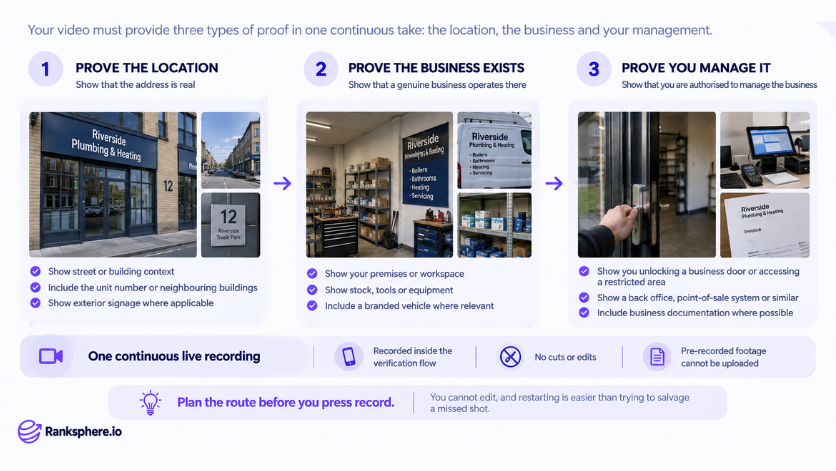
The recording is completed through the verification process on a mobile device. It should be continuous and show enough evidence for Google to understand three things: the business exists where you say it does, it genuinely operates there, and you are authorised to manage it.
For a storefront business, that might mean starting outside so the surrounding area and business signage are visible, then moving inside to show the premises and something only the business operator would normally have access to.
For a service area business, there may not be a shopfront to show. Instead, useful evidence can include branded vehicles, tools, equipment, stock, work materials, business documents or a genuine working area connected to the business.
It is worth thinking through what you need to show before starting the recording. A simple route planned in advance makes it much easier to cover everything clearly in one take.
Common mistakes
- Starting the video without preparing. It is easy to forget an important piece of evidence once the recording begins.
- Trying to use previously recorded footage. Video verification needs to be completed through Google's verification process.
- Showing the premises without proving management. Google also needs evidence that you are connected to and authorised to manage the business.
- Using an address that does not meet Google's eligibility requirements. Virtual offices, mailboxes and other unsuitable locations can cause verification problems.
- Making major profile changes immediately afterwards. Updates to important details such as the business name, address or category may result in another verification request.
- Using business information that does not match. The name, signage, address and other details shown during verification should be consistent with the profile.
Best practices
- Check the profile before you begin. Make sure the name, address, category, phone number and other important information are correct.
- Make sure the real-world business details match the profile. Consistency makes the business easier to verify.
- Plan the video before recording it. Know which signs, equipment, rooms, vehicles or documents you need to show.
- Keep supporting documents available. Business registration, insurance, utility information or other records may be useful if Google asks for additional proof.
- Avoid unnecessary changes once verification is complete. Only update important profile details when there is a genuine business reason.
- If verification is rejected, review the evidence before trying again. Work out what may have been missing instead of simply submitting the same recording twice.
Example
“Northgate Mobile Mechanics operates from a private unit and travels to customers, so there is no traditional storefront for people to visit.
During the first video verification attempt, the owner showed the branded van and tools. That demonstrated that a mobile mechanic business existed, but it did not clearly connect the operation to the business location or show that the person recording had control of the premises.
For the next attempt, the owner planned the recording beforehand.
The video began outside the unit, showing the surrounding area and unit number. The owner then unlocked the premises, showed the tools and parts used by the business, filmed the branded vehicle and included business documentation kept at the workspace.
The second recording gave Google a much clearer picture of the operation because the evidence connected the business, its location and its management.
That is what good verification evidence should do. It does not need to look professionally produced. It simply needs to make the business easy to verify.”
See also
- Google Business Profile, the profile you are verifying and managing
- Service area business, verification works differently when customers do not visit the business address
- Google Business Profile suspension, what can happen when a profile does not meet Google's requirements
- Google Business Profile categories, one of the core fields used to describe the business
- Local pack, where verified local businesses may appear in search
- NAP consistency, keeping your business name, address and phone number consistent across the web