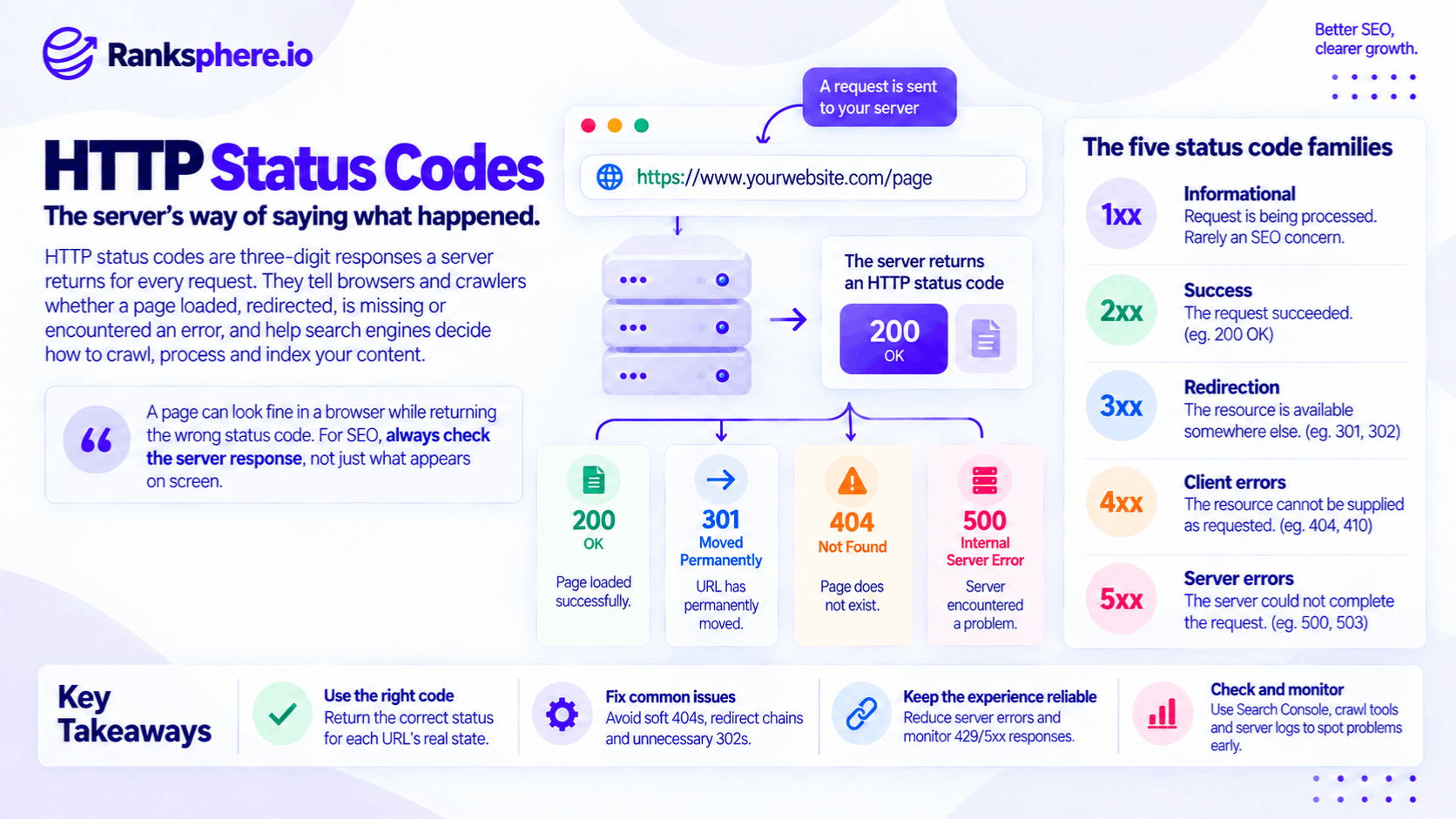
HTTP status codes are three-digit responses a web server sends when a browser, search engine crawler or other client requests a URL.
They tell the requester what happened.
For example:
- The page loaded successfully
- The URL moved somewhere else
- The page no longer exists
- The server encountered an error
For SEO, these responses matter because search engines use them when deciding how to:
- Crawl a URL
- Process a redirect
- Treat missing content
- Revisit unavailable pages
- Consider content for indexing
A page can look completely normal in a browser while returning the wrong HTTP status code.
That is why technical SEO should check the server response, not just what appears on screen.
What are HTTP status codes?
When someone requests a URL such as:
/emergency-plumbing/
the server responds with both:
- The requested content
- An HTTP status code
A normal working page usually returns:
200 OK
A URL that has permanently moved might return:
301 Moved Permanently
A page that no longer exists might return:
404 Not Found
The status code gives machines a clear instruction about what happened before they interpret the page itself.
Why HTTP status codes matter for SEO
Search engines cannot rely only on what a page looks like.
They need the server to describe the state of the requested resource accurately.
Google's current crawler documentation says a successful 2xx response can send content forward for processing, while 3xx, 4xx and 5xx responses are handled differently according to their meaning. A successful response still does not guarantee indexing.
That distinction is important.
A page returning:
200 OK
is not automatically:
indexed
or:
high quality.
It simply means the server says the request succeeded.
The five HTTP status code families
HTTP status codes are grouped by their first digit.
1xx — informational
The request is still being processed or additional information is being exchanged.
These are rarely a major SEO concern.
2xx — success
The request succeeded.
The most common SEO example is:
200 OK
3xx — redirection
The requested resource is available somewhere else.
Examples include:
- 301
- 302
- 307
- 308
4xx — client errors
The requested resource cannot be supplied as requested.
Examples include:
- 401
- 403
- 404
- 410
- 429
5xx — server errors
The server could not complete an otherwise valid request.
Examples include:
- 500
- 502
- 503
For SEO, the most useful work usually involves a relatively small number of these codes.
200 OK
200 OK is the normal successful response for an accessible webpage.
A standard indexable page will usually return:
HTTP 200
Google says content returned through a successful 2xx response can be passed forward for processing and potentially indexing.
But:
200 does not mean indexed.
Google may still decide not to index the content.
The status code only confirms that the server successfully returned something.
A 200 response can still be wrong
A common technical problem is:
HTTP 200
combined with content saying:
Page not found
The browser receives a successful response.
The page itself behaves like an error.
Google may classify this as a soft 404.
That means the server's technical response and the page's actual meaning disagree.
201 and 202
Other successful responses include:
- 201 Created
- 202 Accepted
These are more common in APIs and application workflows than ordinary indexable webpages.
Google can process 2xx responses, but standard public content pages generally use 200 OK.
204 No Content
204 No Content means the request succeeded but the server is intentionally returning no page content.
Google says it cannot process content from a 204 response because no content was received.
For a normal search landing page, that is not what you want.
301 Moved Permanently
A 301 redirect says that a URL has permanently moved.
For example:
/old-service/
→
/new-service/
Google follows the redirect and treats a permanent redirect as a strong signal that the destination URL should become the canonical version.
Use a permanent redirect when the move is genuinely intended to stay in place.
When to use a 301
Typical uses include:
- URL restructuring
- Domain migration
- Merging duplicate pages
- Replacing an old page with a relevant new one
- Moving HTTP to HTTPS
The destination should normally be the most relevant replacement.
Do not redirect every deleted page to the homepage simply because you do not want to return a 404.
301 redirects and SEO signals
It is common to describe a 301 as:
“passing all SEO value.”
That is too simplistic.
The more accurate explanation is that Google treats the permanent redirect as a strong canonicalisation signal and can consolidate signals around the destination URL.
Google still evaluates:
- The source
- Destination
- Other canonical signals
A redirect is not a transferable bag of ranking points.
308 Permanent Redirect
308 Permanent Redirect is also a permanent server-side redirect.
For Google's crawling and indexing systems, it is treated equivalently to a 301.
The HTTP semantics differ, particularly around preserving the request method, but for ordinary SEO migrations either can communicate a permanent move.
Google's site-move documentation recommends permanent server-side redirects such as 301 or 308 where technically possible.
302 Found
A 302 redirect indicates that the redirect is temporary.
For example:
A service page might temporarily send users to an availability notice before returning to its original content later.
Google follows 302 redirects but treats them as a weaker signal that the destination should replace the source as canonical.
That is why a temporary redirect is appropriate when the original URL is expected to return.
A 302 does not guarantee the original URL stays indexed
Avoid saying:
“A 302 means Google always keeps the original URL indexed.”
Google's guidance is more nuanced.
Temporary redirects tell Google that the source is generally intended to remain the primary URL, while other canonicalisation signals can still affect what appears in search.
Use the correct redirect according to the actual purpose.
Do not use 302 for a permanent move
If:
/old-page/
has permanently become:
/new-page/
use a permanent redirect.
Do not choose 302 simply because:
“the website plugin defaulted to it.”
Redirect semantics should describe reality.
307 Temporary Redirect
307 Temporary Redirect is another temporary redirect.
Google currently handles it equivalently to 302 for crawling purposes.
The technical difference is that 307 more strictly preserves the original request method.
For most ordinary SEO discussions, the important distinction is:
307 = temporary
308 Permanent Redirect
Likewise:
308 = permanent
and Google handles it equivalently to 301 for crawling and canonicalisation purposes.
Do not present:
- 301/302 as obsolete
- 307/308 as automatically better
Use the response your web stack supports correctly and that accurately represents the move.
303 See Other
303 See Other is another redirect status, more commonly used in application workflows after form submissions.
Google groups it with temporary redirects for crawling purposes.
It is rarely the status an SEO specialist needs to choose during a normal URL migration.
304 Not Modified
304 Not Modified tells the requester that the resource has not changed since a previous cached version.
The client can reuse what it already has instead of downloading the content again.
Google says a 304 tells its downstream processing systems that the content remains unchanged; for Search, it does not otherwise directly change indexing behaviour.
This is normal caching behaviour.
It is not an SEO error.
404 Not Found
A 404 error means the requested URL cannot be found.
That is the correct response when:
- The page genuinely no longer exists
- There is no relevant replacement
- The URL was entered incorrectly
A 404 is not automatically bad SEO.
Websites naturally accumulate missing URLs over time.
404s are normal
Suppose a business permanently removes:
/christmas-offer-2019/
and there is no useful equivalent page.
Returning:
404 Not Found
is perfectly reasonable.
You do not need to redirect it to:
- Homepage
- Unrelated service page
- Latest promotion
simply to avoid showing a 404.
Google understands real 404 responses.
What happens to indexed 404 URLs?
Google currently treats 4xx responses, with the exception of 429, as indicating that the requested content does not exist.
If the URL was previously indexed, Google's systems remove it over time and crawl it less frequently.
This is expected behaviour.
410 Gone
410 Gone means the resource existed previously but has deliberately and permanently been removed.
That is semantically more explicit than 404.
For example:
An API endpoint or resource may intentionally return 410 when the publisher wants to communicate:
this was here, and it is permanently gone.
Is 410 better than 404 for SEO?
Not in the simplistic sense often claimed.
Google's current documentation says it treats 4xx responses other than 429 similarly: the content is treated as unavailable and previously indexed URLs are removed over time.
So avoid saying:
“410 is a stronger SEO signal and will definitely remove the URL faster.”
Use 410 where its semantic meaning is appropriate.
Otherwise, 404 is fine.
401 Unauthorized
401 Unauthorized generally means authentication is required.
Google treats ordinary 4xx responses as unavailable content for Search.
If a page is intentionally behind login, that may be exactly what you want.
Do not expect Google to index private authenticated content normally.
403 Forbidden
403 Forbidden means the server understood the request but refuses access.
This can happen because of:
- Firewall rules
- Permissions
- IP blocks
- Security configuration
For Google Search, persistent 403 responses can stop content from being used because Google treats ordinary 4xx responses as unavailable.
Do not accidentally block Googlebot with:
- CDN settings
- Bot protection
- Geographic firewall rules
and then diagnose the problem as indexing quality.
429 Too Many Requests
429 Too Many Requests means the server is rate limiting requests.
Google treats 429 differently from ordinary 4xx responses.
Its crawlers treat it as a signal that the server may be overloaded, similar to a server error.
If Googlebot repeatedly encounters 429, crawling can slow down.
Do not use 429 casually against search crawlers
Rate limiting can be necessary.
But if normal Googlebot activity repeatedly receives:
429
because the hosting environment cannot handle crawling, investigate:
- Server capacity
- CDN configuration
- Firewall rules
Do not assume Google's crawler will simply ignore the response and continue normally.
500 Internal Server Error
500 Internal Server Error means the server encountered a problem and could not complete the request.
An occasional server error happens.
A persistent pattern is much more important.
Google says 5xx errors cause its crawlers to slow down, with the reduction influenced by how many URLs are returning server errors. Persistent server errors can eventually result in affected URLs being removed from the index.
502 Bad Gateway
502 Bad Gateway usually indicates that one server received an invalid response from another server upstream.
This can occur with:
- Reverse proxies
- CDNs
- Application servers
Google treats it as part of the 5xx server-error family.
Repeated 502 responses need investigation.
503 Service Unavailable
503 Service Unavailable indicates that the server is temporarily unable to serve the request.
This is especially useful during short planned maintenance.
For example:
A site is being moved between servers for several hours.
Instead of returning:
- 404
- 200 with a replacement maintenance page
the server can return:
503 Service Unavailable
with a clear temporary maintenance message.
503 and planned maintenance
Google recommends keeping a site live with reduced functionality where possible.
If a complete shutdown is unavoidable for roughly a day or two, Google recommends returning 503 responses from the temporarily unavailable pages.
This tells Google:
the problem is temporary.
It does not tell Google:
this content has permanently disappeared.
Use Retry-After
A 503 response can include a:
Retry-After
HTTP header.
For example:
Retry-After: 3600
This tells compatible clients approximately when to try again.
Google recommends providing a best-effort Retry-After value during temporary shutdowns.
Do not leave 503 indefinitely
A temporary response needs to remain temporary.
Google says prolonged 5xx responses can eventually lead to URLs dropping from the index.
Its current temporary-site guidance recommends completely disabling a website only for a very short period — generally a few days at most.
If a closure will last much longer, another approach may be more appropriate.
Do not return 503 for robots.txt during maintenance
This is an important detail.
Google specifically warns against returning 503 for the site's robots.txt during temporary shutdowns, because robots handling follows different rules and can interfere with crawling.
Keep a normal accessible robots.txt file while the temporary page responses use 503.
What is a soft 404?
A soft 404 occurs when a URL behaves like an error page but does not return the appropriate error status.
The classic example is:
HTTP status: 200 OK
Page content: Sorry, this page does not exist.
Google sees:
success
from the server
but:
missing content
from the page.
Google can recognise this mismatch and classify the URL as a soft 404.
Common soft 404 examples
Potential examples include:
- Missing pages returning 200
- Empty result pages
- Nearly empty category pages
- Error pages served with a success response
- Redirects to irrelevant destinations
But not every low-content page is automatically a soft 404.
Google evaluates the actual content and behaviour.
Custom 404 pages are fine
A custom 404 page is good UX.
It can contain:
- Search
- Navigation
- Useful links
- Contact information
The important technical requirement is that a genuinely missing URL still returns:
404
or, where appropriate:
410
Google explicitly recommends real 404 or 410 responses for removed content with no suitable replacement.
The page can look helpful and still return 404
Some businesses worry that an error page must look broken.
It does not.
You can show:
We couldn't find that page. Here are our main services.
while still returning:
HTTP/1.1 404 Not Found
The design is for the user.
The status code is for the client or crawler.
Both can be correct at the same time.
Irrelevant redirects can behave like soft 404s
Suppose:
/old-dental-implant-page/
no longer exists.
Instead of returning a 404, the site redirects every missing page to:
/
the homepage.
That does not necessarily preserve SEO value.
Google may treat irrelevant redirect targets as soft 404-like behaviour because the destination does not meaningfully replace what was requested.
Redirect when a genuine replacement exists.
Otherwise, let the missing URL return the appropriate error.
Redirect chains
A redirect chain looks like:
URL A → URL B → URL C → URL D
Google can follow multiple redirects, but chains create unnecessary requests.
Google recommends redirecting as directly as practical to the final destination during migrations.
Prefer:
URL A → URL D
when possible.
Redirect loops
A more serious problem is:
URL A → URL B → URL A
The crawler never reaches a final page.
That is a failed redirect configuration.
Check redirect rules carefully after:
- HTTPS migrations
- Domain changes
- CMS changes
- URL restructuring
Permanent vs temporary redirects
The choice should follow reality.
Permanent
Use:
- 301
- 308
when the old URL has permanently moved.
Temporary
Use:
- 302
- 307
when users are being sent elsewhere temporarily and the source URL is expected to return.
Google treats permanent redirects as stronger canonicalisation signals than temporary ones.
Redirect type is not a trick
Do not choose:
302 because it preserves rankings
or:
301 because it passes more authority
without understanding the move.
Use the response that truthfully describes what the server is doing.
Search engines can then interpret the relationship correctly.
Status codes and JavaScript
HTTP status codes are determined at the server-response level.
That matters for JavaScript-heavy sites.
Google clarified in late 2025 that pages returning 200 are normally sent to rendering, while pages returning non-200 responses may not necessarily go through the same JavaScript rendering process.
Do not rely on JavaScript to make an incorrectly coded server response behave like the correct one.
Single-page applications
Client-side applications often have a particular problem.
The application receives:
200 OK
for every route.
Then JavaScript decides whether a resource exists.
So:
/product/real-item
returns 200.
And:
/product/does-not-exist
also returns 200.
The second route can become a soft 404.
Google's JavaScript SEO guidance recommends returning a real 404 where possible, or using noindex appropriately for client-side error states.
HTTP status codes and indexing
Status codes influence indexing, but they do not single-handedly determine it.
A useful simplified model is:
200
Content may be considered for indexing.
Permanent 3xx
Google follows the redirect and treats the destination as a strong canonical candidate.
Temporary 3xx
Google follows the redirect but treats the destination as a weaker canonical signal.
Most 4xx
Content is treated as unavailable and indexed URLs are removed over time.
429 and 5xx
Google treats the server as temporarily overloaded or unavailable and can reduce crawling.
That is more accurate than treating every code as an absolute indexing command.
Status codes and crawling
Status codes also affect how frequently Google returns.
Persistent:
- 500
- 502
- 503
- 429
responses signal server trouble.
Google says these responses cause crawling to slow temporarily. When healthy 2xx responses return, crawl activity can gradually increase again.
See crawling for the wider process.
Status codes and Search Console
Search Console can help identify problems involving:
- Server errors
- Redirect failures
- 404s
- Soft 404s
But Search Console is not the only place to check.
Useful evidence can also come from:
- Server logs
- Site crawlers
- Browser developer tools
- curl
The important thing is to verify what the server actually returned.
How to check a status code
A page looking correct in Chrome does not tell you the full HTTP response.
You can check it with:
- Browser developer tools
- SEO crawling software
- Command-line tools
- Server logs
For example:
curl -I https://example.com/page/
might return:
HTTP/2 200
or:
HTTP/2 301
location: https://example.com/new-page/
That tells you what the server actually communicated.
Always test the final destination
If a URL redirects, do not check only the first response.
Follow the complete chain.
You need to know:
- Starting status
- Number of redirect hops
- Final URL
- Final status
For example:
301 → 301 → 302 → 200
works differently operationally from a clean:
301 → 200
The second is normally preferable.
Planned maintenance done properly
Short planned maintenance deserves special handling because it is easy to create accidental indexing problems.
Where possible, keep the site accessible and disable only the function being maintained.
Google recommends this approach because it minimises the impact on Search.
If the whole site genuinely needs to be unavailable for a short period, use:
503 Service Unavailable
rather than pretending the maintenance page is the normal site.
Do not serve every page as 200 with the same maintenance message
Suppose every URL suddenly returns:
200 OK
and:
We'll be back shortly.
The server is saying:
Every page loaded successfully.
But every URL now contains essentially the same temporary content.
That gives crawlers the wrong information.
For a short total shutdown, a 503 response communicates the temporary state much more clearly.
Do not serve maintenance as 404
Likewise, a temporary maintenance period is not:
page permanently missing.
Returning 404 or 410 during a temporary outage tells Google that the content is unavailable rather than temporarily experiencing a server condition.
Google specifically advises against using those responses for temporary full-site closures.
Long downtime is different
Do not assume:
503 means you can take a website offline for months with no search impact.
Google warns that a complete shutdown should remain very short, and prolonged downtime can materially affect Search visibility even when technically configured correctly.
For longer interruptions, keeping an indexable informational site available may be safer.
Status codes after deleting a page
When removing a URL, ask:
Is there a genuinely relevant replacement?
Yes
Use an appropriate permanent redirect.
No
Return:
- 404
- 410
Do not force every removed page somewhere else merely because:
“404s are bad for SEO.”
They are not.
Do not redirect unrelated removed pages
For example:
Deleted:
/red-sofa-model-27/
Unrelated redirect:
/bedrooms/
makes little sense.
A 404 can be cleaner than pretending the unrelated destination is the replacement.
Redirect relevance matters.
Status codes after merging pages
Suppose three weak pages are consolidated into one stronger resource.
Old:
/boiler-cost/
/boiler-prices/
/how-much-boiler/
New:
/boiler-replacement-cost/
Permanent redirects from the retired URLs to the consolidated page can make sense when the destination genuinely replaces their content.
That is a valid use of 301 or 308.
Status codes during a site migration
Before launching a migration, map:
old URL → appropriate new URL
Then test:
- Redirect type
- Redirect destination
- Final status
- Chains
A visually perfect migrated site can still lose discoverability if thousands of old URLs return:
- 404 unexpectedly
- Redirect loops
- Irrelevant destinations
The server behaviour matters as much as the design.
404s after migration
Not every old URL needs redirecting.
If an old page:
- Is no longer useful
- Has no relevant replacement
- Should genuinely disappear
a real 404 or 410 may be the correct result.
The objective is not:
zero 404s.
The objective is:
correct responses.
5xx monitoring
Persistent 5xx errors deserve attention because they can indicate:
- Application failures
- Hosting problems
- Database issues
- CDN problems
and Google can reduce crawling while server failures persist.
Monitor patterns rather than panicking over one isolated error.
A single 500 is not an SEO disaster
Servers occasionally fail.
Google's systems are designed to handle temporary problems.
The concern is:
- Repeated failures
- Large portions of the site failing
- Errors persisting for extended periods
Context matters.
Status codes and uptime monitoring
Uptime monitoring should check more than:
Did the server return something?
A broken application can still return:
200 OK
for an error page.
Good monitoring can check:
- Expected status code
- Page content
- Response time
- Certificate health
That helps detect failures before customers do.
Ranksphere and HTTP status codes
Ranksphere's website audit reports status codes across every URL it crawls, helping identify issues such as:
- Broken URLs
- Redirect chains
- Soft 404 patterns
- Server errors
The value is not simply finding every non-200 URL.
Many non-200 responses are correct.
The audit needs to answer:
Is this the status this URL should be returning?
Common HTTP status code mistakes
- Assuming every indexable URL is guaranteed indexing because it returns 200.
- Returning 200 on a custom “page not found” template.
- Treating every 404 as an SEO problem.
- Using 410 because it is supposedly a stronger ranking or deindexing signal than 404.
- Using a temporary redirect for a genuinely permanent migration.
- Assuming a 302 guarantees the old URL will always remain indexed.
- Redirecting every removed URL to the homepage.
- Allowing unnecessary redirect chains.
- Serving temporary maintenance pages with 200.
- Serving planned short-term downtime as 404 or 410.
- Leaving 503 responses running indefinitely.
- Ignoring persistent 429 or 5xx responses.
- Looking only at what the browser displays instead of checking the actual response.
HTTP status code best practices
- Use 200 OK for normal pages that successfully return their intended content.
- Use 301 redirects or 308 for genuine permanent moves.
- Use 302 redirects or 307 for genuine temporary moves.
- Return a real 404 or 410 when content no longer exists and has no suitable replacement.
- Do not redirect missing pages to irrelevant destinations merely to avoid 404s.
- Use 503 with a sensible Retry-After header for short planned full-site downtime.
- Keep complete site shutdowns as short as possible.
- Monitor persistent 429 and 5xx responses.
- Check redirect chains and point old URLs directly to their final destinations where practical.
- Verify responses directly rather than judging them from the visible page alone.
- Use Search Console, server logs and crawl data together when investigating technical issues.
Example
“Ashworth Interiors plans a two-day platform migration.
During the migration, every normal page is replaced with the same holding message:
We'll be back soon.
The holding page looks fine.
The problem is the server configuration.
Every URL still returns:
200 OK
including:
- Homepage
- Service pages
- Blog articles
- Location pages
From the server's perspective, all of those requests succeeded and returned their normal content.
They did not.
The better setup would be to keep the site available where possible and limit only the functionality being migrated.
If a complete shutdown were genuinely unavoidable for such a short period, the temporarily unavailable pages could return:
503 Service Unavailable
with a suitable:
Retry-After
header. Google specifically recommends this approach for very short complete shutdowns.
After the migration, the normal URLs return:
200 OK
again.
The team then checks:
- Important pages
- Redirects
- Search Console
- Server logs
rather than assuming that correct maintenance configuration guarantees there will be absolutely no temporary search fluctuation.
That distinction matters.
The problem with the original setup was not the holding-page design.
It was the message sent at the protocol level.
That is what HTTP status codes are for:
they tell browsers, crawlers and other systems what actually happened when a URL was requested. Good technical SEO means making sure that message accurately matches the state of the content.”
See also
- 301 redirect — permanent URL moves
- 302 redirect — temporary URL redirects
- 404 error — correctly handling missing pages and soft 404s
- Crawling — how search engines request and process URLs
- Technical SEO — the broader discipline around server and site behaviour
- Indexing — what happens after Google processes eligible content