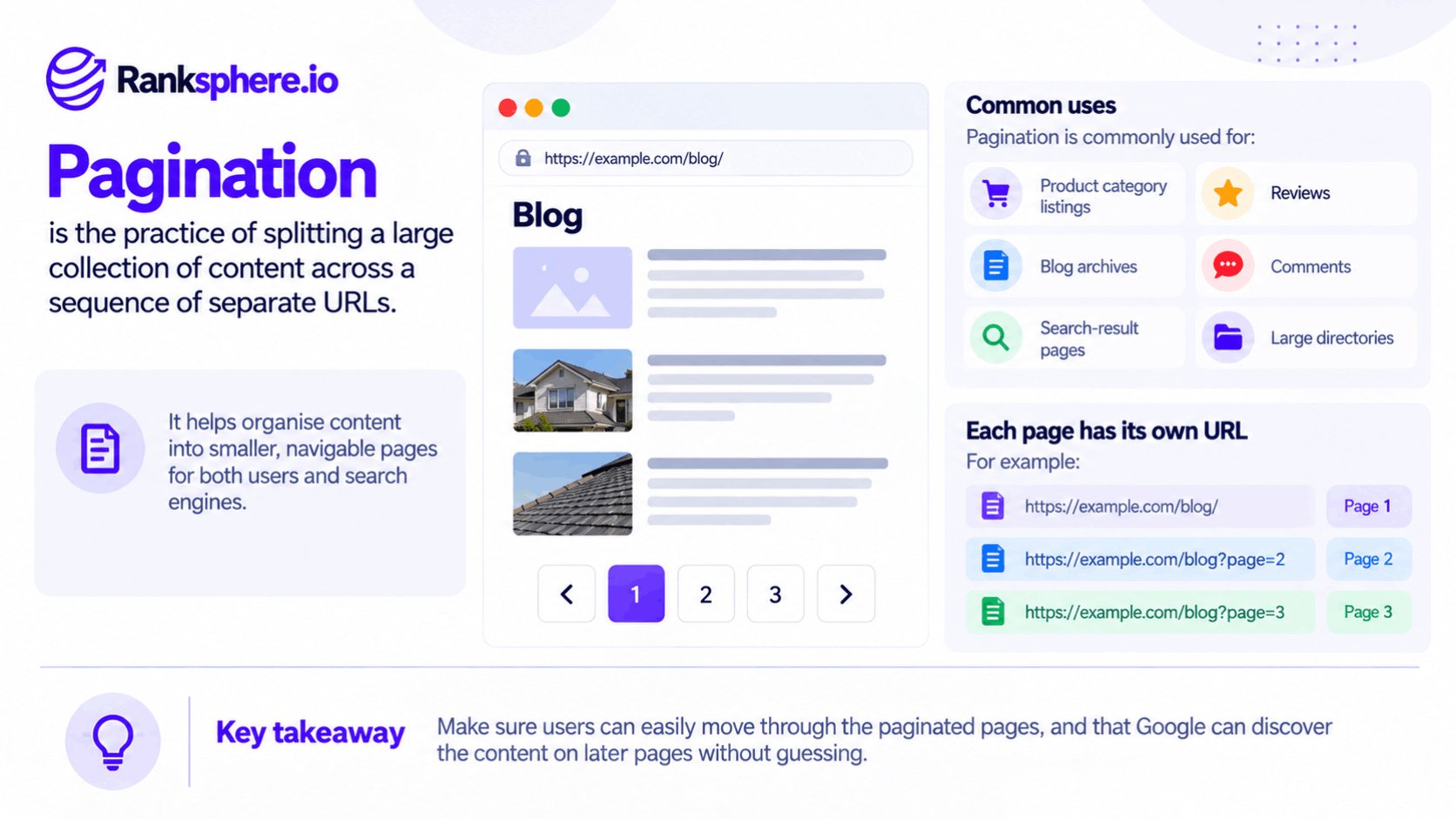
Pagination is the practice of dividing a long list of content into multiple pages, usually connected by numbered links or next and previous buttons.
You'll commonly find pagination on blogs, product category pages, search results, and online directories.
For example, a blog with 140 articles might display ten posts per page, creating 14 separate archive pages.
Pagination makes large collections easier to browse, but it also affects how search engines discover and index content.
Google treats each page in a paginated series as a separate URL. It also stopped using rel="next" and rel="prev" as indexing signals, a change it publicly confirmed in 2019.
That means pagination SEO depends less on special markup and more on making sure every page is accessible, correctly linked, and configured with the appropriate canonical tag.
How Google Handles Pagination
Google previously supported rel="next" and rel="prev" markup to help identify relationships between pages in a series.
In 2019, Google confirmed that it had stopped using these tags for indexing purposes.
Some CMS platforms and SEO plugins still generate the markup. That's not necessarily a problem, and other search engines may still use it, but Google doesn't rely on it to understand pagination.
Instead, Google discovers paginated content through crawlable links and the structure of the website.
How to Make Paginated Pages Crawlable
Google recommends a few straightforward practices:
- Give each page a unique URL. Page two, page three, and later pages should have their own URLs.
- Use self-referencing canonicals. Each paginated page should normally identify its own URL as canonical rather than pointing to page one.
- Use crawlable links. Connect pages using standard links with valid destinations, not navigation that depends entirely on JavaScript click handlers.
- Link pages sequentially. Visitors and search engines should be able to move through the series.
- Keep useful pages accessible. Avoid unnecessarily blocking paginated pages that help search engines discover deeper content.
For example, a blog archive might use:
- /blog/
- /blog/page/2/
- /blog/page/3/
Each URL represents a different group of articles.
Google can crawl these pages individually and follow their links to discover older posts.
Not every archive page needs to rank independently. Its value may come from helping people and search engines navigate the site's content.
Why Canonical Tags Matter for Pagination
One of the most common pagination SEO mistakes is pointing every page in a series to the first page using a canonical tag.
For example, a website might configure page two, page three, and every subsequent archive page to reference /blog/ as their canonical URL.
This can cause problems because the pages don't contain identical content.
Page one might list the ten newest articles, while page two lists ten different articles.
Google recommends giving each page in a paginated series its own canonical URL rather than treating the first page as the canonical for the entire collection.
What Happens When Every Page Points to Page One?
Imagine a blog with 40 archive pages.
If every archive page points to page one as canonical, you're telling Google that the first page is the preferred version of those URLs.
Google may choose to consolidate some URLs or crawl them less frequently, although canonical tags are signals rather than absolute instructions.
This becomes particularly concerning when older articles can only be reached through deeper archive pages.
If those archive pages aren't crawled regularly, Google may have fewer opportunities to discover or revisit the content linked from them.
In some cases, this can contribute to an orphan page problem, especially when older posts have no other internal links.
Best Canonical Setup for Pagination
For a standard paginated series:
- Give each page a unique, stable URL.
- Use a self-referencing canonical on each indexable page.
- Don't automatically canonicalise page two and later pages to page one.
- Keep navigation links crawlable.
- Make sure important articles or products aren't accessible only through very deep pagination.
The goal isn't to force every archive page into Google's index.
It's to help Google understand that the pages contain different items and provide legitimate paths to deeper content.
Should Paginated Pages Be Noindexed?
In most ordinary blog archives and product listings, there's no need to automatically apply noindex to every page after page one.
Paginated pages often contain links to articles, products, or listings that search engines need to discover.
Applying noindex doesn't immediately prevent Google from following those links. However, relying on permanently noindexed archive pages as the only route to important content isn't a sound long-term strategy.
A better approach is to keep useful pagination crawlable and provide additional internal links to important content where appropriate.
If a paginated URL has no useful content or exists only as an unnecessary variation, it may need different treatment.
The decision should depend on the purpose of the page, not simply whether it's page two or page twenty.
View-All Pages and Pagination
Some websites offer a view-all page that displays an entire collection on a single URL.
For example, an article divided into five pages might also provide a version containing the complete article.
Where a view-all page contains the full content and offers a good user experience, it may be appropriate to use it as the preferred canonical version.
However, this doesn't mean every website should replace pagination with a view-all page.
When a View-All Page Makes Sense
A view-all page may work well when:
- The complete content is manageable.
- Users benefit from seeing everything together.
- The page loads quickly enough.
- The full version works well on mobile devices.
Performance is the main consideration.
A view-all page displaying thousands of products, images, or listings may become unnecessarily slow.
That could affect usability and Core Web Vitals.
For large collections, traditional pagination is often more practical.
Use a view-all page when it genuinely improves the experience, not simply because it reduces the number of URLs.
Infinite Scroll and Pagination SEO
Infinite scroll is another way websites display large collections of content.
Instead of clicking through numbered pages, visitors scroll down and more items load automatically.
This works well for some websites, but it can create crawling problems when implemented incorrectly.
Google Search doesn't interact with a webpage the same way a person does. It generally doesn't scroll through a page or click buttons to reveal additional content.
If the next batch of results only appears after someone scrolls, Google may not discover it.
This is a common issue in JavaScript SEO.
How to Make Infinite Scroll SEO-Friendly
Google recommends supporting infinite scroll with paginated loading.
That means:
- Give each content batch a unique URL. Every section should have a persistent address that can be accessed directly.
- Keep the content consistent. Opening a paginated URL should return the expected content rather than a changing set of results.
- Provide crawlable links. Search engines should be able to discover subsequent pages without scrolling or clicking JavaScript-only buttons.
- Update the browser URL where appropriate. When a newly loaded section becomes the main visible content, the URL can be updated to reflect that section.
- Test the rendered content. Use Google Search Console's URL Inspection tool to check what Google can actually see.
The important point is that infinite scroll can remain part of the user experience while conventional pagination supports search engine discovery.
You don't necessarily need to replace infinite scroll with visible numbered pagination.
You do need a reliable way for search engines to reach the underlying content.
How Pagination Affects Local Business Websites
Pagination is more common on large e-commerce websites, but local businesses can encounter the same issues.
Typical examples include:
- Blog archives containing older articles
- Business directories listing services or providers
- Multi-location websites with long location lists
- Product catalogues
- Searchable service directories
For a small business website with only a few dozen pages, pagination may not require much attention.
The main risk is when important content becomes difficult to discover because archive pages are incorrectly configured or navigation relies on JavaScript that search engines cannot follow.
Why Blog Archives Deserve Attention
Consider a local dental practice that publishes articles every month.
After several years, its blog contains more than 100 posts.
The newest articles appear on the main blog page, while older posts are pushed further into the archive.
If pagination is broken, incorrectly canonicalised, or missing crawlable links, search engines may have difficulty discovering some of those older articles.
This is particularly important when the posts still answer useful questions or attract relevant visitors.
A blog shouldn't depend entirely on archive pagination for internal linking.
Important older articles can also be linked from:
- Relevant service pages
- Newer blog posts
- Related-article sections
- Topic or category pages
These links provide additional discovery paths and help visitors find related information.
Ranksphere's website audit tool can help identify crawlability and internal linking issues that deserve attention when reviewing a website's structure.
Common Pagination SEO Mistakes
Pagination problems often come from website templates, CMS configurations, or changes to navigation.
Common mistakes include:
- Canonicalising every paginated page to page one. Different archive pages usually contain different content and should generally have their own canonical URLs.
- Automatically noindexing later pages. This may create unnecessary complications when those pages help search engines discover important content.
- Relying on rel="next" and rel="prev". Google no longer uses this markup as an indexing signal.
- Using JavaScript-only pagination links. Search engines may not discover URLs that require clicking buttons or triggering JavaScript events.
- Implementing infinite scroll without accessible URLs. Content loaded only through scrolling may remain undiscovered.
- Creating an oversized view-all page. Loading thousands of items at once can create performance and usability problems.
- Failing to link important older content. Articles and products buried deep in pagination may be difficult to discover when they have no other internal links.
Most of these issues are easier to prevent through proper website structure than to fix after hundreds of pages have been affected.
Pagination SEO Best Practices
A good pagination setup should make long collections easy to navigate without limiting search engine access.
Follow these practices:
- Give each paginated page its own unique URL.
- Use self-referencing canonical tags on indexable pages.
- Don't automatically point every paginated page to page one.
- Connect pages with crawlable links.
- Keep useful archive and category pages accessible to search engines.
- Avoid unnecessary noindex directives on pages used for content discovery.
- Use view-all pages only when the complete content can load efficiently.
- Support infinite scroll with persistent paginated URLs.
- Provide contextual internal links to important older articles and products.
- Check pagination after website migrations, redesigns, and CMS changes.
- Use Google Search Console to investigate crawling and indexing problems.
The goal isn't to make every paginated page rank.
It's to ensure that pagination doesn't prevent people or search engines from reaching useful content.
Example
“Consider a hypothetical dental practice with 140 blog posts spread across 14 archive pages.
The practice publishes new articles regularly, so older posts gradually move deeper into the archive.
During a website update, an SEO plugin is configured to point every blog archive page back to the main blog URL using canonical tags.
The website still works normally for visitors.
Someone can click through the archives and read older articles without noticing anything unusual.
However, the setup sends Google inconsistent signals about which archive URLs should be treated as the preferred versions.
Some older articles also have very few internal links outside the blog archive.
During a technical SEO review, the team discovers the incorrect canonical configuration and checks whether older posts remain accessible through crawlable links.
The solution involves two changes.
First, the archive pages receive appropriate self-referencing canonical tags.
This helps Google understand that each archive page contains a different group of articles.
Second, the team improves internal linking to older posts.
Relevant articles are linked from newer blog posts, service pages, and related-content sections.
The team then uses Google Search Console to monitor whether Google can discover and index the affected URLs.
These changes don't guarantee that every older article will be indexed or regain its previous rankings.
They do remove unnecessary technical obstacles and give search engines clearer paths to the content.
The lesson is that pagination should support content discovery rather than make older pages increasingly difficult to reach.
Pagination itself isn't bad for SEO. Problems arise when search engines can't access the later pages or when incorrect canonical and indexing settings make those pages harder to discover.
A well-structured paginated series helps visitors browse large collections while allowing search engines to find the content behind them.”
See Also
- Canonical Tag — Identifying the preferred version of a page.
- Orphan Page — Content with no discoverable internal links.
- Crawling — How search engines discover webpages.
- JavaScript SEO — Making dynamically loaded content accessible to search engines.
- Faceted Navigation — Managing URLs created by filters and sorting options.
- Indexing — How eligible webpages enter a search engine's index.