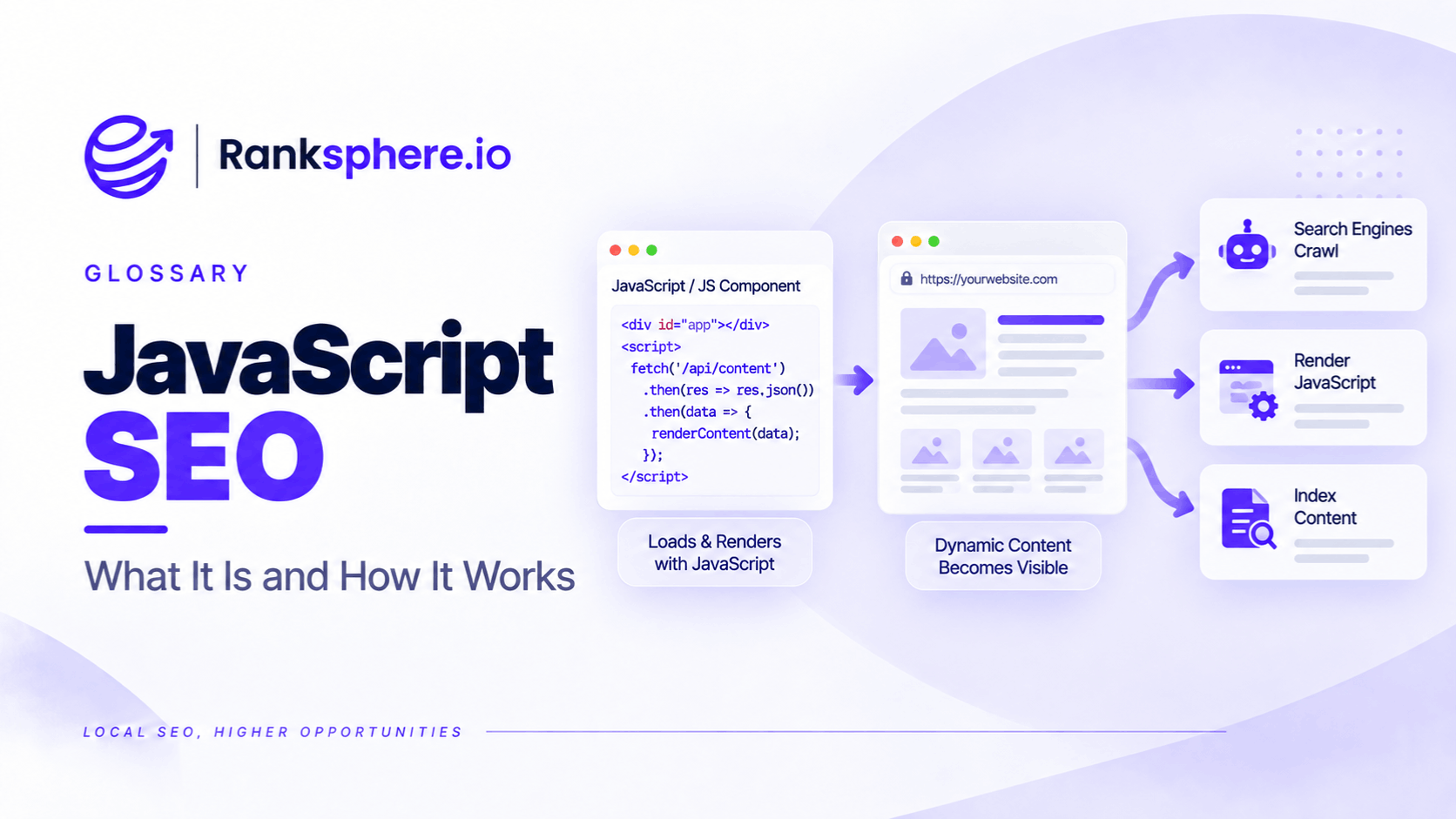
JavaScript SEO is the practice of making sure pages that rely on JavaScript can still be discovered, rendered, understood and indexed by search engines.
JavaScript itself is not an SEO problem.
Google has supported JavaScript rendering for years and currently processes JavaScript pages using an evergreen version of Chromium. In March 2026, Google also clarified that using JavaScript to load content does not, by itself, make a website harder for Google Search to process.
Problems usually appear when JavaScript controls something search engines need but the implementation makes it difficult to access.
That can include:
- Important content
- Navigation
- Internal links
- Metadata
- Pagination
- Canonical information
The right question is therefore not:
Can Google read JavaScript?
It can.
The more useful question is:
Does this implementation make the important content and URLs reliably available to Google and the other systems that need them?
How JavaScript SEO Works
JavaScript SEO sits within technical SEO.
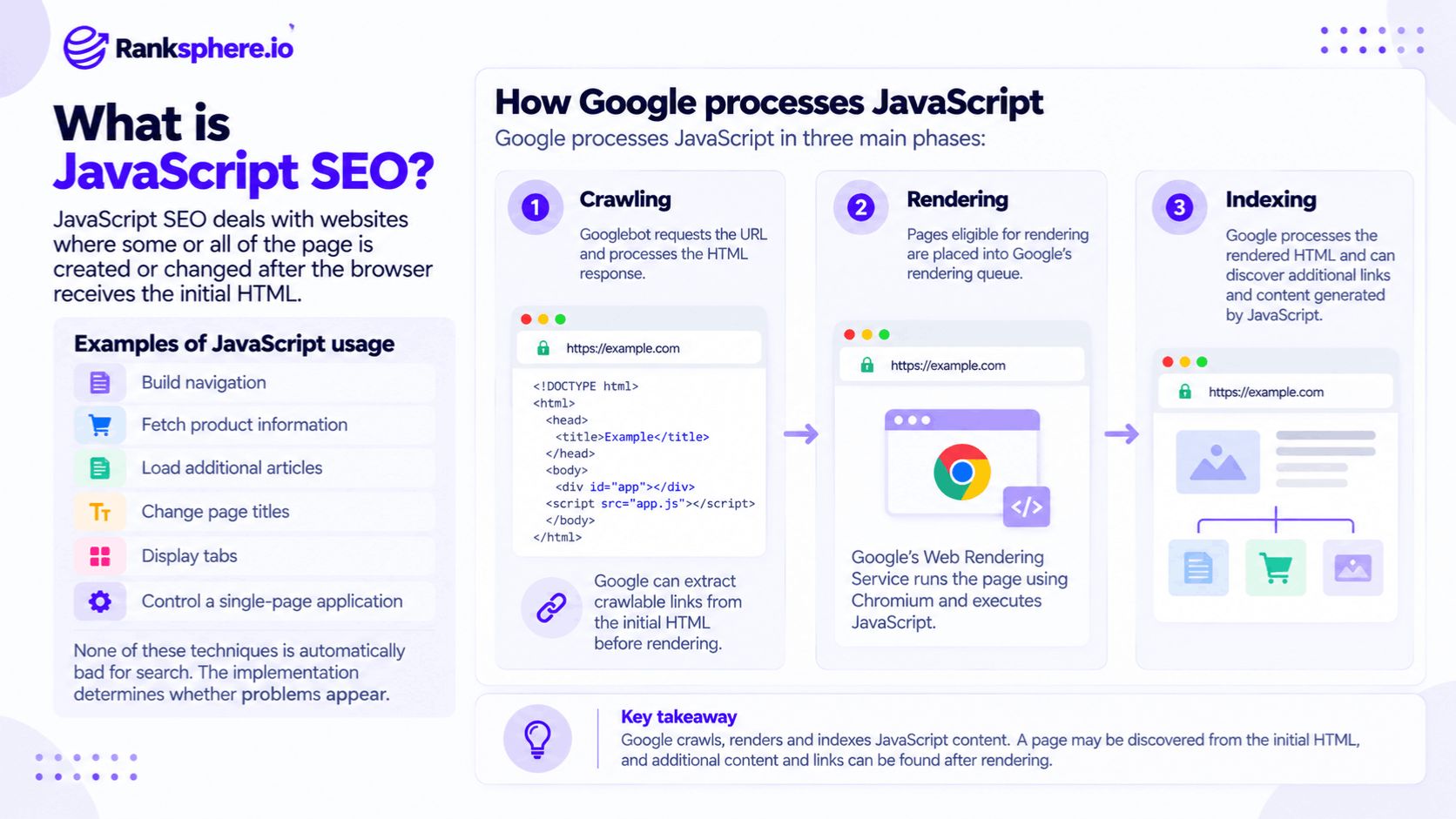
It deals with websites where some or all of the page is created or changed after the browser receives the initial HTML.
For example, JavaScript might:
- Build navigation
- Fetch product information
- Load additional articles
- Change page titles
- Display tabs
- Control a single-page application
None of those techniques is automatically bad for search.
The implementation determines whether problems appear.
How Google processes JavaScript
Google currently describes the process in three main phases:
- Crawling
- Rendering
- Indexing
Googlebot first requests the URL and processes the HTML response.
It can extract crawlable links from that response before rendering.
Pages eligible for rendering are then placed into Google's rendering queue, where Google's Web Rendering Service runs the page using Chromium and executes JavaScript.
Google processes the rendered HTML afterwards and can discover additional links and content generated by JavaScript.
This is more accurate than describing JavaScript SEO as a rigid:
first wave / second wave
indexing process.
The initial HTML still matters
Although Google renders JavaScript, content and links included in the original HTML are immediately available during the initial processing stage.
For example, if the server sends:
<a href="/services/emergency-plumbing/">
Emergency plumbing
</a>
Google can identify that URL without waiting for JavaScript rendering.
If the same link appears only after JavaScript runs, Google can still discover it if the final implementation produces a proper crawlable link.
The difference is that the rendered version has to be processed first.
Rendering is queued
Google says pages with a successful 200 HTTP status are generally sent to its rendering queue unless indexing directives prevent that process.
A page may remain in that queue for only a few seconds, but it can sometimes take longer.
That does not mean every JavaScript page experiences a significant SEO delay.
Google's own 2026 clarification is important here:
JavaScript rendering is a normal part of Google Search.
The practical objective is simply to avoid creating unnecessary dependencies on client-side execution when important information can be delivered more reliably.
Google renders JavaScript, but not every crawler does
Do not assume every system accessing the web has Google's rendering capabilities.
Google itself notes that other search engines may choose not to execute JavaScript.
Other bots, preview systems and automated tools can also differ in:
- JavaScript support
- Rendering time
- Resource limits
That is one reason server-rendered metadata and important content remain a robust approach.
You are not building only for Googlebot.
JavaScript-generated content
Google can index content added through JavaScript as long as that content appears correctly in the rendered HTML.
For example:
Initial response:
<div id="service"></div>
JavaScript later produces:
<div id="service">
<h1>Emergency Plumbing</h1>
<p>We provide emergency plumbing...</p>
</div>
Google can process the resulting content after rendering.
That is a supported pattern.
The problem begins when the content never appears in Google's rendered output.
Content requiring user interaction
Google Search generally does not interact with a page like a human user.
It does not normally:
- Click buttons
- Scroll deliberately to trigger content
- Complete forms
Google specifically warns against lazy-loading implementations that require scrolling or clicking before important content is loaded.
So if important content appears only after:
Click to load
Google may never receive it.
Tabs and accordions
Tabs and accordions are not inherently bad for SEO.
The important distinction is how the content is loaded.
Usually fine
The content is already present in the HTML or rendered DOM and the interface simply hides and reveals it.
Potential problem
Clicking the tab sends another request and loads content that did not previously exist anywhere on the page.
If user interaction is required before the content is created, Google may not see it.
Do not remove useful tabs simply because someone says:
“Google doesn't index hidden content.”
Test the actual implementation.
JavaScript links
JavaScript-generated links can be perfectly crawlable.
Google explicitly says links inserted dynamically into the DOM can be discovered as long as they use normal HTML anchor markup with an href attribute.
Good:
<a href="/services/">Our services</a>
Good when inserted by JavaScript:
<a href="/services/">Our services</a>
The fact that JavaScript created the second element is not the problem.
The final link is still a normal crawlable anchor.
JavaScript click handlers are different
Avoid relying on implementations such as:
<span onclick="goToServices()">Services</span>
or:
<a onclick="goTo('/services/')">Services</a>
Google recommends providing URLs through the href attribute of an <a> element.
For example:
<a href="/services/">Services</a>
JavaScript can still intercept the click for client-side navigation.
The underlying URL should remain available.
Navigation
Navigation is one of the most important places to get this right.
Suppose a solicitor's site has links to:
- Family law
- Conveyancing
- Employment law
- Probate
If those links ultimately render as standard:
<a href="/family-law/">
elements, JavaScript navigation itself is not a problem.
If they exist only as button click handlers with no crawlable URLs, discovery can become less reliable.
See crawling for the wider discovery process.
JavaScript does not automatically create orphan pages
An orphan page is a page with no meaningful internal links pointing to it.
JavaScript navigation does not automatically create orphan pages.
If JavaScript renders proper crawlable links, Google can discover them.
The problem occurs when the implementation creates no crawlable link relationship at all.
So diagnose the HTML that Google actually receives rather than blaming JavaScript as a category.
Sitemaps are helpful, but not substitutes for site structure
An XML sitemap helps Google discover URLs.
That is useful.
But a sitemap does not replace logical internal linking.
Google can discover a page through:
- Internal links
- External links
- Sitemaps
- Other known URLs
A page being listed in a sitemap does not mean Google considers it unimportant.
Likewise, sitemap inclusion does not guarantee:
- Crawling
- Indexing
- Ranking
Use sitemaps for discovery and internal links for genuine site relationships.
Infinite scroll
Infinite scroll often relies on JavaScript to load additional items as the user moves down the page.
The problem is that Google generally does not scroll or click buttons to expose additional content.
If page two exists only after:
scroll another 1,000 pixels
some content may never be discovered reliably.
Make infinite scroll crawlable
Google recommends supporting infinite-scroll content with individual paginated URLs.
For example:
/articles?page=1
/articles?page=2
/articles?page=3
Each page should be independently accessible.
The site can still present the user with a smooth infinite-scroll experience.
Underneath that interface, crawlers need stable URLs they can reach.
“Load more” buttons
The same principle applies to:
Load more
buttons.
A human may click:
Load more products
ten times.
Google generally will not.
Provide an underlying URL structure that crawlers can follow without performing the interaction.
The interface can remain JavaScript-driven for users.
The content should not depend entirely on a click.
Lazy loading
Lazy loading is not bad SEO.
Google supports it when it is implemented correctly.
The important rule is that relevant content should load when it enters the viewport without depending on deliberate user interaction.
Google recommends approaches such as:
- Native browser lazy loading
- IntersectionObserver
rather than loading critical content only after a click or scroll event that Google must simulate.
Do not lazy-load critical above-the-fold content unnecessarily
If something is immediately important when the page loads, delaying it may create:
- User-experience problems
- Rendering complexity
Lazy loading is most useful for content that genuinely does not need to load immediately.
For example:
- Lower-page images
- Embedded media
- Large galleries
Use it intentionally.
robots.txt and JavaScript
Google needs access to important resources required to render the page.
If essential JavaScript or CSS is blocked by robots.txt, Google may not be able to reproduce the page correctly.
Google's JavaScript guidance says it will not render JavaScript from blocked files or blocked pages.
That does not necessarily mean:
the entire page disappears.
Content already present in the server response may still be available.
The risk is that the final rendered page may be incomplete.
Do not blindly unblock every resource
The practical rule is not:
every JavaScript file on the server must always be crawlable.
Some files may genuinely be irrelevant.
The requirement is that Google can access the resources necessary to understand and render the indexable content correctly.
Do not block essential:
- JavaScript
- CSS
- Images
simply to reduce crawling.
Client-side rendering
With client-side rendering, the server may return a relatively small HTML shell.
JavaScript then builds much of the visible page inside the browser.
For example:
Initial HTML:
<div id="app"></div>
<script src="/app.js"></script>
The browser then creates:
- Heading
- Navigation
- Service content
- Links
Google can process client-side rendered websites.
But it creates more dependency on successful rendering.
Client-side rendering is not automatically bad SEO
Avoid the old claim:
“React sites cannot rank.”
or:
“Client-side rendering doesn't work with Google.”
Google can render JavaScript.
Modern client-rendered websites can perform well in search.
The issue is resilience.
Ask:
- What happens if a script fails?
- Are important links crawlable?
- Does content appear in Google's rendered HTML?
- Is metadata correct?
That is more useful than evaluating a site only by its JavaScript framework.
Server-side rendering
With server-side rendering (SSR), the server sends meaningful rendered HTML in the initial response.
JavaScript may then enhance or hydrate the page in the browser.
This often gives crawlers immediate access to:
- Content
- Links
- Metadata
without requiring them to execute the application's full client-side rendering process first.
Google still renders the page as part of its normal processing, but important information is already available.
Static generation
With static generation, pages are usually rendered into HTML during the build process rather than generated for each browser request.
This can work particularly well for:
- Service pages
- Location pages
- Blog articles
- Marketing sites
because their content does not need to be assembled from scratch in the browser.
For a typical local-business website, static or server-rendered output is often a straightforward and robust choice.
SSR and static generation are not ranking factors
Do not say:
SSR ranks better than CSR.
Google does not provide a ranking bonus simply because one rendering architecture was chosen.
SSR and static generation can make:
- Rendering simpler
- Content delivery faster
- Crawl behaviour more predictable
Those are implementation advantages.
They are not direct architecture-based ranking bonuses.
Hydration
Many modern frameworks use hydration.
The server first sends usable HTML.
JavaScript then attaches interactive behaviour after the page loads.
This provides a useful combination:
- Search engines receive meaningful HTML
- Users still receive an interactive application
Google's current dynamic-rendering documentation explicitly recommends approaches such as:
- Server-side rendering
- Static rendering
- Hydration
over dynamic rendering.
Dynamic rendering
Dynamic rendering means detecting crawlers and serving them a pre-rendered HTML version while normal users receive a client-rendered page.
This used to be suggested as a workaround for difficult JavaScript websites.
Google no longer recommends it as a long-term solution.
Its current documentation describes dynamic rendering as a deprecated workaround and recommends server-side rendering, static rendering or hydration instead.
Dynamic rendering is not automatically cloaking
Google says dynamic rendering itself is not normally treated as cloaking when the crawler and human versions contain substantially the same content.
Serving:
one subject to users
and:
a completely different subject to search engines
is another matter.
That can cross into cloaking.
Dynamic rendering's main problem today is not that it is automatically forbidden.
It is that it adds complexity and is no longer the preferred solution.
JavaScript and meta tags
Google can process metadata created through JavaScript.
However, Google's current documentation recommends avoiding JavaScript injection or modification of important meta tags where possible, and testing thoroughly when it is necessary.
Important examples include:
- Robots directives
- Meta descriptions
- Canonicals
- Structured data
Server-delivered metadata is generally easier to reason about.
Title tags and meta descriptions
A JavaScript framework may update:
- <title>
- Meta description
for different routes.
Google can process rendered metadata.
But test it.
Do not assume the browser tab showing the correct title means Google saw exactly the same thing during rendering.
Use Google's own inspection tools.
Canonical tags and JavaScript
Canonicalisation is particularly important.
Google clarified its JavaScript canonical guidance in December 2025 because canonical processing can occur before and after rendering.
Google recommends keeping the canonical URL consistent between:
- Initial HTML
- Rendered HTML
If that cannot be done reliably, it may be safer to omit the canonical from the original HTML than provide a conflicting one that JavaScript later changes.
Avoid:
Initial HTML:
<link rel="canonical" href="https://example.com/page-a/">
Rendered HTML:
<link rel="canonical" href="https://example.com/page-b/">
Give Google one clear signal.
Noindex and JavaScript
Do not serve:
<meta name="robots" content="noindex">
in the initial HTML and expect JavaScript to reliably change it to:
<meta name="robots" content="index">
Google specifically clarified in December 2025 that behaviour around this is not reliable enough to depend on.
If a page may need indexing, do not put noindex in the initial response.
Structured data
Google supports structured data generated through JavaScript, including dynamically injected JSON-LD.
For example:
<script type="application/ld+json">
{
"@context": "https://schema.org"
}
</script>
can be created dynamically.
Again, test the result.
The fact that the browser eventually displays it does not replace validation.
JavaScript errors
JavaScript can fail.
Common causes include:
- Network errors
- Missing API responses
- Browser incompatibility
- Script exceptions
- Blocked resources
If the script responsible for producing the page fails, Google may receive incomplete content too.
Google recommends checking JavaScript console errors when troubleshooting rendering problems.
API-dependent content
Some JavaScript sites obtain important page content from an API after load.
For example:
page loads
↓
JavaScript requests service data
↓
API returns content
↓
content appears
If that API:
- Rejects Googlebot
- Requires persistent session state
- Times out
- Uses unsupported connections
the final rendered content may be incomplete.
Test the whole delivery chain.
Do not rely on browser state
Google's Web Rendering Service does not retain normal browser state between page loads in the way a returning human visitor might.
Google specifically says things such as:
- Local Storage
- Session Storage
- Cookies
are cleared between page loads in WRS.
So important public content should not depend on:
“the user must already have visited this previous page.”
Each URL should be able to stand on its own.
Single-page applications
Single-page applications can work in Google Search.
But URLs need to represent meaningful content states.
Avoid loading different indexable pages entirely through URL fragments such as:
example.com/#/services
Google recommends using the History API and normal crawlable URLs instead.
Prefer:
example.com/services/
with a proper anchor link.
Mobile-first indexing
Google primarily indexes the mobile version of content.
The majority of Googlebot crawling therefore uses Googlebot Smartphone.
That means JavaScript functionality should work correctly on the mobile version.
See Mobile-first indexing for the wider topic.
Do not create a situation where:
- Desktop contains the crawlable links
- Mobile removes them
if Google needs those links to discover important pages.
How to check JavaScript SEO
The most useful tests compare:
- What the server sends
- What the browser renders
- What Google renders
Those are not always identical.
View source
View Source shows the HTML the server originally returned.
This is useful for checking whether important content such as:
- Links
- Headings
- Metadata
already exists before JavaScript runs.
It does not show the final DOM after scripts execute.
Inspect Element
Browser developer tools show the rendered DOM after JavaScript has modified the page.
Google's Search Console documentation explains the same distinction: normal source viewing shows the initial response, while the rendered view includes changes produced by loaded scripts and resources.
Compare the two.
The difference tells you what depends on rendering.
Google Search Console URL Inspection
For a site you control, Search Console provides the most useful Google-specific check.
Use:
URL Inspection → Test Live URL → View Tested Page
You can inspect information including:
- Rendered HTML
- Loaded resources
- JavaScript console output
- Screenshot
Google notes that the screenshot is available from the live test.
This is much more informative than simply looking at the page in your normal browser.
Search for important content in the rendered HTML
Do not rely only on the screenshot.
Search the rendered HTML for:
- H1
- Main text
- Navigation links
- Canonical
- Structured data
A page can look visually correct while important machine-readable information is missing or malformed.
Rich Results Test
Google also recommends the Rich Results Test when troubleshooting JavaScript rendering.
Even beyond structured-data debugging, it can provide:
- Rendered HTML
- Loaded-resource information
for publicly accessible pages.
Search Console remains more useful where you own the property and need indexed-page information.
Disable JavaScript
Turning JavaScript off in a browser can still be a useful diagnostic.
It answers:
What did the server provide before the application's JavaScript ran?
But do not treat that output as:
exactly what Google sees.
Google runs JavaScript.
The test instead tells you how dependent the page is on client-side rendering and what a non-rendering system might receive.
Check navigation directly
For important navigation links, inspect the markup.
You ideally want something equivalent to:
<a href="/services/family-law/">Family law</a>
whether it was:
- Server-rendered
- Generated by JavaScript
Google's requirement is the resulting crawlable link structure.
Do not diagnose by framework name
Avoid conclusions such as:
“This site uses React, so JavaScript SEO is broken.”
or:
“Next.js means SEO is automatically fine.”
Modern frameworks can use several rendering models.
One React site may be:
- Fully client rendered
another may be:
- Server rendered
another may be:
- Statically generated
Test the actual output.
JavaScript SEO and local-business websites
Most local-business websites do not need application-like rendering complexity.
A typical site may contain:
- Home page
- Service pages
- Location pages
- Blog
- Contact page
For that kind of website, delivering important content and links through server-rendered or statically generated HTML is often a simple, reliable choice.
That does not mean JavaScript should be avoided.
Use JavaScript for what it is good at:
- Interaction
- Enhancements
- Forms
- Galleries
- Dynamic components
There is usually little advantage in making basic service-page copy impossible to access until a large client application has executed.
JavaScript SEO and performance
Heavy JavaScript can also affect users.
Large script bundles may contribute to:
- Slow interaction
- Main-thread work
- Delayed content
That is a performance issue as well as a rendering consideration.
Do not remove useful JavaScript simply because it exists.
Reduce unnecessary JavaScript where it improves:
- User experience
- Reliability
- Maintainability
JavaScript SEO and other crawlers
Google is not the only system that may access the site.
Capabilities vary between:
- Search engines
- Social platforms
- AI systems
- Messaging applications
- SEO tools
Do not assume every crawler:
- Runs JavaScript
- Waits as long as a browser
- Executes every resource successfully
Where important machine-readable information such as:
- Title
- Description
- Canonical
- Open Graph metadata
can be provided directly in the HTML, that is often the more robust implementation.
Open Graph metadata
Social and messaging previews often depend on metadata such as:
- og:title
- og:description
- og:image
If that metadata only appears after complex client-side execution, some preview systems may fail to produce the expected card.
For share-critical metadata, serving it in the initial HTML is a safer cross-platform approach.
Ranksphere and JavaScript SEO
Ranksphere's website audit crawls a site the way a search engine does, helping identify structural issues such as pages that are difficult to reach through normal internal links.
Automated crawling is useful for detecting patterns.
For JavaScript-specific problems, combine crawler evidence with:
- Search Console
- Rendered HTML
- Browser testing
One tool rarely tells the whole story.
Common JavaScript SEO mistakes
- Assuming Google cannot read JavaScript.
- Using the outdated “two waves of indexing” explanation as though it were Google's current model.
- Assuming JavaScript rendering automatically creates a serious delay.
- Assuming every other crawler renders JavaScript like Google does.
- Building navigation with click handlers instead of crawlable <a href> links.
- Calling every JavaScript-generated link unindexable even when it renders as a normal anchor.
- Loading important content only after a user click.
- Implementing infinite scroll without accessible paginated URLs.
- Blocking essential JavaScript or CSS in robots.txt.
- Treating client-side rendering as automatically bad SEO.
- Treating SSR or static generation as ranking factors.
- Using dynamic rendering as a normal modern architecture rather than a deprecated workaround.
- Changing critical meta directives through JavaScript without testing.
- Serving noindex initially and relying on JavaScript to remove it later.
- Using conflicting canonicals before and after rendering.
- Assuming sitemap discovery proves a page is internally important or unimportant.
- Testing only in a normal browser rather than checking Google's rendered output.
JavaScript SEO best practices
- Make important URLs available through genuine <a href> links.
- Keep essential public content reliably available in rendered HTML.
- Do not require clicks or other user interactions to load important indexable information.
- Support infinite scroll with crawlable paginated URLs.
- Allow Google to fetch the resources needed to render indexable pages correctly.
- Prefer server-side rendering, static generation or hydration where they simplify a content-focused website.
- Do not use dynamic rendering as the default solution.
- Keep important metadata stable and test JavaScript-generated metadata carefully.
- Keep canonical signals consistent before and after rendering.
- Do not put noindex in the initial HTML of pages you may want indexed.
- Use Search Console URL Inspection to examine rendered output after significant changes.
- Compare original HTML with the rendered DOM when debugging.
- Test the mobile version because Google predominantly crawls using its smartphone crawler.
Example
“Larchmont Legal launches a redesigned website containing eight practice-area pages.
Several weeks later, the team notices that some of those pages have very little Google activity.
The first explanation offered is:
“Google can't read the JavaScript menu.”
That is too simplistic.
The team tests the site properly.
The pages are listed in the XML sitemap, so Google can discover that the URLs exist.
The real navigation, however, is implemented with elements similar to:
<span onclick="openPracticeArea('family-law')">
Family Law
</span>
There is no corresponding crawlable:
<a href="/family-law/">
relationship.
The issue is not that Google cannot execute JavaScript.
The issue is that the site has not created normal crawlable navigation URLs.
The navigation is rebuilt using proper anchors:
<a href="/family-law/">Family Law</a>
JavaScript still controls the dropdown behaviour for users.
The business also adds useful contextual links between related pages.
The team then uses Search Console to test the rendered output and confirm that Google can see:
- The navigation
- The URLs
- The page content
The site does not need to abandon JavaScript.
It simply needs to use web fundamentals underneath it.
That is the central idea behind JavaScript SEO:
Google can render JavaScript. The goal is not to remove JavaScript from modern websites, but to make sure important content, links and metadata remain discoverable and reliable regardless of how the interface is built.”
See also
- Crawling — how search engines discover and request URLs
- Indexing — what happens after pages are processed
- Orphan page — pages with no meaningful internal links pointing to them
- Internal linking — creating clear crawlable relationships between pages
- Robots.txt — controlling what crawlers are allowed to request
- Mobile-first indexing — why the mobile version of JavaScript content and links matters most