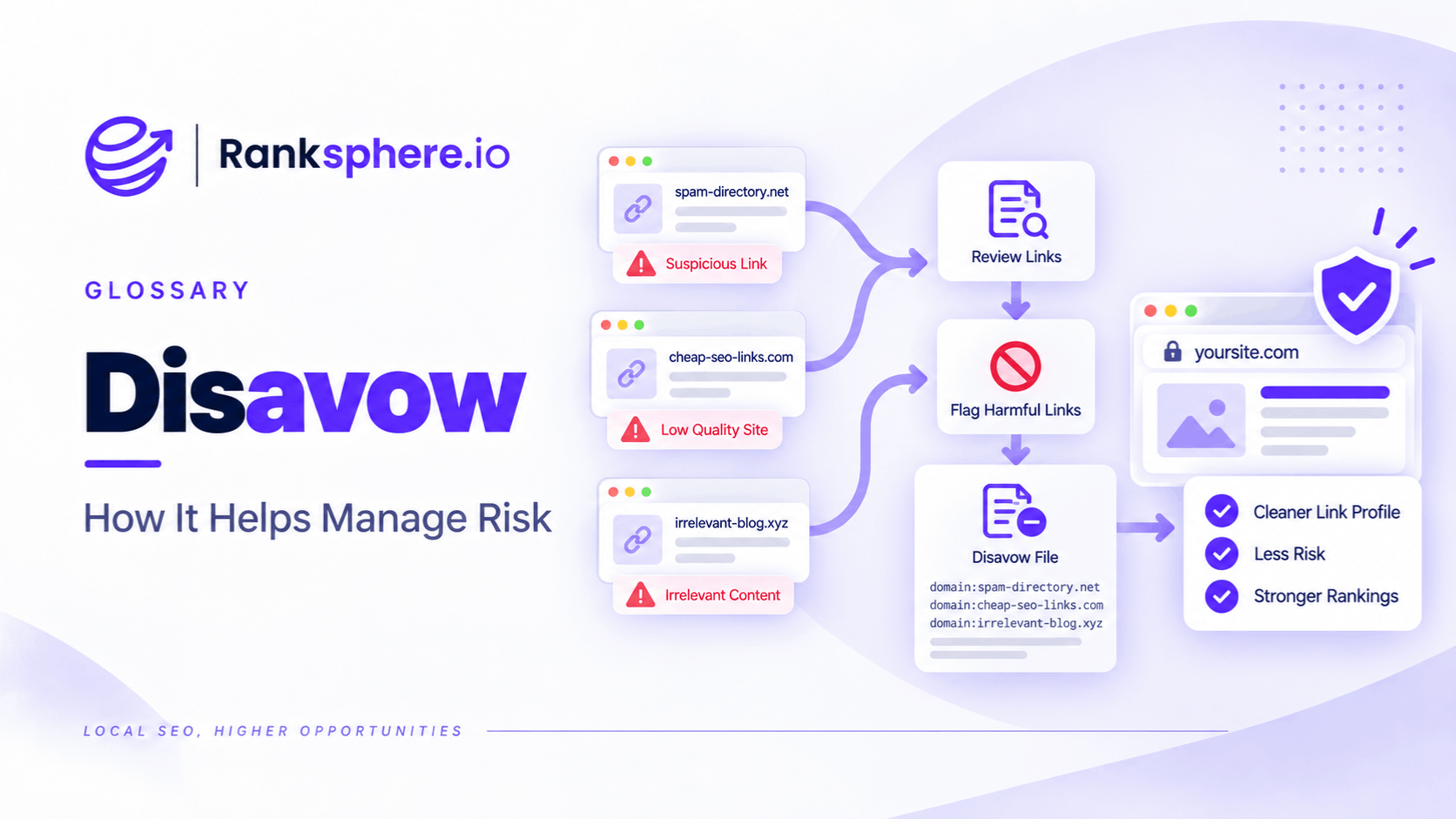
Disavowing links means submitting a file to Google that lists backlinks or linking domains you want Google to disregard when assessing your site.
Google provides this through its Disavow Links tool.
It is not a standard SEO maintenance task.
Google describes it as an advanced feature that should be used carefully because using it incorrectly can harm a site's performance in Google Search. Google also says that most websites will never need to use it because its systems can usually determine which backlinks should be trusted without help from the site owner.
That makes disavow fundamentally different from routine backlink monitoring.
The question is not:
“Do I have ugly-looking backlinks?”
It is:
“Do I have a substantial manipulative backlink problem that has caused, or is genuinely likely to cause, a manual action?”
For most businesses, the answer is no.
What does disavow mean?
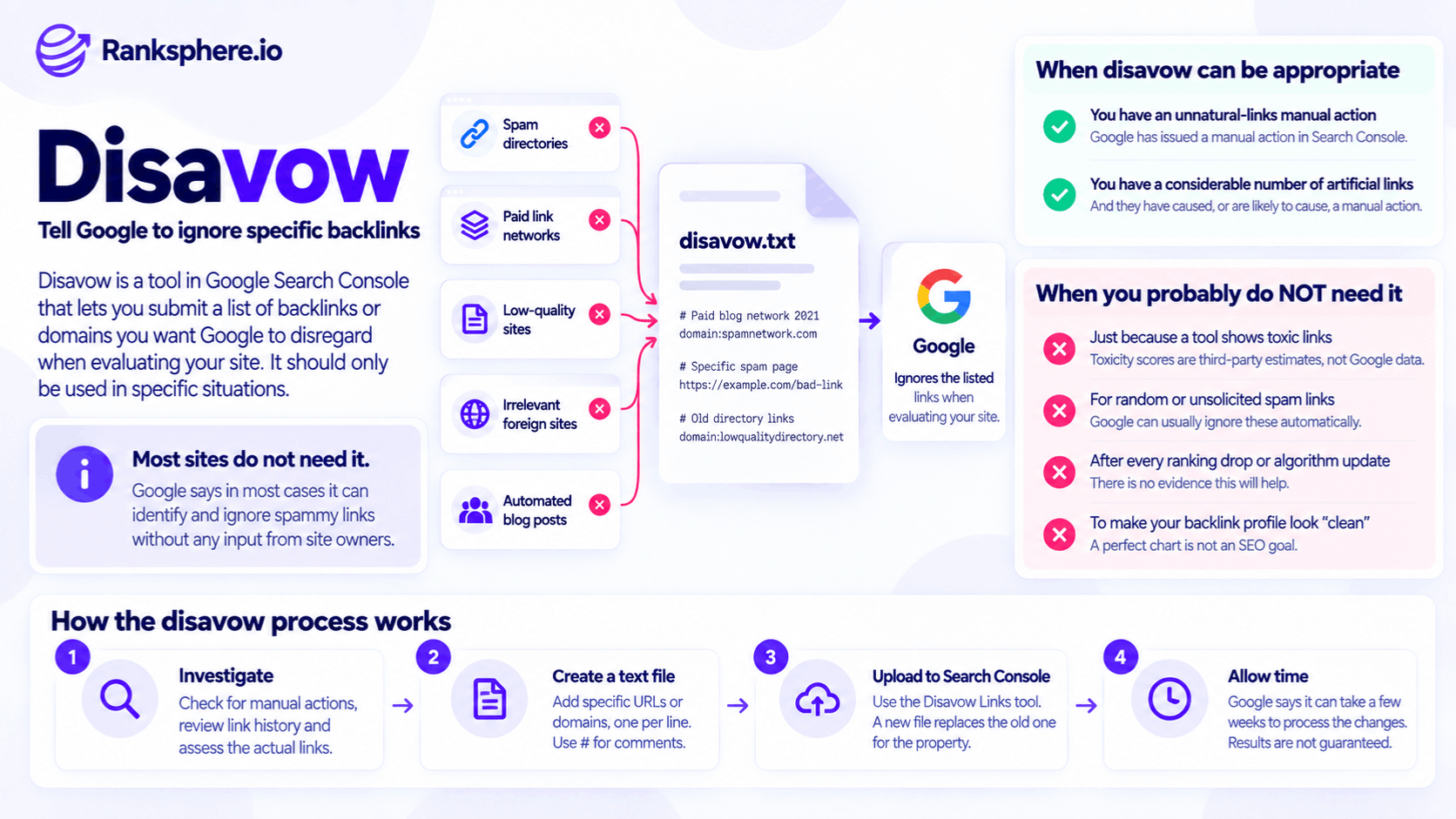
When you disavow a backlink, you are asking Google not to take that link into account in the normal way when evaluating your website.
For example, a business might submit:
domain:spamnetwork.example
if it genuinely needs to repudiate links coming from that entire domain.
Or it might submit an individual URL:
https://example.com/paid-links/article-123
if only a specific linking page is problematic.
The file is uploaded through Google's Disavow Links tool.
It does not:
- Remove the backlink from the web
- Ask the publisher to delete it
- Remove the linking page
- Guarantee a ranking change
It tells Google how you want those inbound links treated.
Google says most sites do not need disavow
Google's current guidance could hardly be clearer.
It says that in most cases Google can determine which links to trust without additional information from the site owner.
Google therefore says most sites will not need the Disavow Links tool.
That should be the starting point for every backlink-cleanup discussion.
Not:
“The backlink tool found 600 bad links, so let's upload them.”
Google's two-part test
Google currently says backlinks should be disavowed only when both of these conditions apply:
- The website has a considerable number of spammy, artificial or low-quality links.
- Those links have caused a manual action or are likely to cause one.
That is a much narrower standard than:
“This domain has a high toxicity score.”
or:
“We have some strange backlinks.”
Disavow is not a backlink hygiene tool
There is no Google recommendation to:
- Review toxic links every month
- Continuously add suspicious domains
- Maintain a perfectly clean backlink profile
- Disavow every scraper
- Disavow every low-authority domain
That type of workflow usually comes from third-party backlink tools rather than Google's own guidance.
See toxicity scores for why third-party risk labels need context.
Why the tool exists
Google introduced the Disavow Links tool in 2012.
At the time, unnatural backlink penalties and early Penguin-related link problems were a major concern for site owners, and businesses needed a mechanism to tell Google that certain backlinks should not be associated with their site.
The webspam environment has changed considerably since then.
Google now relies much more heavily on automated spam detection.
In 2022, Google said its SpamBrain system could detect sites buying links and sites being used to pass outgoing links, and that its algorithms and manual actions aimed to neutralise unnatural links at scale.
That does not mean manipulative links no longer matter.
It means Google is much less dependent on webmasters manually identifying every bad backlink.
Spam links are often neutralised rather than rewarded
Google's 2022 link-spam update specifically said spammy links could be neutralised, with any ranking credit they had been passing being lost.
That distinction matters.
Suppose an SEO buys 100 manipulative links.
Google may identify them and stop them contributing.
The resulting ranking change may simply be the disappearance of artificial credit.
That is different from:
“100 bad links have created 100 negative ranking points.”
Disavow is still live in 2026
Despite years of discussion about whether Google still needs the feature, Google continues to document and provide the Disavow Links tool in 2026.
Its current support documentation still explains:
- When to use it
- How to prepare the file
- How to upload it
- How to remove disavowals
So avoid saying:
“Google has effectively retired disavow.”
It has not.
The more accurate statement is:
the situations where Google recommends using it are narrow.
Google representatives have repeatedly discouraged casual use
Google has repeatedly pushed back against routine disavowal.
In Google's November 2022 SEO Office Hours, John Mueller said that disavowing random links that look strange or have been flagged by a tool is not a good use of time, and that the tool should be used in situations such as links you actually paid for and cannot remove.
That aligns closely with Google's current written documentation.
The useful distinction is:
known manipulative link building
versus:
random links you happen not to like.
Bing removed its disavow feature
Microsoft took the process one step further.
Bing announced in September 2023 that it would remove its Disavow Links feature and associated API in October 2023.
Bing said improvements in its systems meant it could distinguish natural from unnatural links and ignore or discount the latter without requiring site owners to submit them manually.
That does not automatically tell us what Google will do.
But it illustrates how search-engine link-spam handling has evolved since disavow tools were first introduced.
When should you genuinely consider disavowing links?
The circumstances are relatively narrow.
You have an unnatural-links manual action
This is the clearest situation.
In Search Console, Google may issue a manual action labelled:
Unnatural links to your site
when it detects a pattern of:
- Unnatural
- Artificial
- Deceptive
- Manipulative
links pointing to the website.
At that point, there is a documented problem to resolve.
This is very different from:
“SEMrush coloured 400 domains red.”
You inherited a substantial manipulative backlink campaign
A business may discover that a previous:
- SEO agency
- Freelancer
- Affiliate
- Marketing provider
built large numbers of links through methods such as:
- Paid followed links
- Private blog networks
- Keyword-rich guest posts
- Link-exchange schemes
- Low-quality link directories
The existence of that history deserves investigation.
But do not automatically upload a disavow file merely because:
“an old SEO built links.”
Google's own threshold still matters.
There should be a considerable manipulative link problem and credible reason to believe a manual action exists or is likely.
A manual action appears likely
Google's documentation also allows for proactive disavowal where a site has a considerable number of artificial links and the owner genuinely believes a manual action is likely.
That is narrower than:
“I am nervous about my backlink profile.”
For example, imagine discovering:
- Thousands of purchased links
- Dozens of PBN placements
- Repeated commercial anchor text
- Documented invoices for link packages
That is materially different from discovering:
- Scraper links
- Random foreign directories
- Automated spam
you never commissioned.
No manual action does not automatically end the analysis
A clean Manual Actions report is reassuring.
It means Google has not currently notified you of a manual spam action.
But it does not prove:
every backlink strategy used historically was acceptable.
Google's own disavow criteria explicitly cover situations where a manual action is considered likely, not only cases where one already exists.
So the correct process is:
check Search Console + investigate link-building history + apply Google's threshold.
Random spam links are usually not enough
Suppose your backlink report contains:
- Scraper sites
- Foreign-language clones
- Random aggregators
- Strange directories
and you never asked for any of them.
That alone is not a reason to use disavow.
Google says it works hard to prevent third-party actions from negatively affecting websites and that, in most cases, it can decide which links deserve trust without site-owner input.
The web creates noise.
Do not confuse noise with a manual-action-level link scheme.
Toxicity scores are not enough
A tool may classify:
Domain A — Toxic 93
and:
Domain B — Toxic 78
Those scores belong to the tool.
Google does not use them.
A third-party score may be useful for finding links that deserve manual review.
It should not become:
toxicity > 70 = disavow automatically
See toxicity scores for the wider distinction.
Ranking drops are not proof of toxic backlinks
Suppose organic traffic falls 25%.
Then an SEO tool finds several hundred suspicious backlinks.
That correlation does not establish causation.
Traffic can decline because of:
- Competitor changes
- Search-demand changes
- Technical problems
- Content deterioration
- algorithm updates
- Lost valuable backlinks
- Search-result changes
Diagnose broadly before deciding the answer is:
disavow.
Do not use disavow after every Google update
Ranking volatility during or after an algorithm update does not mean:
Google suddenly penalised all the bad backlinks.
Google's systems evaluate many signals.
If there is:
- No manual action
- No known manipulative backlink history
- No evidence of a large artificial-link problem
a disavow project is unlikely to be the most sensible first response.
Disavow is not negative-SEO insurance
Some site owners maintain large files because they fear competitors may send spam links.
Google's own documentation is deliberately designed to reassure site owners that, in most cases, it can decide which links to trust.
Do not build a permanent SEO workflow around:
“What if someone sends us bad links?”
Monitor.
Investigate unusual patterns.
Intervene only when the evidence justifies it.
What to do before disavowing
Before uploading anything, answer several questions.
1. Is there a manual action?
Check:
Search Console → Manual Actions
If there is an unnatural-links action, you have a confirmed issue.
2. Did the business deliberately build manipulative links?
Check:
- Previous agency work
- SEO invoices
- Guest-post campaigns
- Link packages
- PBN use
- Link exchanges
History is often more informative than the current toxicity score.
3. Is the problem substantial?
Google says:
a considerable number
of artificial, spammy or low-quality links.
One questionable guest post is not the same thing as a five-year paid-link programme.
4. Is a manual action genuinely plausible?
This is the important judgement.
Ask:
Would these links reasonably fit Google's definition of a manipulative link scheme at meaningful scale?
If not, disavow is probably the wrong tool.
Remove links first where possible
If there is a genuine unnatural-links problem, Google recommends trying to remove bad links from the web first.
For an unnatural-links manual action, Google's documented process is:
- Identify policy-violating backlinks.
- Contact the linking sites.
- Ask for links to be removed or prevented from passing ranking credit.
- Disavow links you could not resolve.
- Submit a reconsideration request.
That is important.
Disavow is not supposed to replace all cleanup effort in a manual-action case.
Links can also be qualified rather than removed
Google's manual-action guidance says problematic links may also be changed so that they no longer pass ranking credit, for example by adding an appropriate relationship attribute.
Depending on the situation, that could involve:
- nofollow
- sponsored
The aim is to correct the manipulative relationship.
Not necessarily to erase every mention of the business from the web.
How a disavow file works
The disavow list is a text file.
Each line can contain either:
- An individual URL
- A domain
Google currently requires:
- UTF-8 or 7-bit ASCII encoding
- .txt file extension
- One URL or domain entry per line
Google also allows comments beginning with:
#
which it ignores during processing.
Disavowing an individual URL
Example:
https://spam.example/article/bought-link
Use this when the problem is confined to a particular page and links elsewhere on the same domain may be legitimate.
Disavowing an entire domain
Use:
domain:spam.example
to cover links across that domain or subdomain.
Google specifically documents the:
domain:
operator for this purpose.
Do not automatically use domain-level disavowal simply because it is easier.
Use it when you genuinely mean:
links from this entire domain should be disregarded.
Domain vs URL entries
A sensible decision is:
Individual URL
Use when only a particular placement is problematic.
Domain
Use when the whole linking domain is part of the manipulative pattern.
Google's manual-action documentation notes that domain: is convenient when multiple problematic links come from the same domain.
The goal is accuracy.
Not the smallest possible file.
Not the largest possible file.
Comments in the file
You can include internal notes:
# Paid guest-post network used by previous agency in 2021
domain: example-network.com
Google ignores lines beginning with #.
Comments can help future teams understand:
- Why the entry was added
- Which campaign it relates to
- When it was identified
That is particularly useful during client onboarding.
File limits
Google's current limits are:
- Maximum URL length: 2,048 characters
- Maximum file size: 100,000 lines
- Maximum file size on disk: 2 MB
Most legitimate disavow cases should be nowhere near those limits.
A huge file is not inherently more thorough.
Uploading a new file replaces the old one
This is critical.
Google says a property can have one disavow list.
Uploading another list replaces the existing file for that property.
That means you should never upload:
only the 20 new domains
without considering what is already there.
You may accidentally remove all previous disavow instructions.
Always inspect the existing file first
Before changing anything:
- Check whether a file already exists
- Download or document its contents
- Understand who created it
- Review why the domains were included
This matters especially when inheriting an SEO account.
An older agency may have uploaded a large list years ago and nobody on the current team knows it exists.
The tool does not support Search Console Domain properties
This catches people out.
Google's current documentation says the Disavow Links tool does not support Search Console Domain properties.
If a site only has:
example.com
as a Domain property, you may need the appropriate URL-prefix property for the protocol/host you need to manage.
This is a tooling limitation.
It has no effect on the site's rankings by itself.
Disavow is property-specific
Google says the uploaded list applies to the specific property and relevant child properties according to the configuration.
Be particularly careful where a site has:
- HTTP and HTTPS variants
- Subdomains
- Historical properties
Check which property actually has the disavow list.
Disavowed links still appear in backlink reports
Uploading a disavow file does not make the backlinks disappear.
Google explicitly says disavowed links can continue to appear in the Search Console Links report.
So do not use:
“the links are still showing”
as evidence that the disavow failed.
The source page still contains the link.
Disavow does not edit the web.
Processing is not instant
Google says it can take a few weeks to incorporate a disavow list because it has to recrawl the web and reprocess the pages it encounters.
That means:
upload today → ranking recovery tomorrow
is not a realistic expectation.
There may be no visible change
Even after processing, rankings may not move.
For example, if Google was already neutralising the manipulative links algorithmically, disavowing them may produce no measurable difference.
That does not necessarily mean:
the file failed.
It may simply mean the links were already contributing little or nothing.
Disavow does not restore rankings by itself
If a website lost rankings because:
- Competitors improved
- Content became weaker
- Search intent changed
- Technical problems developed
removing backlink credit will not solve those issues.
A disavow file is not:
“reset Google rankings.”
It addresses one specific type of link problem.
Removing a disavow file
Google allows site owners to remove all disavowals for a property.
Its current tool provides a:
Cancel Disavowals
option.
As with adding a file, the change is not instantaneous.
Google says it can take a few weeks as the web is recrawled and the relevant pages are reprocessed.
Removing a file does not guarantee recovery
Avoid promises such as:
“Remove the disavow file and rankings will recover.”
The links being restored to consideration may:
- No longer exist
- Already be ignored
- Carry little value
- Have changed
And the site's current ranking environment may be very different from when the file was uploaded.
Removal simply stops telling Google to disregard those entries.
The resulting ranking effect is not guaranteed.
Review inherited disavow files carefully
An inherited disavow file deserves particular attention during client onboarding.
Ask:
- Who created it?
- When?
- Why?
- Was there a manual action?
- Were the links actually purchased?
- Were legitimate sites included?
Do not cancel it automatically.
And do not preserve it automatically.
Review the evidence.
Large historic disavow files
A file containing thousands of domains does not prove it is wrong.
A site with a documented history of:
- PBNs
- Paid guest posts
- Link schemes
might genuinely have a large file.
But a huge file created solely from:
Domain Rating + Spam Score + toxicity colour
deserves careful reassessment.
Google itself warns that incorrect use of the tool can harm Search performance.
Do not assume disavowed links were valuable
The reverse mistake is:
“If we remove 10,000 domains from a disavow file, Google will restore all of their authority.”
No.
Google still evaluates those links normally.
Many may remain:
- Spam
- Manipulative
- Low-value
- Neutralised algorithmically
Cancelling the file does not make a bad link valuable.
Manual actions and reconsideration
Where an unnatural-links manual action exists, disavow is only part of the process.
Google asks site owners to document:
- Links removed
- Links they could not remove
- Cleanup work undertaken
before requesting review.
A reconsideration request should demonstrate that the underlying behaviour has changed.
Not merely that a text file was uploaded.
Stop the link scheme first
If the business is still:
- Buying links
- Paying for followed guest posts
- Operating PBNs
- Running mass exchanges
a disavow file does not solve the underlying problem.
Stop the manipulative acquisition.
Then deal with the legacy links.
Otherwise you are cleaning one end of the pipeline while new violations continue at the other.
Disavow and paid links
Not every paid placement needs deletion.
If the placement is legitimate advertising or sponsorship, the linking site can appropriately qualify the link.
The problem is paid links being used to manipulate ranking signals.
So a better solution may sometimes be:
keep the sponsorship + qualify the link correctly
rather than:
remove all evidence the sponsorship existed.
Disavow and private blog networks
If a previous SEO knowingly built large numbers of PBN links, that is more relevant to disavow analysis than random scraper links.
The important evidence includes:
- Ownership patterns
- Repeated anchors
- Placement method
- Link-buying records
Do not rely only on:
“these domains look ugly.”
Disavow and guest posts
Guest posting itself is not automatically a problem.
A genuine expert article may naturally contain a useful link.
A paid programme distributing dozens of keyword-rich followed links across unrelated websites is a different situation.
Investigate the acquisition method before deciding what belongs in a file.
Disavow and directories
A legitimate:
- Professional directory
- Trade association
- Local chamber
should not be disavowed simply because an SEO tool assigns it weak authority metrics.
A mass directory network built solely for link manipulation deserves different treatment.
Again:
context over score.
Disavow and foreign-language links
Foreign-language backlinks are not inherently harmful.
A UK business can legitimately be mentioned by:
- International supplier
- Overseas newspaper
- Global trade body
Do not add domains simply because:
the site is foreign.
Disavow and low Domain Authority
Domain Authority and similar scores belong to SEO tools.
Google does not instruct site owners to disavow links below a particular DA.
A small community organisation may have a low score and still provide a completely genuine link.
Disavow and link profile analysis
Before using the tool, inspect the broader link profile.
Look at:
- Referring domains
- Anchor text
- Historical campaigns
- Target pages
- Link placements
A pattern is more informative than one isolated backlink.
The presence of one weird domain does not establish a manipulative profile.
Do not disavow simply to improve a tool's health score
Some SEO tools recalculate their own toxicity or spam score when domains are marked for disavow.
That can make the dashboard look cleaner.
It does not mean Google's view changed.
A prettier chart is not an SEO outcome.
What to do when a tool recommends disavow
Ask:
Why?
A useful recommendation should explain:
- What links are involved
- How they were acquired
- Which Google policy they appear to violate
- Why the volume is material
- Whether a manual action exists or appears plausible
If the explanation is only:
“toxicity score above 60”
that is not enough.
Common disavow mistakes
- Using third-party toxicity scores as automatic inclusion criteria.
- Disavowing random links simply because they look strange.
- Assuming every ranking decline is backlink-related.
- Using disavow as routine monthly maintenance.
- Believing no manual action is the only possible criterion.
- Disavowing a historic manipulative campaign without checking whether it is substantial enough to meet Google's guidance.
- Skipping removal attempts during a genuine manual-action cleanup.
- Uploading an entirely new file without preserving the legitimate entries from the existing one.
- Using domain: where only one specific page is problematic.
- Disavowing legitimate trade, press, supplier or association links because they have low third-party metrics.
- Expecting instant ranking recovery after upload.
- Assuming cancelling an old file will automatically restore traffic.
- Continuing to buy manipulative links while maintaining a disavow file.
- Selling a backlink cleanup solely because a tool found a large number of red domains.
Disavow best practices
- Start with Google's current two-part test: considerable artificial links + manual action or credible likelihood of one.
- Check Search Console for manual actions first.
- Investigate what the business and previous agencies deliberately built.
- Do not confuse unsolicited spam with a known manipulative link campaign.
- Attempt removal or proper link qualification first where a manual action is involved.
- Use URL-level entries when only particular pages are problematic.
- Use domain: when the whole domain genuinely belongs in the disavow set.
- Document why entries were added using # comments where helpful.
- Check for an existing file during client onboarding.
- Remember that uploading a new file replaces the previous list.
- Allow time for Google to recrawl and reprocess affected links.
- Do not promise ranking recovery simply because a file was uploaded or removed.
- Stop manipulative link acquisition rather than treating disavow as permanent cleanup.
Example
“A manufacturing company hires a new SEO agency.
During client onboarding, the team checks the site's backlink history.
It discovers an existing disavow file created several years earlier.
The file contains thousands of domains.That alone does not prove anything is wrong.
So the agency investigates why those domains were included.
The previous provider had built the file largely from an automated toxicity report.
Among the entries are:
- Trade publications
- Industry associations
- Supplier websites
- University research pages
But the file also contains genuinely questionable domains associated with an older paid-link campaign.
The team does not simply delete the entire file.
It reviews the entries against:
- Historic SEO activity
- Google's link-spam policies
- Search Console
- The actual linking pages
Legitimate editorial and industry links are distinguished from deliberately manipulative placements.
The file is then revised carefully rather than replaced with another automated export.
Google's documentation says replacing a disavow list can take a few weeks to be incorporated as Google recrawls and reprocesses the web.
So the agency does not promise:
“Traffic will rise by 30% within a month.”
There is no reliable basis for that claim.
The purpose of the work is simpler:
make sure the site is not unnecessarily asking Google to ignore legitimate links while still repudiating links that genuinely belong to a manipulative historic campaign.
That is the right way to use disavow.
Disavow is not a backlink-cleaning routine. It is a specialist tool for substantial unnatural-link problems where Google's own criteria are met. For most websites, strange backlinks are something to understand and monitor — not something to upload automatically into a disavow file.”
See also
- Toxic link — why third-party toxicity scores are not Google penalties
- Link profile — what to assess before considering disavow
- Backlink — the underlying external link
- Link building — where genuine manipulative-link risk usually originates
- Google Search Console — where manual actions are reported and the disavow property relationship matters
- Client onboarding — when inherited disavow files should be checked