Duplicate content is content that appears at more than one URL in the same or very similar form.
It can occur on the same website or across different websites.
Duplicate content is not automatically a Google penalty. In most cases, Google tries to identify the different versions, group them together and select one URL as the canonical version to show in search.
The real problem is control.
If several URLs contain substantially the same content, Google may choose a different version from the one you intended. Duplicate URLs can also make crawling, internal linking, analytics and indexing harder to manage.
Is there a duplicate content penalty?
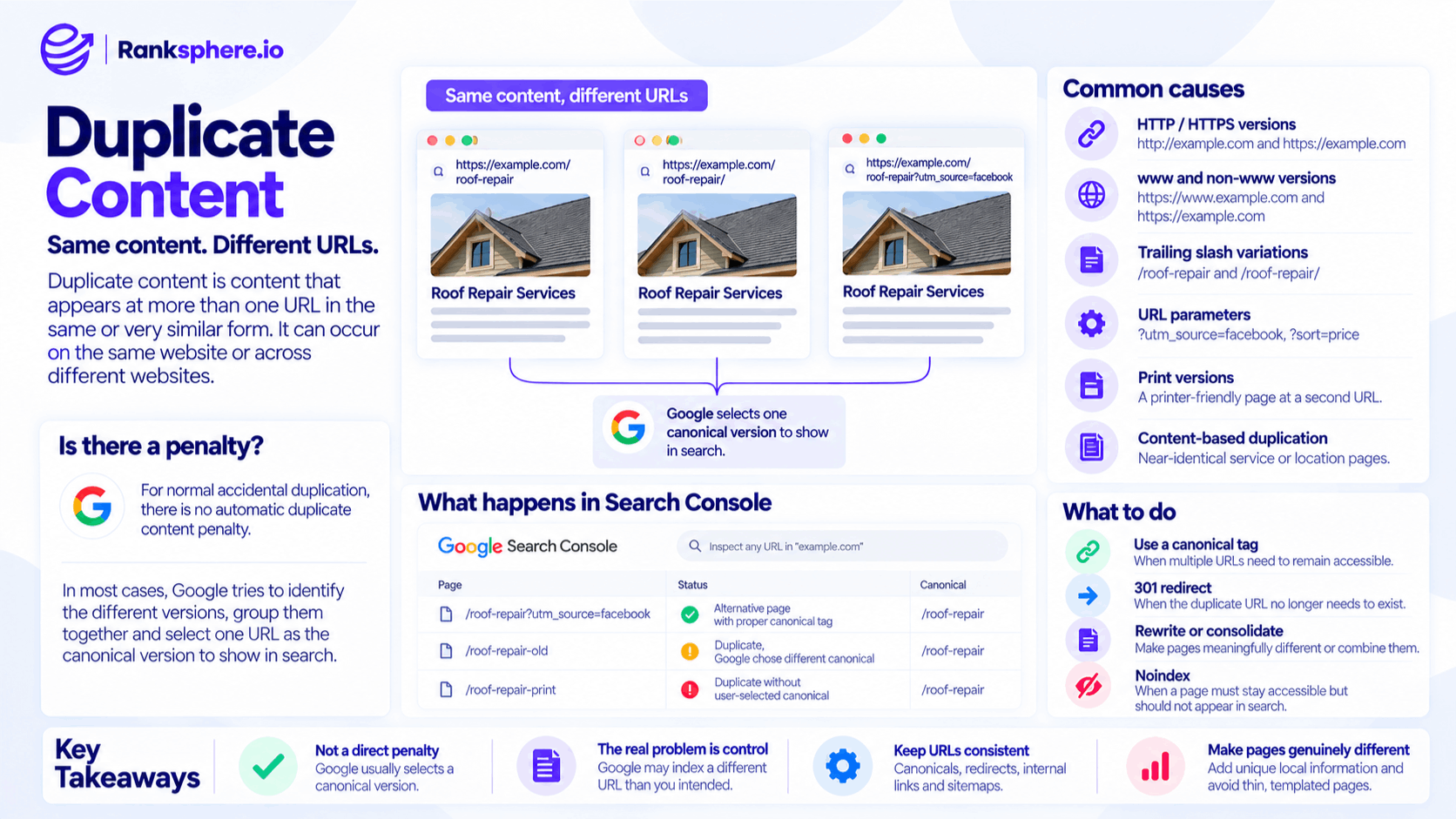
For normal accidental duplication, there is no automatic duplicate content penalty.
Google regularly encounters duplicate and near-duplicate content across the web.
Examples include:
- Tracking URLs
- Printer-friendly pages
- Product filters
- Syndicated articles
- HTTP and HTTPS versions
- www and non-www versions
Google generally handles these by identifying equivalent URLs and selecting one representative version.
Problems are more likely when duplication is created deliberately to manipulate search visibility, or when a site produces large amounts of low-value repetitive content.
So the right question is not:
“Will Google penalise me for duplicate content?”
It is:
“Is Google indexing the version I want, and are these duplicate URLs necessary?”
What happens when Google finds duplicate content?
When Google finds several URLs containing the same or substantially similar content, it may group them into a canonical cluster and select one page as the representative version.
That page may be indexed while the alternatives are excluded.
In Google Search Console, you may see statuses such as:
- Alternative page with proper canonical tag
- Duplicate, Google chose different canonical
- Duplicate without user-selected canonical
This is not necessarily an error.
If Google has chosen the correct canonical URL, the duplication may already be handled properly.
The problem is when:
- Google selects the wrong URL
- Internal links point to several versions
- Your sitemap contains duplicates
- Analytics data becomes fragmented
- Search engines spend time crawling unnecessary URLs
- Multiple near-identical pages compete for the same purpose
What causes duplicate content?
Duplicate content is often created unintentionally.
In many cases, the wording itself is not the original problem. The same page simply becomes accessible through several different URLs.
Technical duplicate content
Common technical causes include:
HTTP and HTTPS versions
For example:
and:
If both versions remain independently accessible, search engines may see two URLs containing the same page.
www and non-www versions
These can also create duplicates:
Choose one preferred version and redirect the other consistently.
Trailing slash variations
Depending on the server configuration, these may resolve separately:
/roof-repair
/roof-repair/
They should normally be consolidated to one preferred version.
URL parameters
Parameters can create large numbers of URLs that show substantially the same content.
Examples include:
?utm_source=facebook
?sort=price
?session=12345
?colour=black
On large websites, filters and sorting options can create thousands of near-identical URLs.
Print versions
A print-friendly version may repeat the entire page at a second URL.
If both versions need to exist, canonicalisation may be appropriate.
Pagination and archive pages
Categories, tags, archives and pagination can also create substantial overlap if a CMS is poorly configured.
Content-based duplication
Duplicate content can also come from genuinely separate pages that say almost the same thing.
Common examples include:
- Near-identical service pages
- Templated location pages
- Manufacturer product descriptions copied across many websites
- Old and new versions of the same article
- Syndicated content
- Repeated landing pages targeting small keyword variations
This type of duplication usually needs more than a technical fix.
If several pages should genuinely exist, they need a clear reason to be different.
Duplicate location pages
Local websites are particularly vulnerable to templated location pages.
For example:
Plumber in Bristol
Plumber in Bath
Plumber in Cardiff
If all three pages contain the same copy with only the city name changed, they may look separate in the CMS but provide very little unique value.
The solution is not simply changing a few words.
A useful location page should contain information that genuinely belongs to that location, such as:
- Areas or neighbourhoods served
- Local projects
- Relevant photographs
- Customer examples
- Location-specific service details
- Travel or access information
- Pricing differences where they genuinely exist
If there is nothing meaningful to say about a location individually, a single service-area page may be more useful than dozens of thin pages.
Duplicate content vs keyword cannibalisation
Duplicate content and keyword cannibalisation are related but not identical.
Duplicate content means two or more URLs contain substantially the same content.
Keyword cannibalisation means several pages compete for the same search intent in a way that hurts performance.
Two pages can cannibalise each other without being duplicates.
Likewise, two duplicate URLs may be handled correctly through canonicalisation and cause no meaningful ranking problem.
Diagnose the actual issue before choosing the fix.
How to fix duplicate content
The right solution depends on why the duplicate URLs exist.
Canonical tag
Use a canonical tag when several URLs need to remain accessible but one should be treated as the preferred search version.
This can work well for:
- Tracking parameters
- Certain filters
- Print versions
- Duplicate product variations
- Syndicated copies where supported
For example:
/roof-repair?utm_source=email
can canonicalise to:
/roof-repair
301 redirect
Use a 301 redirect when the duplicate URL no longer needs to exist.
This is appropriate when:
- A page has permanently moved
- Two pages have been merged
- HTTP should redirect to HTTPS
- www should redirect to non-www, or vice versa
- An obsolete duplicate has been retired
If the alternate URL has no reason to remain accessible, a permanent redirect is usually cleaner than leaving it live with a canonical.
Rewrite the page
If two pages genuinely need to exist but contain almost identical information, make them meaningfully different.
This is particularly important for:
- Location pages
- Service pages
- Product categories
- Comparison pages
Do not simply rewrite sentences to make them look unique.
The page itself should serve a different need.
Consolidate
If two pages cover the same topic and search intent, combining them into one stronger page may be the best solution.
Then redirect the weaker URL to the preferred page where appropriate.
This is often the cleanest fix when duplication overlaps with keyword cannibalisation.
Noindex
Use noindex when a page needs to remain accessible but should not appear in search.
Examples can include:
- Internal search pages
- Certain filter views
- Account pages
- Utility pages
Do not use noindex as the default answer to every duplicate page. If the goal is signal consolidation, canonicalisation or redirects may be more appropriate.
Duplicate content and canonical tags
Canonical tags are one of the main tools used to manage duplicate URLs.
If:
/roof-repair
and:
/roof-repair?campaign=spring
show the same content, the parameter version might use:
<link rel="canonical" href="https://example.com/roof-repair">
This tells search engines that the clean URL is the preferred version.
But a canonical is a signal rather than an absolute command.
If internal links, sitemaps and redirects all point somewhere else, Google may choose a different canonical.
Keep the signals consistent.
Duplicate content and internal links
Internal links should normally point to the canonical version of a page.
Suppose:
/services/roof-repair
is the preferred URL.
But your blog, navigation and footer all link to:
/services/roof-repair?ref=site
That creates unnecessary duplication and mixed signals.
Where possible, link directly to the clean canonical URL.
This keeps:
- Crawling cleaner
- Analytics easier to interpret
- Internal linking more consistent
- Canonical signals aligned
Duplicate content and XML sitemaps
Your XML sitemap should normally contain only canonical URLs.
Do not list:
- Redirecting URLs
- Parameter variants
- Non-canonical duplicates
- noindex pages
- 404s
If Page A canonicalises to Page B, the sitemap should generally contain Page B.
Your XML sitemap, internal links and canonical tags should all point towards the same preferred URL where possible.
Syndicated content
Syndication happens when you intentionally allow another website to republish your content.
For example, an industry publication may republish one of your articles.
Where appropriate, ask the publishing site to make the relationship to the original clear.
A cross-domain canonical pointing back to the original may be useful in some syndication arrangements, although search engines ultimately decide which version to treat as canonical.
A clear link back to the original source is also useful for attribution and discovery.
Do not assume your version must rank simply because you published it first.
Search engines assess many signals when selecting representative URLs.
Scraped content
Scraping is different from syndication.
A scraper copies your content without permission.
In most cases, there is no need to panic simply because another website copied one of your pages.
Search engines often identify the original or more authoritative source correctly.
Investigate further if:
- The copied version outranks your original
- The scraper is causing brand confusion
- Large amounts of content have been copied
- There is a genuine copyright or business issue
Do not spend large amounts of time chasing every low-quality scraper that copies a paragraph from your site.
How to find duplicate content
Useful ways to identify duplication include:
Google Search Console
Look for indexing statuses involving:
- Duplicate URLs
- Alternative pages
- Google-selected canonicals
This shows how Google is interpreting the pages.
Website crawls
A crawler can identify:
- Duplicate title tags
- Duplicate meta descriptions
- Near-identical page content
- Canonical conflicts
- Multiple URL variants
Duplicate metadata does not automatically mean the body content is duplicated, but it can help identify pages worth reviewing.
Site architecture review
Look for patterns such as:
- Location templates
- Product variations
- Filter URLs
- Archive pages
- Old migrated URLs
Often the duplication becomes obvious once you look at groups of pages rather than individual URLs.
Ranksphere's website audit surfaces duplicate and near-duplicate pages across a site, helping identify URL patterns and templated content that may need consolidation or differentiation.
Duplicate content and crawl budget
Duplicate URLs can cause additional crawling.
On very large websites, this can become a genuine crawl-efficiency problem.
For example, an ecommerce site might create thousands of versions of the same category through:
- Colour filters
- Size filters
- Sort orders
- Tracking parameters
Search engines can spend considerable time crawling these combinations.
For a small local-business website, crawl budget is rarely the main concern.
The bigger problems are usually:
- Indexing the wrong URL
- Weak location pages
- Confusing internal links
- Poor reporting
- Competing pages
Keep the scale of the solution proportional to the size of the website.
Common duplicate content mistakes
- Believing every duplicate page triggers a penalty. Ordinary duplication is usually handled through canonicalisation rather than punishment.
- Building templated location pages. Swapping the city name does not make the underlying content meaningfully different.
- Allowing several site versions to remain accessible. HTTP, HTTPS, www and non-www should be consolidated consistently.
- Using a canonical when the duplicate URL should simply disappear. A redirect may be cleaner.
- Using redirects when both versions genuinely need to remain accessible.
- Rewriting sentences purely to pass a uniqueness test. Different wording does not create different value.
- Ignoring URL parameters. They can generate duplicate pages at scale.
- Putting non-canonical URLs in the sitemap.
- Internally linking to duplicate variants instead of the preferred URL.
- Assuming every duplicate status in Search Console is a problem. If Google selected the intended canonical, the system may be working correctly.
Duplicate content best practices
- Choose one preferred version of each URL.
- Redirect HTTP/HTTPS and www/non-www variants consistently.
- Use self-referencing canonicals on important indexable pages.
- Use canonical tags for genuine duplicate URLs that must stay accessible.
- Use 301 redirects when the duplicate URL no longer needs to exist.
- Keep canonical URLs in the XML sitemap.
- Link internally to preferred URLs.
- Write genuinely useful location and service pages.
- Avoid creating pages solely for minor keyword variations.
- Review Search Console when Google selects an unexpected canonical.
- Audit parameters and templates on large or complex websites.
Example
“Blackwood Cleaning creates sixteen separate location pages.
Each page has a different town in the title and H1, but almost everything else is the same.
The service descriptions, photographs, FAQs and calls to action are identical.
Search Console shows that only a small number of the pages are being indexed consistently, while several others are treated as duplicates or alternative versions.
The first idea is to rewrite every paragraph using different words.
That would change the wording without changing the value.
Instead, Blackwood reviews where it genuinely has enough local information to justify an individual page.
Five locations stand out.
Those pages are rebuilt using:
- Actual areas covered
- Real work completed nearby
- Original photographs
- Customer examples
- Location-specific service information
- Practical local details
The remaining locations are covered naturally on a wider service-area page rather than forcing a separate page for every town.
The website ends up with fewer pages, but each one has a clearer purpose.
That is the right way to handle duplicate content: do not chase uniqueness for its own sake. Make sure every important URL earns its place by providing a distinct and useful reason to exist.”
See also
- Canonical tag — identifying the preferred version of duplicate URLs
- 301 redirect — permanently consolidating URLs that no longer need to remain live
- Keyword cannibalisation — when multiple pages compete for the same search intent
- Indexing — where duplicate and canonical decisions appear
- Multi-location SEO — where templated pages commonly create duplication
- Thin content — the related problem of pages offering too little unique value