Multi-location SEO is the process of managing local SEO for a business with more than one physical location. Each branch needs its own Google Business Profile and its own location page, but they should still sit within one clear brand strategy.
The biggest challenge is not simply having more locations to manage. It is making sure those locations do not all end up looking exactly the same.
A business with ten branches should not have ten nearly identical pages, ten copied profiles, and the same content repeated everywhere. Each location serves a different area, has different competitors, and builds its own local reputation.
Why multi-location SEO is different
Every location competes in its own local market.
A branch in a busy city centre may be surrounded by dozens of competitors, while another branch a few miles away could be serving a much wider suburban area. The search landscape is different, so the strategy should reflect that.
Nearby branches can also overlap in search results. This is normal, especially when locations are close together, but it is important to understand which branch is appearing for which searches and whether your own pages are competing for the same terms.
A good multi-location SEO strategy should cover:
- A separate Google Business Profile for each eligible location
- A dedicated website page for each branch
- Reviews managed at location level
- Local rankings tracked separately
- Consistent brand information across every location
- Enough local detail to make each branch useful and distinct
Google Business Profiles across locations
Each eligible physical location should have its own Google Business Profile.
The profiles can be managed together, but the information on each one should reflect the actual branch rather than simply copying the same setup across the whole business.
- Create a location group or business account to manage profiles more easily
- Use the real business name and avoid adding location keywords unless they are genuinely part of the name
- Choose categories based on what each branch actually offers
- Use store codes to make locations easier to identify when managing them in bulk
- Check for duplicate profiles when branches move, rebrand or are acquired
If several locations are affected at the same time, it is worth checking whether the issue is account-wide rather than limited to one branch. GBP Suspensions can become much more disruptive when multiple profiles are managed under the same account.
Ranksphere's GBP management handles multiple locations from one dashboard with real-time sync and audits, making it easier to keep profile information organised across a larger group.
Location pages on the website
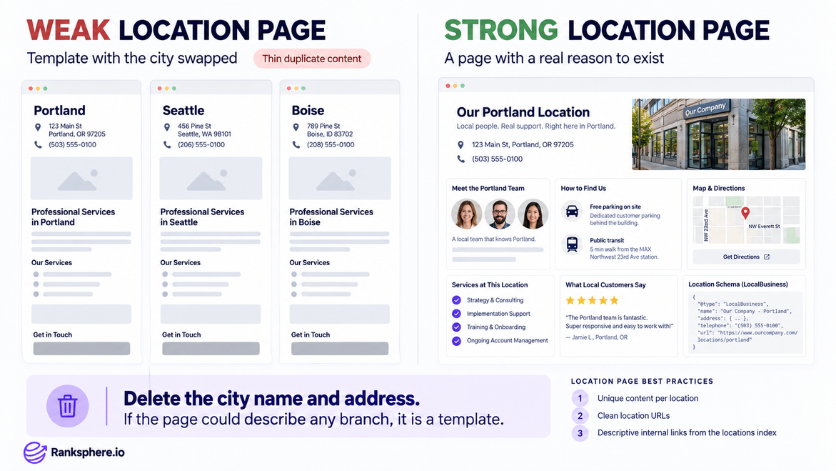
Each location should have its own page, but the page needs to offer more than an address and phone number.
Someone visiting a location page should be able to learn something useful about that specific branch.
That could include:
- The team working at the location
- Services available at that branch
- Opening hours
- Parking and public transport information
- Nearby areas or neighbourhoods served
- Directions and an embedded map
- Reviews connected to the location
- Local contact details
Each page should also use location-specific LocalBusiness schema with the correct name, address and phone number for that branch.
Use simple, readable URLs such as example.com/locations/portland rather than parameter-based URLs where possible. It also helps to connect every branch from a main locations page using clear internal links.
A useful test is to remove the city name and address from the page.
If the content could still describe any other branch, it probably needs more local detail.
Reporting across locations
Group-level reporting is useful, but averages rarely tell the whole story.
A few strong locations can make the overall numbers look healthy while weaker branches are being missed.
That is why each location should be reviewed separately before the results are rolled into a wider report.
- Track each branch on its own geo-grid
- Measure top-three visibility by location
- Compare branches with similar markets
- Monitor reviews and response activity per location
- Check where nearby branches overlap in search results
- Look at individual performance as well as the overall group
This makes it much easier to see where the business is doing well and where more work is needed.
Common mistakes
- Using the same location page everywhere. Changing only the city name and address creates pages that add very little value.
- Managing every branch the same way. Categories, services, hours and local competition can vary from one location to another.
- Creating profiles for places where there is no real location. Serving a city does not automatically mean the business qualifies for another profile there.
- Sending all reviews to one profile. Reviews should build the reputation of the branch that actually served the customer.
- Looking only at the overall average. Group-level reporting can hide locations that are underperforming.
- Ignoring overlap between nearby branches. Two locations can appear for many of the same searches, so it is important to understand how that affects visibility.
- Making unnecessary bulk changes. Profile information should be updated when something genuinely changes, not adjusted across every branch without a clear reason.
Best practices
- Create one profile for each eligible location. Keep it accurate and specific to that branch.
- Give every location page a real purpose. Include information that is genuinely useful to someone visiting or contacting that particular branch.
- Manage reviews at branch level. Give local teams a simple process for requesting and responding to customer feedback.
- Track each market separately. A city-centre location and a suburban branch should not automatically be measured in exactly the same way.
- Keep core business details consistent. Names, addresses, phone numbers and other important information should match across profiles, pages, schema and relevant directories.
- Review branches individually before making group-wide changes. What works for one location may not be necessary for another.
- Use group reporting as a summary. Keep enough location-level detail to see which branches are improving and which still need attention.
Example
“Northwind Dental operates six clinics across the same metropolitan area.
Originally, every location page followed the same template. The address, phone number and city changed, but most of the content was identical. The Google Business Profiles were also set up in much the same way, with little consideration for what each clinic actually offered.
At group level, the numbers looked reasonably strong.
Once each clinic was reviewed separately, the picture changed. Two locations had good local visibility and regular new reviews, while several others were barely appearing outside the area immediately around the clinic.
The business then started treating each branch as its own local market.
The location pages were updated with the dentists working at each clinic, the services available there, parking and transport details, and other information that mattered to local patients. Categories were reviewed for each branch, and every clinic was given its own process for requesting and responding to reviews.
That made it much easier to see which locations were performing well, which still needed work, and where the business should focus next.”
See also
- Local SEO, local search optimization applied across several business locations
- Google Business Profile, the local profile for each eligible branch
- Geo-grid rank tracking, measuring visibility around individual locations
- Service area business, for businesses that travel to customers rather than operating from several customer-facing locations
- NAP consistency, keeping core business details accurate across profiles, pages and directories
- Location page, the website page created for a specific branch