HTTPS is the secure version of HTTP, the protocol browsers use to communicate with websites.
It protects data travelling between the visitor's browser and the web server using Transport Layer Security (TLS).
You will still often hear people say:
SSL certificate
but SSL is the older technology. Modern secure web connections use TLS.
HTTPS helps protect information from being:
- Read in transit
- Altered in transit
- Intercepted by somebody between the visitor and the website
It should be standard on any modern website, whether the site handles:
- Payments
- Login details
- Contact forms
- Simple informational content
HTTPS is no longer something reserved for ecommerce and banking sites.
It is part of the basic technical setup of the modern web.
What does HTTPS mean?
HTTPS stands for:
Hypertext Transfer Protocol Secure
It is HTTP delivered over an encrypted TLS connection.
When a browser successfully connects to an HTTPS website, TLS helps provide three important protections:
- Encryption — third parties should not be able to read the traffic in transit
- Integrity — traffic should not be altered without detection
- Authentication — the browser can verify that it is communicating with the domain represented by the certificate
That matters even when a page appears to contain nothing sensitive.
Without HTTPS, somebody intercepting the connection may potentially see or alter the information being transferred.
HTTPS vs HTTP
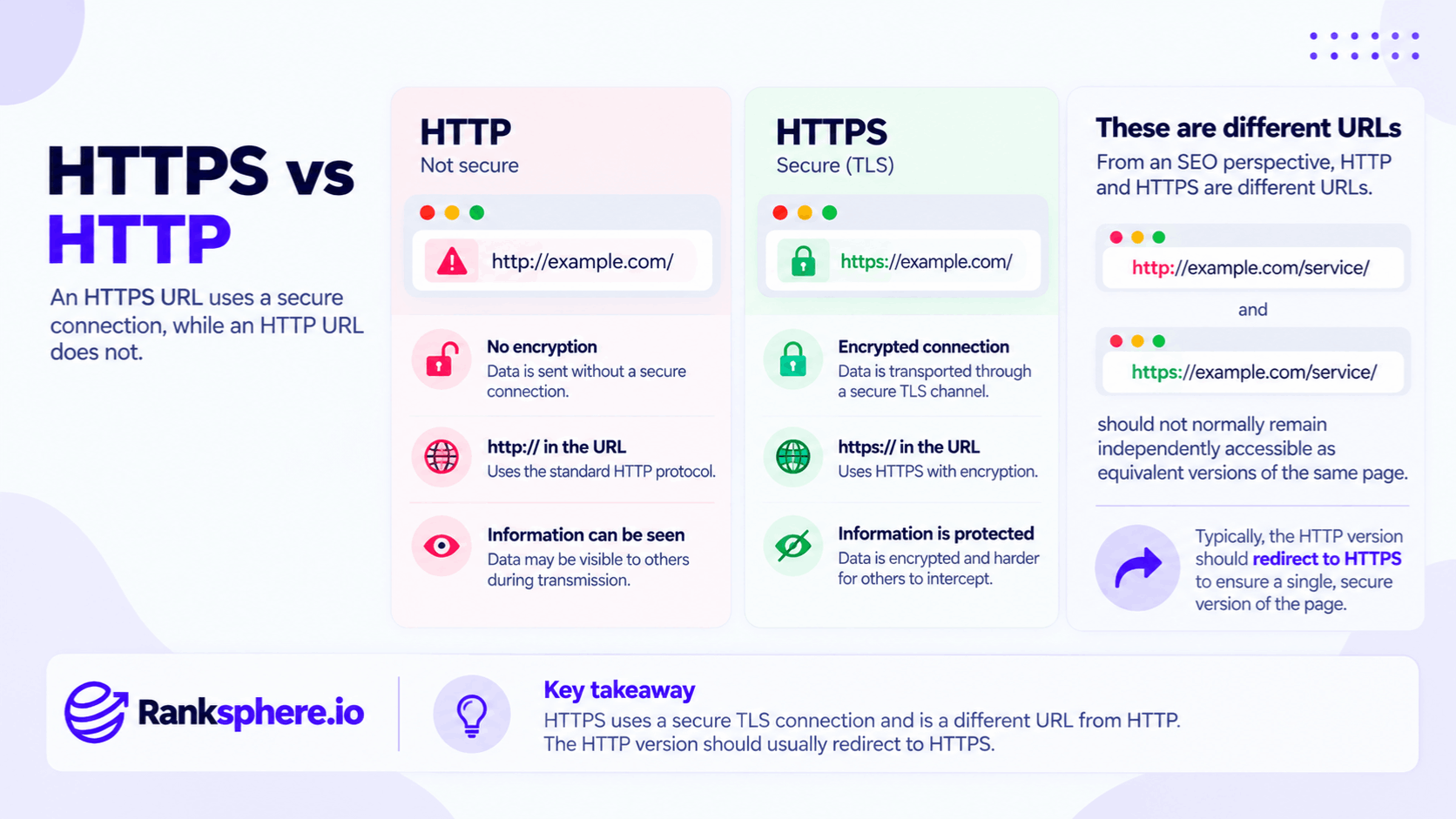
An HTTP URL looks like:
An HTTPS URL looks like:
The additional S indicates that the HTTP connection is being transported through a secure TLS channel.
From an SEO perspective, these are also different URLs.
That means:
and:
should not normally remain independently accessible as equivalent versions of the same page.
The HTTP version should generally redirect to HTTPS.
HTTPS and SSL certificates
The term SSL certificate remains widely used in hosting dashboards and marketing material.
Technically, TLS certificate is the more accurate term.
SSL was the predecessor to TLS and is no longer the modern protocol used to secure normal web traffic.
The certificate helps associate the site's cryptographic identity with its domain.
Without a valid certificate, the browser cannot establish the normal trusted HTTPS connection.
HTTPS is a security requirement, not primarily an SEO tactic
HTTPS is sometimes discussed as though its main purpose were:
getting an SEO ranking boost.
That misses the point.
Its primary job is security.
Modern web standards expect websites to use HTTPS, and many browser capabilities are restricted to secure contexts, which normally means content delivered over HTTPS.
You should move to HTTPS because your website should be secure.
Not because you expect the protocol change alone to produce a meaningful ranking increase.
Is HTTPS a Google ranking factor?
Historically, Google described HTTPS as part of its search and page-experience signals.
However, Google's current page-experience documentation says that, outside Core Web Vitals, other page-experience aspects do not directly help a page rank higher. Google still strongly recommends HTTPS and continues to prefer HTTPS versions when otherwise equivalent HTTP and HTTPS URLs exist.
So for a current SEO glossary, I would avoid saying:
“HTTPS gives you a ranking boost.”
The more accurate conclusion is:
HTTPS is expected technical hygiene, strongly recommended by Google and the secure standard your users and browsers expect.
Google prefers HTTPS URLs
When Google finds equivalent HTTP and HTTPS versions of a page, HTTPS is one of the signals it uses when selecting the canonical version.
Google says it generally prefers HTTPS unless there are conflicting problems such as:
- An invalid certificate
- Insecure dependencies
- Redirects back through HTTP
- Canonical tags pointing to HTTP
That is another reason the entire HTTPS setup needs to be internally consistent.
Simply installing a certificate is not enough.
HTTPS and customer trust
Visitors increasingly expect a website connection to be secure.
Chrome, for example, uses security indicators to distinguish normal secure connections from connections it considers insecure or dangerous.
The exact browser interface changes over time, so avoid promising that every HTTP page will always display the literal words:
Not secure
in the same place.
The broader point remains:
an insecure connection can trigger browser security indicators and warnings that reduce confidence in the site.
That is particularly damaging on pages where the visitor is being asked to:
- Submit a form
- Enter personal information
- Log in
- Make a payment
HTTPS does not make a website completely secure
This distinction is important.
HTTPS protects data in transit.
It does not mean the website itself is immune to:
- Malware
- Weak passwords
- Vulnerable plugins
- SQL injection
- Compromised administrator accounts
- Poor server security
A hacked website can still have a perfectly valid HTTPS certificate.
The padlock or secure connection is not a universal:
“This site is safe.”
badge.
It tells the user that the browser–server connection is encrypted and authenticated.
Why HTTPS matters
The practical benefits go well beyond search.
HTTPS supports:
- Encrypted connections
- Browser trust
- Secure forms
- Modern browser features
- Better protection against interception
- Cleaner referral information between secure sites
It is infrastructure.
That is why it should be treated as a basic website requirement rather than an advanced optimisation.
Modern browser features
Many browser APIs are only available within secure contexts.
MDN notes that powerful web capabilities are often restricted to pages delivered securely.
That can affect features involving:
- Location
- Devices
- Credentials
- Other sensitive browser functionality
So HTTPS can be required for a site to function correctly, not merely to display a secure connection indicator.
HTTPS and referral data
HTTPS also matters to referral information.
Under the modern default strict-origin-when-cross-origin referrer policy, a browser does not normally send referrer information when navigating from a secure HTTPS page to a less-secure HTTP destination.
That means an HTTP website can lose useful source information from secure referring sites.
Moving to HTTPS creates a cleaner modern analytics environment, although referral behaviour can also depend on the referrer policies individual sites configure.
Free HTTPS certificates
A paid certificate is not normally required simply to enable HTTPS.
Let's Encrypt is a nonprofit certificate authority that provides free TLS certificates, and many hosting companies now provision and renew certificates automatically.
That does not mean HTTPS has zero operational cost in every environment.
A complex organisation may still need:
- Engineering work
- Load balancer configuration
- Certificate management
- Security monitoring
But for an ordinary local-business website, obtaining a trusted certificate usually should not require a significant certificate purchase.
Having a certificate is not the same as having HTTPS configured correctly
This is where many problems begin.
A developer installs a certificate.
The homepage shows HTTPS.
Everyone assumes the work is finished.
But the website may still contain:
- HTTP internal links
- HTTP canonical tags
- HTTP sitemap URLs
- Mixed content
- Incomplete redirects
A technically successful certificate installation can therefore still leave a poor HTTPS migration.
Mixed content
Mixed content occurs when a page loads over HTTPS but attempts to load some resources over HTTP.
Those resources could include:
- Images
- JavaScript
- Stylesheets
- Fonts
- iframes
Modern browsers automatically upgrade certain mixed resources where possible and block other insecure resource types.
For example:
might contain:
The HTML document is secure.
The script request is not.
That creates a mixed-content problem.
Why mixed content matters
Mixed content weakens the security model of the HTTPS page.
A secure page should not depend on insecure resources that could potentially be intercepted or changed in transit.
Scripts are particularly important because a compromised script can alter the behaviour of the page itself.
The correct objective is:
HTTPS page + HTTPS resources
throughout the site.
Find mixed content across the whole website
Do not test only the homepage.
Mixed-content issues frequently hide inside:
- Old blog posts
- Theme files
- Widgets
- CSS
- Embedded tools
- Legacy image URLs
Test representative pages across:
- Services
- Blog
- Contact
- Ecommerce
- Templates
A site crawler or browser developer console can help identify insecure resource requests.
HTTP and HTTPS both loading
Another common mistake is allowing both versions of every URL to return a normal page.
For example:
and:
both return HTTP 200.
Technically, the content is now accessible through two URLs.
Google can usually canonicalise duplicates itself, and HTTPS is one of its canonicalisation preferences, but relying on Google to resolve an avoidable configuration problem is unnecessary.
Use redirects.
HTTP to HTTPS redirects
Every old HTTP URL should normally redirect directly to its corresponding HTTPS equivalent.
For example:
http://example.com/boiler-repair/
→
https://example.com/boiler-repair/
For a permanent migration, use an appropriate permanent server-side redirect such as a 301 redirect.
Google treats an HTTP-to-HTTPS move as a site move involving URL changes and recommends redirecting old URLs to their new equivalents.
Keep redirects to one hop
Avoid:
→
→
when the infrastructure can instead send:
→
directly.
Redirect chains add unnecessary requests.
They also make migrations and troubleshooting more complicated.
Do not redirect everything to the homepage
Each old URL should go to the most appropriate new equivalent.
For example:
http://example.com/emergency-plumbing/
should redirect to:
https://example.com/emergency-plumbing/
not:
A protocol migration is normally a one-to-one URL change.
The content itself has not moved to a different subject.
Canonical tags
After the HTTPS migration, canonical tags should normally point to the preferred HTTPS URLs.
For example:
<link rel="canonical" href="https://example.com/emergency-plumbing/" />
not:
<link rel="canonical" href="http://example.com/emergency-plumbing/" />
Google specifically lists HTTP canonicals on an HTTPS page as a conflicting signal that can interfere with its preference for the secure version.
XML sitemap
Your XML sitemap should also list the preferred HTTPS URLs.
For example:
Good:
Outdated:
The sitemap should reinforce the URLs you actually want search engines to crawl and index.
Do not leave Google to reconcile:
- HTTPS redirects
- HTTPS canonicals
- HTTP sitemap URLs
when all three can simply agree.
Internal links
Update internal links to point directly to HTTPS.
For example:
Old:
<a href="http://example.com/contact/">Contact</a>
New:
<a href="https://example.com/contact/">Contact</a>
An old HTTP internal link may still work because the server redirects it.
But every click and crawl now goes through an unnecessary redirect.
Fix the source link instead.
Relative internal URLs
Many sites use relative internal links such as:
/contact/
rather than writing the full protocol and domain.
Those links naturally follow the current site's protocol and may require less migration work.
Still check the site thoroughly.
Absolute HTTP URLs can remain hidden in:
- CMS fields
- Old content
- Navigation
- Structured data
- JavaScript
Certificate expiry
TLS certificates have validity periods.
If the certificate expires and is not renewed successfully, visitors can receive a browser certificate warning rather than the normal website experience.
For an ecommerce or lead-generation website, that can be commercially serious.
Most modern hosting platforms automate certificate renewal, but automation can still fail.
Monitor it.
Certificate monitoring
Useful alerts can include:
- Expiry approaching
- Certificate invalid
- Certificate chain problem
- Hostname mismatch
Do not wait for a customer to tell you:
“Your website says it isn't secure.”
A basic uptime/security monitoring system can identify the problem first.
Certificate hostname mismatch
The certificate needs to cover the hostname visitors use.
For example, a certificate might cover:
but not:
unless both names are included.
Modern hosting systems often configure both automatically.
Still test:
- HTTP www
- HTTP non-www
- HTTPS www
- HTTPS non-www
Every supported variant should ultimately resolve correctly to the preferred HTTPS hostname.
www vs non-www
HTTPS does not determine whether you should use:
or:
Either can work.
Choose the preferred hostname and keep the site consistent.
For example:
could all redirect to:
if that is the chosen canonical hostname.
The important point is consistency.
Invalid certificates
Google's own canonicalisation documentation notes that an invalid TLS certificate is one reason it may not prefer the HTTPS version of an otherwise equivalent page.
A broken certificate therefore creates problems for:
- Users
- Browsers
- Crawlers
Do not assume:
HTTPS URL = valid secure connection.
The certificate needs to work correctly.
Search Console and HTTPS
A common migration mistake is assuming the existing HTTP Search Console URL-prefix property automatically becomes HTTPS.
It does not.
Search Console URL-prefix properties include the protocol.
So:
and:
are different URL-prefix properties.
If you are migrating from HTTP to HTTPS and use URL-prefix properties, make sure the HTTPS version is available in Search Console.
Domain properties simplify this
A Search Console Domain property covers:
- HTTP
- HTTPS
- www
- non-www
- Other subdomains
under the verified domain.
Google itself has advised that, when moving from HTTP to HTTPS, you can either create the new HTTPS property or use domain-level verification so both protocols are already covered.
For many businesses, the Domain property is the cleaner long-term setup.
Do not mistake Search Console reporting for a traffic loss
Suppose you monitor only:
and then migrate everything to:
Traffic visible in the old URL-prefix property can decline because the search results are increasingly sending users to HTTPS URLs.
That does not automatically mean the site itself lost the same amount of Google traffic.
Check the correct property before drawing conclusions.
Search Console HTTPS report
Search Console also provides an HTTPS report for eligible properties.
It shows whether indexed URLs are being served through HTTP or HTTPS and can flag reasons HTTPS versions are not being indexed. Google says the ideal state is to have the site's searchable URLs served over HTTPS.
That report can be useful after a migration.
Google Business Profile
After changing the site's preferred URL, review the website field in Google Business Profile.
If it still points to:
the redirect may technically handle it.
But there is no reason to keep sending customers through the old version.
Update the field directly to:
The same principle applies to:
- Social profiles
- Important directories
- Email templates
- Advertising
- QR codes where practical
Do you need to update every citation?
Do not turn an HTTPS migration into months of citation cleanup solely because an old directory links to the HTTP URL.
If the HTTP URL redirects properly to HTTPS, the link still reaches the business.
Prioritise:
- Major profiles
- Important traffic sources
- Platforms you control
over chasing every old URL on the internet.
Analytics after an HTTPS migration
Review analytics and tracking configuration after the migration.
Check:
- Analytics settings
- Tag manager
- Conversion tracking
- Referral exclusions
- Third-party scripts
- Advertising destinations
Do not assume the tracking system needs a full rebuild simply because the protocol changed.
Test whether:
- Page views are arriving
- Conversions fire
- Source information looks sensible
The practical objective is continuity of measurement.
Third-party integrations
HTTPS migrations can expose hard-coded HTTP URLs in:
- Payment systems
- Forms
- APIs
- Webhooks
- Booking platforms
- CRMs
- CDN configurations
Some integrations may reject changed callback URLs or domains.
Test business-critical functionality before and after launch.
HTTPS and secure contexts
Some modern web features work only in a secure context.
MDN describes HTTPS as the normal requirement for such environments and notes that many powerful web APIs are not made available to insecure pages.
That makes HTTPS increasingly a functional requirement.
Not merely an optional security improvement.
HSTS
After HTTPS is working reliably, some sites also use HTTP Strict Transport Security (HSTS).
HSTS tells browsers that future connections to the host should use HTTPS rather than HTTP.
That can provide additional protection against downgrade attempts.
However, HSTS should be configured carefully.
Options such as:
includeSubDomains
and:
preload
can affect every relevant hostname.
Do not enable aggressive HSTS settings without confirming that all affected subdomains support HTTPS properly.
HTTPS migration checklist
A sensible HTTP-to-HTTPS migration should cover the whole environment rather than only the certificate.
Check:
- TLS certificate is valid
- Required hostnames are covered
- HTTP redirects to HTTPS
- Redirects are direct rather than chained
- Internal links use HTTPS
- Canonicals use HTTPS
- XML sitemap uses HTTPS
- Structured data contains correct URLs
- Mixed content is fixed
- Search Console covers HTTPS
- Google Business Profile uses the new URL
- Analytics still works
- Important integrations still work
This is why Google classifies HTTP-to-HTTPS as a site move involving URL changes.
Do rankings drop during an HTTPS migration?
A correctly implemented migration should not be approached as a way to gain rankings.
Nor should temporary movement automatically be interpreted as an HTTPS penalty.
Google needs to:
- Recrawl old URLs
- Follow redirects
- Process the new HTTPS URLs
- Reconcile canonical signals
That can take time.
The goal is to make those signals as consistent as possible.
Avoid changing everything at once
If possible, do not combine an HTTPS migration with unnecessary simultaneous changes to:
- Domain
- URL structure
- Content
- Navigation
- CMS
Every additional change makes troubleshooting harder.
Sometimes business circumstances require a larger migration.
But if the only goal is HTTPS, keep the rest stable.
Do not delete the HTTP site before redirects are working
Users, search engines and external links may continue requesting HTTP URLs for years.
The right behaviour is not:
HTTP disappears completely and returns an error.
It is:
HTTP request → permanent redirect → HTTPS equivalent
The HTTP endpoint therefore remains useful as the entrance to the redirect.
Mixed content after redesigns
An HTTPS site can develop mixed-content problems years after the original migration.
Common causes include:
- New theme
- Imported content
- Old plugin
- Hard-coded asset URL
- Third-party embed
That is why HTTPS belongs in ongoing technical QA, not only the original launch checklist.
Ranksphere's website audit checks certificate status, mixed content and redirect configuration alongside the rest of the site's technical setup.
HTTPS after a hosting migration
Changing hosting can affect:
- Certificates
- DNS
- Redirects
- CDN settings
- HSTS
- www/non-www behaviour
Retest HTTPS after any host move.
Do not assume settings automatically transfer from the old server.
HTTPS after a redesign
A redesign can also reintroduce old HTTP references.
Crawl the finished website and look for:
- HTTP internal links
- Mixed content
- HTTP canonicals
- HTTP structured-data URLs
This is particularly important when old content has been migrated into a new CMS.
HTTP images inside old content
Older websites sometimes contain thousands of image references beginning with:
http://
Simply changing the site's domain configuration to HTTPS does not necessarily rewrite all of those references.
Modern browsers may upgrade certain mixed image requests automatically, but relying on browser remediation is not ideal.
Update the source URLs where possible.
HTTPS and duplicate content
If HTTP and HTTPS versions both remain accessible, the same content exists at multiple URLs.
That falls within the wider duplicate content and canonicalisation problem.
Duplicate content is not automatically a penalty.
Google can cluster duplicate URLs and choose a canonical version.
But a clean HTTPS migration removes the ambiguity:
HTTP redirects to HTTPS
and all other signals support HTTPS.
HTTPS and canonicalisation
Google considers several signals when selecting canonical URLs, including:
- Redirects
- Sitemap inclusion
- rel="canonical"
- HTTP vs HTTPS
You want those signals to agree.
For example:
Good
Redirect → HTTPS Canonical → HTTPS Sitemap → HTTPS Internal links → HTTPS
Poor
Redirect → HTTPS Canonical → HTTP Sitemap → HTTP Internal links → mixture
The second configuration creates unnecessary conflict.
HTTPS and website performance
HTTPS itself should not be treated as a reason for a modern website to be meaningfully slow.
Modern hosting, TLS and HTTP protocols are built around secure web delivery.
If enabling HTTPS exposes serious performance problems, investigate the server or configuration rather than concluding:
“Encryption makes websites slow.”
That is not a useful reason to remain on HTTP.
Common HTTPS mistakes
- Calling HTTPS primarily a Google ranking tactic.
- Using “SSL” as though it were still the modern transport protocol rather than the predecessor to TLS.
- Installing a certificate but leaving HTTP URLs accessible without redirects.
- Redirecting every HTTP URL to the homepage instead of its HTTPS equivalent.
- Creating unnecessary redirect chains.
- Leaving canonical tags pointing to HTTP.
- Leaving the XML sitemap full of HTTP URLs.
- Leaving internal links pointing to HTTP.
- Ignoring mixed content.
- Assuming an HTTPS URL guarantees a valid certificate.
- Allowing certificates to expire without monitoring.
- Forgetting www or non-www certificate coverage.
- Assuming an HTTP Search Console URL-prefix property automatically contains HTTPS data.
- Adding another Search Console property unnecessarily when a Domain property already covers both protocols.
- Forgetting important external profiles such as Google Business Profile.
- Failing to test analytics and integrations after migration.
- Changing the domain, URLs, design and HTTPS configuration simultaneously without a reason.
HTTPS best practices
- Serve the entire website over HTTPS.
- Use a valid TLS certificate covering every hostname you intend visitors to use.
- Redirect each HTTP URL directly to its HTTPS equivalent using a permanent redirect such as a 301 redirect.
- Keep redirects to one hop where practical.
- Update internal links to HTTPS.
- Point canonical tags at HTTPS URLs.
- List HTTPS URLs in the XML sitemap.
- Remove mixed content.
- Monitor certificate validity and renewal.
- Use a Search Console Domain property where appropriate, or verify the HTTPS URL-prefix property separately.
- Review important business profiles and external links you control.
- Test analytics, forms, booking systems and other integrations after migration.
- Recheck HTTPS after redesigns, CMS changes and hosting migrations.
- Treat HTTPS primarily as security infrastructure rather than a ranking trick.
Example
“Fenwick Opticians moves its website from HTTP to HTTPS.
The certificate is installed correctly.
Anyone opening the homepage sees a secure HTTPS connection, so the migration appears complete.
Several weeks later, the team notices confusing search and reporting behaviour.
A technical review finds three problems.
First, the old HTTP pages still return normal content instead of redirecting.
For example:
http://fenwickopticians.example/contact/
and:
https://fenwickopticians.example/contact/
both work independently.
Second, the site's canonical tags still point to HTTP.
Third, the practice is monitoring only its old HTTP Search Console URL-prefix property.
The certificate itself is fine.
The configuration around it is not.
The team fixes the migration:
- Every HTTP URL permanently redirects to the matching HTTPS URL
- Canonical tags are changed to HTTPS
- Internal links are checked
- The sitemap is regenerated with HTTPS URLs
- Search Console coverage is corrected
- The Google Business Profile website link is updated
The team then lets Google recrawl and process the revised signals rather than promising that traffic will recover within an exact number of weeks.
That distinction matters.
The lesson is not:
“HTTPS caused the rankings to fall.”
It is:
the migration changed every URL, but the surrounding technical signals were never updated consistently.
That is the right way to think about HTTPS.
The certificate is only one part of the job. A properly implemented HTTPS site uses secure resources, clean redirects, consistent canonical URLs and reliable certificate management so users and search engines encounter one clear, secure version of every page.”
See also
- Technical SEO — the broader discipline HTTPS configuration sits within
- 301 redirect — sending old HTTP URLs permanently to HTTPS equivalents
- Duplicate content — what can happen when HTTP and HTTPS versions remain independently accessible
- Canonical tag — identifying the preferred secure URL
- Google Search Console — monitoring HTTPS URLs and migration behaviour
- HTTP status codes — understanding redirects, successful responses and errors