It was called Google My Business until 2021, and plenty of people still call it GMB. The name changed; the thing did not. What matters is that for any business serving a local market, this profile is usually more commercially important than the website, and unlike the website, it is not something you own. Google can suspend it, edit it, or accept a change suggested by a member of the public.
Why the profile matters
Local pack and Maps results come from profiles, not from web pages. A business with an excellent website and a half-finished profile will lose local visibility to a competitor with the reverse.
The profile also closes the sale on its own. A searcher can read reviews, check hours, get directions and call, all without leaving the result. That is why traffic figures understate its value so badly, much of the return shows up as phone calls and direction requests.
- The source of local pack and Google Maps listings
- Handles calls, directions and bookings directly from search
- Hosts the reviews that shape both ranking and buying decisions
- Free, and available to any business with a genuine physical or service-area presence
What the profile contains
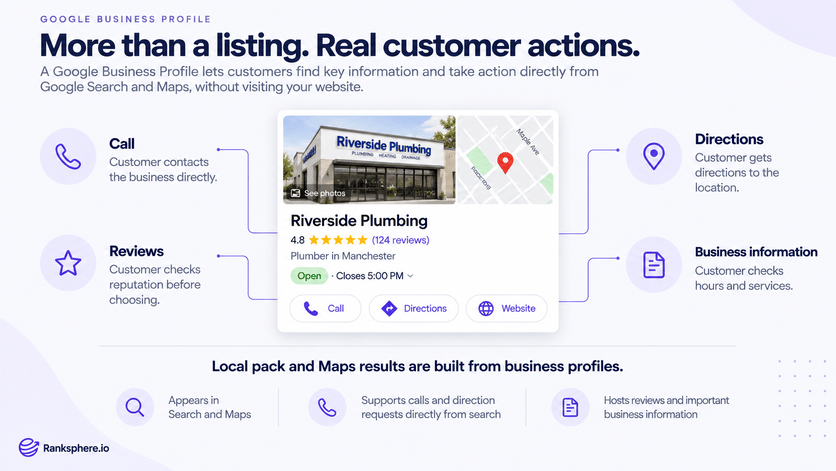
The fields differ in weight considerably. Categories and reviews do real ranking work; the business description does almost none.
- Name, address, phone, the core data, which must match your other listings
- Categories - one primary plus secondaries; the highest-leverage field on the profile
- Services and products, what you actually sell, increasingly used by AI-generated results
- Hours, special hours, attributes, accuracy here affects trust and conversion
- Photos and video, uploaded images have no alt text field; Google infers content itself
- Google Posts, short updates that keep the listing active
- Reviews and Q&A, public, and both worth managing actively
- Performance data, calls, direction requests, website clicks, search terms
How to set one up
You create or claim the profile, then prove you are entitled to manage it. Claiming is quick; verification is the part that takes time and where most people get stuck.
- Search for the business first, an unclaimed profile may already exist, and creating a second one causes duplicates
- Enter the business name exactly as it appears in the real world, with no added keywords
- Choose whether you are a storefront, a service area business, or both
- Complete verification using whichever method Google offers you
- Fill in every remaining field before you start optimising anything else
Google's Business Profile help documentation covers the mechanics of each step.
Managing several profiles through Google's own dashboard becomes painful quickly. Ranksphere's GBP management tools handle multiple locations from one place, with audits and change monitoring across all of them.
Common mistakes
- Adding keywords to the business name. “Smith Plumbing | Emergency Plumber Denver” violates the guidelines and is the leading cause of suspension.
- Creating a second profile instead of claiming the existing one. Duplicates get suspended and you lose the review history.
- Using a virtual office, mailbox or coworking address. Not an eligible location, and it will eventually be caught.
- Making several major edits in one sitting. Bulk changes to name, address, phone and category together look like spam.
- Leaving reviews and Q&A unanswered. Both are public, and both are read.
- Filling it in once and walking away. Hours drift, services change, and stale profiles slide.
Best practices
- Use the real-world business name, exactly as it appears on signage and registration
- Complete every field, then review the whole profile quarterly
- Make significant edits one at a time, with a few days between them
- Keep a dated record of the profile's state so you can spot unauthorised changes
- Monitor for user-suggested edits, which Google can apply without asking you
- Treat reviews as an ongoing programme rather than a campaign
Example
“Aurora Family Law has a profile created years ago by a former marketing agency. The name field reads “Aurora Family Law – Divorce Attorney Aurora CO”, the primary category is the generic “Law Firm”, four of seven practice areas are missing from services, and the last photo was uploaded in 2022.
The firm fixes it in stages rather than all at once. First the business name is corrected to match the registration. Two weeks later the primary category changes from “Law Firm” to “Divorce Lawyer”. A fortnight after that, the missing services and a set of current photos go in.
Spacing the edits matters as much as the edits themselves, the same three changes made in a single session are a common suspension trigger. Over the following quarter, pack visibility for divorce-related searches improves across most of the metro area, with the category change doing most of the work.”
See also
- Google Business Profile categories, the highest-impact field on the profile
- Google Business Profile verification, proving you manage the business
- Google Business Profile suspension, what happens when guidelines are broken
- Local pack, the result profiles feed
- Google Posts, updates published to the profile
- Service area business, profiles without a public storefront