Lazy loading is a website performance technique that delays loading certain resources, such as images, videos, and iframes, until they are needed.
Instead of loading every image or embedded element when someone opens a webpage, the browser can wait until those resources are approaching the visible part of the screen.
For example, a dental practice's website might contain a large gallery of treatment room photographs. Without lazy loading, the browser may begin downloading all the images immediately, even though most visitors haven't scrolled down to see them.
With lazy loading, images further down the page can wait until the visitor gets closer to them.
This reduces unnecessary initial downloads and can improve loading performance.
However, lazy loading needs to be configured correctly.
If important images are delayed unnecessarily, the page may load more slowly from the visitor's perspective.
Poorly implemented JavaScript lazy loading can also prevent search engines from discovering content.
For local businesses, the goal is to delay resources that aren't immediately needed while making sure important content loads quickly and remains accessible to search engines.
How Does Lazy Loading Work?
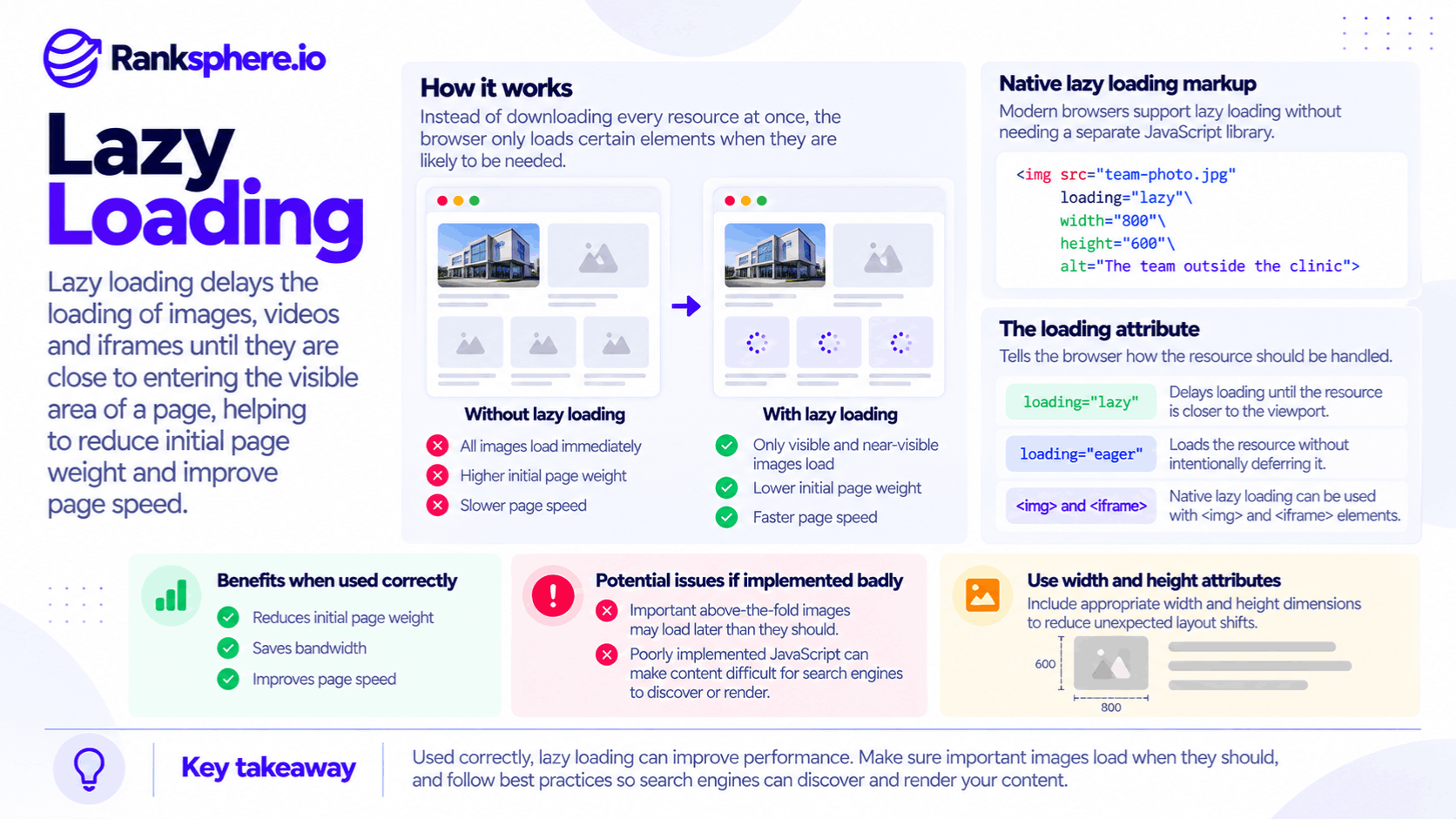
When a browser opens a webpage, it discovers resources such as images, stylesheets, scripts, and embedded content.
Normally, images may begin loading as the browser encounters them in the page.
Lazy loading changes when certain resources are requested.
Instead of downloading them immediately, the browser may wait until they're close to the viewport.
The viewport is the visible area of the webpage on the visitor's device.
For example, a visitor opening a roofing company's homepage may initially see:
- The navigation menu
- The main heading
- A hero image
- A call-to-action button
Further down the page, the website might contain a project gallery, customer testimonials, and an embedded map.
Lazy loading can delay the gallery images and map until the visitor approaches those sections.
This allows the browser to prioritise resources needed for the initial view.
Native Lazy Loading
Modern browsers support native lazy loading through the HTML loading attribute.
For images, developers can use:
- loading="lazy" — Tells the browser that the image can be loaded later.
- loading="eager" — Tells the browser to load the image without lazy-loading deferral.
The loading attribute is supported on image and iframe elements.
For most ordinary websites, native lazy loading is preferable to adding a separate JavaScript library solely to delay images.
However, the browser decides exactly when a lazy-loaded resource begins downloading.
It may start loading before the element becomes visible so the resource is ready when the visitor scrolls toward it.
Why Image Dimensions Matter
Images should generally have defined dimensions or an equivalent reserved layout space.
For example, setting appropriate width and height attributes allows the browser to calculate the image's aspect ratio before the file finishes loading.
Without reserved space, the page layout may move when the image appears.
This can contribute to Cumulative Layout Shift (CLS), one of Google's Core Web Vitals.
However, dimensions aren't only important for lazy-loaded images.
They help maintain stable layouts for images throughout a website.
Should You Lazy Load the Hero Image?
In most cases, you should not lazy load an image that is immediately visible when the page opens, particularly if it is the page's Largest Contentful Paint element.
The hero image is a common example.
A hero image is the prominent image displayed near the top of a webpage.
On many local business websites, it may show:
- A clinic or treatment room
- A roofing project
- A team photograph
- A service being performed
- A business location
If this image is the largest visible content element, it may determine the page's Largest Contentful Paint.
How Lazy Loading Affects LCP
Largest Contentful Paint (LCP) measures when the largest qualifying content element becomes visible in the viewport.
It is one of Google's Core Web Vitals.
When an important above-the-fold image is lazy loaded, the browser may delay requesting it.
That can increase the time needed to display the main visual content.
For example, if a homepage hero image uses loading="lazy", the browser may not prioritise it as early as it should.
Even if other images further down the page are delayed successfully, the slower hero image can worsen LCP.
How to Handle Important Above-the-Fold Images
For images likely to be visible immediately:
- Avoid using loading="lazy".
- Make sure the image can be discovered early.
- Consider fetchpriority="high" for the LCP image.
- Use preload hints when appropriate, particularly if the image would otherwise be discovered late.
- Optimise the image format, dimensions, and file size.
Preloading isn't necessary for every hero image.
For example, an image referenced directly in the initial HTML may already be discoverable early.
The correct approach depends on how the page is built and what the performance measurements show.
Watch for Automatic Lazy Loading Plugins
Some WordPress performance plugins and website optimisation tools apply lazy loading automatically.
This can be useful for galleries and images further down the page.
However, check whether the plugin excludes important above-the-fold images.
A plugin that indiscriminately applies lazy loading to every image may delay the one image most important to the visitor's initial experience.
What Should You Lazy Load?
Lazy loading is most useful for resources visitors don't need immediately.
For local business websites, several elements are good candidates.
Images Below the Fold
Images appearing further down a page are commonly suitable for lazy loading.
For example, a roofing company might have several project photographs below its main service description.
Visitors who never reach that section may not need to download those images.
Delaying them can reduce unnecessary network activity during the initial page load.
Image Galleries
Long galleries can contain dozens of photographs.
For example, a landscaping company may display completed garden projects across several sections.
Loading every image immediately can increase the initial amount of data requested.
Lazy loading allows the browser to fetch images as visitors approach them.
The images should still use appropriate sizes, formats, and dimensions.
Lazy loading doesn't replace image compression or responsive image optimisation.
Embedded Google Maps
An embedded Google Map can add substantial resources to a webpage.
Local business websites often place maps on:
- Contact pages
- Location pages
- About pages
- Service area pages
If the map appears below the initial viewport, lazy loading may reduce the amount of work required when the page first opens.
For example, a dental clinic's contact page might include its address, phone number, opening hours, and a Google Maps embed.
If the map appears further down the page, delaying the iframe can help prioritise the contact information visitors see first.
However, if the map is immediately visible and central to the page, delaying it may not improve the experience.
Embedded Videos
Videos can require additional resources and scripts.
For example, a physiotherapy clinic may embed a video introducing its staff or explaining a treatment.
If the video appears below the fold, lazy loading its iframe or using an appropriate lightweight preview can improve initial loading performance.
However, visitors should still be able to access the video normally when they reach it.
Third-Party Widgets
Local business websites may use third-party elements such as:
- Review widgets
- Booking tools
- Social media embeds
- Video players
- Interactive maps
These resources can add JavaScript, network requests, and rendering work.
When the widget isn't needed immediately, deferring its loading may help.
However, some widgets require specific integration methods, so they should be tested carefully after changes.
Does Lazy Loading Affect SEO?
Lazy loading can support better website performance, but incorrect implementations may create crawling and indexing problems.
The main concern is whether search engines can discover and render the content.
Native Lazy Loading and Google Search
Native lazy loading is generally compatible with Google's rendering systems when implemented correctly.
For example, an image with a real src attribute and loading="lazy" can be discovered without requiring a user to click a button or manually scroll.
However, search engine compatibility doesn't mean every lazy-loading implementation is automatically correct.
The page still needs to provide accessible resources and allow Google to discover the content.
JavaScript Lazy Loading Problems
Some websites use JavaScript to replace placeholder images with actual image URLs.
For example, the page may initially contain a placeholder while JavaScript waits for a scroll event before inserting the real image.
This can cause problems when the implementation requires an interaction that Google doesn't perform.
Google Search can render JavaScript, but it doesn't interact with pages exactly like a human visitor.
It doesn't rely on manually scrolling through a webpage or clicking buttons to reveal content.
If important content only becomes available after those interactions, Google may not discover it correctly.
For more information, see JavaScript SEO.
Lazy Loading Important Text Content
Lazy loading is normally most appropriate for images, videos, and other non-essential resources.
Important text should generally be available without requiring user interaction.
For example, a service page shouldn't require someone to scroll before its main service description is inserted into the page.
Google needs to be able to access the information that explains what the page is about.
This doesn't mean every interactive page component is automatically an SEO problem.
The concern is whether essential indexable content depends on interactions or scripts that prevent Google from discovering it.
Infinite Scroll and Pagination
Some websites load additional content as visitors scroll.
This is commonly called infinite scroll.
For example, a website might display more products, articles, or listings as someone reaches the bottom of the page.
The problem occurs when those additional items are only accessible through scrolling and don't have crawlable URLs.
Google may not discover all the content.
For important collections, provide accessible links and a suitable pagination structure where appropriate.
Infinite scroll can still be used for the visitor experience, but it shouldn't be the only way search engines can reach important content.
How to Check Whether Lazy Loading Works Correctly
After enabling lazy loading, check both page performance and search engine accessibility.
1. Test the Page on Mobile
Mobile visitors may experience different loading behaviour from desktop users.
Open the page on a mobile device and check:
- Whether the hero image loads promptly
- Whether images appear as you scroll
- Whether the layout shifts when images load
- Whether embedded maps and videos work
- Whether important content remains accessible
Testing on a real device can help reveal issues that aren't obvious from a desktop browser.
2. Review Core Web Vitals
Check whether the implementation affects:
- Largest Contentful Paint
- Interaction to Next Paint
- Cumulative Layout Shift
Lazy loading may reduce unnecessary initial downloads, but that doesn't guarantee improvements to all three metrics.
For example, loading fewer images may help resource prioritisation.
However, images without reserved dimensions may still cause layout shifts.
3. Use Google Search Console URL Inspection
Google Search Console provides URL Inspection tools that can help investigate how Google accesses and renders a page.
Use the live URL test where appropriate and inspect the rendered output and available resources.
Check whether important images and content are accessible.
However, don't rely on the rendered screenshot alone.
An image may be discoverable to Google even if it isn't visible in a screenshot because it is below the captured viewport.
Consider the rendered HTML, image URLs, accessibility of important content, and any reported loading errors.
4. Check What Plugins Are Changing
If your website uses a performance plugin, review its lazy-loading settings.
Check whether it:
- Adds lazy loading to every image
- Excludes above-the-fold images
- Rewrites image URLs
- Uses JavaScript placeholders
- Reserves image dimensions
- Defers embedded iframes
Don't assume the default settings are appropriate for every page.
5. Run a Technical Website Audit
A website audit can help identify performance and technical issues associated with image loading, resources, and rendering.
Ranksphere's website audit tool helps review website performance and technical SEO issues that may need attention.
For JavaScript-dependent content, additional rendered-page testing may be necessary to confirm what search engines can access.
Common Lazy Loading Mistakes
Several implementation mistakes can reduce the benefits of lazy loading or create new problems.
- Lazy loading the hero image. Delaying an important above-the-fold image can worsen LCP.
- Applying lazy loading to every image. Sitewide rules may affect images that should load immediately.
- Failing to reserve image dimensions. Images can cause layout shifts when their space isn't defined.
- Using JavaScript that requires scrolling. Search engines may not trigger the interactions needed to reveal content.
- Hiding important content behind user interactions. Essential text and links should remain accessible to crawlers.
- Using infinite scroll without crawlable URLs. Additional content may become difficult for Google to discover.
- Assuming lazy loading replaces image optimisation. Large images still need appropriate compression and sizing.
- Never testing the rendered page. An implementation may appear correct in the browser while creating accessibility or indexing problems.
Lazy Loading Best Practices
To implement lazy loading effectively:
- Use native browser lazy loading for suitable images and iframes.
- Avoid lazy loading important above-the-fold images.
- Identify the LCP element before changing image-loading behaviour.
- Consider high fetch priority or preloading where appropriate.
- Include image dimensions or otherwise reserve layout space.
- Lazy load images and galleries that appear further down the page.
- Consider lazy loading below-the-fold maps and video embeds.
- Keep essential text accessible without requiring scrolling or clicking.
- Provide crawlable URLs for important paginated or infinite-scroll content.
- Test on mobile and desktop devices.
- Inspect rendered content using Google Search Console when needed.
- Review automatic lazy-loading settings in performance plugins.
- Compare performance before and after implementation.
The objective is to reduce unnecessary loading without delaying the resources that visitors need immediately.
Example of Lazy Loading Affecting Core Web Vitals
Consider a hypothetical optician called Fernhill Opticians.
The practice installs a website performance plugin to improve mobile loading speed.
The plugin enables lazy loading automatically.
However, it applies loading="lazy" to every image on the website, including the homepage hero image.
What Happens to Website Performance?
The website's Largest Contentful Paint becomes slower.
For illustration, suppose its measured mobile LCP increases from 2.9 seconds to 3.6 seconds after the change.
The team expected lazy loading to improve performance, so the result is confusing.
A closer inspection reveals that the hero image is the largest visible content element on the page.
Because the image is lazy loaded, its request may be delayed instead of being prioritised during the initial load.
Images further down the page are being deferred successfully, but the most important image is also being delayed.
How the Developer Fixes It
The developer reviews the plugin configuration and makes several changes:
- Excludes the homepage hero image from lazy loading
- Removes unnecessary lazy-loading rules from other above-the-fold images
- Ensures the hero image is discoverable early
- Considers an appropriate fetch priority or preload hint
- Confirms that image dimensions are reserved
- Keeps lazy loading enabled for images further down the page
The team tests the website again.
For example, a later reporting period might show LCP improving to approximately 2.1 seconds, although the actual result would depend on the page, visitor conditions, and other changes.
Example Shows
“Lazy loading wasn't necessarily the wrong technique.
The problem was applying it to an image that needed to load immediately.
Once important above-the-fold images were excluded, the website could benefit from delaying less important resources without unnecessarily slowing the hero image.
Lazy loading improves performance when it delays resources visitors don't need yet. It can make performance worse when it delays the content they're waiting to see.
For local businesses, the most effective approach is to use lazy loading selectively, keep important content accessible, and confirm the results through performance and rendering tests.”
See Also
- Core Web Vitals — Measuring loading performance, responsiveness, and visual stability.
- Image SEO — Optimising website images for search engines and visitors.
- Page Speed — Understanding the factors affecting website loading time.
- JavaScript SEO — Ensuring JavaScript-rendered content is accessible to search engines.
- Pagination — Making multi-page and infinite-scroll content discoverable.
- Technical SEO — Improving the technical elements that affect crawling, indexing, and performance.