A site migration is a significant change to a website's domain, platform, URL structure, or technical setup that can affect how search engines access, understand, and index its content.
For example, a business might move from one website platform to another, change its domain after rebranding, or reorganise its service pages under new URLs.
The changes may look straightforward to visitors. The homepage loads, the navigation works, and the website appears finished.
But behind the scenes, search engines may need to discover new URLs, process redirects, and reassess the updated pages.
This makes site migration one of the more important technical SEO projects to plan carefully.
Most avoidable migration problems come from details that weren't checked before or immediately after launch.
Common examples include a staging robots.txt rule blocking search engines, incorrect canonical tags, temporary 302 redirects used for permanent URL changes, and noindex directives accidentally left on important pages.
A successful migration involves more than launching the new website. It requires making sure the content, URLs, and technical signals still work as intended.
What Counts as a Site Migration?
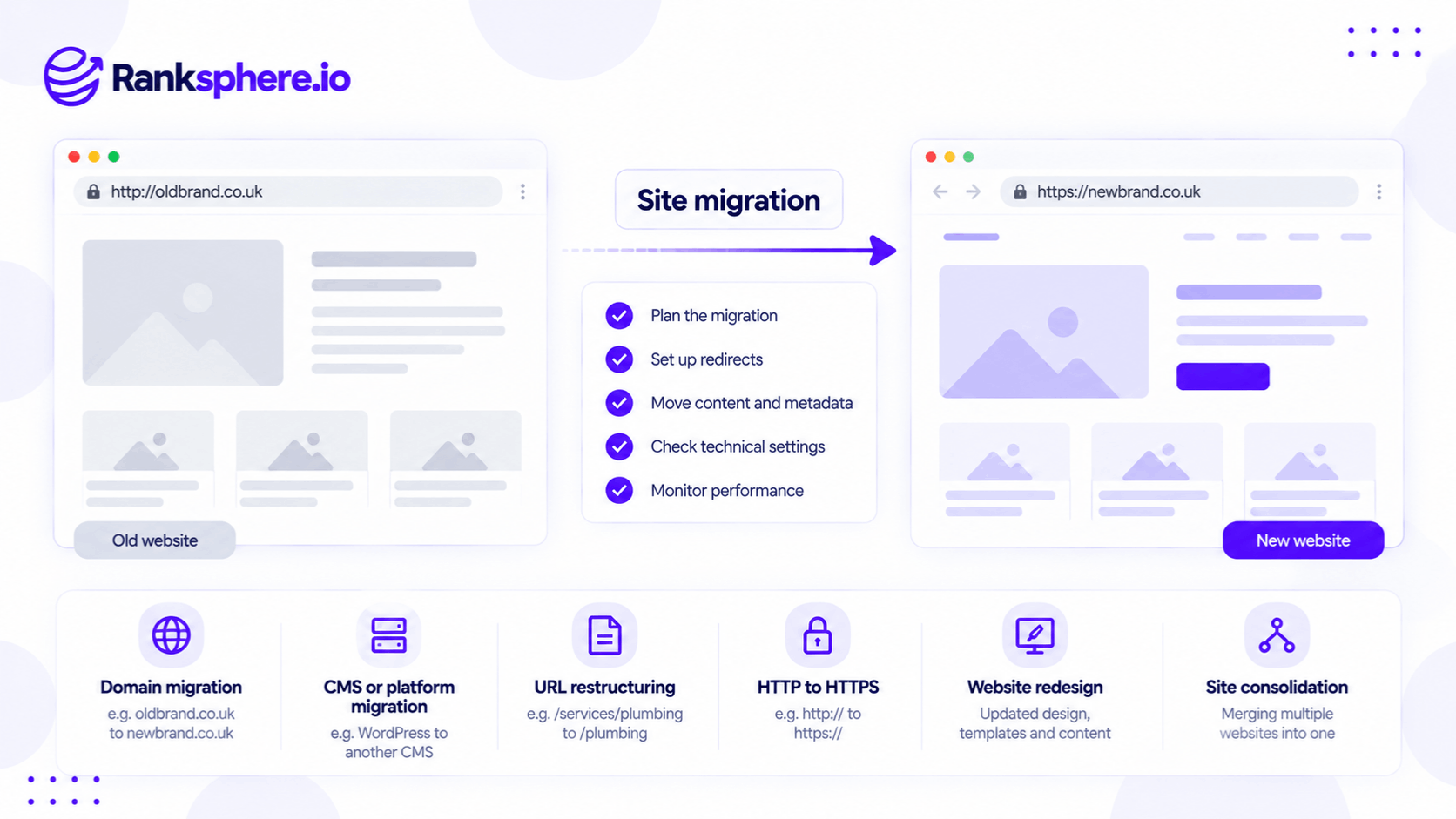
Not every website update is a migration.
Changing a photograph or updating a paragraph usually doesn't require a formal migration plan.
However, larger changes can affect indexing, internal links, and search visibility.
Domain Migration
A domain migration occurs when a website moves to a different domain.
For example:
oldbusiness.com → newbusiness.com
This often happens during a rebrand, acquisition, or business consolidation.
Domain migrations require particular care because search engines need to associate the old URLs with their new destinations.
Website Platform Migration
A platform migration involves moving a website from one content management system or technology stack to another.
For example, a business may move from WordPress to a different website platform.
The design may remain similar, but the new system could change URL structures, internal links, canonical tags, or other technical elements.
Platform changes don't necessarily require new URLs, but they still need testing.
URL Structure Migration
A URL migration changes the paths used to access website pages.
For example:
example.com/services/roofing-repairs
becomes:
example.com/roof-repair
These changes may result from a new website structure or updated URL slugs.
When URLs change permanently, the old addresses generally need redirects to their relevant replacements.
HTTP to HTTPS Migration
Moving from HTTP to HTTPS changes the protocol used to access a website.
For example:
http://example.com
becomes:
https://example.com
The migration should include appropriate permanent redirects, valid security certificates, and updated internal links.
Website Redesign
A redesign doesn't always change the URLs.
However, it may significantly change:
- Page content
- Headings
- Navigation
- Internal links
- Service page structure
- Mobile layouts
- Technical templates
These changes can affect search performance even when the URLs stay the same.
For example, a roofing company might redesign its homepage and remove important service descriptions that previously helped users understand its offerings.
The new page may look better but answer fewer relevant questions.
Website Consolidation
A consolidation combines multiple websites or sections into one.
For example, a business may acquire another company and merge both websites under one domain.
The migration needs to determine which content should remain, which pages should be combined, and where old URLs should redirect.
Why Can Site Migrations Affect SEO Rankings?
Google needs to discover, crawl, and process changes to a website.
When important URLs move, Google must understand where their content now lives.
Permanent redirects help communicate that relationship.
However, a migration can also change the content and other signals Google uses to evaluate pages.
For example, rankings may be affected if:
- Important pages disappear.
- Old URLs redirect to unrelated destinations.
- Internal links break.
- Canonical tags reference incorrect pages.
- Valuable content is removed.
- Pages become blocked from crawling or indexing.
- The new website loads incorrectly.
Even a properly executed migration can experience temporary ranking fluctuations while Google processes the changes.
That doesn't mean every decline is normal or that traffic will always recover automatically.
The objective is to preserve useful content and technical signals while reducing avoidable problems.
SEO Site Migration Checklist
A reliable migration process has three stages: preparation, launch, and monitoring.
Each stage should be completed before moving to the next.
Before the Migration
1. Crawl the Existing Website
Start by collecting the URLs currently available on the website.
Include:
- Homepage
- Service pages
- Location pages
- Blog articles
- Important landing pages
- Images and downloadable files where relevant
A website crawl helps identify pages that may otherwise be missed during the move.
Also review XML sitemaps, analytics, and other available records for URLs that may not be discoverable through internal links.
2. Export Historical Search Performance
Use Google Search Console to record the website's performance before launch.
Review:
- Organic clicks
- Search impressions
- Important queries
- Top-performing pages
- Indexing information
- Relevant search appearance data
Export useful historical data before changing the website.
Search Console provides limited historical performance retention, so important baseline information should be saved.
3. Record Current Rankings
Identify the keywords and pages that matter to the business.
For a local company, this may include service and geographic searches.
Where relevant, record local ranking performance and geo-grid coverage.
This gives the agency a baseline for evaluating changes after launch.
However, ranking comparisons should account for location, device, competition, and normal fluctuations.
4. Identify Pages With Important Backlinks
Review pages that have valuable backlinks.
For example, a business may have a roofing guide linked from a local publication.
If that page moves, the redirect should lead to its relevant replacement.
Otherwise, visitors following the link may reach an error page or unrelated content.
Pages with valuable external links deserve particular attention, but they aren't the only URLs that need mapping.
5. Build a Redirect Map
A redirect map documents where old URLs should lead after the migration.
For example:
| Old URL | New URL |
| /roof-repairs | /services/roof-repair |
| /gutter-services | /services/guttering |
| /contact-us | /contact |
Each old URL should lead to the most relevant new destination.
If several old pages are genuinely combined into one comprehensive page, redirects to that consolidated destination may be appropriate.
Avoid redirecting unrelated pages to the homepage.
Google may treat irrelevant redirects as soft 404 errors.
6. Review the Staging Website
A staging website allows developers and SEO teams to test changes before launch.
The staging environment should be protected appropriately so unfinished content doesn't become publicly indexed.
This may involve access restrictions or other suitable controls.
If robots.txt or noindex rules are used during development, document exactly what needs to change when the new website goes live.
The staging protections should not accidentally block the production website.
What to Check on Site Migration Launch Day
Launching the redesigned website is only one part of the process.
The most important technical settings need to be verified immediately.
Check Redirect Status Codes
Permanent URL changes should normally use permanent server-side redirects, such as 301 redirects or HTTP 308 redirects.
For example:
example.com/old-service → example.com/new-service
Google recommends permanent redirects for pages that have permanently moved.
A 302 redirect communicates that the move is temporary.
Google can still process temporary redirects, but they don't provide the same direct canonicalisation signal as permanent redirects.
This makes permanent redirects the appropriate choice for ordinary permanent migrations.
Avoid Redirect Chains
A redirect chain occurs when one URL redirects through several other URLs before reaching the final destination.
For example:
Old page → Intermediate page → New page
Google can follow redirect chains, but unnecessary hops increase complexity and can slow access.
Where possible, redirect the old URL directly to the final destination.
Check Canonical Tags
Canonical tags help search engines understand which URL should be treated as the preferred version of a page.
After the migration, canonical tags should reference the correct new URLs.
For a straightforward migration, important indexable pages will commonly use self-referencing canonicals.
For example, the canonical tag on:
example.com/services/roof-repair
should normally reference that URL rather than the old address.
However, canonical configuration depends on the website's content structure. Intentional duplicate or alternate pages may need a different canonical target.
Remove Unintended Indexing Restrictions
Review both robots.txt and page-level indexing directives.
Make sure important production pages aren't accidentally blocked.
For example:
Disallow: /
can prevent Googlebot from crawling an entire site when used in the wrong robots.txt configuration.
Likewise, a noindex directive on an important service page can prevent it from appearing in Google Search.
These settings should be tested rather than assumed to be correct.
Submit the Updated XML Sitemap
An XML sitemap should contain the intended new URLs.
Submit it through Search Console.
A sitemap helps Google discover URLs, but it doesn't guarantee indexing.
Review Search Console Properties
For a domain migration, verify the relevant old and new website properties in Search Console.
Google also provides a Change of Address tool for supported domain and subdomain moves.
However, this tool isn't needed for every migration.
For example, it isn't required for an HTTP-to-HTTPS change or for restructuring paths within the same domain.
The tool also doesn't replace redirects.
Test Important Pages
Don't rely only on whether the homepage loads.
Test:
- Main service pages
- Location pages
- Contact forms
- Booking links
- Navigation
- Mobile layouts
- Tracking scripts
- Redirect destinations
For example, a dental practice may complete a technically correct migration but discover that its appointment booking form no longer submits properly.
That's a serious business problem even if search rankings remain stable.
What to Monitor After a Site Migration
A migration doesn't finish when the website launches.
Google may continue processing changed URLs over time.
Monitor Indexing
Check Search Console for unexpected indexing issues.
For example, a sudden increase in not-found errors may indicate missing redirects or incorrectly mapped pages.
Review both the old and new properties when relevant.
Check Organic Traffic
Compare performance against the pre-migration baseline.
Look at:
- Total organic traffic
- Important landing pages
- Search impressions
- Branded and non-branded queries
- Enquiries and other conversions
Avoid evaluating the migration using only one overall traffic figure.
Some pages may recover while others remain affected.
Crawl the New Website
Run another website crawl after launch.
Look for:
- Broken internal links
- Redirect chains
- Unexpected temporary redirects
- Incorrect canonical tags
- Non-indexable important pages
- Missing content
Ranksphere's Website Audit Tool helps identify technical website issues, including problems that may affect crawling, indexing, and site structure.
An audit provides useful findings, but it should be combined with Search Console and manual checks to evaluate the migration properly.
Keep Redirects Active
Google recommends keeping redirects in place for as long as possible, generally at least one year.
This gives Google time to process the move and helps users following old links reach the correct content.
For important external links, maintaining redirects for longer may be worthwhile.
Removing redirects too early can create broken links and interrupt access to pages that have moved.
Local SEO Checks During a Website Migration
Local businesses have additional migration tasks that generic technical SEO checklists sometimes overlook.
Update Google Business Profile Website Links
Check the website URL in the business's Google Business Profile.
If the domain or landing page URL has changed, update the field to point directly to the correct destination.
For example, a plumbing company's profile shouldn't continue linking to an old domain unnecessarily.
A redirect can preserve access, but updating the destination avoids the extra step.
Review Local Citations
Business citations may contain the old website address.
Check important directories and update the website link where appropriate.
For example, a business that has changed its domain may still have the previous URL listed on trade directories or industry websites.
Prioritise sources relevant to customers rather than attempting to update every obscure directory immediately.
Update LocalBusiness Schema
Review the website's LocalBusiness schema.
Relevant properties may include:
- url
- @id
- sameAs
- image
- Other URLs referencing the old website
However, each property should be reviewed according to its meaning.
For example, @id identifies the entity in structured data and should remain consistent with the site's intended entity identification strategy.
Don't change values unnecessarily or include properties that aren't supported by real business information.
Update UTM-Tagged Links
Businesses may use UTM parameters to understand traffic from Google Business Profile, email campaigns, or other sources.
Review these links after the migration.
For example, if the Business Profile uses a UTM-tagged website URL, update its destination while preserving appropriate tracking parameters.
Also check that redirects and the new site's analytics configuration don't interfere with attribution.
Check Local Location Pages
Businesses operating across several areas should confirm that important location pages remain available.
Check whether each page still contains relevant information, such as:
- Location details
- Services
- Opening hours
- Contact information
- Genuine local content
- Internal links
A redesign that removes location-specific information may affect the usefulness and search relevance of those pages.
Common Site Migration SEO Mistakes
Redirecting Everything to the Homepage
Redirecting every old URL to the new homepage isn't an appropriate replacement for a proper URL map.
Google may treat irrelevant redirects as soft 404 errors.
Instead, redirect each old URL to a genuinely relevant destination.
Using Temporary Redirects for Permanent Moves
A platform may default to a 302 redirect.
The website may appear to work in a browser, but the status code communicates a different intention from a permanent move.
Check the actual HTTP response rather than relying only on visual testing.
Leaving Staging Restrictions in Place
Robots.txt and noindex directives used during development can become serious problems if they are deployed to the production website.
Check the live website immediately after launch.
Forgetting Internal Links
Redirects help people and search engines reach the new URLs.
However, the new website's internal links should point directly to the intended destinations.
Relying unnecessarily on old URLs creates additional redirect hops.
Removing Useful Content During a Redesign
A visually improved website may lose important information.
For example, a roofing company could replace detailed service pages with short generic descriptions.
Even if redirects are technically correct, search performance may change because the content itself is different.
Launching Without Baseline Data
Without historical information, it becomes difficult to tell whether changes are caused by the migration or by other factors.
Record relevant search performance before launch.
Ignoring Local Business Listings
A local business may update its website but forget the old URL in Google Business Profile and important directories.
This can create unnecessary redirects or broken customer journeys.
Launching Without Monitoring
A technically complex migration needs people available to investigate problems.
Avoid scheduling the launch when developers and SEO staff cannot monitor the results.
The ideal timing depends on the business's traffic patterns and support arrangements, not a universal rule against launching on a particular weekday.
How Long Does SEO Recovery Take After a Site Migration?
There isn't a fixed recovery period.
Google explains that migration processing depends on factors such as the number of URLs, server performance, and how quickly its systems discover and process the changes.
For small and medium-sized websites, Google may begin showing most of the new URLs within a few weeks.
Larger or more complicated migrations can take longer.
Temporary ranking fluctuations are normal.
However, businesses shouldn't assume every decline will resolve itself.
If important pages lose visibility, investigate technical errors, missing content, redirect problems, and other possible causes.
A well-planned migration reduces unnecessary risk but cannot guarantee identical rankings or traffic afterward.
The best approach is to monitor performance closely and investigate unexpected changes rather than wait for an arbitrary recovery deadline.
Site Migration Best Practices
For a safer SEO migration:
- Crawl and document the existing website.
- Export Search Console and analytics baselines.
- Identify important pages and backlinks.
- Create a complete redirect map.
- Test the new website before launch.
- Use permanent redirects for permanent URL changes.
- Check canonical tags and indexing directives.
- Update internal links to the new URLs.
- Submit an updated XML sitemap.
- Use the Change of Address tool when applicable.
- Keep redirects active for at least a year where possible.
- Update Google Business Profile and important citations.
- Review structured data and tracking links.
- Check important location pages.
- Monitor indexing and traffic after launch.
- Investigate unexpected problems promptly.
The goal is to make the move clear to users and search engines while preserving as much useful content and existing search visibility as possible.
Example
“Consider a hypothetical outdoor equipment retailer called Carrow Outdoor.
The company moves its website to a new platform.
The developer creates redirects for more than 200 old URLs and tests several examples in a browser.
Each old address opens the correct new page.
The team assumes the redirects are working properly.
After launch, the agency notices that some old URLs remain visible in Google's search results.
Several new pages also struggle to gain visibility.
A technical review reveals that the platform's redirect manager was configured to use temporary 302 redirects.
The redirects worked for visitors, but they didn't clearly communicate that the URL changes were permanent.
A browser normally follows a redirect regardless of whether it returns a 301 or 302 status code.
From the visitor's perspective, the page opens successfully.
However, search engines interpret permanent and temporary redirects differently.
The team had checked the destination but not the HTTP response.
The agency reviews the redirect map and changes the relevant redirects to permanent 301 responses.
It also checks:
- Canonical tags
- Internal links
- XML sitemap URLs
- Indexing directives
- Important landing pages
The team then monitors Search Console to see how Google processes the updated URLs.
Google may gradually replace old URLs with their new destinations as it recrawls the site.
However, the agency cannot guarantee when this will happen or whether every page will return to its previous ranking.
The team continues monitoring and investigating other issues if performance remains below expectations.”
See Also
- 301 Redirect — Sending old URLs to their permanent replacements.
- 302 Redirect — Understanding temporary redirects and when to use them.
- Canonical Tag — Identifying the preferred URL for a page.
- Robots.txt — Controlling which website areas search engines may crawl.
- Benchmark Report — Recording performance before a major website change.
- HTTPS — Secure website connections and protocol changes.