The phrase itself is the least important part. Google has treated near me searches like “coffee shop near me” and a bare “coffee shop” as essentially the same request for years, both signal that the searcher wants somewhere nearby, and both return a map. Understanding that saves a lot of wasted effort, because the most common near-me tactic is also the most useless one.
Why near me searches matter
These are the highest-intent searches a local business can receive. Nobody types “emergency plumber near me” out of curiosity. The gap between the search and the phone call is usually minutes.
They also almost always produce a local pack. That makes the Google Business Profile, not the website, the asset that decides whether you appear.
- Extremely high commercial intent, often immediate
- Overwhelmingly mobile, where the pack dominates the screen
- Reliably trigger map results rather than plain organic links
- Frequently end in a call or a direction request rather than a website visit
How Google handles a Near-Me Search
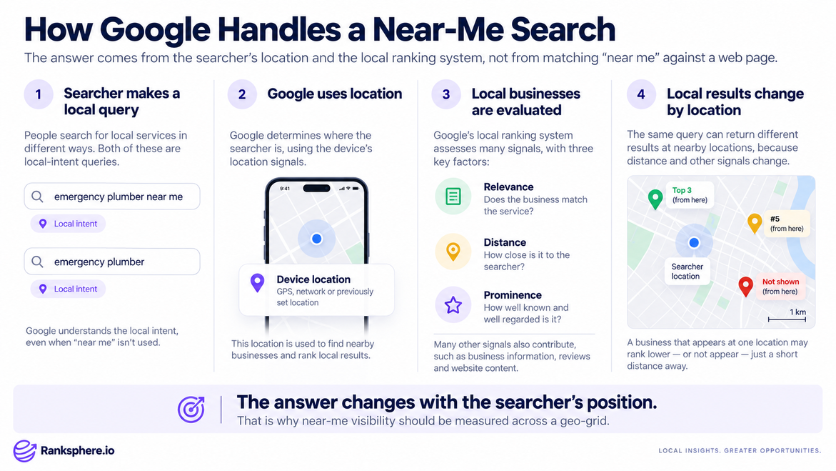
Google resolves a near-me query using the device's location, GPS, network, or a previously set location, rather than the words. The phrase “near me” is a hint about intent, not a keyword to be matched against your page.
This is the part that catches people out. There is no page you can write that makes you the answer to “near me”, because the answer changes with every searcher's position. What you can influence is whether you are eligible and compelling when someone in your area searches: the right categories, a complete profile, strong reviews, and an address inside a realistic radius.
- Location comes from the device, not the query text
- “Near me” and the bare service term usually return near-identical results
- Proximity weighting is heaviest in dense markets and lightest in sparse ones
- Results change street by street, which is why geo-grid tracking is the sensible way to measure them
How to compete for them
Everything that improves local ranking factors improves near-me visibility, because they are the same system. There is no separate near-me discipline.
- Choose the narrowest accurate primary category
- Complete services so the profile matches the specific thing being searched
- Build reviews steadily, prominence is what separates you from equally close competitors
- Keep hours accurate, since “open now” filtering is common on these searches
- Make sure the phone number is correct and the call button works
- Track coverage across your service area rather than a single rank
Ranksphere's local rank tracker maps where you actually appear for these queries across a grid, which is the only honest way to measure a result that changes by location.
Common mistakes
- Forcing “near me” into page titles or headings. It usually sounds unnatural and does not make a page more relevant to someone nearby.
- Creating separate “[service] near me” pages. Location is based on the searcher, not on whether a page contains the phrase “near me.”
- Adding keywords to the business name. Your Google Business Profile name should reflect the real-world business name, not extra search terms.
- Focusing only on the website. Near-me searches often rely heavily on local results, so your Google Business Profile, categories, reviews and business details also matter.
- Forgetting about opening hours. If someone searches for a business that is open now, inaccurate or outdated hours can reduce your chances of appearing.
- Checking rankings from only one location. Local results can change significantly from one street or neighbourhood to another, so a single search does not show the full picture.
Best practices
- Focus on the service and location. Write naturally around what you offer and where you offer it instead of forcing the phrase “near me” into the page.
- Keep your Google Business Profile accurate. Categories, services, contact details and other business information should reflect what customers can actually expect.
- Update your opening hours regularly. This includes special hours, public holidays and any temporary changes.
- Create useful service pages. Explain the service clearly, answer common questions and include the local information a customer needs before getting in touch.
- Track actions that matter. Calls, direction requests and enquiries are often more useful than looking at website sessions alone.
- Measure visibility across your area. Local rankings change by location, so use several search points to understand where the business is actually visible.
Example
“Kettle & Crumb, an independent bakery, asks its agency to “rank for bakery near me.” The agency's first instinct is a page titled “Bakery Near Me | Kettle & Crumb.”
It does nothing, because it cannot. Google is not matching those words against a page, it is finding bakeries close to whoever searched and ordering them by relevance and prominence.
The work that does move it looks unrelated to the phrase: the primary category is corrected from “Restaurant” to “Bakery”, opening hours are fixed so the shop stops disappearing from “open now” results at 7am, product listings are added, and staff start asking regulars for reviews. Within two months the bakery appears in the pack across most of the surrounding neighbourhoods. The words “near me” appear nowhere on the site.”
See also
- Local Pack, the local results displayed for many location-based searches
- Local Ranking Factors, the factors Google uses when ordering local results
- Google Business Profile, the business information shown across Google Search and Maps
- Geo-Grid Rank Tracking, a way to measure local rankings from different search locations
- Search Intent, understanding what a person is trying to find when they search
- Local SEO, improving a business’s visibility in local search results