Noindex is a directive that tells supported search engines not to include a page or other resource in their search index.
For an HTML page, it is normally added through a robots meta tag:
<meta name="robots" content="noindex">
It can also be sent through an HTTP response header:
X-Robots-Tag: noindex
The HTTP-header method is particularly useful for non-HTML resources such as PDFs, images or other files that do not have an HTML <head>. Google supports both approaches.
The important requirement is that the crawler must be able to access the URL.
If Googlebot cannot crawl the page, it cannot see the noindex directive.
That makes noindex one of the most useful indexing controls in technical SEO — and one of the most damaging directives to leave on an important page accidentally.
What does noindex do?
When Google crawls a page and finds:
<meta name="robots" content="noindex">
it understands that the page should not appear in Google Search.
If the page is already indexed, Google can remove it after recrawling and processing the directive. If it has never been indexed, the directive prevents it from being added while it remains in place.
Noindex controls indexing.
It does not necessarily stop:
- Crawling
- Users visiting the page
- Other websites linking to the page
- Search engines that do not support the directive
That distinction matters.
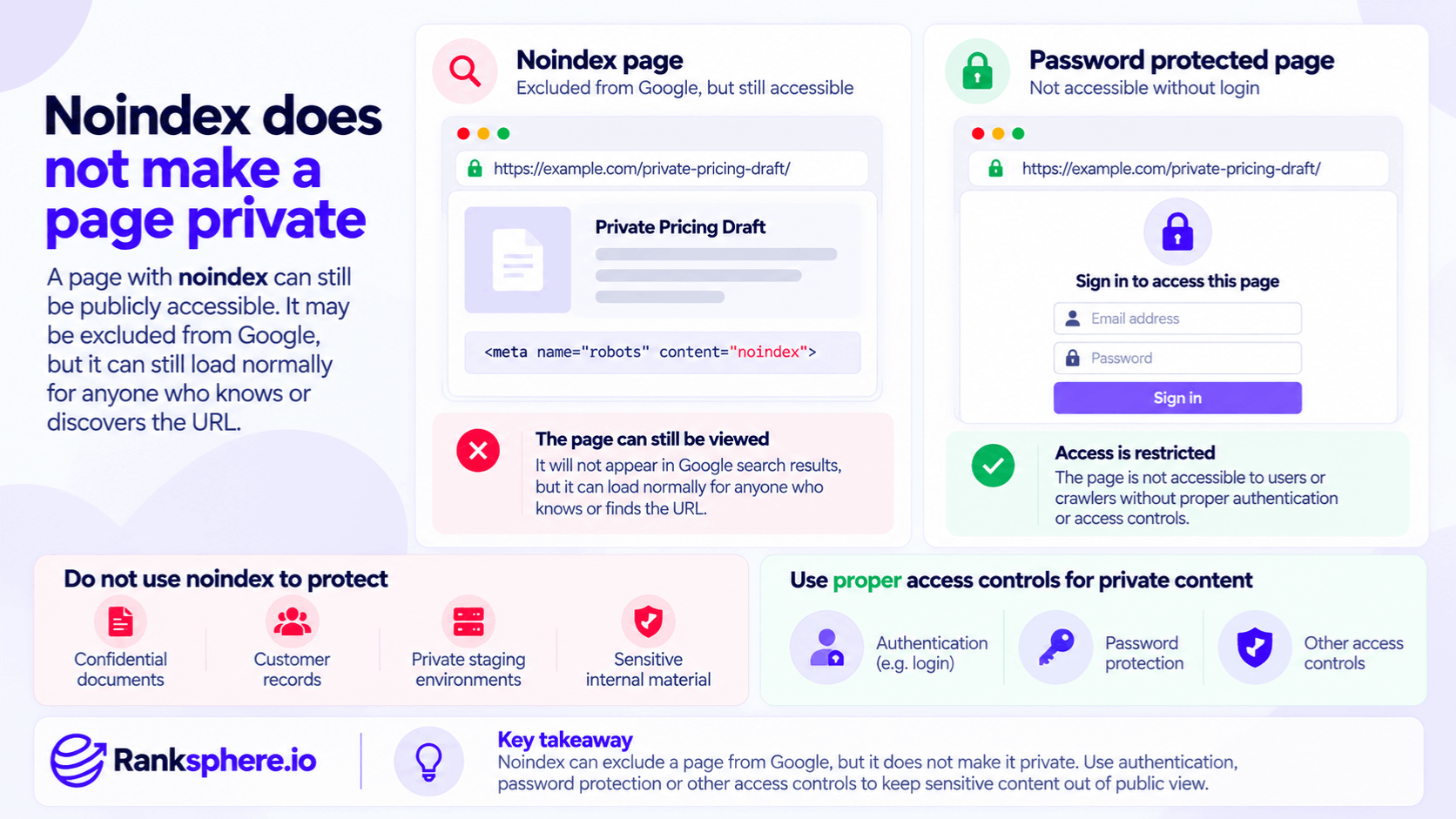
Noindex does not make a page private
A page with noindex can still be publicly accessible.
For example:
https://example.com/private-pricing-draft/
could be excluded from Google but still load normally for anyone who knows or discovers the URL.
So do not use noindex to protect:
- Confidential documents
- Customer records
- Private staging environments
- Sensitive internal material
For content that genuinely must remain private, use:
- Authentication
- Password protection
- Other proper access controls
Google specifically recommends restricting access when you need to prevent both users and crawlers from reaching the content.
How to add a noindex meta tag
For an ordinary HTML page, use the robots meta tag.
Place:
<meta name="robots" content="noindex">
within the HTML document.
Google's documentation recommends using the <head> section, although as of 2026 Google also documents that it can process supported robots meta directives found elsewhere in an HTML document. Keeping it in the <head> remains the clearest and most conventional implementation.
For example:
<!doctype html>
<html>
<head>
<title>Order Confirmation</title>
<meta name="robots" content="noindex">
</head>
<body>
...
</body>
</html>
Noindex with X-Robots-Tag
For files that do not contain HTML, use the HTTP response header.
For example:
HTTP/1.1 200 OK
Content-Type: application/pdf
X-Robots-Tag: noindex
Google specifically recommends X-Robots-Tag for non-HTML resources such as:
- PDFs
- Images
- Videos
where an HTML robots meta tag is not available.
The header can also be used on ordinary HTML responses where the server configuration makes that more practical.
Meta robots vs X-Robots-Tag
Both can express the same indexing rules.
Robots meta tag
Best suited to HTML pages.
<meta name="robots" content="noindex">
X-Robots-Tag
Sent through the HTTP response.
X-Robots-Tag: noindex
This is often preferable when controlling:
- PDFs
- Image files
- Generated resources
- Large URL groups through server rules
Neither is inherently stronger for Google.
The important thing is that the directive is valid, accessible and intentionally applied.
Noindex, follow
You will often see:
<meta name="robots" content="noindex, follow">
This means:
- Do not index the page
- Links on the page may still be followed
However, Google's default behaviour is already:
index, follow
when no relevant directive says otherwise.
That means you normally do not need to write follow explicitly.
In most cases:
<meta name="robots" content="noindex">
is sufficient if your only objective is keeping the page out of search results.
Noindex, nofollow
You can also use:
<meta name="robots" content="noindex, nofollow">
This tells supported crawlers:
- Do not index the page
- Do not follow links on the page
Google also supports:
<meta name="robots" content="none">
which is equivalent to:
noindex, nofollow
Use nofollow only when you actually want to instruct the crawler not to follow links from that page.
Do not add it by habit.
Index, follow
You may see:
<meta name="robots" content="index, follow">
but this is normally redundant.
Google's default behaviour is already equivalent to:
index, follow
unless another directive restricts it.
So a normal indexable page generally does not need a robots meta tag at all.
Noindex vs robots.txt
This is one of the most important distinctions in technical SEO.
Robots.txt controls crawling.
Noindex controls indexing.
They solve different problems.
robots.txt
Says:
Do not request this URL or path.
noindex
Says:
You may request this page, but do not show it in search results.
Google explicitly says robots.txt should not be used as the normal method for preventing a page from appearing in Search.
Why robots.txt does not reliably deindex a page
Suppose your robots.txt contains:
User-agent: *
Disallow: /private-page/
Googlebot cannot crawl:
/private-page/
That means it also cannot inspect:
- Page content
- Robots meta tag
- noindex
If Google learns about the URL through:
- Internal links
- External links
- Other sources
the URL can potentially still appear in search results, even though Google cannot crawl its contents normally.
So:
robots.txt is a crawl control, not a reliable indexing control.
Noindex and robots.txt together
Suppose the HTML contains:
<meta name="robots" content="noindex">
but robots.txt says:
Disallow: /page/
Google cannot fetch the HTML.
Therefore it cannot read the noindex.
Google's own documentation explicitly warns that page-level indexing rules cannot be read when robots.txt prevents crawling.
If your objective is:
keep this publicly accessible page out of Google Search
then the usual pattern is:
- Allow crawling
- Apply noindex
not both.
When robots.txt can still be appropriate
That does not mean robots.txt is wrong.
It is useful when your goal is genuinely to stop crawling.
For example:
- Endless URL patterns
- Certain internal search combinations
- Crawl traps
Google's own robots guidance distinguishes crawl control from indexing control.
Choose the mechanism according to the problem.
Noindex vs canonical tag
A canonical tag and a noindex directive also solve different problems.
Canonical
Says:
This page is a duplicate or close variant, and this other URL is the preferred representative.
Noindex
Says:
Do not show this page in search results at all.
Google specifically recommends using canonicalisation methods rather than noindex when your goal is simply to indicate the preferred version among duplicate pages.
Do not combine canonical and noindex without a clear reason
For example:
<link rel="canonical" href="https://example.com/main-page/">
<meta name="robots" content="noindex">
creates two different messages:
- Canonical: consolidate this page with another
- Noindex: exclude this page from Search
Google can process restrictive directives, but this is usually unnecessary if your only objective is duplicate consolidation.
Use the tool that matches the intention.
What pages might use noindex?
There is no universal list.
The right question is:
Should this URL appear as an independent search result?
Possible candidates can include:
- Thank-you pages
- Confirmation pages
- Some login or account pages
- Certain internal search results
- Some utility pages
- Selected campaign landing pages
- Certain low-value CMS archives
But each one needs context.
Thank-you pages
A page such as:
/thank-you/
shown only after a form submission usually does not need to appear in Google.
Noindex can make sense.
It may also prevent users from reaching the page directly through search and triggering:
- Conversion tracking
- Download access
- Other post-conversion behaviour
But if the page contains material that should genuinely remain private, noindex alone is not enough.
Confirmation pages
Similar logic applies to:
- Order confirmation
- Booking confirmation
- Form-completion confirmation
These pages are normally part of a user flow rather than independent search landing pages.
A noindex directive can therefore be appropriate.
Again, sensitive information needs proper access control, not merely SEO directives.
Login pages
Some account and login pages have little search value.
But think before automatically adding noindex.
If:
/login/
is useful for branded navigational searches, indexing may not necessarily create a problem.
For truly private account content behind authentication, Google normally cannot access the protected content anyway.
Noindex is a search directive, not a security layer.
Internal search result pages
Internal search result pages often do not need to appear in public search results.
For example:
/search?q=plumbing
may provide value inside the website but not as a Google landing page.
Depending on the site's scale and URL behaviour, the solution might involve:
- noindex
- Crawl controls
- URL architecture changes
Do not assume noindex is automatically the best approach for an enormous crawl space, because Google still needs to crawl a page in order to read the directive.
Filtered and sorted pages
Examples include:
?colour=red
?sort=price
?size=large
Some may be useful search landing pages.
Others may simply duplicate the same catalogue in a different order.
Potential solutions include:
- Canonicalisation
- Crawl controls
- Noindex
- Making certain combinations indexable intentionally
Choose according to:
- Search demand
- Uniqueness
- Crawl behaviour
- Site size
Do not add noindex to every filtered URL by default.
Tag and taxonomy archives
CMS platforms often generate:
- Tag pages
- Category pages
- Author archives
- Date archives
Some can be useful landing pages.
Others can become thin collections with little independent value.
The correct decision may be:
- Keep and improve
- Consolidate
- Noindex
- Remove
The existence of a taxonomy template alone does not make it unsuitable for indexing.
Campaign landing pages
A campaign landing page does not need noindex simply because it is used for:
- PPC
- Social advertising
If the page also has genuine organic search value, indexing may be useful.
Use noindex only when you deliberately do not want the page appearing in search.
Being:
“unlinked”
is not, by itself, a reason to noindex a page.
Staging websites
Staging sites deserve special treatment.
A public staging environment might contain:
- Duplicate production content
- Unfinished designs
- Development URLs
Noindex may reduce the chance of those pages appearing in Search if Google can crawl them.
But a better approach for genuinely private staging is usually:
- Authentication
- Password protection
- IP restrictions
Google itself recommends restricting access when content should not be publicly accessible.
That also prevents users from accidentally discovering unfinished material.
Why staging noindex frequently causes problems
A common deployment mistake looks like this:
Staging
<meta name="robots" content="noindex">
Production launch
The same tag gets deployed.
The site looks perfect.
Forms work.
Navigation works.
Nothing appears technically broken.
But Google receives:
do not index these pages.
That can affect:
- Service pages
- Location pages
- Blog posts
- Entire template groups
Noindex problems are dangerous precisely because they are invisible to ordinary visitors.
CMS-wide noindex settings
Many CMS platforms provide a global search-engine visibility setting.
WordPress, for example, has historically exposed a:
Discourage search engines from indexing this site
option.
The exact implementation depends on the platform.
When staging or development settings are copied into production, global noindex rules can accidentally remain enabled.
Always include indexing directives in launch QA.
Template-level noindex
Another common problem occurs when an SEO plugin or theme applies noindex at the template level.
For example:
Custom post type: Services → noindex
That may affect dozens or hundreds of pages at once.
The page editor can look completely normal.
The directive is inherited from the template.
This is why checking only individual CMS screens is not enough.
Crawl the site.
JavaScript and noindex
Noindex can also be injected through JavaScript.
Google supports JavaScript-generated robots directives, but there is an important limitation.
If the initial HTML already contains:
<meta name="robots" content="noindex">
do not rely on JavaScript to remove it later.
Google says that when it encounters noindex, it may skip rendering and JavaScript execution, so changing the directive client-side may not work as expected.
If a page should be indexable, do not send noindex in its initial response.
Search Console and noindex
Search Console can help identify pages Google has excluded because of noindex.
The Page indexing report currently includes a reason labelled:
URL marked ‘noindex’
when Google encountered the directive while attempting to index a page.
That can be useful after:
- Site launch
- Redesign
- CMS migration
- Template changes
But do not treat every noindexed URL as an error.
Some are intentionally excluded.
Intentional vs accidental noindex
This distinction is essential.
Suppose Search Console reports:
250 URLs marked noindex
That sounds alarming.
But if the URLs are:
- Confirmation screens
- Account pages
- Internal search results
the behaviour may be correct.
The useful question is:
Are any pages we actually want indexed carrying noindex?
Technical audits should prioritise intent, not raw issue counts.
Use URL Inspection for important pages
For a specific URL, Search Console's URL Inspection tool is more useful than scanning aggregate counts.
Google recommends using URL Inspection to check:
- Whether the page is indexed
- Whether indexing is allowed
- Whether noindex is detected
If a directive has been removed, the live test can confirm whether Google can now see the corrected version.
Removing an accidental noindex
If an important page contains noindex, first remove the directive at its source.
That might mean:
- Page-level SEO setting
- Theme
- CMS template
- HTTP header
- Server rule
Then verify that the page is:
- Publicly accessible
- Not blocked by robots.txt
- Returning the expected status code
Do not assume deleting one visible meta tag solved the problem if an X-Robots-Tag header is still sending noindex.
Check both HTML and HTTP headers
A page can receive a noindex directive from more than one place.
For example:
HTML:
<meta name="robots" content="index, follow">
HTTP response:
X-Robots-Tag: noindex
Google applies the more restrictive valid instruction when rules conflict.
So checking only the HTML source can miss the actual cause.
Removing noindex does not guarantee indexing
Once you remove noindex, the page becomes eligible for indexing again.
That does not guarantee that Google will index it.
Google still evaluates the page like any other URL.
Factors may include:
- Discovery
- Duplicate content
- Canonicalisation
- Content usefulness
- Technical accessibility
The correct wording is:
removing noindex allows indexing again.
Not:
removing noindex automatically indexes the page.
Google must recrawl the page
If Google last crawled the page while the directive was present, removing it from the live website does not instantly update Google's stored understanding.
Google needs to:
- Recrawl the URL
- See the new version
- Process the changed directive
Google explicitly notes that indexing is not instantaneous, even when a crawl is requested.
Request indexing where it matters
For an important page that was accidentally noindexed, you can use:
Search Console → URL Inspection → Request Indexing
after confirming that the live test no longer detects noindex.
Use this for priority URLs.
Do not manually request hundreds or thousands of pages one by one.
For larger changes, make sure:
- Internal linking is correct
- Sitemap is current
- Site can be crawled normally
and allow Google's normal crawling systems to process them.
How long does reindexing take?
Avoid promising:
“Google will reindex it in three days.”
There is no fixed timetable.
Search Console's documentation notes that discovery, crawling and indexing can take days or weeks depending on the site and URL.
For an important URL, request indexing and monitor.
Do not attach a guaranteed recovery date.
Internal links after removing noindex
Make sure important pages receive normal internal links.
For example, a restored service page might be linked from:
- Main Services page
- Navigation
- Relevant location page
- Related article
That makes the page easier for both:
- Users
- Crawlers
to discover.
Do not rely entirely on Search Console's Request Indexing button.
XML sitemap after removing noindex
An important indexable page should also normally be included in the site's XML sitemap.
Conversely, intentionally noindexed pages usually do not belong in a sitemap whose purpose is to communicate preferred indexable URLs.
Keep technical signals aligned.
A page that is:
- In the sitemap
- Internally linked
- Marked noindex
creates unnecessary inconsistency.
Noindex and canonicalisation
Avoid sending mixed signals such as:
<meta name="robots" content="noindex">
<link rel="canonical" href="https://example.com/this-page/">
when the goal is simply:
this is the preferred version.
Google recommends using canonicalisation rather than noindex when resolving duplicate versions within a site.
If the page should genuinely never appear in Search, noindex may be appropriate.
If it should contribute as a duplicate version to a preferred canonical, use the canonical mechanism.
Noindex and index bloat
Noindex can help prevent certain low-value or utility URLs from appearing in search results.
That can form part of a wider strategy for controlling index bloat.
But do not begin by:
noindexing anything that does not get traffic.
Low traffic does not automatically mean a URL should not be indexed.
Evaluate:
- Search purpose
- User value
- Duplication
- Business purpose
first.
Noindex is not a quality fix
Suppose a site contains:
30 weak location pages.
Adding noindex may remove them from Search.
It does not improve them.
The better long-term decision may be to:
- Rewrite
- Consolidate
- Remove
- Leave selected pages indexable
depending on why they exist.
Noindex is a visibility directive.
It is not a substitute for content strategy.
Noindex does not conserve much crawl resource by itself
A noindexed page still needs to be crawled for Google to see the directive.
So if a large website is generating millions of unwanted URLs, adding noindex to every one may not solve the underlying crawl problem.
For large URL spaces, techniques involving:
- URL architecture
- robots.txt
- Faceted-navigation controls
may also need consideration.
Again:
crawl control and index control are different problems.
Removing a page entirely
Sometimes noindex is not the correct tool because the page should not exist at all.
Suppose an old service is permanently discontinued and there is:
- No user purpose
- No relevant replacement
You may be better off:
- Removing it
- Returning the appropriate HTTP status
rather than leaving a dead page accessible forever with noindex.
Use the directive when the page still needs to exist for users but should not appear in Search.
Temporary removals
Google also provides a Removals tool in Search Console for situations where something needs to disappear from Google Search quickly.
That is temporary.
Google says Removals requests generally last for around six months, so a permanent solution still requires something such as:
- Content removal
- Password protection
- noindex
depending on the objective.
Do not confuse:
temporary Search Console removal
with:
permanent indexing control.
Noindex is search-engine specific
The generic:
<meta name="robots" content="noindex">
targets crawlers that support the robots directive.
Google supports it.
Other search engines can have their own behaviour.
Google explicitly notes that a noindex rule controls Google Search but does not make the content inaccessible to users or to systems that do not support that directive.
Again, if access itself must be restricted, use security controls.
Googlebot-specific noindex
You can target Google specifically with:
<meta name="googlebot" content="noindex">
rather than:
<meta name="robots" content="noindex">
Google supports googlebot as a crawler-specific robots meta value.
But for most normal websites, a generic robots directive is clearer unless there is a specific reason to treat Google differently from other supported search engines.
Conflicting robots directives
Avoid contradictory rules.
For example:
<meta name="robots" content="index">
<meta name="googlebot" content="noindex">
Google applies the relevant more restrictive instruction to Googlebot.
Google's documentation says that where valid robots rules conflict, the more restrictive rule applies.
This is another reason technical audits should check all sources of robots directives rather than one visible tag.
Noindex after a redesign
Every redesign should include an indexing-directive check.
Test representative:
- Homepage
- Service page
- Location page
- Blog article
- Category page
Then crawl the whole site where practical.
Look for:
- Unexpected noindex
- Unexpected nofollow
- Robots.txt blocks
- Canonical changes
A template-level mistake can affect hundreds of URLs at once.
Noindex after a migration
The same applies after:
- Domain migration
- CMS migration
- Hosting change
An indexing problem can be introduced through:
- Theme defaults
- Environment variables
- Server headers
- SEO-plugin settings
Do not rely on visual QA alone.
The page can look perfect while telling Google:
do not index me.
Ranksphere and noindex auditing
Ranksphere's website audit flags noindex directives across every page it crawls, helping surface pages where the directive may have been applied unexpectedly.
The useful part is not simply:
“We found 40 noindex pages.”
It is determining:
Which of those 40 were intentional?
A thank-you page may be correct.
A high-value service page may be a serious problem.
Technical SEO is about interpreting the finding, not maximising the number of warnings fixed.
Common noindex mistakes
- Using robots.txt when the real objective is to keep a publicly accessible page out of Search.
- Blocking a page in robots.txt and expecting Google to read the noindex tag on it.
- Using noindex as security for confidential or staging content.
- Leaving staging directives active after production launch.
- Applying noindex to an entire template accidentally.
- Checking the HTML but missing an X-Robots-Tag: noindex header.
- Using noindex instead of a canonical tag for normal duplicate consolidation.
- Noindexing pages simply because they currently receive little traffic.
- Adding noindex to every filtered URL without considering crawl behaviour or organic value.
- Assuming removing noindex guarantees indexing.
- Expecting Google to see the change before recrawling the page.
- Serving noindex initially and relying on JavaScript to remove it later.
- Treating every “URL marked noindex” entry in Search Console as an error.
- Using noindex, nofollow by default without understanding why nofollow is being added.
Noindex best practices
- Use noindex when a publicly accessible page should exist but should not appear in search results.
- Keep the URL crawlable so search engines can read the directive.
- Use proper authentication rather than noindex for private content or staging environments.
- Use a robots meta tag for normal HTML pages and X-Robots-Tag where server-level or non-HTML control is needed.
- Do not add follow unnecessarily; it is the default behaviour unless restricted.
- Use canonical tags for duplicate consolidation rather than using noindex as a substitute.
- Audit noindex directives after launches, redesigns and migrations.
- Check both HTML and HTTP headers.
- Use Search Console URL Inspection for important pages.
- Keep internal links, sitemaps and indexing directives aligned with the intended page status.
- Document intentional template-level noindex rules so future developers know why they exist.
- After removing an accidental noindex, allow time for recrawling and processing rather than promising instant recovery.
Example
“Brackenhill Dental launches a new dental-implant service page.
The page looks normal.
It contains:
- Detailed treatment information
- Clinician credentials
- FAQs
- Internal links
- A booking CTA
Months later, the practice notices that the page has generated no organic visibility.
A technical audit finds the problem.
The theme's custom service-page template is outputting:
<meta name="robots" content="noindex">
The directive was inherited from a staging configuration and was never removed when the new template went live.
There is no:
- Broken layout
- Server error
- Missing content
to alert the practice.
Google simply sees an instruction not to index the page.
The developer removes the directive at template level rather than editing only that one URL.
The team then:
- Confirms the page is not blocked by robots.txt
- Checks that no X-Robots-Tag is sending another noindex instruction
- Tests the live URL in Search Console
- Requests indexing for the important page
- Checks the other service URLs using the same template
The page is now eligible for indexing again.
The team does not promise:
“It will rank on page one in three weeks.”
Removing noindex fixes an eligibility problem.
Google still has to:
- Recrawl the URL
- Process it
- Decide whether to index it
- Evaluate it against competing pages
That is the right way to think about noindex.
It is a precise indexing control, not a ranking tool. Used intentionally, it keeps utility and non-search pages out of results. Left on an important page by mistake, it can prevent that page from competing in Search at all.”
- Indexing — the process noindex controls
- Robots.txt — controlling crawling rather than indexing
- Canonical tag — consolidating duplicate or similar URLs
- Crawling — required before Google can read a noindex directive
- Google Search Console — checking whether Google detected noindex
- Index bloat — managing unnecessary URLs in the search index