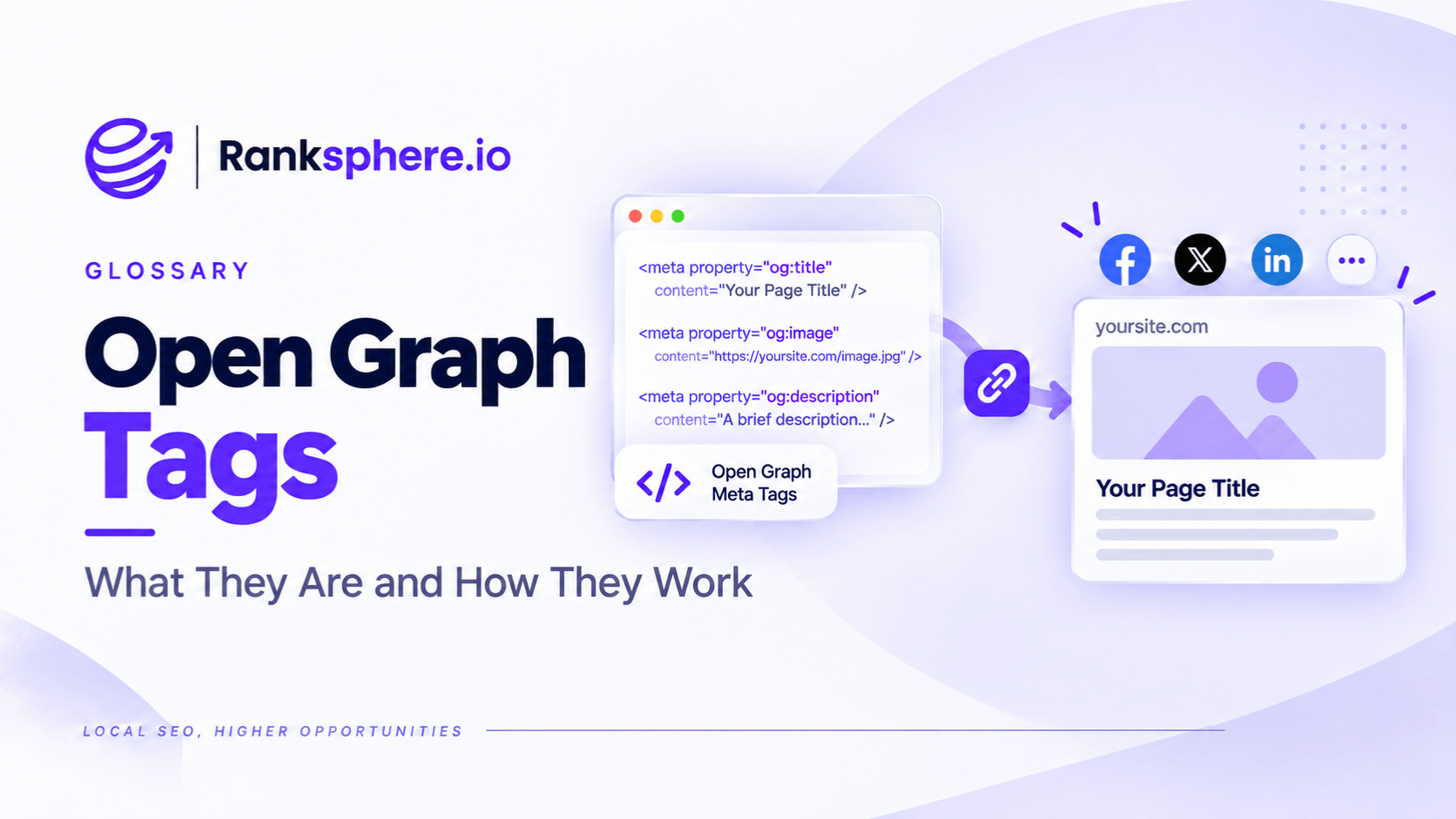
Open Graph tags are metadata added to a webpage to help supported platforms understand how that page should appear when someone shares its URL.
They can provide information such as:
- The share title
- Description
- Preview image
- Preferred URL
- Content type
Open Graph was originally developed for Facebook, but the protocol is now used or understood by a range of services that create rich previews from web links.
That includes platforms such as LinkedIn, which explicitly supports Open Graph metadata when generating URL previews.
Open Graph tags are not a documented Google Search ranking factor. Google publishes a specific list of metadata it supports for Search, and unsupported meta tags are ignored for Google Search purposes.
Their main job is elsewhere:
controlling how a page is presented when it is shared.
For a local business, that can matter whenever somebody sends a service page, guide, booking page or offer through:
- Social networks
- Messaging apps
- Team communication tools
A technically good webpage can still make a poor first impression if the shared link produces the wrong image, an outdated headline or no useful preview at all.
What is Open Graph?
The Open Graph protocol adds metadata to the <head> of a webpage.
According to the protocol, the four core properties are:
- og:title
- og:type
- og:image
- og:url
The protocol also defines additional optional properties such as:
- og:description
- og:site_name
- og:locale
and structured image properties such as:
- og:image:width
- og:image:height
- og:image:type
- og:image:alt
A basic implementation might look like this:
<meta property="og:title" content="Flat Roof Repair in Kent">
<meta property="og:description" content="Flat roof repairs, surveys and replacement options for homes across Kent.">
<meta property="og:image" content="https://example.com/images/flat-roof-repair.jpg">
<meta property="og:url" content="https://example.com/flat-roof-repair/">
<meta property="og:type" content="website">
<meta property="og:image:alt" content="Roofer repairing a flat roof on a residential property">
These tags sit alongside normal page metadata.
They do not replace your:
- Title tag
- Meta description
- Canonical tag
- Structured data
They serve a different purpose.
og:title
og:title defines the title of the page or object for Open Graph consumers.
For example:
<meta property="og:title" content="Flat Roof Repair in Kent">
It can match the normal title tag, but it does not have to.
That can be useful because the search result and the social share may have slightly different presentation needs.
For example:
Search title
Flat Roof Repair Kent | Ashdown Roofing
Open Graph title
Need a Flat Roof Repaired in Kent?
The second version may be more natural in a social or messaging context.
But avoid changing it simply for the sake of being different.
If the standard page title already works well when shared, reusing it is perfectly reasonable.
og:description
og:description provides a short description of the page.
For example:
<meta property="og:description" content="Flat roof repairs, surveys and replacement options for homes across Kent.">
The Open Graph protocol lists this as optional metadata rather than one of its four required core properties.
It can differ from the meta description.
Again, that does not mean it has to.
A useful Open Graph description should:
- Explain what the page offers
- Be understandable without additional context
- Avoid keyword stuffing
- Avoid unsupported marketing claims
Think of it as preview copy.
Not an SEO ranking field.
og:image
og:image specifies the image associated with the page.
For example:
<meta property="og:image" content="https://example.com/images/roof-repair.jpg">
This is often the most visually prominent part of a link preview.
A useful preview image can make the shared page easier to recognise and understand.
But avoid describing the image as:
“the most important Open Graph ranking factor.”
There is no Open Graph ranking system.
Its importance is mainly visual and practical.
og:image:alt
This field is frequently omitted.
The Open Graph specification supports:
<meta property="og:image:alt" content="Roofer repairing a flat roof on a residential property">
and says that when an og:image is specified, an image description should also be provided.
This is separate from the normal HTML alt attribute on the image inside the page.
For example:
<img
src="/images/roof-repair.jpg"
alt="Roofer repairing damaged felt on a flat roof"
>
and:
<meta
property="og:image:alt"
content="Roofer repairing a flat roof on a residential property"
>
can coexist.
They serve related but different contexts.
og:url
og:url identifies the URL associated with the Open Graph object.
For example:
<meta property="og:url" content="https://example.com/flat-roof-repair/">
The Open Graph specification describes this as the object's canonical URL or permanent ID within the graph.
In practice, it should normally point to the preferred public URL for the page.
For example, if someone lands on:
https://example.com/flat-roof-repair/?utm_source=newsletter
the Open Graph URL would normally still be:
https://example.com/flat-roof-repair/
Do not, however, confuse og:url with Google's canonical tag.
For Search canonicalisation, use:
<link rel="canonical" href="https://example.com/flat-roof-repair/">
Open Graph and Search canonicalisation are separate systems.
og:type
og:type tells Open Graph consumers what kind of object the page represents.
For many ordinary pages:
<meta property="og:type" content="website">
is appropriate.
Articles may use:
<meta property="og:type" content="article">
The Open Graph specification also defines other specialised object types.
For most local-business websites, you do not need to invent complicated custom types.
Use a type that genuinely represents the page.
og:site_name
Another useful optional property is:
<meta property="og:site_name" content="Ashdown Roofing">
This identifies the wider website or brand associated with the page.
It is not required, but it can provide additional context to platforms that use it.
Open Graph image size
There is no single image dimension required by the Open Graph protocol itself.
Different consumers can crop and display images differently.
A practical cross-platform starting point is a landscape image around:
1200 × 630 pixels
or roughly:
1.91:1
But treat that as a working convention rather than a universal Open Graph requirement.
For example, LinkedIn currently recommends:
1200 × 627 pixels
at a:
1.91:1
ratio for URL preview imagery.
So when choosing an image:
- Use a reasonably large source
- Keep important content away from extreme edges
- Expect some variation between platforms
- Test the actual preview
File-size limits vary
The original rule:
“Keep Open Graph images under 5 MB.”
needs context.
LinkedIn currently lists 5 MB as the maximum file size in its URL-sharing image guidance.
That does not make 5 MB a universal Open Graph limit.
Other platforms may have different:
- File-size limits
- Image dimensions
- Formats
- Cropping behaviour
A much smaller optimised image is normally preferable anyway.
There is rarely a reason for a social preview image to weigh several megabytes.
Use a fully qualified image URL
For broad compatibility, use a complete public URL for og:image.
For example:
https://example.com/images/roof-repair.jpg
rather than relying on:
/images/roof-repair.jpg
The Open Graph specification defines og:image as a URL representing the object. Its examples use full URLs.
Using a complete HTTPS URL also makes the resource clearer for external crawlers attempting to retrieve it.
The image needs to be accessible
A social platform cannot create a useful preview from an image it cannot retrieve.
Problems can occur when the image or page is:
- Behind authentication
- Restricted by server rules
- Returning an error
- Protected by hotlink restrictions
- Unavailable to the platform's crawler
LinkedIn explicitly notes that preview images can fail if the website prevents LinkedIn from retrieving them or if they live in a protected directory.
So if an Open Graph image exists in the HTML but does not appear in the preview, check accessibility before repeatedly changing the tag.
Open Graph and robots.txt
Robots.txt is primarily a crawler-control mechanism and different services have their own crawling behaviour.
Do not assume:
“Googlebot can access it, therefore every social platform can.”
Likewise, do not assume a social-preview failure is automatically caused by robots.txt.
Check the actual preview crawler or inspection tool where the platform provides one.
Make the image work at preview size
The image may appear much smaller than the source file.
That means:
- Tiny text can become unreadable
- Detailed screenshots can become unclear
- Important subjects near the edges can be cropped
- Busy designs can lose impact
You do not need to avoid text completely.
But if the image contains text:
- Keep it brief
- Make it large enough to survive reduction
- Do not place critical wording against the edges
The image should still make sense if different platforms crop it slightly differently.
Do not use the same image blindly everywhere
A default branded Open Graph image is useful as a fallback.
But important pages often benefit from page-specific imagery.
For example:
Homepage
Brand image.
Flat roof repair
Roofing project photograph.
Dental implants guide
Relevant clinical or educational image.
Case study
Image from the actual project.
A single company-logo image across every page is technically functional.
It is not always the clearest representation of what is being shared.
Missing Open Graph metadata
If Open Graph metadata is missing, a platform may attempt to extract information from other parts of the page.
LinkedIn, for example, says that when a website does not provide Open Graph or oEmbed metadata, it may fail to pull the expected information or may select other content from the site instead.
That can result in:
- Unexpected title
- Wrong image
- Small thumbnail
- Incomplete preview
So it is better to provide the intended metadata explicitly rather than hope the platform chooses correctly.
Do not assume a missing og:image always creates a bare link
The draft currently goes too far here.
Different platforms have fallback systems.
A platform might select:
- Another page image
- A logo
- Other metadata
- No image
So:
missing og:image = unpredictable preview
is more accurate than:
missing og:image = guaranteed bare URL.
Open Graph and the title tag
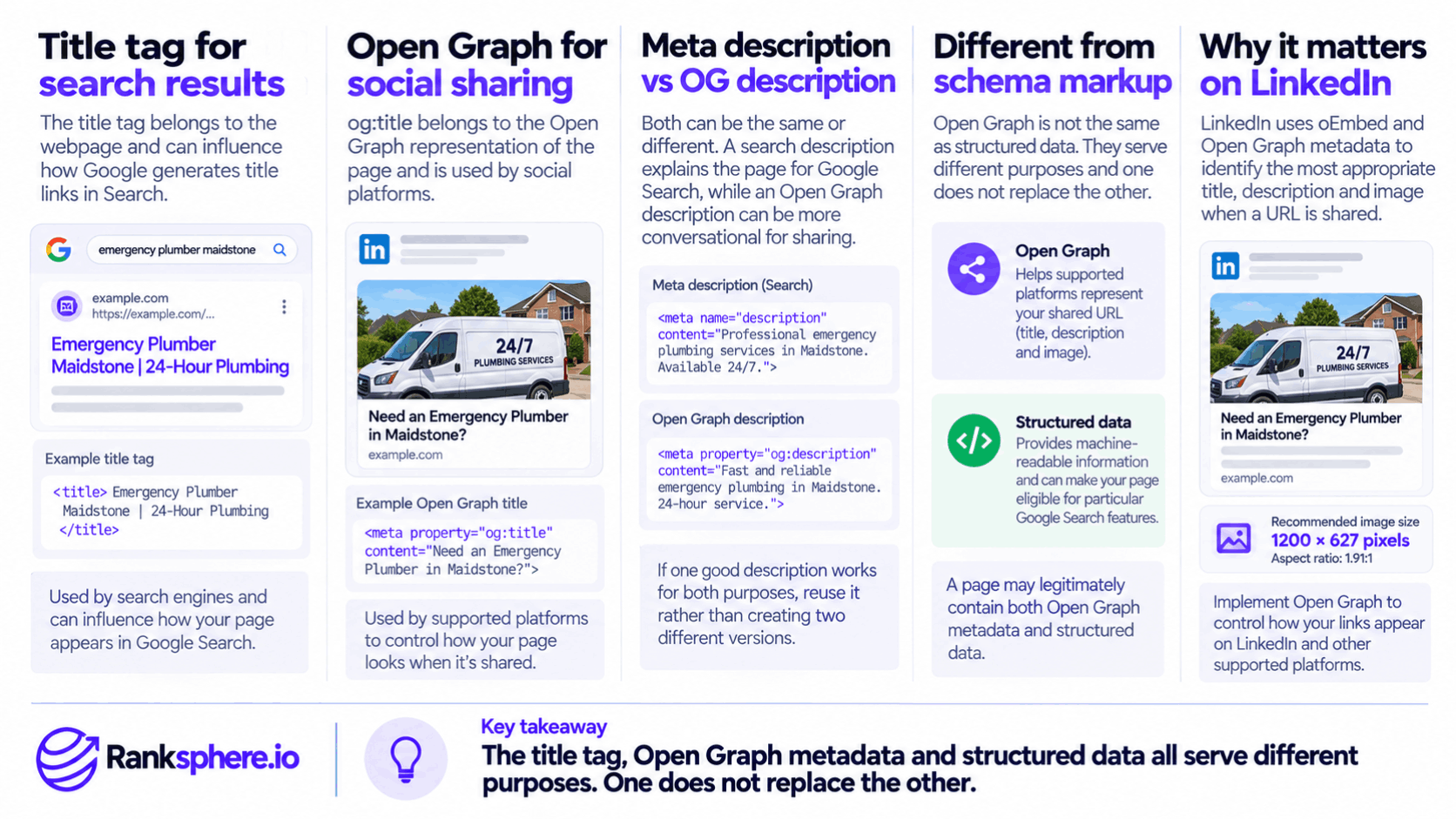
The title tag primarily belongs to the webpage and can influence how Google generates title links in Search.
og:title belongs to the Open Graph representation of the page.
They may contain the same wording.
They may also differ.
For example:
<title>Emergency Plumber Maidstone | 24-Hour Plumbing</title>
and:
<meta property="og:title" content="Need an Emergency Plumber in Maidstone?">
can both be reasonable.
Neither needs to copy the other exactly.
Open Graph and meta descriptions
The same applies to the meta description.
A search description may be written to explain the page in Google Search.
An Open Graph description may be slightly more conversational for sharing.
But avoid creating two versions just because your SEO plugin gives you two text boxes.
If one good description serves both purposes, reuse it.
Open Graph and structured data
Open Graph is not the same thing as schema markup.
Open Graph
Primarily helps supported external platforms represent a shared URL.
Structured data
Provides machine-readable information about page content and, where supported, can make a page eligible for particular Google Search features.
One does not replace the other.
A page may legitimately contain both.
Open Graph and Google rankings
Do not pitch Open Graph implementation as:
“social SEO that improves Google rankings.”
Google's list of supported Search metadata does not document Open Graph properties as ranking controls, and Google says unsupported meta tags are ignored by Search.
Use Open Graph because it helps control link presentation.
Any traffic benefit comes through the sharing experience, not because an og:image tag gives the page additional ranking weight.
LinkedIn and Open Graph
LinkedIn explicitly says its share system relies on:
- oEmbed
- Open Graph Protocol metadata
to identify the most appropriate title, description and image when a URL is shared.
That makes LinkedIn one of the clearest examples of why Open Graph implementation matters.
LinkedIn also currently recommends a 1.91:1 preview image ratio at approximately 1200 × 627 pixels.
LinkedIn preview caching
LinkedIn caches URL-preview information.
If you update an image and LinkedIn continues displaying the previous one, its Post Inspector can be used to refresh the URL information for future shares.
Importantly, LinkedIn says this refresh does not alter the preview attached to posts that have already been published.
It affects new shares.
That distinction prevents a common misconception:
refreshing the cache does not rewrite every old post containing the URL.
Open Graph caching varies by platform
Caching behaviour is not standardised by the Open Graph protocol.
One platform may refresh a preview quickly.
Another may retain its cached metadata longer.
Some offer inspection or refresh tools.
Others do not expose a manual refresh process.
So avoid a universal statement such as:
“Change the tags, run the debugger and every app updates.”
Instead:
- Update the source metadata.
- Confirm it is present in the rendered HTML.
- Test the URL on the target platform.
- Use that platform's inspection or refresh tool where available.
- Allow for cached previews.
Test before an important launch
This is one of the strongest points from the original draft.
If you know an important page will be shared widely, check the preview before the campaign starts.
For example:
- New service launch
- Event registration
- Promotion
- New location
- Press coverage
- Major guide
Paste the URL into the platforms where it will actually be shared.
Check:
- Title
- Description
- Image
- Crop
- Branding
- Destination URL
Do not rely solely on the CMS preview.
X and Twitter Card metadata
X has historically used its own twitter: metadata for cards.
A typical configuration might include:
<meta name="twitter:card" content="summary_large_image">
<meta name="twitter:title" content="Flat Roof Repair in Kent">
<meta name="twitter:description" content="Roof surveys, repairs and replacement options.">
<meta name="twitter:image" content="https://example.com/images/roof-repair.jpg">
Open Graph and Twitter Card metadata can coexist.
Where you want different presentation on X, define the X-specific fields.
Where the presentation is intended to be the same, avoid unnecessary duplication in your CMS unless there is a clear implementation reason.
Your CMS may already generate Open Graph tags
Many CMS platforms, themes and SEO plugins generate Open Graph metadata automatically.
That is useful.
It does not mean the output is automatically correct.
Check important pages for issues such as:
- Homepage image used everywhere
- Wrong canonical URL
- Empty descriptions
- Low-resolution imagery
- Old branding
- Duplicate tags from two plugins
- Template titles instead of page-specific titles
Automation should reduce repetitive implementation.
It should not replace QA.
Duplicate Open Graph tags
This is an easy problem to create when:
- Theme adds Open Graph
- SEO plugin adds Open Graph
- Custom code adds Open Graph
all at once.
You may end up with several:
<meta property="og:title">
or:
<meta property="og:image">
values.
The Open Graph protocol does allow multiple values for array properties such as images and says the first value is preferred when conflicts occur.
But accidental duplicate metadata from several systems can make debugging difficult.
Know which part of the site generates the tags.
Use one primary Open Graph image deliberately
Open Graph supports multiple og:image properties.
If you supply more than one, the specification gives preference to the first declared value.
For most local-business pages, a simpler approach is:
- Choose one clear primary preview image
- Provide its dimensions where useful
- Add og:image:alt
For example:
<meta property="og:image" content="https://example.com/images/roof-repair.jpg">
<meta property="og:image:width" content="1200">
<meta property="og:image:height" content="630">
<meta property="og:image:alt" content="Completed flat roof repair on a residential extension">
Open Graph images and image SEO are different
An Open Graph image may also appear in the page itself.
But these are separate considerations.
Normal Image SEO deals with issues such as:
- HTML alt text
- Crawlability
- Responsive sizing
- Compression
- Page performance
Open Graph metadata tells sharing consumers which image represents the page.
A perfectly optimised website image does not automatically become the right social preview image unless the platform selects it or you specify it.
Open Graph is mainly a referral and presentation issue
The strongest reason to implement it is not rankings.
It is control.
Without explicit metadata, someone else sharing your URL may see a preview you did not intend.
With good Open Graph data, you have a better chance of providing:
- Relevant headline
- Relevant image
- Useful description
- Correct destination URL
That makes the shared page easier to understand before somebody clicks.
Do not promise a specific CTR uplift.
The effect depends on:
- Audience
- Platform
- Page
- Offer
- Context of the share
Local businesses and shared links
For local businesses, links may travel through places that standard SEO reporting barely captures.
A customer might send:
- A treatment page to a family member
- A roofing page to a neighbour
- A restaurant booking page to a group chat
- A solicitor's guide to a colleague
The recipient may encounter the preview before they ever see the website.
That makes social metadata part of the broader customer experience.
But avoid asserting:
“WhatsApp sharing is one of the main local acquisition channels”
unless you have actual attribution data for that business.
It is a plausible sharing path, not a universal benchmark.
Open Graph does not control every preview perfectly
Even with correct metadata, the platform ultimately controls how its interface renders the link.
It may:
- Crop an image
- Shorten a title
- Hide part of a description
- Change the layout
- Use different presentation on mobile and desktop
So Open Graph gives you input and influence, not total visual control.
That is another reason to test real previews.
Common Open Graph mistakes
- Missing og:image on important pages.
- Assuming every missing image produces the same fallback behaviour.
- Using a relative or inaccessible image location instead of a reliable public URL.
- Providing a very small or poor-quality image.
- Treating 1200 × 630 as an Open Graph protocol requirement rather than a practical convention.
- Using a platform-specific 5 MB file limit as though it applies everywhere.
- Forgetting og:image:alt.
- Letting every page inherit the same homepage image unnecessarily.
- Leaving outdated branding in cached or template-generated metadata.
- Using several plugins that generate conflicting Open Graph tags.
- Assuming changing the tags immediately updates existing shared posts.
- Expecting og:url to behave exactly like Google's canonical tag.
- Treating Open Graph as a Google ranking factor.
- Claiming richer previews guarantee more clicks.
- Testing only the CMS preview rather than the actual platforms where the URL will be shared.
Open Graph best practices
- Set og:title, og:type, og:image and og:url on important public pages.
- Add og:description when a short description improves the preview.
- Add og:image:alt to describe the preview image.
- Use a fully qualified HTTPS URL for the preview image.
- Use a large, well-optimised landscape image that can tolerate some cropping.
- Treat roughly 1.91:1 and around 1200 pixels wide as a useful cross-platform starting point, not an Open Graph requirement.
- Keep important image content away from the extreme edges.
- Make sure preview assets are publicly retrievable by the platforms that need them.
- Point og:url at the preferred public page URL.
- Keep Open Graph metadata separate conceptually from title tags, meta descriptions, canonicals and schema.
- Test real shared URLs before important launches.
- Use platform-specific preview or inspection tools where available.
- Check Open Graph output after redesigns, migrations or plugin changes.
- Treat social-preview optimisation as a referral and presentation task rather than a direct ranking tactic.
Open Graph audit checks
A practical audit can check whether important pages have:
- og:title
- og:description
- og:image
- og:image:alt
- og:url
- og:type
It can also identify:
- Duplicate tags
- Empty properties
- Broken image URLs
- Template-default images
- Non-canonical Open Graph URLs
- Inconsistent branding
Ranksphere's website audit checks meta tags across every page it crawls, helping surface missing or inconsistent page metadata alongside the wider technical picture.
The audit finding still needs human review.
For example:
Every page uses the same Open Graph image
may be perfectly acceptable for a small corporate website.
On a large service or content site, it may be worth improving.
Example
“Consider a hypothetical pharmacy called Kingsway Pharmacy.
It launches a new page explaining its seasonal flu-clinic service.
The team plans to share the page through:
- Local social groups
- Customer messages
- Community organisations
Before the campaign starts, someone tests the URL.
The preview is wrong.
Instead of the flu-clinic page title and relevant photograph, the sharing platform has selected:
- A generic website title
- No useful description
- An unrelated image from the page template
The problem is not the service-page content.
The page simply has no page-specific Open Graph metadata.
The team adds:
<meta property="og:title" content="Book Your Flu Vaccination at Kingsway Pharmacy">
<meta property="og:description" content="Check availability and book your seasonal flu vaccination with Kingsway Pharmacy.">
<meta property="og:image" content="https://example.com/images/kingsway-flu-clinic.jpg">
<meta property="og:image:alt" content="Pharmacist preparing the flu vaccination area at Kingsway Pharmacy">
<meta property="og:url" content="https://example.com/flu-clinic/">
<meta property="og:type" content="website">
The chosen image is:
- Large enough for a rich preview
- Properly compressed
- Easy to understand at small sizes
- Relevant to the actual page
The team then tests the page on the platforms it plans to use.
Where a platform provides a cache-refresh tool, it uses that before the campaign begins. LinkedIn's Post Inspector, for example, can refresh stored preview data for future shares.
The team does not claim that:
- CTR increased ninefold
- Open Graph improved rankings
- Every platform displayed an identical card
unless those outcomes were actually measured.
The improvement is simpler and verifiable:
the URL now presents the intended title, description and image when supported sharing platforms read the metadata.
That is what Open Graph optimisation is for.
Open Graph tags do not make a page rank higher. They make its identity clearer when the URL leaves the search results and starts travelling through social feeds, messages and other sharing environments. Set the core metadata correctly, give important pages an appropriate preview image, and test the result where your audience will actually encounter it.”
See also
- Meta description — the description used primarily for search-result snippets
- Title tag — the page title that can differ from og:title
- On-page SEO — the wider page-optimisation discipline
- Image SEO — optimising the image assets themselves
- Schema markup — a separate machine-readable layer used for structured data
- Click-through rate — useful for measuring response where click data is available