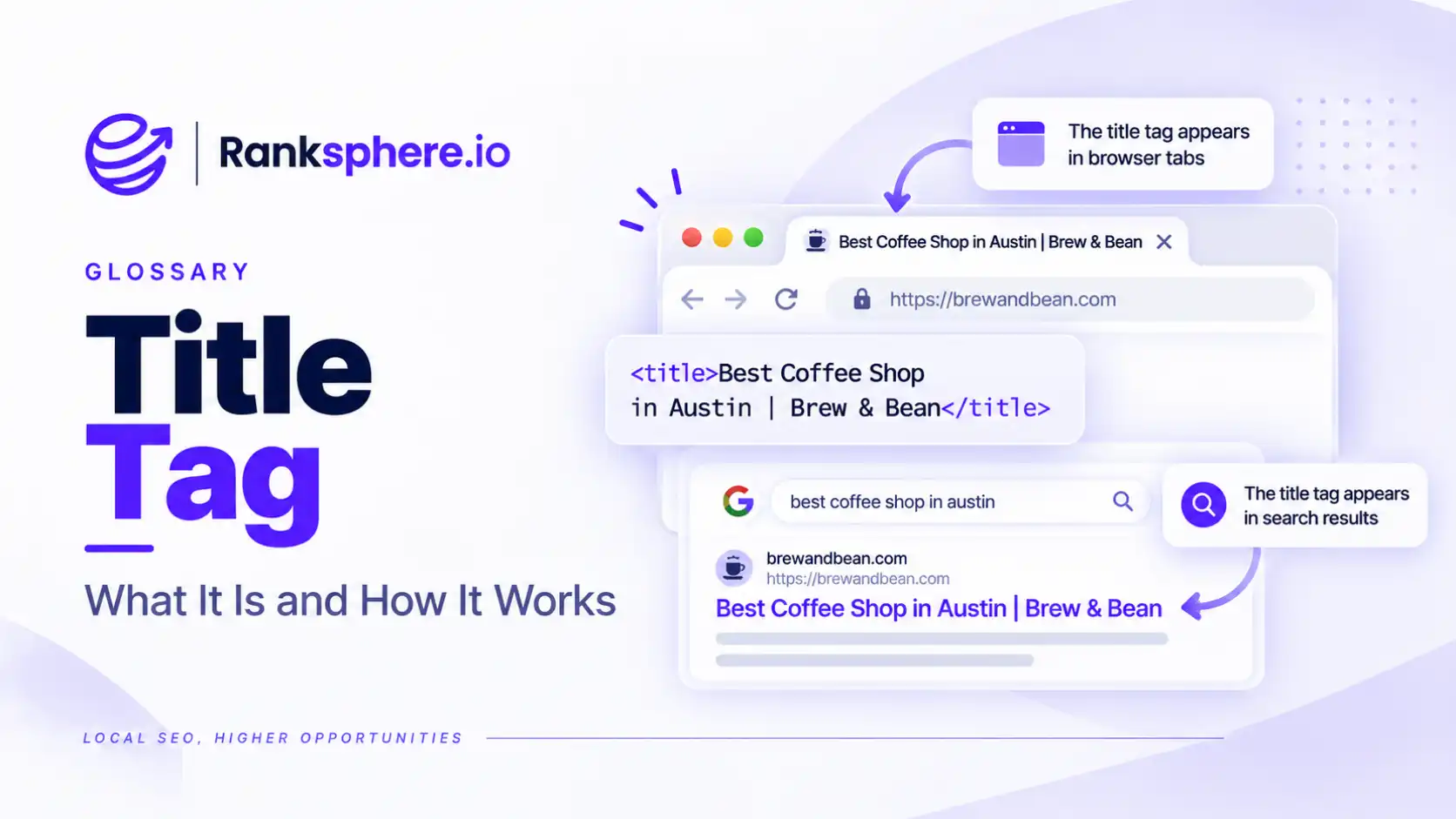
A title tag is an HTML element that defines the title of a webpage. It is commonly used by search engines when generating the clickable headline shown in search results, and it also appears in browser tabs.
Title tags are an important part of on-page SEO because they help search engines understand the main topic of a page and help searchers decide whether the result is relevant to what they need.
Yet they are often overlooked.
Many content management systems automatically create a title from the page name, which can leave important pages with generic titles such as:
Services | Company Name
Technically correct, but not particularly useful to someone choosing between search results.
Why title tags matter
A title tag has two important jobs.
First, it gives search engines a clear indication of the subject of the page.
Second, it influences how the page is presented to people in search results.
That second role can have a significant effect on click-through rate.
A page can rank reasonably well and still attract relatively few clicks if the title is vague, overly generic or poorly matched to the query.
A useful title should make three things clear quickly:
- What the page is about
- Whether it matches the searcher's intent
- Why someone might choose this result over another
Good title tag optimisation is therefore not simply about including a keyword. It is about describing the page clearly enough that both search engines and people understand what it offers.
What does a title tag look like?
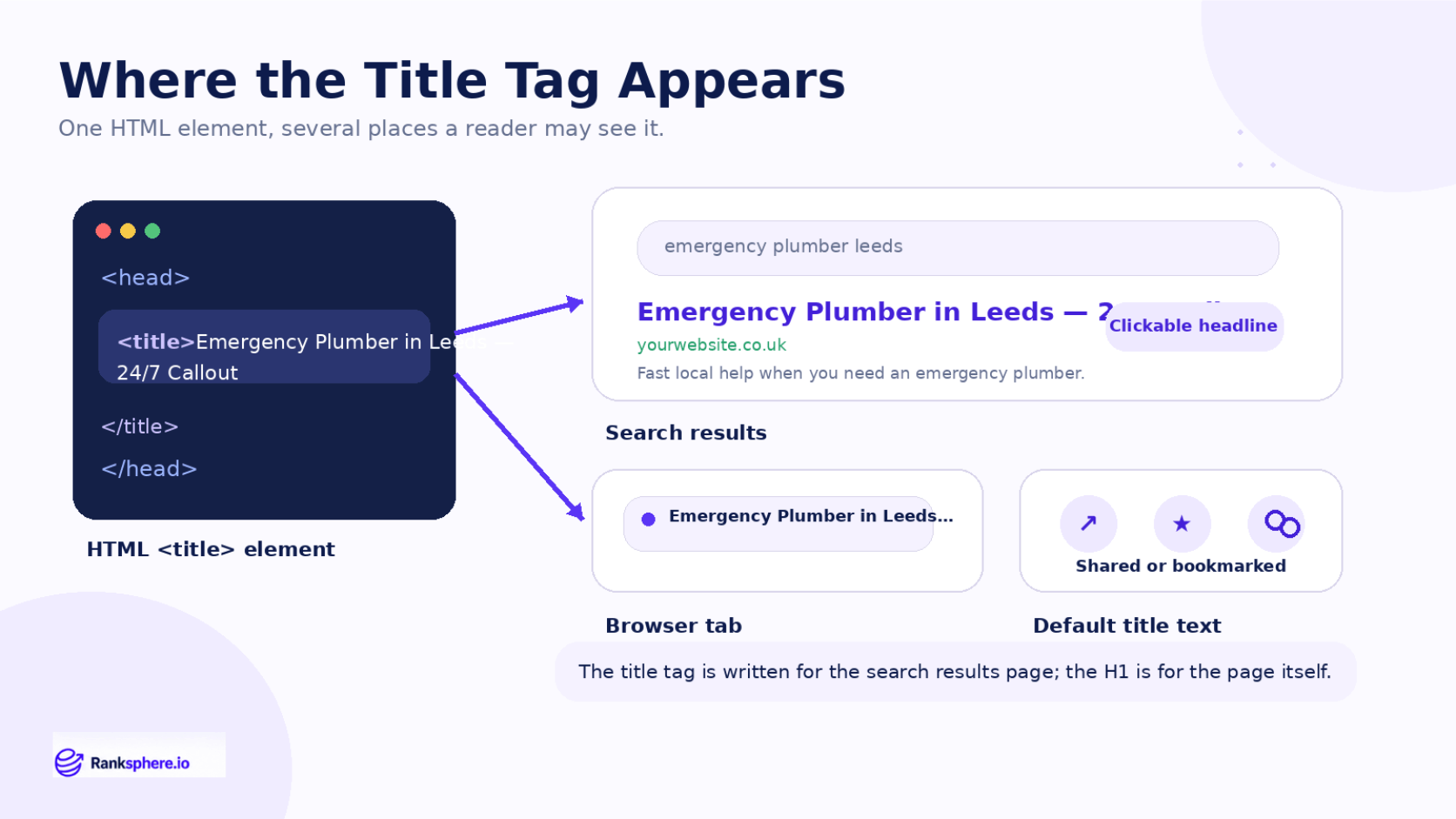
The title tag sits inside the <head> section of a webpage.
<head>
<title>Emergency Plumber in Leeds - 24/7 Callout</title>
</head>
Visitors do not normally see this text as part of the main page content.
Instead, it may appear:
- As the title link in Google Search
- In the browser tab
- In bookmarks
- In link previews or other platforms that use the page title as a default
The title tag is separate from the page's <h1> heading.
For example:
<title>Emergency Plumber in Leeds - 24/7 Callout</title>
<h1>Emergency Plumbing Services in Leeds</h1>
The two can be similar without being identical.
The title tag is usually written with the search result in mind, while the H1 introduces the page to someone who has already clicked through.
See heading tags for more on how page headings work.
How long should a title tag be?
There is no fixed character limit for title tags.
Google displays titles according to the space available in the search result, so two titles with the same number of characters can display differently depending on the width of the letters used.
As a practical guide, keeping important titles concise — often around 50 to 60 characters — can reduce the chance that useful information is cut off.
But do not write to a character count at the expense of clarity.
Focus on putting the most important information early.
For example:
Emergency Plumber in Leeds | 24/7 Callouts
is generally clearer than:
ABC Plumbing Services Ltd | Professional Emergency Plumber Services in Leeds
The first version tells the searcher what they need to know immediately.
How to structure an SEO title
There is no single title format that works for every page.
The structure should depend on the search intent and what the page offers.
A service-page title might follow:
Service + Location + Useful Detail
For example:
Boiler Repair in Bristol | Same-Day Appointments
A product page might use:
Product Name + Important Feature + Brand
An informational page might focus on the question or topic:
How Long Does a Boiler Last? Average Lifespan Explained
The aim is not to follow a template mechanically.
It is to communicate the purpose of the page as clearly as possible.
Should the keyword appear in the title tag?
Where it fits naturally, the main topic or primary keyword should usually appear in the title.
This helps establish relevance and reassures the searcher that the page matches their query.
For example, if a page is about emergency plumbing in Leeds:
Emergency Plumber in Leeds | 24/7 Callouts
is clearer than:
Fast Help When You Need It Most | ABC Plumbing
The second title may sound more promotional, but it hides the actual service.
Avoid forcing the exact keyword into awkward wording.
Search engines can understand variations, so readability should come first.
Should you put the brand name in the title?
It depends on the page.
Brand names can be useful on:
- The homepage
- Branded searches
- Company information pages
- Pages where brand recognition affects the click
On competitive service or informational pages, the service or topic is often more useful at the beginning of the title.
For example:
Flat Roof Repair in Kent | Ashdown Roofing
usually communicates more quickly than:
Ashdown Roofing | Flat Roof Repair in Kent
unless the company name itself is what people are searching for.
Branding should support the title, not push the useful information out of view.
Title tags for local SEO
For local service pages, including a relevant location in the title can help make the page's purpose clear.
Examples include:
- Emergency Electrician in Manchester | 24/7 Callouts
- Dental Implants in Bristol | Private Dentist
- Commercial Cleaning in Leeds | Free Site Survey
Only include the location where it accurately reflects the page.
Do not add multiple town names to one title simply to target more searches.
A title such as:
Plumber Leeds Manchester Bradford York Sheffield
is harder for people to understand and provides a poor search result experience.
If a business genuinely has separate pages for different locations, each page should have its own useful content and a title that accurately describes that location.
Why Google may rewrite title tags
The title tag you write is not guaranteed to be the exact title Google shows in search results.
Google can generate a different title link when it believes another version better represents the page or the search.
It may use information from:
- The page's H1
- Other headings
- Prominent page text
- Anchor text from links
- The title tag itself
- Other signals associated with the page
Rewrites can be more likely when a title is:
- Extremely long
- Repetitive
- Keyword-stuffed
- Generic
- Missing
- Reused across many pages
- Poorly matched to the visible page content
That does not mean every rewritten title is bad.
But if Google repeatedly replaces your titles, it is worth reviewing whether they accurately describe the pages.
Ranksphere's website audit flags missing, duplicate and over-length title tags, helping you find pages where automatic CMS titles or duplicated metadata may need attention.
Title tags and click-through rate
Title tags can have a direct influence on whether someone chooses your result.
Suppose two pages appear beside each other.
One title says:
Roofing Services | ABC Roofing
The other says:
Flat Roof Repair in Kent | Free Roof Survey
The second gives the searcher much more information before they click.
It identifies:
- The service
- The location
- A potentially useful differentiator
That does not guarantee a higher click-through rate, because ranking position and SERP features also matter.
But a clear title gives the result a better chance of attracting the right click.
How to find title tags worth improving
You do not need to rewrite every title on a website at once.
Start with pages that already have search visibility.
Google Search Console can help identify pages with:
- High impressions
- Reasonably stable rankings
- Lower-than-expected CTR
- Important commercial keywords
These pages already have an audience.
Improving the title may help make better use of the visibility the page has already earned.
Also check for:
- Missing title tags
- Duplicate titles
- CMS-generated defaults
- Very long titles
- Titles that no longer match the page
- Important pages with vague titles
This creates a much more useful priority list than rewriting every page simply because it exists.
Common title tag mistakes
- Leaving the CMS default. Titles such as “Services | Company Name” often fail to explain the page clearly.
- Keyword stuffing. Repeating the same term several times makes the result harder to read.
- Using the same title on several pages. Each important page should have a distinct purpose.
- Putting the brand first on every page. The service or topic may be more useful to the searcher.
- Treating 60 characters as a hard limit. Display width matters more than a fixed character count.
- Writing for search engines instead of people. A technically optimised title still needs to make sense.
- Using claims the page cannot support. Do not add prices, guarantees or availability purely to attract clicks.
- Ignoring search intent. The title should reflect what the searcher expects to find after clicking.
- Rewriting high-performing titles without a reason. Optimisation should solve a real problem, not create unnecessary changes.
Title tag best practices
- Write titles deliberately. Do not rely automatically on CMS defaults.
- Make the page topic immediately clear.
- Use the primary keyword naturally where appropriate.
- Put important information near the beginning.
- Keep titles concise without obsessing over character counts.
- Include the location naturally on relevant local pages.
- Use meaningful differentiators where the page genuinely supports them.
- Make important titles unique across the site.
- Match the title to the page's search intent.
- Prioritise high-impression pages with weak CTR when looking for optimisation opportunities.
Example
“Ashdown Roofing has a flat-roofing page receiving regular impressions in Google Search, but relatively few searchers click it.
The existing title is:
Flat Roofing | Ashdown Roofing Ltd | Roofing Contractors Kent
Nothing is technically broken, but the title spends much of its available space repeating the company name and broad roofing terminology.
The team replaces it with a clearer title that reflects the actual page:
Flat Roof Repair in Kent | Free Roof Survey
The new version immediately tells the searcher:
- What service the page offers
- Where the company provides it
- What useful next step is available
The page itself does not need to be rebuilt simply because the title was weak.
The team monitors impressions, rankings and CTR in Search Console over the following weeks to see whether more people choose the result.
That is the value of a well-written title tag: it makes the purpose of the page clear before the visitor has even reached it.”
See also
- Meta description — supporting text that may appear beneath the search title
- Click-through rate — the percentage of impressions that become clicks
- Heading tags — the visible heading structure within the page
- On-page SEO — the wider process of optimising individual webpages
- Google Search Console — where title performance can be investigated
- Search intent — what the title and page should match