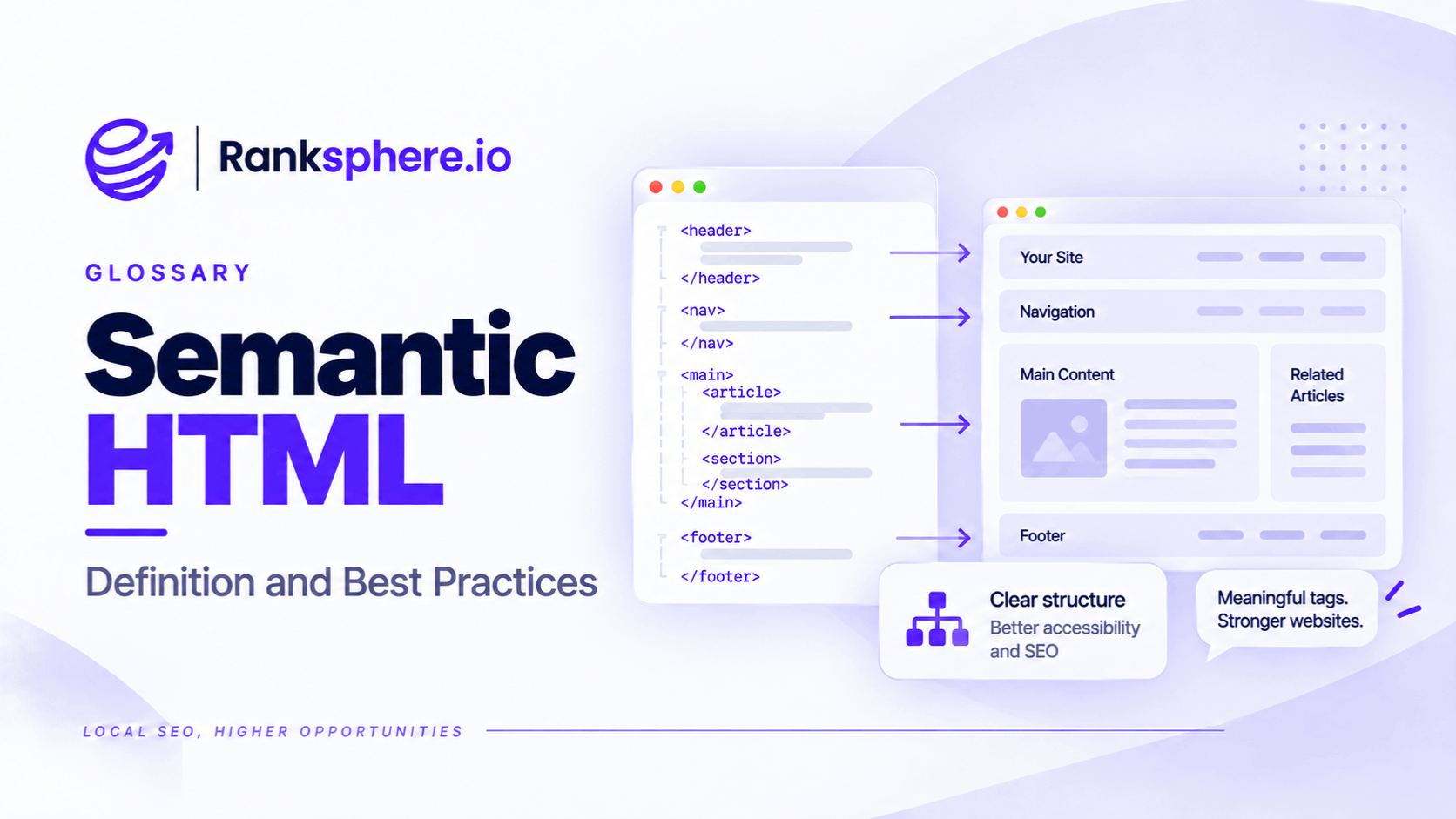
Semantic HTML is the practice of using HTML elements according to their meaning and purpose, rather than choosing them simply for how they look on a webpage.
For example, a heading should use a heading element, a list should use list elements, and a clickable action should use a button.
These elements help browsers, assistive technologies, and search engines understand how a webpage is organised.
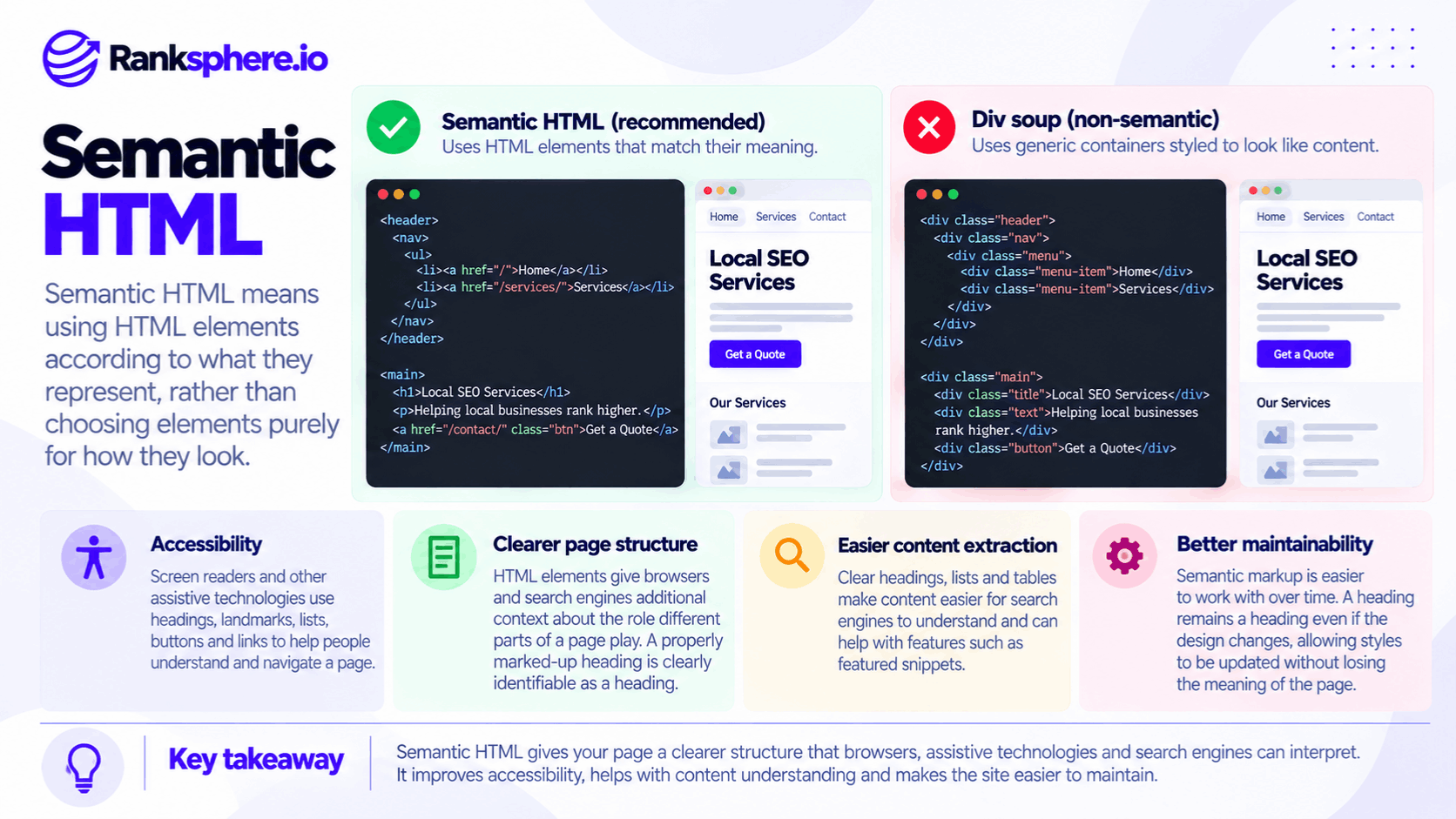
A heading might look exactly the same whether it's created using a proper heading element or a generic container styled with CSS. However, the underlying HTML communicates different information.
A real heading identifies the text as part of the document's structure. A generic container doesn't provide that meaning automatically.
For SEO, semantic HTML helps make content easier to interpret, while also supporting accessibility and website maintenance.
However, semantic HTML isn't a shortcut to higher rankings. Its main value is giving pages a clear, meaningful structure that both people and software can work with.
Why Is Semantic HTML Important?
A webpage can look perfectly organised while its underlying HTML tells a different story.
For example, a local business website might display large headings, bullet points, comparison tables, and navigation buttons.
If all these elements are built using generic containers, the visual layout may look correct, but the page can be more difficult for assistive technologies and automated systems to interpret.
Semantic HTML helps avoid these problems.
1. It Improves Accessibility
People using screen readers often navigate webpages through headings, links, lists, and page landmarks.
For example, someone may open a dental practice's website and use a screen reader to move directly between sections covering treatments, pricing, and contact information.
If those sections use proper headings, the screen reader can identify them.
If they are only large pieces of text styled to look like headings, that navigation may not work as expected.
Semantic HTML provides built-in meaning that helps assistive technologies interpret page structure.
However, semantic markup alone doesn't guarantee an accessible website. Labels, keyboard behaviour, focus management, and other accessibility requirements still matter.
2. It Helps Search Engines Understand Page Structure
Search engines analyse webpages to understand their content and organisation.
Semantic HTML provides useful structural information.
For example:
- Headings identify sections and subtopics.
- Lists group related items.
- Tables organise information into rows and columns.
- Navigation elements identify groups of navigational links.
- Main content elements distinguish primary content from surrounding page elements.
These signals can help search engines interpret the relationship between different parts of a webpage.
However, Google doesn't rely exclusively on semantic HTML.
Its systems can also interpret visible text, layout, links, and other information.
Using proper semantic elements makes the structure clearer, but doesn't guarantee better indexing or rankings.
3. It Makes Content Easier to Interpret and Extract
Google may select passages, lists, or tables from webpages when generating certain search features, including featured snippets.
Semantic HTML can help communicate how that information is organised.
For example, a properly marked-up list makes it clear that several items belong together.
A genuine HTML table identifies relationships between headings, rows, and cells.
However, a page doesn't need a particular HTML element to be eligible for a featured snippet, and adding lists or tables doesn't guarantee selection.
Google decides whether to display a featured snippet based on its own systems.
The same caution applies to AI-generated search experiences. Clear structure can make content easier to interpret, but there is no guaranteed AI citation benefit from semantic HTML alone.
4. It Makes Websites Easier to Maintain
Semantic HTML separates the meaning of content from its visual appearance.
For example, a heading remains a heading even if its font size, colour, or spacing changes.
Developers can update the page's appearance using CSS without changing the underlying purpose of the element.
This can make websites easier to maintain and improve consistency across pages.
Important Semantic HTML Elements
Several HTML elements are particularly useful for website structure, accessibility, and content organisation.
Heading Elements
HTML provides six heading levels, from h1 to h6.
These identify headings and subheadings within a document.
For example:
- h1 — Main page heading
- h2 — Major section heading
- h3 — Subsection heading
- h4 to h6 — Further subdivisions when needed
A service page might use an H1 for "Dental Implants in Manchester" and H2 headings for treatment costs, procedures, and recovery.
Heading levels should reflect the relationship between sections rather than their visual appearance.
For more information, see heading tags.
Lists
HTML provides elements for different types of lists.
- ul — Unordered list
- ol — Ordered list
- li — List item
For example, a roofing company might use an unordered list to display its services.
An instructional guide might use an ordered list to explain steps that need to be followed in sequence.
Using real list elements helps communicate that the items belong together.
By contrast, paragraphs containing manually typed bullet characters may look like a list without providing the same structural information.
Tables
The table element is designed for information that belongs in rows and columns.
Related elements include:
- tr — Table row
- th — Header cell
- td — Data cell
- caption — Table title or description
For example, a clinic might use a table to compare consultation types, durations, and prices.
Proper table markup helps communicate relationships between the data.
However, tables shouldn't be used simply to position unrelated content on a page.
CSS layouts are generally more appropriate for arranging visual elements.
Page Landmarks
Semantic HTML includes elements that identify important areas of a page.
Common examples include:
- header — Introductory content or a section header
- nav — Navigation links
- main — Primary page content
- footer — Footer content
- aside — Complementary content
These elements can help assistive technologies identify and navigate major sections.
For example, a screen reader user may be able to jump directly to the main content rather than moving through the navigation links every time.
Article and Section Elements
The article element represents a self-contained piece of content.
It may be appropriate for a blog post, news article, or independently meaningful content item.
The section element groups related content, typically under a heading.
However, not every visual container needs to be a section.
For ordinary layout and styling, a generic div may still be the appropriate choice.
Semantic HTML isn't about eliminating generic elements. It's about using meaningful elements when they accurately describe the content.
Buttons and Links
Buttons and links have different purposes.
A button is generally used for an action, such as opening a menu, submitting a form, or expanding content.
An a element with an href is generally used for navigation.
For example:
- Book an appointment — A link if it takes visitors to a booking page.
- Open appointment options — A button if it expands an interactive menu.
- Submit enquiry — A button that submits a form.
- View our services — A link that navigates to another page.
Using the correct element supports keyboard accessibility and provides appropriate behaviour.
A generic container with a click handler doesn't automatically offer those features.
Other Useful Semantic Elements
HTML also includes elements for more specific types of content.
Examples include:
- time — Dates and times
- address — Contact information for a person or organisation associated with the page
- figure — Self-contained content such as an image or illustration
- figcaption — A caption associated with a figure
These elements help describe what the content represents.
However, they should be used according to their intended purpose rather than added simply because they are available.
What Is Non-Semantic HTML?
Non-semantic HTML uses generic elements that don't describe a specific type of content.
The most common examples are div and span.
These elements aren't inherently bad.
They're useful for grouping content, styling layouts, and implementing designs.
Problems arise when they're used instead of appropriate semantic elements.
For example, a developer might create a large text block using a div and style it to look like a heading.
Visually, it may appear identical to an H2.
However, it doesn't automatically provide heading semantics.
Similarly, a clickable div might look like a button without providing the expected keyboard behaviour or accessible role.
This is sometimes called div soup, particularly when a webpage contains deeply nested generic containers with little meaningful structure.
The goal isn't to remove every div.
It's to avoid using generic elements where a more appropriate semantic element already exists.
Common Semantic HTML Mistakes
Several implementation mistakes can make websites harder to navigate and maintain.
Choosing Headings Based on Font Size
A common mistake is choosing an H3 because it looks smaller than an H2.
Heading elements describe hierarchy, not appearance.
For example, if a major section is followed by a subsection, the heading levels should reflect that relationship.
Use CSS to control font size, colour, and spacing.
This keeps the document structure consistent even when the design changes.
Using Generic Containers as Buttons
A clickable div may work with a mouse but fail to provide expected keyboard interaction.
For example, visitors may not be able to activate it with the Enter or Space keys.
It may also lack appropriate accessibility information.
Use a real button for interactive actions whenever possible.
Creating Fake Lists
Some page builders allow designers to create a list by placing bullet characters in separate paragraphs.
This may look correct visually, but the markup doesn't describe the content as a list.
If the information genuinely belongs in a list, use the appropriate list elements.
Using Tables for Layout
HTML tables are intended for tabular information.
They shouldn't be the default method for arranging columns, images, or navigation elements.
For example, using a table to position two service cards side by side can create unnecessary accessibility and maintenance problems.
CSS Grid or Flexbox is generally more suitable for visual layouts.
Creating Links with JavaScript Alone
Some websites create navigation by attaching click handlers to generic elements.
For example, clicking a card might trigger JavaScript that changes the page URL.
While this may work in a browser, it doesn't necessarily provide a standard crawlable link.
Google generally discovers links through anchor elements containing an href attribute.
For navigation, use proper links that point to accessible URLs.
This is particularly important for JavaScript SEO.
Relying Entirely on Page Builder Output
Visual page builders make website creation easier, but the generated HTML isn't always ideal.
Some produce deeply nested containers or use generic elements where semantic markup would be more appropriate.
This doesn't mean every page builder generates poor HTML.
However, website owners should review the output rather than assuming that a visually correct page also has a clear document structure.
Semantic HTML vs Schema Markup
Semantic HTML and schema markup are related concepts, but they serve different purposes.
Semantic HTML describes the structure and meaning of elements within a webpage.
Schema markup provides structured information about entities and their properties.
For example, semantic HTML can identify:
- The main heading
- A list of services
- A pricing comparison table
- The navigation menu
- The main article
Schema markup can describe information such as:
- The business name
- Business type
- Postal address
- Telephone number
- Services offered
- Opening hours, when provided
The two approaches can complement one another.
For example, a dental practice might use semantic HTML to organise its service page and valid structured data to describe the business.
However, adding schema markup doesn't repair inaccessible buttons, missing heading semantics, or improperly structured tables.
Likewise, semantic HTML doesn't replace structured data when a website needs to provide specific machine-readable entity information.
Both should be implemented accurately for their intended purposes.
Does Semantic HTML Improve SEO Rankings?
Semantic HTML can support search engine understanding, but it shouldn't be treated as a guaranteed ranking improvement.
Google can analyse content using multiple signals, including text, links, rendered content, and page structure.
Proper markup helps communicate the relationship between content elements.
For example, an H2 identifies a section heading more explicitly than a generic container styled to look like one.
A real list communicates a group of related items.
A standard anchor link provides a clear navigation path to another URL.
These are useful technical foundations.
However, Google doesn't guarantee higher rankings simply because a page uses semantic HTML correctly.
The quality, relevance, and usefulness of the content remain important.
Semantic HTML and Featured Snippets
Google sometimes displays information from webpages as featured snippets.
These can include paragraphs, lists, or tables.
Clear structure may help Google identify and interpret information.
However, a page doesn't need a particular list or table element to be eligible for a featured snippet.
Nor does adding semantic markup guarantee that Google will select the page.
Treat proper HTML as part of building a well-structured website, not as a featured snippet shortcut.
Semantic HTML and AI Search
AI-powered search systems may analyse webpage content to identify information relevant to a user's question.
Clear headings, accessible text, and well-organised information can make content easier for automated systems to interpret.
However, there is no established guarantee that using semantic HTML will cause content to appear in AI-generated answers.
The same principles apply as with traditional search: make important information accessible, accurate, and clearly presented.
How to Check Semantic HTML on Your Website
You don't need to rebuild your entire website to review its HTML structure.
Start with important pages and identify obvious problems.
1. Review the Heading Hierarchy
Check whether the page has a clear main heading and logically organised subsections.
For example, a local service page might use:
- H1 for the primary service
- H2 for major topics
- H3 for supporting subsections
Avoid selecting heading levels solely for their visual appearance.
2. Inspect Lists and Tables
Review any content that visually resembles a list or table.
Check whether it uses the correct HTML elements.
For example, a pricing comparison should use an appropriate data table rather than unrelated containers positioned into columns.
3. Test Links and Buttons
Make sure navigation uses functional links and interactive actions use appropriate controls.
Try navigating the page using a keyboard.
Check whether you can:
- Reach important links
- Activate buttons
- Open menus
- Submit forms
- Identify the focused element
Keyboard testing can reveal problems that aren't obvious when using a mouse.
4. Review Page Landmarks
Check whether the main content, navigation, and other important page areas use appropriate structural elements.
This can help assistive technologies navigate the website.
However, avoid adding unnecessary landmark elements simply to increase their number.
5. Check Page Builder Output
If your website uses a visual page builder, inspect the generated HTML on important pages.
Look for headings that are actually generic containers, fake lists, or navigation elements without proper links.
Where the builder offers semantic element settings, use them appropriately.
6. Run a Technical Website Audit
A website audit can help identify certain structural and technical issues.
Ranksphere's website audit tool can help review website issues, including heading hierarchy and other technical SEO concerns.
However, a technical crawler doesn't replace a full accessibility review.
For interactive controls and assistive technology behaviour, additional manual testing may be needed.
Semantic HTML Best Practices
To create better-structured webpages:
- Choose HTML elements according to their meaning, not their appearance.
- Use CSS to control visual styling.
- Maintain a logical heading hierarchy.
- Use real list elements for lists.
- Use properly structured tables for tabular data.
- Use anchor links for navigation.
- Use buttons for interactive actions.
- Include appropriate page landmarks.
- Use semantic elements only when they match the content's purpose.
- Review the HTML generated by page builders.
- Test keyboard accessibility.
- Keep important content accessible to search engines.
- Use structured data separately where appropriate.
- Review the page after major redesigns or template changes.
The objective isn't to use as many semantic elements as possible.
It's to use the correct elements where they provide meaningful structure.
Example of Semantic HTML on a Local Business Website
Consider a hypothetical financial services company called Calder Financial.
The business redesigns its website using a visual page builder.
The new site looks professional.
It has clear headings, service descriptions, comparison tables, and contact buttons.
However, a technical review identifies problems with the underlying HTML.
What the Agency Finds
The page builder has created several important elements using generic containers.
For example:
- Large text blocks that look like headings aren't marked up as headings.
- A comparison table is built from styled containers rather than table elements.
- Some interactive controls use clickable containers instead of buttons.
- Important navigation elements lack standard anchor links.
The visual design looks correct, but the HTML doesn't consistently describe the content's purpose.
This creates potential problems for accessibility and navigation.
It may also make certain content relationships less explicit to automated systems.
How the Agency Fixes the Structure
The agency reviews the page templates and makes several changes.
It replaces visually styled heading containers with appropriate heading elements.
The comparison of account types is rebuilt as a proper HTML table with suitable headers.
Interactive actions use buttons, while navigation uses standard anchor links.
The team also reviews the page landmarks and tests keyboard navigation.
Where the page builder supports semantic element settings, those options are used.
For elements the builder cannot produce correctly, the developer considers appropriate custom components.
Example Shows
“The website can maintain the same visual design while using more meaningful HTML.
The changes make the document structure clearer and help assistive technologies interpret its content.
They also provide search engines with more explicit information about headings, lists, tables, and navigation.
However, the agency doesn't assume the changes will automatically produce featured snippets or improve rankings.
Those outcomes depend on Google's systems and many other factors.
Semantic HTML is about giving content the correct structure, not making a webpage look different.
For local businesses, using meaningful HTML elements helps create websites that are easier to navigate, more accessible, and better organised for visitors and search engines.”
See Also
- Heading Tags — Organising webpage headings in a logical hierarchy.
- Alt Text — Describing images for accessibility and search.
- Featured Snippet — Understanding how Google selects content for featured search results.
- Schema Markup — Providing structured information about entities and their properties.
- JavaScript SEO — Ensuring JavaScript-generated content and links can be discovered.
- On-Page SEO — Improving individual webpages for search engines and users.