Image SEO is the process of making website images easy for search engines to discover and understand while keeping them fast and accessible for users.
It covers several areas, including:
- Alt text
- File names
- Page context
- Image dimensions
- Compression
- Responsive image delivery
- File formats
- Lazy loading
- Image discovery
- Performance
For most local-business websites, it helps to think about image SEO in two parts.
Understanding
Helping Google and users understand what an image represents.
Performance
Delivering that image without unnecessarily slowing or destabilising the page.
Both matter.
But neither should be reduced to a checklist such as:
“rename the file, add a keyword to the alt text and convert it to WebP.”
Good image SEO starts with using the right image in the right place and then implementing it properly.
How Google understands images
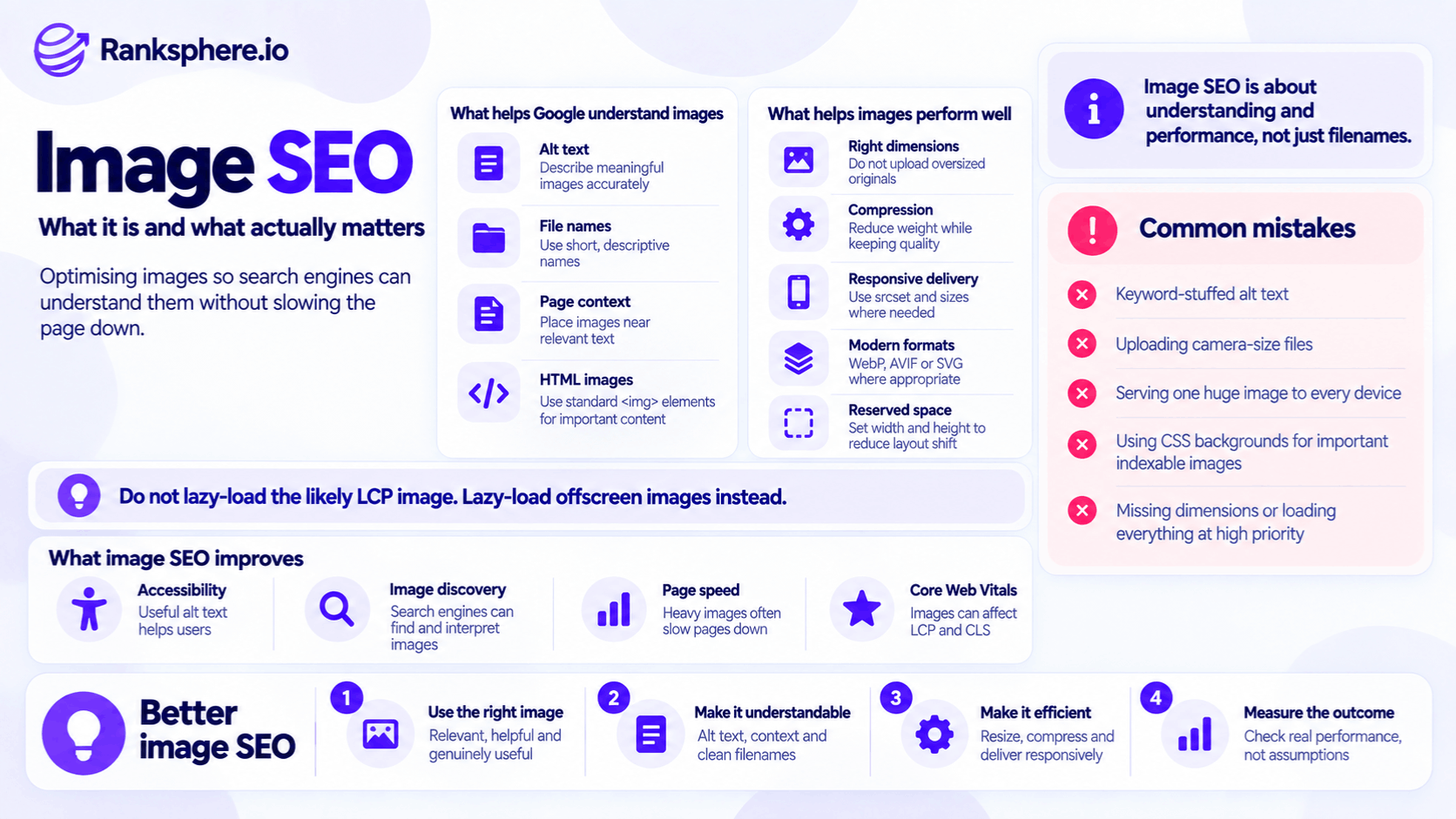
Google does not rely on one field to understand an image.
Its current Google Images guidance says it can use information including:
- Alt text
- File names
- Captions
- Image titles
- Surrounding page content
- Computer vision
- Page metadata
Google specifically recommends placing images close to relevant text and using them on pages whose content relates to the image.
There is no published weighting that says:
page text is worth twice as much as alt text
or:
file name matters more than captions.
Treat the signals as complementary.
Alt text
Alt text describes the image for people who cannot see it and also provides useful context to search engines.
Google describes alt text as the most important image attribute for supplying additional textual information about the image. It combines that information with page content and computer-vision systems when understanding the image.
The accessibility purpose should come first.
For example:
Useful
alt="Plumber repairing a burst copper pipe beneath a kitchen sink"
Stuffed
alt="plumber emergency plumber burst pipe plumber Kent best plumbing repair"
The second version is not better optimisation.
Google explicitly warns against stuffing keywords into alt attributes because it creates a poor user experience and may be treated as spam.
Decorative images should usually use empty alt text
Not every image needs a written description.
If an image is purely decorative and communicates no useful content, an empty alt attribute can be appropriate:
alt=""
That tells assistive technology that the image does not need to be announced.
Do not force keywords into:
- Background decorations
- Dividers
- Decorative icons
simply because the CMS provides an alt-text field.
Alt text depends on context
The same image may need different alt text in different contexts.
For example, a photograph of a newly installed driveway could reasonably be described as:
“New block-paved driveway outside a detached house”
on a project gallery.
On a page specifically comparing paving patterns, the useful description might focus on:
“Herringbone block paving pattern with charcoal border”
Alt text describes the image's purpose in context.
It is not a keyword field detached from the page.
Image file names
Google says file names can provide very light clues about the subject of an image.
That wording is important.
A descriptive file name is useful.
It is not a major ranking signal.
For example:
Better
burst-pipe-repair-kitchen.jpg
Less useful
IMG_4521.jpg
If you are preparing a new image, giving it a sensible name is easy.
Do not, however, build an elaborate image-renaming project expecting major ranking gains.
Do not keyword-stuff image filenames
This:
burst-pipe-repair.jpg
is enough.
This:
burst-pipe-repair-emergency-plumber-kent-plumbing-company-best-plumber.jpg
is unnecessary.
Google recommends short, descriptive file names where possible.
The purpose is to provide a small amount of context.
Not to turn the URL into a keyword list.
Surrounding content matters
An image does not exist in isolation.
Google says the content and metadata of the page containing an image can strongly influence where that image may appear in Search. It recommends placing images near relevant text and using them on pages relevant to the image subject.
For example:
A photograph of a boiler being serviced on a detailed boiler-maintenance page already has strong contextual support.
You do not need to compensate with an artificial alt attribute such as:
“boiler service boiler repair boiler servicing heating engineer near me”.
The page and image should make sense together.
Captions
Visible captions can also help users understand an image.
For example:
“Block paving installed in Maidstone after removal of the original concrete driveway.”
may be useful underneath a project photograph.
A caption should add information a reader benefits from.
Do not add captions purely to repeat target keywords.
Page titles and headings
Google can also use the wider page context when interpreting imagery.
That includes:
- Page topic
- Main heading
- Relevant nearby text
But do not treat headings as image metadata.
A good page structure helps Google understand the page as a whole.
The image then sits inside that context.
Make images discoverable
Image optimisation is not useful if Google cannot reliably discover the image.
Google recommends using standard HTML image elements.
For example:
<img src="/images/roof-repair.jpg" alt="Roofer repairing tiles on a pitched roof">
Google can discover images referenced through the src attribute of an <img> element, including when the image sits inside a <picture> element.
CSS background images are different
Google's current image-search guidance says it does not index CSS images in the same way it discovers standard <img> images.
So if an image is meaningful content that you want Google Images to understand and potentially index, use an appropriate HTML image element rather than relying only on:
background-image: url(...)
CSS backgrounds are perfectly appropriate for genuinely decorative imagery.
Image sitemaps
Image sitemaps can help Google discover images that it might otherwise miss.
Google specifically says an image sitemap can provide URLs for images that it may not have discovered through normal crawling.
They can be particularly useful for sites with:
- Large image libraries
- Galleries
- JavaScript-driven image discovery
- Images hosted on a CDN
But they are not mandatory for every small local-business website.
If Google can already discover your images clearly through crawlable HTML pages, an image sitemap may not be the priority.
Structured data and images
Structured data can also provide image information in certain contexts.
For example, supported structured-data types such as:
- Article
- Product
- Recipe
- Event
may contain image properties.
Google also allows a page to identify a preferred image through metadata such as primaryImageOfPage, and og:image can provide another hint about a preferred representative image.
Do not treat this as:
“add image schema to every JPG.”
Use structured data where it accurately describes the page and where Google supports the relevant markup.
Image performance
The other half of image SEO is delivery.
Images are often among the largest resources on a page, particularly on:
- Local service sites
- Ecommerce sites
- Galleries
- Portfolio sites
Poorly delivered images can contribute to slow loading and unstable layouts.
They can affect Core Web Vitals, especially:
Largest Contentful Paint
If the page's largest above-the-fold element is an image.
Cumulative Layout Shift
If image space has not been reserved before the file loads.
But do not assume images are always the cause.
LCP can also be affected by:
- Server response time
- Resource discovery
- CSS
- JavaScript
- Fonts
- Rendering delays
Google's current LCP guidance breaks the metric into several components rather than treating file size as the entire problem.
Compress images appropriately
A photograph straight from a camera or phone can be much larger than a website needs.
Compression can substantially reduce transferred bytes.
But there is no universal:
“compress every image to 80% quality”
rule.
Google's web-performance guidance recommends testing compression levels and balancing:
- Visual quality
- File size
because different types of imagery respond differently.
A photograph may tolerate lossy compression very well.
A graphic containing:
- Fine text
- Sharp lines
- Flat colours
may need different settings.
Resize images for their real use
Do not serve a 4,000-pixel image simply because the original camera file is 4,000 pixels wide if the image will never appear anywhere near that size.
For example:
If an image displays at roughly:
800 pixels
on a typical desktop layout, delivering a 4,000-pixel original can transfer far more data than necessary.
Responsive sites complicate this slightly because high-density displays may benefit from larger image variants.
The correct solution is usually responsive image delivery, not one enormous file for every device.
Use responsive images
HTML provides tools such as:
- srcset
- sizes
- <picture>
that allow the browser to choose an appropriate image for the visitor's screen and layout.
For example, a phone does not necessarily need the same source image as a large desktop display.
Google's performance guidance recommends responsive images so browsers can select an appropriate candidate instead of downloading unnecessarily large resources.
This is often more effective than simply compressing one huge image slightly harder.
WebP and AVIF
Modern formats such as:
- WebP
- AVIF
can provide efficient compression.
Google Search currently supports both formats, along with formats including JPEG, PNG, GIF, SVG and others.
Choose the format based on the image and the site's browser requirements.
For example:
Photographs
WebP or AVIF may provide substantial savings.
Logos and simple vector graphics
SVG may be more suitable.
Images requiring particular lossless characteristics
PNG or lossless WebP/AVIF may be appropriate.
There is no requirement to convert every image to the same format.
Fallbacks
The <picture> element can provide different sources where compatibility or format choice requires it.
For example, Google explicitly documents using <picture> with newer formats while retaining an <img> element as a fallback.
On modern sites, browser support for WebP and AVIF is broad, so how much fallback complexity you need depends on the site's actual audience.
Always reserve image space
Images without reserved dimensions are a common cause of layout movement.
A basic implementation might be:
<img src="driveway.jpg" width="1200" height="800" alt="Newly installed block-paved driveway">
Modern browsers can use the width and height values to calculate the image's aspect ratio before the file finishes loading.
That helps prevent content suddenly shifting down the page.
Google's web-performance guidance recommends providing width and height, or otherwise reserving the correct space with techniques such as CSS aspect-ratio.
Width and height do not prevent responsive design
A common misconception is that:
width="1200" height="800"
forces the image to render at exactly 1,200 × 800 pixels.
It does not have to.
Responsive CSS can still use:
max-width: 100%;
and:
height: auto;
while the intrinsic dimensions help the browser reserve the correct aspect ratio.
The point is layout stability.
Lazy loading
Lazy loading delays offscreen images until the browser expects they will soon be needed.
For an appropriate below-the-fold image:
loading="lazy"
can reduce unnecessary initial network work.
Native browser lazy loading is widely supported and does not require a JavaScript library.
But lazy loading should be applied selectively.
Do not lazy-load the LCP image
This is one of the most important image-performance rules.
If an image is likely to become the page's Largest Contentful Paint element, do not give it:
loading="lazy"
Google's current LCP guidance explicitly warns against lazy-loading the LCP image because doing so introduces unnecessary resource-load delay.
That commonly applies to:
- Large hero photographs
- Major above-the-fold product images
- Prominent banner imagery
But identify the actual LCP candidate instead of assuming every page's hero is one.
Do not blindly lazy-load every below-the-fold image
Native lazy loading is useful, but:
“lazy load everything below the fold”
is still too rigid.
Images close to the initial viewport may need to load before the user reaches them.
Browser implementations already use distance thresholds to decide when lazy images should be fetched.
The better rule is:
lazy-load genuinely non-critical offscreen imagery while keeping likely in-viewport and LCP images eager.
Prioritise important images
For an <img> that is likely to be the LCP resource, this can be useful:
fetchpriority="high"
Google's current performance guidance recommends considering a high fetch priority for likely LCP images so the browser can prioritise them earlier.
But do not apply it to every image.
If everything is high priority, the prioritisation becomes much less useful.
Do not preload every hero image
Preloading and fetch priority solve different problems.
Fetch priority
Tells the browser how important a resource is.
Preload
Helps the browser discover a critical resource earlier.
If the main hero image is already an ordinary <img> in the initial HTML, the browser can usually discover it quickly.
Preload becomes more useful when the LCP resource is otherwise discovered late—for example:
- CSS background image
- JavaScript-inserted image
Google specifically recommends using preload for resources that are difficult for the browser to discover early.
So:
“preload the hero image on every page”
is not a good universal rule.
Core Web Vitals
The current Core Web Vitals are:
- Largest Contentful Paint
- Interaction to Next Paint
- Cumulative Layout Shift
Google recommends measuring them at the 75th percentile of real visits, separately for mobile and desktop where appropriate. A good LCP is currently 2.5 seconds or less, while a good CLS is 0.1 or less.
Images can influence two of those metrics strongly.
But always identify the actual bottleneck before optimising.
Lighthouse and field data can disagree
A website can perform well in Lighthouse and still have weaker real-user performance.
That is not necessarily a contradiction.
Lighthouse
Runs a controlled lab test under defined conditions.
Field data
Reflects experiences from real users, devices, locations and network conditions.
Google's Chrome User Experience Report field data aggregates real-user experiences over time, while a Lighthouse test is one simulated run.
That makes field data particularly important when assessing Core Web Vitals.
Do not diagnose LCP from image size alone
Suppose the hero image is:
2 MB.
It is certainly worth investigating.
But reducing it to:
400 KB
does not automatically fix LCP.
The bottleneck may instead be:
- Slow server response
- Image discovered too late
- Render-blocking CSS
- Image fetched at low priority
- JavaScript delaying rendering
Google's more recent LCP analysis has specifically shown that image load duration is not always the largest part of the problem.
So:
compress
and:
measure again.
Do not assume.
Local-business image priorities
For a typical local-business website, sensible priorities often include:
- Make important images crawlable and accessible.
- Deliver correctly sized responsive files.
- Compress them appropriately.
- Reserve dimensions to protect CLS.
- Keep the likely LCP image eager and easy to discover.
- Lazy-load appropriate offscreen images.
- Write accurate alt text.
- Use descriptive file names when creating new assets.
- Add image sitemaps or specialised metadata where the site genuinely needs them.
The exact ordering may change depending on the site's problem.
A site with inaccessible images has a different priority from one whose 5 MB hero photograph is delaying LCP.
Use original photographs where they add value
Local businesses often have an advantage that larger generic sites do not:
they can show the real business.
Useful original images may include:
- Team members
- Premises
- Completed work
- Equipment
- Products
- Before-and-after examples where appropriate
These can help customers assess:
- Credibility
- Experience
- Relevance
and can support the wider evidence of real-world experience discussed in E-E-A-T.
But avoid saying:
“Google rewards original photos as an E-E-A-T ranking signal.”
Google has not documented such a rule.
Stock photography is not automatically bad
Stock imagery can still be appropriate for:
- Decorative sections
- Abstract concepts
- Supporting design
The problem is usually not:
stock photo = bad SEO.
It is when stock imagery replaces the evidence users actually want.
For example, a roofing business showing generic stock roofers on every service page may be less persuasive than one showing:
- Its actual team
- Real projects
- Real materials
That is primarily a credibility and conversion issue.
Google Business Profile photos are different
Google Business Profile photos should not be treated like website images.
Google's current Business Profile interface and documentation do not provide a website-style alt-text field for uploaded photos.
Its guidance instead focuses on photographs that are:
- Relevant
- In focus
- Well lit
- Representative of reality
Google currently recommends JPG or PNG, files between 10 KB and 5 MB, a recommended resolution of 720 × 720 pixels and a minimum of 250 × 250 pixels.
Do not treat GBP filenames as a ranking tactic
There is no current official Google Business Profile guidance saying:
“rename your photo to emergency-plumber-manchester.jpg to improve Maps rankings.”
Likewise, Google's local ranking documentation identifies the broad factors as:
- Relevance
- Distance
- Prominence
and does not list photo filenames or EXIF geotags as local-ranking factors.
So for Business Profile photos, prioritise:
- Accurate photographs
- Useful subject matter
- Quality
- Relevant coverage of the business
rather than metadata tricks.
Image geotagging
The same applies to GPS metadata embedded in image files.
There is no solid official evidence that adding EXIF latitude and longitude to Business Profile photographs improves local rankings.
Do not sell:
image geotagging
as a ranking technique without evidence.
If location metadata exists for legitimate photographic reasons, that is separate.
It should not be treated as a local SEO hack.
Images and E-E-A-T
Images can strengthen content by providing visible evidence.
For example:
- A medical practice showing its actual clinicians
- A builder showing completed projects
- A restaurant showing real dishes
- A workshop showing equipment and processes
That can help users evaluate whether the business appears credible.
But E-E-A-T is not a public Google score that rises because a page contains ten original images.
Use photographs because they make the page more trustworthy and useful.
Image SEO and accessibility
Image optimisation should never be separated from accessibility.
A page that ranks well but cannot be interpreted properly by someone using assistive technology is not well optimised.
For meaningful images:
- Provide useful alt text.
For decorative images:
- Use appropriate empty alternatives.
For text contained in images:
- Make sure essential information also exists as accessible text where appropriate.
Google itself points to accessibility guidance when discussing alt text.
Image SEO and user experience
The best image optimisation often improves several things at once.
For example:
A properly resized image can:
- Download faster
- Use less mobile data
- Improve LCP
Explicit dimensions can:
- Reduce layout shifts
- Make the page feel more stable
A meaningful original photograph can:
- Explain a service
- Build customer confidence
Good image SEO is not about manipulating Google Images.
It is about making visual content work properly.
Common image SEO mistakes
- Calling images the universal number-one cause of poor Core Web Vitals.
- Assuming file size is the only cause of poor LCP.
- Treating alt text as a keyword field.
- Claiming surrounding text has a published weighting greater than alt text.
- Uploading camera-resolution files without considering their actual display size.
- Serving one oversized image to every device instead of using responsive images.
- Leaving images without reserved dimensions and creating avoidable layout shifts.
- Lazy-loading the likely LCP image.
- Preloading every hero image whether it needs preload or not.
- Giving several images fetchpriority="high" without testing the effect.
- Converting everything to WebP or AVIF without considering the source image or quality.
- Using CSS background images for meaningful image content you want Google Images to discover.
- Assuming original photography is a direct E-E-A-T ranking signal.
- Treating stock imagery as automatically harmful to SEO.
- Claiming Google Business Profile image filenames improve local rankings.
- Using EXIF geotagging as an unsupported local-ranking tactic.
- Optimising file names while ignoring accessibility, page context and actual page performance.
Image SEO best practices
- Use standard HTML <img> elements for meaningful images you want search engines to discover.
- Place images close to relevant page content.
- Write accurate alt text for meaningful images and use empty alt text for genuinely decorative ones.
- Give new image files short, descriptive names without keyword stuffing.
- Compress images while maintaining acceptable visual quality.
- Use responsive images with srcset and sizes where appropriate.
- Consider WebP or AVIF when they provide useful file-size savings.
- Provide width and height or otherwise reserve the correct aspect ratio.
- Lazy-load appropriate offscreen imagery, not likely above-the-fold or LCP images.
- Keep the LCP resource discoverable in the initial HTML wherever possible.
- Consider fetchpriority="high" for a genuine LCP image rather than automatically preloading every hero.
- Use preload when an important resource would otherwise be discovered late, such as a critical CSS background image.
- Use image sitemaps when they genuinely improve discovery.
- Use original photographs where they help users verify the real business, work or expertise.
- Treat Google Business Profile photographs according to Google's Profile-specific guidance rather than applying website-image tactics to them.
- Measure the actual effect with field and lab data rather than assuming an optimisation worked.
Example
“Consider a hypothetical physiotherapy clinic called Oakfield Physiotherapy.
A Lighthouse test reports strong performance, so the team assumes the homepage is fast.
But its Search Console Core Web Vitals data indicates that real mobile visitors are having a weaker loading experience.
The team investigates the page rather than assuming Lighthouse is wrong.
The homepage's main visual is a large photograph of the clinic.
Several issues appear:
- The original file is much larger than the displayed image needs to be.
- The same large source is delivered to mobile and desktop.
- The image is being lazy-loaded even though it is a likely LCP element.
- The HTML does not make its priority clear.
- Image space is not reserved consistently.
The image's alt text is already perfectly reasonable:
“Physiotherapist helping a patient with a shoulder mobility exercise.”
There is no reason to rewrite it.
The optimisation work instead focuses on delivery.
The team:
- Creates appropriately sized responsive image variants.
- Compresses them while checking visual quality.
- Serves an efficient modern format.
- Adds correct dimensions.
- Removes lazy loading from the likely LCP image.
- Makes the resource discoverable early.
- Tests whether fetchpriority="high" improves loading.
- Measures the result again using both lab and field data.
The team does not invent a claim that:
- LCP fell from 4.1 to 1.9 seconds
- The work took exactly one hour
- Rankings increased
- Conversions rose
unless those figures are actually measured.
The useful lesson is more important:
the image was not poorly optimised because its alt text was wrong. It was poorly delivered.
That distinction is central to modern image SEO.
An image needs to be understandable, accessible and relevant, but it also needs to reach the user's screen efficiently.
Good image SEO is not about choosing between search optimisation and performance. It is about using the right image, making its meaning clear, making it discoverable, and delivering it without unnecessary weight or layout instability.”
See also
- Alt text — describing meaningful images accurately
- Core Web Vitals — where image loading and dimensions can affect real-user performance
- Page speed — the wider performance picture
- Google Business Profile photos — which are managed differently from website images
- On-page SEO — the wider optimisation context
- Technical SEO — implementing image discovery, rendering and performance correctly