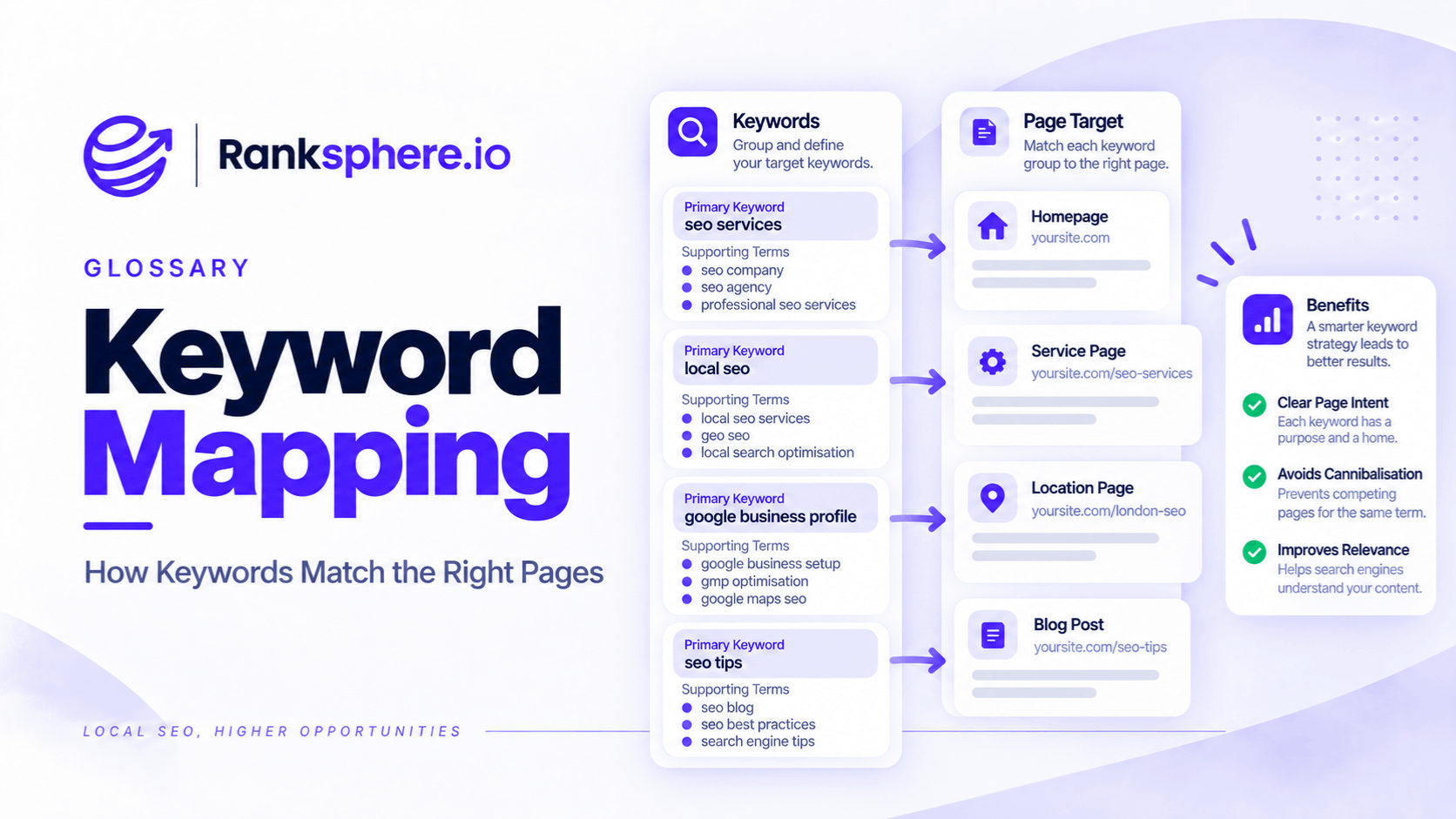
Keyword mapping is the process of assigning groups of related search queries to the pages best suited to satisfy them.
Instead of creating a page for every keyword variation, you group terms by:
- Topic
- Search intent
- SERP similarity
- User need
and decide which URL should be responsible for each group.
Keyword mapping helps answer a simple but important question:
Which page on this site should satisfy this search?
Done properly, it can reduce unnecessary overlap, expose missing content and make future content planning much clearer.
It is especially useful for avoiding problems such as keyword cannibalisation, near-duplicate service pages and websites where several URLs compete for essentially the same search intent.
What is keyword mapping?
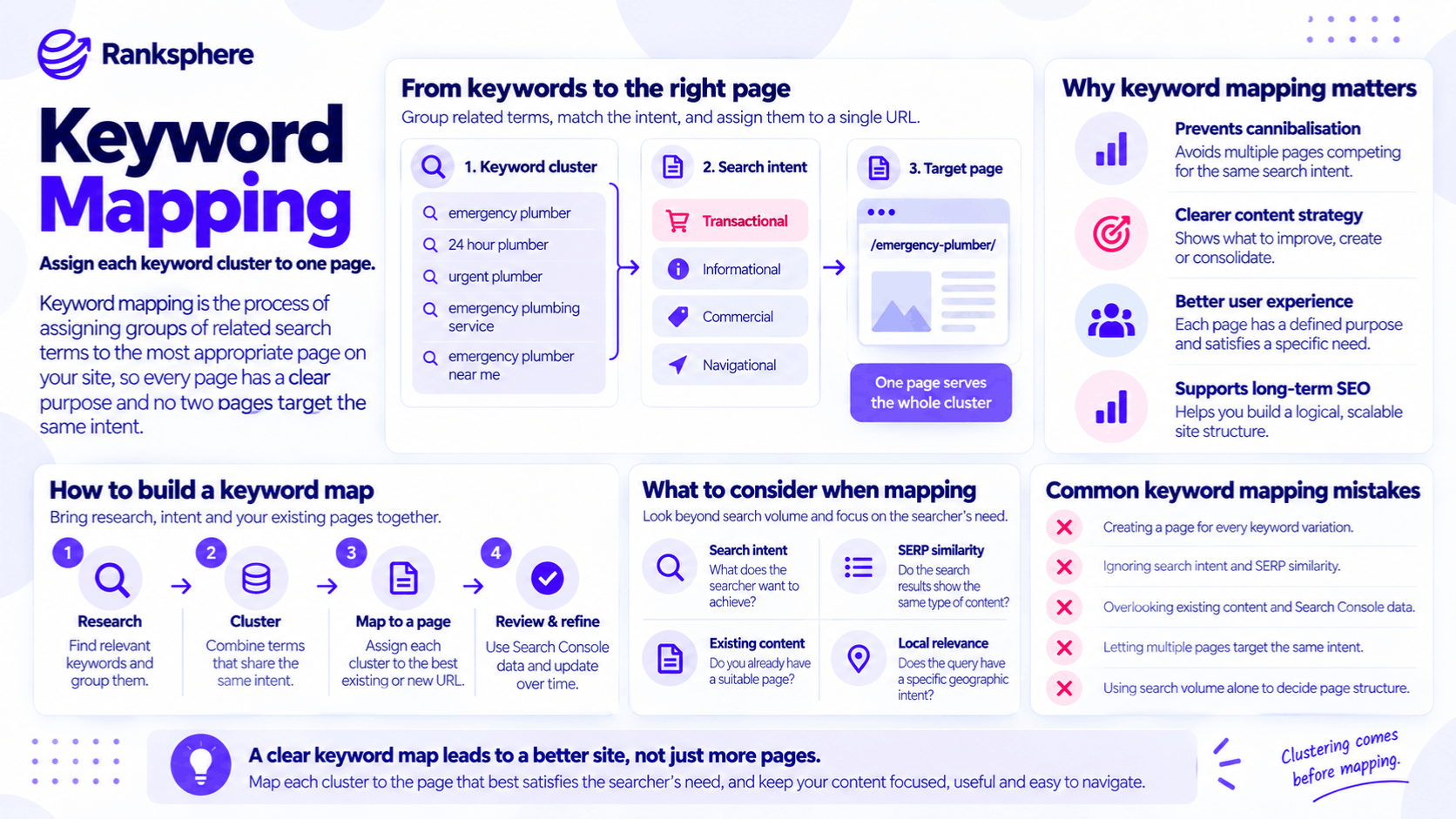
A keyword map connects keyword research to actual website architecture.
For example, a plumbing company may find queries such as:
- emergency plumber
- 24 hour plumber
- emergency plumbing service
- plumber for emergency call-outs
Those phrases may all represent substantially the same need.
Rather than creating four pages, the business may decide that one strong emergency-plumbing page can satisfy the group.
Another query such as:
boiler servicing
serves a different need and would normally belong to another page.
Keyword mapping turns that decision-making process into a structured plan.
Keyword clustering comes first
Before assigning keywords to URLs, group related queries into clusters.
A cluster is a collection of terms that appear to represent the same or closely related search need.
For example:
Likely one cluster
- emergency plumber
- 24 hour plumber
- emergency plumbing
- emergency plumber near me
These phrases may reasonably be served by the same page.
Likely different clusters
- emergency plumber
- boiler servicing
They describe different services and should normally have separate destinations.
Same topic, different intent
- how much does a boiler service cost
- book a boiler service
These concern the same subject but may represent different stages of the customer journey.
The first is primarily informational.
The second is much more transactional.
See search intent for the wider distinction.
Cluster by user need, not just wording
Keywords do not belong together simply because they contain the same words.
For example:
boiler service cost
and:
boiler service checklist
both contain:
boiler service
but the user may want very different things.
Likewise, queries using different wording can represent almost the same need.
That is why clustering should focus on:
what the searcher is trying to accomplish
rather than only:
which words appear in the query.
Use SERPs to validate clusters
Search-result comparison is a useful way to test whether queries belong together.
Search two terms and compare the results.
If many of the same pages appear prominently for both queries, that can suggest Google sees substantial overlap in the type of content that satisfies them.
If the results are noticeably different, the queries may deserve separate pages or content types.
This is sometimes called SERP overlap analysis.
However, do not treat it as an absolute rule.
Search results can vary by:
- Location
- Device
- Time
- Search context
SERP overlap is evidence.
It is not a mathematical definition of search intent.
Semantic search allows broader keyword coverage
Modern semantic search means pages do not need to repeat every possible wording of a query.
A strong page about emergency plumbing may naturally become relevant for variations such as:
- emergency plumber
- urgent plumber
- 24 hour plumber
- emergency plumbing service
without creating a separate page for each phrase.
That is one of the reasons modern keyword mapping should work with topic and intent groups, rather than one keyword per URL.
One keyword does not need one page
This is one of the most important principles.
Avoid structures such as:
/emergency-plumber/
/24-hour-plumber/
/urgent-plumber/
/emergency-plumbing-service/
when all four pages would provide substantially the same answer.
That can create:
- Repetitive content
- Unclear page purpose
- Competing URLs
- Poor user experience
A single well-developed page may serve all four phrases more effectively.
One page can cover several keyword clusters
The opposite mistake is making the map too rigid.
A page can sometimes satisfy several closely related clusters if the content naturally serves them together.
For example, a comprehensive boiler servicing page might cover:
- Boiler servicing
- Annual boiler checks
- Boiler service cost
- What happens during a service
without needing a separate URL for every subtopic.
The question is whether one page can satisfy those needs clearly.
Do not create extra pages simply because a spreadsheet contains extra rows.
What goes into a keyword map?
A keyword map can be a simple spreadsheet.
Useful fields might include:
Primary topic or query
The main phrase used to describe the cluster.
This is primarily an organisational label.
It does not mean the page should optimise only for that exact phrase.
Supporting terms
Related queries that belong to the same group.
Search intent
For example:
- Informational
- Commercial
- Transactional
- Navigational
These labels are useful, but real intent can overlap.
Target URL
The page responsible for serving the cluster.
Page type
For example:
- Service page
- Location page
- Category page
- Guide
- Product page
- Comparison page
Current status
Such as:
- Existing
- Needs improvement
- Needs consolidation
- Needs creating
Existing rankings
Which URLs already receive impressions or rankings for the cluster.
Internal links
Relevant pages that should link towards the target URL.
That last field makes the map useful beyond content planning.
It connects keyword research with site architecture.
A simple keyword map example
| Cluster | Supporting queries | Intent | Target page | Status |
| Emergency plumber | 24 hour plumber, urgent plumber | Transactional | /emergency-plumber/ | Improve |
| Boiler servicing | boiler service, annual boiler service | Transactional | /boiler-service/ | Existing |
| Boiler service cost | boiler service price, cost of boiler service | Informational / commercial | /boiler-service-cost/ or suitable section | Review |
| Frozen pipes | what to do with frozen pipes | Informational | /guides/frozen-pipes/ | Create |
The exact structure depends on the site.
The point is to make the decision explicit.
Keyword mapping an existing website
Keyword mapping is often most valuable on websites that already contain years of content.
In that situation, do not begin by creating more pages.
First work out what is already there.
Export the existing URLs
Start with a complete list of relevant URLs.
Sources might include:
- Site crawl
- XML sitemap
- CMS export
Group the pages by type, such as:
- Services
- Locations
- Blog posts
- Categories
- Products
This gives you the existing structure before you start assigning keyword clusters.
Use Search Console data
Search Console is particularly useful for existing sites because it shows the queries for which pages are already receiving:
- Impressions
- Clicks
Review query data at page level.
A page may already be appearing for terms nobody intentionally targeted.
That can change the content plan considerably.
What a page ranks for may differ from what it was written for
Suppose a blog article called:
How to Choose a New Consumer Unit
receives strong impressions for:
consumer unit replacement
while the site's commercial service page barely appears.
That is useful information.
It does not automatically mean the blog is wrong.
It means you need to investigate:
- Search intent
- Internal linking
- Page quality
- Whether both pages serve distinct purposes
Keyword mapping makes that overlap visible.
Search Console is evidence, not the whole keyword universe
Search Console should not be your only source of keywords.
It only shows queries for which the site has already received impressions.
That means it may not reveal important opportunities the website has never appeared for.
Combine it with:
- Keyword research
- Customer questions
- Competitor analysis
- SERP research
The existing data tells you what Google already associates with your pages.
Keyword research shows where opportunities may still exist.
Finding keyword cannibalisation
Keyword mapping can help surface keyword cannibalisation.
For example, suppose four URLs all receive impressions for:
consumer unit replacement
That deserves investigation.
But do not automatically assume all four must be merged.
First check:
- What intent each page serves
- Which queries each page receives
- Whether rankings alternate
- Whether the pages genuinely overlap
Sometimes multiple pages ranking around the same topic is perfectly reasonable.
Cannibalisation becomes a problem when pages compete unnecessarily for essentially the same need.
Do not diagnose cannibalisation by keyword overlap alone
A service page and an informational guide can both mention:
boiler servicing
without being duplicates.
For example:
Service page
Book a Boiler Service
Transactional.
Guide
What Happens During a Boiler Service?
Informational.
They cover the same topic but serve different purposes.
They may even support each other through internal linking.
Keyword mapping should preserve useful differences.
Not eliminate them.
Finding content gaps
The map also reveals clusters with no suitable page.
For example:
The business may have good pages for:
- Rewiring
- Consumer units
- Lighting
but discover meaningful demand around:
EV charger installation
with no relevant page.
That is a genuine content gap.
It provides a much stronger reason for creating a page than:
“We need another article this week.”
Not every keyword needs a page
This deserves repeating.
A keyword research tool might export:
4,000 queries.
That does not mean the website needs:
4,000 URLs.
Many of those terms will be:
- Synonyms
- Variations
- Questions
- Long-tail versions
that can be covered naturally within larger topic groups.
Mapping is partly the process of deciding what not to create.
Service-page mapping
Service businesses often create the clearest mapping problems.
Suppose an electrician has pages for:
- Electrical services
- Electrician services
- Domestic electrician
- Residential electrician
- Home electrician
If all five pages largely describe the same service and user intent, separate URLs may not be justified.
A map helps identify whether they should be:
- Consolidated
- Repositioned
- Kept separate
based on actual purpose.
Location-page mapping
Local SEO adds another layer.
For example:
plumber Bristol
and:
plumber Bath
may represent the same service but different geographic intent.
Separate pages can make sense where the business genuinely serves those locations and each page contains useful location-specific information.
Do not apply:
one topic = one URL
so rigidly that legitimate location intent disappears.
At the same time, avoid creating hundreds of near-identical town pages purely by swapping place names.
Mapping informational content
Informational queries often form larger clusters than businesses expect.
For example:
- how often should a boiler be serviced
- when should a boiler be serviced
- annual boiler service frequency
may fit naturally into one guide.
Creating three articles would add little.
One useful resource can answer the underlying question comprehensively.
Mapping commercial and transactional terms
Commercial queries often sit close to transactional ones.
For example:
best boiler service company
and:
book boiler service
may sometimes be served by the same service page.
Other times the first query may produce:
- Comparisons
- Directories
- Reviews
while the second strongly favours service providers.
Check the search landscape rather than assuming the intent labels alone decide the page structure.
Primary keywords are planning labels
The term primary keyword can be misleading.
A page does not need one magical phrase that controls everything else.
In a keyword map, the primary term is usually best treated as:
the clearest label for the main search need the page serves.
Then support it naturally with related language.
Do not force the exact phrase into:
- Every heading
- Every paragraph
- Every internal anchor
The page should read naturally.
Secondary keywords
Secondary keywords can help define the breadth of a page.
For example, an emergency-plumbing page might naturally discuss:
- Burst pipes
- Emergency leaks
- 24-hour call-outs
- Urgent plumbing repairs
These are useful when they genuinely belong to the service.
They should not become a checklist of phrases to repeat a certain number of times.
Keyword mapping and internal linking
A keyword map can also improve internal linking.
If /boiler-service/ is the main page for boiler servicing, related pages can link towards it when relevant.
For example:
Preparing Your Boiler for Winter
may link to the service page with natural anchor text such as:
book a boiler service
or:
our boiler servicing team
The map makes it easier to see which pages should support which destination.
Do not over-engineer anchor text
Keyword mapping does not mean every internal link should use the exact primary keyword.
Use varied, descriptive anchor text that fits the sentence.
For example:
- boiler servicing
- annual service
- arrange a boiler check
- our boiler service
can all make sense.
Internal links are for navigation and context, not keyword repetition.
Mapping new content
Before creating a new URL, check the map.
Ask:
- Does an existing page already serve this intent?
- Could the existing page be improved instead?
- Would the new URL satisfy a meaningfully different need?
If the answer to the first question is yes, another page may create unnecessary overlap.
This simple check prevents a surprising amount of content duplication.
Updating the map
A keyword map should not be treated as a document created once and forgotten.
Update it when:
- New services launch
- Locations change
- Pages are merged
- New content is published
- Search intent changes
- Existing pages begin ranking for unexpected queries
The map should represent the current site.
Not the site as it looked two years ago.
Search results can change
SERP-based clustering also needs periodic review.
A query that once favoured:
- Blog articles
may later favour:
- Service pages
- Product listings
- Videos
Search behaviour and Google results evolve.
If an important cluster stops performing, recheck the current SERP before rewriting the page.
Keyword mapping and rank tracking
After pages have been mapped, rankings can help show whether the intended URL is appearing consistently across related queries.
Ranksphere's rank tracker tracks a set of terms together across your service area, which can help show whether one page is gaining visibility across its mapped terms or whether different URLs are appearing unexpectedly.
For local businesses, geographic variation also matters.
A page may rank differently across different parts of the service area.
Treat rank tracking as one source of evidence alongside Search Console and actual enquiries.
Keyword mapping is not a ranking factor
Google does not award rankings because a business owns a keyword spreadsheet.
Keyword mapping is an internal SEO planning process.
Its value comes from helping teams build:
- Clearer page purposes
- Better site architecture
- Less duplication
- More intentional content
- Better internal linking
The spreadsheet itself has no ranking value.
The decisions it produces can.
Common keyword mapping mistakes
- Creating one page for every keyword variation.
- Treating SERP similarity as an absolute rule rather than evidence.
- Forcing every cluster into a strict one-cluster-one-page structure.
- Assuming any two pages mentioning the same topic are cannibalising each other.
- Creating a new page before checking whether an existing one already serves the intent.
- Using search volume alone to decide page structure.
- Ignoring Search Console data on an existing site.
- Treating a primary keyword as something that must be repeated throughout the page.
- Mapping keywords without considering page type.
- Creating local pages purely by changing the town name.
- Building the map once and never updating it.
Keyword mapping best practices
- Cluster keywords by user need, topic and search intent.
- Use SERP overlap as a useful validation signal, not an absolute rule.
- Map closely related variations to one strong page where appropriate.
- Allow separate pages where the user need, page type or location is genuinely different.
- Use Search Console to understand what existing pages already receive impressions for.
- Check for keyword cannibalisation before creating new content.
- Treat primary keywords as organisational labels rather than exact-match writing instructions.
- Connect the map with internal linking.
- Review the map whenever services, locations or important content change.
- Use the map to decide when not to create another page.
Example
“Consider a hypothetical electrical company called Bramwell Electrical.
The website has eleven service pages and a growing blog.
The initial assumption is:
we need more content because rankings are weak.
Before commissioning anything new, the team builds a keyword map.
It exports the existing URLs and reviews page-level data in Search Console.
Several pages are receiving impressions around:
consumer unit replacement
including:
- Two service pages
- An older landing page
- A blog guide
At first this looks like obvious cannibalisation.
But the team reviews the intent.
The blog guide answers:
What is involved in replacing a consumer unit?
and serves a clear informational purpose.
That page is kept.
The three commercial pages, however, largely repeat the same service and target the same customer need.
Those are candidates for consolidation into one clearer service page.
The map also reveals several genuine gaps.
The business offers:
- EICR testing
- EV charger installation
- Emergency electrical call-outs
but does not have a strong dedicated page for each service.
Instead of writing another ten blog posts, the content plan becomes much smaller and clearer:
- Consolidate overlapping commercial pages
- Preserve useful informational content
- Create pages for genuinely missing services
- Improve internal links between related guides and service pages
- Leave pages that already have a clear purpose alone
The site does not get larger simply because keyword research produced more terms.
It becomes more deliberate.
That is the real value of keyword mapping:
it turns a long keyword list into a clear decision about which pages the site actually needs, what each page is responsible for and where unnecessary overlap should be resolved.”
See also
- Keyword research — finding the queries and topics worth investigating
- Search intent — understanding what the searcher is trying to achieve
- Keyword cannibalisation — when multiple pages compete unnecessarily for the same intent
- Topic cluster — organising related content around a broader subject
- Content brief — turning a mapped topic into a writing plan
- Google Search Console — understanding which queries existing pages already appear for