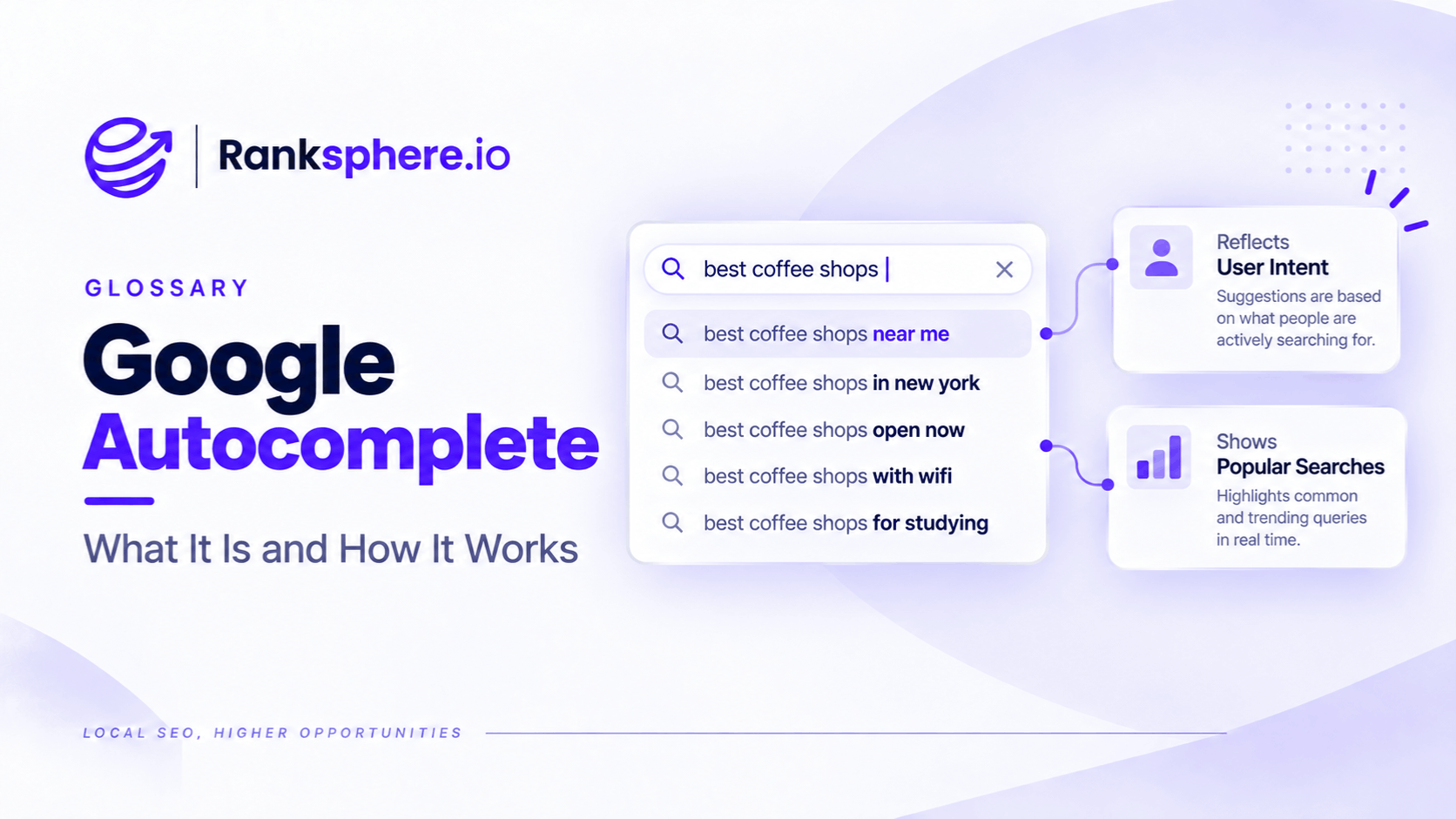
Google Autocomplete is the feature that predicts possible searches as someone types into the Google search box.
For SEO, it can be a useful source of keyword and topic ideas because Google says its predictions reflect real searches that have previously been made.
But Autocomplete is not a raw list of the most popular queries.
Google also considers factors such as:
- The language of the query
- The searcher's location
- Trending interest
- Previous searches and personalisation
Some predicted words and phrases can also be influenced by patterns Google has found across the web.
That makes Autocomplete valuable for keyword discovery, especially when researching:
- Local searches
- Long-tail phrases
- Question wording
- New or changing terminology
It should not, however, be treated as a substitute for search volume, search intent analysis or broader keyword research.
What is Google Autocomplete?
When someone begins typing into Google, Autocomplete displays predictions underneath the search box.
For example, typing:
dental implants
might produce predictions around:
- Cost
- Finance
- Recovery
- Suitability
- Longevity
The exact suggestions can differ depending on:
- Location
- Language
- Timing
- Search activity
- Personalisation
Google says its automated systems look for common searches that match what someone has started typing while also using those contextual signals.
This is why two people do not necessarily see exactly the same suggestions.
Autocomplete predictions come from real searches
Google states that Autocomplete predictions reflect real searches that have been made on Google.
That makes the feature particularly useful for discovering how people actually phrase searches.
For example, a business may describe a service internally as:
domestic EV charging installation
while users might search:
home EV charger installation
Autocomplete can help surface that language difference.
That is useful information for:
- Keyword research
- Page copy
- FAQs
- Content planning
But Autocomplete is not a search-volume tool
A suggestion appearing does not tell you:
- How many searches it receives
- Whether it gets 10 searches or 10,000
- How popular it is relative to another suggestion
- Whether it has commercial value
Google explicitly says Autocomplete is different from Google Trends because it does not simply display the most common queries for a topic.
So avoid interpreting the order of predictions as:
#1 suggestion = highest-volume keyword
That conclusion is not supported.
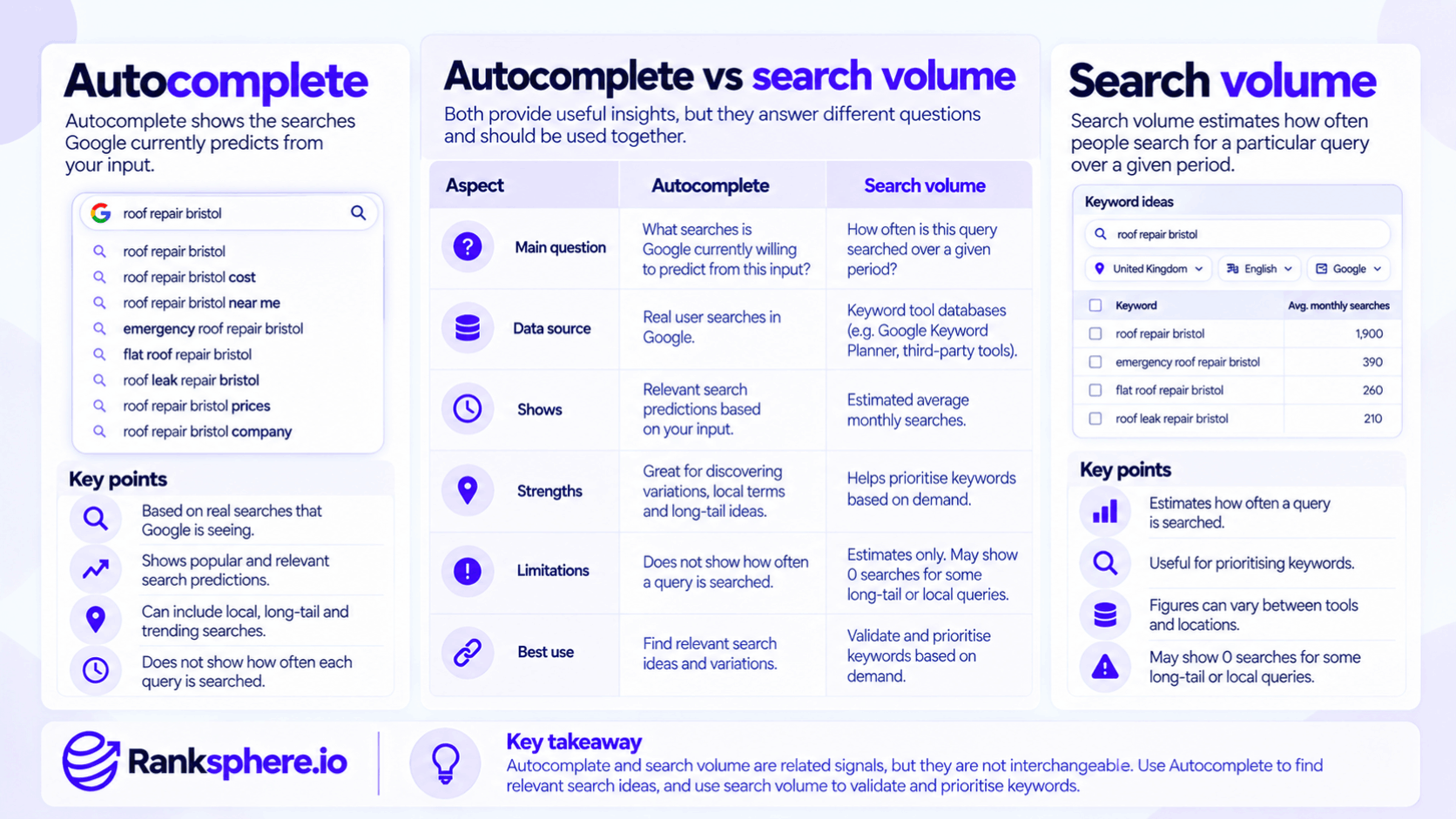
Autocomplete vs search volume
Search volume attempts to estimate how often people search for a particular query over a given period.
Autocomplete answers a different question:
What searches is Google currently willing to predict from this input?
Those are related signals.
They are not interchangeable.
A keyword tool may report:
0 searches
for a long-tail local query while Autocomplete still shows a related prediction.
That does not prove the tool is wrong.
Its database, location settings or volume thresholds may differ.
Likewise, an Autocomplete prediction does not prove that the query receives substantial monthly demand.
Use each source for what it is good at.
Why Google Autocomplete is useful for SEO
Autocomplete is especially good at showing language patterns.
It can reveal:
- How customers phrase a problem
- Questions they ask
- Modifiers they add
- Local terminology
- Comparisons
- Concerns
That can uncover useful topics that a standard keyword export might not make obvious.
Long-tail keyword discovery
Autocomplete can be particularly useful for exploring longer, more specific searches.
For example:
Start with:
dental implants
Then Google may suggest variations around:
- Price
- Finance
- Bone loss
- Recovery
- Age
- Pain
Those phrases can reveal what people want to understand before making a decision.
That makes Autocomplete useful for long-tail research.
But do not create a separate page for every prediction.
Related terms often belong together, as covered in keyword mapping.
Local keyword research
Autocomplete can also help with local SEO because Google says location is one of the factors used when generating predictions.
A search performed in Manchester may therefore produce different suggestions from the same starting phrase searched elsewhere.
This can help identify:
- Local terminology
- Location modifiers
- Regional service wording
However, do not treat Autocomplete as a precise local-demand measurement tool.
Location influences predictions.
It does not turn them into exact local search-volume figures.
New and trending searches
Google also considers trending interest when generating predictions.
That makes Autocomplete useful when language changes quickly.
A new:
- Product
- Regulation
- Technology
- News event
may begin appearing before conventional keyword databases have accumulated enough historical data to provide useful volume estimates.
That can help with early-stage research.
It still does not tell you how large or durable the demand will be.
Question research
Autocomplete can reveal how searchers frame questions.
Try starting with phrases such as:
- how
- why
- what
- when
- can
- should
- does
For example:
how dental implants...
may surface very different ideas from:
dental implants...
This can help identify:
- Information gaps
- Customer concerns
- FAQ ideas
But always check whether the question genuinely belongs on your site before creating content for it.
The alphabet method
One common SEO research technique is adding letters after a seed phrase.
For example:
plumber a
plumber b
plumber c
Different inputs may trigger different predictions.
This is often called the alphabet method.
It is an SEO research technique rather than an official Google keyword-research feature.
It can still be useful for expanding a seed list.
The important thing is not to confuse:
Autocomplete showed it
with:
we definitely need to target it.
Use modifiers
Another useful approach is adding natural modifiers.
For example:
Questions
- how
- what
- when
- why
- can
Commercial modifiers
- cost
- price
- quote
- best
Relationship words
- for
- with
- without
- vs
- near
These can reveal different parts of the customer journey.
For example:
dental implants cost
may represent commercial research.
dental implants with bone loss
may represent suitability concerns.
dental implants near me
may have strong local intent.
The wording provides clues.
The results page confirms more about what Google currently serves.
Always check search intent
Autocomplete helps discover the query.
It does not tell you what content should rank for it.
See search intent.
For every useful prediction, inspect the actual search results.
Look at whether Google returns:
- Service pages
- Guides
- Local results
- Videos
- Product pages
- Mixed results
That tells you much more about how to address the query.
Do not infer intent from wording alone
For example:
dental implants cost
sounds informational.
But the SERP may contain:
- Pricing guides
- Clinic pages
- Local businesses
That indicates mixed informational and commercial intent.
Autocomplete discovered the wording.
The SERP helps you understand the search.
Autocomplete and People Also Ask
Autocomplete pairs well with People Also Ask.
They reveal different things.
Autocomplete
Shows query predictions while someone is typing.
People Also Ask
Shows related questions Google associates with a completed search.
Used together, they can help uncover:
- Initial search wording
- Follow-up questions
- Topic relationships
Neither should be treated as search-volume data.
Related searches
Related searches can add another layer.
A practical research workflow might use:
- Autocomplete
- Search results
- People Also Ask
- Related searches
This provides a broader picture of the language around a topic.
Then use:
- Keyword data
- Commercial relevance
- Intent
- Existing pages
to decide what actually deserves attention.
Incognito mode and Autocomplete
Using a private browsing window can help reduce some influences from your normal browser session.
But it does not create a perfectly neutral Google environment.
Google can still use contextual factors such as:
- Location
- Language
- Device
and signed-out Search can still be customised in some circumstances.
If you sign into Google inside an incognito window, account activity may also still be associated with the account depending on settings.
So describe incognito as:
a useful way to reduce some personal-history effects
rather than:
the way to see completely unbiased Autocomplete results.
Personalisation
Google says previous searches can influence Autocomplete predictions.
Signed-in users may also see personalised predictions based on their Google activity.
That means repeated research can sometimes affect what you see.
For important research:
- Compare more than one session
- Check the target location where practical
- Record what you find
- Avoid assuming one researcher's suggestions represent everyone
Location matters
Google says the searcher's location is one factor used when generating Autocomplete predictions.
That makes local research useful.
If you are researching keywords for a business in another city or country, results from your own location may not perfectly represent what customers there see.
When practical, use:
- Appropriate region settings
- Location-specific searches
- Local rank-tracking data
to provide additional context.
Ranksphere's rank tracker suggests terms your business already ranks for alongside manually added terms, which can complement Autocomplete research by showing where the business already has search visibility.
Google filters Autocomplete predictions
Autocomplete is not a raw stream of everything people search.
Google has systems designed to prevent certain predictions from appearing, including predictions that violate policies around areas such as:
- Violence
- Sexual content
- Hate
- Harassment
- Dangerous content
Google may also remove problematic predictions manually when automated systems do not catch them.
This matters because:
prediction absent
does not necessarily mean:
nobody searches for it.
Likewise:
prediction present
does not mean:
it is one of the most popular searches.
Autocomplete predictions are not statements of fact
This is especially important for brand research.
Google explicitly says Autocomplete predictions are not assertions of fact or opinion.
For example:
Brand Name complaints
appearing as a suggestion does not establish that the business has a widespread complaint problem.
It means Google generated that prediction from the signals available to its systems.
Investigate it.
Do not treat it as evidence by itself.
Brand Autocomplete
It can still be useful to search your business name and observe what follows.
For example:
- Brand reviews
- Brand prices
- Brand opening hours
- Brand complaints
These can reveal areas worth investigating from a customer-experience or content perspective.
For example, repeated interest around:
Brand Name prices
may suggest customers want clearer pricing information.
That does not mean you need to manipulate the suggestion.
It may simply reveal an information need worth addressing.
Brand suggestions and reputation management
Potentially negative suggestions can be useful prompts for reputation management.
If you see:
Business Name complaints
look at:
- Reviews
- Search results
- Customer feedback
- Relevant media coverage
Then decide whether an underlying issue actually exists.
Do not assume the prediction itself proves anything.
You cannot simply edit Autocomplete
Businesses cannot open a dashboard and rewrite their Autocomplete suggestions.
Google generates them automatically.
Users can report predictions that they believe violate Google's Autocomplete policies, but reporting does not guarantee removal.
So reputation work should focus on:
- Customer experience
- Accurate information
- Genuine reviews
- Useful public content
rather than trying to “optimise” the prediction directly.
Autocomplete is not Google Trends
Google specifically distinguishes Autocomplete from Google Trends.
Autocomplete is designed primarily to help people complete searches more quickly.
Google Trends is designed for analysing the popularity of searches and topics over time.
So use:
Autocomplete
for discovery and wording.
Google Trends
for relative trend analysis.
Keyword tools
for estimated keyword metrics.
Search Console
for queries where your own site is already receiving impressions.
Each answers a different question.
Autocomplete is not Search Console
Autocomplete tells you about potential query language.
Search Console tells you which queries your own site has already appeared for.
That distinction matters.
If Autocomplete suggests:
dental implants nervous patient
but Search Console shows no impressions for anything similar, you may have uncovered:
- A possible content gap
- A query Google does not associate with your current pages
Or the demand may simply be very small.
Further analysis is required.
Autocomplete is not a content plan
One research session can produce dozens of suggestions.
Do not immediately turn them into:
dozens of new URLs.
Many predictions belong to the same intent.
For example:
- how long do dental implants last
- dental implant lifespan
- how many years do dental implants last
may belong to one useful section or page.
Use keyword mapping to group related queries before deciding what to create.
One suggestion does not equal one keyword target
This is one of the most common mistakes.
Google can generate different variations around essentially the same need.
Creating:
/dental-implants-how-long/
and:
/dental-implant-lifespan/
and:
/how-many-years-do-implants-last/
would usually be unnecessary if one useful page can answer the question.
Autocomplete expands your vocabulary.
Keyword mapping turns that vocabulary into sensible site structure.
Commercial relevance still matters
Autocomplete can show searches with no value to your business.
A dentist might find predictions about:
- Dental school
- Dental equipment
- DIY procedures
- Jobs
Those are still real research observations.
They may have nothing to do with acquiring the right patients.
Filter by:
- Business relevance
- Intent
- Services offered
- Customer value
before investing in content.
Do not assume a suggestion is easy to rank for
Autocomplete tells you nothing reliable about SEO difficulty.
A long-tail phrase may still have:
- Major publishers
- Government sites
- Strong commercial competitors
in the results.
The fact that the query looks specific does not make it easy.
Check the actual SERP.
Do not assume long-tail means low volume
Longer queries are often described as “low-volume”.
Sometimes they are.
But phrase length alone does not tell you demand.
Likewise, an Autocomplete suggestion does not tell you whether its search volume is high or low.
Separate:
- Query specificity
- Search volume
- Ranking difficulty
rather than treating them as the same thing.
A practical Autocomplete workflow
A useful process might look like this:
1. Start with the core service
Example:
dental implants
2. Record useful predictions
Do not judge them yet.
3. Explore modifiers
Try:
- cost
- with
- without
- how
- can
- when
4. Explore question forms
Look for recurring concerns.
5. Check People Also Ask
Use People Also Ask to expand related questions.
6. Inspect the SERP
Check search intent.
7. Compare with your existing site
Is there already a page that answers this?
8. Cluster the findings
Feed validated ideas into keyword mapping.
That turns a collection of suggestions into an actual SEO plan.
Common Google Autocomplete mistakes
- Treating predictions as exact search-volume data.
- Assuming the first suggestion is the most searched.
- Believing every suggestion is generated only from raw search frequency.
- Assuming an absent query has no demand.
- Using incognito mode and calling the results completely unbiased.
- Ignoring location and language.
- Creating a separate page for every suggestion.
- Assuming longer Autocomplete phrases are automatically easy to rank for.
- Treating negative brand predictions as established facts.
- Using Autocomplete instead of checking search intent.
- Turning the alphabet method into the entire keyword-research process.
- Ignoring business relevance because a phrase happens to appear.
Google Autocomplete best practices
- Use Autocomplete primarily for keyword and language discovery.
- Remember that predictions reflect real searches but are influenced by location, language, trends and personalisation.
- Do not infer precise volume or popularity from suggestion order.
- Use private browsing where helpful, but recognise that it does not remove all contextual influences.
- Check important terms from the relevant location where practical.
- Use question words and modifiers to uncover different customer concerns.
- Pair Autocomplete with People Also Ask and related searches.
- Validate search intent on the live SERP.
- Group related suggestions through keyword mapping rather than creating one page per phrase.
- Treat brand predictions as research signals rather than factual reputation scores.
- Combine Autocomplete with Search Console, keyword data and actual customer questions before making content decisions.
Example
“Consider a hypothetical practice called Hartwell Dental.
The team is researching:
dental implants
A commercial keyword tool returns a relatively small group of phrases with measurable search-volume estimates.
The team then uses Google Autocomplete.
It discovers additional wording around themes such as:
- Finance
- Bone loss
- Nervous patients
- Implant lifespan
Some of these phrases have little or no reported volume in the commercial tool.
That does not prove that the keyword tool is wrong.
Nor does it prove that every Autocomplete suggestion has meaningful monthly traffic.
Instead, the team notices something more useful:
the themes closely match questions patients already raise during consultations.
That gives the practice several independent pieces of evidence:
- Autocomplete predictions
- Real customer questions
- Relevant search results
The team then checks search intent and groups related queries through keyword mapping.
Rather than creating thirty pages from thirty predictions, it improves one relevant resource so that it answers the major concerns clearly.
The headings are based on genuine patient needs rather than stuffed keyword variations.
There is no promise that the page will:
- Rank within five months
- Win People Also Ask
- Increase traffic by a fixed amount
Those outcomes depend on many factors.
The value of Autocomplete came earlier in the process.
It helped the practice discover how people express the questions they already care about.
That is the right way to use Google Autocomplete for SEO:
as a fast, free source of query language and topic ideas — not as a search-volume database, ranking forecast or instruction to create a page for every prediction.”
See also
- Keyword research — the wider process that Autocomplete supports
- People Also Ask — another source of related search questions
- Long-tail keyword — more specific queries Autocomplete can help uncover
- Search volume — estimated demand that Autocomplete does not provide
- Keyword mapping — grouping useful discoveries into sensible page targets
- Reputation management — investigating brand-related searches and public perception