A Google Business Profile description is an optional free-text field that lets a business explain what it does, what makes it distinctive and any background information that may help customers understand it.
Google allows up to 750 characters, and the description can appear in the “From the business” section of the Business Profile. Google specifically suggests including information about what the business offers, what makes it different and how long it has been operating.
The field is useful, but it is often misunderstood.
It is not a place to repeat every keyword you want to rank for, and Google does not publish a separate ranking weight for the business description.
A better way to think about it is:
the description helps customers and Google understand the business more clearly, while more structured fields such as categories, services, hours, attributes and location information provide their own specific signals and information.
A good description should therefore explain the business naturally rather than trying to manipulate local rankings.
What a Google Business Profile description is for
Google says the field should provide useful information about the business's products, services, mission and history. It should be relevant to the business and genuinely useful to customers.
That gives the field several practical jobs.
It explains what the business actually does
A category can tell Google and customers that a company is a:
Physiotherapist
but the description can explain that the clinic focuses on:
sports injuries, post-operative rehabilitation and persistent back pain.
Likewise, services can list individual offerings, while the description gives those services context.
It helps customers decide whether the business is relevant
Someone reading the profile may want to know:
Is this company suitable for what I need?
The description can answer that quickly.
For example:
“Independent dental practice in Maidstone providing general dentistry, dental implants and Invisalign treatment for adults and families.”
That tells the reader far more than:
“Providing excellent dental care with outstanding customer service.”
Specific information is more useful than generic marketing language.
It provides business context within Google Maps
Google says Business Profile information is compiled from several sources, including information supplied by the business, crawled website content, third-party data and user contributions. That information is then used across Google Search and Maps.
The business description is one part of that overall information set.
This matters increasingly as Google Maps becomes more conversational.
In March 2026, Google introduced Ask Maps, which uses Gemini to answer questions and make recommendations using information about hundreds of millions of places, including insights from the Maps community.
Google has not documented the editable description field as a specific Ask Maps input, so avoid claiming:
“Write this description and Ask Maps will quote it.”
The safer principle is:
keep all information Google has about the business accurate and useful, because Maps increasingly combines information from multiple sources when helping customers understand places.
Is the business description a ranking factor?
This is where SEO advice often becomes too confident.
Google does not publish a separate:
Business Description Ranking Factor
or a numerical weighting for this field.
Google's official local-ranking guidance says local results are based mainly on:
relevance, distance and prominence.
Business information helps Google understand relevance, but Google does not publicly say that inserting keywords into the description gives a specific ranking boost.
That means you should not treat the description as:
750 characters of ranking space.
Do not write:
“Emergency plumber Kent, plumber Kent, boiler repair Kent, best plumber Kent…”
Write the description for a customer who wants to understand the business.
Categories are different
Google Business Profile categories have a more direct structural role.
The primary category tells Google what type of business the profile represents.
For example:
Dentist
Roofing contractor
Family law attorney
The description cannot replace that.
If the primary category is inaccurate, writing:
“We are a dental practice”
six times in the description is not a substitute for correcting the category.
Services are different too
Google Business Profile services let eligible businesses describe the specific services they provide.
For example, a physiotherapy clinic might list:
Sports injury rehabilitation
Back pain treatment
Post-operative physiotherapy
The description can then explain how those services fit together instead of repeating the entire service list.
This creates a cleaner profile:
Category: what the business is.
Services: what the business provides.
Description: useful context about the business.
Google Business Profile description rules
Google's current rules are more specific than many SEO guides suggest.
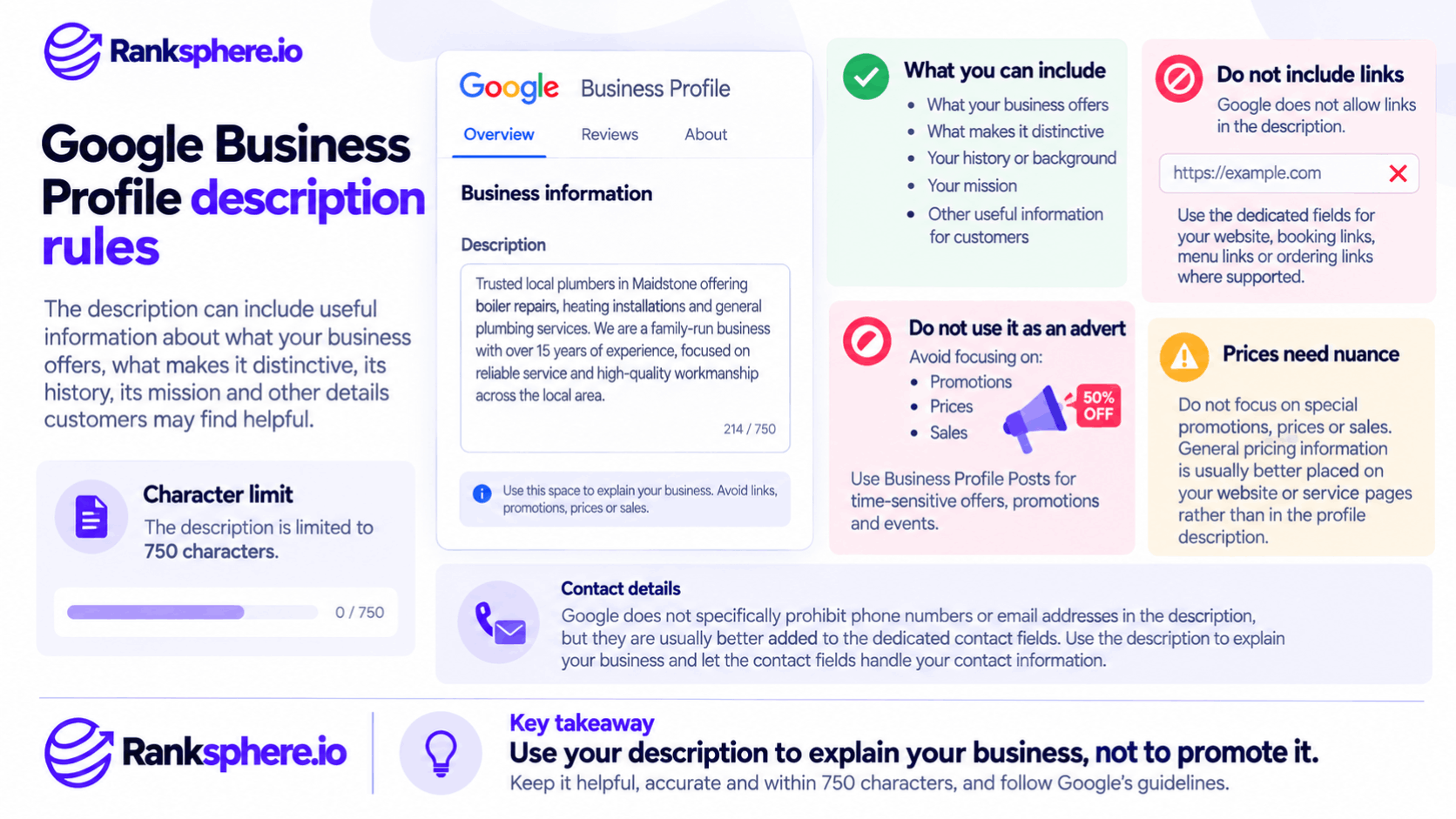
The description can contain useful information about:
- What the business offers
- What makes it distinctive
- Its history
- Its mission
- Other information customers may find useful
The field is limited to 750 characters.
Google's guidelines specifically say the description should not contain links and should not focus on promotions, prices or sales. Low-quality, irrelevant or distracting content is also prohibited.
No links
Do not put:
https://example.com
inside the description.
Google explicitly prohibits links in this field.
The Business Profile already has dedicated fields for:
- Website
- Booking links
- Menu links
- Ordering links
where supported.
Use those instead.
Do not turn the description into an advert
Google specifically tells businesses to focus primarily on information about the business rather than:
- Promotions
- Prices
- Sales
For example:
“50% off this week — book today!”
does not belong in the description.
Business Profile Posts are a more appropriate place for timely promotions and offers where the feature is supported. Google continues to support Offer, Update and Event Posts separately from the business description.
Prices need nuance
It is too broad to state:
“Prices are completely prohibited from ever appearing.”
Google's wording is that the description should not focus on special promotions, prices or sales.
For practical purposes, pricing information is normally better placed on:
- The website
- Product information
- Service information
rather than filling the profile description with price points.
Contact details
The original draft said phone numbers and email addresses are prohibited.
Google's current description-specific guidance does not list those as an absolute prohibition.
In fact, Google's wider Business Profile policies recognise that merchants can provide contact information about their own business in appropriate places.
That said, there is usually no reason to waste description space on:
Call 01622…
because Business Profile already provides dedicated contact fields.
Use the description to explain the business.
Use the contact fields for contact information.
Avoid unsupported claims
A description such as:
“The number-one dentist in Maidstone”
is rarely useful.
Even where a phrase is not explicitly banned under the description-specific rules, it creates obvious credibility problems if it cannot be substantiated.
Prefer factual differentiators.
Instead of:
“Maidstone's best dentist”
write:
“Independent dental practice in Maidstone, established in 1998, providing general dentistry, dental implants and Invisalign treatment.”
The second version gives the customer information they can actually use.
Do not keyword-stuff the description
The description is especially tempting for keyword stuffing because it is one of the few large free-text fields inside the Business Profile.
Avoid turning it into:
“Divorce solicitor Maidstone, family solicitor Maidstone, child custody solicitor Maidstone, best divorce lawyer Maidstone.”
That does not make the business clearer.
It creates low-quality repetitive copy, which conflicts with Google's requirement for relevant and useful profile information.
See keyword stuffing.
How to write a good business description
The simplest approach is to answer four questions:
What are you?
Where are you?
What do you mainly provide?
What genuinely distinguishes the business?
For example:
Aurora Family Law is a family law practice in Aurora helping individuals and parents with divorce, child custody, financial settlements and mediation. Established in 2009, the firm works with clients through separation and other family-law matters, with consultations available in person and by video.
That is clear without reading like a keyword list.
Front-load the useful information
It is still sensible to put the main information near the beginning.
Interfaces can truncate text depending on:
- Device
- Layout
- Search surface
But there is no official universal rule saying:
exactly 250 characters are always visible before expansion.
So write the opening well because it matters to readers, not because you are trying to beat an undocumented character cutoff.
A good opening might be:
“Family-run dental practice in Maidstone providing general, cosmetic and implant dentistry.”
The reader immediately understands the business.
First person or third person?
Either can work.
Google does not require third-person descriptions.
Its own example uses first-person language:
“We're an independent ice cream shop…”
So you might write:
“We are an independent physiotherapy clinic…”
or:
“Oakfield Physiotherapy is an independent clinic…”
Choose the style that fits the brand.
Consistency and natural language matter more than grammatical person.
Mention location naturally
Including the genuine town, neighbourhood or area can help customers identify the branch they are viewing.
For example:
“Independent veterinary practice in Maidstone…”
is completely natural.
That is different from:
“Vet Maidstone, emergency vet Maidstone, best veterinary clinic Maidstone…”
Use location as business information.
Not as repetition.
Mention history when it adds credibility
Google specifically suggests that businesses may include how long they have been operating.
For example:
“Established in 1998…”
or:
“Family-run practice serving Maidstone since 2004…”
can provide useful context.
Do not invent heritage language merely to fill space.
If the business opened last year, there is nothing wrong with leaving establishment history out.
You do not need to use all 750 characters
The maximum is:
750 characters.
It is not a target.
A clear 450-character description is better than 750 characters padded with:
“We pride ourselves on delivering exceptional quality and outstanding customer satisfaction…”
Use the space when you have useful information to communicate.
Stop when you do not.
Google can also suggest descriptions with AI
Google now offers an AI-powered description-writing feature for eligible users in selected regions and languages.
Google says the feature can use information from the Business Profile and other sources such as the business website to suggest a description. Google also explicitly tells businesses to review AI-generated text for accuracy before using it.
That distinction is important.
The tool can draft.
The business remains responsible for whether the information is correct.
If an AI-generated description says:
“Open 24 hours”
when the clinic closes at 6pm, do not publish it because it sounds polished.
Accuracy comes first.
Business description vs Google's editorial summaries
Another easy source of confusion is that not every descriptive sentence shown on Google Maps comes from the business-description field.
Google currently documents three different kinds of short summaries:
business descriptions, editorial summaries and customer review snippets.
The business description is editable by the business.
An editorial summary is different.
Google may create its own description of a popular place.
So if wording appears in Maps that you did not write, do not automatically assume somebody edited your Business Profile description.
Business descriptions and entity understanding
It is tempting to describe the field as:
“an entity signal.”
That goes further than Google's documentation.
The more defensible point is that a clear business description adds consistent factual information about:
- What the business does
- Its history
- Its location
- Its offering
Google combines Business Profile information with other sources when building its information about local places.
That can help create a clearer overall representation of the business.
But there is no public:
entity-strength score
that increases because you filled all 750 characters.
See entity for the wider concept.
Business descriptions and Ask Maps
Ask Maps makes accurate local-business information increasingly important.
Google launched Ask Maps in March 2026 as a conversational Gemini-powered experience for asking questions about places and receiving personalised recommendations. Google says Maps can analyse information from more than 300 million places, including reviews from its contributor community.
By August 2026, Google had expanded Ask Maps with additional capabilities including real-time information and conversational contributions.
But keep the SEO claim precise:
Google has not publicly documented the business-description field as a dedicated Ask Maps ranking or citation source.
So the right strategy is not:
“Write keywords in the description to rank in Ask Maps.”
It is:
keep the whole business information ecosystem accurate and useful.
That includes:
- Business Profile
- Services
- Categories
- Hours
- Attributes
- Reviews
- Website information
Google itself says Maps business information comes from several of these kinds of sources rather than one editable field alone.
Multi-location business descriptions
A multi-location business does not need to paste one generic description into every profile.
If branches genuinely differ, the descriptions can explain those differences.
For example:
Maidstone branch
May offer specialist orthodontic appointments.
Canterbury branch
May include a larger hygiene team.
Tunbridge Wells branch
May provide Saturday appointments.
Those are useful distinctions.
See multi-location SEO.
Duplicate descriptions are not a documented penalty
Do not overstate this either.
Google does not publish a rule saying:
“Identical Business Profile descriptions across locations are duplicate content and will hurt rankings.”
If twelve branches genuinely offer exactly the same thing, some overlap is inevitable.
The reason to customise them is customer usefulness.
Where a location has genuinely different:
- Services
- History
- Facilities
- Team
- Local context
use the description to explain that.
Do not manufacture differences merely to avoid duplication.
Keep description and profile fields consistent
The description should not contradict other profile information.
For example, do not write:
“24-hour emergency dentist”
when the official hours show:
09:00–17:00
unless there is a genuine separately explained emergency arrangement.
Likewise, do not describe services the business does not actually offer.
Google's wider Business Profile guidelines emphasise accurate representation of the real-world business.
Ranksphere's GBP management keeps descriptions and other profile fields consistent across locations, which can be particularly useful when multiple branches need to maintain accurate location-specific information.
When should you update the description?
There is no SEO requirement saying:
update it every year.
Review it when something meaningful changes.
For example:
- New core services
- Business repositioning
- New location
- Change in specialism
- Major change to customer offering
A periodic QA check is still sensible, especially for large multi-location accounts.
The important thing is that the description remains accurate.
Do not rewrite it every few months merely to create “freshness”.
Common Business Profile description mistakes
The most common problems are leaving the description vague or empty when there is useful information to provide; stuffing it with repeated services and locations; putting links into a field where Google explicitly prohibits them; using the description mainly for discounts, promotions or price advertising; wasting space on contact information already available elsewhere in the profile; treating 750 characters as a minimum rather than a maximum; forcing every description into third person; inventing location-specific copy for branches that are actually identical; and assuming keyword changes to the description will directly produce local-ranking gains.
Best practices
A strong Google Business Profile description should explain the business clearly, mention its principal products or services naturally, include genuine history or differentiators where useful, use customer-friendly language, remain within the 750-character limit, avoid links and sales-led promotional copy, stay consistent with the rest of the profile and website, and be customised by location when there is something genuinely different to say.
Example
“Consider a hypothetical law firm called Aurora Family Law.
Its original Business Profile description reads:
Aurora Family Law is the BEST family law firm in Aurora CO! Divorce lawyer Aurora, child custody Aurora, family attorney Aurora. Call 555-0134 or visit aurorafamilylaw.com for a FREE consultation!
The problem is not simply that it “breaks five SEO rules”.
Several different issues are being mixed together.
The URL is directly prohibited in the Business Profile description.
The free-consultation promotion makes the description sales-led rather than primarily informational.
The repeated:
Aurora
and:
family law
phrasing makes the copy awkward and adds little useful information.
The phone number would also be better placed in Google's dedicated phone field rather than consuming description space.
And:
“BEST”
does not tell a prospective client anything specific about the practice.
A clearer rewrite would be:
Aurora Family Law is a family law practice in Aurora, established in 2009. The firm advises individuals and parents on divorce, child custody, financial settlements and mediation. Clients can meet the team at the Aurora office or
arrange video consultations, with support tailored to the circumstances of each family.
This version tells the reader:
- What the business is
- Where it operates
- How long it has been established
- Which services it provides
- Who it primarily works with
- How consultations can take place
It does not require keyword repetition.
It does not claim:
“Google will rank this description higher.”
And it does not guarantee:
Ask Maps will quote the mediation sentence.
It simply provides Google and, more importantly, potential customers with accurate information about the business.
That is the right way to think about the field.
A Google Business Profile description is not a 750-character SEO loophole. It is a short business introduction. Use it to explain what the company does, who it helps and what genuinely distinguishes it, while keeping the information accurate and consistent with the rest of the profile.”
See also
Google Business Profile — where the business description is managed
Ask Maps — Google's conversational Maps experience
Google Business Profile services — describing the individual services a business offers
Google Business Profile categories — identifying the core type of business
Keyword stuffing — why repetitive description copy is unnecessary
Multi-location SEO — managing useful location-specific information across multiple branche