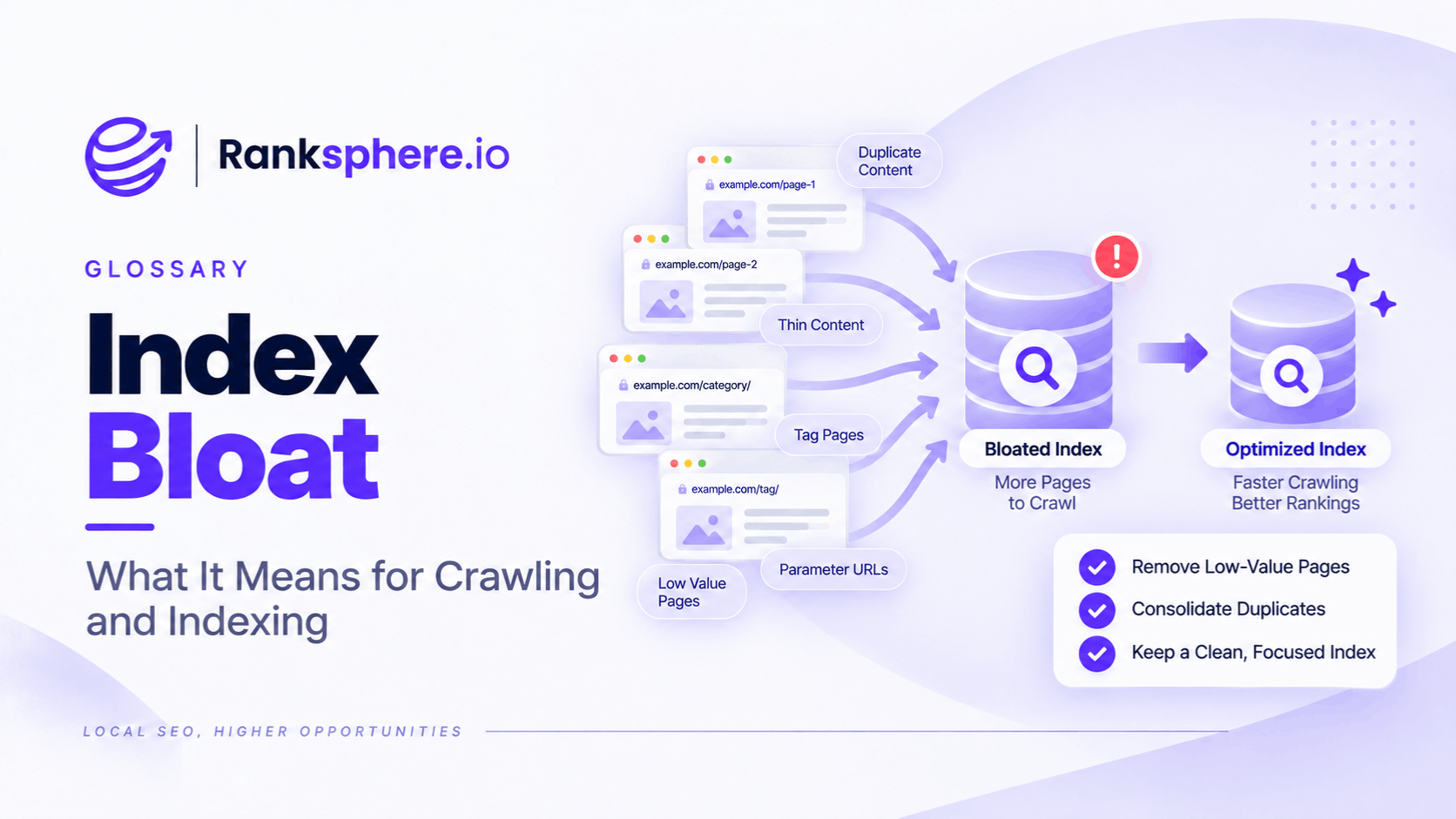
Index bloat is an SEO term used to describe a website having far more URLs indexed by search engines than are genuinely useful as search results.
These extra URLs might include:
- Duplicate pages
- Filter and sort variations
- Internal search results
- Thin archive pages
- Old campaign URLs
- Unintended CMS-generated pages
- Large groups of near-identical templated pages
The important word is unintended.
A website having many indexed pages is not automatically a problem.
The issue is whether search engines are indexing URLs that:
- Add little independent value
- Duplicate better pages
- Should not exist as search landing pages
- Create confusion about which URL should rank
Index bloat is often discussed alongside crawl budget, but the two are not the same thing.
A small business website can have poor indexing hygiene even when crawl budget is nowhere near being a constraint.
What is index bloat?
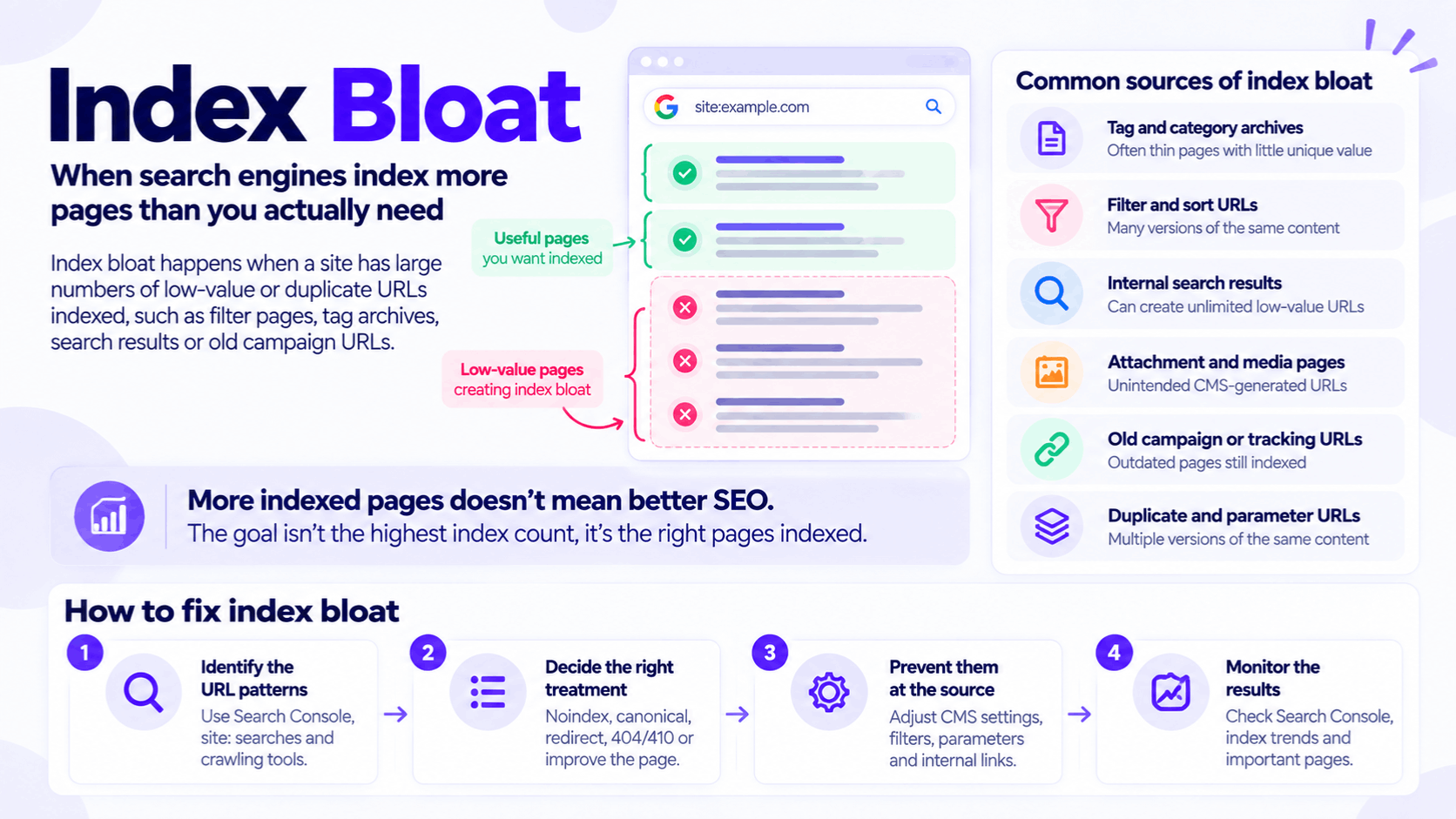
Suppose a dental practice intentionally publishes:
- 8 service pages
- 4 clinician pages
- 6 useful guides
- 5 location and contact pages
The business thinks it has around 25 meaningful search pages.
But Google has indexed hundreds of additional URLs created by:
- Tag archives
- Author archives
- Image attachment pages
- Search URLs
- Tracking parameters
That deserves investigation.
It does not mean that the site is automatically being penalised.
It means:
Google's searchable URL set may contain far more pages than the business intended to make available as independent search results.
Index bloat is not an official Google metric
Google does not provide a:
“Index Bloat Score.”
Nor does it publish a threshold such as:
“More than three times your intended page count damages rankings.”
The phrase is useful shorthand used by SEOs.
The diagnosis still needs to be based on real URL patterns and actual search behaviour.
Indexed URLs vs known URLs
This distinction matters.
Google may know about a URL without indexing it.
Search Console separates:
- Indexed URLs
- Known but not indexed URLs
Google explicitly says not every known URL needs to be indexed, and duplicate or filtered URLs may correctly remain outside the index.
So if a website exposes:
5,000 parameter URLs
but Google has correctly canonicalised or excluded most of them, that is different from having all 5,000 appearing independently in the index.
Why unwanted indexed URLs can be a problem
The concern is not simply:
“Google has too many pages.”
The consequences depend on what those pages are.
Unwanted indexed URLs can create:
- Duplicate search results
- Canonicalisation problems
- Competing pages
- Poor landing pages
- Confusing reporting
- Unnecessary crawling on larger sites
- Maintenance overhead
Each of those is a concrete problem worth fixing.
Index bloat and site quality
Be careful with claims such as:
“Every thin indexed page lowers the quality score of the whole domain.”
Google does not publish a simple sitewide formula like that.
However, large quantities of genuinely low-value pages can still be problematic.
Google's spam policies prohibit scaled content abuse where large numbers of pages are created primarily to manipulate rankings and provide little or no value to users. Its doorway policy also covers groups of substantially similar pages created to rank for similar queries and funnel users elsewhere.
That is different from saying:
one weak tag archive reduces every service page by 2%.
No such calculation exists.
Duplicate content is not automatically harmful
Google explicitly says that duplicate content on a site is normal and is not inherently a spam violation.
For example:
- Sort orders
- Filter variants
- HTTP/HTTPS variants
- Tracking parameters
can all produce duplicate or near-duplicate URLs.
Google attempts to cluster duplicates and choose a canonical version.
The technical objective is to make that choice as clear and efficient as possible.
How index bloat usually happens
Most businesses do not intentionally publish 900 weak pages.
The URLs are usually created by:
- CMS functionality
- Ecommerce filters
- Search systems
- Plugins
- Old content processes
That is why the problem can remain unnoticed for years.
CMS-generated archives
Many CMS platforms automatically generate:
- Category pages
- Tag pages
- Author archives
- Date archives
These are not automatically bad.
A well-built category page may be useful.
For example:
Boiler Advice
could be a valuable hub connecting high-quality heating guides.
The problem is a taxonomy system that creates hundreds of pages such as:
/tag/boiler/
/tag/boilers/
/tag/boiler-repair/
each containing one or two links and little independent value.
Do not automatically noindex every archive
A blanket rule such as:
“All category and tag pages should be noindexed.”
is too broad.
Ask:
- Does the page satisfy a real search intent?
- Does it help users navigate?
- Does it contain useful unique information?
- Does it receive impressions?
- Is it internally important?
Some archive pages deserve improvement.
Others deserve noindexing or removal.
WordPress attachment pages
Historically, some WordPress configurations and plugins could create a separate attachment URL for each uploaded media item.
That can produce URLs containing little beyond:
- An image
- A title
- Minimal surrounding content
If hundreds of these pages exist unintentionally, they are worth investigating.
However, do not assume every modern WordPress site creates indexed attachment pages automatically.
CMS behaviour changes according to:
- Version
- Theme
- Plugin
- Configuration
Inspect the actual site.
Parameter URLs
Parameters can create many versions of essentially the same content.
For example:
/shoes/?sort=price
/shoes/?sort=name
/shoes/?utm_source=email
/shoes/?colour=red
Not all parameters are equivalent.
Tracking parameter
May change nothing about page content.
Sort parameter
May rearrange the same items.
Filter parameter
May create a meaningfully different subset.
The correct SEO treatment depends on what the URL represents.
Faceted navigation
Faceted navigation is one of the clearest sources of URL proliferation.
A shop might allow filtering by:
- Colour
- Size
- Brand
- Price
- Material
If every combination creates a crawlable URL, the number of possible URLs can grow extremely quickly.
Google specifically identifies faceted navigation as a common source of overcrawling because it can create an effectively infinite URL space.
That is both a crawling and indexing-management problem on larger sites.
Filter URLs are not automatically useless
Some filter combinations may have genuine search demand.
For example:
/sofas/leather/
could be a useful organic category.
A filter such as:
?sort=price-desc
probably does not need to become a separate search result.
The objective is not:
block every filter.
It is:
decide which URL states deserve to exist as search landing pages.
Internal search results
Internal search can create a practically unlimited number of URLs.
For example:
/search?q=blue+sofa
/search?q=cheap+blue+sofa
/search?q=blue+sofa+delivery
Those pages are often useful inside the site but poor candidates for independent Google landing pages.
Depending on the implementation and scale, possible controls include:
- noindex
- robots.txt
- URL-generation changes
Google's URL guidance specifically calls out dynamically generated search-result URLs as candidates for crawl controls.
Pagination
Pagination is often incorrectly included in index-bloat cleanup projects.
Pages such as:
/category?page=2
/category?page=3
are not automatically unwanted duplicates.
Google currently recommends giving each page in a paginated sequence:
- Its own URL
- Its own canonical URL
and specifically says not to canonicalise every page in the sequence back to page one.
That matters because later pages may contain links to products or articles Google needs to discover.
Do not canonicalise pagination to page one
This is a common technical error.
Bad pattern:
/blog?page=2
canonical →
/blog/
/blog?page=3
canonical →
/blog/
The content on page two and page three is not identical to page one.
Google's current guidance is that each paginated page should normally self-canonicalise.
If the archive itself should not be indexed, solve that problem deliberately rather than misusing canonical tags.
Programmatic pages
Large sets of programmatic pages can also contribute to unnecessary index expansion.
For example:
Service × town
might produce:
- Plumber in Town A
- Plumber in Town B
- Plumber in Town C
That can work when each URL serves a genuine distinct purpose and contains useful information.
It becomes risky when hundreds of pages differ only by:
- Place name
- Keyword
- A few substituted sentences
Google's scaled-content and doorway policies become relevant when large page sets are created primarily to manipulate search rather than help users.
Old campaign pages
Marketing campaigns leave URLs behind.
Examples include:
/summer-sale-2022/
/black-friday-2023/
/spring-offer/
Some still have value.
Others are:
- Expired
- Unlinked
- Outdated
- Still indexed
Do not automatically remove them.
Decide whether to:
- Update
- Redirect
- Remove
- Keep as historical content
depending on the page.
Staging sites
A forgotten staging environment can create a large duplicate copy of the production website.
For example:
staging.example.com/
may be publicly accessible and crawlable.
Google explicitly lists accidentally accessible demo versions among the ways duplicate URLs can occur.
Private staging environments should ideally use proper access controls rather than relying only on search directives.
HTTP and HTTPS duplicates
An incomplete HTTPS migration can leave both:
http://example.com/page/
and:
https://example.com/page/
accessible.
Google can canonicalise protocol duplicates, but the cleaner setup is to redirect the old HTTP URL permanently to HTTPS and keep all other canonical signals consistent.
This is another example where index problems originate from configuration rather than content.
Trailing slash and hostname variants
Likewise, inconsistent server behaviour can expose:
example.com/page
example.com/page/
www.example.com/page/
as separate URLs.
Search engines can often resolve these.
But unnecessary URL duplication makes:
- Tracking
- Canonicalisation
- Crawling
more complicated.
Why index bloat can affect reporting
Suppose Search Console reports:
1,300 indexed URLs.
That may sound impressive.
But if the business intentionally maintains only:
80 useful search pages
the raw count tells you very little.
A better question is:
What are those indexed URLs?
Index count is not an SEO success metric.
More indexed pages does not mean more SEO success
Avoid reporting:
Indexed pages increased by 40%, therefore SEO improved.
A rise could come from:
- Useful new content
- Duplicate parameter URLs
- Search result pages
- Tag archives
The number needs context.
Google itself says the goal is not 100% indexing. Important canonical pages should be indexed; duplicate or alternate URLs often should not be.
How to identify possible index bloat
Start by asking:
How many URLs do we actually intend Google to treat as independent search pages?
Then compare that with Google's index information.
A large difference is not proof of a problem.
It is a reason to investigate.
Search Console Page indexing report
Search Console is one of the most useful starting points.
The Page indexing report shows:
- Indexed URLs
- Known URLs not indexed
- Reasons certain URLs were not indexed
Google notes that the totals represent URLs it knows about and that not every URL should necessarily be indexed.
Look for unexpected patterns.
Look at indexed URL examples
Search Console allows you to inspect examples of indexed URLs.
Group them mentally or externally into patterns such as:
- /tag/
- /author/
- ?sort=
- ?filter=
- /search/
- /attachment/
Often the problem becomes obvious when viewed by pattern rather than URL by URL.
Search Console is not a complete downloadable index
Search Console provides useful examples, but it does not necessarily give you an export of every indexed URL on a large site.
The indexed-pages view exposes an example list of up to 1,000 URLs.
For larger sites, combine it with:
- Crawling
- Server logs
- URL-pattern analysis
- Sitemap data
Compare against the sitemap
A clean sitemap should normally contain the canonical URLs you actively want Google to consider.
Compare:
Sitemap URLs
What you intentionally publish.
Search Console indexed URLs
What Google currently has indexed.
The difference can reveal unintended patterns.
But remember that some legitimate pages may not be in your sitemap, and Search Console may know URLs from many other sources.
Use the comparison diagnostically.
Run a site: search carefully
A query such as:
site:example.com
can provide a rough view of what Google is surfacing from the domain.
You can also narrow it:
site:example.com/tag/
or:
site:example.com inurl:?sort=
This is useful for discovering patterns.
But do not treat the search-result count as an exact index inventory.
Use Search Console for more reliable index-status information.
Search specific patterns
Pattern searches can be more informative than a broad site query.
For example:
site:example.com/tag/
site:example.com/author/
site:example.com/search/
These can reveal unwanted families of URLs quickly.
Then confirm representative URLs with URL Inspection.
Crawl the website
A technical crawler can show what the site itself exposes through internal links.
Compare:
- Crawlable URLs
- Sitemap URLs
- Indexed examples
If a crawler finds 45 internal pages but Search Console shows hundreds of strange indexed URLs, the extra URLs may be coming from:
- Historic links
- Parameter generation
- External links
- Old CMS behaviour
That is useful evidence.
Check server logs on larger sites
Server logs can show what Googlebot is actually requesting.
That is especially helpful when millions of potential URLs exist.
You can identify whether Googlebot spends substantial time crawling:
- Filters
- Search results
- Parameters
- Deprecated URLs
That is a more direct crawl-efficiency diagnosis than simply counting indexed pages.
Inspect canonical selection
If duplicate URLs appear, check what Google considers canonical.
URL Inspection can show:
- User-declared canonical
- Google-selected canonical
Google may already be consolidating the duplicate correctly.
If so, the problem may be less severe than it first appears.
Index bloat vs crawl budget
Index bloat and crawl budget overlap, but they are different.
Crawl budget
Concerns how search engines allocate crawling resources.
Index bloat
Describes unwanted or unnecessary URLs appearing as independent indexed pages.
A site can have:
- Poor index hygiene without crawl-budget constraints
- Crawl inefficiency without those URLs ultimately being indexed
Keep the diagnoses separate.
Small sites can still have index problems
A local-business site with:
40 intended pages
and:
900 unexpected indexed URLs
deserves investigation even if Google can easily crawl the whole site.
The concern is not:
Google has run out of crawl budget.
It is:
Why are hundreds of unintended URLs appearing as search results?
That may reveal:
- CMS problems
- Duplicate versions
- Indexable archives
- Parameter URLs
How to fix index bloat
There is no single:
“Remove index bloat”
button.
The correct action depends on why the URL exists.
Typical options include:
- Noindex
- Canonical tags
- 301 redirects
- 404 or 410 responses
- Robots.txt
- CMS configuration
- Improving the page
Choose the remedy by URL type.
Use noindex when the page should exist but not appear in Search
Noindex is appropriate when a page remains useful to users but should not be an independent search result.
Possible examples include:
- Some internal search pages
- Some utility pages
- Certain filter variations
The URL needs to remain crawlable for Google to read the noindex directive.
Do not simultaneously block it with robots.txt if you need Google to process the noindex.
Noindex is not a universal archive setting
Do not automatically noindex:
- Every category
- Every tag
- Every taxonomy archive
First ask whether the page has legitimate organic value.
An archive that ranks for a useful query and helps visitors find content may deserve to stay indexable.
Improve it if necessary.
Use canonical tags for true duplicates
A canonical tag is appropriate when several URLs contain duplicate or substantially similar content and one should be the preferred representative.
For example:
/products/?sort=price
might canonicalise to:
/products/
if the only meaningful difference is ordering.
Google describes rel="canonical" as a strong canonicalisation signal, although Google ultimately chooses the canonical itself.
Canonical is not a deindex command
A canonical tag does not mean:
“Never index this URL under any circumstances.”
It says:
“We prefer this URL as the representative version of these duplicates.”
Google may choose differently where other signals conflict.
If a page genuinely should never appear in Search, noindex may be the clearer control.
Do not canonicalise unrelated pages
Bad example:
/red-shoes/
canonical →
/shoes/
if those pages contain substantially different useful content.
Canonicalisation is for:
- Duplicates
- Near-duplicates
not:
any page we don't want ranking.
Do not canonicalise paginated pages to page one
Google explicitly recommends that paginated URLs each have their own canonical.
For example:
/blog?page=2
canonical →
/blog?page=2
not:
/blog/
unless page two is genuinely duplicate content, which normally it is not.
This prevents an index-bloat cleanup from creating a different technical problem.
Use redirects when a genuine replacement exists
A 301 redirect makes sense when an unwanted old URL has been permanently replaced.
For example:
Old:
/emergency-plumber-services/
New:
/emergency-plumbing/
If the new page genuinely replaces the old one, redirect it.
Do not leave both competing indefinitely.
Do not redirect every obsolete page
If an old page has:
- No useful content
- No traffic
- No relevant equivalent
forcing it to the homepage usually provides little value.
A proper:
- 404
- 410
may be cleaner.
The right response depends on what happened to the content.
Check backlinks before deleting pages
Before removing a URL, check whether useful external links point to it.
If the page has a meaningful replacement, redirecting can preserve the relationship for:
- Users
- Search engines
Do not throw away genuinely useful inbound links because:
“the page had no organic clicks last month.”
Traffic is not the only consideration.
Disable unwanted URL generation at source
Where possible, this is often the cleanest solution.
If the CMS is creating:
500 useless attachment URLs
and those URLs serve no purpose, stop generating them.
Likewise:
- Unused taxonomies
- Endless filter states
- Duplicate routes
are better prevented than permanently managed with layers of SEO directives.
Fix the system that creates the URLs.
URL prevention is different from deindexing
Stopping future URLs from being generated does not necessarily remove existing URLs already known to Google.
Those may still need an appropriate treatment such as:
- Redirect
- 404/410
- noindex
depending on what the URL should now do.
Think about:
- Existing URLs
- Future URL generation
separately.
Use robots.txt for crawl control
Robots.txt can be useful where the main problem is a large crawlable URL space that should never be requested.
Google specifically recommends considering robots.txt for problematic dynamic URL patterns such as:
- Search result URLs
- Infinite calendar spaces
- Sorting functions
- Filtering functions
when you do not need them crawled.
But robots.txt is not a reliable method for removing already indexed URLs.
Do not block first and then add noindex
If robots.txt prevents Googlebot from crawling the URL, Google cannot read:
<meta name="robots" content="noindex">
That means:
robots.txt + noindex
can defeat the deindexing process.
If the immediate objective is to remove an indexed URL through noindex, let Google crawl it until the directive has been processed.
Faceted navigation requires its own strategy
For large filtered sites, there may be two groups.
Filters that should rank
Keep them:
- Crawlable
- Indexable
- Useful
- Internally linked
Filters that should not rank
Control them through an appropriate combination of:
- URL design
- robots.txt
- noindex
- canonicalisation
depending on whether the issue is primarily:
- Crawling
- Indexing
- Duplication
Google's current faceted-navigation guidance explicitly distinguishes between blocking unwanted filters and optimising the filters you genuinely want crawled.
Improve pages that deserve to exist
Sometimes the wrong response is:
deindex it.
A category page might already receive impressions but lack useful content.
Instead of removing it from Search, improve it with:
- Better organisation
- Useful copy
- Stronger internal links
- Clear purpose
Index-bloat audits should not become deletion exercises.
Check impressions before removing URLs
Use Search Console to check whether a URL receives:
- Impressions
- Clicks
A page with no clicks is not automatically worthless.
But a page with meaningful impressions deserves additional scrutiny before deindexing.
It may already satisfy a search need.
Traffic data has limitations
Also remember that:
zero Search Console clicks
does not prove:
zero value.
A page might support:
- Navigation
- Conversion journeys
- Existing customers
- Paid campaigns
Combine organic data with the page's business purpose.
Check backlinks
Before deleting or consolidating pages, check whether they have:
- External links
- Internal links
- Referral traffic
A weak-looking URL may still have useful equity or audience value.
If it has a good replacement, consolidation may be better than deletion.
Check internal links too
If hundreds of unwanted URLs are being linked across:
- Navigation
- Filters
- Templates
the problem is not only indexing.
The site itself is actively reinforcing their discoverability.
Fix the internal generation and linking logic.
Work in batches on large cleanups
A major index cleanup can affect thousands of URLs.
There is little benefit in making every possible change simultaneously if you cannot tell what happened afterwards.
For large sites, group changes by:
- URL pattern
- Template
- Content type
Then monitor:
- Indexing
- Crawl behaviour
- Traffic
The right batch size depends on the site and risk.
There is no universal waiting period
Avoid rules such as:
“Always wait exactly four weeks between batches.”
Google recrawls and processes sites at different speeds.
Large sites and high-value pages may move differently from small, rarely crawled areas.
Monitor actual behaviour.
Site: searches are useful, not authoritative
After cleanup, repeat pattern searches such as:
site:example.com/tag/
to see whether unwanted results are disappearing.
But do not use:
site: result count
as the official success metric.
Search Console and representative URL inspections provide better evidence.
Watch Search Console trends
Over time you may see indexed counts change.
That is expected.
Do not judge success solely by:
indexed URLs went from 1,000 to 100.
The better questions are:
- Are the correct canonical pages indexed?
- Have useful pages remained visible?
- Have unwanted patterns declined?
- Has important search performance remained stable or improved?
Do not chase the lowest possible index count
The goal is not:
minimum URLs indexed.
The goal is:
the right URLs indexed.
A large ecommerce site may legitimately need:
- 100,000 product pages
- 5,000 categories
A local plumber may need 50.
There is no good universal number.
Index bloat and keyword cannibalisation
Some unwanted URLs can contribute to keyword cannibalisation.
For example:
- /boiler-repair/
- /tag/boiler-repair/
- /services/boiler-repair-services/
might all target substantially the same intent.
But do not assume every additional indexed URL creates cannibalisation.
Cannibalisation requires meaningful overlap in:
- Search intent
- Topic
- Ranking purpose
Index bloat and thin content
Many unwanted URLs happen to contain little useful information.
But:
index bloat = thin content
is not a perfect equivalence.
A duplicate product sort page may contain lots of content.
Its problem is duplication.
A tag page may be short but useful.
Its length alone is not the issue.
Diagnose the reason the URL is unnecessary.
Index bloat and programmatic SEO
Programmatic SEO can produce very large URL inventories.
That is not inherently bad.
The problem arises when scale outruns value.
A useful programmatic page needs:
- Distinct purpose
- Relevant data
- Genuine customer usefulness
not simply a different keyword in the heading.
Google's scaled-content policy focuses on pages generated at scale primarily to manipulate rankings while providing little or no user value.
Index bloat and site architecture
Unwanted URLs can also make site architecture harder to understand.
If a crawler encounters:
- 40 service pages
- 2,000 tag pages
- 5,000 filtered URLs
the site's link graph becomes more complex.
But avoid saying:
“Google loses track of which pages matter whenever there are lots of URLs.”
Google is designed to handle very large websites.
The issue is whether your architecture gives users and crawlers clear, consistent relationships between important content.
Index bloat and XML sitemaps
An XML sitemap should normally focus on canonical URLs that you genuinely want Google to consider for indexing.
Do not routinely include:
- Noindexed URLs
- Redirecting URLs
- Parameter duplicates
The sitemap is a weak canonicalisation signal, so keeping it clean reinforces your preferred URL set.
Index bloat after a redesign
Redesigns and migrations can introduce unwanted URLs.
Common examples include:
- Old site still live
- Preview subdomain indexed
- Duplicate routing
- New archive templates
- Query-string versions
Check index patterns after major technical changes.
Do not wait until traffic declines to inspect what Google is indexing.
Index bloat after a CMS migration
A new CMS may generate URL structures the old one did not.
For example:
Old:
/services/plumbing/
New CMS also exposes:
/service-category/plumbing/
and:
/services/plumbing/?output=1
If all are crawlable and indexable, duplication can grow quietly.
Audit URL generation as part of migration QA.
Staging and development environments
If staging should not be public, use proper access protection.
Do not leave:
staging.example.com
publicly accessible and assume:
“Google probably won't find it.”
Third-party tools, links and developer activity can expose URLs.
Prevention is easier than cleaning an indexed staging copy later.
Index bloat and Google quality systems
It is reasonable to care about large volumes of weak pages.
But keep the explanation evidence-based.
Google may:
- Canonicalise duplicates
- Exclude low-value URLs
- Apply spam policies to manipulative scaled content
What it does not provide publicly is a simple:
weak URLs ÷ total URLs = site-quality score
formula.
Avoid inventing one.
Ranksphere and index-bloat prioritisation
Ranksphere's smart tasks prioritise findings by impact, helping teams decide whether an unexpected indexed-URL pattern deserves immediate action or whether more important technical and content issues come first.
That context matters.
For one website, 500 extra URLs may be harmless duplicate variants Google already canonicalises correctly.
For another, 500 indexed doorway-like location pages may require urgent investigation.
The number alone does not provide the answer.
Common index bloat mistakes
- Treating index bloat as an official Google metric or penalty.
- Assuming every extra indexed URL weakens the entire site.
- Assuming a large gap between intended and indexed URLs automatically proves a problem.
- Using site: result counts as an exact index inventory.
- Noindexing all category, tag or archive pages without checking whether any have real value.
- Canonicalising every parameter regardless of whether the pages are actually duplicates.
- Canonicalising every paginated page to page one.
- Using robots.txt to remove URLs already indexed while also relying on noindex.
- Deleting URLs without checking traffic, links or business purpose.
- Redirecting every old URL to the homepage.
- Treating every low-traffic page as thin or worthless.
- Fixing individual URLs while leaving the CMS configuration that keeps generating thousands more.
- Measuring success only by reducing the total indexed-page count.
- Calling a crawl-budget problem and an indexing problem the same thing.
Index bloat best practices
- Treat a large unexplained indexed-URL count as a diagnostic signal, not automatic proof of a penalty.
- Use Search Console to understand which URL patterns are actually indexed.
- Compare indexed URLs with the canonical URLs you intentionally publish.
- Use site: searches for discovery and pattern spotting, not precise counting.
- Use noindex when a page must remain accessible but should not be a search result.
- Use canonical tags for genuine duplicate or near-duplicate URLs.
- Keep paginated pages self-canonical unless there is a specific reason not to.
- Use 301 redirects where an old URL has a genuine permanent replacement.
- Return an appropriate 404 or 410 where a URL should disappear and has no replacement.
- Use robots.txt for genuine crawl-control problems, not as a general deindexing tool.
- Disable unnecessary URL generation at the source where possible.
- Check impressions, clicks, links and business purpose before removing useful-looking pages.
- Monitor large cleanups by URL pattern rather than changing everything blindly.
- Judge success by whether the right pages are indexed, not whether the index count is as small as possible.
Example
“Wrenfield Dental has around 40 pages that the practice intentionally considers part of its public website.
During a technical review, the team notices that Search Console reports a much larger number of indexed URLs.
That is not immediately labelled:
“Google has penalised the site for index bloat.”
Instead, the team investigates the patterns.
It finds several groups:
- Legacy attachment-style pages created by an old CMS configuration
- Hundreds of tag archives containing very little independent information
- Historical campaign URLs
- Paginated archive pages
- A few service pages that overlap heavily
The team does not apply one fix to everything.
They serve no useful independent purpose.
The CMS behaviour generating them is disabled, and existing URLs are handled according to whether they have a relevant replacement.
Most add little value and receive no meaningful organic activity.
Those are excluded appropriately.
A small number already receive relevant impressions and help users navigate useful topics.
Those are kept and improved.
The team does not canonicalise every paginated page to page one.
Each legitimate page in the series keeps its own URL and canonical, in line with Google's current pagination guidance.
Several pages serve essentially the same search intent.
Those are reviewed and consolidated where a single clearer page better serves users.
The team checks:
- Search Console performance
- Internal links
- External links
before removing anything.
Over the following weeks and months, Google's indexed set gradually changes as URLs are recrawled and reprocessed.
The business does not claim that:
reducing the index from X pages to Y caused a 25% traffic increase.
There is no clean way to isolate that conclusion from other changes.
Instead, the outcome is measured more practically:
- Important canonical pages remain indexed
- Unintended URL patterns decline
- Duplicate landing pages are reduced
- Search Console becomes easier to interpret
- The CMS stops producing URLs nobody intended to publish
That is what a good index-bloat cleanup should achieve.
The goal is not to make Google index as few pages as possible. It is to make sure the URLs appearing in Search are the ones that genuinely deserve to be there.”
See also
- Noindex — excluding pages that should remain accessible but should not appear in Search
- Crawl budget — the separate issue of how crawling resources are allocated
- Thin content — pages that provide too little value for their intended purpose
- Canonical tag — consolidating duplicate and near-duplicate URL versions
- Indexing — how search engines decide which pages enter the searchable index
- Content audit — evaluating whether pages should be kept, improved, consolidated or removed