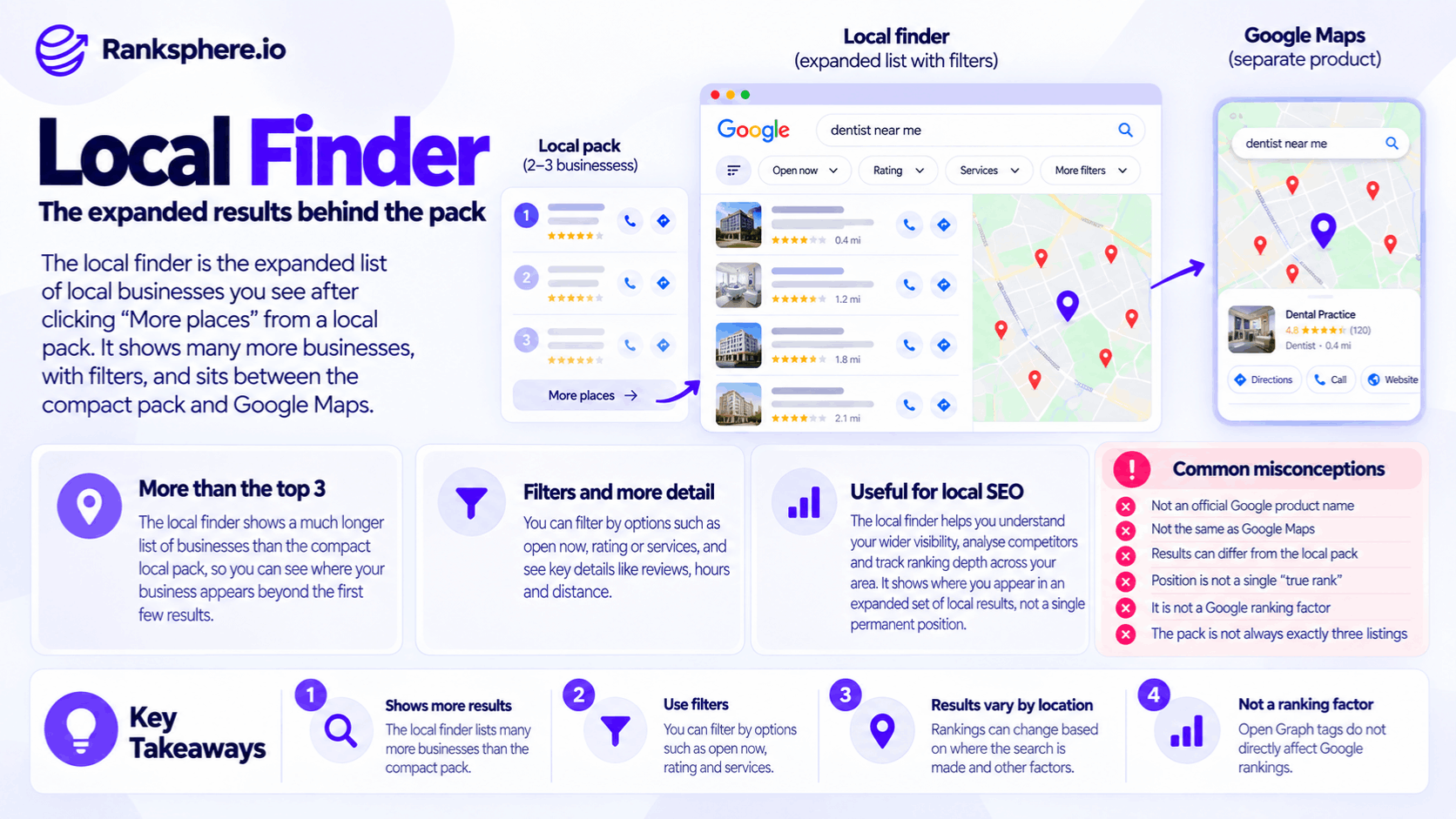
The Local Finder is the SEO-industry term commonly used for the expanded list of local businesses that appears when someone opens more results from Google's compact local results.
For example, a search for:
dentist near me
may first show a small group of local businesses directly in Google Search.
Selecting a control such as:
More places
or:
More businesses
can open a larger local-results view containing:
- More businesses
- A map
- Business details
- Reviews
- Opening information
- Filters where available
This expanded experience is commonly called the Google Local Finder by local SEO professionals.
It is related to the local pack and Google Maps, but it should not be treated as identical to either one.
For SEO, its main value is that it gives you a broader view of the businesses Google is returning for a local query than the compact pack alone.
Is Local Finder an official Google term?
Google's own documentation generally talks about:
local results
across:
- Google Search
- Google Maps
rather than consistently using Local Finder as a product name.
Google says people searching for nearby businesses can find local results in both Search and Maps.
The term Local Finder is therefore best understood as established local-SEO terminology for the expanded Search-based local results.
That distinction matters when writing accurately about the feature.
Do not imply that Google has officially named three rigid products:
- Local Pack
- Local Finder
- Maps
with a formally documented hierarchy between them.
They are better understood as related local-search experiences.
Local Pack vs Local Finder vs Google Maps
These surfaces can look similar, but they serve somewhat different interfaces and contexts.
Local pack
The local pack is the compact group of local businesses that can appear directly within the main Google Search results.
It typically includes information such as:
- Business name
- Rating
- Location
- Opening status
- Map information
The exact layout and number of businesses shown can vary.
Avoid stating:
“The local pack is always three listings.”
Google changes Search layouts, devices differ, and some result types can contain different numbers or presentations.
Local Finder
The Local Finder is the expanded local-business view reached from Google's local Search results.
It can provide a longer list of businesses than the compact pack and lets users explore more options without being restricted to the businesses initially highlighted in the Search results.
BrightLocal currently describes the Local Finder as the expanded view reached after someone interacts with a local-pack result or selects the option to see more businesses.
Google Maps
Google Maps is the separate mapping product available through:
- The Google Maps website
- The Google Maps app
Users can search directly for businesses, places and categories there.
Google's own Maps documentation says local Maps results are based mainly on:
- Relevance
- Distance
- Prominence
the same broad factors Google documents for local search.
However, that does not mean the ordering must match the Local Finder exactly.
The results can differ
A common mistake is assuming:
“If I am fourth in the Local Finder, I am fourth everywhere.”
Local search does not work that way.
A business could appear differently in:
- The compact local pack
- The expanded local results
- Google Maps
- Searches from another neighbourhood
BrightLocal's comparison of Local Finder and Google Maps also notes that results across the two interfaces can differ.
So treat every ranking check as:
a result observed under a particular set of conditions.
Not:
the permanent rank of the business.
Where does the business information come from?
Google Business Profile is central to local search, but it is not the only information source.
Google says business information can be compiled from:
- Business owners
- Publicly available web content
- Licensed third-party data
- User contributions
- Google's own interactions with places
That means local results should not be described as simply:
“a ranked database of Google Business Profile fields.”
Your Google Business Profile matters enormously.
But Google can also use information from the wider web and other sources when understanding a business.
How Local Finder rankings are determined
Google does not publish a separate Local Finder ranking formula.
Its official local-ranking guidance says local results are mainly based on:
Relevance
How well the business matches what the person searched for.
Distance
How far the business is from the searcher or the location Google associates with the search.
Prominence
How well known or established the business appears to be.
See local ranking factors for the wider explanation.
These factors interact.
A nearby business is not automatically first.
Google explicitly notes that a business farther away may outrank a closer one when its systems consider it a better overall match.
Local Finder does not reveal one “true rank”
This is the most important correction to make.
Suppose your business appears:
4th
in the Local Finder when you search from your office.
That does not establish:
“Our real Google position is 4.”
Someone searching:
- Two miles east
- Five miles south
- From another device
may see something different.
The Local Finder gives you more ranking depth than the compact pack, but it does not remove the geographic nature of local search.
A better description is:
Local Finder shows where the business appeared in an expanded set of local results for that search context.
Why Local Finder is still useful
Even with that limitation, it can be very useful diagnostically.
Suppose your business does not appear in the visible local pack.
That tells you:
you were not included in that compact result set for that search.
It does not tell you whether you appeared:
- Just below it
- Much farther down
- Not at all in the extended results
Opening the expanded results provides more information.
That changes the diagnosis.
Pack absence does not mean total invisibility
This is one of the most useful practical lessons.
A business missing from the initial local pack may still appear further down in the expanded local results.
So avoid reporting:
“You do not rank locally.”
when what you actually know is:
“You did not appear in the compact local pack for this search.”
Those statements are very different.
Rank depth provides context
Imagine two businesses that both fail to appear in the compact local pack.
Business A
Appears near the top of the expanded results.
Business B
Appears much farther down.
Both are:
outside the pack
but the competitive situations are different.
That is why tracking a broader ranking range can provide more information than a simple:
in pack / not in pack
status.
Do not turn position four into a universal threshold
It is tempting to say:
“Position four means you are one optimisation away.”
That cannot be known from position alone.
A business at position four may still face:
- Strong proximity differences
- A much more relevant competitor
- Significant prominence differences
- An unusually competitive market
Likewise, a business much farther down may have an obvious correctable relevance problem.
Use ranking depth as evidence.
Do not turn it into a difficulty score.
Geographic variation matters more than one Local Finder check
Because distance is one of Google's main documented local-ranking factors, one ranking check from one place cannot describe the whole market.
For a local business, ask:
Where are we visible?
not simply:
What number are we?
This is where geo-grid rank tracking becomes useful.
Local Finder and geo-grid tracking
A geo-grid repeats the same local search from a series of defined geographic points.
For example:
A plumber might be tracked from:
- Town centre
- North side
- South side
- Several surrounding neighbourhoods
That can reveal:
- Strong coverage close to the business
- Weak coverage farther away
- Competitor strongholds
- Areas where visibility changes
Ranksphere's rank tracker measures local position across your service area, which provides more geographic context than a single Local Finder check.
A grid is still a measurement sample.
It is not a guarantee of what every customer will see.
Competitor analysis in the Local Finder
The expanded result set can also make competitor research easier.
Instead of looking only at the first business, examine several businesses around your own observed position.
For example:
- Which categories do they use?
- How many reviews do they have?
- What services do they represent?
- How complete is their public business information?
- What does their website cover?
This can reveal competitive differences worth investigating.
The word investigating matters.
A difference is not automatically the cause of the ranking difference.
Do not blindly copy the business above you
Suppose the business immediately above yours uses a particular primary category.
That does not mean you should copy it.
Google's category guidance is based on accurately representing the business.
A category is useful only if it genuinely describes what the business does.
Likewise:
- More reviews do not automatically explain a higher position
- More photos do not automatically explain it
- More services do not automatically explain it
Local rankings combine multiple signals.
Competitor comparison creates hypotheses.
It does not reveal Google's formula.
Review counts
Review differences can be useful context.
Google explicitly says that more reviews and positive ratings can help local ranking as part of prominence.
For example:
Your business
96 reviews
Competitor
210 reviews
That is worth noting.
But avoid saying:
“You need another 114 reviews to catch them.”
There is no such formula.
The competitor may also differ in:
- Distance
- Relevance
- Links
- Business history
- Other prominence signals
Review counts are one observation among several.
Filters in local search
Local search experiences can also provide filtering options.
In Google Maps, for example, Google's current desktop guidance documents filters including:
- Price for restaurants
- Hours, such as currently open
- Hotel-specific information
Mobile Maps offers additional filtering options depending on the query, language, region and device.
So it is correct to say that filters can alter which businesses a user sees.
But avoid claiming that every Local Finder provides the same universal filters for:
- Rating
- Accessibility
- Attributes
- Hours
Google interfaces vary.
Business hours matter
Google says business information such as hours can help surface a business for searches such as:
salons open now.
That makes accurate business hours important.
If your business is closed when the user explicitly filters for or searches for businesses open now, that can naturally affect whether it appears in those results.
That is different from claiming:
“longer opening hours improve your general rankings.”
Google does not publish such a rule.
Keep hours accurate.
Do not manipulate them for visibility.
Attributes matter for customer information
Google Business Profile attributes describe characteristics of a business.
Depending on the category and location, they may include details around:
- Accessibility
- Amenities
- Payments
- Services
Google says attributes help customers understand what a business offers, and the available attributes depend on business category and location.
That makes accurate attributes useful.
But do not say:
“Missing attributes automatically remove you from Local Finder filters.”
Filter behaviour varies.
Some information may affect filtering or presentation, while some attributes simply provide useful profile information.
Accessibility is a good example
Google Maps can show accessibility information such as whether a location has:
- Wheelchair-accessible entrance
- Restroom
- Seating
- Parking
- Elevator
in supported regions.
This is a strong reason to keep factual attributes accurate.
It is primarily about helping customers make the right choice.
Do not turn accessibility attributes into an SEO tactic.
If the business does not have an accessible entrance, do not mark:
Yes
because you think it might improve visibility.
Accuracy comes first.
“Open now” is different
Hours have a more obvious relationship with certain local searches.
Google explicitly gives:
salons open now
as an example where supplied opening information can help a business appear for a relevant query.
Google Maps also offers an Hours filter for finding places that are currently open.
So operating hours can affect visibility in that specific context.
Again:
accurate hours
are the optimisation.
Not artificially extending them.
Local Finder and Maps do not necessarily have identical ordering
Because the interfaces and search contexts differ, avoid assuming:
Local Finder position 5 = Maps position 5.
Third-party local SEO testing has found differences between results in the two surfaces.
The useful takeaway is:
- Track the surface that matters to your objective
- Keep measurement settings consistent
- Do not mix rankings from different interfaces in one trend line
What should you track?
For most local campaigns, useful measurements can include:
Local pack presence
Did the business appear in the compact results?
Expanded local position
Where did it appear deeper in the local-result set under the tracked conditions?
Grid coverage
Across how much of the target geographic area does it perform strongly?
Organic position
Where does the website rank outside the local results?
These answer different questions.
Avoid reducing them all to:
Local rank: 4
because that hides important context.
Local Finder rankings are snapshots
A manual check tells you what appeared:
- At that moment
- From that location
- Under those search conditions
It should not be treated as a permanent ranking record.
This is particularly important when reporting to clients.
Instead of:
“You are position four.”
use wording such as:
“The business appeared fourth in the expanded local results in this tracked search.”
That is more accurate.
Manual checking has limitations
Repeatedly searching Google yourself also has limitations.
Results can be affected by context, and manually checking many locations is difficult.
That makes consistent tracking useful when monitoring trends.
The goal is not to reproduce every searcher's exact experience.
It is to create a stable methodology that lets you compare:
this scan
with:
the previous scan.
Keep tracking settings consistent
If you compare local rankings over time, keep important variables stable.
For example:
- Keyword
- Geographic points
- Grid size
- Device
- Search surface
Changing the setup can create apparent movement that came from measurement rather than from Google's results.
Local Finder is not a KPI by itself
Ranking position is diagnostic.
The business ultimately cares about:
- Calls
- Bookings
- Enquiries
- Revenue
A Local Finder improvement may support those outcomes.
It does not guarantee them.
The strongest reporting combines local visibility with actual customer behaviour.
Local Finder position and customer intent
Avoid saying:
“Users who open Local Finder have higher purchase intent.”
Someone who requests more local businesses may indeed be comparing options.
But without behavioural data, we cannot assume:
- Higher conversion rate
- Stronger purchase intent
- Higher lead quality
The safer conclusion is:
the expanded view gives users more businesses to compare.
That alone makes visibility there relevant.
Local Finder and zero-click behaviour
A user can gather substantial information from a local result without visiting the website.
For example:
- Reviews
- Hours
- Address
- Phone number
- Directions
- Booking links
Google Business Profiles are designed to surface this information across Search and Maps.
So local visibility should not be measured only through website traffic.
A business can receive valuable profile interactions without an organic website visit.
Using Local Finder diagnostically
A practical workflow might look like this:
1. Choose a commercially relevant query
For example:
dentist near me
rather than a random keyword selected only because a tool reports volume.
2. Check the compact local results
Note whether the business appears.
3. Open the expanded local results
See where the business appears under that search context.
4. Repeat geographically
Check several representative points where customers actually search from.
5. Identify relevant competitors
Look at businesses appearing consistently around or above yours.
6. Compare real differences
Review:
- Categories
- Reviews
- Profile information
- Services
- Website relevance
7. Form hypotheses
Decide what deserves investigation.
Do not assume correlation proves cause.
8. Track the same setup over time
Look for persistent patterns rather than reacting to one result.
Compare more than one competitor
The original suggestion to compare only with:
the business immediately above you
is too narrow.
That business can certainly be useful.
But it may be:
- Much closer to the search point
- A different business model
- Using a category that does not apply to you
A better approach is to compare with a small set of relevant businesses that repeatedly compete for the same searches.
This helps identify patterns.
Do not obsess over the market leader either
The opposite mistake is modelling the entire strategy around the number-one result.
The top business may have:
- A different location
- Many years of history
- Different services
- A much larger brand
Competitor analysis is strongest when the businesses are genuinely comparable.
Use competitor analysis to understand the competitive set rather than blindly copying whoever appears first.
Common Local Finder mistakes
- Treating “Local Finder” as though it were Google's consistently documented official product name.
- Calling one Local Finder result the business's “true position”.
- Assuming pack absence means complete local invisibility.
- Assuming the compact pack always contains exactly three listings.
- Claiming AI results are universally reducing the local pack to fewer businesses.
- Assuming Local Finder and Google Maps show identical ordering.
- Checking from one physical location and generalising the result across the service area.
- Treating a single ranking check as permanent.
- Assuming position four is always easy to improve and position thirty is always difficult.
- Copying a competitor's categories without checking whether they accurately apply to the business.
- Treating review-count differences as proof of ranking causation.
- Assuming every profile attribute is available as a search filter.
- Using inaccurate hours or attributes in an attempt to improve visibility.
- Treating Local Finder ranking as the final business KPI.
Local Finder best practices
- Use the Local Finder to see beyond the compact local pack.
- Describe ranking as an observation from a specific search context rather than a universal position.
- Check visibility from multiple representative points across the service area.
- Use geo-grid rank tracking when geographic variation matters.
- Keep tracking settings consistent so trends remain comparable.
- Compare with several relevant search competitors rather than copying the top result.
- Keep Google Business Profile attributes accurate and complete where applicable.
- Maintain accurate business hours, especially because open-status information can affect open-now searches and filters.
- Review profile categories for accuracy rather than competitor imitation.
- Track local visibility alongside calls, bookings, website clicks and other business outcomes.
- Use local ranking factors as the framework for diagnosis: relevance, distance and prominence.
Example
“Consider a hypothetical dental practice called Elmswood Dental.
The owner searches:
dentist
from the practice and does not see Elmswood in the compact local pack.
The immediate conclusion is:
“We are invisible on Google.”
That conclusion is too broad.
The team opens the expanded local results.
From that particular location, Elmswood appears just outside the compact group.
That gives the team useful new information:
the practice is present in the wider local result set, even though it was not selected for the compact pack in this search.
But the team does not stop there.
Because Google says distance affects local ranking, the same search is checked from several representative points around the practice's catchment.
The pattern is uneven.
Elmswood performs relatively strongly near the practice and more weakly farther away.
That is more informative than saying:
“Elmswood ranks fourth.”
The team then compares Elmswood with several relevant practices that repeatedly appear above it.
It notices differences including:
- Review counts
- Business Profile categories
- Service information
- Website coverage
One competing practice has substantially more reviews.
Another uses a more specific primary category.
But neither difference is immediately treated as the cause of Elmswood's ranking.
The category is reviewed against Google's requirement that the profile accurately describe the business.
If another category genuinely represents Elmswood's core business more accurately, it may be changed.
If it does not, the competitor's choice is irrelevant.
The review programme is also assessed on its own merits.
Google says reviews can contribute to prominence, but there is no calculation saying Elmswood must reach a competitor's exact review total before it can improve.
The practice then monitors the same geographic search points over time.
No fabricated claim is added that:
- The category change produced a pack ranking
- The review programme took exactly six months
- Elmswood entered the pack the following quarter
- The practice had been “one position away” for two years
Those outcomes would require actual evidence.
The lesson is simpler:
the compact local pack had hidden useful information. Opening the wider local results showed that the practice was present, but geographic tracking was still needed to understand where it was genuinely competitive.
That is the right way to use the Local Finder.
It gives you a broader view of Google's local results than the compact pack alone, but it does not reveal one permanent “true rank”. Local search varies by geography and context, so the most useful approach is to combine expanded-result tracking with consistent geo-grid measurement, Business Profile data and real customer outcomes.”
See also
- Local pack — the compact local results shown directly in Search
- Google Maps — the separate mapping and local-search interface
- Local ranking factors — relevance, distance and prominence
- Geo-grid rank tracking — measuring local visibility across multiple geographic points
- Google Business Profile attributes — factual business information that can affect presentation and certain search contexts
- Competitor analysis — identifying and comparing the businesses that repeatedly compete for the same searches