Google Maps is Google's mapping and navigation service, allowing people to search for businesses, explore nearby places, read reviews, check opening hours, and get directions.
For local businesses, Google Maps is an important way for potential customers to discover and contact them.
Someone searching for a physiotherapist, restaurant, plumber, or dental practice may use Google Maps without ever visiting the business's website.
They can compare businesses, view photographs, read customer reviews, check availability, and get directions directly from the listing.
Businesses appearing on Google Maps are primarily represented through information associated with their Google Business Profile, along with other information Google collects.
Google Maps rankings are influenced by Google's local ranking systems, which consider relevance, distance, and prominence.
However, appearing prominently on Google Maps doesn't guarantee enquiries or customer visits. Businesses also need accurate information that helps people decide whether to contact or visit them.
Google Maps vs Local Pack vs Local Finder
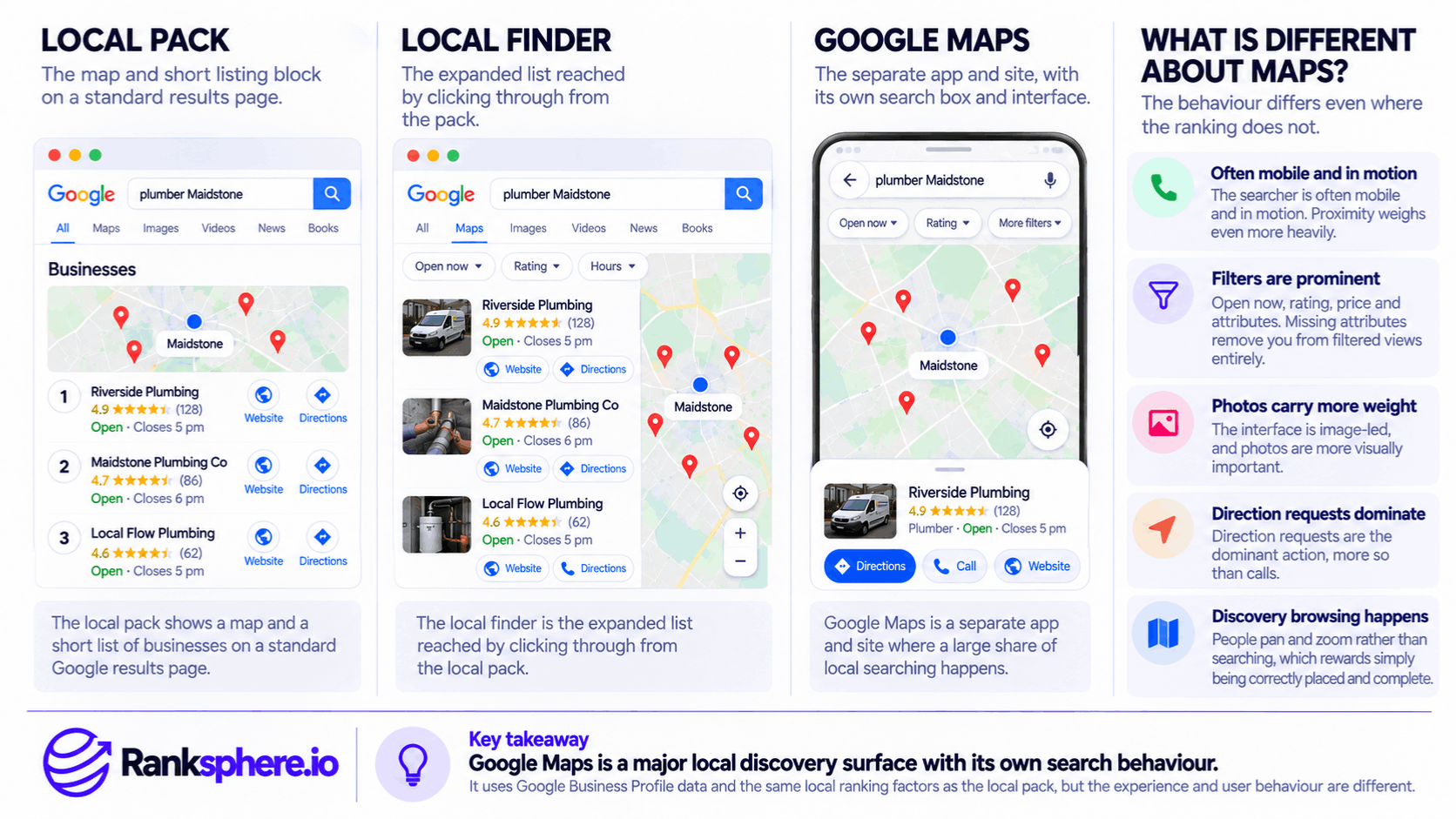
Google Maps, the local pack, and the local finder are closely related, but they aren't identical.
They provide different ways for people to discover local businesses.
Google Local Pack
The local pack is the business listing section that Google may display within its main search results.
For example, someone searching for "dentist in Manchester" may see a map alongside a small selection of dental practices.
The local pack allows users to compare nearby businesses without opening Google Maps separately.
Google Local Finder
The local finder is an expanded local business results interface that users may reach from Google's local search results.
It provides additional listings and allows people to explore businesses beyond those initially displayed.
Depending on Google's current interface, the experience may closely resemble or lead into Google Maps.
Google Maps
Google Maps is a separate mapping service available through its website and mobile app.
It offers location-based search, navigation, business information, photographs, reviews, and other features.
For example, someone walking through a city centre might open Maps to find a nearby coffee shop.
Another person might use it to compare physiotherapy clinics before making an appointment.
All three experiences draw on related business information and local ranking systems.
However, a business's position can differ between Google Search and Google Maps because the query, user's location, filters, map area, and other search context may change.
How Does Google Maps Rank Local Businesses?
Google explains that local search results are mainly based on three factors.
Relevance
Relevance describes how closely a business matches what someone is searching for.
For example, a business categorised as a physiotherapy clinic may be more relevant to a search for physiotherapy services than a business offering unrelated services.
Accurate categories, services, and business information help Google understand what the business provides.
Distance
Distance considers how far a business is from the location associated with the search.
For example, someone searching for "pharmacy near me" may see businesses close to their estimated location.
However, Google Maps doesn't always rank the nearest business first.
Other factors can influence the results.
Prominence
Prominence reflects how well-known or established a business is, based on information Google can evaluate.
Google states that factors such as reviews, ratings, links, and other information about businesses can contribute to local prominence.
A business farther away may appear above a closer competitor if Google's systems consider it more relevant or prominent.
These factors are explained further in local ranking factors.
There is no separate, guaranteed formula for ranking number one on Google Maps.
Why Google Maps Matters for Local Businesses
Google Maps supports several actions that may happen without a website visit.
Customers Can Find Businesses Nearby
People can use Maps to discover businesses near their current location or within a location they're researching.
For example, someone visiting another town may search for nearby restaurants, clinics, shops, or services.
The business listing may provide enough information for them to make a decision.
However, Maps isn't used exclusively for immediate, nearby searches. People also research businesses in other cities, plan journeys, and compare options before visiting.
Customers Can Check Important Information
Google Maps commonly displays information such as:
- Business name and category
- Address or eligible service area information
- Opening hours
- Phone number
- Website
- Photographs
- Customer reviews
- Available business attributes
The exact information and actions displayed depend on the business type, location, and available features.
Keeping this information accurate helps customers make informed decisions.
Customers Can Take Action Without Visiting a Website
Someone viewing a business on Google Maps may be able to:
- Call the business
- Request directions
- Visit its website
- Explore photographs
- Read reviews
- Use available booking or contact options
For a restaurant or physical clinic, directions may be particularly important.
For a service-area business such as a plumber, calls and website enquiries may be more relevant.
The most valuable action depends on the business and what the customer needs.
How to Optimise Your Google Maps Listing
There isn't a completely separate Google Maps optimisation process.
Most improvements begin with maintaining an accurate, useful Google Business Profile.
However, some details are especially important for people using Maps to navigate or choose a business.
1. Check Your Business Location and Map Pin
For businesses that receive customers at a physical location, the map marker should accurately represent where customers need to go.
A misplaced pin can create problems.
For example, a clinic may appear on the opposite side of a large building from its actual entrance.
Customers following directions could arrive at the wrong location or struggle to find the building.
Check the listing on Google Maps and verify that the marker accurately identifies the business.
If it's incorrect, use the available Google Business Profile or Maps editing options to request a correction.
Changes may be reviewed by Google and aren't always applied immediately.
For service-area businesses that don't qualify to display an address, follow Google's address and service-area guidelines rather than showing a location customers cannot visit.
2. Choose Accurate Business Categories
Business categories help Google understand the services a company provides.
For example, a dental practice should select the most relevant primary category for its main business activity.
It may also have appropriate secondary categories, depending on the services offered.
Google Business Profile categories should describe the business accurately.
Avoid selecting unrelated categories simply to appear for more searches.
Categories are important for relevance, but no category selection guarantees a particular ranking.
3. Complete Relevant Business Attributes
Google Business Profile attributes describe specific characteristics of a business.
Depending on the category, these may include information about accessibility, amenities, service options, or other facilities.
Some attributes may be used in Google Maps filters or displayed to customers evaluating a business.
For example, someone looking for wheelchair-accessible facilities may use available accessibility information when comparing locations.
Complete applicable attributes accurately.
However, missing an attribute doesn't universally remove a business from all Maps results. Whether an attribute affects visibility depends on the specific feature, query, and filters being used.
4. Keep Opening Hours Accurate
People frequently check Google Maps to find out whether a business is open.
Incorrect hours can lead to wasted journeys and frustrated customers.
Make sure regular business hours reflect actual operations.
Also update special hours for:
- Public holidays
- Temporary schedule changes
- Planned closures
- Other relevant changes
For example, a physiotherapy clinic operating shorter hours during a holiday should update its profile accordingly.
Accurate hours also help Google display relevant availability information.
5. Add Useful Business Photographs
Photographs can help customers understand what to expect.
For a physical business, useful images may include:
- Building exterior
- Main entrance
- Reception area
- Interior facilities
- Parking or accessibility features
- Staff and services, where appropriate
An exterior photograph is particularly useful when the entrance is difficult to recognise from the street.
Google Business Profile photos should accurately represent the business.
Avoid uploading misleading photographs or stock images presented as the actual premises.
Google determines which images appear most prominently, so uploading a particular photo doesn't guarantee it will become the main listing image.
6. Manage Customer Reviews
Reviews help potential customers evaluate local businesses.
Someone comparing two dental practices may read recent reviews to understand previous patients' experiences.
Google also confirms that more reviews and positive ratings can help local ranking.
Businesses should encourage genuine feedback without offering incentives or selectively soliciting only positive reviews.
Responding professionally to reviews can also help demonstrate that the business values customer feedback.
However, replying to reviews shouldn't be presented as a separately confirmed direct ranking factor.
7. Keep Business Information Consistent and Accurate
Review the information displayed across important profiles and business listings.
Pay particular attention to:
- Business name
- Address, where applicable
- Phone number
- Website URL
- Business category
- Opening hours
Incorrect or outdated details can confuse customers.
Ranksphere's GBP Management helps businesses manage Google Business Profile information across locations, making it easier to review and maintain important profile details.
How to Measure Google Maps Performance
Google Maps can generate valuable customer interactions that don't necessarily appear in website analytics.
For example, someone may find a clinic on Maps, check its opening hours, and request directions.
If that person never opens the website, their Maps activity won't appear as a website session in Google Analytics.
Google Business Profile Performance
Google Business Profile Performance provides information about how people discover and interact with a business profile.
Depending on the metric and reporting interface, businesses may be able to review:
- Profile views or searches
- Calls
- Direction requests
- Website clicks
- Other supported interactions
Available reporting can also distinguish between Google Search and Google Maps for certain visibility metrics.
This helps businesses understand where customers are discovering their listings.
However, performance data should be interpreted carefully.
Google Maps Views vs Customer Visits
A Maps view doesn't necessarily mean someone visited the business.
The person may have been comparing several businesses or exploring an area.
Likewise, a direction request doesn't prove that someone completed the journey.
For example, a user may request directions and later change their plans.
These metrics help show customer interest and interaction, but they aren't confirmed physical visits or completed sales.
Why Google Analytics Doesn't Show the Full Picture
Google Analytics 4 measures website and app interactions when appropriately implemented.
It doesn't automatically record every action someone takes within Google Maps.
For example, someone may call a business directly from Maps without visiting the website.
That action may be reflected in supported Google Business Profile reporting, but not as a website conversion in Google Analytics.
For a more complete assessment, review both website data and Google Business Profile performance.
Compare Search and Maps Activity
Where the reporting provides the relevant breakdown, compare discovery activity from Google Search and Google Maps.
For example, a restaurant may receive substantial visibility through Maps, while a specialist consultancy may attract more website research.
However, this comparison doesn't prove whether people were nearby, travelling, or planning a future visit.
Use the data to identify trends and investigate customer behaviour rather than making assumptions based on one metric.
Common Google Maps SEO Mistakes
Several mistakes can reduce the usefulness of a business listing or create unnecessary problems for customers.
Never Checking the Map Pin
A business may have a correct address but an incorrectly positioned map marker.
This can make navigation difficult.
Check the marker and request a correction when necessary.
Using Inaccurate Categories
Choosing categories that don't reflect the actual business can mislead customers and violate Google's guidelines.
Select categories based on the services the business genuinely provides.
Leaving Business Attributes Incomplete
Missing relevant information may make it harder for customers to determine whether a business meets their needs.
Review applicable attributes and keep them accurate.
Forgetting Special Opening Hours
A business may have correct regular opening hours but forget to update its profile for holidays.
This can lead to customers arriving when the business is closed.
Not Adding Useful Exterior Photographs
For businesses with difficult-to-find entrances, exterior photographs can make navigation easier.
Photographs should help visitors recognise the premises rather than simply serve as promotional images.
Measuring Success Only Through Website Traffic
Google Maps users can contact or navigate to a business without visiting its website.
Website traffic alone therefore doesn't capture every Maps interaction.
Review relevant Google Business Profile performance metrics as well.
Assuming Maps Rankings Are Identical Everywhere
Rankings can vary depending on the search location, query, map area, and filters.
A business ranking prominently near its address may appear differently several miles away.
Avoid relying on a single ranking position to represent visibility across an entire service area.
Google Maps Best Practices
For businesses looking to improve their Google Maps listing:
- Verify the business address and map marker where applicable.
- Choose the most accurate primary and secondary categories.
- Complete relevant business attributes.
- Keep regular and special opening hours updated.
- Upload accurate exterior and interior photographs.
- Make contact details easy to use.
- Encourage genuine customer reviews.
- Respond professionally to customer feedback.
- Follow Google Business Profile guidelines.
- Review visibility across relevant search locations.
- Monitor calls, direction requests, and website clicks.
- Compare Search and Maps performance where reporting supports it.
The objective isn't simply to improve ranking positions.
It's to make sure potential customers can find accurate information, evaluate the business, and reach it without unnecessary difficulty.
Example of a Google Maps Location Problem
Consider a hypothetical physiotherapy clinic called Beckford Physiotherapy.
The clinic receives occasional feedback from patients who say the building was difficult to find.
The team assumes the problem is inadequate signage.
However, one staff member opens the business listing in Google Maps and checks the route to the clinic.
What the Clinic Discovers
The map marker is positioned on the wrong side of a dual carriageway.
The actual clinic entrance is approximately forty metres away, accessible from a different approach.
Someone following the suggested route may arrive near the building but struggle to find the entrance.
The address is correct, but the marker doesn't accurately represent where visitors need to go.
How the Clinic Fixes the Problem
The team reviews the listing information and submits an appropriate map marker correction.
It also:
- Confirms the business address
- Adds a clear exterior photograph
- Provides useful entrance information
- Checks accessibility and parking details
- Tests the suggested route from nearby roads
Once the marker correction is accepted, the clinic checks whether the updated position provides more useful navigation.
Example Shows
“The problem wasn't necessarily related to Google Maps rankings.
The clinic was discoverable, but customers were having difficulty reaching its entrance.
Correcting the information could make the listing more useful without changing its position in local search results.
The team can monitor whether navigation-related complaints decrease, but it shouldn't assume that every direction request results in a completed patient visit.
Google Maps optimisation isn't only about appearing in search results. It's also about making sure customers can find, evaluate, and reach the business.
For local businesses, accurate profile information, useful photographs, genuine reviews, and reliable location details can be just as important to the customer experience as visibility itself.”
See Also
- Local Pack — Understanding the local business listings displayed in Google Search.
- Local Finder — Exploring expanded local business search results.
- Google Business Profile — Managing business information displayed across Google.
- Local Ranking Factors — How relevance, distance, and prominence influence local results.
- Google Business Profile Performance — Measuring profile visibility and customer interactions.
- Google Business Profile Attributes — Describing relevant facilities, features, and service options.