Sessions and users are two website traffic metrics used in Google Analytics 4 (GA4). A session represents a visit to a website, while a user represents an individual visitor who may return multiple times.
For example, someone might visit a dental practice's website on Monday to check its services, return on Wednesday to read reviews, and visit again on Friday to book an appointment.
GA4 may count that as one user and three sessions.
Both metrics help you understand website traffic, but they measure different things.
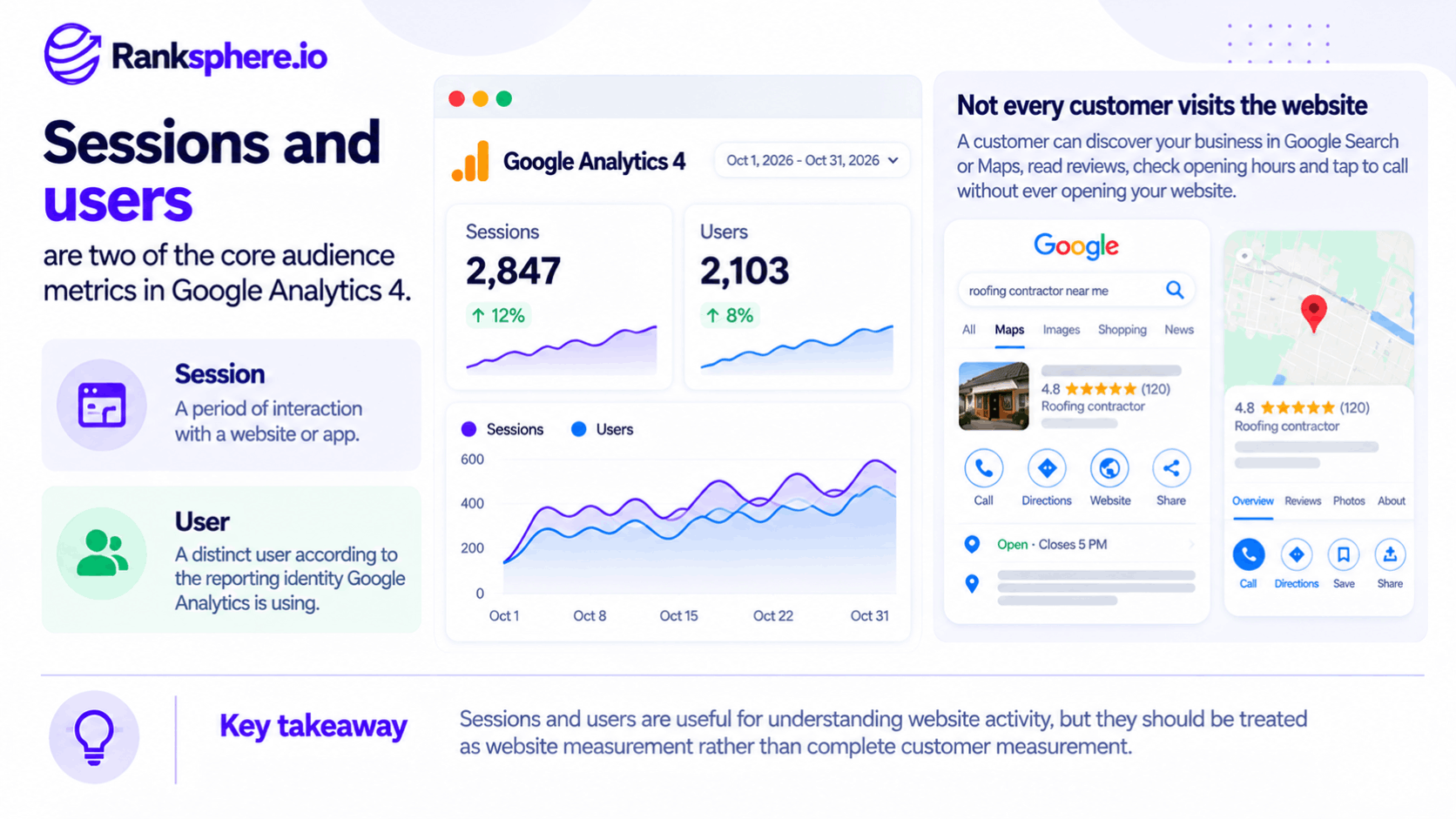
For local businesses, there's another important distinction: not every customer interaction happens on the website.
Someone might discover your business through Google Maps, read your reviews, check your opening hours, and call directly from your Google Business Profile. That interaction may lead to a new customer without generating a website session.
This is why sessions and users are useful reporting metrics, but they shouldn't be the only numbers used to evaluate local SEO performance.
How GA4 Counts Sessions and Users
Google Analytics 4 measures website activity through events.
Events record actions such as page views, session starts, and other interactions.
GA4 uses this information to calculate several related metrics.
Sessions
A session is a group of user interactions that occur within a particular period.
GA4 automatically collects a session_start event when a user begins a new session.
By default, a session ends after 30 minutes of inactivity. This timeout can be adjusted in GA4 settings.
Unlike the older Universal Analytics system, GA4 doesn't automatically start a new session when midnight passes or when a campaign source changes during an existing session.
For example, someone might browse a business website for several minutes, leave, and return ten minutes later.
If the session hasn't timed out, GA4 can treat those interactions as part of the same session.
If the visitor returns after the inactivity timeout, a new session begins.
Total Users
Total users measures the number of distinct users who triggered at least one event during the selected reporting period.
A user may generate several sessions, but they are generally counted once in the Total users metric for that period.
However, GA4 doesn't always identify a person perfectly across devices and browsers. Depending on the available identifiers and reporting identity settings, the same person may be counted more than once.
Active Users
Active users measures distinct users who engaged with the website or application during the reporting period.
In GA4, a user can qualify as active through an engaged session or certain automatically collected engagement-related events, including first_visit.
This matters because Active users is the primary user metric in GA4 reports.
When you see a metric labelled "Users" in many standard GA4 reports, it generally refers to Active users rather than Total users.
That distinction can cause confusion when comparing reports or working with historical analytics data.
New Users
New users measures users who interact with a website or application for the first time, based on GA4's first_visit or first_open events.
This helps businesses understand how many new visitors they're attracting.
However, a new user isn't necessarily a new customer.
Someone might already know your business or have visited it in person before accessing your website for the first time.
Returning Users
Returning users measures users who have previously interacted with the website or application and return during the reporting period.
This can help identify repeat visits from people researching services, comparing options, or considering a purchase.
For example, someone researching dental implants may visit a practice's website several times before contacting the clinic.
Returning visits may be useful context, but they don't automatically indicate stronger purchase intent.
Why GA4 Sessions and Users Don't Match Other Tools
Website owners sometimes compare Google Analytics, Google Search Console, and server logs and expect the numbers to match.
They usually won't.
Each system measures a different type of activity.
GA4 Sessions vs Google Search Console Clicks
Google Search Console reports clicks from Google Search results.
GA4 records website activity when its measurement system is able to collect the relevant events.
These numbers can differ for several reasons:
- A visitor may click a search result but leave before GA4 records a session.
- A browser extension or ad blocker may prevent analytics data from being collected.
- Consent settings may affect measurement.
- Tracking scripts may fail to load.
- A visitor may return to the website without another Google Search click.
- GA4 and Search Console use different reporting methods and attribution rules.
A Search Console click doesn't always create a GA4 session, and a GA4 session doesn't necessarily originate from a Google Search click.
The two metrics are useful together, but they shouldn't be treated as interchangeable.
GA4 vs Universal Analytics
Universal Analytics and GA4 use different measurement models.
Universal Analytics relied primarily on sessions and pageviews, while GA4 uses an event-based model.
The two platforms also differ in how they define and report sessions and users.
For example:
- GA4 sessions don't automatically restart at midnight.
- GA4 doesn't restart a session simply because the campaign source changes.
- GA4's primary Users metric refers to Active users.
- Universal Analytics primarily reported Total users.
These differences mean historical Universal Analytics figures aren't directly comparable with GA4 figures.
A lower number in GA4 doesn't automatically mean traffic has declined.
However, the difference in measurement definitions also doesn't prove that traffic remained unchanged.
GA4 vs Server Logs
Server logs record HTTP requests made to the website's servers or other logging infrastructure.
These requests may come from:
- Human visitors
- Search engine crawlers
- Automated tools
- Website monitoring systems
- Other software requesting website resources
GA4, on the other hand, measures activity through analytics events.
A single website visit can generate multiple server requests, so server log requests should not be compared directly with GA4 sessions.
Consent Mode and Data Modelling
Consent settings can also affect GA4 reporting.
Depending on the implementation and eligibility requirements, Google Analytics may use modelling to help account for activity that cannot be observed directly.
This means reported figures may include a combination of observed and modelled information.
When investigating unexplained changes, review the website's consent implementation and measurement configuration before assuming the change reflects actual visitor behaviour.
Why Sessions and Users Don't Tell the Whole Story for Local SEO
For local businesses, one of the biggest limitations of website analytics is that customers don't always need to visit the website before contacting the business.
Imagine someone searching for a nearby dentist.
They find a practice in the local pack, read its reviews, check its opening hours, and tap the call button.
The practice may receive a valuable enquiry, but that interaction won't necessarily create a website session.
The same applies when someone requests directions or completes a booking directly through an eligible Google Business Profile feature.
Google Business Profile Actions Aren't Website Sessions
Google Business Profile can generate customer interactions without sending visitors to a website.
These may include:
- Phone call button clicks
- Direction requests
- Booking interactions
- Website clicks
Website clicks may lead to measurable sessions, but the other actions don't necessarily involve the website at all.
That's why a local business should evaluate website analytics alongside Google Business Profile performance.
A decline in website sessions doesn't automatically mean local SEO is underperforming.
It could reflect a genuine decline, a measurement problem, changes in customer behaviour, or more customers choosing to contact the business directly from its profile.
You need additional data to understand what's happening.
Zero-Click Searches
Zero-click searches occur when someone gets the information they need without clicking through to a website.
For local businesses, this might happen when someone finds:
- Opening hours
- A business address
- Contact information
- Customer reviews
- Directions
directly in Google Search or Maps.
These interactions may influence customer decisions without generating website sessions.
The same measurement limitation can arise with AI-generated search results.
Someone may encounter a business in an AI-generated answer without immediately visiting its website.
That exposure isn't recorded as a GA4 session, and it doesn't necessarily produce a measurable customer action.
Why Local SEO Reports Need More Than Sessions
Sessions can tell you whether website visits are increasing or decreasing.
They cannot tell you on their own whether more customers are contacting the business.
A more useful local SEO report considers website traffic alongside:
- Google Business Profile actions
- Search Console clicks and impressions
- Website enquiries
- Appointment bookings
- Phone leads
- Other relevant conversions
These metrics help explain what customers do after discovering a business through search.
Ranksphere's white-label AI reports can help agencies present local SEO reporting to clients, including relevant Google Business Profile and website insights.
How to Use Sessions and Users in SEO Reporting
Sessions and users are still valuable. The key is to use them to answer specific questions instead of reporting totals without context.
Segment Traffic by Channel
Start by separating website traffic into meaningful acquisition channels.
For example:
- Organic search
- Direct
- Referral
- Paid search
- Organic social
This helps you understand where visitors come from.
A business might experience a decline in overall sessions while organic search traffic remains stable.
Without channel segmentation, that distinction could easily be missed.
Review Traffic by Landing Page
A landing page is the first page a visitor views during a session.
Reviewing sessions by landing page helps identify which parts of the website attract visitors.
For a local business, useful landing pages may include:
- Service pages
- Location pages
- Blog articles
- The homepage
- Appointment or contact pages
This is often more informative than looking at total sessions alone.
For example, an increase in sessions to a dental implants service page may be more relevant to the business than a similar increase to an unrelated informational article.
However, the actual value depends on whether those visits lead to meaningful actions.
Compare Year-on-Year Performance
Many local businesses experience seasonal changes in demand.
For example, certain services may receive more interest during particular months or seasons.
Comparing traffic with the same period in the previous year can help account for those patterns.
However, year-on-year comparisons are most reliable when the measurement setup has remained reasonably consistent.
If the website changed analytics platforms, consent settings, or tracking configurations during the comparison period, the figures may not be directly comparable.
Measure Conversions Alongside Sessions
Sessions show visits. Conversions show whether visitors complete actions the business values.
Examples include:
- Submitting an enquiry form
- Booking an appointment
- Clicking a tracked phone number
- Completing a purchase
- Requesting a quote
A website receiving fewer sessions may still generate more enquiries if visitors are more likely to convert.
This is why conversion rate and conversion counts are important alongside traffic data.
Avoid evaluating SEO performance through session growth alone.
Track Google Business Profile Website Traffic with UTM Parameters
If you want to understand how many website visits come from Google Business Profile links, use UTM parameters.
UTM parameters are tracking values added to URLs to help analytics tools identify where traffic originated.
For example, you can add campaign parameters to the website link on a Google Business Profile.
When someone clicks that link and GA4 successfully records the visit, the parameters can help distinguish that traffic from other sources.
This gives you a clearer view of how your Business Profile contributes to website activity.
However, UTM tracking only measures visits that reach the website and are recorded. It doesn't capture calls, direction requests, or other interactions completed directly on the profile.
Investigate Sudden Traffic Changes Before Drawing Conclusions
If sessions suddenly rise or fall, check the measurement setup before assuming customer behaviour has changed.
Possible causes include:
- A missing or broken GA4 tag
- Changes to a cookie consent banner
- Website redirects
- Changes to analytics configuration
- Duplicate tracking
- Changes to channel attribution
- Actual traffic fluctuations
Compare GA4 with Search Console and other available data to determine whether the change is likely to be real or measurement-related.
Common Sessions and Users Reporting Mistakes
Several reporting mistakes can lead businesses to misunderstand their SEO performance.
- Using sessions as the main measure of local SEO success. Website visits don't capture every customer interaction generated by Search and Maps.
- Comparing GA4 directly with Universal Analytics. The platforms use different definitions and measurement models.
- Expecting Search Console clicks and GA4 sessions to match. These tools measure different activities.
- Ignoring Google Business Profile actions. Calls, direction requests, and other profile interactions may happen without a website visit.
- Reporting totals without segmentation. Overall sessions can hide changes in important channels or landing pages.
- Assuming every decline reflects lost traffic. Tracking problems, consent changes, and configuration updates can affect reported numbers.
- Treating users as individual people with perfect accuracy. The same person may be counted differently depending on devices, identifiers, and reporting settings.
A useful report should explain what the numbers mean rather than simply present them.
Best Practices for Reporting Sessions and Users
To make sessions and users more useful in SEO reporting:
- Report website conversions and relevant Google Business Profile actions alongside traffic.
- Segment sessions by acquisition channel and landing page.
- Use Total users and Active users consistently rather than treating them as identical metrics.
- Avoid direct comparisons between Universal Analytics and GA4.
- Apply UTM parameters to inbound links you control.
- Use year-on-year comparisons when seasonal patterns matter and measurement is consistent.
- Check tracking and consent settings before diagnosing sudden changes.
- Explain the difference between sessions, users, and search clicks to clients.
- Measure outcomes that matter to the business, not just increases in traffic.
The objective isn't to stop reporting sessions.
It's to give them the right context.
Example of Sessions vs Users in Local SEO Reporting
Consider a hypothetical dental practice working with an SEO agency.
The agency prepares a performance report showing that website sessions are lower than the previous year.
At first glance, the decline looks concerning.
However, during the review, the team discovers that the historical report came from Universal Analytics while the current figures come from GA4.
The agency had also been comparing the previous year's Total users with the current GA4 Users metric, which represents Active users in standard reports.
Those figures are not directly comparable.
The team investigates further.
Search Console shows that organic search clicks have remained relatively stable during the periods where comparable data is available.
Google Business Profile reporting also shows an increase in phone call button clicks.
These findings suggest that the website traffic report alone doesn't provide enough evidence to conclude that local SEO performance has declined.
However, they don't prove that traffic was unchanged or that every additional phone interaction resulted in a new customer.
Example
“The agency updates its reporting approach.
Instead of comparing incompatible Universal Analytics and GA4 figures, it establishes a consistent GA4 reporting baseline.
It also includes:
- Organic search clicks from Search Console
- Google Business Profile actions
- Website conversions
- GA4 sessions by channel
- Traffic to important service and location pages
This provides a clearer picture of how visitors discover and interact with the practice.
If website traffic declines in the future, the agency can investigate whether the change is related to search visibility, customer behaviour, or analytics measurement.
The lesson is that sessions and users are useful metrics, but they don't tell you whether a local business is getting more customers.
For local SEO, the most useful reporting connects website visits with search visibility, customer actions, and measurable business outcomes.”
See Also
- Google Analytics 4 — How GA4 collects and reports website activity.
- Organic Traffic — Visitors arriving through unpaid search results.
- Conversion Rate — Measuring the proportion of visits or users that lead to a desired action.
- Google Business Profile Performance — Understanding customer interactions on a Business Profile.
- Engagement Rate — Measuring how frequently sessions meet GA4's engagement criteria.
- Zero-Click Search — Search interactions that don't result in a website visit.