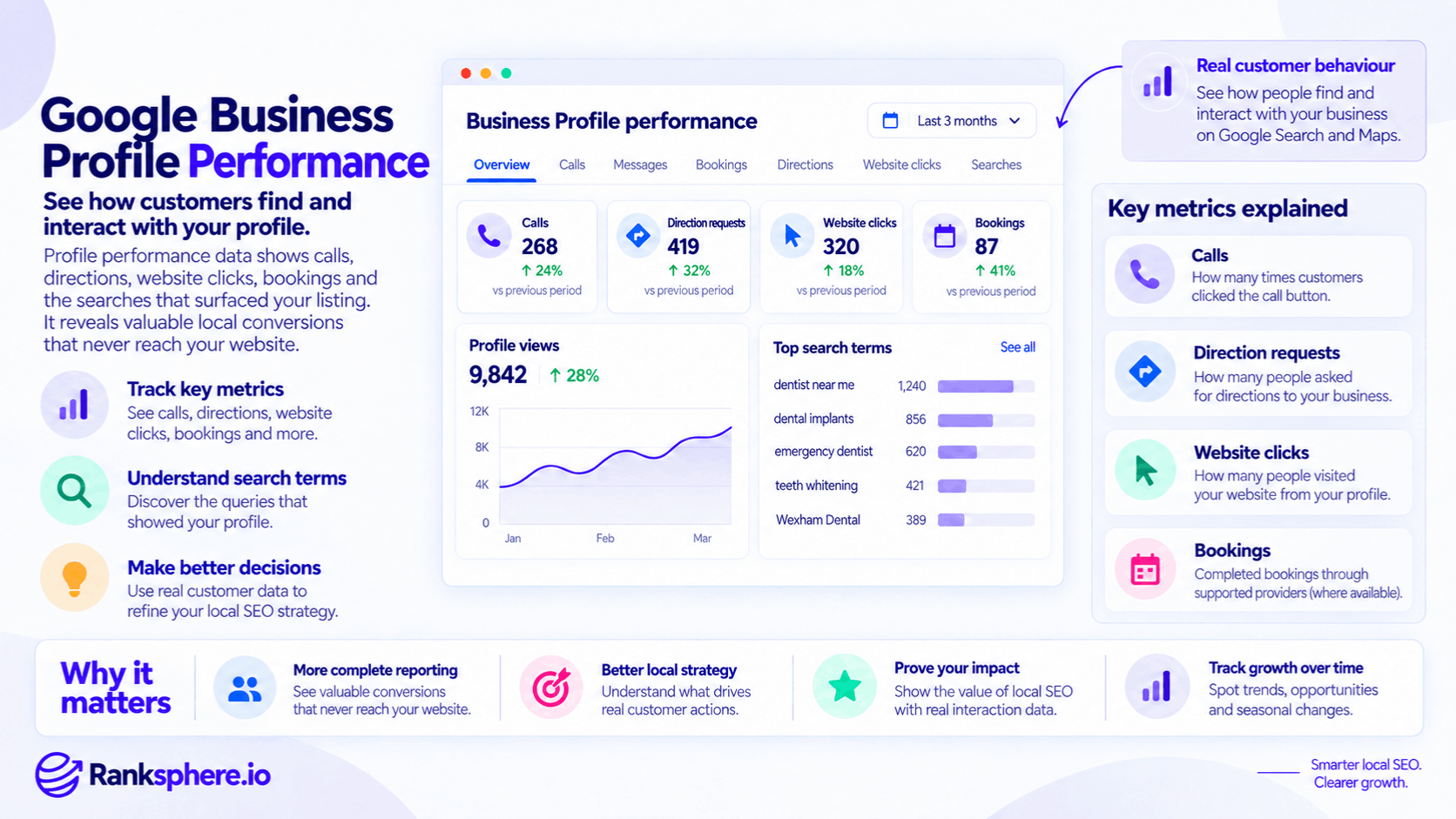
Google Business Profile performance shows how people discover and interact with a business across Google Search and Maps.
Depending on the profile, the report can include metrics such as:
- Searches
- Profile views
- Calls
- Direction requests
- Website clicks
- Bookings
- Other eligible interactions
For a local business, this data matters because not every customer journey passes through the website.
Someone can:
- Search for a business.
- Find it in the local pack.
- Read reviews.
- Check opening hours.
- Tap the call button.
There may be no website session at all.
That means Business Profile performance data can reveal an important part of local search activity that website analytics alone may miss.
What is Google Business Profile performance?
Google Business Profile Performance is Google's reporting area for understanding how customers find and interact with a verified Business Profile.
Google says the report can show how people use Search and Maps to discover the profile and what they do afterwards. Available metrics depend on the business, so not every profile receives every metric.
This makes it particularly useful for local SEO reporting.
Traditional website analytics answers questions such as:
How many people visited the website?
Business Profile data can answer a different set of questions:
How many people viewed the profile?
How many requested directions?
How many tapped the call button?
Which searches caused the profile to appear?
Both sides matter.
Google Business Profile performance vs Google Analytics
Historically, local SEO reporting often treated Business Profile activity and Google Analytics as almost completely separate datasets.
That changed in 2026.
Google introduced a direct Business Profile integration for GA4 in June 2026. Businesses can now link eligible Google Business Profiles with a Google Analytics property and bring GBP metrics into Analytics reporting.
The available imported metrics include Business Profile activity such as:
- Interactions
- Calls
- Bookings
- Direction requests
- Website clicks
This does not mean those actions suddenly become ordinary website sessions.
A customer who calls directly from Google still never visited your site.
Instead, GA4 can now bring the separate Business Profile data into the same reporting environment.
That is an important distinction.
Why Google Business Profile data matters
For some local businesses, the website is only one path to conversion.
A customer searching for:
emergency plumber near me
may never need to visit the plumber's website.
The profile may already provide:
- Reviews
- Phone number
- Opening hours
- Service information
If the customer calls directly, website-only reporting can understate the value generated through local search.
Business Profile performance helps fill that measurement gap.
Calls
Google's Calls metric measures how many times customers clicked the call button on the Business Profile.
That is useful.
But it is not the same as:
completed phone calls
or:
qualified leads.
A person might:
- Tap the call button
- Cancel immediately
- Call with an irrelevant enquiry
- Be an existing customer
- Be a supplier
So the safest description is:
call-button interactions
rather than:
phone conversions.
Calls can still be an important local KPI
For call-driven businesses, the metric can be commercially useful.
Examples include:
- Plumbers
- Electricians
- Dentists
- Clinics
- Solicitors
- Tradespeople
But reporting should distinguish between:
call clicks
and:
qualified calls.
If the business needs to know what happened after the tap, call tracking can provide additional information.
Direction requests
The Directions metric shows how many people asked for directions to the business.
Google has refined the way it counts this data to account for issues such as:
- Repeated taps
- Cancelled direction requests
- Spam
to provide a more useful measure of unique direction activity.
For a premises-based business, this can be a valuable indicator of local intent.
Examples include:
- Shops
- Restaurants
- Clinics
- Showrooms
- Attractions
But a direction request is not proof that the person actually arrived.
Treat it as a strong interaction signal rather than a confirmed store visit.
Website clicks
The Website clicks metric measures how many times people clicked the website link from the Business Profile.
This can help distinguish:
profile → website traffic
from broader website traffic when used alongside appropriate tracking.
Where useful, the profile website link can also be tagged consistently so the resulting sessions can be identified more clearly inside analytics.
Bookings
For eligible businesses, Business Profile performance can report completed bookings.
Google notes that booking data is available when the bookings are managed through a supported booking provider.
That distinction matters.
A:
booking-link click
is not necessarily the same thing as:
completed booking.
Understand which metric your particular profile is reporting before calling it a conversion.
Search terms
One of the most useful parts of Google Business Profile performance is the Searches report.
Google describes this as the search terms people used when the Business Profile appeared.
For example, a dental practice might see queries relating to:
- Dentist
- Emergency dentist
- Dental implants
- Practice name
This is valuable because it reflects actual Google search behaviour associated with the profile.
It is not a third-party estimate of monthly search volume.
Search terms are not search volume
If:
emergency dentist
appears in the Business Profile search-term report, that does not tell you the total number of searches for that phrase in the market.
It tells you that the business's profile appeared in connection with that query.
Do not convert the metric into:
“X people searched this keyword locally.”
That is not what the report measures.
Branded vs non-branded search terms
It can be useful to separate queries into:
Branded
Queries containing the business or brand name.
Non-branded
Queries describing a:
- Service
- Product
- Category
- Need
without naming the business.
For example:
Wexham Dental
is branded.
dentist near me
is non-branded.
This distinction can help explain whether visibility is coming from people who already know the business or from broader discovery.
But this classification should be done analytically.
Do not present:
branded / non-branded / direct
as a built-in current Business Profile report.
Why non-branded queries matter
Non-branded queries can provide evidence that the business is being discovered for broader customer needs.
For example:
boiler repair
may represent new discovery more strongly than:
Ashcroft Heating phone number
But do not assume every non-branded impression or search appearance was caused by SEO work.
Visibility can also be influenced by:
- Proximity
- Business prominence
- Competition
- Search demand
Use the data as evidence, not as proof of causation.
Branded search is still valuable
Do not dismiss branded activity either.
People searching directly for the business may be:
- Returning customers
- Referrals
- People who saw advertising
- People who discovered the business earlier through SEO
Branded search therefore tells a different story rather than a useless one.
Report it separately where possible.
Search-query reporting has a delay
Google says search terms are updated at the beginning of each month and may take up to five days to appear.
That means the newest reporting period may not always be complete.
Avoid making a major strategic decision because the most recent few days appear unusually low.
Check whether the data itself has finished updating.
Profile views
The Views metric shows how many people viewed the Business Profile through Search and Maps.
Google's current methodology counts unique profile viewers more carefully than a simple page-view counter.
A person can only be counted once per day, although limited additional counting can occur across different devices and platforms.
That makes profile views different from ordinary website page views.
Views are not impressions
Do not use:
views
and:
search impressions
interchangeably.
A profile view represents someone viewing the Business Profile under Google's current reporting methodology.
It is not a count of every time the business appeared somewhere in Google.
Google explicitly notes that the metric measures views of the Business Profile rather than all appearances of the business across Google.
Total interactions
Google can also report an overall Interactions metric summarising customer actions taken on the profile.
This can be useful as a high-level trend.
But the total can hide important differences.
For example:
200 interactions
could consist mainly of:
- Website clicks
or:
- Direction requests
or:
- Calls
Those actions may have very different commercial value.
Break down the total before drawing conclusions.
Messages are no longer a normal GBP interaction channel
Older Google Business Profile reporting documentation and some integrations may still reference Messages as a metric.
However, Google discontinued Business Profile chat and call history on 31 July 2024. Businesses can no longer use the old Business Profile chat functionality to communicate with customers.
For a current glossary entry, do not present:
messages
as though it remains a standard live GBP lead-generation feature.
Products, menus and other category-specific metrics
Some Business Profiles may receive additional performance metrics.
Google currently documents examples such as:
- Product views
- Menu interactions
- Offers
depending on the business type.
Not every profile receives them.
Only report metrics that actually apply to the business.
Which GBP metrics matter most?
There is no universal answer.
For an emergency plumber, calls may matter most.
For a restaurant:
- Directions
- Menu interactions
- Bookings
may be more useful.
For an optician:
- Calls
- Directions
- Website visits
- Bookings
could all matter.
The Business Profile report should follow the business model rather than use the same headline metric for every client.
Google Business Profile metrics are not automatically conversions
A common reporting mistake is to call every profile interaction:
a conversion.
That can exaggerate performance.
For example:
Call click
Potential lead.
Direction request
High-intent interaction.
Website click
Visit opportunity.
Completed booking
Much closer to a true conversion.
The terminology should reflect what actually happened.
Profile actions vs business outcomes
A useful reporting hierarchy is:
Visibility
- Grid coverage
- Search appearances
- Profile views
Interactions
- Calls
- Directions
- Website clicks
Conversions
- Qualified calls
- Completed bookings
- Form submissions
Commercial outcomes
- Customers
- Revenue
This keeps the reporting honest.
Compare Business Profile data with geo-grid visibility
Business Profile Performance becomes much more useful when paired with geo-grid rank tracking.
The grid answers:
Where are we visible?
The Business Profile report answers:
What did people do when they found us?
For example:
Local visibility
Top-three grid coverage:
22% → 41%
Profile interactions
Calls:
45 → 68
Directions:
36 → 57
Together, those metrics provide more context than either dataset on its own.
Do not assume one caused the other
If grid coverage and calls both increase, that is useful evidence.
But avoid saying:
“The coverage increase caused exactly 23 additional calls.”
Other variables may also have changed:
- Search demand
- Reviews
- Seasonality
- Advertising
- Brand awareness
Report the relationship without overstating attribution.
Calls-to-views ratio
A calls-to-views ratio can be useful as an internal diagnostic metric.
For example:
80 calls ÷ 2,000 profile views = 4%
But do not treat it as a standard Google conversion rate.
A low ratio could reflect many things:
- Search intent
- Business type
- Customer preference
- Price
- Reviews
- Opening hours
- Location
It does not automatically mean:
the photos or reviews are bad.
Investigate before deciding why the number changed.
Direction-requests-to-views ratio
The same principle applies to direction requests.
For a shop or restaurant, this may provide useful context.
For a remote service business, it could be largely irrelevant.
Choose ratios that match the customer journey.
Website clicks can fall while business grows
A local business may generate more calls directly from its Business Profile while receiving fewer website visits.
That is not automatically negative.
For example:
Before
Customer finds profile → visits website → finds number → calls
After
Customer finds profile → taps Call
The second journey contains fewer website sessions.
But it may be easier for the customer.
This is why website traffic cannot be the only local SEO KPI.
Website clicks can also remain important
Do not swing too far in the opposite direction.
Website visits matter when customers need:
- Detailed service information
- Pricing
- Case studies
- Forms
- Complex booking journeys
Local SEO reporting should capture both:
on-profile behaviour
and:
website behaviour.
Seasonality matters
Local search performance can change significantly with the season.
Examples include:
- Boiler repair in winter
- Landscaping in spring
- Tourism in summer
- Restaurants around holidays
So:
June calls vs May calls
may tell you less than:
June this year vs June last year.
Use year-on-year comparisons where seasonal variation is strong and enough historical data exists.
Compare like periods
Even outside strong seasonality, use comparable reporting windows.
Avoid comparing:
31 days
against:
19 days
or:
Christmas week
against:
an ordinary week in November
without explaining the difference.
Consistent periods make trends easier to interpret.
Business Profile data can include organic and paid activity
Google notes that Business Profile performance data can contain activity from both organic Google results and Google Ads.
This is an important attribution limitation.
Do not automatically label every Business Profile interaction:
organic SEO.
If advertising is active, interpret the figures with that wider context.
Historical data is limited
Business Profile reporting does not provide unlimited historical data.
This is important enough to plan for during client onboarding.
In 2026, Google's new GA4 Business Profile integration provides GBP metrics on a rolling six-month window. Google notes that if the Analytics date range extends beyond that period, it loads only the most recent available Business Profile data.
That makes regular data storage important if you want to maintain a longer historical record.
Export the baseline before changing anything
At the start of a new engagement, save the available:
- Calls
- Directions
- Website clicks
- Bookings
- Searches
- Views
before optimisation begins.
Otherwise, months later you may discover that the original comparison period is no longer available.
A baseline that was never saved cannot be reconstructed reliably after the data disappears.
Export performance data regularly
Google allows Business Profile owners and managers to download performance information into a spreadsheet. Multi-location organisations can also download data across several profiles.
A regular export process is useful for:
- Long-term reporting
- Year-on-year comparison
- Agency handover
- Auditing
Do not rely entirely on the interface to preserve years of history.
Search terms are not exhaustive keyword research
Business Profile queries are valuable.
But they should not replace:
- Search Console
- Keyword research
- Competitive analysis
The report shows terms associated with your profile's visibility.
It does not provide a complete census of everything people search for in the market.
Use it as one first-party evidence source.
Business Profile data and Search Console are different
Google Search Console measures website performance in Google Search.
Business Profile performance measures activity around the local business profile.
For example:
Search Console
- Organic website clicks
- Website impressions
- Search queries
- Average position
Business Profile
- Profile views
- Calls
- Directions
- Website clicks
- Profile search terms
There is overlap in the customer journey.
The datasets answer different questions.
The 2026 GA4 integration changes reporting
The direct Google Business Profile integration introduced in June 2026 makes it easier to bring local-profile and website/app reporting together.
Google says linked Analytics properties can now receive GBP metrics including:
- Interactions
- Calls
- Bookings
- Directions
- Website clicks
- Messages
- Menus
with a dedicated Business Profile reporting collection created inside GA4.
This is useful operationally.
But it does not erase the conceptual difference between:
a website event
and:
a Google Business Profile interaction.
Keep the underlying source clear.
Using GBP data with call tracking
Business Profile Performance already tells you how often users clicked the call button.
So before buying a call tracking platform, define what additional information you need.
If the question is only:
How many people clicked Call on the profile?
Google already reports that.
If the questions are:
Did the call connect?
Was it a new lead?
Was it qualified?
Did it turn into revenue?
then call tracking may add useful information.
Call tracking goes deeper than call clicks
A dedicated call-tracking setup may help record:
- Call connection
- Duration
- Source
- Landing page
- New vs repeat caller
- Lead quality
depending on the system.
That moves the measurement closer to commercial outcomes.
Business Profile calls should not automatically be revenue
Suppose Google reports:
120 call clicks.
Do not calculate:
120 × average customer value = SEO revenue.
Some callers will not become customers.
A stronger chain is:
call clicks → connected calls → qualified leads → customers → revenue
The farther you can follow that chain, the more meaningful the reporting becomes.
Direction requests are not confirmed visits
The same caution applies to directions.
A customer can request directions and:
- Cancel
- Visit later
- Never arrive
Google itself has refined the metric to better account for cancelled requests and repeated taps.
Treat it as an intent indicator rather than a store-visit count.
Bookings are stronger outcomes
Where Google reports completed bookings through an eligible provider, the metric sits much closer to an actual business outcome.
That makes it potentially more valuable than:
- Profile views
- Website clicks
for businesses where appointments drive revenue.
Even then, a booking is not necessarily the same as:
completed appointment
or:
paid customer.
Follow the customer journey where possible.
Profile views need context
More views can be good.
But view growth alone does not mean business improved.
For example:
Views +80%
while:
Calls −10%
and:
Bookings −15%
deserves investigation.
Perhaps the business is appearing for less relevant searches.
Perhaps demand shifted.
Perhaps the profile is attracting attention but failing to convert it.
Use views as context rather than a headline business outcome.
More calls are not always better
Likewise:
Calls +40%
sounds good.
But if most calls are:
- Wrong numbers
- Existing customers
- Irrelevant enquiries
the commercial benefit may be small.
Qualified outcomes matter more than raw interaction counts.
Look at the customer journey
The most useful reporting often connects several stages.
For example:
Grid coverage increased
↓
Profile views increased
↓
Call clicks increased
↓
Qualified leads increased
↓
Bookings increased
This does not prove perfect causation.
But it tells a far stronger story than:
website sessions increased 8%.
Google Business Profile Performance and KPIs
For many local businesses, suitable profile-related KPIs might include:
- Calls
- Completed bookings
- Direction requests
depending on what the business actually values.
But these should sit alongside:
- Qualified leads
- Revenue
- Local visibility
rather than replacing them.
The right headline metric depends on the business.
Multi-location businesses
For multi-location brands, aggregate totals can hide major differences.
Suppose:
Location A
Calls +40%
Location B
Calls −20%
Location C
Calls flat
The company-wide figure may look healthy while one branch has a real problem.
Report both:
portfolio-wide trends
and:
location-level performance.
Keep location comparisons fair
Locations can differ in:
- Population
- Search demand
- Competition
- Opening hours
- Services
So do not automatically label the branch with the highest call count:
the best-performing location.
Compare each location against:
- Its baseline
- Its market
- Its objectives
where possible.
Ranksphere and Business Profile reporting
Ranksphere's white-label reports bring profile performance into client-ready documents alongside local visibility, reviews and other campaign data.
That is where Business Profile metrics become particularly useful:
not as isolated numbers, but as the interaction layer between:
search visibility
and:
business outcomes.
Common Google Business Profile performance mistakes
- Reporting website sessions as though they represent the whole local-search journey.
- Saying Google Analytics cannot access Business Profile data at all. GA4 introduced direct GBP integration in 2026.
- Treating call-button clicks as qualified calls.
- Treating direction requests as confirmed visits.
- Calling every profile interaction a conversion.
- Listing Business Profile chat as an active lead channel after its 2024 retirement.
- Claiming the current query report automatically splits searches into branded, non-branded and direct categories.
- Treating search terms as market-wide search volume.
- Assuming all Business Profile data represents organic SEO when Google Ads may also contribute.
- Using profile views as though they were total Google impressions.
- Comparing non-equivalent reporting periods.
- Ignoring seasonality.
- Failing to export historic data.
- Not saving a baseline before optimisation begins.
- Reading profile interactions without local-visibility context.
- Reporting totals without checking qualified leads or business outcomes.
Google Business Profile performance best practices
- Save a performance baseline before making major changes.
- Export Business Profile data regularly for long-term reporting.
- Use calls, directions and bookings according to what they actually represent.
- Do not label call clicks as completed calls.
- Classify branded and non-branded search terms separately where useful, but make clear that this is your analysis rather than Google's native split.
- Compare like-for-like periods.
- Use year-on-year comparisons when seasonality is strong.
- Pair Business Profile activity with geo-grid rank tracking.
- Keep website analytics and profile interactions conceptually separate even when both are reported in GA4.
- Use call tracking when the business needs qualification or source detail beyond Google's call-click count.
- Connect interactions to qualified leads, customers and revenue wherever possible.
- Analyse individual locations separately for multi-location businesses.
- Use the metrics to understand the customer journey, not simply to produce bigger numbers.
Example
“An agency reports to Larchfield Opticians that organic website sessions have fallen by 6%.
Taken alone, that looks negative.
The agency considers whether the SEO campaign needs to change.
Then it reviews the wider local-search data.
During the same period:
- Local pack coverage increased
- Business Profile call interactions increased
- Direction requests increased
- The profile appeared for more commercially relevant non-branded searches
That changes the interpretation.
Some customers who previously followed this journey:
Google → website → phone number → call
can now use:
Google → Business Profile → call
The website receives one fewer visit.
The business may still receive the enquiry.
The agency rebuilds the report so that it separates:
Geo-grid coverage
Calls Directions Website clicks
Organic clicks Landing-page performance Website conversions
Qualified leads Bookings
It also begins exporting Business Profile data regularly rather than assuming Google will retain an unlimited historical record.
The decline in website sessions was real.
It simply was not the whole story.
That is the value of Google Business Profile performance data:
it shows what customers do within Google's local ecosystem, helping businesses understand the part of the search journey that website analytics alone cannot explain.”
See also
- Google Analytics 4 — now able to integrate Google Business Profile performance data alongside website and app reporting
- Conversion rate — understanding which profile actions represent meaningful outcomes
- Call tracking — measuring what happens after someone initiates a phone call
- KPI — choosing which local interactions belong in performance reporting
- Geo-grid rank tracking — measuring the geographic visibility that precedes profile interactions
- White-label reporting — presenting visibility, interactions and outcomes together