Technical SEO is the process of making a website easy for search engines to discover, crawl, render and index while ensuring it works properly for the people using it.
It covers areas such as site architecture, crawling, indexing, redirects, canonical URLs, structured data, website performance and mobile usability.
Technical SEO creates the foundation that allows your content to compete in search.
A technically perfect website will not automatically outrank more useful or relevant content. But serious technical problems can prevent a strong page from being discovered or indexed in the first place.
That is why technical SEO is best approached as a matter of removing genuine barriers rather than chasing every warning an audit tool can produce.
Why technical SEO matters
Before Google can rank a webpage, it needs to be able to find and process it.
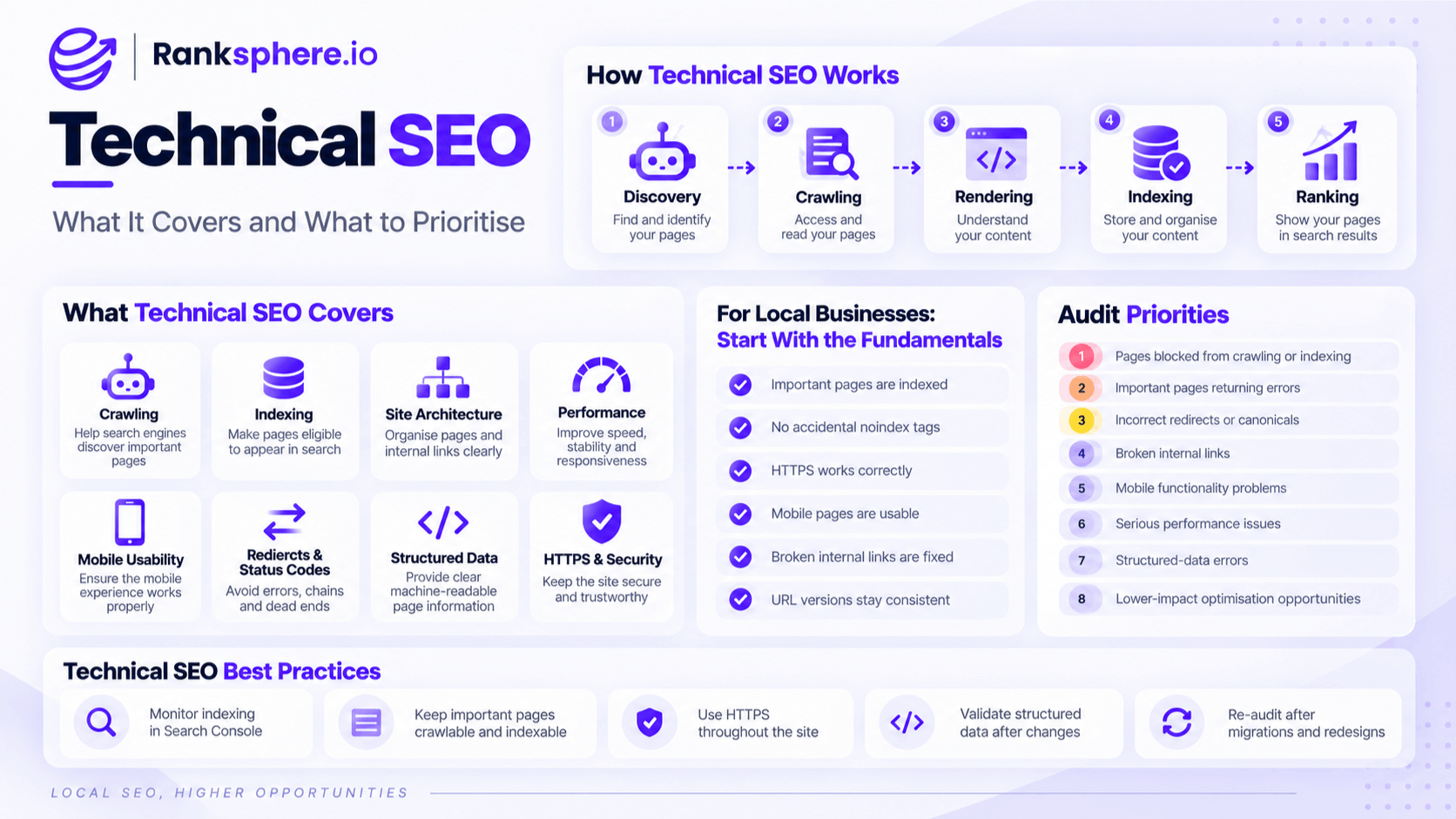
The basic journey looks something like this:
Discovery → Crawling → Rendering → Indexing → Ranking
If something goes wrong early in that process, everything after it becomes harder or impossible.
For example:
- A page that cannot be crawled may never reach the indexing stage
- A page that is not indexed cannot appear in normal Google search results
- Broken redirects can send visitors and crawlers to the wrong place
- Conflicting canonical signals can make the preferred URL unclear
- Poor mobile performance can make the site frustrating to use
- Important content loaded incorrectly through JavaScript may be harder for search engines to process
Technical SEO does not replace good content.
It makes sure good content has a fair chance to be found, understood and used.
What does technical SEO include?
Technical SEO covers several parts of how a website is built and interpreted.
Crawling
Crawling is how search engines discover pages and follow links around a website.
Technical crawling work can involve:
- robots.txt
- Internal linking
- Crawlable navigation
- XML sitemaps
- Orphan pages
- Crawl traps
- URL parameters
Crawl budget can matter on very large or complex websites, but it is rarely the first concern for a small local-business site with a few dozen pages.
The priority is simply making sure important pages can be discovered.
Indexing
Indexing is the stage where Google decides whether a page should be stored and become eligible to appear in search.
Common indexing considerations include:
- noindex directives
- Canonical tags
- Duplicate and near-duplicate URLs
- Redirects
- Page quality
- Crawl accessibility
An important page that has accidentally been set to noindex can be beautifully written and technically fast while receiving no organic visibility at all.
Site architecture
Site architecture describes how pages are organised and connected.
A clear structure helps both visitors and search engines understand where information belongs.
Review:
- Navigation
- URL structure
- Internal links
- Crawl depth
- Categories
- Breadcrumbs
- Orphan pages
Important pages should not sit several unnecessary clicks away from the homepage with no meaningful internal links pointing to them.
Website performance
Technical SEO also includes website performance.
This can involve:
- Core Web Vitals
- Image optimisation
- Server response time
- JavaScript
- CSS
- Fonts
- Caching
- Third-party scripts
The goal is not simply to achieve a perfect score in a testing tool.
It is to give real visitors a website that loads quickly, responds properly and remains visually stable while they use it.
Mobile usability
Google uses mobile-first indexing, meaning the mobile version of a site's content is the primary version used for indexing and ranking.
That makes it important that the mobile site contains the same essential information and functionality visitors receive on desktop.
Check:
- Content visibility
- Navigation
- Forms
- Buttons
- Images
- Internal links
- Structured data
- Page performance
Responsive design is usually the simplest way to keep desktop and mobile content aligned.
Redirects and HTTP status codes
Status codes tell browsers and search engines what happened when a URL was requested.
Technical SEO commonly deals with:
- 301 redirects
- 404 errors
- 5xx server errors
- Redirect loops
- Redirect chains
- Soft 404s
A few legitimate 404 pages are normal.
The real problem is when important internal links, backlinks or migrated URLs lead visitors into dead ends unnecessarily.
Rendering
Modern websites often rely heavily on JavaScript.
Google can process JavaScript, but complex rendering setups can still create problems if important content or links are unavailable during crawling and rendering.
Check that search engines can access:
- Main page copy
- Internal links
- Navigation
- Product or service information
- Canonical tags
- Structured data
Critical SEO content should not depend on a fragile interaction that a crawler may struggle to reproduce.
Structured data
Structured data gives search engines explicit information about content and entities on a page.
Technical SEO work includes making sure the markup is:
- Valid
- Accurate
- Appropriate for the page
- Consistent with visible content
- Maintained after redesigns
Schema should describe the page correctly rather than being treated as a shortcut to higher rankings.
HTTPS and security
A modern website should run securely over HTTPS with a valid certificate.
Visitors should not encounter browser security warnings, mixed-content errors or expired certificates.
HTTPS is now standard website hygiene as much as it is an SEO consideration.
Technical SEO for a local business
Most local-business websites do not need an enormous technical SEO programme.
A 20-page website built on a mainstream CMS has very different technical requirements from a marketplace with millions of URLs.
Yet both can receive audit reports containing hundreds of warnings.
That does not mean every warning deserves equal attention.
For a typical local business, start with the fundamentals.
Make sure important pages are indexed
Use the Pages report in Google Search Console to check whether important service and location pages are indexed.
Pay particular attention to pages that should generate enquiries.
Check for accidental noindex directives
A noindex tag tells search engines not to include a page in search results.
It is useful when intentional and extremely damaging when it appears accidentally on an important page.
This can happen after:
- Site migrations
- Theme changes
- Staging-site launches
- CMS configuration changes
Make sure HTTPS works correctly
Visitors should reach one secure version of the website.
HTTP URLs should redirect appropriately to HTTPS rather than existing as separate versions.
Check the mobile site
Test important pages on a real phone.
Can visitors:
- Read the content?
- Open the navigation?
- Tap the phone number?
- Submit the form?
- Book an appointment?
- Use the page without awkward layout shifts?
Technical SEO should support customers, not just crawlers.
Fix broken internal links
Broken internal links waste visitors' time and make the site harder to navigate.
After redesigns and migrations, check that important internal links still point to working URLs.
Keep URL versions consistent
Avoid allowing multiple versions of the same page to compete unnecessarily.
For example:
should not behave as three completely separate sites.
Choose your preferred configuration and keep redirects, canonicals, internal links and sitemaps consistent with it.
How to prioritise a technical SEO audit
The number of issues in an audit is much less important than their impact.
An audit might report hundreds of warnings, but only a handful may genuinely affect crawling, indexing, usability or conversions.
A useful order of priority is:
- Pages blocked from crawling or indexing
- Important pages returning errors
- Incorrect redirects or canonicals
- Broken internal links
- Mobile functionality problems
- Serious performance issues
- Structured-data errors
- Lower-impact optimisation opportunities
For example, an accidentally noindex service page is more urgent than shaving a few kilobytes from an already fast image.
Ranksphere's smart tasks prioritise technical findings by impact, helping turn a long audit report into a more manageable list of what actually needs attention.
Technical SEO and Google Search Console
Google Search Console is one of the most useful tools for monitoring technical SEO.
It can help identify:
- Indexing problems
- Crawled but unindexed pages
- Canonical issues
- Sitemap processing
- Core Web Vitals
- Mobile and page experience signals
- Manual actions
- Individual URL status
The URL Inspection tool is especially useful when an important page is not appearing in search.
It can show whether Google discovered the URL, whether it has been indexed and which canonical Google selected.
Technical SEO after a website redesign
Redesigns and migrations deserve particular attention.
A website can look better than ever while losing organic visibility because important technical elements changed underneath it.
After a redesign, check:
- Redirects
- Canonical tags
- noindex directives
- Robots rules
- XML sitemap
- Internal links
- Structured data
- Page titles
- Mobile content
- Core Web Vitals
- Important URLs
Do not assume the new website preserved the old SEO setup simply because the visible content looks similar.
Technical checks should be part of the launch process.
Technical SEO and Core Web Vitals
Core Web Vitals are an important part of website performance, but they should be kept in perspective.
A poor-performing website deserves attention.
That does not mean every site needs weeks of development work to chase a perfect Lighthouse score.
Use real-user performance data where available and prioritise problems that affect:
- Loading
- Responsiveness
- Visual stability
- User experience
- Conversions
A site that already performs well should not have important content or local SEO work delayed simply because an audit tool found minor optimisation opportunities.
Common technical SEO mistakes
- Trying to fix every audit warning. Tools report what they can detect, not necessarily what matters most.
- Prioritising minor technical improvements over blocked pages. Crawling and indexing problems come first.
- Doing months of technical work on a small healthy site while neglecting content. Technical SEO may not be the limiting factor.
- Accidentally leaving important pages as noindex. Always check after launches and migrations.
- Ignoring the mobile version. Important content and functionality need to work properly on mobile.
- Chasing a perfect Lighthouse score. Use performance testing to improve real user experience, not as a score-collecting exercise.
- Leaving redirect chains after migrations. Redirect old URLs directly to the final destination where possible.
- Assuming plugins are configured correctly. SEO plugins can generate canonicals, robots directives and schema incorrectly if their settings are wrong.
- Ignoring Search Console until traffic falls. Regular monitoring can reveal technical problems earlier.
- Assuming a redesign preserved SEO settings. Always verify them.
Technical SEO best practices
- Monitor indexing regularly in Search Console.
- Make sure important pages are crawlable and indexable.
- Use HTTPS throughout the website.
- Keep redirects and canonical URLs consistent.
- Maintain a clean internal-link structure.
- Test important pages on real mobile devices.
- Use XML sitemaps to support discovery of important URLs.
- Prioritise real performance problems rather than perfect lab scores.
- Validate structured data after template changes.
- Re-audit after migrations and redesigns.
- Fix issues according to business and SEO impact, not raw issue count.
Example
“Brackenhill Dental commissions a technical SEO audit.
The report comes back with more than 200 findings, which initially looks alarming.
Most are minor recommendations around image compression, CSS and other optimisations on pages that already perform reasonably well.
A closer review finds three issues that matter far more.
The new appointment page has accidentally inherited a noindex directive from the site's template.
Several important internal links still point to URLs removed during an earlier redesign.
And the website can be accessed through inconsistent hostname variations that have not been properly consolidated.
Those issues are addressed first.
The appointment page becomes eligible for indexing, broken links are repaired and the preferred site version is made consistent across redirects, canonicals and internal links.
The lower-impact performance recommendations remain on the backlog.
That is the point of technical SEO prioritisation: the goal is not to make an audit report reach zero. It is to remove the technical problems that prevent important pages and real customers from getting where they need to go.”
See also
- Crawling — how search engines discover and access webpages
- Indexing — whether a page is stored and eligible to appear in search
- Core Web Vitals — real-world website performance metrics
- Canonical tag — identifying the preferred version of duplicate URLs
- XML sitemap — helping search engines discover important pages
- On-page SEO — optimising the content and elements on individual webpages