A URL slug is the part of a page's URL that identifies that specific page, usually at the end of the URL path.
For example:
example.com/services/flat-roof-repair/
The slug is:
flat-roof-repair
A good slug is usually:
- Easy to read
- Descriptive
- Consistent with the rest of the site
- Stable over time
Slug optimisation is not a major ranking tactic.
Google's current SEO guidance says that keywords in a domain name or URL path have hardly any ranking effect on their own, apart from their possible appearance in breadcrumbs.
The real value of a sensible URL is practical.
It can make pages easier to:
- Understand
- Share
- Manage
- Link to
- Crawl consistently
That makes URL structure worth getting right, even though rewriting established URLs simply to squeeze in a keyword is rarely worthwhile.
What is the difference between a URL and a slug?
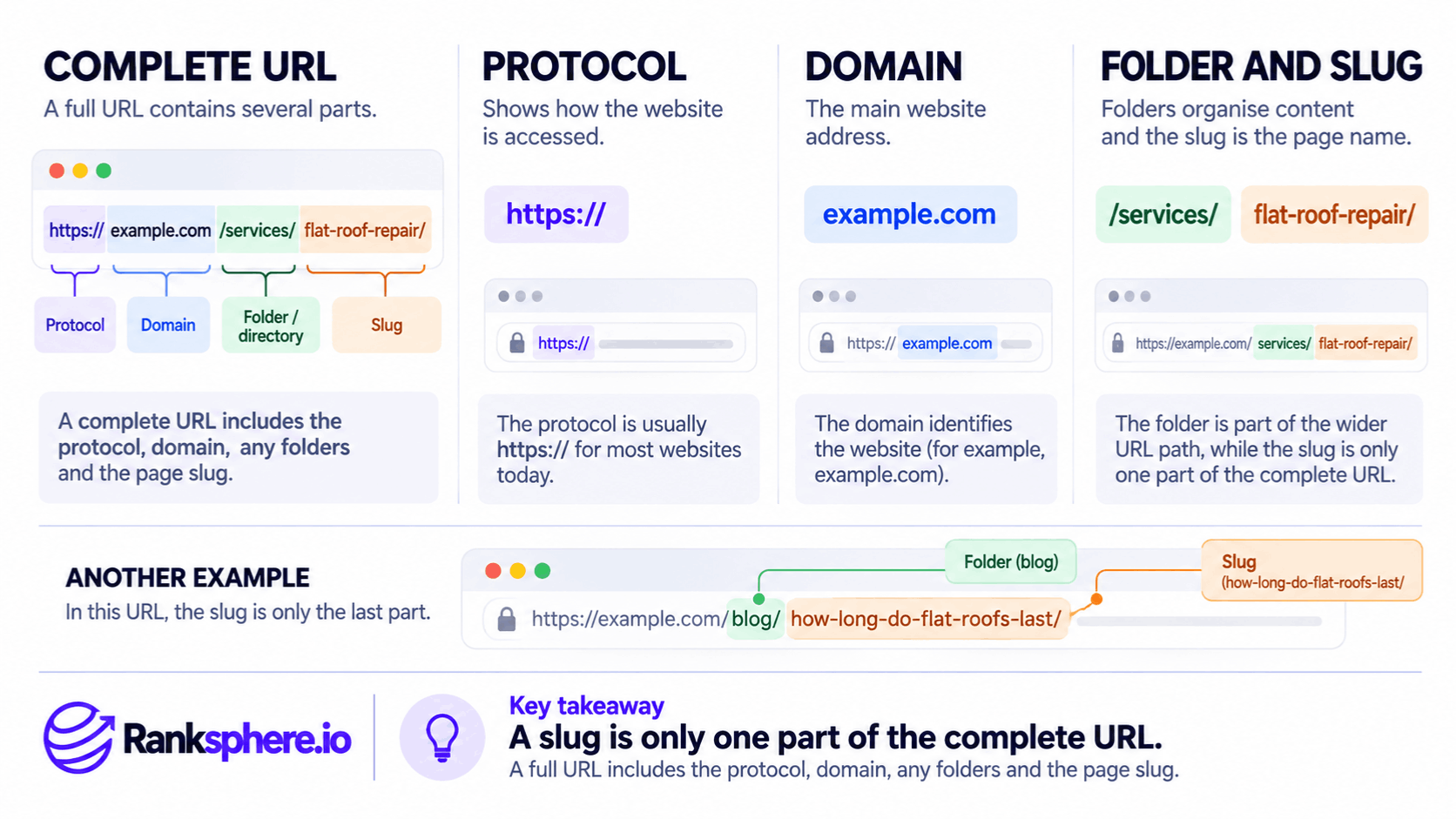
A complete URL might look like:
https://example.com/services/flat-roof-repair/
It contains several parts:
Protocol
https://
Domain
example.com
Folder or directory
services/
Slug
flat-roof-repair
The slug is only one part of the complete URL.
In:
example.com/blog/how-long-do-flat-roofs-last/
the slug is:
how-long-do-flat-roofs-last
while:
blog
is part of the wider URL path.
That distinction becomes useful when discussing site architecture, because the overall URL structure and the individual page slug are related but not identical.
What makes a good URL slug?
Google recommends creating a simple URL structure that is logical and easy for people to understand.
It specifically recommends using descriptive words rather than long unreadable identifiers where practical.
For example:
Clear
/services/flat-roof-repair/
Less helpful
/page?id=48291
Both can technically work.
The first simply communicates more clearly what the page is about.
Make it descriptive
Someone reading the URL should ideally have a reasonable idea of what the page contains.
For example:
/boiler-repair/
is clearer than:
/service-7/
Likewise:
/locations/maidstone/
is easier to interpret than:
/location?id=3182
Google recommends readable words in URLs where possible.
That does not mean every word from the page title needs to appear in the slug.
The goal is clarity.
Not keyword repetition.
Keep slugs reasonably concise
There is no Google rule saying a slug should contain:
three words
or:
four words.
A useful slug should simply contain enough information to identify the page without unnecessary clutter.
For example:
/flat-roof-repair/
is clear.
This:
/professional-flat-roof-repair-and-replacement-services-for-homes/
contains much more information than the URL needs.
Use the page itself to explain the service in detail.
The slug only needs to identify it sensibly.
Use lowercase consistently
Google treats URLs as case-sensitive.
For example:
/Flat-Roof-Repair/
and:
/flat-roof-repair/
can be treated as different URLs.
Whether your server actually serves different content at those URLs depends on its configuration.
But using lowercase consistently reduces ambiguity.
A sensible convention is:
/flat-roof-repair/
rather than:
/Flat-Roof-Repair/
or:
/FLAT-ROOF-REPAIR/
The important point is consistency.
Use hyphens between words
Google specifically recommends hyphens rather than underscores when separating words in URLs.
For example:
Recommended
/flat-roof-repair/
Less suitable
/flat_roof_repair/
Google says hyphens help users and search engines identify the concepts contained in the URL.
That makes hyphens the sensible default for new URLs.
Do not change existing underscore URLs just for this
That recommendation does not mean you should immediately rewrite every established URL containing an underscore.
If:
/flat_roof_repair/
has existed for years and performs well, changing it creates an unnecessary URL migration simply to satisfy a formatting preference.
The guidance is most useful when creating new URLs.
Avoid keyword stuffing
A URL should describe the page.
It should not attempt to contain every search phrase you want the page to rank for.
For example:
Clear
/flat-roof-repair/
Stuffed
/flat-roof-repair-kent-flat-roofers-maidstone-best-roofing-company/
The second is harder to:
- Read
- Remember
- Maintain
and the extra keywords provide little SEO value.
Google's current guidance already makes clear that keywords in the URL path itself have very little ranking effect.
Use keywords where they genuinely describe the page.
Do not turn the slug into a list.
Do not obsess over stop words
Older SEO advice often recommends stripping words such as:
- a
- the
- to
- for
- of
from every URL.
That is not a Google requirement.
Sometimes removing them makes the slug cleaner.
For example:
/guide-to-the-best-roof-materials/
could reasonably become:
/roof-materials-guide/
But sometimes a connecting word makes the URL easier to understand.
The decision should be based on readability and stability rather than a rule that certain words are bad for SEO.
Parameters are not automatically bad
Dynamic URLs can contain parameters such as:
?product=123
or:
?colour=blue
Google can crawl parameterised URLs.
The problem appears when unnecessary parameters create:
- Duplicate URLs
- Huge crawl spaces
- Multiple versions of the same content
- Difficult tracking
Google recommends using as few unnecessary parameters as possible.
So:
parameters are not inherently bad
but:
uncontrolled parameters can become a technical SEO problem.
For a straightforward content or service page, a clean descriptive URL is usually easier to manage.
IDs are not automatically an SEO problem
Likewise, Google can understand URLs containing numbers and IDs.
For example:
/product/28472/
can still be indexed.
But where a readable identifier is practical:
/product/oak-dining-table/
is normally more useful to humans.
Google's own URL guidance prefers descriptive words rather than long ID strings where possible.
Again, that is a usability and maintainability preference.
Not evidence that an ID-based URL cannot rank.
Dates in URLs
Dates deserve more nuance than:
“Never use them.”
A URL such as:
/2026/09/google-search-update/
can be completely valid.
Date-based structures are common on:
- News websites
- Publications
- Archives
Google can index them normally.
Why dates can be awkward for evergreen content
The practical problem appears when an evergreen article is tied permanently to a year.
For example:
/2024/local-seo-guide/
may later be updated in 2026.
The page itself can still be refreshed, and the old year in the URL does not stop it ranking.
But the URL can make the content feel dated when:
- Shared
- Viewed by users
- Managed internally
For evergreen resources, a URL such as:
/local-seo-guide/
may therefore be easier to maintain.
That is an editorial advantage.
Not a Google ranking requirement.
Do not change an existing dated URL just to remove the year
If:
/2024/local-seo-guide/
already has:
- Rankings
- Links
- Traffic
do not automatically migrate it to:
/local-seo-guide/
just because the second version looks cleaner.
The migration has a cost.
Assess whether there is a genuine reason to change it.
Stability matters
Once a page has an established URL, stability becomes valuable.
Changing the slug changes the page's address.
That means you may need to manage:
- Redirects
- Internal links
- Canonicals
- Sitemaps
- External references
So a slightly imperfect URL can be preferable to an unnecessary migration.
The important distinction is:
New page
Choose the slug carefully before publication.
Existing page
Do not change the slug merely to make it marginally prettier.
When should you change a slug?
A URL change can make sense when the existing URL is genuinely problematic.
Examples include:
- Major site restructuring
- Incorrect page purpose
- CMS migration
- Consolidating duplicate URLs
- Removing obsolete parameters
- Changing a URL that no longer represents the content
For example:
/services/service-17/
might reasonably become:
/services/flat-roof-repair/
during a planned site rebuild.
But changing:
/flat-roofing/
to:
/flat-roof-repair/
solely because the second phrase looks slightly more SEO-friendly may not justify the migration.
What happens when a slug changes?
Suppose:
/services/flat-roofing/
becomes:
/services/flat-roof-repair/
The old URL does not automatically transfer everything simply because the page content stayed the same.
You need to tell:
- Users
- Crawlers
where the page moved.
For a permanent URL change, Google recommends a server-side permanent redirect such as:
- 301
- 308
where possible.
Use a permanent redirect
If the change is permanent, redirect:
/services/flat-roofing/
to:
/services/flat-roof-repair/
Google describes 301 and 308 redirects as permanent redirects and recommends permanent server-side redirects for permanent URL moves.
See 301 redirect.
Do not leave the old URL as a 404
If a page has simply moved to a new address, leaving the old URL returning:
404
unnecessarily breaks:
- Bookmarks
- External links
- Internal references
- User journeys
A permanent redirect gives both people and search engines the new destination.
Redirect directly to the final URL
Avoid creating:
Old URL → Temporary URL → New URL
when you can instead use:
Old URL → New URL
Google advises avoiding redirect chains where possible because they add latency and complexity.
If URLs have changed several times over the years, periodically check that older redirects now point directly to the current destination.
Update internal links
After changing a URL, update your internal links.
For example, instead of:
Page A → Old URL → 301 → New URL
change the link to:
Page A → New URL
The redirect should remain for old external links and bookmarks.
Your own website should not rely on the redirect unnecessarily.
Update canonical tags
If the page contains a canonical tag, make sure it points to the final preferred URL.
For example:
https://example.com/services/flat-roof-repair/
rather than the old address.
Google treats redirects and rel="canonical" annotations as strong canonicalisation signals. Sitemap inclusion is a weaker supporting signal.
Keep those signals aligned rather than telling Google:
- Redirect says new URL
- Canonical says old URL
- Sitemap contains both
Update the XML sitemap
The XML sitemap should contain the preferred canonical URL.
Remove the old URL and include the new one.
Google says sitemap inclusion acts as a canonicalisation signal, although weaker than redirects and canonical annotations.
A sitemap should describe the URLs you actually want Google to process as canonical pages.
You do not need to “resubmit” the sitemap after every slug change
If your CMS automatically regenerates the XML sitemap and Search Console already knows about it, Google can discover the update through normal recrawling.
You may choose to submit or refresh the sitemap where useful, but:
manually resubmitting a sitemap is not a required step every time one URL changes.
The important thing is that the sitemap itself contains the correct URL.
Do not promise a fixed migration timeline
Avoid:
“rankings will fluctuate for three weeks.”
There is no universal timetable.
Google needs to:
- Crawl the redirect
- Process the new URL
- Update canonical signals
- Refresh its index
How long that takes can vary.
For larger URL migrations, Google explicitly warns that moves can affect users and rankings while its systems process the changes.
For one page, the transition may be relatively uneventful.
The point is:
URL changes introduce processing and risk, so make them for a reason.
Redirects are designed to preserve signals
It is also too dramatic to say that changing the slug automatically:
“loses everything the URL earned.”
A properly implemented permanent redirect is specifically designed to tell Google that the content has permanently moved.
Google uses permanent redirects as a strong canonicalisation signal.
So the risk is not:
all SEO value disappears.
The practical concern is that a URL migration introduces:
- More moving parts
- More chances for implementation mistakes
- Additional processing
That is enough reason not to change established URLs casually.
External links do not need to be manually changed in every case
If another site links to the old URL and you have implemented a proper permanent redirect, users and Google can still reach the destination.
Where you control an important external link, updating it can be useful.
But you do not need to contact every website on the internet every time a URL changes.
The permanent redirect exists partly to handle old references.
URL structure for local websites
For a local service website, simple organisation is usually helpful.
For example:
/services/flat-roof-repair/
/locations/maidstone/
/blog/how-long-do-flat-roofs-last/
This can make the structure easier for:
- Users
- Editors
- Developers
to understand.
See site architecture.
But do not confuse tidy folders with ranking signals.
Google does not rely mainly on URL folders to understand site hierarchy
Google has explicitly explained that it generally looks at how pages link to one another rather than relying on the structure of URLs to infer the site's hierarchy.
That means:
/services/roofing/flat-roof-repair/
is not automatically easier for Google to understand than:
/flat-roof-repair/
simply because it contains more folders.
Navigation and internal linking matter much more to the actual site structure.
There is no two- or three-folder SEO limit
Advice such as:
“Never go deeper than three URL levels.”
is not a Google rule.
A page can sit at:
/services/commercial/roofing/flat-roof-repair/
and still be perfectly crawlable.
The more useful question is:
Can users and crawlers reach this page easily through the site's navigation and links?
A short URL can still belong to a badly structured site.
A longer URL can belong to an excellent one.
Keep folders useful
Folders can still help organisation.
For example:
Services
/services/
Locations
/locations/
Blog
/blog/
This can make:
- CMS management
- Analytics
- Reporting
- Human navigation
more straightforward.
The benefit is organisational clarity.
Not a guaranteed ranking advantage.
Service-by-location URLs
A structure such as:
/locations/maidstone/roof-repair/
is not automatically programmatic SEO.
The issue is the content strategy behind it.
A business may legitimately need separate pages for genuinely different:
- Locations
- Services
- Customer needs
The problem appears when hundreds of location pages are created with little meaningful difference beyond replacing the town name.
Whether pages are manually written or generated programmatically is less important than whether they provide genuine value and represent real business coverage.
Use trailing slashes consistently
A URL might technically be accessible as:
/flat-roof-repair
and:
/flat-roof-repair/
Depending on the server, those can be treated as distinct URLs.
The clean approach is to choose one preferred format and consistently:
- Link to it
- Canonicalise to it
- Redirect the alternate version where appropriate
The goal is not that trailing slashes are good or bad.
It is that the site has one consistent version of each URL.
Avoid duplicate URL variants
The same content may accidentally become available through:
- Uppercase URLs
- Lowercase URLs
- Trailing-slash variants
- Parameters
- HTTP and HTTPS
- www and non-www
Google can often choose a canonical version, but duplicate URL variants make:
- Crawling
- Reporting
- Maintenance
less clean.
Google notes that having the same content accessible through multiple URLs can complicate user experience and performance reporting.
Use:
- Redirects
- Canonicals
- Consistent internal links
to make the preferred URL clear.
URL slugs and search results
It is also worth updating the claim that:
“URLs appear in search results.”
Google does not necessarily display the raw URL path exactly as it exists.
Search results can use breadcrumb information to show the page's position in the site hierarchy. Google's breadcrumb feature is designed to help users understand where a page sits within a website.
So a clean URL can still help human understanding and site management, but do not optimise the slug under the assumption that every character will always be displayed as the clickable search-result URL.
URL slugs and click-through rate
There is no published rule saying a short keyword-rich URL directly improves CTR.
A readable URL may contribute to a clearer overall presentation when users encounter it in:
- Search
- Messages
- Browser history
- Shared documents
But do not claim:
“Optimising the slug increases CTR.”
That would require evidence from the specific site.
For search results, the title and snippet are normally much more prominent elements.
URL slugs and ranking
This deserves repeating because older SEO advice often overstates it.
Google's current SEO Starter Guide says:
Keywords in the domain name or URL path alone have hardly any ranking effect beyond breadcrumbs.
So do not spend time changing:
/roof-repairs/
to:
/roof-repair-services/
because you think the second URL contains a stronger target keyword.
Focus instead on:
- Page content
- Search intent
- Internal linking
- Technical accessibility
- Overall usefulness
The slug should support the page structure.
It should not drive the SEO strategy.
URL slugs and canonicals
The preferred slug should also match your canonical signals.
If:
/flat-roof-repair/
is the page you want indexed, your site should ideally reinforce that through:
- Internal links
- Canonical tag
- XML sitemap
- Redirects from duplicate variants
Google says these canonicalisation signals can reinforce one another.
Consistency is more useful than trying to optimise several versions of the same URL.
CMS-generated slugs
Many CMS platforms automatically create the slug from the page title.
For example:
Title:
Flat Roofing Repair and Replacement Services in Kent
Automatic slug:
/flat-roofing-repair-and-replacement-services-in-kent/
That URL is not technically broken.
It is simply longer than necessary.
Before publishing a new page, you might shorten it to:
/flat-roof-repair/
if that accurately represents the page.
The important time to make this decision is:
before the page establishes history.
Existing CMS slugs need a different decision
Suppose the long CMS-generated URL has already existed for four years.
It receives traffic.
It has backlinks.
It ranks well.
Now the question is not:
“What would the ideal slug be if we published this today?”
It is:
“Is changing the existing URL worth the migration?”
Those are different questions.
Often, the answer to the second one is:
no.
URL auditing
A technical audit can look for issues such as:
- Duplicate URL variants
- Uppercase and lowercase versions
- Redirect chains
- Parameter proliferation
- Incorrect canonicals
- Broken redirects
- Sitemap inconsistencies
Ranksphere's website audit flags URL problems alongside the rest of the technical picture, helping identify URL issues that may need investigation alongside broader site health.
The point of the audit should be to identify real URL problems, not flag every long slug as an SEO emergency.
Common URL slug mistakes
- Treating keywords in URLs as an important ranking lever.
- Stuffing several keyword variations into the slug.
- Following an arbitrary three- or four-word limit.
- Removing stop words mechanically even when the result becomes harder to read.
- Assuming dates in URLs are inherently bad for SEO.
- Changing established dated URLs simply to make them look fresher.
- Using inconsistent uppercase and lowercase URLs.
- Using underscores on new URLs when hyphens would be clearer.
- Allowing unnecessary parameters to create multiple URL versions.
- Changing a working URL for a marginal keyword improvement.
- Changing a slug without a permanent redirect.
- Leaving internal links pointing through old redirects indefinitely.
- Forgetting to update canonicals and XML sitemaps after a URL change.
- Assuming a URL migration always settles within a fixed number of weeks.
- Treating folder depth as a ranking rule.
- Creating large numbers of service-by-location URLs without enough distinct value.
- Allowing slash, casing or protocol variations to create unnecessary duplicates.
URL slug best practices
- Choose clear, descriptive slugs when a page is first published.
- Keep them concise enough to be easy to read without chasing an arbitrary word limit.
- Use lowercase consistently.
- Use hyphens to separate words in new URLs.
- Use keywords only where they naturally describe the page.
- Avoid unnecessary parameters and unreadable identifiers where practical.
- Choose dated URL structures only when they make sense for the site's publishing model.
- Do not remove stop words unless doing so genuinely makes the URL cleaner.
- Leave established URLs alone when the improvement would be merely cosmetic.
- For permanent changes, use a server-side 301 or 308 redirect.
- Update internal links to point directly to the final URL.
- Update the canonical tag and XML sitemap where relevant.
- Keep URL variants such as trailing slashes and casing consistent.
- Use folders to organise the site where helpful, but do not confuse folder depth with SEO quality.
Example
“Consider a hypothetical roofing company called Ashdown Roofing.
Its CMS automatically created this URL:
/services/flat-roofing-repair-and-replacement-services-in-kent/
If the page had not yet been published, the team might reasonably shorten it to:
/services/flat-roof-repair/
The shorter version is:
- Easier to read
- Easier to share
- Easier to maintain
and still describes the page clearly.
But the page is not new.
It has existed for several years.
It already:
- Receives organic traffic
- Has external links
- Performs well for relevant searches
The question therefore changes.
The agency is no longer deciding:
“Which slug looks better?”
It is deciding:
“Does the benefit justify changing an established URL?”
In this case, the shorter URL would mostly be a cosmetic improvement.
Google's own guidance says keywords in URL paths have very little ranking impact, so there is no strong SEO reason to change the address simply to make it shorter.
The team leaves the existing URL in place.
For new pages, however, editors now review the slug before publication.
A new roof-maintenance page launches as:
/services/roof-maintenance/
instead of accepting a long CMS-generated version.
If Ashdown later has a genuine reason to move the old flat-roof page, the team will:
- Create the new URL.
- Add a permanent 301 redirect or equivalent permanent server-side redirect.
- Update internal links.
- Update the canonical.
- Update the sitemap.
- Monitor Search Console while Google processes the change.
No invented claim about:
- Three weeks of ranking volatility
- Returning to exactly position four
- A measurable ranking benefit
is needed.
The useful lesson is simpler:
the cheapest time to choose a clean URL is before publication. Once a page has established history, change its slug because the URL genuinely needs to move—not because another version looks slightly more optimised.
A good URL slug supports a clean website structure. It should be descriptive, readable and consistent, but it is not a ranking trick. Get new URLs right at publication, keep established URLs stable where possible, and treat any later URL change as a migration that needs proper redirects and consistent canonical signals.”
See also
- Site architecture — the wider structure URLs sit within
- 301 redirect — handling permanent URL changes
- On-page SEO — where URL optimisation fits into the wider page
- Internal linking — keeping links pointed at the final URL
- Keyword stuffing — why more keywords do not make a better slug
- Canonical tag — reinforcing the preferred version of a URL