Conversion rate optimisation (CRO) is the process of improving a website so that more visitors complete a desired action, such as making an enquiry, calling a business, booking an appointment, or requesting a quote.
For example, a plumbing company may receive hundreds of website visits each month but very few enquiries. Visitors might struggle to find its phone number, understand its call-out charges, or complete its contact form.
CRO focuses on identifying and fixing those problems.
The distinction is simple: conversion rate measures the proportion of visitors who take an action, while conversion rate optimisation is the work involved in improving that outcome.
CRO is often associated with A/B testing, heatmaps, and specialist analytics tools. These can be useful, but most local businesses don't need to start there.
For a local business, conversion rate optimisation often begins with something much simpler: opening the website on a phone and checking how easy it is to become a customer.
How Does Conversion Rate Optimisation Work?
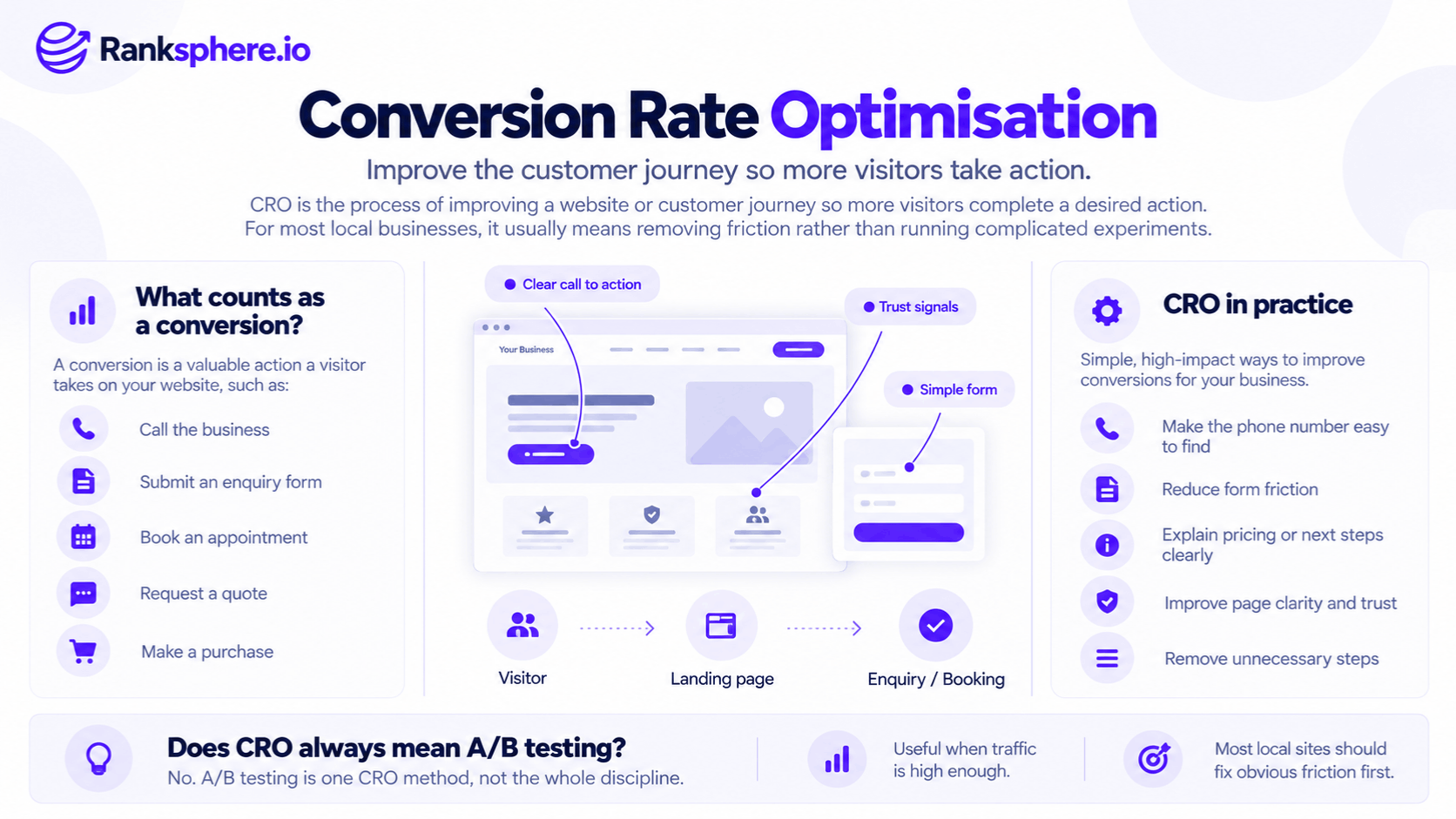
CRO involves understanding what visitors want to do, identifying what prevents them from doing it, and improving the experience.
For example, someone searching for an emergency electrician may want to call a business immediately.
If the website hides its phone number inside a navigation menu, the visitor has to spend time finding it.
That creates unnecessary friction.
Making the number visible and tappable can remove that obstacle.
A practical CRO process usually involves:
- Identifying the action the page should encourage.
- Checking how visitors currently complete that action.
- Finding problems that make the process difficult.
- Making targeted improvements.
- Measuring whether the changes are associated with better results.
For websites with enough traffic and conversions, controlled experiments can provide stronger evidence.
For smaller local business websites, usability reviews and customer feedback are often a more practical starting point.
Why CRO Matters for Local Businesses
SEO helps businesses attract relevant visitors.
CRO focuses on what happens after those visitors reach the website.
For example, a roofing contractor might rank well for "roof repair near me" and receive regular organic traffic.
However, if visitors can't find its contact details or understand which services are available, that visibility may not produce many enquiries.
Improving rankings isn't always the answer.
Sometimes the business needs to make it easier for people who are already interested to take the next step.
More Enquiries From Existing Traffic
A website doesn't necessarily need more visitors to generate more enquiries.
For example, a dental practice may already attract people searching for treatment information.
If its appointment booking process is confusing, improving that process may help more visitors complete a booking.
However, an increase in conversions isn't guaranteed.
Results depend on the quality of traffic, the changes made, and other factors.
Better Mobile Usability
Many local customers use mobile devices when searching for nearby services.
For example, someone dealing with a leaking pipe may want to contact a plumber quickly.
A mobile page with a difficult-to-find phone number, slow loading, or a complicated form can make that unnecessarily difficult.
CRO helps identify these problems.
Clearer Customer Information
Visitors may hesitate because they cannot find answers to basic questions.
For example:
- How much does the service cost?
- Is the business available today?
- Does it cover my area?
- How long will the work take?
- What happens after I submit an enquiry?
Answering these questions can make the page more useful and help customers decide whether the business meets their needs.
CRO vs A/B Testing
Conversion rate optimisation and A/B testing aren't the same thing.
CRO is the wider process of improving conversions.
A/B testing is one method of evaluating changes.
For example, an agency might test two different versions of a booking page.
Half of eligible visitors see version A, while the other half see version B.
The agency then compares the results.
This can help determine which version performs better, provided the test is designed correctly and receives enough relevant observations.
However, many local business websites don't have sufficient traffic or conversions to run useful experiments within a reasonable timeframe.
Why Small Websites Struggle With A/B Testing
Imagine a plumbing website receives 900 sessions per month and generates 30 enquiries.
An agency wants to test two versions of its contact button.
Each version would receive only a portion of the site's traffic.
If the change being tested is small, the website may need a much larger sample to detect a meaningful difference reliably.
The required sample size depends on several factors, including:
- The current conversion rate
- The size of the improvement being tested
- The confidence level
- Statistical power
- How traffic is divided between variants
There isn't one universal number of conversions required for every test.
However, small samples make results more uncertain.
A variation that appears to perform better after a few enquiries may look worse once more data becomes available.
Seasonality Can Complicate Long Tests
Local businesses may experience substantial changes in demand throughout the year.
For example, a landscaping company's traffic may rise in spring and decline during winter.
If an experiment takes several months, those changes can complicate how the results are interpreted.
See seasonality.
Well-designed randomised tests can still account for shared changes in demand, but long-running tests require careful monitoring and appropriate analysis.
For many smaller websites, correcting obvious usability problems is a more sensible first step than testing minor design variations.
What Actually Improves Local Website Conversions?
The most useful changes depend on the business and the problems visitors encounter.
However, several issues are worth checking first.
1. Make Phone Numbers Easy to Find
For many local businesses, phone calls are an important customer action.
For example, an emergency plumbing website should make its contact number easy to locate.
On mobile, visitors should be able to tap the number to initiate a call.
If the phone number is hidden inside a menu, some visitors may struggle to find it.
Important contact options should be visible when customers need them.
This relates to above the fold, the portion of a page visible before scrolling.
However, not every business needs the same layout.
A restaurant might prioritise reservations, while a dental practice might prioritise appointment booking.
2. Answer Pricing Questions
Pricing is often an important part of a customer's decision.
For example, someone searching for boiler repair may want to know whether the company charges a call-out fee.
A page that avoids the subject entirely may leave that question unanswered.
Businesses don't always need to publish a fixed price.
Where accurate pricing is possible, useful information may include:
- Starting prices
- Typical price ranges
- Call-out charges
- Factors affecting the final quote
- What the service includes
- Whether an assessment is required
The information should be accurate and appropriate to the service.
For complex work, explaining why the price varies can still help visitors make an informed decision.
3. Simplify Contact Forms
A long contact form can create unnecessary work for visitors.
For example, a homeowner requesting a roof repair quote may not want to complete fifteen fields before speaking to someone.
Ask only for information needed at that stage.
A basic enquiry form might request:
- Name
- Contact details
- Service required
- A short description of the problem
Additional details can be collected later.
However, shorter forms aren't automatically better in every situation.
Some businesses need more information to assess enquiries properly.
The objective is to reduce unnecessary friction without removing important questions.
4. Improve Mobile Page Performance
Slow or unstable pages can make it harder for visitors to complete tasks.
For example, a contact button that moves unexpectedly while the page loads may frustrate someone trying to call.
Review:
- Loading speed
- Mobile responsiveness
- Layout stability
- Form usability
- Navigation
- Unnecessary scripts
See page speed for more information.
Ranksphere's Website Audit Tool helps identify technical website issues that may affect usability and performance.
An audit can highlight problems worth investigating, although it cannot establish how much a particular correction will improve conversions.
5. Show Genuine Evidence of Your Work
Customers may want reassurance before contacting an unfamiliar business.
For example, a roofing company can provide:
- Photographs of completed projects
- Genuine customer reviews
- Relevant qualifications
- Information about its team
- Examples of services performed
This helps visitors evaluate whether the business is suitable.
However, businesses should avoid exaggerated claims, fabricated testimonials, or unsupported results.
6. Explain What Happens Next
Some visitors hesitate because they don't know what will happen after contacting the business.
For example, a dental practice could explain:
"Submit your enquiry and our reception team will contact you to discuss appointment availability."
This is more useful than a generic button that simply says "Submit."
If a business promises a response timeframe, it should be able to meet it.
7. Review Cookie Banners and Pop-Ups
Cookie banners, promotional pop-ups, and other overlays can interfere with mobile usability.
For example, a large banner may cover important contact options.
Businesses should design consent interfaces so they remain accessible and compliant with applicable privacy requirements without unnecessarily obstructing the page.
The solution isn't to remove legally required consent information.
It's to make the experience clear, usable, and appropriately implemented.
How to Measure Conversion Rate Optimisation
CRO is difficult to evaluate if the important customer actions aren't being measured.
For local businesses, this often means tracking more than contact form submissions.
Track Phone Number Taps
If phone calls matter to the business, tracking taps on telephone links can help reveal how visitors interact with contact options.
For example, a tel: link can be tracked as an event in Google Analytics 4.
Where appropriate, it can be marked as a key event.
However, a phone tap doesn't prove that a completed phone call occurred.
Someone may tap the number and cancel before connecting.
For more reliable call measurement, businesses may need appropriate call tracking or telephone system data.
Track Form Submissions
Measure successful enquiry submissions rather than simply form opens or button clicks.
For example, a contact form might record an event when the submission is successfully completed.
This provides a clearer measure of website enquiries.
Track Appointment Bookings
For businesses offering online booking, completed appointments may be an important conversion.
For example, a dental practice may want to measure confirmed appointment requests rather than visits to the booking page.
Choose events that reflect meaningful customer actions.
Review Google Business Profile Actions
Not every local customer visits the website before contacting a business.
Some may call, request directions, or follow other links directly from Google Business Profile.
These interactions can be reviewed through Google Business Profile performance.
However, Google Business Profile interactions and website conversions are different measurements.
They should be reported separately to avoid counting the same customer journey incorrectly.
Review Conversion Rates by Page
A site-wide conversion rate can hide important differences.
For example, a blog article explaining roof maintenance may receive many informational visits.
An emergency roof repair page may receive fewer visits but more immediate enquiries.
Comparing those pages using one conversion expectation would be misleading.
Review conversion performance according to each page's purpose.
How to Improve CRO Without A/B Testing
Smaller websites can still benefit from structured conversion optimisation.
The evidence may be less conclusive than a well-designed controlled experiment, but usability improvements can address real problems.
Review the Website on a Mobile Phone
Open the website using a mobile device.
Try completing a typical customer task.
For example:
- Find the main service.
- Check whether the business covers your location.
- Find pricing information.
- Locate the contact number.
- Submit an enquiry.
Note anything confusing, slow, or difficult.
Ask Customers About Their Experience
Customers can provide useful feedback about the buying process.
For example, ask recent customers:
- Was anything difficult to find?
- Did you understand the pricing?
- Was the booking process clear?
- What information did you need before contacting us?
These questions may reveal problems that analytics alone cannot explain.
Speak With Reception or Sales Staff
Employees who handle enquiries often know which questions customers ask repeatedly.
For example, reception staff at a physiotherapy practice may frequently answer questions about session costs, appointment availability, or treatment duration.
If that information is missing from the website, it may be worth adding.
Review Customer Feedback
Customer review sentiment can reveal recurring concerns.
For example, customers may mention confusing appointment instructions or difficulty contacting the business.
These comments can help identify problems worth investigating.
However, reviews don't necessarily represent every customer's experience.
Observe Someone Using the Website
Ask someone unfamiliar with the website to complete a typical task.
For example, ask them to find the cost of an initial consultation and explain how they would book it.
Watch where they hesitate or become confused.
Even a short usability session can reveal practical issues.
However, a small observation doesn't establish how often the same problem affects the wider audience.
Use it to identify potential improvements rather than calculate statistically reliable conversion effects.
How to Evaluate CRO Changes
After making an improvement, review whether the website is performing better.
For example, if you make the phone number more visible, monitor telephone link interactions and qualified enquiries.
Compare similar periods where possible.
However, before-and-after comparisons have limitations.
Results can be influenced by:
- Seasonal demand
- Advertising activity
- Changes in traffic sources
- Search rankings
- Competitor activity
- Other website changes
That means an improvement in conversions doesn't automatically prove that one design change caused it.
For smaller websites, the most useful approach is often to combine analytics with customer feedback and usability observations.
Where traffic and conversions are sufficient, controlled testing can provide stronger evidence.
Common CRO Mistakes
- Running A/B tests without enough data. Small samples can produce unreliable conclusions.
- Testing minor design details before fixing obvious usability problems. A hidden contact number deserves attention before button colour.
- Not measuring important customer actions. Missing phone or booking data can distort conversion reporting.
- Treating phone taps as completed calls. Link interactions don't guarantee conversations.
- Using one conversion rate for every page. Different pages serve different purposes.
- Comparing against generic industry benchmarks. Conversion definitions, traffic quality, and business models vary.
- Changing several things and attributing all results to one improvement. This makes causal conclusions difficult.
- Ignoring seasonality. Demand changes may influence conversion results.
- Buying tools before identifying the problem. Software is useful only when it supports a clear objective.
- Focusing only on conversion rate. More conversions aren't necessarily better if the enquiries are unqualified.
CRO Best Practices for Local Businesses
To improve website conversions:
- Define the main action each important page should support.
- Make contact and booking options easy to find.
- Test the website on mobile devices.
- Provide clear pricing information where practical.
- Keep forms as simple as the service allows.
- Improve slow or unstable pages.
- Use genuine reviews, project examples, and business information.
- Answer common customer questions.
- Track successful enquiries and relevant interactions.
- Separate website conversions from Google Business Profile actions.
- Review conversion performance by page and traffic source.
- Use customer feedback to identify friction.
- Compare results over appropriate periods.
- Run controlled tests when sufficient data is available.
The objective isn't to increase a percentage at any cost.
It's to help relevant visitors complete useful actions and generate better outcomes for the business.
Example
“Consider a hypothetical plumbing business called Aldermoor Plumbing.
Its emergency plumbing page receives approximately 600 sessions per month.
The company wants to increase phone enquiries.
An agency initially recommends a CRO programme involving heatmaps, session recordings, and several A/B tests.
However, the website has relatively few tracked conversions, making it difficult to evaluate small changes reliably through controlled experiments.
The agency opens the emergency plumbing page on a mobile phone.
Several problems become obvious.
The page begins with a large image and promotional heading.
The telephone number is hidden inside the mobile navigation menu.
A cookie consent banner also occupies a substantial portion of the screen.
Someone dealing with a burst pipe has to navigate several obstacles before finding a way to call the business.
The agency prioritises usability improvements.
It makes the phone number clearly visible and tappable.
The page also explains the emergency services available and how customers can request assistance.
The cookie consent interface is reviewed to ensure it remains accessible and compliant without unnecessarily covering important content.
These changes address practical problems identified during the usability review.
The agency configures telephone link tracking and reviews available call enquiry data.
It also monitors the page's organic traffic, conversion activity, and relevant customer enquiries.
Performance is compared across suitable periods, with consideration for seasonal demand and other changes.
If enquiries increase, that is encouraging.
However, without a controlled test, the agency cannot establish that the improvements alone caused the change.”
See Also
- Conversion Rate — Measuring the proportion of visitors who complete a desired action.
- Above the Fold — The first visible section of a webpage.
- Key Event — Tracking important customer actions in Google Analytics 4.
- Page Speed — Understanding website loading and performance.
- Service Page — The webpages where customers evaluate services and make enquiries.
- Seasonality — How recurring changes in demand affect website performance.