A search impression is recorded when Google counts a link or result from your site as having been shown to a user.
In Google Search Console, impressions are one of the main measures of search visibility.
They do not mean:
- The user clicked
- The user read the result
- The user noticed the result
- The user became aware of the brand
An impression simply means the result met Google's counting rules for being shown.
Those rules vary depending on the type of search result.
That distinction matters because impression growth can look impressive while clicks, enquiries and revenue remain flat.
Impressions are useful.
They just need to be interpreted correctly.
What is a search impression?
Google defines an impression as a situation where a user has seen, or could potentially have seen, a link to your site in:
- Search
- Discover
- Google News
For standard Search results, an impression is generally counted when the item appears in the current set of results, even if the user does not scroll far enough for it to enter the visible browser window.
But there are exceptions.
For example, items inside:
- Carousels
- Expandable sections
- Image Search
- Discover
may need to be brought into view before an impression is recorded.
So:
impression = result counted as shown
is more accurate than:
impression = user definitely saw it.
An impression is not a page view
This is one of the most common reporting mistakes.
A website page view normally means someone actually loaded the page.
A Search Console impression happens before the visit.
For example:
A page can receive:
10,000 impressions
and:
300 clicks
That means the search result appeared 10,000 times under Google's counting rules and generated 300 recorded clicks.
It does not mean 10,000 people visited the website.
An impression is not necessarily attention
Suppose a result appears relatively far down a standard results page.
Google may count an impression even if the user does not physically scroll far enough to look at that individual result, as long as the result belongs to the current set of results.
That is why impressions should be treated primarily as an exposure and visibility metric, not a measure of human attention.
Lower-ranking results do not automatically receive impressions
The opposite misunderstanding is:
“If I rank position 50, every search creates an impression.”
That is not correct.
Google says a result must receive an impression for a position to be recorded.
If the user never reaches the set of results containing your page, there is no impression for that appearance.
So a page technically ranking much lower may receive far fewer impressions than the total number of times the query was searched.
Position one and position forty are not equivalent
Each impression counts as an impression.
But that does not make every impression equally valuable.
An impression at a prominent position may have a much greater chance of producing a click than one much further down the results.
That is why impressions should usually be interpreted alongside:
- Clicks
- Click-through rate
- Average position
- Query
- Search appearance
The count alone lacks context.
How Search Console counts multiple results
This becomes more complicated when a site appears more than once for the same query.
Search Console can aggregate data either by:
- Property
- Page
The totals can therefore look different depending on how the report is grouped.
Property-level impressions
When data is aggregated by property, multiple results from the same Search Console property can be counted as one impression for that query.
For example, if Google shows:
example.com/service-a
and:
example.com/service-b
for the same search, the property-level chart can record:
1 impression
for the property.
Page-level impressions
When the report is grouped by page, each unique URL can receive its own impression.
In the same example:
example.com/service-a — 1 impression
example.com/service-b — 1 impression
That means page-table totals and property-level chart totals do not always reconcile perfectly.
It is not necessarily an error.
It is an aggregation difference.
The same URL can appear more than once
If multiple links inside one result element point to the same page, Search Console generally combines them when reporting that page.
But the exact treatment depends on the result type.
Google documents different rules for:
- Images
- Carousels
- Rich results
- AI Overviews
- People Also Ask
- Other search features
so avoid assuming every Search appearance is counted identically.
Impressions and average position
Search Console's average position metric is often misunderstood alongside impressions.
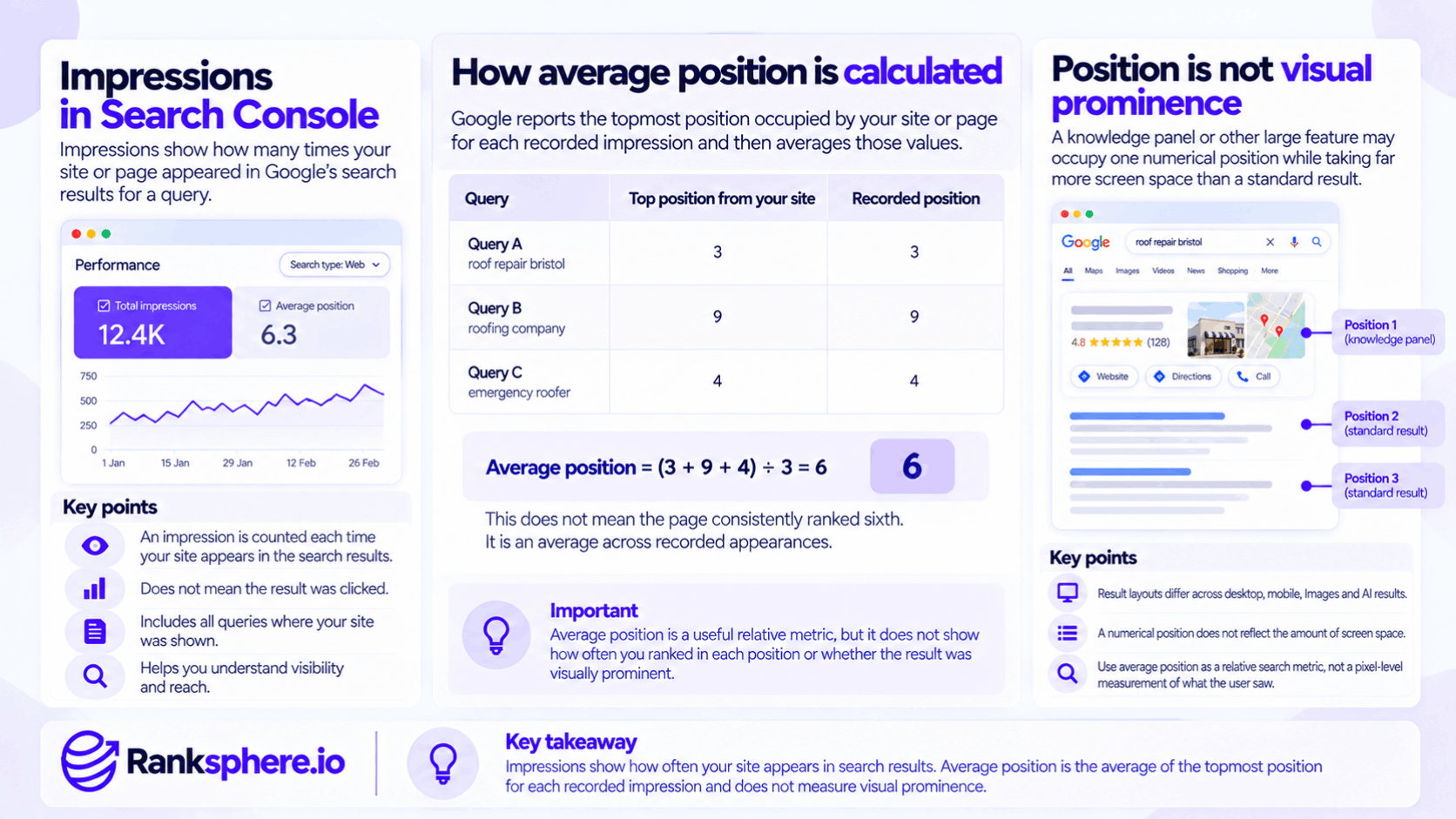
Google reports the topmost position occupied by your property or page for each recorded impression and then averages those values.
For example:
Query A:
Top result from your site = position 3
Query B:
Top result from your site = position 9
Average position:
6
That does not mean the page consistently ranked sixth.
It is an average across recorded appearances.
Average position is not visual prominence
Google itself warns that position can be misleading.
A knowledge panel or other large feature may occupy one numerical position while taking far more screen space than an ordinary result.
Likewise, result layouts differ across:
- Desktop
- Mobile
- Images
- AI results
So interpret position as a relative search metric.
Not a pixel-level measurement of what the user saw.
Impressions and click-through rate
Impressions become particularly useful when paired with clicks.
Click-through rate is calculated as:
Clicks ÷ Impressions × 100
If a page receives:
5,000 impressions
and:
250 clicks
its CTR is:
5%
That creates a much more useful picture than either metric on its own.
High impressions and low clicks
This can be an important pattern to investigate.
Possible explanations include:
- Low average position
- Irrelevant queries
- Weak title
- Weak snippet
- Strong competitors
- SERP features taking attention
- Mixed search intent
Do not automatically assume:
low CTR = bad title tag.
Check the queries and SERP first.
There is no universal good CTR
Avoid claims such as:
“Position six should achieve at least 5% CTR.”
CTR varies widely depending on:
- Query
- Brand familiarity
- Device
- Intent
- SERP layout
- Ads
- Local packs
- AI Overviews
Use your own historical and query-level data for comparison rather than relying on a fixed benchmark.
Rising impressions with flat clicks
This pattern can mean several things.
For example:
New keyword visibility
The page may be appearing for more searches but still at weak positions.
Broader query matching
Google may be testing or showing the page for more related queries.
SERP layout changes
A SERP feature may be absorbing more attention.
Different query mix
The page may be gaining impressions from low-intent informational searches.
So:
impressions up, clicks flat
is a diagnostic clue.
It is not automatically success or failure.
Falling impressions
A decline can also have several causes.
Possible explanations include:
- Lower rankings
- Reduced search demand
- Seasonality
- Lost indexing
- Changed query relevance
- Competitor changes
Do not assume:
impressions down = rankings down.
Compare:
- Average position
- Query trends
- Clicks
- Search demand
before diagnosing the cause.
Search Console vs Google Business Profile
This distinction is especially important for local businesses.
Search Console reports performance for links and content pointing to the verified website property in Google Search.
Google Business Profile performance reports how people discover and interact with the Business Profile itself across Search and Maps.
Google's Business Profile Performance reporting includes metrics such as:
- Profile views
- Search terms
- Calls
- Website clicks
- Direction requests
- Bookings where supported
depending on the profile.
These are related datasets.
They are not interchangeable.
Local pack visibility is not the same as website impressions
If your business appears prominently in the local pack, that profile visibility should not simply be interpreted as:
Search Console impressions.
Search Console tracks links and content associated with the website property.
Business Profile Performance tracks the profile itself.
For local reporting, use both.
Website links inside Google Search can still be counted
Avoid the absolute statement:
“Nothing in the local pack is ever recorded in Search Console.”
Google says Search Console includes Search elements that point to your site under its normal impression and click rules.
The important distinction is that Search Console is not the reporting system for Business Profile views and interactions.
Those belong in Business Profile Performance.
The Generative AI performance report
Google introduced dedicated Generative AI performance reports in Search Console on 3 June 2026.
By 31 August 2026, Google said the reports had been rolled out to websites worldwide.
The Search version reports visibility within:
Google also provides a separate report for generative AI features in Discover.
What the dedicated AI report shows
The dedicated Search Generative AI report currently focuses on impressions.
You can break them down by:
- Page
- Country
- Device
- Date
Google defines these as occasions when links to the site were shown in supported generative AI Search features.
What the dedicated AI report does not show
The dedicated report does not currently expose:
- Clicks
- CTR
- Average position
- Query data
- Citation text
- Which sentence or source passage was used
- Conversions
So it answers a relatively narrow question:
Is my site being shown within Google's generative AI search features, and where is that visibility coming from?
It does not tell you how valuable each appearance was.
AI data is also included in overall Search performance
This needs to be clear.
Google says generative AI data remains included in the overall Search Performance report while the dedicated AI report provides a separate visibility view.
Google's normal Search Console methodology also states that:
- Clicking an external link in AI Mode counts as a click
- Clicking an external link in an AI Overview counts as a click
- Standard impression rules apply
- Position is recorded under the relevant AI-result methodology
So the dedicated AI report is not evidence that AI traffic is completely clickless or unmeasurable.
It is simply a specialised report focused on AI impressions.
Search Labs is excluded
Google currently excludes data from experiments running in Search Labs from these Search Console AI reports because those experiments remain under active development.
That means the report should not be treated as a complete record of every experimental AI experience Google may be testing.
Why the AI report may be empty
If the Generative AI report is missing or empty, possible reasons include:
- The site has not received enough qualifying AI impressions
- The site has been excluded from generative AI features
- The relevant feature has not generated reportable visibility
Google specifically notes that insufficient impressions can prevent the report from appearing.
An empty report is therefore not automatically a technical error.
Search generative AI control
Google also introduced a Search Console control that allows site owners to manage whether their content can appear in certain Search generative AI features.
The covered features currently include:
- AI Overviews
- AI Mode
- Generative AI features in Discover
Inclusion is the default.
What happens if you exclude the site?
If you exclude the site through the Search generative AI control:
- Your links cannot appear in those features
- Your content cannot be used to ground those Search AI responses
- You stop receiving traffic from those appearances
- You stop receiving impressions from those appearances
That is why this setting should not be changed casually.
It affects visibility as well as reporting.
This is separate from Google-Extended
The Search generative AI control is not the same thing as the Google-Extended crawler control.
Google says the Search Console setting controls inclusion in supported Search generative AI features.
Google-Extended is the separate mechanism used to limit model training and certain grounding uses outside ordinary Search inclusion.
Keep those controls conceptually separate.
Impressions and zero-click search
Zero-click search makes impression data particularly useful.
Some searches may provide enough information directly on Google that the user does not visit any website.
In those situations:
- Visibility can rise
- Impressions can rise
- Clicks may remain flat
That does not make impressions worthless.
It means they measure something different from traffic.
Use them as evidence of search exposure.
Do not automatically convert them into:
visitors
or:
leads.
Impressions are a useful leading indicator
Impressions often move before clicks.
For example, a newly published page may initially:
- Begin appearing for queries
- Accumulate impressions
- Improve its positions
- Generate more clicks
That makes impressions useful as an early indication that Google is surfacing the page.
But the sequence is not guaranteed.
More impressions do not guarantee future ranking growth.
Use impressions to discover opportunities
One practical Search Console workflow is to look for pages or queries with:
- Meaningful impressions
- Relatively few clicks
Then investigate them.
Possible actions might include:
- Improving title clarity
- Better matching search intent
- Improving the page itself
- Checking SERP features
- Strengthening internal links
The key word is:
investigate.
Do not mechanically rewrite every title with a low CTR.
High impressions can reveal unexpected query coverage
Suppose a page written about:
garden drainage
receives large numbers of impressions for:
- waterlogged lawn
- garden drainage cost
- French drain garden
- garden drainage company
That tells you how Google is already associating the page with search demand.
Some queries may deserve:
- Better coverage
- Their own page
- No action
depending on search intent.
Impressions can therefore feed directly into content planning.
Low impressions do not automatically mean poor SEO
A page can have low impressions because:
- Very few people search for the topic
- The service is highly specialised
- The location is small
- The query is seasonal
A page serving a valuable but low-demand query can still be commercially useful.
Do not use impression count as a universal quality score.
Search Console data is privacy-filtered
The Performance report does not show every query.
Google removes some queries from query-level tables to protect user privacy.
This means:
- Query table totals may be lower than chart totals
- Adding together visible queries may not reproduce the headline figure exactly
Do not call that discrepancy:
missing tracking
without checking the reporting rules first.
Search Console is not simply “sampled”
Avoid describing all Search Console Performance data as sampled.
The more accurate explanation is that data is:
- Aggregated
- Privacy-filtered
- Subject to interface and row limits
Google also applies different aggregation depending on whether you are looking at property or page data.
That is why totals can differ between views.
The interface has a 1,000-row limit
The Search Console Performance table can display a maximum of 1,000 rows.
That matters for large sites with:
- Thousands of queries
- Thousands of pages
The first 1,000 rows may not represent the entire long tail.
Export does not automatically remove the limit
The normal Search Console interface export is also limited to the available table data.
For more data, Google provides:
Search Analytics API
Up to 50,000 rows per day per property per search type.
BigQuery bulk export
A much broader ongoing export of Search Console performance data, excluding anonymised queries.
So for larger reporting setups:
click Export
is not necessarily enough.
Data freshness
Search Console data no longer has one simple delay.
Google's traditional complete data may still take around 2–3 days to settle and appear fully.
But Search Console now also provides a 24-hour view with preliminary hourly data that can appear after only a few hours.
Preliminary data can change
The most recent data may still be incomplete.
Google marks preliminary periods with a dotted line in the Performance report.
So do not panic over:
this morning's impressions are down 40%.
The data may still be filling in.
Time zones can create reporting differences
In standard Search Console Performance views, daily data is generally based on Pacific Time.
The 24-hour view is displayed using the browser's local time zone.
This can cause differences when comparing Search Console with:
- Google Analytics
- CRM reports
- Server logs
Make sure date boundaries match before assuming one platform is wrong.
Canonical URLs affect reporting
Search Console generally assigns performance data to Google's selected canonical URL.
That means an alternate URL may appear in Google, but the impression and click data can be attributed to the canonical version in the report.
This matters during:
- Canonicalisation audits
- Migrations
- Duplicate-content analysis
Do not assume the URL you physically saw in a test search must always be the one receiving the reported data.
How to report impressions properly
Impressions work best as context.
A client report might show:
Search visibility
Impressions
Search response
Clicks
Efficiency
CTR
Ranking context
Average position
Business outcome
Enquiries or conversions
No one metric needs to carry the entire story.
Ranksphere's white-label reports bring local performance into client-ready documents, where impressions are most useful when shown alongside:
- Clicks
- Local visibility
- Business Profile interactions
- Leads
rather than as an isolated growth figure.
Impressions should not automatically be the headline KPI
A report that says:
Impressions increased 60%.
sounds positive.
But suppose:
- Clicks fell
- Enquiries fell
- New impressions came from irrelevant queries
The increase may have little commercial value.
A better report would explain:
why impressions changed and whether that visibility produced useful outcomes.
Impression growth can still be meaningful
Do not go too far the other way and dismiss impressions entirely.
They can show:
- Growing query coverage
- New page visibility
- Emerging AI visibility
- Increased brand exposure
- Seasonal demand
The metric is useful.
The mistake is confusing visibility with business impact.
Common impression mistakes
- Treating an impression as a confirmed human view.
- Assuming every ranking occurrence creates an impression even when the user never reaches that result set.
- Reporting impression growth as a business outcome on its own.
- Ignoring aggregation differences between property and page reporting.
- Assuming several results from the same site are always counted separately.
- Treating Search Console as a Business Profile visibility report.
- Calling all Search Console data sampled.
- Assuming the UI export provides every available query or page.
- Using a fixed two-to-three-day lag without accounting for the preliminary 24-hour view.
- Treating AI impressions as clicks or conversions.
- Assuming an empty Generative AI report means something is broken.
- Changing the AI inclusion control without understanding that it also removes the associated visibility and traffic.
- Assuming high impressions and low clicks always mean the title tag is bad.
- Using universal CTR expectations based only on average position.
Impression best practices
- Report impressions alongside clicks and click-through rate.
- Use average position and query data to understand what the impression count represents.
- Remember that impression rules vary by Search result type.
- Check high-impression, low-click pages for genuine optimisation opportunities rather than applying automatic fixes.
- Separate website Search performance from Google Business Profile performance for local businesses.
- Review the dedicated Generative AI report separately for AI Overviews and AI Mode visibility.
- Do not confuse dedicated AI impressions with the broader Search Performance data where AI clicks and position are still included.
- Treat recent preliminary data cautiously.
- Account for anonymised queries and aggregation differences when totals do not reconcile.
- Use the Search Analytics API or BigQuery if the 1,000-row interface limit is too restrictive.
- Use impressions as a visibility metric, not a substitute for traffic, leads or revenue.
Example
“Consider a hypothetical landscaping business called Greenhaven Landscapes.
Its monthly organic clicks appear relatively flat.
At first glance, the team concludes:
SEO has stalled.
Then they look at impressions.
One guide about garden drainage receives:
14,000 impressions
and:
210 clicks
with an average reported position of:
6.4
Those numbers do not automatically prove the page has a bad CTR.
Average position is an aggregate, and the page may appear across many different queries and SERP layouts.
So the team investigates further.
The Search Console query data shows that the page appears for several commercially and informationally relevant searches.
The live SERPs show:
- Different result layouts
- Some strong competing guides
- Search features above the page
The team also notices that the title is simply:
Drainage | Greenhaven Landscapes
That title gives searchers very little context about what the page actually answers.
The title is rewritten to describe the guide more clearly, and the meta description is improved so it accurately reflects the content.
The team then monitors:
- Impressions
- Clicks
- CTR
- Query mix
- Average position
over time.
No promise is made that clicks will:
- Quadruple
- Reach a particular CTR
- Increase without any ranking changes
The reason the page was identified for review was simpler:
it already had meaningful search visibility, but that visibility was not producing many clicks.
The impressions were useful because they exposed an opportunity worth investigating.
That is the right way to use the metric.
Impressions tell you that Google is showing your site. They do not tell you that someone noticed it, clicked it or became a customer. Their real value comes from combining them with clicks, CTR, position, query context and business outcomes to understand what that visibility is actually doing.”
See also
- Click-through rate — clicks divided by impressions
- Google Search Console — where website Search impressions are reported
- Average position — the ranking metric that needs context alongside impressions
- AI Overviews — now available in dedicated generative AI impression reporting
- Zero-click search — where visibility may not produce a website visit
- Google Business Profile performance — separate reporting for profile visibility and interactions