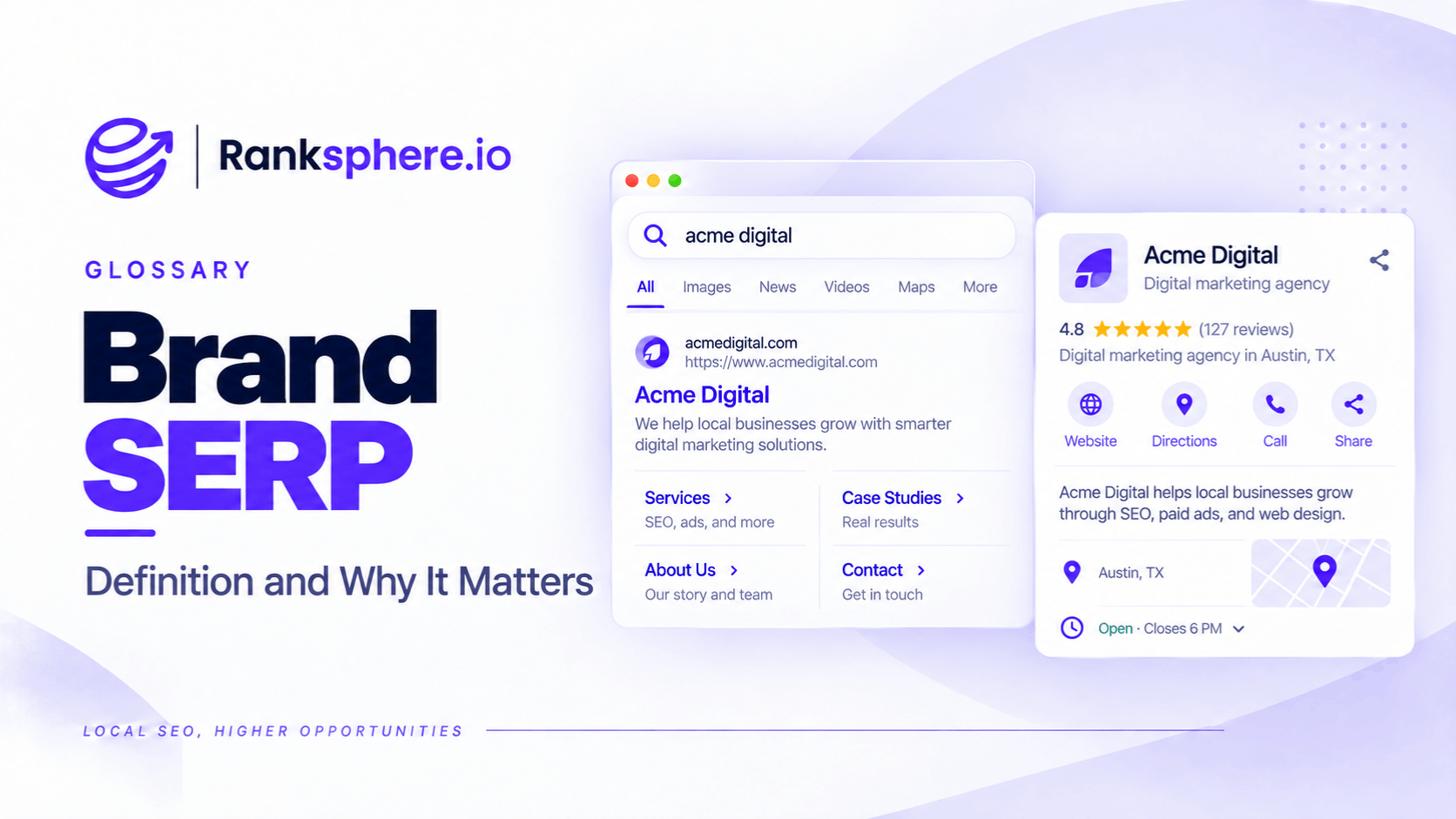
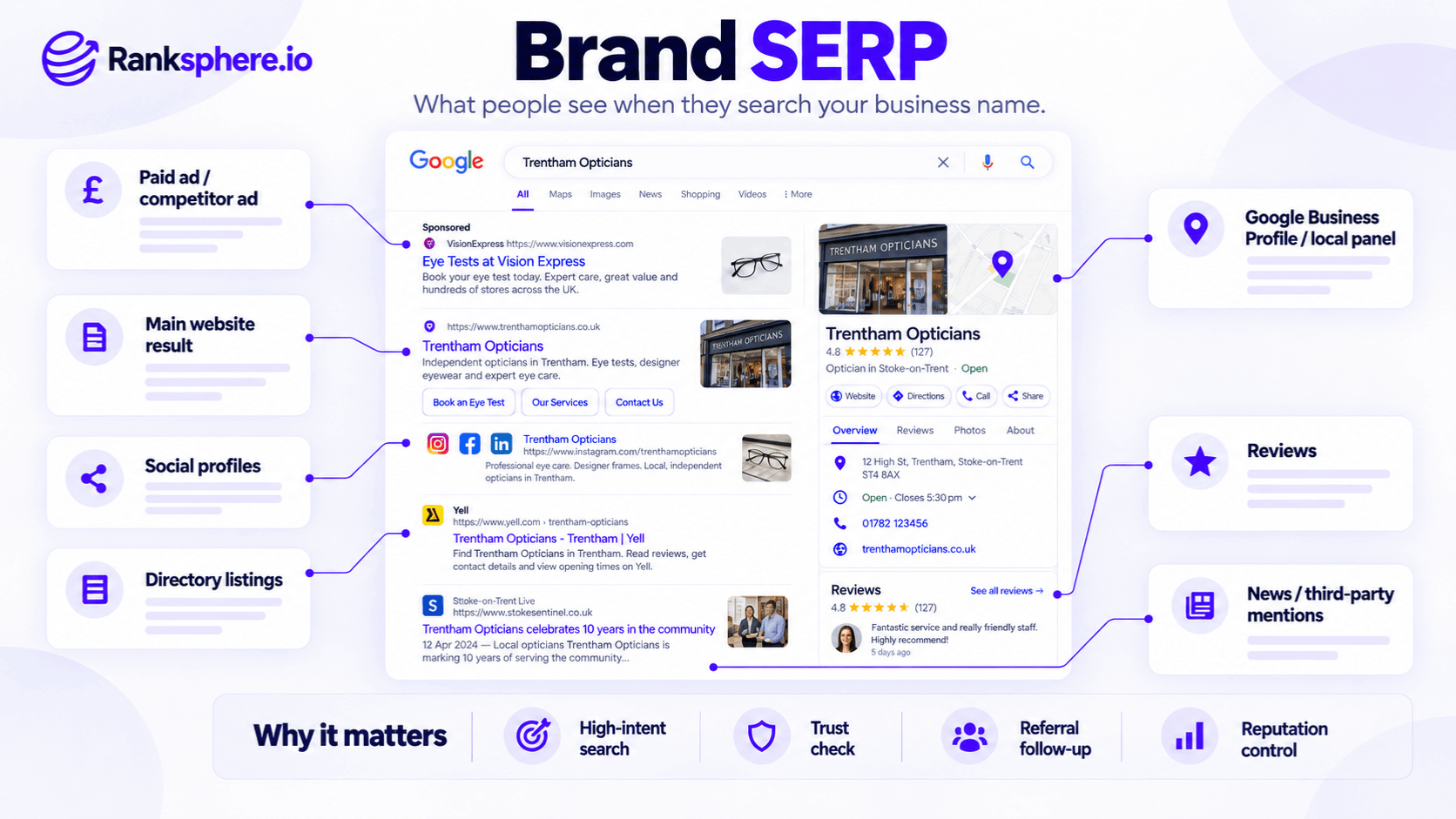
A brand SERP is the search engine results page Google displays when someone searches for a business, organisation, or brand by name.
For example, someone searching for "Trentham Opticians" may see the practice's website, Google Business Profile, customer reviews, social media accounts, directory listings, and other information about the business.
Some of these results come from sources the business manages. Others come from third-party websites, review platforms, and Google's own systems.
A brand SERP matters because people often search for a business by name after hearing about it elsewhere.
Someone might receive a recommendation from a friend, see a company vehicle, or come across the business on social media. Before contacting the company, they search its name to learn more.
What appears in those results can influence whether they decide to call, book an appointment, or continue researching alternatives.
A business may control its website and manage its profiles, but it cannot control everything Google displays when someone searches its name.
That makes monitoring branded search results an important part of local SEO and online reputation management.
Why Does a Brand SERP Matter?
A business's branded search results often reach people who already know something about the company.
That awareness may come from advertising, referrals, previous website visits, or offline marketing.
However, not every branded search comes from someone ready to become a customer.
People also search business names when looking for contact details, reviews, employment information, or customer support.
Even so, these results are worth paying attention to.
They Influence First Impressions
Imagine someone receives a recommendation for a local roofing company.
They search the company name and discover that its business listing has an incorrect telephone number.
They may abandon the enquiry or contact another provider.
The recommendation created interest, but the search results made the next step difficult.
They Support Word-of-Mouth Referrals
A recommendation doesn't always lead directly to a phone call.
Someone may search the business name first to check:
- Opening hours
- Location
- Customer reviews
- Services
- Contact information
- Whether the business appears legitimate
This means accurate branded search results can support referral enquiries.
They Show Information From Multiple Sources
A business may have accurate information on its website but outdated details on external directories.
For example, an old directory listing might display a previous address or phone number.
When that listing appears prominently for the business name, customers may encounter conflicting information.
They Can Include Competitors
Google may display competing businesses through advertisements or related business recommendations.
For example, a competitor may advertise against a business's brand name.
A knowledge panel may also show other businesses that Google considers related.
This doesn't necessarily indicate a problem, but it shows that branded search results aren't an environment the business controls completely.
They Provide Clues About Brand Awareness
Changes in branded search impressions may help businesses understand how often people look for them by name.
For example, an increase in branded searches might coincide with advertising, public relations, or stronger word-of-mouth awareness.
However, branded search volume isn't a complete measure of brand awareness.
Search behaviour can also be affected by existing customers, navigational searches, seasonality, and other factors.
What Appears in a Brand SERP?
The results depend on the business, search query, location, device, and information available to Google.
Common elements include the following.
Official Website
The business's website often appears prominently for its own name.
For example, a branded search for a dental practice may display its homepage as an organic result.
Depending on Google's selection, the listing may include sitelinks leading to important pages such as:
- Treatments
- Fees
- About
- Contact
- Book an Appointment
Google generates sitelinks automatically, so businesses cannot select them directly.
Google Business Profile
For eligible local businesses, a Google Business Profile may appear prominently.
It can display information such as:
- Business name
- Address or service area
- Opening hours
- Telephone number
- Website
- Customer rating
- Reviews
- Photographs
This information is particularly important when someone wants to contact or visit the business.
Knowledge Panel
A knowledge panel may appear for certain businesses and other entities.
Depending on the entity, it can contain business details, related information, and links to relevant sources.
For local businesses, Google's business information display can overlap with the information available through Google Business Profile.
However, a business cannot directly control every element Google chooses to show.
Local Pack
Some branded or location-specific searches may display a local pack.
For example, searching for a business name shared by several locations may produce multiple relevant results.
Google may also display other nearby businesses depending on the query.
Review Platforms
External review websites can appear in branded search results.
Examples include:
- Google review information
- Yelp
- Trustpilot
- Industry-specific review websites
- Relevant business directories
Which platforms appear depends on the industry, location, and search query.
These results can influence customer decisions because they contain feedback outside the business's own website.
Social Media Profiles
A business's social media accounts may also appear.
For example:
- YouTube
These results can help people find additional information about the business.
However, a social media account doesn't automatically rank for every branded search.
Business Directories
Directory listings may appear alongside the official website.
For example, a local plumbing company could have listings on several trade or business directories.
Some may have been created or populated without direct involvement from the business.
If those pages contain outdated information, they may create confusion.
Third-Party Articles and Mentions
Press coverage, industry publications, forum discussions, and other independent content may appear.
These results can be positive, negative, or neutral.
Businesses generally cannot determine whether Google displays a particular third-party article.
Competitor Advertisements
Competitors may run Google Ads associated with searches for another business's brand.
Whether an advertisement can run depends on Google's advertising policies, including rules concerning trademarks and misleading ad content.
Competitor advertising isn't automatically prohibited.
However, a business may have options to report advertising that violates applicable policies.
What Can a Business Control in Its Brand SERP?
A useful way to approach branded search results is to separate what the business manages from what it can only influence.
Information the Business Can Manage
A company generally has substantial control over:
- Its official website
- Page titles and website content
- Its own social media profiles
- Information submitted through its Google Business Profile
- Business directories it has claimed
- Published case studies and company information
However, managing these sources doesn't guarantee how Google will display them.
For example, Google may rewrite a search result's title or decide not to show a particular webpage.
Information the Business Can Influence
Some elements can be influenced but not directly controlled.
These include:
- Customer review ratings
- Third-party directory information
- Google Autocomplete suggestions
- Knowledge panel presentation
- Which pages Google selects as sitelinks
For example, a business can request genuine customer reviews and respond appropriately.
It cannot legitimately dictate what customers write or guarantee a particular average rating.
Information the Business Usually Cannot Control
Independent content may include:
- Press coverage
- Public forum discussions
- Third-party criticism
- Independent reviews
- Competitor advertisements
A business may be able to request corrections or report content that violates platform policies.
However, it cannot simply require Google to remove lawful, accurate criticism because the result is unfavourable.
How to Audit Your Brand SERP
A basic brand SERP audit can be completed without specialist software.
The goal is to understand what someone sees when searching for the business.
1. Search Your Exact Business Name
Start with the full business name.
For example:
Trentham Opticians
Review the results Google displays.
If the business has a common name, include the town or another distinguishing term.
2. Check Mobile and Desktop Results
Google's presentation can differ between devices.
For example, a mobile result may display prominent contact or directions options.
A desktop result may show a different layout.
Both experiences are worth checking.
3. Review Google Autocomplete
Begin typing the business name into Google and review the predictions.
Google Autocomplete may suggest related searches involving reviews, contact details, or other topics.
For example:
- Business name reviews
- Business name prices
- Business name complaints
- Business name contact
However, an autocomplete suggestion isn't proof that a business has a reputation problem.
Predictions can reflect broader search activity and other contextual factors.
Investigate concerning suggestions before drawing conclusions.
4. Check Business Information
Review the information displayed in the Google Business Profile.
Pay attention to:
- Business status
- Telephone number
- Address
- Website link
- Opening hours
- Services
- Customer reviews
If something is incorrect, investigate the appropriate correction process.
5. Review First-Page Results
Look beyond the official website.
Check whether the results include:
- Social profiles
- Directory listings
- Review websites
- News articles
- Competitors
- Outdated business information
Record anything that may confuse customers or misrepresent the business.
6. Check From the Relevant Location
Search results can vary geographically.
For local businesses, research should reflect the area where customers are likely to search.
Using incognito mode can reduce some personalisation, but it doesn't remove the effect of location or other search settings.
7. Record the Findings
Create a simple record of:
- What appears
- Which results are accurate
- Which results need attention
- Who controls the relevant information
- What action is possible
Repeat the review periodically to identify changes.
How to Improve Your Brand SERP
Improving branded search results usually involves correcting business information and making useful, trustworthy content easier to find.
Keep Google Business Profile Information Accurate
Review the business's profile regularly.
For example, an optician should make sure its opening hours, telephone number, website, and location information remain correct.
Ranksphere's GBP Management helps businesses manage and monitor Google Business Profile information across locations.
This supports accurate business information, although it cannot control every element of Google's search results.
Improve Your Official Website
A business's website should make essential information easy to find.
Important pages may include:
- About
- Services
- Locations
- Contact
- Booking
- Fees or pricing information
- Team profiles
These pages should contain accurate, relevant information.
Clear navigation and internal linking also help visitors find what they need.
Maintain Relevant Social Profiles
Check that the business's social accounts use consistent branding and contain accurate contact information.
Outdated social profiles can confuse customers, particularly if they display old addresses or telephone numbers.
However, there is no need to create accounts on every platform simply to occupy more branded search results.
Focus on platforms relevant to the business and its customers.
Review Business Directory Listings
Directories may contain information that was submitted years ago.
For example, a business might have moved premises while several old directory listings still show its previous address.
A citation audit can help identify these inconsistencies.
Claim and update listings where appropriate.
However, correcting directory information doesn't guarantee that Google will rank those directories differently.
Build a Genuine Review Process
Customer reviews can influence how people evaluate a business.
For example, recent reviews may help prospective patients decide whether to contact a dental practice.
Businesses can encourage customers to share genuine experiences and respond appropriately to feedback.
Avoid fake reviews, incentives conditioned on positive ratings, or other practices that violate platform policies.
Publish Useful Company Information
A business may benefit from publishing information that helps prospective customers verify its experience and services.
For example:
- Team biographies
- Qualifications
- Completed projects
- Genuine case studies
- Service explanations
- Business updates
This content can also help answer questions that appear during branded searches.
However, publishing more pages doesn't automatically make them rank for the business name.
Consider Branded Search Advertising
If competitors advertise against a business's name, the business may consider running its own branded search campaign.
This can give the company an additional paid placement opportunity.
However, it isn't automatically necessary or cost-effective for every business.
The decision should consider advertising costs, competition, existing organic visibility, and measurable outcomes.
What If Negative Results Appear for Your Business Name?
Negative branded search results require careful handling.
For example, a business may discover an unfavourable customer review, critical article, or outdated complaint page ranking for its name.
The correct response depends on the content.
Correct Inaccurate Information
If a directory contains an incorrect telephone number or address, request a correction through the appropriate process.
If Google Business Profile information is wrong, use the available edit or support tools.
Respond to Genuine Customer Feedback
If a customer raises a legitimate concern, an appropriate response may help demonstrate that the business takes feedback seriously.
Avoid arguments, threats, or attempts to pressure the customer into removing a review.
Request Removal When Policies Are Violated
Some content may be eligible for removal if it violates a platform's policies or applicable law.
However, negative opinions aren't automatically removable simply because a business dislikes them.
Review the relevant policies before submitting a request.
Publish Accurate, Useful Information
Maintaining an informative website and relevant business profiles can help customers find reliable information.
However, there is no guarantee that publishing positive content will outrank negative results.
Search engines determine rankings independently.
For a broader explanation, see reputation management.
Common Brand SERP Mistakes
- Never checking branded search results. Customers may encounter inaccurate information without the business realising it.
- Assuming a branded search guarantees purchase intent. People search business names for many reasons.
- Ignoring autocomplete suggestions. These can provide useful research clues, although they aren't definitive evidence of reputation problems.
- Leaving outdated directory information online. Conflicting contact details can frustrate customers.
- Assuming the business controls its knowledge panel. Google decides how information is presented.
- Ignoring competitor advertisements. Paid results may appear alongside the business's own listings.
- Treating every negative result as removable. Independent criticism may be legitimate.
- Creating unnecessary profiles purely to dominate results. Accuracy and relevance matter more than the number of accounts.
- Checking only from one device or location. Search appearance can vary.
Brand SERP Best Practices
To maintain accurate and useful branded search results:
- Search your business name regularly.
- Review results on mobile and desktop.
- Check Google Autocomplete for relevant suggestions.
- Keep Google Business Profile information current.
- Maintain accurate contact details on important directories.
- Review how your website appears in branded results.
- Keep relevant social media accounts updated.
- Monitor and respond appropriately to customer reviews.
- Check whether competitors are advertising against your name.
- Investigate negative or misleading results before taking action.
- Publish trustworthy information about your business.
- Repeat the audit periodically.
The goal isn't to control every result.
It's to make sure people searching for the business can find accurate information and make an informed decision.
Example of a Brand SERP Problem for an Optician
Consider a hypothetical optician called Trentham Opticians.
The practice receives regular word-of-mouth recommendations, but its management team has noticed that enquiries aren't increasing as expected.
The practice hasn't reviewed its branded search results for some time.
What the Audit Finds
An agency searches for the practice by name and identifies three issues.
The Google Business Profile shows an incorrect business status.
The listing indicates that the practice is permanently closed, even though it is still operating.
A directory listing contains an outdated telephone number.
The directory appears prominently for the practice's name and displays contact information from several years earlier.
A competing optician is advertising against the practice name.
The competitor's advertisement appears above some of the organic results.
Why These Problems Matter
Someone who receives a recommendation may search for the practice before arranging an appointment.
If they see an incorrect closed status or call an outdated telephone number, they may struggle to contact the business.
However, the practice cannot know how many potential customers were lost without additional evidence.
The audit identifies problems that could interfere with enquiries, rather than proving the exact cause of the decline.
How the Practice Responds
The practice investigates the incorrect Google Business Profile status and follows Google's process to request a correction.
It also claims or contacts the directory to update its telephone number.
The agency reviews the competitor advertisement to determine whether it complies with Google's policies.
The practice then considers whether branded search advertising would be commercially worthwhile.
How the Practice Measures Progress
After correcting the available information, the practice monitors:
- Accuracy of its branded search results
- Google Business Profile interactions
- Relevant branded search queries
- Website visits
- Contact enquiries
- Appointment requests
The practice also introduces a periodic brand SERP review.
Example Shows
“The business had focused on attracting new customers without regularly checking what people saw when searching for its name.
The brand SERP audit revealed inaccurate information that could make contacting the practice more difficult.
Correcting those details was valuable regardless of whether the business could directly attribute an increase in enquiries to the changes.
A brand SERP is often where a customer's existing interest meets the information Google provides about your business.
For local businesses, regularly checking those results can help identify outdated listings, reputation concerns, and opportunities to make important information easier to find.”
See Also
- Knowledge Panel — Business and entity information displayed in Google Search.
- Branded Keywords — Searches that include a business or brand name.
- Reputation Management — Monitoring and responding to information about a business online.
- Google Autocomplete — Search predictions that appear while someone types.
- Sitelinks — Additional website links that may appear beneath branded results.
- Citation Audit — Finding and correcting inconsistent business information.