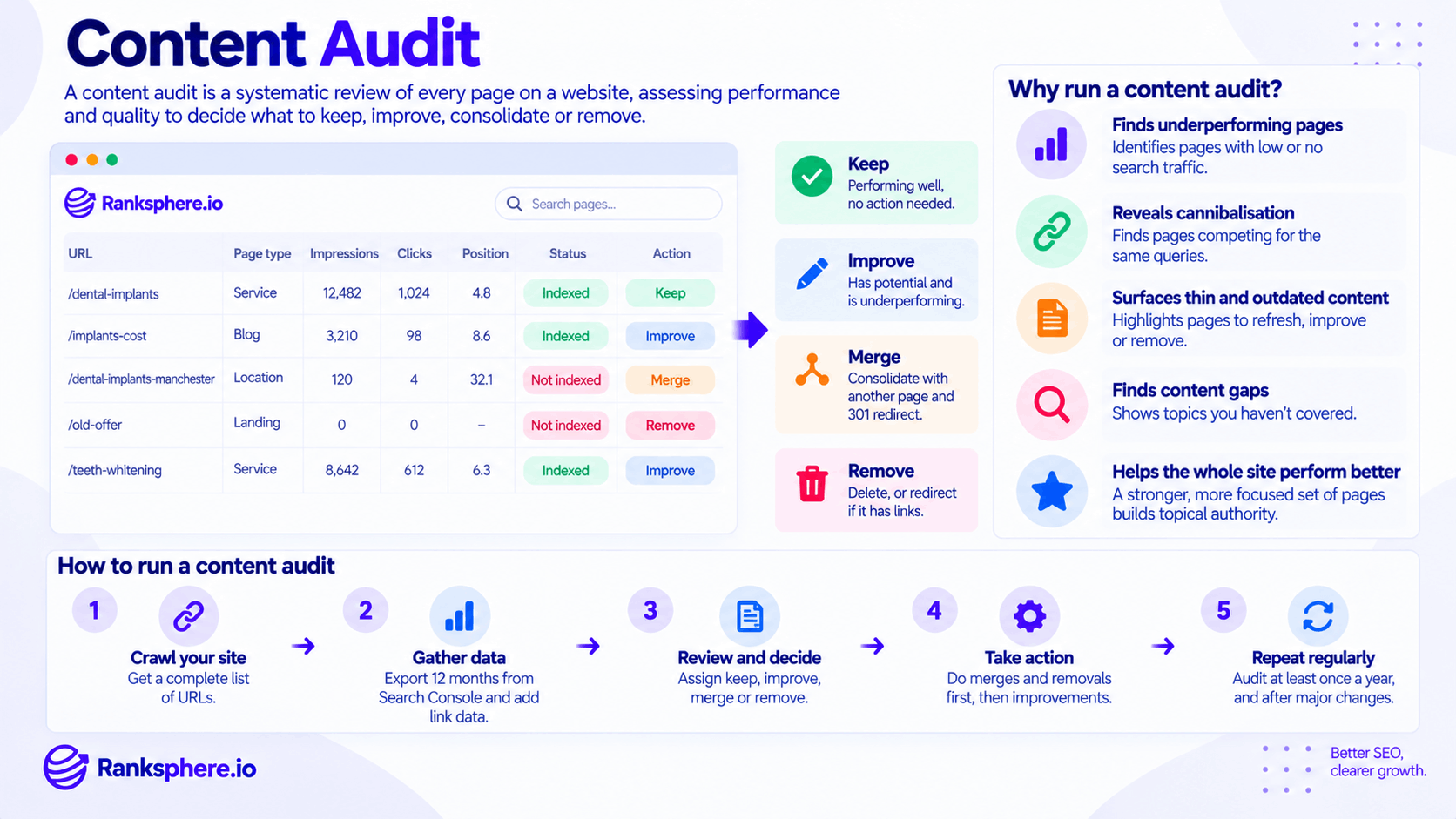
A content audit is a systematic review of the pages on a website to determine what should be kept, improved, consolidated, redirected or removed.
Over time, websites accumulate content.
A new service page gets added. A campaign creates several landing pages. Blog posts are published for years. Old services remain live after the business changes. Similar articles cover the same topic from slightly different angles.
Eventually, the website can contain far more pages than anyone actively manages.
A content audit turns that collection back into a deliberate content strategy.
The goal is not simply to delete old pages or identify low traffic.
It is to understand which content is helping the website, which content has potential, and which pages no longer justify their existence.
Why run a content audit?
Content naturally becomes outdated.
Even a well-managed website can develop:
- Old information
- Overlapping pages
- Thin content
- Duplicate topics
- Broken internal links
- Outdated offers
- Forgotten landing pages
- Weak location pages
- Blog posts that no longer match search intent
A content audit helps identify these problems before they become part of the site's permanent structure.
It can help you:
- Find pages receiving little or no organic visibility
- Identify keyword cannibalisation
- Find content that needs a refresh
- Discover outdated or inaccurate information
- Identify pages that should be consolidated
- Find content gaps
- Improve internal linking
- Prioritise pages with genuine growth potential
- Remove content that no longer serves users or the business
A good audit should end with decisions, not just observations.
Content audit vs SEO audit
A content audit and a technical SEO audit overlap, but they are not the same thing.
A technical audit looks primarily at areas such as:
- Crawling
- Indexing
- Redirects
- Canonicals
- Page speed
- Structured data
- Technical errors
A content audit focuses more on:
- Usefulness
- Search intent
- Organic performance
- Accuracy
- Duplication
- Topic overlap
- Internal linking
- Business relevance
- Content quality
In practice, the two often work together.
A page that receives no traffic may have weak content.
Or it may simply be noindex.
You need enough technical information to avoid making the wrong editorial decision.
What should a content audit include?
A useful audit normally starts with one row per URL.
The exact data depends on the site, but the following fields are often useful.
URL
Record the canonical URL for each page.
Also identify the page type where possible, such as:
- Service
- Location
- Product
- Blog post
- Landing page
- Category
- Guide
Page type makes patterns easier to spot.
Search impressions
Impressions from Google Search Console show whether a page is appearing in search at all.
A page with strong impressions but few clicks presents a very different opportunity from a page with no visibility.
Organic clicks
Clicks show how much search traffic the page currently receives.
Do not judge a page by clicks alone.
A commercially important page may generate fewer visits but more valuable enquiries.
Search queries
Review the queries for which the page appears.
This helps answer questions such as:
- Is Google understanding the topic correctly?
- Is the page appearing for the intended intent?
- Is it competing with another URL?
- Are there useful subtopics missing from the page?
Average position
Average position can provide useful context, but treat it carefully.
It is an average across queries, devices, locations and search appearances rather than one fixed ranking.
Use it alongside query-level data rather than treating it as an exact rank.
Indexing status
Check whether important pages are indexed.
Statuses worth investigating can include:
- Crawled – currently not indexed
- Discovered – currently not indexed
- Duplicate
- Alternative page with proper canonical
- Excluded by noindex
Do not automatically assume a non-indexed page has poor content.
Indexing problems can have several causes.
Internal links
Review how many useful internal links point to the page and where they come from.
A strong page with almost no internal support may be underperforming partly because it is poorly integrated into the site.
Backlinks
Check whether the page has backlinks from other websites.
This can materially change what you do with an old URL.
A page with little traffic but several useful backlinks may be a good candidate for:
- Improvement
- Consolidation
- A relevant redirect
rather than deletion.
Conversions
Where tracking allows it, include business outcomes.
Examples include:
- Form submissions
- Calls
- Purchases
- Bookings
- Downloads
- Account registrations
A page with modest traffic but strong conversions may be much more valuable than a high-traffic article that generates no meaningful action.
Last meaningful update
Record when the page was last substantially reviewed or updated.
A publication date alone does not tell you whether the content is still accurate.
A five-year-old evergreen article can still be excellent.
A six-month-old pricing guide can already be wrong.
How much data should you use?
For many websites, looking across roughly a year is useful because it reduces the risk of making decisions based on temporary or seasonal fluctuations.
But twelve months is not a universal minimum.
A newer site may not have that much history.
A rapidly changing product may require much more recent data.
A seasonal business may benefit from comparing equivalent periods year over year.
Choose a date range that reflects how the business actually operates.
The important thing is not to label a page “dead” because you reviewed it during the wrong season.
The four main content audit decisions
Most pages eventually fall into one of four broad categories:
Keep, Improve, Merge or Remove.
Some teams add separate categories such as Redirect or Refresh, but these four cover most decisions.
Keep
Keep a page when it is:
- Useful
- Accurate
- Performing appropriately
- Serving a distinct purpose
- Still relevant to the business
A page does not need constant editing simply because it exists.
If it works, leave it alone unless there is a genuine improvement to make.
Improve
Improve a page when it has a clear purpose but is not performing as well as it could.
Potential candidates include pages with:
- Strong impressions but weak CTR
- Useful rankings just below stronger visibility
- Outdated information
- Weak internal linking
- Missing sections
- Poor titles or descriptions
- Content that no longer fully matches search intent
Improvement might involve:
- Rewriting sections
- Adding first-hand examples
- Updating statistics
- Improving headings
- Adding internal links
- Improving the title tag
- Improving the meta description
- Adding clearer conversion paths
Do not improve a page simply because an SEO tool says the word count is low.
Fix the reason the page is weak.
Merge
Merge pages when several URLs cover essentially the same topic or search intent.
For example:
/boiler-service-cost/
/boiler-servicing-prices/
/how-much-is-a-boiler-service/
may be better represented by one stronger page.
Choose the best URL, combine the useful content and 301 redirect retired versions where appropriate.
Merging can help simplify:
- Internal linking
- Canonicalisation
- Search intent
- Content maintenance
It can also reduce keyword cannibalisation.
Remove
Remove a page when it no longer has a useful purpose.
Candidates might include:
- Expired campaign pages
- Obsolete services
- Very weak outdated posts
- Duplicate pages
- Old event pages
- Pages created for keywords the business no longer targets
Before removing anything, check:
- Organic traffic
- Backlinks
- Internal links
- Conversions
- Whether a relevant replacement exists
If there is a genuine replacement, redirect.
If not, a proper 404 may be completely appropriate.
Do not judge content by traffic alone
A content audit is not:
“Delete everything that receives no traffic.”
Some pages serve purposes that search traffic does not capture.
For example:
- Terms pages
- Customer-support content
- Contact information
- Sales enablement pages
- Campaign landing pages
- Existing-customer resources
Likewise, a page may receive little traffic because the underlying search demand is small.
That does not necessarily mean the page is poor.
Ask what the page is supposed to achieve before evaluating whether it succeeds.
How to prioritise content improvements
Pages with existing visibility can be attractive opportunities because Google already understands something about them.
For example, a page receiving strong impressions while ranking around the middle of the first or second page may deserve investigation.
But ranking position alone should not determine priority.
Also consider:
- Business value
- Conversion potential
- Search volume
- Search intent
- Competition
- Current content quality
- Ease of improvement
A page ranking eighth for a commercially valuable service may deserve immediate attention.
A page ranking eighth for an irrelevant informational query may not.
Prioritise opportunity, not simply position.
How to run a content audit
A practical content audit can follow a straightforward process.
1. Build a complete URL inventory
Start by identifying the URLs that actually exist.
Use more than one source where possible:
- Website crawl
- XML sitemap
- CMS
- Search Console
- Analytics
Do not rely entirely on the CMS page count.
Old URLs, orphan pages and unusual templates can easily be missed.
2. Add performance data
Bring in useful Search Console metrics such as:
- Impressions
- Clicks
- CTR
- Queries
- Average position
Use a date range appropriate to the business.
3. Add indexing data
Check whether important URLs are indexed and investigate unusual exclusion patterns.
This prevents you from assuming an editorial problem when the real issue is technical.
4. Add internal-link information
Identify pages that are:
- Well connected
- Poorly connected
- Orphaned
- Linked mainly through navigation
- Still receiving links to old redirected URLs
Internal linking can materially influence the decision about what to improve.
5. Add backlink data
Before deleting or consolidating pages, check whether external sites link to them.
A URL with valuable links should not be discarded carelessly.
6. Review content quality
The numbers narrow the list.
Human review makes the decision.
Ask:
- Is the information accurate?
- Is it still useful?
- Does it match search intent?
- Is another page better?
- Does it add anything distinct?
- Does the business still need it?
7. Assign an action
Give every relevant URL a clear outcome:
Keep
Improve
Merge
Remove
You can also record notes explaining why.
8. Prioritise the work
Not every decision has equal urgency.
A simple priority system might consider:
Impact × effort × business importance
High-value service pages should usually come before low-value archive clean-up.
Should you merge and remove content before improving it?
Often, yes.
If several pages are going to be combined, there is little value in spending hours independently improving each one first.
Consolidation can also reveal which surviving pages are actually worth investing in.
A sensible sequence is often:
Inventory → Diagnose → Consolidate → Clean up → Improve
But there are exceptions.
If an important commercial page has an obvious problem causing lost leads, there is no need to wait until the entire audit is complete before fixing it.
Use judgement rather than treating the workflow as a rigid rule.
Content audits and keyword cannibalisation
A content audit is one of the best times to identify keyword cannibalisation.
Look for:
- Several pages appearing for the same queries
- URLs frequently swapping position
- Multiple pages serving essentially the same intent
- Similar title tags and headings
- Overlapping service or location pages
Do not merge pages simply because they share keywords.
The key question is whether they satisfy the same search intent.
If they serve different purposes, both may deserve to stay.
Content audits and thin content
Thin content is another common audit finding.
But avoid using word count as the test.
A short page may be perfectly useful.
Instead, look for pages that provide little meaningful value, such as:
- Generic service pages
- Repetitive location pages
- Old landing pages
- Automatically generated archives
- Near-duplicate articles
The decision may be to improve them.
It may also be to merge or remove them.
Content audits and content decay
Some pages once performed well but gradually lose visibility.
This is often called content decay.
Possible reasons include:
- Information becoming outdated
- Search intent changing
- Competitors publishing stronger pages
- Links breaking
- Internal linking changing
- The SERP itself changing
- The business offering changing
A content refresh can be appropriate when the page still deserves to exist but needs updating.
Do not update dates and change a few sentences simply to make content look fresh.
Refresh the substance.
Finding content gaps
A content audit is not only about removing things.
It can also reveal what is missing.
Suppose a roofing website has detailed pages for:
- Roof replacement
- Flat roofing
- Guttering
- Chimney work
but no useful page about roof repair, despite customers searching for it regularly.
That is a genuine content gap.
Likewise, several existing pages may repeatedly touch on one question without any page answering it properly.
Auditing what exists makes it easier to see what does not.
Using a spreadsheet for a content audit
A simple audit sheet might contain columns for:
| Field | Purpose |
| URL | Identify the page |
| Page type | Service, blog, location, etc. |
| Index status | Is it eligible to appear in search? |
| Impressions | Search visibility |
| Clicks | Organic traffic |
| CTR | How impressions convert to clicks |
| Main queries | What Google associates with the page |
| Internal links | How well the site supports it |
| Backlinks | External value attached to the URL |
| Conversions | Business value |
| Last reviewed | Freshness and maintenance |
| Decision | Keep, improve, merge or remove |
| Priority | What should happen first |
Do not turn the spreadsheet into an exercise in collecting every possible metric.
Collect enough information to make good decisions.
Ranksphere's website audit surfaces thin, duplicate and orphaned pages, helping narrow down the mechanical part of the review before individual pages are assessed manually.
Common content audit mistakes
- Creating a spreadsheet and never implementing the recommendations. The audit only matters if something changes.
- Deleting every page with no traffic. Some URLs serve purposes beyond organic search.
- Deleting pages without checking backlinks. Valuable links may justify improvement or a relevant redirect.
- Improving everything. Some pages are better merged or removed.
- Using word count as a quality score.
- Using too short a date range for a seasonal business.
- Treating average position as one fixed ranking.
- Ignoring internal links. Weak architecture can make good content look weaker than it is.
- Creating new content before checking for existing overlap.
- Refreshing dates without improving the information.
- Redirecting every removed page to the homepage.
- Treating the audit as a one-time exercise.
Content audit best practices
- Start with a complete URL inventory.
- Use a meaningful performance window rather than an arbitrary one.
- Combine search data with human content review.
- Check indexing before diagnosing content quality.
- Review internal links and backlinks before removing pages.
- Group overlapping URLs by search intent.
- Keep pages that already do their job well.
- Improve pages with genuine potential.
- Merge pages that unnecessarily compete.
- Remove content that no longer has a useful purpose.
- Prioritise work by business impact as well as SEO opportunity.
- Repeat the audit periodically and after major migrations or restructuring.
Example
Caldermoor Accountants has been publishing content for years.
The website now contains nearly 200 URLs.
Rather than commissioning another batch of blog posts, the firm audits what it already has.
The review finds several clear patterns.
A small group of pages generates most of the site's organic traffic.
Several articles overlap heavily and target the same search intent.
A group of older pages receives little visibility and contains information the firm no longer considers useful.
A handful of pages already receive meaningful impressions but have weak titles, outdated sections or poor internal linking.
Instead of treating all of those pages the same way, the firm gives each one a job.
Strong pages are kept.
Promising pages are refreshed and better connected.
Overlapping articles are consolidated, with relevant old URLs redirected to the surviving pages.
Content with no continuing purpose is removed after backlinks and traffic are checked.
The website ends the process smaller than it started.
But the surviving pages are easier to maintain, internal linking is clearer and the team finally knows which content deserves future investment.
That is what a content audit should accomplish: not simply finding old pages, but deciding which pages still earn their place on the website and what should happen to the ones that do not.
See also
- Thin content — low-value pages that often surface during an audit
- Content refresh — updating content that still has value
- Keyword cannibalisation — when multiple pages compete for the same search intent
- Google Search Console — a key source of content performance and indexing data
- 301 redirect — used when consolidating or permanently moving useful content
- Topic cluster — organising surviving content into connected subject areas