A location page is a page on a business website created for a specific city, town, neighbourhood or area.
For a business with several physical branches, a location page usually represents one real premises.
For a service area business, it may describe a place the company genuinely serves even though there is no customer-facing office there.
Location pages can be useful for local SEO, but they are also one of the easiest types of content to get wrong.
The common mistake is simple:
Build one template, duplicate it across several towns, replace the place name and publish.
That creates more URLs, but not necessarily more useful content.
A good location page should give someone in that area a genuine reason to land there rather than on a generic service page.
What is a location page used for?
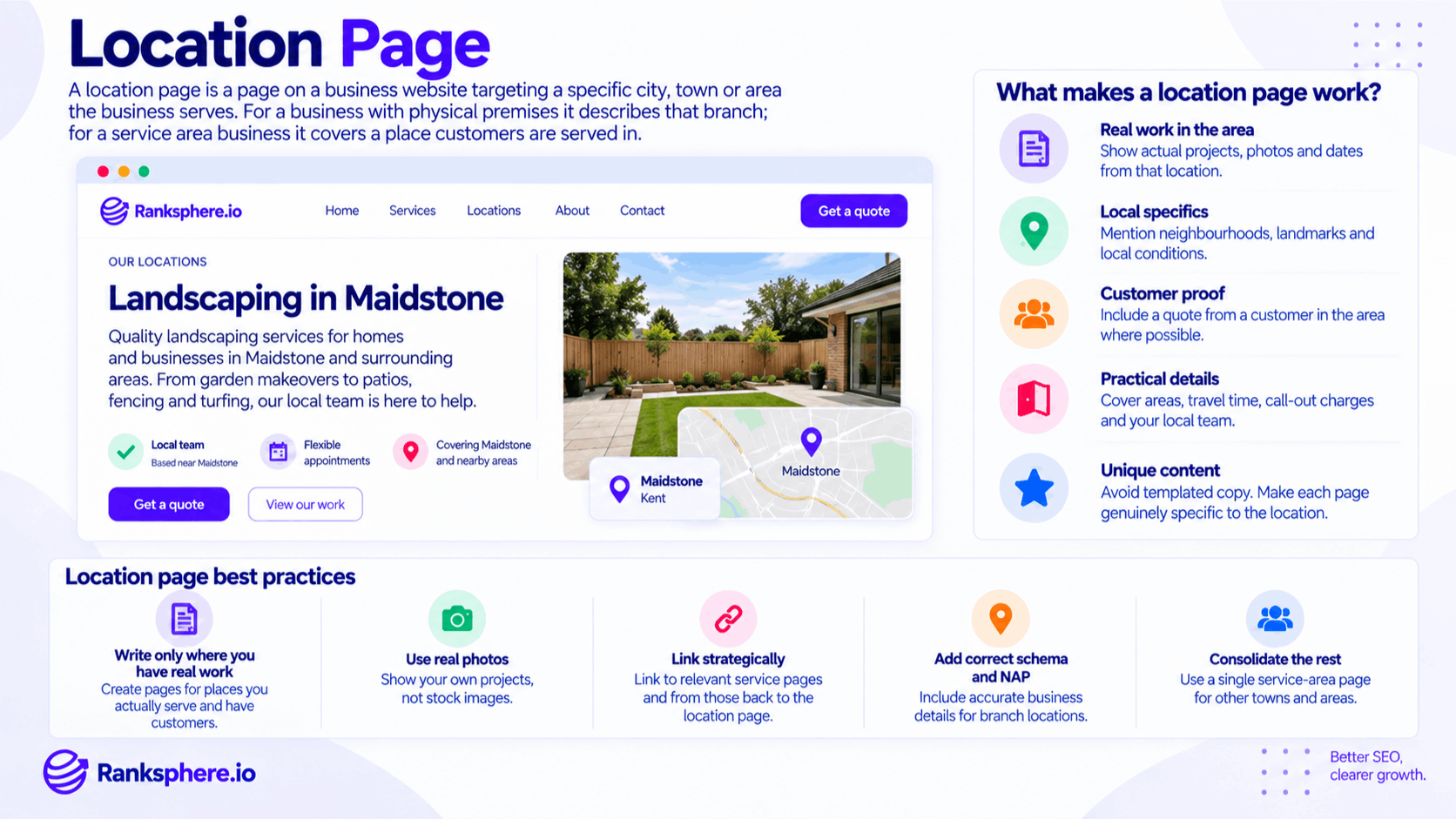
A location page can serve several purposes.
For a business with physical branches, it can help customers find:
- The correct address
- Opening hours
- Contact details
- Directions
- Parking information
- Services available at that branch
For a service area business, a location page can explain:
- Whether the business serves that area
- Which services are available there
- What type of work has been completed locally
- How far the team travels
- Any location-specific considerations
Location pages can also target organic searches containing a place name, such as:
roof repair Maidstone
or:
dentist Canterbury
But the page still needs to deserve its place in the website.
Simply including the town name in the URL and heading is not enough.
Why location pages often fail
Location pages usually fail because they are created around keywords rather than around useful local information.
Suppose a business publishes:
- Plumber in Maidstone
- Plumber in Ashford
- Plumber in Canterbury
- Plumber in Dover
If each page contains the same paragraphs with only the town changed, there is very little separating one URL from another.
Search engines may still crawl or even index those pages.
But near-identical pages can create problems around:
- Duplication
- Canonical selection
- Weak search intent
- Thin content
- Poor user value
Some may remain unindexed. Others may rank poorly. Some may be treated as substantially similar to another URL.
See duplicate content for the wider issue.
The problem is not that Google has a rule against location pages.
The problem is that the pages often give Google and the user almost nothing different to evaluate.
A simple test for a location page
Remove the town name from the page.
Then ask:
Would this still read exactly the same for any other town?
If the answer is yes, the page probably needs more work.
For example:
We provide professional roofing services throughout Maidstone. Our experienced team offers high-quality workmanship at competitive prices.
could describe almost any roofing business in almost any town.
Compare that with:
In Maidstone, we regularly work on Victorian terraces around Fant and older tiled properties near Loose, where slipped tiles and deteriorated flashing are common repair jobs.
The second version contains information connected to the actual area.
That is much harder to duplicate meaningfully across twenty towns.
What makes a good location page?
A strong location page usually combines useful service information with genuine local detail.
Real work completed in the area
Show evidence that the business genuinely operates there.
This could include:
- Completed projects
- Before-and-after photographs
- Short case studies
- Types of work carried out
- Dates where useful
For example:
Roof replacement in Bearsted
is much more convincing when accompanied by photographs and a short explanation of what the job involved.
Genuine local details
Mention places that matter because they relate to your work.
Examples might include:
- Neighbourhoods
- Villages
- Estates
- Roads
- Commercial districts
Do not insert lists of place names simply to target more keywords.
Use them where they help someone understand the real service area.
Local conditions
Some services are genuinely affected by geography.
For example:
A landscaper may encounter different soil types.
A roofer may deal with a particular housing stock.
A drainage company may regularly work on older clay drainage systems.
A coastal contractor may deal with weather exposure that inland customers experience less often.
Use those differences when they are real.
Customer examples
A genuine testimonial from someone in the area can add useful context.
Avoid creating artificial “local” testimonials simply to make the page appear unique.
If customer permission and privacy allow, real examples are much stronger.
Practical service information
Useful location-specific details might include:
- Typical travel or response times
- Service boundaries
- Call-out charges
- Parking constraints
- Appointment availability
- Services unavailable in that area
This is information a potential customer may actually want before contacting the business.
Location pages for businesses with physical branches
A genuine branch page should make it easy for somebody to visit or contact that location.
Useful information can include:
- Branch name
- Address
- Phone number
- Opening hours
- Services provided
- Directions
- Parking
- Public transport
- Accessibility information
- Photographs of the premises
- Relevant staff or team members
The business's NAP information should be accurate.
Relevant LocalBusiness schema can also describe the branch in structured data.
For multi-location businesses, each genuine branch should normally have its own accurate location information rather than sharing one generic page.
Location pages for service area businesses
A service area business works at the customer's location rather than receiving customers at a storefront.
Examples include:
- Plumbers
- Electricians
- Roofers
- Landscapers
- Mobile locksmiths
- Cleaning companies
These businesses can still create useful location pages.
But a location page does not create a physical branch in that town.
It also does not automatically extend where the business appears in Google's local pack.
Local results are influenced by factors including relevance, distance and prominence.
See local ranking factors for the wider picture.
A page for a nearby town can still compete organically for relevant location-based searches.
It can also reassure prospective customers that the business genuinely serves their area.
Those are useful outcomes on their own.
Location pages and the local pack
This distinction matters.
There are two different types of visibility:
Local pack visibility
The local pack is tied closely to business entities, their real-world location or service-area setup and the searcher's location.
Creating a page titled:
Plumber in Ashford
does not create a new Ashford business location.
Organic visibility
The same page may still compete in the normal organic results for:
plumber Ashford
if the page is relevant and useful.
That is where location pages can be particularly helpful for service area businesses.
They support organic local searches without pretending the business has premises where it does not.
Do service areas improve local pack rankings?
Setting a service area tells Google and customers where the business provides services.
It should accurately reflect where the company actually works.
But adding more towns to a service area should not be treated as a way to expand ranking coverage.
Similarly, creating website pages for dozens of towns does not turn those towns into physical business locations.
Use service areas and location pages to describe the business accurately rather than as tools for manufacturing proximity.
How many location pages should you create?
There is no ideal number.
Create as many as you can support with genuine value.
For one business, that may be three.
For another, it may be thirty.
The important question is:
Does each page have a clear reason to exist?
A useful page should represent:
- A genuine branch
- An area the business meaningfully serves
- A distinct local audience
- Useful local information
Do not create pages simply because a keyword tool produced a list of towns.
Do you need to have completed work in every location?
Not necessarily.
A business can genuinely serve an area before completing a documented project there.
The stronger question is whether you can provide useful, accurate information about serving that place.
Real project examples are excellent evidence when available, but they should not become an artificial requirement.
If the business genuinely covers the town and can explain the service meaningfully, the page may still be useful.
What you should avoid is claiming local experience that does not exist.
Service-by-location pages
Service-by-location structures can grow very quickly.
Suppose a roofing company offers 12 services across 20 towns.
Creating every possible combination produces:
240 pages.
Examples might include:
/roof-repair/maidstone/
/roof-repair/ashford/
/flat-roofing/maidstone/
/flat-roofing/ashford/
and so on.
That structure is not automatically wrong.
The issue is whether each page serves a genuinely distinct purpose.
For some large businesses, individual service-and-location pages may be justified.
For a smaller local business, hundreds of combinations often lead to repetitive content that is difficult to maintain.
Before creating one, ask:
Why does this service need its own page for this specific location?
If there is no good answer beyond the keyword combination, reconsider it.
When a service-area page is better
Sometimes a single broader page is cleaner.
For example:
Areas We Cover
could explain that the company serves:
- Maidstone
- Ashford
- Canterbury
- Tonbridge
- Sevenoaks
and provide practical coverage information.
That may be more useful than publishing five nearly identical location pages with no meaningful differences.
You can always create dedicated pages later when enough genuine information exists to justify them.
Location pages and thin content
Thin content is a common problem with location-page strategies.
But thin does not mean short.
A concise branch page containing:
- Correct address
- Opening hours
- Directions
- Services
- Contact details
may be perfectly useful.
A 1,500-word location page can still be thin if most of it is generic filler.
The goal is not to reach a particular word count.
It is to provide the information someone searching in that area actually needs.
Location pages and duplicate content
Similarity is not automatically a problem.
Every branch page may reasonably contain certain repeated information about the business.
For example:
- Brand description
- Core services
- Company guarantees
- Contact process
The problem appears when almost the entire page is duplicated and the location name is the only meaningful difference.
A stronger location page combines necessary shared information with details that are genuinely specific to the branch or area.
Location pages and internal linking
Every important location page should be part of the wider website structure.
Useful internal links might include:
Locations hub → Location page
Location page → Relevant services
Service page → Relevant locations
Blog article → Relevant location page
These links should make sense to visitors.
Do not create huge grids of links simply to connect every service to every town.
Internal linking works best when the relationships are real and useful.
Location page URL structure
Keep URLs readable and consistent.
For example:
/locations/maidstone/
works well for many sites.
A multi-location business might use:
/clinics/maidstone/
or:
/offices/manchester/
There is no requirement that every business use /locations/.
Choose a structure that reflects the website naturally and keep it consistent.
Avoid repeatedly changing existing URLs purely to make them look more SEO-friendly.
What should a location page include?
There is no fixed template, but useful elements can include:
- Clear page title
- What the business offers in the area
- Areas or neighbourhoods covered
- Real work or examples
- Original photographs
- Relevant services
- Customer testimonials
- Practical travel information
- Contact or booking option
- FAQs specific to the location
For physical branches, you may also include:
- Full address
- Phone number
- Opening hours
- Parking
- Accessibility
- Public transport
- Map
- Branch photographs
- Team information
Include what is useful.
Do not add sections simply because another SEO location-page template includes them.
NAP on location pages
For a real branch, keep its NAP details accurate:
Name
Address
Phone
That information should represent the actual business location.
For a service area business that does not have premises in the town, do not invent a local address.
A location page should never create the impression that a business has an office or storefront where none exists.
Accuracy matters more than making the page appear more “local.”
LocalBusiness schema
LocalBusiness schema can be appropriate on genuine business-location pages when it accurately describes the entity represented on the page.
It should not be used to invent multiple physical business locations.
If the company has one real business entity serving several areas, the website structure and structured data should reflect that reality.
Schema describes the business.
It does not create a location.
Should you embed a map?
For a physical branch, a map can be genuinely useful.
It can help customers:
- Find the premises
- Plan a journey
- Understand parking
- Identify nearby landmarks
For a service area page where the company has no physical location, an embedded pin suggesting there is an office in the town may be misleading.
Use maps when they clarify a real location, not simply as an SEO decoration.
Location page keyword optimisation
Location keywords should appear naturally where they help identify the page.
For example:
Roof Repair in Maidstone
is a perfectly reasonable H1.
You do not need to repeat:
roof repair Maidstone
in every paragraph.
Use natural language such as:
- Roof repairs across Maidstone
- Homes in Bearsted and Loose
- Roofing work in the Maidstone area
Optimise for clarity, not repetition.
The reader already knows which town they searched for.
Calls to action on location pages
A location page should give someone a sensible next step.
Depending on the business, that may be:
- Call
- Book an appointment
- Request a quote
- Check availability
- Send an enquiry
- Visit the branch
Make the action obvious.
Do not build a location page purely to attract search traffic and then leave visitors wondering what to do next.
How to decide which locations deserve pages
Start with business reality rather than keyword volume.
Useful signals include:
- Existing customers in the area
- Jobs completed there
- Genuine service coverage
- Commercial importance
- Relevant organic demand
- Enough distinct information to make the page useful
Ranksphere's rank tracker measures visibility across your actual service area, helping you see how local visibility varies geographically and where further investigation may be worthwhile.
Rank-tracking data can inform the decision.
It should not be the sole reason for creating a page.
Common location page mistakes
- Copying one template across every town. Shared structure is fine; near-identical substance is the problem.
- Inventing local expertise. Only claim experience the business actually has.
- Creating fake local addresses. Never imply there is a branch where none exists.
- Expecting a page to create local-pack proximity. Website pages and physical-location signals are different.
- Producing every possible service-and-location combination. Create pages only when there is a useful reason.
- Stuffing the town name repeatedly into the copy.
- Using stock photographs when real local work is available.
- Creating pages with no route to enquire or book.
- Leaving location pages disconnected from service pages.
- Using LocalBusiness schema to imply nonexistent branches.
Location page best practices
- Create pages only for genuine locations or service areas.
- Give each page a distinct purpose.
- Use real local information wherever possible.
- Show real work and original photography when available.
- Keep branch NAP details accurate.
- Never invent a local address for a service area business.
- Use LocalBusiness schema only when it accurately describes the business entity.
- Link location pages to relevant services.
- Give visitors a clear next step.
- Consolidate areas that do not justify individual pages into a broader service-area page.
- Review location pages periodically as the business's coverage changes.
Example
“Ashgrove Landscaping creates 18 location pages covering towns across its service area.
Every page follows almost exactly the same template.
The introduction changes from:
Landscaping in Maidstone
to:
Landscaping in Ashford
but the services, benefits, photographs and supporting copy remain almost identical.
After several months, the pages generate very little organic visibility and some remain unindexed.
Instead of adding more words to all 18, the company reviews where it actually has useful local information.
Five towns stand out.
In those areas, the business can show:
- Completed projects
- Original photographs
- Neighbourhoods regularly served
- Relevant customer feedback
- Local landscaping considerations
Those five pages are rebuilt around real evidence.
The remaining areas are listed on a broader service-area page rather than being supported by nearly identical standalone URLs.
The final site contains fewer location pages, but each one has a clearer purpose.
That is the right way to approach local SEO location pages: do not create a page simply because a town name can be paired with a service keyword. Create it when you can give someone in that place information worth finding.”
See also
- Multi-location SEO — optimising several genuine business locations
- Thin content — low-value pages that add little useful information
- Duplicate content — substantially similar content across multiple URLs
- Local ranking factors — relevance, distance and prominence in local search
- LocalBusiness schema — structured data describing a local business
- Service area business — businesses that travel to customers rather than serving them from a storefront