A service area is the geographic area a business identifies on its Google Business Profile as the locations where it provides services or makes deliveries.
For example, an electrician based in Maidstone may serve customers in Aylesford, Rochester, Chatham, and nearby towns. Adding these locations to the business profile helps customers understand where the company operates.
What it doesn't do is guarantee visibility in those locations.
A business might list fifteen towns in its service area and still rank prominently only near its base. That's because Google's local rankings are mainly determined by relevance, distance, and prominence, not by how many places appear in the service area settings.
Your declared service area tells customers where you work. It doesn't define where Google will rank you.
Understanding that distinction is important for businesses trying to attract customers across multiple towns.
What Does a Service Area Do on Google Business Profile?
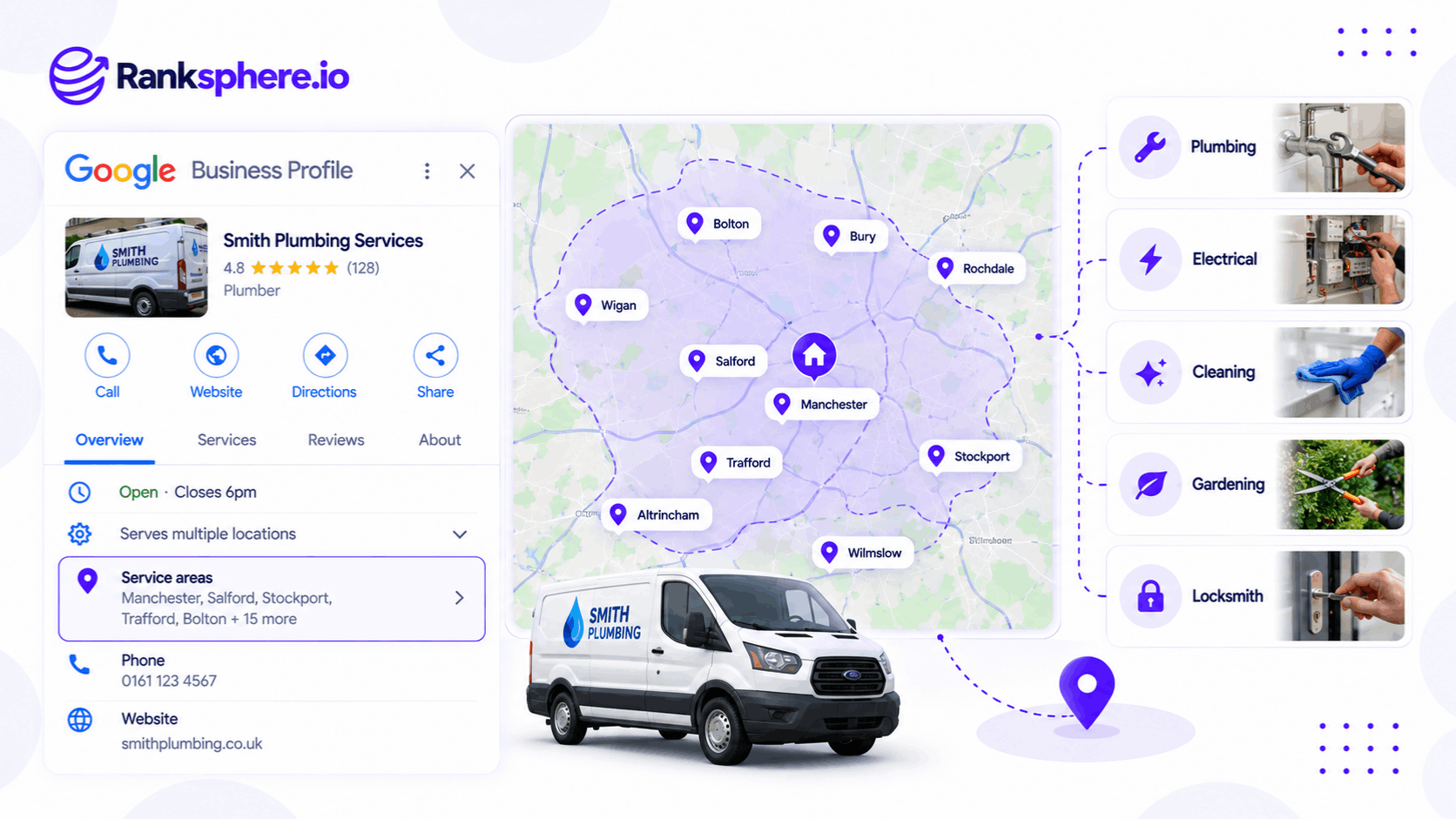
The main purpose of a service area is to describe where the business provides its services.
For example, a plumbing company that travels to customers may use its service area to show which towns it covers.
A declared service area can:
- Show customers where you operate. The selected locations may appear on your Business Profile.
- Represent your business accurately. It helps explain the geographic coverage of your services.
- Support the correct profile setup. Eligible service-area and hybrid businesses can specify where they serve customers.
- Help customers decide whether to contact you. Someone outside your coverage area can see whether your business is likely to serve them.
However, adding a service area doesn't make an otherwise ineligible business eligible for a Google Business Profile.
Eligibility depends on whether the business meets Google's requirements, including its rules about genuine operations and in-person customer contact.
For more information, see service area business.
What a Service Area Does Not Do
The biggest misunderstanding is treating service area settings as a way to expand Google Maps rankings.
For example, a roofing contractor based in Maidstone might add Canterbury to its service area.
That doesn't mean the business will automatically appear in Canterbury's local search results.
It Doesn't Extend Your Ranking Radius
Google determines local rankings using several factors, including distance.
The distance calculation depends on the business and the location associated with the search.
Adding more towns to a service area doesn't remove that distance consideration.
It Doesn't Guarantee Local Pack Visibility
The local pack displays businesses Google considers relevant to a local search.
A business can genuinely serve a town without appearing among the top results for searches made there.
For example, an electrician operating from Maidstone may accept jobs in Canterbury but still face stronger competition from electricians based closer to the searcher.
It Doesn't Replace Website Location Pages
A declared service area doesn't replace useful information on the business's website.
For example, a roofing company that regularly works in Canterbury may benefit from a genuine location page explaining its services in that area.
The page could include completed projects, photographs, and practical information for local customers.
However, creating a location page doesn't guarantee rankings either.
More Service Areas Don't Mean More Visibility
Adding ten towns instead of five doesn't automatically improve rankings in those towns.
The service area setting is primarily there to represent the business's operating coverage.
It isn't a keyword targeting tool.
Google's Service Area Rules
Google has specific guidelines for businesses that declare service areas.
Maximum of 20 Service Areas
Google allows businesses to select up to 20 service areas.
These can include supported geographic locations such as cities, towns, and postal codes.
Businesses shouldn't try to use the maximum simply because the option is available.
If a company genuinely serves seven towns, listing those seven is more useful than adding thirteen unrelated locations.
The Two-Hour Driving Guideline
Google advises that the overall service area should generally stay within about two hours' driving time of the business's base.
There are exceptions for businesses that reasonably operate across larger areas.
For example, some specialised service providers may legitimately travel farther than a typical local contractor.
The important thing is that the listed coverage reflects how the business actually operates.
Service Areas Aren't Set by Radius
Google no longer supports configuring service areas by entering a fixed distance radius.
Instead, businesses select supported geographic areas.
For example, an electrician may add the towns it regularly serves rather than selecting a twenty-mile radius.
Keep Service Areas Accurate
Review the list when the business changes.
For example, if a plumbing company expands its workforce and begins regularly serving another town, it may make sense to add that location.
If the business stops covering an area, remove it.
The purpose is accuracy, not increasing the number of geographic terms on the profile.
How to Choose the Right Service Areas
Start with where the business genuinely operates.
For example, a roofing contractor should consider:
- Towns where it regularly accepts work
- How far its team can reasonably travel
- Whether it can provide the advertised service in each location
- Whether customers in those locations receive the same service
- Changes to staffing, vehicles, or operational capacity
There's no SEO advantage to adding places the business doesn't realistically serve.
Should You Use Towns or Postcodes?
Both can be appropriate.
For example, a business operating across several towns may find town names easier to manage.
A company with a tightly defined delivery area may prefer specific postcodes.
Choose whichever representation best reflects the business's actual coverage.
Google doesn't identify town names as a ranking advantage over postcodes.
Should Your Website Match Your Service Area?
Your website and Google Business Profile should accurately describe where you operate.
For example, if your profile says you serve Canterbury but your website says your services are limited to Maidstone, customers may receive conflicting information.
That doesn't mean every service area needs a dedicated webpage.
It means the business's coverage claims should be accurate and understandable.
Service-Area Businesses vs Hybrid Businesses
Google distinguishes between businesses that travel to customers and businesses that also serve customers at their premises.
Service-Area Business
A service-area business visits or delivers to customers rather than receiving them at a customer-facing address.
Examples may include:
- Electricians
- Plumbers
- Mobile cleaners
- Roofing contractors
- Mobile repair services
If customers aren't served at the business address, Google generally requires the address to be hidden from the public profile.
For example, an electrician working from home should not present the residential property as a public storefront when customers don't visit it.
The profile can show the service area instead.
Hybrid Business
A hybrid business serves customers at its premises and also visits or delivers to customers.
For example, a garden centre might have a physical shop that customers visit while also offering garden installation services at customers' homes.
An eligible hybrid business can display its storefront address and specify its service area.
The distinction depends on how the business actually operates.
A company shouldn't use a hybrid setup simply to display an address where customers cannot genuinely receive service.
See service area business for more information.
Can an Incorrect Service Area Cause Suspension?
Google expects businesses to represent their operations accurately.
An unrealistic service area may be worth reviewing, particularly if other parts of the profile are inconsistent with Google's guidelines.
However, Google doesn't identify exceeding a particular number of towns within its allowed settings as an automatic suspension trigger.
Profile restrictions can involve more serious eligibility or representation problems, including:
- Ineligible business addresses
- Misleading business information
- Duplicate or ineligible profiles
- Incorrect storefront representation
- Other violations of Google's policies
These issues may result in Google Business Profile suspension.
Some practitioners also use the term listing suppression to describe unexplained losses of local visibility without a clear suspension notice.
However, listing suppression isn't a separately documented Google enforcement status.
If your visibility declines, investigate profile eligibility, verification status, competition, and rankings before attributing the problem to your declared service areas.
How to Rank in Towns Outside Your Main Location
If adding more service areas doesn't improve rankings, what can a business do to reach customers farther away?
There are several legitimate options.
Improve Your Existing Local Visibility
Start with an accurate, complete Google Business Profile.
Use appropriate categories, maintain current business information, and encourage genuine customer reviews.
Google confirms that relevance, distance, and prominence influence local rankings.
Improving the quality and accuracy of your profile can support local visibility, but it doesn't eliminate distance as a factor.
Create Useful Location Pages
A company that genuinely serves several towns may benefit from relevant location pages.
For example, a roofing contractor based in Maidstone could create a Canterbury service page if it regularly completes work there.
The page might include:
- Roofing services available in Canterbury
- Genuine project examples
- Photographs of completed work
- Relevant local customer information
- How to request a quote
Avoid creating near-identical pages that only change the town name.
The content should have a clear purpose for customers in that location.
Target Relevant Geographic Keywords
A geo-modifier is a location term added to a search.
For example:
- Roof repair Canterbury
- Electrician Rochester
- Emergency plumber Maidstone
These queries can help identify opportunities for geographically relevant website content.
However, the search results should be reviewed before deciding which page to create or optimise.
Compete in Local Organic Results
A business may struggle to appear in the local pack for a distant town while still having an opportunity to rank organically.
For example, a useful roofing service page may compete among the local organic results for Canterbury.
Organic search and local pack rankings use different systems, although some signals and considerations overlap.
That gives businesses another route to potential customers outside their strongest Google Maps coverage.
Open a Genuine Additional Location
A business expanding into a new area may eventually open another staffed location.
If the premises meet Google's eligibility requirements, a separate Business Profile may be appropriate.
However, opening a virtual office or creating an unstaffed address solely to gain a second map listing violates Google's guidelines.
A second profile should represent a genuine eligible business location.
Focus on Areas Where You Can Compete
A business doesn't need to rank across an entire county to generate useful enquiries.
For example, an electrician may find that most profitable jobs come from a smaller group of nearby towns.
Improving visibility in those areas may be more valuable than spreading marketing resources across distant locations.
The right approach depends on service demand, competition, operational capacity, and the business's goals.
How to Measure Your Actual Service Area Rankings
The geographic area displayed on your Google Business Profile isn't the same as the area where customers can find you prominently in search.
To measure actual visibility, use location-based ranking data.
Geo-Grid Rank Tracking
A geo-grid rank tracker checks a business's ranking for a selected keyword from multiple geographic search points.
For example, an electrician might track "emergency electrician" across Maidstone and nearby towns.
The resulting heatmap can show where the business appears prominently and where its rankings weaken.
This gives a clearer picture of geographic visibility than the service area settings alone.
Compare Rankings Over Time
Local search positions can change because of competition, relevance, distance, and other factors.
Recurring scans help businesses identify whether visibility is improving or declining in particular areas.
Ranksphere's GBP Management helps businesses manage profile information, including service areas, across connected locations.
For ranking performance, a local rank tracker can measure geographic visibility separately from the areas declared on the profile.
This distinction matters because a business can serve a location without appearing prominently in its local search results.
Common Service Area SEO Mistakes
- Adding more towns to improve rankings. Declared coverage doesn't automatically increase Google Maps visibility.
- Using all 20 service areas unnecessarily. Choose locations the business genuinely serves.
- Ignoring Google's driving-time guidance. Service areas should generally reflect a realistic operating area.
- Treating the service area as a ranking radius. Google's local ranking systems consider relevance, distance, and prominence.
- Displaying an ineligible storefront address. Service-area businesses that don't receive customers at their premises should hide their address.
- Creating duplicate profiles for nearby towns. Separate listings require genuinely eligible locations.
- Publishing identical location pages. Pages should contain useful information specific to the area served.
- Allowing website information to contradict the profile. Customers should receive accurate service coverage information.
- Assuming every ranking decline is a suspension. Local visibility can change for several reasons.
Service Area Best Practices
- Declare only towns or regions where you genuinely operate.
- Stay within Google's limit of 20 service areas.
- Follow the general two-hour driving guideline where applicable.
- Choose supported locations that accurately describe your coverage.
- Keep business address visibility appropriate to your operating model.
- Review your service area when your business expands or changes.
- Make sure your website describes your actual coverage accurately.
- Use genuine location pages when customers need location-specific information.
- Track geographic rankings rather than assuming declared areas equal visibility.
- Focus SEO efforts on locations that make commercial and operational sense.
The objective is to represent your business accurately and understand where you're genuinely competitive in local search.
Example
“Consider a hypothetical electrical contractor called Copperline Electrical.
The company operates from Maidstone and regularly accepts work in seven nearby towns.
The owner assumes that adding more towns to the Google Business Profile will expand its rankings.
The company therefore lists the maximum number of service areas allowed by Google.
The owner believes the business will become more visible across every declared location.
For example, adding Canterbury is expected to improve rankings for "emergency electrician Canterbury."
However, the agency's local rank tracking data tells a different story.
A geo-grid scan shows that Copperline Electrical has its strongest local visibility closer to its base.
Its rankings are weaker across more distant towns.
That is consistent with distance being an important part of Google's local ranking systems.
The agency also discovers that several declared service areas fall outside the company's normal operating coverage.
Copperline Electrical updates its profile to reflect the seven towns it regularly serves.
The agency checks that its business type and address visibility are configured correctly.
It then reviews the website for organic search opportunities.
For nearby towns where the company has completed genuine work, the agency considers creating useful pages supported by project information and photographs.
The agency tracks local pack visibility separately from organic website rankings.
It also monitors relevant enquiries from each area.
The business no longer assumes that adding a town to Google Business Profile will improve its local ranking there.
Instead, it uses geographic ranking data to understand where it is visible and where other marketing channels may be needed.
A service area is a statement of where your business operates, not a way to tell Google where to rank you.
For local businesses, accurate service area information, appropriate profile setup, and realistic geographic SEO planning are more valuable than adding towns simply to increase the number of locations displayed.”
See Also
- Service Area Business — Businesses that visit customers instead of serving them at a storefront.
- Local Ranking Factors — How relevance, distance, and prominence influence Google Maps rankings.
- Geo-Grid Rank Tracking — Measuring actual geographic ranking visibility.
- Location Page — Creating useful service pages for particular towns or regions.
- Google Business Profile Suspension — Understanding profile restrictions and enforcement.
- Centroid Bias — The relationship between geographic position and local ranking patterns.