A service page is a page dedicated to a specific service a business offers.
Its job is usually to do two things well:
- Help the right people find the service through search.
- Give those people enough information and confidence to take the next step.
For a local business, service pages are often among the most commercially important pages on the website.
They are also frequently underdeveloped.
A common service page contains:
- A short introduction
- A few generic claims
- A contact form
That may be technically enough to create a page.
It is rarely enough to answer the questions a potential customer has before contacting the business.
The strongest service pages explain the service properly, show evidence that the business actually provides it and make the next step clear.
What is a service page?
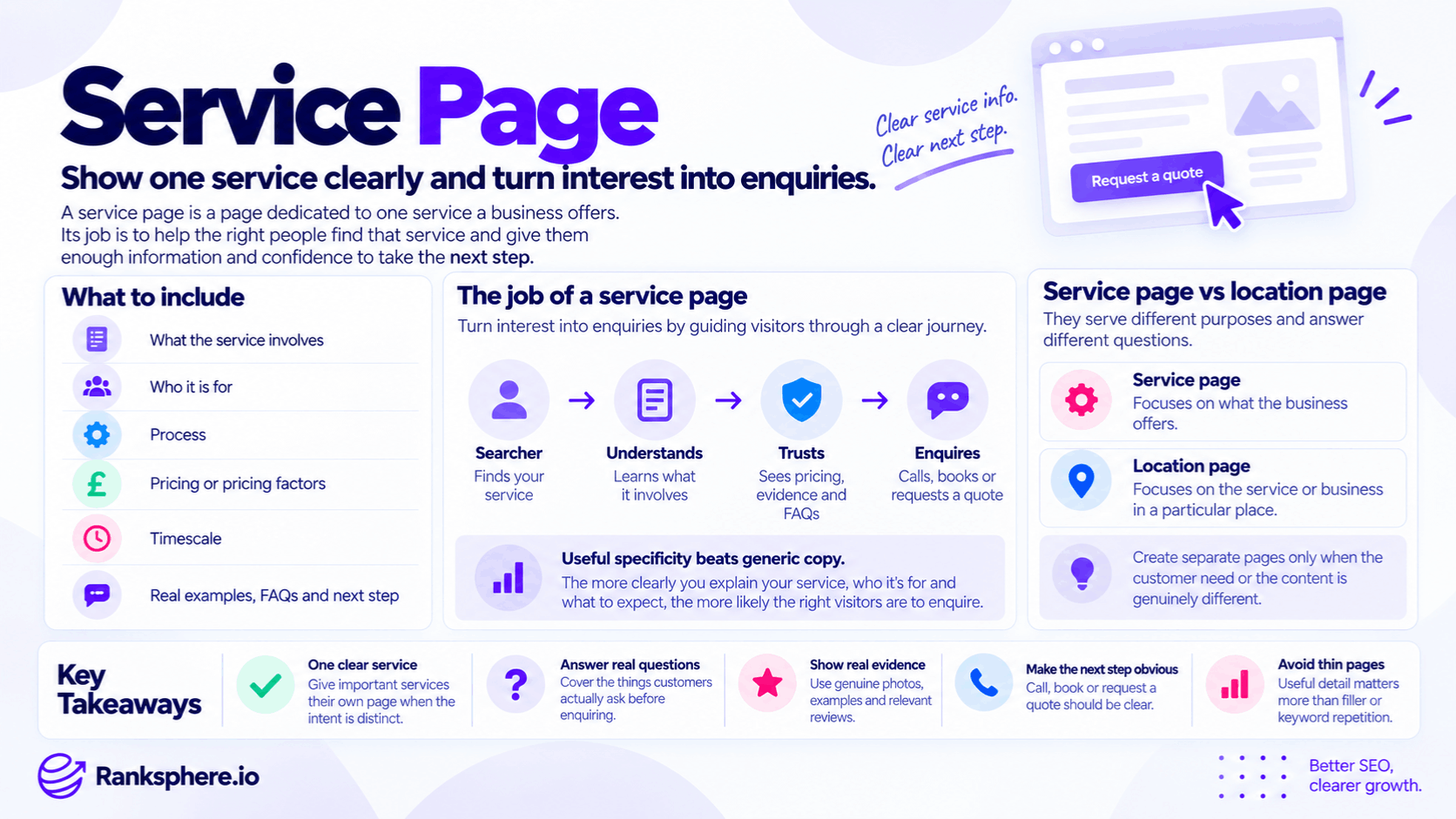
A service page explains one of the things a business does.
For example, a plumbing company might have pages for:
- Boiler repair
- Boiler installation
- Emergency plumbing
- Bathroom installation
A dental practice might have pages for:
- Dental implants
- Teeth whitening
- Emergency dentistry
- Dental hygiene
The purpose is not simply to create another SEO landing page.
A useful service page should help someone understand:
What is this service?
Is it right for me?
What does it involve?
What might it cost?
Why should I trust this business to do it?
What do I do next?
One service per page — when the intent is genuinely different
A useful starting principle is:
give important, distinct services their own pages when customers search for them separately and expect meaningfully different information.
For example:
Emergency plumbing
and:
Bathroom installation
usually represent different needs.
Someone with a burst pipe wants:
- Immediate availability
- Response information
- Emergency process
Someone researching a bathroom installation may want:
- Design
- Materials
- Timescales
- Pricing
- Previous projects
Those topics justify different pages.
Not every variation needs another URL
Do not create separate pages for wording variations that represent the same basic intent.
For example:
- Emergency plumber
- Emergency plumbing
- Emergency plumbing service
would normally belong on the same page.
Creating multiple near-identical pages for slightly different phrases can cause unnecessary overlap and keyword cannibalisation.
The right question is not:
Can I find another keyword?
It is:
Does the customer need a genuinely different page?
Related services can sometimes share a page
“One service, one page” should not become an inflexible rule.
Suppose a company offers:
- Tap repair
- Tap replacement
If the customer journey, intent and information required are almost identical, one strong page may cover both naturally.
Likewise, closely related minor services can sometimes sit within a broader page.
Site structure should follow:
- Search intent
- Customer needs
- Business structure
rather than a rigid page formula.
A Services page still has a role
A broad Services page is not automatically useless.
It can act as:
- A navigation hub
- An overview of the business
- A way to introduce service categories
For example:
/services/
could link to:
- Electrical rewiring
- EICR testing
- Consumer unit replacement
- EV charger installation
The broad page helps people understand what the company offers.
Dedicated pages then provide more detail where individual services deserve it.
What should a service page include?
There is no universal template, but strong service pages usually answer the practical questions that stand between a potential customer and an enquiry.
Useful sections may include:
- What the service involves
- Who it is for
- Common problems it solves
- Process
- Cost or pricing factors
- Timescale
- Evidence of previous work
- Frequently asked questions
- Qualifications or expertise where relevant
- Clear next step
The exact structure depends on the service.
A £50 repair does not need the same depth as a £20,000 renovation.
Explain what the service actually involves
Avoid opening with vague copy such as:
We provide high-quality professional electrical services tailored to your needs.
It says very little.
Instead, explain what actually happens.
For example:
A consumer unit replacement normally starts with an inspection of the existing board and circuits. The old unit is then removed, the new unit installed and the circuits tested before the installation is certified.
That gives the customer something useful.
Explain the process
People often hesitate to enquire because they do not know what will happen next.
A simple process section can remove that uncertainty.
For example:
1. Initial enquiry
Tell us what work you need.
2. Site visit
We inspect the property and confirm the scope.
3. Quotation
You receive a written quote explaining the work and costs.
4. Installation
The work is completed on the agreed date.
5. Handover
We test the installation and provide the relevant documentation.
The process does not need to sound impressive.
It needs to be accurate.
Include pricing when it can be stated responsibly
Cost is one of the most useful questions many service pages can answer.
Where the business can provide reliable pricing, include it.
That might mean:
- Fixed price
- Starting price
- Typical range
- Hourly rate
For example:
Consumer unit replacements typically start from £X, with the final price depending on the number of circuits and any remedial electrical work required.
That is more useful than:
Contact us for a competitive quote.
Do not invent a price range
Some services cannot be priced meaningfully without inspecting the work.
For example:
- Roof replacement
- Major drainage repair
- Full landscaping project
- Structural work
In that case, explain the pricing factors.
For example:
The final cost depends on roof size, material, access, the condition of the existing structure and whether additional repair work is needed.
Transparent pricing does not always mean publishing one number.
It means helping the customer understand how the price is determined.
Explain how long the service takes
Timescale is another common customer question.
Where possible, explain:
- How long the appointment takes
- How long the work usually takes
- What can cause delays
Avoid promising unrealistic certainty.
For example:
Most standard installations are completed within one working day, although additional remedial work can extend the job.
That is useful without pretending every project is identical.
Explain who the service is suitable for
Not every visitor should become a lead.
A good service page can help people qualify themselves.
For example:
Dental implants may be suitable for people who have lost one or more teeth and have sufficient bone to support an implant. A clinical assessment is needed before treatment can be recommended.
This is more useful than trying to persuade every visitor to book immediately.
Explain when the service may not be appropriate
Honest limitations can increase trust.
For example:
A repair company might explain when:
replacement may be more economical than another repair.
A dentist may explain when:
a particular treatment may not be suitable without further assessment.
Qualification can improve the quality of enquiries.
It does not necessarily reduce them in a harmful way.
Show real work
Original photographs can make a service page much more credible.
Useful examples include:
- Completed projects
- Before-and-after images
- Team at work
- Equipment
- Finished results
Real images demonstrate what the business actually does.
Stock photography can still have legitimate design uses, but it cannot provide the same evidence of first-hand work.
Use photographs with context
Do not simply place ten photographs in a gallery.
Explain what they show.
For example:
Consumer unit replacement completed in a 1970s semi-detached property. The original board lacked modern residual-current protection, so the installation was replaced and the existing circuits tested.
Now the photograph has meaning.
Case examples
Short case examples can strengthen commercially important pages.
A useful example might include:
- Problem
- Work completed
- Challenges
- Outcome
You do not need a full case study every time.
Even a few sentences based on real work can make the page more specific.
Reviews related to the service
Where appropriate and permitted, relevant customer feedback can support the page.
A generic review saying:
Great company!
provides little service-specific evidence.
A review mentioning:
consumer unit replacement
or:
emergency call-out
is more directly relevant.
Do not rewrite or manufacture customer reviews for SEO.
Use authentic feedback.
Who performs the work?
For some services, the person doing the work matters.
This is especially true for:
- Healthcare
- Legal services
- Financial services
- Specialist trades
Where appropriate, explain:
- Who provides the service
- Relevant qualifications
- Professional registrations
- Genuine experience
That gives potential customers useful information before they enquire.
Answer the questions customers really ask
Service-page FAQs should come from genuine customer concerns.
Useful sources include:
- Phone calls
- Emails
- Reception staff
- Sales teams
- Enquiry forms
For example:
- How quickly can you come out?
- Do I need to leave the property?
- Is the quote fixed?
- Is there a guarantee?
- Do you remove the old unit?
These questions are often more valuable than generic FAQs copied from competitors.
FAQ content does not require FAQ rich results
FAQ content can still be useful because customers want answers.
But do not add FAQs solely because you expect Google to display FAQ rich results.
Google significantly restricted FAQ rich-result visibility, and ordinary local-business pages should not treat FAQPage markup as a search-feature shortcut.
Use structured data only when it accurately represents the page.
The customer value of the FAQ is the important part.
Give the page a clear next step
A visitor should not reach the bottom of a strong service page and wonder:
What now?
Depending on the business, the next step might be:
- Call
- Request a quote
- Book
- Complete a form
- Send photographs
Make the action obvious.
Match the CTA to the service
Not every service needs:
BUY NOW
or:
BOOK TODAY
For an expensive project, a better CTA might be:
Request a site survey
For a medical service:
Book an initial consultation
For an emergency trade:
Call for availability
The action should match how customers actually buy the service.
Service pages and search intent
Before creating a service page, check what people searching for the service appear to want.
A query such as:
emergency plumber Bristol
has strong commercial intent.
A query such as:
why does my boiler lose pressure
is mostly informational.
The second may deserve a guide rather than another service page.
Page type should follow intent.
Service pages and location pages
A location page and a service page can serve different purposes.
Service page
Focuses primarily on:
what the business provides.
Location page
Focuses primarily on:
the business or service in relation to a particular place.
The distinction is not always perfectly clean, but it helps prevent unnecessary duplication.
Local context can belong on service pages
For a local business, a service page can still make the geographic context clear.
For example:
Emergency Plumbing in Maidstone
may be an appropriate service page if Maidstone is the business's primary market.
Do not assume search engines will infer every relevant location purely from proximity.
Use location information naturally where it helps customers understand:
- Where the service is available
- Which branch provides it
- What area the business covers
Service-by-location pages
A service-by-location page can make sense when it has a genuine reason to exist.
For example:
Emergency Plumbing in Maidstone
and:
Emergency Plumbing in Canterbury
may justify separate pages if the business can provide genuinely useful area-specific information.
But generating every possible:
service × town
combination can quickly become programmatic SEO.
If those pages differ only by place name, they are unlikely to provide much value.
Location pages should not manufacture proximity
A page about a town does not move a business physically closer to someone searching there.
For local-pack visibility, factors such as:
- Relevance
- Distance
- Prominence
still matter.
Location-specific pages can support organic visibility and help explain real service coverage.
They do not create a new physical location.
Google Business Profile services
Important services should also be represented accurately within Google Business Profile services where the feature is available.
For example, if the website prominently offers:
dental implants
but the Business Profile omits the service entirely, the profile is giving an incomplete picture of the business.
The website and profile do not need identical wording.
They should agree on the underlying facts.
Does every GBP service need a service page?
No.
A Business Profile may contain smaller services that do not warrant separate website pages.
For example:
A plumber might list:
- Tap replacement
- Toilet repair
- Leak repair
These could all be covered within a broader:
Plumbing Repairs
page if they share the same intent.
Create dedicated service pages only when there is enough distinct customer need to justify them.
Service page URLs
Keep URLs simple and stable.
For example:
/services/emergency-plumbing/
is clear.
You do not need:
/best-emergency-plumber-emergency-plumbing-services-near-me/
A good URL describes the page without becoming a keyword list.
Title tags
The title tag should clearly describe the service.
For example:
Consumer Unit Replacement in Bristol | Bramford Electrical
can work well when location and brand are useful.
Do not cram every keyword variation into the title.
Google can also rewrite title links, so the goal is clarity rather than treating the title as an exact display command.
Headings
Use headings to organise the page logically.
A service page might include:
Consumer Unit Replacement
When does a consumer unit need replacing?
What the work involves
How much does it cost?
How long does replacement take?
Our recent consumer unit work
Frequently asked questions
Headings should help the reader scan.
They are not places to repeat the target keyword mechanically.
Internal linking
Important service pages should receive relevant internal links.
Possible sources include:
- Home page
- Services overview
- Related guides
- Relevant location pages
For example:
A guide explaining:
why a circuit breaker keeps tripping
could link naturally to:
electrical fault finding
if professional diagnosis is relevant.
Use descriptive anchors.
Do not force identical keyword-rich anchor text across the entire site.
Link out from the service page too
Internal linking should not only point into a service page.
The service page can also link naturally to:
- Related services
- Pricing information
- Guides
- Relevant location information
This helps customers move through the site.
LocalBusiness schema
LocalBusiness schema can describe a local business and its factual details.
It does not need to be treated as a unique SEO requirement for every service page.
The site's structured data should accurately represent:
- The business
- Relevant locations
- Information actually present on the page
Schema is descriptive.
It is not a local-ranking shortcut.
NAP
Where the page contains business contact details, keep them accurate.
The underlying:
- Name
- Address
- Phone number
should agree with the real business.
Do not obsess over trivial formatting differences such as:
Street
versus:
St
when the factual information is identical.
Accuracy is the important part.
Mobile usability
Local service pages often receive visitors who are:
- On their phone
- Looking for immediate help
- Ready to call
Test the page on mobile.
Check:
- Phone number is tappable
- Forms are usable
- Buttons are easy to find
- Important content is not hidden
- Page loads reasonably well
A page can rank and still lose the enquiry through poor usability.
Page speed
Performance matters to users.
But avoid treating every imperfect Lighthouse score as a reason to delay publishing a useful service page.
Focus on meaningful issues such as:
- Very slow loading
- Oversized images
- Broken layouts
- Interaction delays
Technical optimisation should support the customer experience.
Word count
There is no correct word count for a service page.
Do not assume:
200 words is always thin
or:
900 words is enough
or:
2,000 words ranks better.
A straightforward service may need less explanation.
A complex medical or financial service may require considerably more.
Write enough to answer the customer's questions properly.
Then stop.
Thin service pages
A service page becomes weak when it provides very little useful information relative to its purpose.
That may look like:
We offer professional boiler repair services. Our experienced team provides reliable boiler repairs throughout the area. Contact us today.
The problem is not merely that the paragraph is short.
The problem is that it does not answer:
- What problems you repair
- How the process works
- Availability
- Cost
- What happens next
See thin content for the wider concept.
Do not pad thin pages
If a service page lacks useful information, the solution is not automatically:
add another 1,000 words.
Add information the customer genuinely needs.
That could be:
- Pricing
- Process
- Real examples
- Qualifications
- FAQs
Useful specificity beats padding.
Service-page conversion
Ranking is only half the job.
A service page also needs to persuade the right person to continue.
Useful conversion elements may include:
- Clear contact options
- Relevant reviews
- Real work
- Pricing information
- Qualifications
- Guarantees
- Booking availability
Do not add everything simply because it appears on a conversion checklist.
Use what matters for that service.
Search Console and service pages
Search Console can help diagnose how service pages perform.
Look at:
- Queries
- Impressions
- Clicks
- Average position
For example:
A page may receive many impressions but few clicks.
That could suggest:
- Unappealing title/snippet
- Poor intent match
- Stronger SERP features
It does not automatically prove the service page needs more words.
When to consolidate service pages
Sometimes a site has too many pages.
For example:
- Fuse box replacement
- Consumer unit replacement
- New consumer unit
may overlap heavily depending on how customers search and how the business provides the service.
If pages consistently target the same intent, consolidation may produce a clearer site.
Review:
- Search queries
- Page purpose
- Content overlap
before deciding.
When to split a service page
The opposite can also happen.
A broad page such as:
Electrical Services
may cover:
- Rewiring
- EICR testing
- EV chargers
- Consumer units
If each service has substantial independent search demand and requires different information, individual pages may be useful.
The Services page can remain as the hub.
Service pages and content briefs
A strong service page should ideally start with a clear content brief.
Before writing, define:
- Target intent
- Audience
- Important questions
- Required business information
- Internal links
- CTA
This prevents the writer from producing another generic service description that could belong to any company.
Ranksphere and service-page visibility
Ranksphere's rank tracker tracks service terms across your service area, helping businesses see how visibility varies geographically rather than relying on one ranking checked from the business address.
That distinction is particularly useful for local services.
A company may perform strongly near its base but lose visibility farther across the target area.
Rank tracking can show the pattern.
It does not by itself explain the cause.
Common service page mistakes
- Creating pages that provide little useful information.
- Treating “one service, one page” as an absolute rule.
- Creating a separate page for every keyword variation.
- Putting every distinct service on one shallow page when individual pages are justified.
- Forcing a price onto services that cannot be quoted responsibly.
- Hiding all useful pricing information behind “contact us”.
- Using generic copy that could belong to any competitor.
- Relying entirely on stock imagery when real work is available.
- Creating service-by-location pages with nothing genuinely local.
- Assuming location is always understood from proximity alone.
- Creating a new website page for every Google Business Profile service.
- Leaving important pages poorly internally linked.
- Treating LocalBusiness schema as a ranking requirement for every service page.
- Adding FAQ schema purely to chase rich results.
- Writing to an arbitrary word-count target.
- Optimising for rankings while ignoring the enquiry journey.
Service page best practices
- Create dedicated pages for services with genuinely distinct intent.
- Combine closely related services where one page serves customers better.
- Explain exactly what the service involves.
- Describe the process in plain language.
- Publish pricing or useful pricing factors where appropriate.
- Explain realistic timescales.
- Show who the service is and is not suitable for.
- Use genuine photographs and real examples where possible.
- Include relevant qualifications and evidence where they matter.
- Answer questions customers actually ask.
- Give the visitor a clear next step.
- Use natural geographic context where relevant.
- Keep the website and Google Business Profile services factually aligned.
- Link important service pages properly with internal links.
- Keep the page easy to use on mobile.
- Update the page when pricing, process or the service itself changes.
Example
“Bramford Electrical has eleven service pages.
Most were created when the website launched.
Several contain little more than:
- A short introduction
- Generic claims
- A contact form
The assumption is that the business needs even more pages.
Instead, the team reviews Search Console, customer enquiries and the actual purpose of each page.
Two services clearly deserve substantial standalone pages:
- Consumer unit replacement
- EICR testing
Several others overlap enough to be consolidated.
The two priority pages are rebuilt around real customer questions.
The consumer unit page now explains:
- Why replacement may be needed
- What the electrician checks first
- What the work involves
- Factors affecting price
- Typical timescale
- What certification is provided
The business also adds:
- Photographs of completed installations
- The electrician's genuine qualifications
- Customer questions taken from phone enquiries
- Clear links to related electrical services
Where reliable pricing can be given, the page explains it.
Where the final cost depends on inspection, it explains the variables rather than inventing a fixed figure.
The remaining service pages are reviewed individually.
Some stay.
Some are strengthened.
Others are consolidated where they were targeting essentially the same customer need.
The site ends up with fewer URLs, but each important service is easier to understand and better connected to the rest of the site.
Performance is then measured using:
- Search visibility
- Search Console data
- Qualified enquiries
rather than assuming that changing the page structure will automatically produce first-page rankings within a fixed timeframe.
That is the role of a good service page:
give a specific customer the information they need about a specific service, demonstrate that the business can genuinely provide it and make the next step easy when they are ready to act.”
See also
- Location page — the geographic counterpart to a service-focused page
- Thin content — when a page provides too little value for its purpose
- Google Business Profile services — structured service information on the Business Profile
- Keyword cannibalisation — what can happen when several pages compete for the same intent
- Content brief — defining what a service page needs before writing begins
- Internal linking — connecting important service pages with the rest of the site