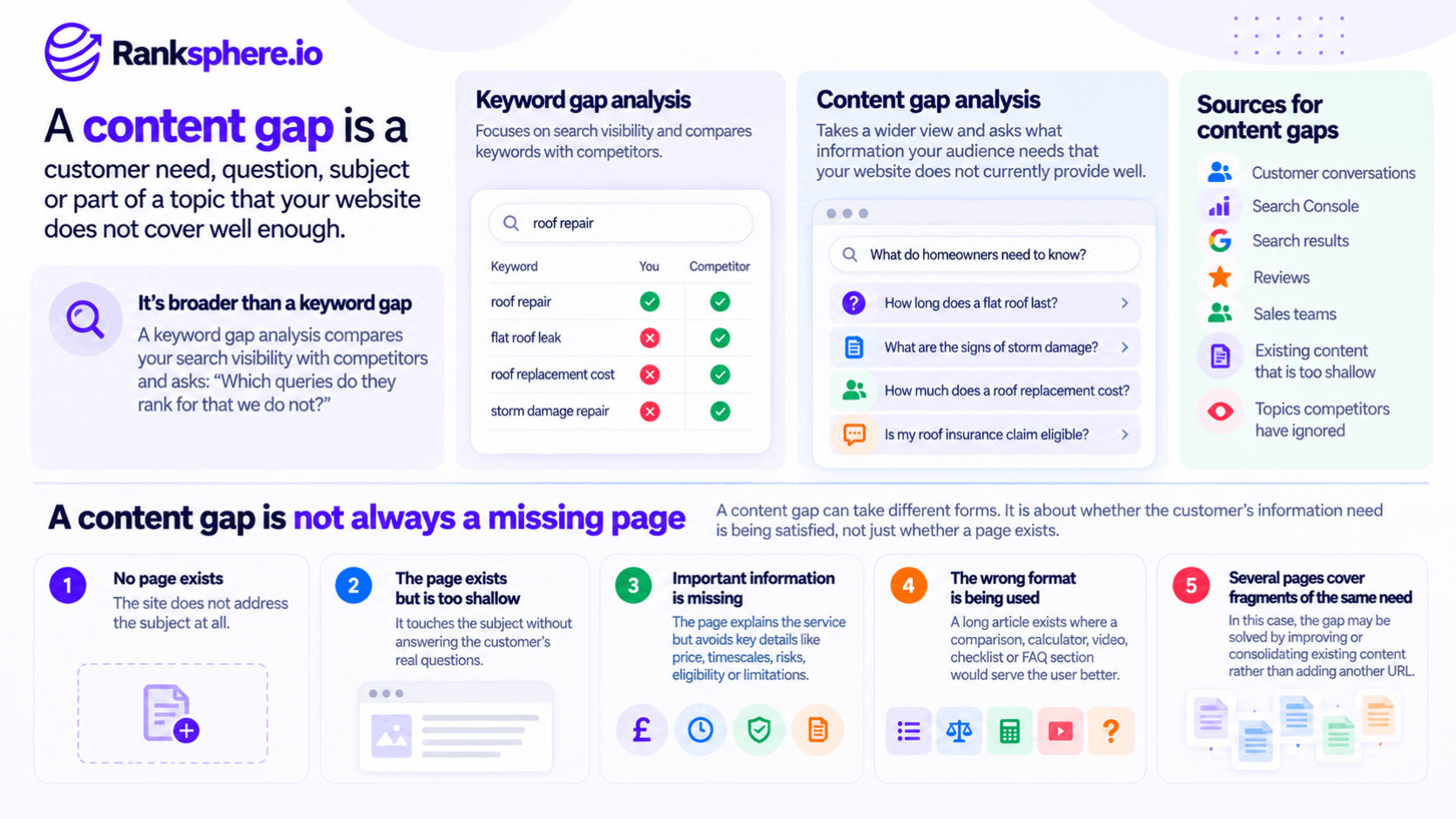
A content gap is a customer need, question, subject or part of a topic that your website does not cover well enough.
That is broader than a simple keyword gap.
A keyword gap analysis usually compares your search visibility with competitors and asks:
Which queries do they rank for that we do not?
A content gap asks a wider question:
What information does our audience need that our website does not currently provide well?
Sometimes the answer comes from competitor research.
Sometimes it comes from:
- Customer conversations
- Search Console
- Search results
- Reviews
- Sales teams
- Existing content that is too shallow
And sometimes the strongest opportunity is a subject that competitors have largely ignored.
That distinction matters because copying everything competitors have written can only reproduce the market as it already exists.
A useful content-gap analysis should also uncover information the market is failing to provide.
A content gap is not always a missing page
This is an important distinction.
A content gap might mean:
No page exists
The site does not address the subject at all.
The page exists but is too shallow
It touches the subject without answering the customer's real questions.
Important information is missing
The page explains the service but avoids:
- Price
- Timescales
- Risks
- Eligibility
- Limitations
The wrong format is being used
A long article exists where a:
- Comparison
- Calculator
- Video
- Checklist
- FAQ section
would serve the user better.
Several pages cover fragments of the same need
In that case, the gap may be solved by improving or consolidating existing content rather than adding another URL.
So:
content gap = missing page
is too narrow.
The real question is whether the customer's information need is being satisfied.
Content gap vs keyword gap
A keyword gap analysis is one useful input.
It can reveal queries or topics for which competing sites appear in search while yours does not.
For example:
A roofing competitor may rank for:
how long does a flat roof last
while your site has no useful page addressing roof lifespan.
That is worth investigating.
But competitor research has an obvious limitation:
it can only show you what competitors have already created.
If every roofing company in the area avoids explaining:
how much a flat-roof replacement costs
a conventional keyword-gap report may not surface the opportunity clearly.
Your customers still might ask the question every week.
That is why a content-gap process should use more than competitor rankings.
Where content gaps come from
There is no single best source.
The strongest analysis normally combines several.
1. Customer questions
Start with the questions people already ask the business.
These might come from:
- Phone calls
- Enquiry emails
- Consultations
- Sales conversations
- Reception teams
- Live chat
- Support requests
For example, an orthodontic practice may repeatedly hear:
- Does Invisalign hurt?
- Can I eat normally?
- How often do I need appointments?
- What happens if I lose an aligner?
- How much does treatment cost?
Those questions are valuable because they come from real customers trying to make real decisions.
They do not automatically need a separate page each.
But they give you direct evidence of the information customers need.
Customer questions are qualitative evidence
Do not confuse:
customers repeatedly ask this
with:
this keyword has high Google search volume.
Those are different signals.
A question may be commercially important even if keyword tools show tiny volume.
Another may be frequently asked during sales calls but rarely searched online.
Customer conversations tell you about customer needs.
Keyword research tells you more about search behaviour.
Use both.
2. Search Console
Google Search Console is one of the most useful sources for finding possible content gaps on an existing website.
Its Performance report shows the queries for which your site has appeared in Google Search, together with metrics such as:
- Impressions
- Clicks
- CTR
- Average position
Google specifically says the report can be used to see which queries are bringing or exposing users to your site and to improve SEO efforts.
For example, a page may receive impressions for:
flat roof repair cost
while barely addressing pricing.
That is worth investigating.
Search Console does not “tell you to create a page”
An impression does not mean:
Google wants a new page for this query.
It only tells you that your site appeared for the search.
The right response might be:
- Add a useful section to the existing page
- Improve the current explanation
- Create a dedicated page
- Do nothing
depending on the search intent and what already exists.
This distinction prevents content teams from creating unnecessary URLs every time a new query appears.
Search Console query data is also incomplete
Search Console should not be treated as a complete record of every search involving your site.
Google says:
- Rare anonymised queries can be omitted from query tables
- Table row limits apply
- Filtering can cause differences between table and chart totals
So Search Console is a valuable first-party source.
It is not a complete keyword database.
3. Competitor content
Competitor research can show you:
- Subjects they cover
- Questions they answer
- Service details they explain
- Formats they use
That is useful.
But the correct question is not:
“What do they have that we do not?”
It is:
“Which of those differences actually matter to our customers?”
A competitor may have 600 pages because it operates nationally.
That does not mean a local business needs to reproduce them.
Filter competitor gaps for:
- Audience relevance
- Business relevance
- Search intent
- Genuine expertise
A gap is not an instruction.
It is an opportunity to investigate.
4. Search results
Google Search itself can reveal useful related questions and concepts.
Sources can include:
- People Also Ask
- Google Autocomplete
- Related searches
- The ranking pages themselves
These can help you understand how a subject expands beyond one keyword.
Autocomplete
Google confirms that Autocomplete predictions can reflect real searches people have made.
However, the predictions also take into account factors such as:
- Language
- Location
- Trending interest
- Previous searches
and some word or phrase predictions can be informed by patterns found across the web. Google explicitly says Autocomplete is not simply a list of the most popular searches.
Use it for:
discovery
not:
search-volume measurement.
Related searches
Google says related searches are automatically generated based on what its systems understand about how people search.
That makes them useful for finding:
- Related concepts
- Alternative phrasing
- Adjacent needs
But again:
appears under Related searches
does not tell you:
- Monthly volume
- Commercial value
- Whether you need a new page
Those decisions still need analysis.
People Also Ask
People Also Ask can reveal questions Google considers relevant enough to surface around a search.
Google's documentation confirms that featured snippets can appear inside the People Also Ask section when its systems identify useful answers from webpages.
That makes PAA useful for:
- Understanding related questions
- Examining how Google frames the topic
- Finding subtopics worth investigating
It is not a direct measure of search volume.
And not every PAA question deserves its own page.
5. Existing content
One of the most overlooked sources of content gaps is:
your own website.
You may already have the right URL, but the page does not answer the question well enough.
For example:
A page called:
Boiler Installation
might cover:
- Installation process
- Brands
- Booking
but never explain:
- Typical cost variables
- How long installation takes
- Whether the old boiler is removed
- What preparation is needed
Those are still content gaps.
The fix may be to improve the existing page rather than create four more URLs.
Refresh before you create
Before commissioning a new page, ask:
Does something on the site already serve substantially the same purpose?
If yes, a content refresh may be appropriate.
But avoid saying:
“a refresh is always cheaper.”
That depends on:
- Content quality
- Technical condition
- How much rewriting is needed
- Whether the intent has changed
Sometimes improving an existing page is efficient.
Sometimes a genuinely distinct page is warranted.
Content gaps and keyword cannibalisation
Creating a new page on a related subject does not automatically create keyword cannibalisation.
Cannibalisation becomes a concern when multiple pages unnecessarily compete to satisfy substantially the same search need.
For example:
/flat-roof-repair/
and:
/flat-roof-repairs/
covering essentially the same service may be redundant.
But:
/flat-roof-repair/
and:
/how-long-does-a-flat-roof-last/
can have clearly different purposes.
Before creating a new URL, identify whether the user intent is genuinely distinct.
What makes a content gap worth filling?
Not every uncovered topic deserves content.
Use a filter.
Can you answer it well?
If the business has no meaningful expertise or experience in the subject, a competitor gap alone is not enough.
Google's current people-first guidance encourages content that demonstrates first-hand experience, real expertise and useful original information rather than content created mainly to attract search traffic.
A gap outside your genuine area of knowledge may simply not be your opportunity.
Does the audience care?
A keyword tool can produce thousands of related terms.
Most businesses should not write about all of them.
Ask:
- Does this matter to our customers?
- Does it help them make a decision?
- Does it answer a real problem?
- Is it relevant to our products or services?
A gap with no meaningful audience relationship is just a missing topic.
That does not make it strategically useful.
Is the intent relevant?
See search intent.
Search the query and examine the results.
Are people looking for:
- A service?
- A definition?
- A comparison?
- Instructions?
- A product?
- A local provider?
For example:
roofing
and:
how to install a slate roof yourself
both relate to roofing.
They may represent completely different audiences and business opportunities.
A content gap is only useful if you can satisfy the underlying need well.
Does it have to lead directly to an enquiry?
No.
The original rule:
“traffic with no path to an enquiry is a cost”
is too narrow.
Some useful content can:
- Build trust
- Answer early-stage questions
- Support another page
- Reduce objections
- Earn links
- Help existing customers
- Assist sales teams
The content should still have a reason to exist.
But that reason does not need to be:
direct lead generated from this page.
Is there evidence of demand?
Demand can come from several forms of evidence.
For example:
- Search data
- Customer conversations
- Sales questions
- Search Console impressions
- Search-result features
- Reviews
- Internal-site search
- Support queries
Do not rely on one number.
Search volume is useful.
It is not the only definition of demand.
National volume is not automatically local demand
This point from the original draft is good, but it needs nuance.
A national keyword tool may report:
2,000 searches per month
for a service.
A local business cannot assume its catchment contains a proportional share of those searches.
Demand varies by:
- Population
- Competition
- Geography
- Seasonality
- Local terminology
Local estimates and first-party evidence can help.
But no keyword tool gives perfect local demand.
Use volume directionally.
Can you add something worthwhile?
This is increasingly important.
Google's spam policies specifically warn against producing many unoriginal pages primarily to manipulate rankings.
If the only planned contribution is:
“Rewrite the five top-ranking pages into another article”
the content gap may not be worth filling.
Look for something useful you can contribute.
That may be:
- First-hand experience
- Original photographs
- Real examples
- Better explanation
- Local expertise
- Pricing methodology
- A clearer comparison
Group gaps by customer need
Avoid turning your research into 200 separate article ideas.
Suppose you find:
- How much does emergency vet care cost?
- What does an emergency vet visit cost?
- Emergency vet consultation price
- How expensive is an out-of-hours vet?
Those may represent one core customer need:
out-of-hours veterinary pricing.
Grouping related queries and questions prevents unnecessary fragmentation.
This is where topic clusters can be useful.
But again, a cluster is an organisational approach.
It does not require a fixed number of pages.
A practical content-gap workflow
A useful process can look like this:
1. Audit what you already have
Build an inventory of relevant pages.
Identify:
- Strong pages
- Weak pages
- Overlap
- Missing subjects
Ranksphere's website audit surfaces thin and near-duplicate pages across a site, helping distinguish between a genuinely missing topic and a page that already exists but may need improvement.
2. Collect real customer questions
Ask:
- Reception
- Sales
- Support
- Account managers
- Business owners
to record repeated questions.
A month can be useful as a starting sample, but there is no requirement to stop there.
For some businesses, ongoing collection is more valuable.
3. Review Search Console
Look for queries with:
- Meaningful impressions
- Relevant intent
- Existing pages that under-address the need
Do not simply filter:
impressions > 0 = new page.
Investigate the landing page first.
4. Analyse the search results
Use:
- People Also Ask
- Google Autocomplete
- Related searches
- Ranking pages
to understand:
- Terminology
- Questions
- Formats
- Search intent
5. Compare competitors
Choose competitors that actually compete for the same audience.
Do not limit yourself arbitrarily to:
exactly two or three competitors.
In a small local market, three may be plenty.
In another market, a broader set may be useful.
6. Group related needs
Combine variations that belong to the same user need.
7. Check the existing site again
Decide whether each gap requires:
- New page
- Expanded section
- Content refresh
- Consolidation
- No action
8. Prioritise
Use factors such as:
- Customer importance
- Commercial relevance
- Search opportunity
- Existing visibility
- Distinctive expertise
- Cost to produce
- Business priority
There is no universal weighting.
Customer questions are often the most differentiated source
Competitor analysis tends to produce familiar ideas.
Customer conversations can reveal questions competitors have not addressed.
That does not make them automatically more valuable.
But it makes them particularly useful for finding original opportunities.
For example, a private clinic might repeatedly hear:
Can I bring someone with me to the appointment?
If no competing site answers it, that may still be worthwhile information.
The business knows it matters because real patients ask.
Search Console gaps need page-level analysis
Suppose Search Console shows:
boiler repair cost
with many impressions and few clicks.
Before creating:
/boiler-repair-cost/
check which existing page is generating those impressions.
If:
/boiler-repair/
already ranks for the term, the better fix may be:
- Add useful cost information
- Improve the title
- Strengthen the relevant section
Creating another page could unnecessarily split the topic.
Search Console should generate questions.
Not automatic URLs.
Search Console data should be interpreted carefully
Remember that Search Console reports:
how your existing site performed in Google Search.
It does not reveal all unmet market demand.
Queries for which your site has never appeared will not suddenly show up simply because they represent good opportunities.
It also excludes some anonymised queries from the query table.
That makes Search Console especially good at finding:
nearby opportunities around your existing visibility
rather than mapping the entire market.
The gaps competitors avoid
Some types of information are regularly under-covered because businesses find them uncomfortable to publish.
These can produce genuinely useful content when they are appropriate.
Price and cost
Customers often want to know what something costs before contacting a business.
That does not mean every business needs to publish one fixed number.
A useful page might explain:
- Typical range
- What affects price
- What is included
- What can increase the cost
Only publish figures you can keep accurate.
And for regulated or sensitive industries, follow the relevant professional and advertising rules.
Who the service is not for
Content explaining limitations can be useful.
For example:
When Invisalign may not be suitable
may help patients understand that assessment is required.
That can build trust because the page is helping the reader make a decision rather than simply selling the service.
Be particularly careful with health, legal and financial topics.
The business should provide information within its real expertise and appropriate professional standards.
What can go wrong
Customers often want to understand:
- Risks
- Common problems
- Failure modes
- Maintenance
- What happens if something is delayed
This can be valuable where the business genuinely has first-hand knowledge.
Do not use scare tactics.
The objective is to help someone understand the decision.
Difficult customer questions
Some of the most useful content comes from questions people hesitate to ask.
Depending on the industry, that could include:
- Pain
- Embarrassment
- Cost
- Delays
- Failure
- Recovery
- Cancellation
These subjects should be handled sensitively.
But avoiding them because competitors avoid them can leave genuine information needs unanswered.
Local knowledge
Local businesses can sometimes provide information national publishers cannot.
For example:
- Local planning considerations
- Regional property types
- Weather conditions
- Local processes
- Genuine service-area limitations
That can make the content more useful.
But do not manufacture local detail simply to make a page appear unique.
If the local factor does not materially change the answer, there is no reason to force it in.
Review sentiment as another gap source
Review sentiment can reveal subjects customers care about.
For example, customers may repeatedly praise:
- Speed
- Communication
- Aftercare
or repeatedly express confusion about:
- Pricing
- Appointment preparation
- Delivery timing
Some themes belong in marketing content.
Others belong in operations.
A content-gap analysis should know the difference.
Internal-site search can reveal gaps too
If your website has internal search, examine what visitors search for.
Repeated searches for:
refund policy
when no refund page exists are a clear signal.
Likewise, searches for a service that is difficult to find may reveal a navigation problem rather than a missing-content problem.
That distinction matters:
not every information gap requires SEO content.
Sometimes the solution is:
- Better navigation
- Better page structure
- Better labels
Content gaps and site architecture
A topic may technically exist on the site but still be effectively missing if customers cannot find it.
For example:
Pricing may be buried at the bottom of an unrelated page.
The content-gap solution could simply be:
- Better navigation
- Clearer headings
- Stronger internal linking
before creating anything new.
Prioritising content gaps
A simple prioritisation model can ask:
Audience value
How much does the customer need this?
Business relevance
How closely does it relate to what we actually provide?
Evidence of demand
What evidence suggests the need exists?
Existing coverage
Do we already address it?
Ability to add value
Can we produce something genuinely useful?
Effort
How difficult is it to create and maintain?
This produces a much better roadmap than sorting a spreadsheet by search volume alone.
Do not prioritise by commercial value alone
The original draft says:
prioritise by commercial value, then distinctiveness.
That may work for some businesses, but it is too rigid.
An early-stage informational question can be worth addressing even if it does not immediately generate an enquiry.
Likewise, a commercially attractive keyword may be a poor priority if:
- The business cannot answer it well
- Intent is wrong
- Competition is unrealistic
- The existing page already covers it
Use several factors.
The content-gap analysis is not the final deliverable
A spreadsheet containing:
437 missing keywords
is not a strategy.
The useful output is a prioritised plan explaining:
- Which needs matter
- What already exists
- What should change
- Which new pages are justified
- Which existing pages should improve
- Which ideas should be ignored
That plan should then feed into the wider content strategy.
Common content-gap mistakes
- Treating competitor keyword comparison as the whole analysis.
- Assuming every competitor page represents an opportunity.
- Calling every Search Console impression a content gap.
- Saying Search Console has “flagged” a missing page when it has only reported performance data.
- Using Google Autocomplete or People Also Ask as though they provide search-volume data.
- Creating one page for every keyword variation.
- Assuming a new related page automatically causes keyword cannibalisation.
- Publishing a new page when an existing page needs expansion instead.
- Chasing national keyword volume without checking whether the opportunity matters locally.
- Ignoring content gaps that customers reveal directly.
- Requiring every page to produce a direct enquiry.
- Producing generic content on subjects where the business has little genuine expertise.
- Copying competitors instead of identifying what the market still fails to explain.
- Producing a gap spreadsheet without turning it into a prioritised plan.
Content-gap best practices
- Start with customer needs rather than competitor keywords alone.
- Use Search Console as evidence of existing search visibility, not as an automatic page-generation tool.
- Use People Also Ask, Google Autocomplete and related searches for discovery rather than exact demand measurement.
- Review existing pages before deciding that a new URL is required.
- Group related queries by intent and customer need.
- Use content refresh where an existing page can genuinely satisfy the need.
- Create separate pages only when the intent or purpose is distinct enough to justify them.
- Filter opportunities for audience relevance, business relevance and genuine expertise.
- Use search volume directionally rather than treating it as the only evidence of demand.
- Look for useful subjects competitors avoid, particularly where customers repeatedly ask about them.
- Turn the analysis into a prioritised content plan, not just a list of missing keywords.
Example
“Consider a hypothetical veterinary practice called Thornbury Veterinary.
The practice asks its agency for a content plan.
The first competitor-gap export produces hundreds of pet-related terms.
They include topics around:
- General pet nutrition
- Breed guides
- Training
- Grooming
- Toys
Large national publishers rank for many of them.
Technically, these are:
keyword gaps.
Strategically, most are irrelevant to the practice.
The team changes the research process.
Reception and the clinical team begin recording recurring customer questions.
Several themes appear:
- What should I do if my dog eats grapes?
- When does limping need urgent attention?
- Can a vaccination be delayed?
- What happens at an emergency appointment?
- How much does an out-of-hours consultation cost?
The agency then reviews Search Console.
Some of those subjects already produce impressions for existing pages.
That does not automatically trigger five new articles.
Each query is mapped against the current site.
The team discovers that:
Is already addressed reasonably well on an existing vaccination page.
The page needs a better section, not a new URL.
Are barely explained anywhere.
Customers ask about them regularly, and the information has clear decision-making value.
That is a stronger gap.
Several questions belong to a broader emergency guidance area rather than requiring one thin article for every food or substance.
The content plan is therefore built around customer needs, not every keyword variation.
The team also checks:
- People Also Ask
- Google Autocomplete
- Related searches
- Local competitors
These provide additional language and questions to investigate.
They are not treated as search-volume reports.
The resulting plan might contain:
- One improved vaccination page
- An out-of-hours pricing resource
- A stronger emergency-care page
- A small number of genuinely useful supporting guides
rather than hundreds of generic pet-care articles.
No fabricated outcome is needed claiming:
the pricing page became the practice's second-largest source of new clients.
The useful result is the strategy itself:
the practice stops asking what competitors have written and starts asking what its own customers need that the current website fails to explain.
That is what a useful content-gap analysis should do.
A good content gap is not simply a keyword your competitor ranks for and you do not. It is an unmet information need that matters to your audience and that your business can address credibly.
Competitor research helps find some of those gaps.
Search Console can reveal opportunities around your existing visibility.
Search features can expose related questions.
But the strongest analysis combines all of those sources with something keyword tools do not have:
the real questions customers ask the business every day.”
See also
- Keyword gap analysis — comparing search visibility with competitors
- Content strategy — turning identified gaps into a prioritised plan
- People Also Ask — discovering related questions in Google Search
- Google Search Console — analysing queries for which your existing site already appears
- Topic cluster — grouping related needs into a coherent structure
- Review sentiment — another source of customer language and recurring concerns