Content pruning is the process of reviewing existing website content and deciding what should be improved, consolidated, removed or excluded from search.
It usually follows a content audit.
The objective is not simply to make the website smaller.
It is to make the site more useful, easier to maintain and clearer in purpose.
That might mean:
- Updating an outdated page
- Merging overlapping articles
- Removing content that no longer serves anyone
- Redirecting an old URL to a genuine replacement
- Keeping a useful page live while applying noindex
- Leaving a perfectly good low-traffic page alone
Good content pruning is therefore less about:
“Which pages can we delete?”
and more about:
“What is the right future for each page?”
Does content pruning improve SEO?
It can.
But content pruning should not be treated as a guaranteed ranking technique.
Google says its ranking systems aim to reward helpful, reliable, people-first content. It encourages site owners to assess whether content provides original information, useful analysis and a satisfying experience for the intended audience.
Removing or improving genuinely poor content can therefore make the overall site more useful.
But there is no Google rule saying:
“Delete 30% of your pages and rankings improve.”
Nor is there a public threshold for:
- Too many pages
- Too much thin content
- Too much indexed content
The decision needs to be made page by page and pattern by pattern.
Content pruning is not just deletion
The word pruning can make the process sound more destructive than it is.
In practice, the most valuable outcome is often:
consolidation or improvement
rather than removal.
A page may be weak because:
- It is outdated
- It overlaps another page
- It no longer matches search intent
- Important information is missing
- It has never been maintained
- Several thin pages should really be one useful resource
Deleting it may solve none of those problems.
The better action may be a content refresh.
Why prune content?
There are several legitimate reasons.
Remove obsolete information
Some pages simply stop being useful.
Examples include:
- Expired promotions
- Events that will never recur
- Discontinued services
- Obsolete product pages
- Old announcements with no continuing value
If the information no longer serves users and does not need to remain archived, removal may be appropriate.
Consolidate overlapping pages
Sites often accumulate multiple pages covering substantially the same subject.
For example:
/flat-roof-repair/
/flat-roof-repairs/
/repairing-flat-roofs/
If all three satisfy essentially the same customer need, keeping them separate may create unnecessary duplication.
Google normally clusters duplicate or very similar pages and selects a canonical representative. Duplicate content itself is not automatically a spam violation, but having many versions can make site management and performance reporting less clear.
In cases like this, consolidation may be more useful than maintaining several weak versions.
Content pruning and keyword cannibalisation
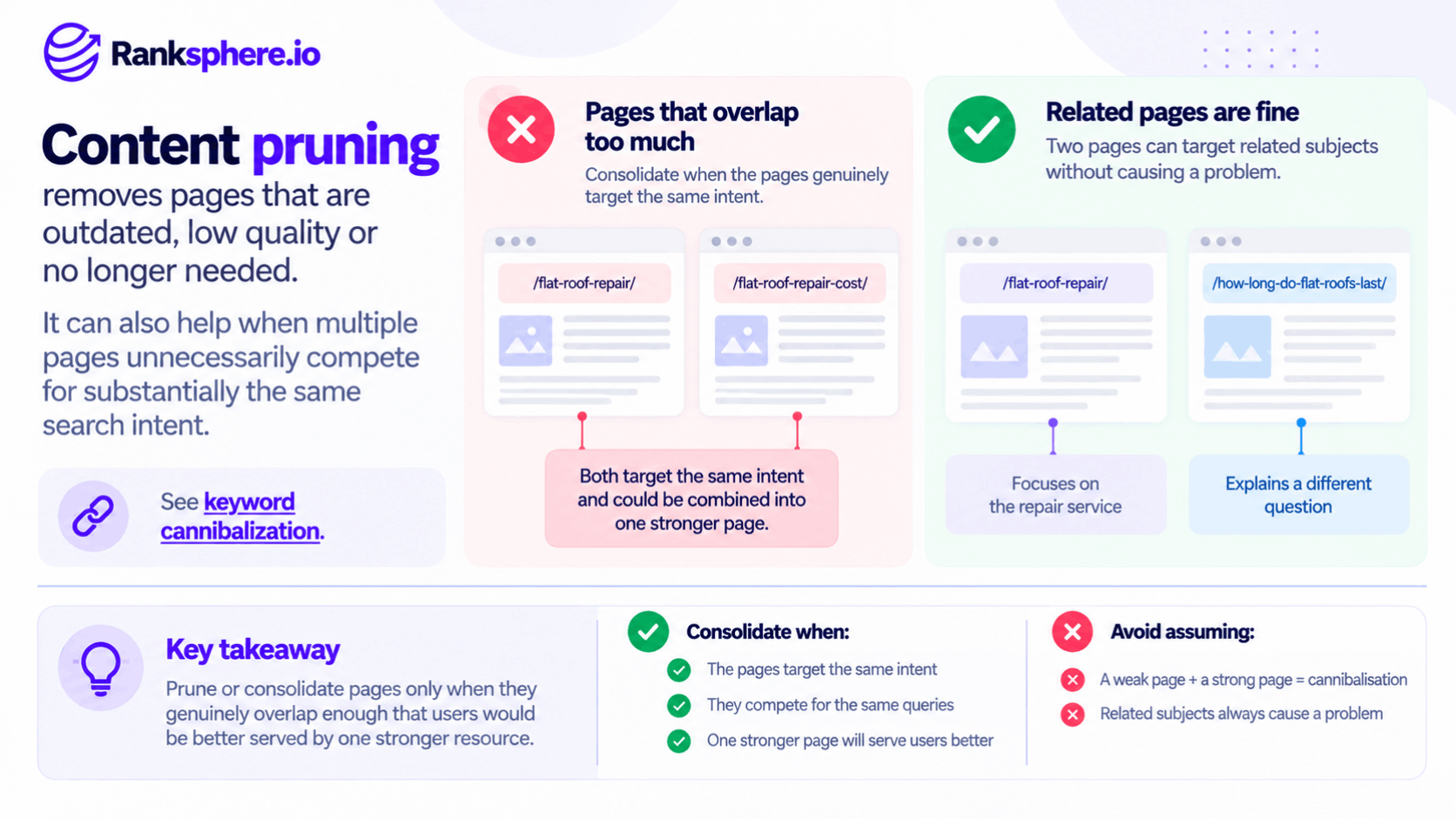
Pruning can also help when multiple pages unnecessarily compete for substantially the same search intent.
But avoid assuming:
weak page + strong page = cannibalisation.
Two pages can target related subjects without causing a problem.
For example:
/flat-roof-repair/
and:
/how-long-do-flat-roofs-last/
serve different purposes.
Consolidate only when the pages genuinely overlap enough that users would be better served by one stronger resource.
Link consolidation
When several old pages are genuinely combined into one replacement, permanent redirects can help users and Google find the consolidated page.
Google treats permanent redirects as a strong canonicalisation signal, and its documentation confirms that redirects are appropriate when content has moved or several pages have been merged.
That can help consolidate signals associated with the previous URLs.
But avoid simplistic language such as:
“five pages have five lots of link equity, so merging them pours all the authority into one page.”
Google’s link and canonical systems are more complex than that.
The safer principle is:
when content has genuinely moved or been consolidated, redirect the old URLs to the closest relevant replacement.
Content pruning and index bloat
Index bloat is an SEO-industry term for a situation where a search engine knows about or indexes many URLs that provide little useful search value.
That can happen through:
- Faceted navigation
- Parameters
- Duplicate URLs
- Thin tag pages
- Automatically generated archives
- Near-duplicate location pages
But a large indexed-page count is not itself a penalty.
Google explicitly says you should not expect every known URL on a website to be indexed. Only the canonical pages you actually want represented in Search need to be.
So the objective is not:
get the indexed-page count as low as possible.
It is:
make sure the right pages are discoverable and indexable.
Maintenance is a real benefit
Content pruning also has a benefit that has nothing to do with an algorithm.
Smaller, more focused content libraries can be easier to maintain.
A business may realistically be able to keep:
- 70 important pages accurate
while struggling to maintain:
- 500 loosely relevant pages
If old content contains:
- Outdated prices
- Incorrect services
- Dead links
- Old claims
- Obsolete advice
reducing unnecessary maintenance can improve the site even without any measurable ranking change.
What should you consider pruning?
There is no single metric.
Look for combinations of evidence.
Pages with little or no search visibility
A page with:
- No clicks
- No impressions
- No meaningful search queries
over a suitably long period deserves investigation.
But:
zero impressions = delete
is not a valid rule.
Ask why the page exists first.
It may still serve:
- Existing customers
- Paid campaigns
- Email traffic
- Navigation
- Sales teams
Or it may simply need improvement.
Near-duplicate pages
Near-duplicate pages are often stronger pruning candidates.
This can be especially relevant to templated location pages.
For example, if 30 pages differ only by replacing:
Maidstone
with:
Canterbury
while everything else remains the same, ask whether those URLs provide genuine place-specific value.
Do not remove location pages merely because they use a shared template.
Templates are not inherently bad.
The problem is when pages have no meaningful reason to exist separately.
Expired content
Old content should be judged by whether it retains value.
A page for:
Christmas opening hours 2023
probably has little continuing purpose.
A report called:
Local Search Trends 2023
may still have historical value.
The date alone does not decide.
Ask:
- Does anybody still need this?
- Does it have links?
- Is the information still useful?
- Should it be archived?
- Is there a newer equivalent?
Thin content
Thin content can be a candidate for pruning when the page provides too little value for its purpose.
But thinness is not a word-count rule.
A useful 150-word contact page can be perfectly adequate.
A 2,000-word generic article can still be low value.
Google's people-first guidance focuses on whether content is useful, substantial enough for its purpose and satisfying to users—not whether it reaches a particular word count.
Tag and category archives
A category or tag archive containing only one article might be unnecessary.
Or it might be useful navigation.
Do not automatically remove every small archive.
Ask:
- Does it help users browse?
- Is it intended to rank?
- Does it duplicate another archive?
- Will more content eventually be added?
The correct action may be:
- Keep
- Noindex
- Consolidate
- Remove
depending on the site's structure.
Crawled – currently not indexed
Do not automatically prune pages because Search Console shows:
Crawled – currently not indexed.
Google defines this status as:
the page was crawled but is not currently indexed, and it may or may not be indexed later. Google also says there is no need to repeatedly resubmit it for crawling.
Treat the status as something to investigate.
Ask:
- Is the content useful?
- Is it redundant?
- Is another page being selected instead?
- Is internal linking weak?
- Is the page genuinely worth indexing?
The label itself is not a deletion recommendation.
What should you not prune automatically?
Several signals should trigger review before removal.
But almost none creates an absolute:
never delete this page
rule.
Pages with backlinks
Backlinks matter.
But:
backlink = mandatory redirect
is too simplistic.
First determine whether there is a relevant replacement.
If an old guide has been replaced with a newer version, a 301 redirect may make perfect sense.
If the old content is gone and there is no relevant equivalent, Google recommends returning a proper 404 or 410 rather than redirecting users somewhere unrelated.
Google has also said that normal 404s do not hurt the rankings of the rest of the website.
The backlink is an important input into the decision.
It does not justify a bad redirect.
Pages receiving traffic
Traffic is another reason to pause.
But a page receiving traffic is not automatically untouchable.
Ask:
- Is the traffic relevant?
- Does the page still serve users?
- Is the information accurate?
- Could another page serve the same audience better?
For example, an outdated page might still receive visits because old links continue sending users there.
The correct action could be consolidation and redirection.
Pages with conversions
Conversions deserve particularly careful review.
Even a low-traffic page can be highly valuable if it generates:
- Calls
- Bookings
- Leads
- Purchases
Do not remove it simply because Search Console traffic looks small.
But again, a conversion does not make the URL sacred forever.
If the functionality or content is moving to a stronger replacement, consolidate properly.
Seasonal content
Always account for seasonality.
A page about:
Christmas catering
may appear dead in June.
Likewise:
- Tax deadlines
- Winter boiler problems
- Summer landscaping
- School admissions
may have narrow periods of demand.
Choose a measurement window that covers the relevant cycle.
A full year is often useful for seasonal businesses.
But 12 months is not a universal pruning requirement.
Some businesses need:
- 18 months
- Multiple annual cycles
- A shorter period for genuinely time-sensitive content
Use the window that fits the subject.
Non-SEO pages
Some URLs exist for reasons unrelated to organic search.
Examples include:
- Privacy policies
- Terms
- Returns information
- Login pages
- Customer support
- Contact processes
Search traffic is not the correct measure of whether those pages deserve to exist.
A pruning audit should understand the page's business purpose before judging it.
The main content-pruning actions
There are several possible outcomes.
1. Keep
Nothing is wrong.
Leave the page alone.
This should always be an available decision.
2. Improve
The topic is valuable but the execution is weak.
A content refresh may involve:
- Updating facts
- Improving structure
- Adding missing sections
- Removing outdated information
- Improving internal links
Do this when the page deserves to exist.
3. Consolidate
Several pages serve substantially the same purpose.
Choose the strongest destination, merge the useful information and redirect the retired URLs to that page.
For example:
/flat-roof-cost-guide/
and:
/how-much-does-flat-roofing-cost/
may reasonably become one stronger pricing guide if their intent is essentially the same.
4. Redirect
Use a permanent redirect when the removed page has a clear, genuinely relevant replacement.
Google recommends 301 or another permanent redirect when content has moved permanently.
The destination should make sense to somebody who clicked the old URL.
5. Noindex
Use noindex when a page should remain accessible to users but should not appear in Google Search.
Google says a noindex directive prevents a page appearing in its search results once Google crawls and processes the directive.
The page must remain crawlable for Google to see the directive.
Do not block it in robots.txt and expect Google to read the noindex.
6. 404 or 410
If the content is permanently gone and there is no genuine replacement:
404 or 410 is correct.
Google explicitly recommends these status codes when content no longer exists and there is no similar replacement.
A 404 is not an SEO failure when the URL genuinely should no longer exist.
Do not redirect everything
One of the most damaging pruning shortcuts is:
Old URL → homepage
for every removed page.
Google explicitly warns against redirecting many old URLs to an irrelevant destination such as a homepage, because this can confuse users and may be interpreted as a soft 404.
For example:
Old page:
/2021-office-christmas-party/
New destination:
/
is unlikely to satisfy the person looking for that old event.
If there is no suitable replacement:
return a proper 404 or 410.
What about backlinks to deleted pages?
This deserves nuance.
Suppose an old article has several useful links.
Relevant newer replacement exists
Redirect.
Old page has been merged into another resource
Redirect to the consolidated page.
No relevant content exists anymore
Do not invent a destination solely to preserve the links.
Google's own advice is clear that irrelevant redirects can create poor user experiences and that a genuine 404 is acceptable when no suitable replacement exists.
Update internal links
Once a page is removed or consolidated, update internal links.
Do not leave your site doing:
Page A → Old URL → 301 → New URL
when you control Page A.
Change it to:
Page A → New URL
The redirect can remain to handle:
- Old external links
- Bookmarks
- Historic URLs
but your own navigation should point directly to the current destination.
Update the XML sitemap
The XML sitemap should reflect the URLs you actually want Google to consider for Search.
Google recommends including the canonical URLs you want to appear in search results.
So after pruning:
Remove
- Deleted URLs
- Redirecting URLs
- Noindexed URLs that you do not want in Search
Keep
- Canonical, indexable pages you want represented
Your sitemap should not function as an archive of every URL the website has ever had.
Do not use robots.txt to deindex pruned pages
If you want a page removed from Search but still accessible, use noindex, not a robots.txt block.
Google explains that robots.txt controls crawling, while noindex controls indexing. A page blocked by robots.txt may prevent Google from seeing the noindex directive.
That distinction matters during large pruning projects.
Content pruning and crawl efficiency
On very large sites, reducing unnecessary URLs can also make crawling more efficient.
Google says sites with very large amounts of less-important or duplicate content may want to control unnecessary crawling so Google can focus more efficiently on important pages.
For a small local-business site with:
80 pages
this is unlikely to be the main motivation.
Do not turn crawl budget into the justification for deleting ten blog posts from a small website.
The main benefits are usually:
- Content quality
- Clarity
- Maintenance
- Reduced duplication
Work in batches where risk is meaningful
For a large pruning project, making changes in batches can be sensible.
For example:
Batch 1
Consolidate obvious duplicates.
Batch 2
Remove clearly obsolete content.
Batch 3
Address marginal pages after reviewing the earlier changes.
This makes QA and troubleshooting easier.
But:
you must always wait several weeks between every batch
is not a Google rule.
The correct pace depends on:
- Site size
- Risk
- Resources
- Number of URLs
- Ability to monitor
Do not promise a recovery timeline
Avoid:
“Expect results after three months.”
Google does not publish a universal timeline for content pruning.
Changes need to be:
- Crawled
- Processed
- Re-evaluated
and the effect depends on what was actually changed.
Some URL removals may be processed relatively quickly.
Ranking changes may take longer or may not happen at all.
Content pruning should be justified because the resulting site is better—not because somebody promised a 90-day traffic increase.
Monitor the right things
After pruning, monitor:
- Search impressions
- Search clicks
- Important rankings
- Organic landing pages
- Conversions
- Indexing
- Crawl errors
- Redirects
Use Google Search Console to check indexing and performance.
For an individual URL, the URL Inspection tool is more useful than relying on a site: search to determine its current index status.
Keep a pruning log
Document what happened.
For each affected URL, record:
- Old URL
- Previous purpose
- Decision
- New destination if applicable
- Redirect status
- Date changed
- Reason
For example:
| Old URL | Action | Destination |
| /old-flat-roof-guide/ | Consolidate + 301 | /flat-roof-guide/ |
| /summer-offer-2022/ | 404 | — |
| /customer-login/ | Noindex | — |
This becomes especially valuable when:
- Staff change
- Agencies change
- A migration happens later
Nobody should need to reverse-engineer why 150 URLs disappeared.
Ranksphere and content pruning
Ranksphere's website audit surfaces thin, duplicate and orphaned pages across a site, helping identify URLs that deserve review.
The audit should create:
a shortlist for investigation
rather than:
an automatic deletion list.
A page flagged as thin may need:
- Improvement
- Consolidation
- No action
depending on its purpose.
Human review still matters.
Common content-pruning mistakes
- Deleting pages simply because they received no impressions over an arbitrary 12-month period.
- Treating every low-traffic page as low quality.
- Assuming many weak pages automatically apply a mathematical “quality dilution” to the whole site.
- Pruning a page solely because Search Console says “Crawled – currently not indexed”.
- Assuming every duplicate-looking page should be removed.
- Deleting seasonal content during its quiet period.
- Ignoring conversions, referrals or non-search purposes.
- Automatically redirecting every page with a backlink.
- Sending unrelated removed URLs to the homepage.
- Treating a 404 as inherently harmful to SEO.
- Using noindex while simultaneously blocking the page in robots.txt.
- Leaving removed URLs inside the XML sitemap.
- Leaving internal links pointing through old redirects.
- Pruning content that would be more useful after a content refresh.
- Promising a specific traffic increase or recovery timeline after pruning.
Content pruning best practices
- Start with a content audit, not a deletion quota.
- Judge pages by purpose, usefulness, accuracy and performance together.
- Use a data window that accounts for seasonality rather than assuming twelve months suits every site.
- Check traffic, impressions, conversions and backlinks before making a decision.
- Review near-duplicate pages for genuine consolidation opportunities.
- Use a content refresh when the subject deserves a stronger page.
- Use a 301 redirect only when there is a genuine replacement or consolidated destination.
- Return 404 or 410 when content is permanently gone and has no relevant replacement.
- Use noindex for pages that users still need but that should not appear in Search.
- Update internal links to point directly at surviving URLs.
- Keep the XML sitemap focused on canonical URLs you want Google to index.
- Document every important removal, consolidation and redirect.
- Measure what actually happens rather than assuming a smaller site must perform better.
Example
“Consider a hypothetical accounting firm called Caldermoor Accountants.
Its website has grown to:
186 URLs.
Some were written years ago.
Others were created during short-lived campaigns.
Several cover very similar tax and accounting topics.
The first mistake would be to sort the spreadsheet by:
Organic clicks = 0
and delete everything at the bottom.
Instead, the team runs a content audit.
Each page is reviewed against:
- Search visibility
- Traffic
- Conversions
- Backlinks
- Purpose
- Accuracy
- Topic overlap
- Seasonality
Several different groups emerge.
These already serve useful customer and search needs.
They remain untouched.
Some pages appear for commercially relevant searches but are:
- Outdated
- Poorly structured
- Missing important information
These are not pruned.
They receive a content refresh.
Several articles explain substantially the same tax question.
The useful parts are combined into stronger resources.
The retired URLs receive permanent redirects to the relevant consolidated pages.
Old event and promotion pages have:
- No current purpose
- No meaningful traffic
- No conversions
- No useful replacement
Those return proper 404 or 410 responses rather than being redirected to the homepage.
A handful of low-search-traffic pages exist for customers rather than SEO.
They stay.
A page should not disappear merely because Google Search is not its main audience.
The team then:
- Updates internal links
- Removes retired URLs from the sitemap
- Checks redirects
- Records every change
- Monitors Search Console and business outcomes
The website becomes smaller.
But that is not the success metric.
The success is that:
- Important information is easier to maintain
- Duplicated subjects are clearer
- Obsolete pages are gone
- Redirects make sense
- Useful low-traffic pages have not been destroyed simply to satisfy an SEO spreadsheet
No fabricated claim such as:
“organic clicks rose 40% in two quarters”
is necessary.
A pruning project may improve organic performance.
It may mainly improve maintenance and clarity.
The right conclusion is more useful:
content pruning works when it removes or consolidates content the site genuinely no longer needs—not when deletion itself is treated as an SEO growth tactic.
Google’s current guidance supports that approach. Its ranking systems aim to reward helpful, reliable content, duplicate URLs are not automatically spam, normal 404s are acceptable when content is gone, and redirects should point to genuine replacements rather than unrelated destinations.”
See also
- Content audit — assessing existing pages before making pruning decisions
- Thin content — pages that may need improvement, consolidation or removal
- Index bloat — unnecessary or low-value URL proliferation
- 301 redirect — sending an old URL to a genuine permanent replacement
- Keyword cannibalisation — when overlapping pages compete unnecessarily
- Content refresh — improving a useful page instead of removing it