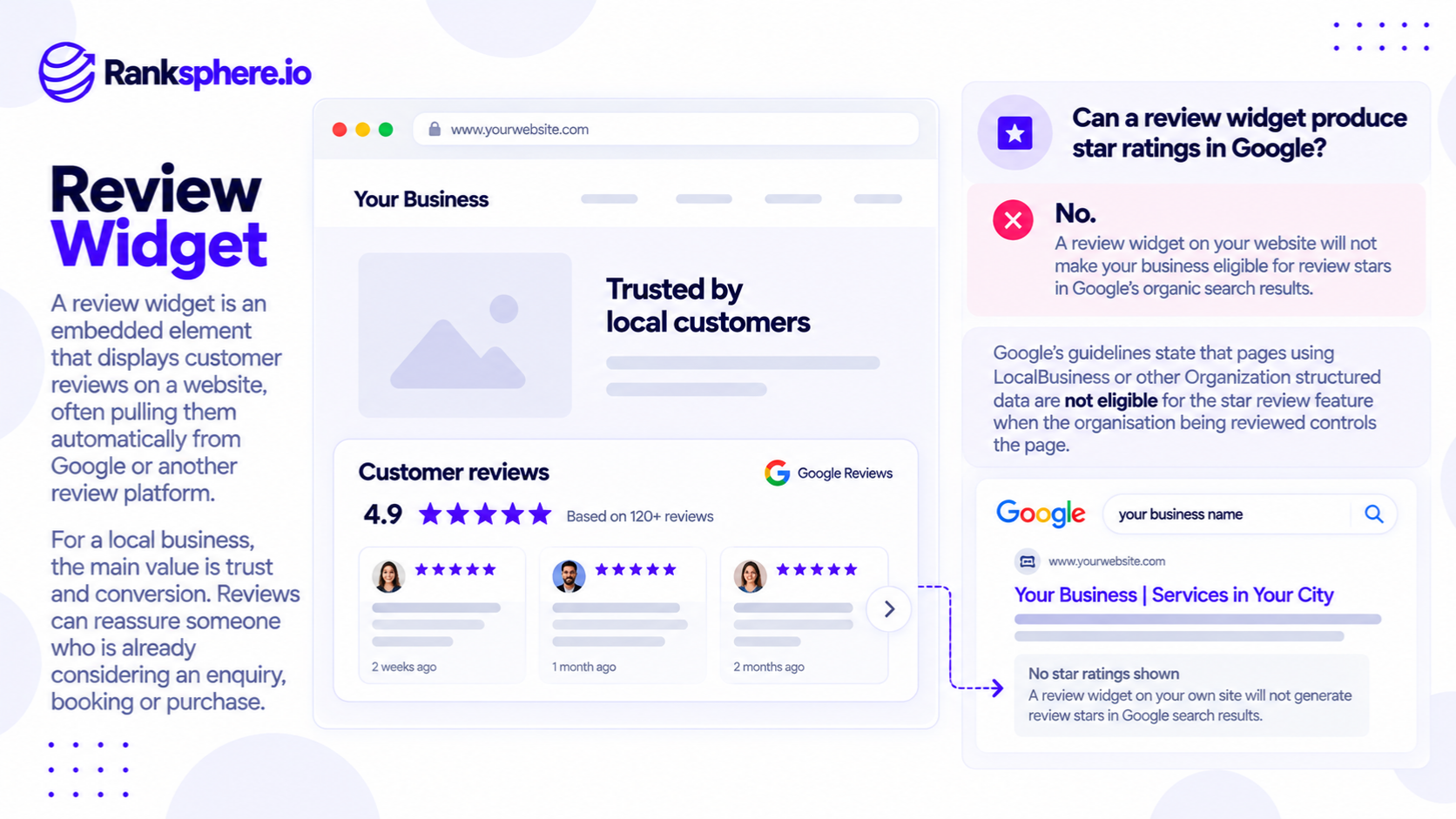
A review widget is a website element that displays customer reviews from Google or another review platform. It allows businesses to show ratings and customer feedback directly on their websites, often using a third-party plugin or embedded script.
For example, a plumbing company might display its recent Google reviews beside the enquiry form on its emergency plumbing page.
Visitors can read what previous customers have said without leaving the website.
Review widgets can help businesses build trust and give potential customers more confidence before contacting them.
However, adding a Google review widget to your website does not make your business eligible for review stars in Google's organic search results.
Google has restricted self-serving review rich results for businesses and organisations since September 2019.
The distinction matters because some review widget services still promote star ratings in search results as a reason to install their software.
For local businesses, the value of a review widget is primarily in the information it provides to website visitors, not in generating additional search result features.
How Does a Review Widget Work?
A review widget connects to a review source and displays selected information on a website.
Depending on the provider, it may show:
- Customer ratings
- Written reviews
- Reviewer names
- Review dates
- Average star rating
- Links to the original review platform
Some widgets update automatically when new reviews become available.
Others require manual updates or use cached review information.
For example, a dental practice could display recent customer feedback on its website using a widget connected to its Google Business Profile.
The widget might show the review text, star rating, and date.
However, the features depend on the provider and the permissions available from the review platform.
Not every review widget offers the same functionality.
Do Review Widgets Help You Get Star Ratings in Google Search?
No. Adding a review widget that displays feedback about your own business doesn't make your website eligible for self-serving review rich results.
Google changed its review snippet rules in September 2019.
Under these rules, reviews about a business or organisation aren't eligible for review stars in organic search when that same business or organisation controls the reviews displayed on its own website.
This applies to relevant LocalBusiness and Organization structured data.
For example, imagine a roofing company has 150 genuine Google reviews.
The company installs a widget that displays those reviews on its homepage.
It also adds review structured data showing the same rating.
Even if the reviews are genuine and the structured data is technically valid, Google's rules make that self-serving business review markup ineligible for review rich results.
Google specifically addresses third-party widgets in its guidance.
For a more detailed explanation, see review schema.
Why Doesn't Google Allow These Review Stars?
Google considers reviews self-serving when a business displays reviews about itself on a webpage it controls.
The issue isn't necessarily whether the reviews are genuine.
It's that the business controls how those reviews are presented on its own website.
For example, a business could select favourable reviews, choose where they appear, or decide which feedback visitors see.
Google's restriction applies even when the reviews originate from an independent platform.
What If the Review Schema Passes Google's Rich Results Test?
A successful structured data validation doesn't guarantee that Google will display a rich result.
A page may contain syntactically valid structured data while failing the eligibility requirements for a particular search feature.
For example, a business could correctly implement AggregateRating markup for its own Google reviews.
The markup may be technically readable.
However, that doesn't override Google's restriction on self-serving reviews.
Review snippet eligibility depends on Google's policies, not simply whether the markup is valid.
Can Other Websites Display Review Stars?
Yes, review snippets remain available for certain eligible content types and circumstances.
For example, Google supports review structured data for qualifying products, recipes, software applications, and other documented types.
Websites collecting genuine reviews about other businesses may also qualify under applicable rules.
However, these exceptions don't allow a local business to mark up its own customer reviews as an eligible review rich result.
See Google's official review snippet documentation.
Review Widget vs Google Business Profile Ratings
The stars displayed in local business results are different from the review rich results generated through website structured data.
A local business may have ratings displayed in:
- Google Business Profile
- Google Maps
- The local pack
- The business's knowledge panel, where available
Those ratings come from Google's business review systems.
They aren't created by installing a widget on the company's website.
For example, a physiotherapy clinic might have a 4.8-star Google Business Profile rating.
That rating may appear alongside its listing in Google Maps or relevant local search features.
Displaying the same reviews on the clinic's website doesn't cause Google to add stars to its ordinary organic website result.
The two systems should be evaluated separately.
What Are the Benefits of a Review Widget?
Although review widgets don't produce self-serving review rich results, they can still be useful for local businesses.
1. Display Customer Feedback Where It Matters
Reviews can help visitors evaluate a business before making an enquiry.
For example, someone considering an expensive roof replacement may want to know whether previous customers were satisfied.
Displaying relevant feedback near the quote request section can make that information easier to find.
However, simply placing reviews near a form doesn't guarantee more enquiries.
Businesses should measure whether the placement improves the user experience or contributes to conversions.
2. Show Recent Customer Experiences
Recent feedback can help visitors understand how customers currently experience a service.
For example, a dental practice may have reviews discussing appointment communication, staff professionalism, and the patient experience.
An automatically updating widget can reduce the need to manually copy new reviews onto the website.
However, businesses should check how frequently the provider synchronises reviews.
Not every widget updates in real time.
3. Provide Service-Specific Feedback
A review discussing the exact service a visitor is researching can be particularly useful.
For example, a roofing page about gutter repairs may benefit from genuine feedback mentioning completed guttering work.
This provides practical context that a general star rating cannot.
However, the business should not alter review wording or present reviews in a misleading way.
4. Help Visitors Make an Informed Decision
Detailed customer feedback may answer concerns that promotional copy doesn't address.
For example, a visitor may want to know whether a contractor:
- Arrived when expected
- Explained the work clearly
- Communicated throughout the project
- Left the property tidy
- Responded appropriately to problems
Reviews can help customers evaluate those experiences.
The potential benefit relates to trust and conversion rate, rather than a guaranteed direct improvement in organic rankings.
Can Review Widgets Slow Down a Website?
Yes. Some review widgets can affect website performance.
Many depend on third-party JavaScript, external stylesheets, fonts, or network requests.
The impact depends on how the widget is built and loaded.
Additional Third-Party Scripts
A widget may need to contact an external server before displaying reviews.
This can add network requests and JavaScript processing.
If the widget loads unnecessary resources on every page, it may contribute to slower performance.
Layout Shifts
Some widgets don't reserve enough space before their content loads.
For example, a service page may initially display an enquiry form near the top.
When the review widget finishes loading, it pushes the form farther down.
That unexpected movement can affect Cumulative Layout Shift (CLS), one of Google's Core Web Vitals.
Interaction Delays
Heavy scripts can compete for browser resources.
On slower mobile devices, excessive JavaScript may affect responsiveness.
However, review widgets don't automatically damage Core Web Vitals.
A lightweight widget may have little measurable impact, while a poorly implemented one can create unnecessary delays.
How to Reduce the Performance Impact
Before installing a widget:
- Check how many scripts it loads.
- Test the page before and after installation.
- Reserve space for the widget to reduce layout shifts.
- Avoid loading the same widget unnecessarily across every page.
- Consider lazy loading below-the-fold widgets.
- Explore server-rendered or lightweight alternatives where licensing and platform rules permit.
Lazy loading can help when a widget appears farther down the page.
However, it isn't always appropriate for content that visitors need immediately.
Server-side rendering can reduce some client-side JavaScript work, but it still requires careful implementation and may not eliminate every performance cost.
Where Should You Place a Review Widget?
The best placement depends on the page and what visitors need to know.
Service Pages
A review widget may be useful near service information or an enquiry form.
For example, a plumbing company might show relevant customer feedback close to its emergency plumbing contact options.
Homepage
A homepage may display a small selection of recent reviews or an overall rating.
This can help visitors understand the experiences of previous customers.
However, the widget shouldn't dominate the page or push essential service information out of view.
Location Pages
For businesses operating from several locations, reviews associated with the relevant branch may be particularly useful.
For example, a dental group could display customer feedback for the clinic featured on a specific location page.
Make sure the review source and business location are identified accurately.
Dedicated Reviews Page
Some businesses create a page where visitors can read more customer feedback.
This may be appropriate when reviews are important to the purchasing decision.
However, a dedicated reviews page shouldn't replace useful service descriptions, pricing information, or other details customers need.
Should You Display Only Five-Star Reviews?
Displaying only positive reviews can create a misleading impression of customer experiences.
A business may want to highlight favourable feedback, but it should avoid presenting a heavily filtered selection as though it represents all reviews.
A more transparent approach is to display genuine recent reviews and provide a clear link to the original review platform.
For example, if the widget shows an average rating, visitors should be able to understand its source.
Don't fabricate reviews, change customer statements, or hide relevant context in a misleading way.
Also follow the review platform's applicable display and attribution requirements.
A credible review widget should help customers evaluate the business, not manufacture the appearance of universal satisfaction.
Review Widgets vs Review Management
A review widget displays existing customer feedback.
It doesn't automatically create a process for earning new reviews.
That distinction matters.
For example, a plumbing company could install an attractive widget showing ten reviews collected several years ago.
However, the widget doesn't solve the underlying problem of having little recent customer feedback.
An ongoing review process may involve:
- Asking customers for genuine feedback
- Monitoring new reviews
- Identifying reviews requiring attention
- Preparing appropriate responses
- Keeping track of review activity
Ranksphere's Review Management helps businesses monitor and manage customer feedback, including preparing review responses.
The widget serves a different purpose: displaying reviews to website visitors.
Both can support the wider customer experience, but they shouldn't be confused.
Do Review Widgets Help SEO?
Review widgets can contribute useful information to a page, but their SEO benefits should not be overstated.
They Don't Guarantee Higher Rankings
Google doesn't identify installing a review widget as a direct ranking factor.
Adding a widget won't automatically improve organic rankings or Google Maps visibility.
They Don't Make Self-Serving Review Schema Eligible
Adding schema markup around reviews of your own business doesn't override Google's self-serving review restrictions.
The markup may be valid without being eligible for review rich results.
They May Support the Website Experience
Genuine customer feedback can help visitors evaluate a business.
That may support trust and conversions.
However, any increase in enquiries or bookings should be measured rather than assumed.
They Don't Replace Google Business Profile Reviews
Google states that more reviews and positive ratings can help local rankings.
Those reviews belong to the business's Google review profile, not to the website widget.
The widget simply displays feedback that already exists.
A consistent, policy-compliant process for requesting genuine reviews is therefore more important than installing a widget alone.
Common Review Widget Mistakes
- Buying a widget to generate organic search stars. Self-serving business review markup is ineligible.
- Assuming valid schema guarantees rich results. Technical validity doesn't override Google's policies.
- Ignoring website performance. Third-party scripts can affect loading and responsiveness.
- Displaying only favourable reviews without context. Overly selective presentation can mislead visitors.
- Placing reviews where visitors are unlikely to need them. A widget should support the page's purpose.
- Installing multiple competing widgets. This can add unnecessary visual clutter and scripts.
- Showing outdated feedback. Old reviews may provide limited insight into current service quality.
- Treating the widget as a review collection strategy. Displaying reviews isn't the same as earning new ones.
- Ignoring platform requirements. Review content may be subject to attribution, usage, and display conditions.
Review Widget Best Practices
To use review widgets effectively:
- Choose a reliable review source.
- Display genuine, relevant customer feedback.
- Include review text where useful, not only stars.
- Identify the original review platform.
- Keep review information reasonably current.
- Avoid misleading filtering or presentation.
- Place reviews near relevant service or decision-making content.
- Test mobile usability and page performance.
- Reduce unnecessary third-party scripts.
- Consider lightweight alternatives where appropriate.
- Don't add self-serving review markup expecting organic search stars.
- Measure changes in enquiries and conversions.
- Maintain an ongoing process for collecting genuine reviews.
The goal is to make customer feedback useful and accessible.
A widget that helps visitors make a decision may justify its place on the website even though it doesn't create a special search appearance.
Example of a Review Widget for a Plumbing Company
Consider a hypothetical plumbing business called Whitfield Plumbing.
The company hires an agency to add a review widget to its website.
The agency recommends a widget and review structured data, claiming that the installation will make star ratings appear alongside the company's organic search results.
What Happens?
The widget displays genuine Google reviews on the company's service pages.
The agency also implements review markup.
A structured data test shows that the markup is technically valid.
However, the company doesn't receive review stars in its ordinary organic search listings.
The agency initially suggests waiting longer for Google to process the markup.
The problem isn't necessarily a delay.
Google's self-serving review rules make this type of markup ineligible for review rich results.
How the Company Changes Its Approach
The plumbing company decides to retain the widget, but for a different purpose.
Instead of expecting search stars, it focuses on helping visitors evaluate the business.
The agency moves the widget closer to relevant service information and contact options.
It also checks the effect on page speed and mobile usability.
Meanwhile, the company introduces a consistent process for requesting genuine reviews after completed jobs.
Customers are invited to share their experiences without incentives or pressure to leave a positive rating.
How the Company Measures Results
The team monitors:
- Relevant service page visits
- Contact form submissions
- Tracked phone enquiries
- Changes in conversion rate
- New Google reviews
- Website performance
It compares results over time rather than assuming the widget caused every change.
The review collection process and website widget are evaluated separately.
Example Shows
“The widget was originally sold as a way to generate star ratings in organic search results.
That promise was inconsistent with Google's review snippet rules.
However, the widget could still be useful for displaying customer experiences to people considering the company's services.
A review widget helps visitors see what customers say about your business. It doesn't create eligibility for organic search review stars.
For local businesses, the priority should be collecting genuine reviews, displaying them transparently, and making sure the widget improves the website experience rather than slowing it down.”
See Also
- Review Schema — Understanding review structured data and Google's self-serving review restrictions.
- Online Review — Customer feedback and its role in evaluating businesses.
- Rich Result — Enhanced Google Search appearances and their eligibility requirements.
- Conversion Rate — Measuring how often visitors complete important actions.
- Core Web Vitals — Measuring loading performance, responsiveness, and visual stability.
- User-Generated Content — Content created by customers and other users.