
Web hosting is the service that stores a website's files and makes them accessible to visitors through the internet.
Every website needs hosting, whether it runs on shared infrastructure, a managed platform, a virtual private server or a dedicated server.
Hosting can affect SEO through server response times, uptime, security and Googlebot's ability to access a website.
For a local business, poor hosting can mean slow service pages, failed contact forms and customers leaving before they can make an enquiry.
A fast website cannot compensate indefinitely for an unreliable server. But upgrading hosting won't fix every website performance problem either.
The important part is identifying whether hosting is actually responsible for the issue.
How Does Web Hosting Affect SEO?
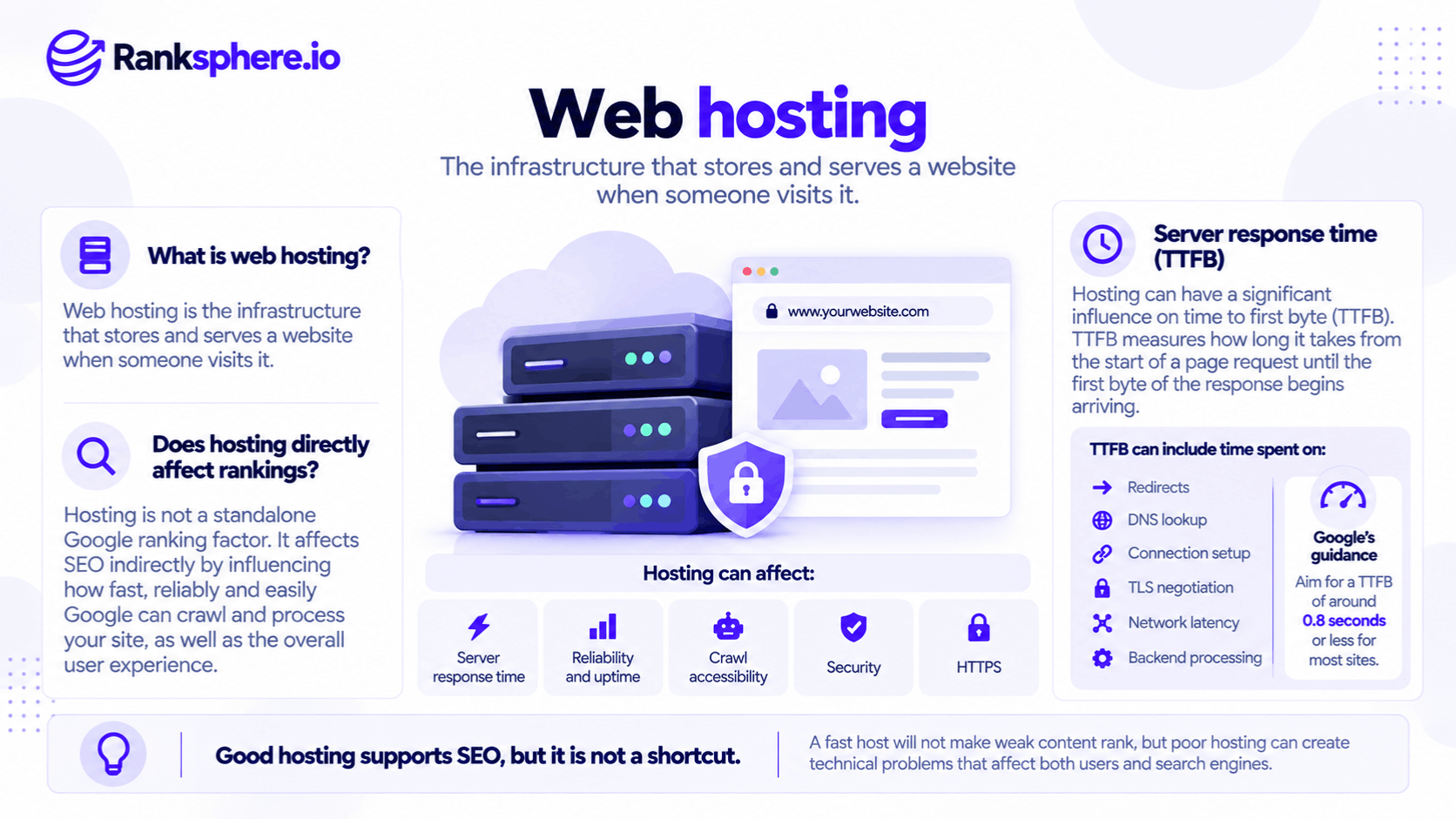
Hosting influences several aspects of website performance and technical reliability.
Server Response Time
One of the clearest measurements is Time to First Byte (TTFB).
TTFB measures how long it takes a browser to receive the first byte of a response after requesting a resource.
It includes more than server processing. Network delays, redirects and connection setup can also contribute.
Google's web performance guidance suggests aiming for a TTFB of 0.8 seconds or less, measured at the 75th percentile.
A consistently slow response can delay the point at which the browser begins rendering useful content.
However, TTFB isn't itself a Core Web Vital or a direct measure of hosting quality.
Core Web Vitals
Hosting can affect Core Web Vitals, particularly Largest Contentful Paint (LCP).
LCP measures when the largest visible content element finishes rendering.
If the server takes nearly two seconds to respond, the browser has less time to load and render that element within Google's recommended 2.5-second threshold.
However, the other Core Web Vitals measure different experiences.
Interaction to Next Paint (INP) focuses on responsiveness, while Cumulative Layout Shift (CLS) measures unexpected visual movement.
A hosting upgrade won't automatically fix inefficient JavaScript or layout shifts.
Uptime and Crawlability
A reliable host keeps the website accessible to visitors and search engine crawlers.
If a server repeatedly returns 5xx errors, Google may temporarily reduce its crawling activity.
Persistent server failures can eventually affect indexing.
A brief outage doesn't automatically remove a website from Google, but recurring availability problems should be investigated.
Server Location and Network Latency
Physical distance between a server and its visitors can affect response times.
For example, a UK-based local business with most customers in the UK may benefit from hosting infrastructure or edge delivery close to that audience.
A Content Delivery Network (CDN) can reduce network delays by serving cached content from locations nearer to visitors.
This often makes the location of the origin server less important for cacheable resources.
Security and HTTPS
Hosting also affects how securely a website operates.
Poorly maintained software, weak access controls and missing updates can increase the risk of compromise.
A hacked website may expose visitors to malicious content and could trigger security warnings or other Google Search enforcement, including a manual action in applicable cases.
Reliable HTTPS support, certificate renewal, backups and security updates are therefore important.
When Is Web Hosting the Problem?
Slow page speed doesn't automatically mean the hosting provider is inadequate.
However, several symptoms warrant investigation:
- TTFB remains consistently high in real-user measurements.
- Server response times become noticeably worse during busy periods.
- The website frequently returns 500, 502, 503 or other server errors.
- Google Search Console reports recurring host availability problems.
- The website becomes slow when several customers visit simultaneously.
- Front-end improvements have produced limited results because document responses remain slow.
Start with evidence.
Use Google Search Console, real-user performance data and server monitoring to understand when and where the problem occurs.
A single slow speed test isn't enough to justify moving hosting providers.
Check Caching Before Upgrading Your Host
Before paying for more expensive hosting, investigate whether the website uses caching effectively.
For a typical WordPress website, full-page caching can reduce the amount of work the server performs when delivering pages to visitors.
Without caching, the server may need to run application code and database queries for every request.
With properly configured caching, many requests can be served more efficiently.
However, caching isn't always appropriate for personalised, logged-in or frequently changing content.
It also won't eliminate every source of delay.
If TTFB remains poor after reviewing caching, redirects, application processing and network performance, hosting capacity may be the next issue to investigate.
Ranksphere's Website Audit Tool helps identify technical website issues and performance concerns that warrant further investigation.
When Better Hosting Won't Fix Website Speed
Hosting is sometimes blamed for problems elsewhere on the page.
For example, a website might have a fast server response but still fail its Core Web Vitals assessment.
Common causes include:
Large images. An unoptimised hero image may delay LCP even when the server responds quickly. See image SEO.
Excessive JavaScript. Large scripts can delay rendering and user interactions.
Layout instability. Missing image dimensions, dynamically inserted content and font changes can cause layout shifts.
Third-party services. Advertising, analytics, chat widgets and external scripts can affect performance independently of the main hosting provider.
Check which part of the loading process is slow before deciding what to replace.
A website may need better caching, smaller images or less JavaScript rather than a more expensive server.
What Should a Local Business Look for in Web Hosting?
Most local business websites don't need dedicated enterprise infrastructure.
They need hosting that is reliable, secure and capable of handling their normal traffic.
Important considerations include:
- Consistent performance: Response times remain reasonable during normal and busy periods.
- Caching support: The platform supports effective page and asset caching.
- Reliable uptime: Outages are monitored and addressed promptly.
- Automatic backups: Recent backups are available and can be restored.
- Security maintenance: Updates, access controls and protective measures are supported.
- HTTPS certificates: Certificates are installed and renewed reliably.
- Server or CDN location: Content can be delivered efficiently to the intended audience.
- Technical access: Appropriate logs and diagnostics are available when problems occur.
Access to server records can also be useful for log file analysis, particularly when investigating crawling errors.
Managed hosting can simplify these responsibilities, especially for businesses without an internal technical team.
However, a higher price doesn't automatically mean better performance.
Evaluate the actual service rather than relying on marketing claims.
Does Changing Web Hosting Affect SEO?
Moving to a different hosting provider isn't inherently a ranking improvement.
If the website's URLs, content and functionality remain unchanged, the move is primarily an infrastructure change.
However, a hosting move can introduce problems similar to those encountered during a site migration.
For example, a new server might introduce incorrect redirects, inaccessible resources or crawler restrictions.
Before and after switching providers, verify:
- HTTPS certificates and redirect behaviour
- Important URL availability
- Robots.txt and noindex settings
- Googlebot access
- Website forms and booking functionality
- Server errors and response times
Check that restrictions used on a staging site haven't accidentally been transferred to production.
Continue monitoring the website after the move rather than assuming successful deployment means everything is working correctly.
Common Web Hosting Mistakes
- Blaming every performance problem on hosting. Images, scripts and layouts can be the real cause.
- Upgrading before checking caching. An inexpensive configuration improvement may solve the problem.
- Choosing hosting solely by price. Reliability, support and maintenance also matter.
- Relying on one speed test. Real-user measurements provide better context.
- Ignoring recurring server errors. Persistent failures can affect Google's crawling and indexing.
- Overlooking backups and security. Recovery matters as much as speed.
- Failing to test after a host change. New infrastructure can introduce technical SEO problems.
Web Hosting Best Practices
Measure performance before changing providers.
Check TTFB, server availability and Core Web Vitals using appropriate field and diagnostic data.
Investigate caching and application performance before assuming the server needs upgrading.
Choose a provider with reliable backups, security maintenance and HTTPS support.
If changing hosts, test important pages and crawler access immediately after launch.
The right hosting setup isn't necessarily the fastest or most expensive. It's the one that reliably serves the website's content without creating a performance or availability bottleneck.
Example of Hosting Affecting Website Performance
Consider a hypothetical veterinary practice whose website performs poorly on mobile devices.
The agency begins by compressing images, reducing unnecessary JavaScript and improving font loading.
These changes help, but the main service pages still load slowly.
What the Audit Finds
Further testing shows that the site's TTFB is consistently poor.
The website runs on low-cost shared hosting, with no effective page caching and several resource-intensive plugins.
Server response times also worsen during busy periods.
What the Agency Changes
The agency configures caching and removes unnecessary processing.
It then evaluates whether the existing hosting provider can deliver acceptable performance.
Because response times remain inconsistent, the practice moves to a managed hosting environment suited to its website.
The team checks redirects, HTTPS, indexing directives and Googlebot access after the move.
Example
“The earlier front-end improvements weren't wasted.
Reducing image sizes and unnecessary scripts remained useful after the hosting changes.
The problem was that the agency initially focused on browser-side performance without fully diagnosing the server response.
This example illustrates why hosting and front-end optimisation should be assessed together.
A faster server may improve loading performance, but neither improved Core Web Vitals nor better rankings are guaranteed simply by changing providers.”
See Also
- Time to First Byte — Measuring how quickly a server begins responding.
- Core Web Vitals — Google's loading, responsiveness and visual stability metrics.
- CDN — Delivering website resources closer to users.
- Page Speed — Understanding website loading performance.
- Site Migration — Managing technical changes when moving websites.
- Staging Site — Testing website changes before publication.