Organic traffic is website traffic that arrives through unpaid search results.
In Google Analytics 4, the Organic Search channel includes visits from non-ad links on recognised search engines.
That can include traffic from:
- Traditional organic search results
- Google AI Overviews
- Google AI Mode
- Other recognised search engines
Google currently classifies traffic from AI Overviews and AI Mode as Organic Search rather than putting it into GA4's separate AI Assistant channel.
Organic traffic does not normally include:
- Paid search ads
- Direct visits
- Referral traffic
- Organic social
- Paid social
For local businesses, it also misses an important part of the customer journey:
people who take action directly from Google without ever reaching the website.
A customer may:
- Tap the call button on a Google Business Profile
- Ask for directions
- Complete a supported booking
without creating an organic website session at all.
That is why organic traffic is useful, but rarely sufficient as the headline measure of local SEO performance.
What is organic search traffic?
In GA4, Organic Search is a channel classification.
Google defines it as traffic where users arrive at the website through non-ad links in organic search results.
For example, somebody searches:
emergency dentist Bristol
clicks your standard Google result and lands on your website.
That visit can be classified as Organic Search.
Likewise, if a user clicks your website from an AI Overview or AI Mode, Google currently includes that traffic in Organic Search.
Organic traffic is not the same as search visibility
A page can receive:
- Thousands of impressions
- Very few clicks
and therefore generate little organic traffic.
Search Console measures things such as:
- Impressions
- Clicks
- CTR
- Average position
while GA4 measures what happens after users reach the website.
Those are related datasets.
They are not interchangeable.
Organic traffic is not the same as organic clicks
This distinction matters when comparing Google Analytics 4 with Search Console.
Search Console counts:
clicks from Google Search to the site.
GA4 measures:
sessions, users, events and other on-site behaviour.
A click and a session are not the same unit.
For example, a user could:
- Click a Google result
- Return to Google
- Click again
while those interactions still belong to one Analytics session.
Or somebody could click a result and leave before the Analytics tag loads, creating a Search Console click without a corresponding GA4 session.
Google's own documentation explains that clicks and sessions are fundamentally different metrics and should not be expected to match exactly.
What organic traffic includes
Depending on your Analytics configuration, Organic Search can include traffic from recognised search engines such as Google and others.
GA4 determines organic search using factors including:
- The referring search engine
- Traffic-source information
- The organic medium
Google documents Organic Search as the channel for users arriving from non-ad search-engine results.
Google AI Overviews and AI Mode
This area has changed significantly.
GA4's current default channel definitions explicitly state that:
Organic Search includes Google's AI Overviews and AI Mode.
So if a user sees your site cited in an AI Overview and clicks through, that visit can be part of your organic search traffic.
Likewise, clicks from AI Mode are included in overall Search Console performance data.
This is different from third-party AI systems.
AI Assistant traffic is a separate GA4 channel
GA4 now also has an AI Assistant default channel.
Google describes that channel as traffic arriving from AI assistants such as:
- ChatGPT
- Gemini
- DeepSeek
- Copilot
- Grok
while explicitly excluding Google's own AI Overviews and AI Mode.
That distinction is useful when reporting.
For example:
Google AI Mode → Organic Search
but:
ChatGPT referral → AI Assistant
under GA4's current default channel rules.
What organic traffic misses
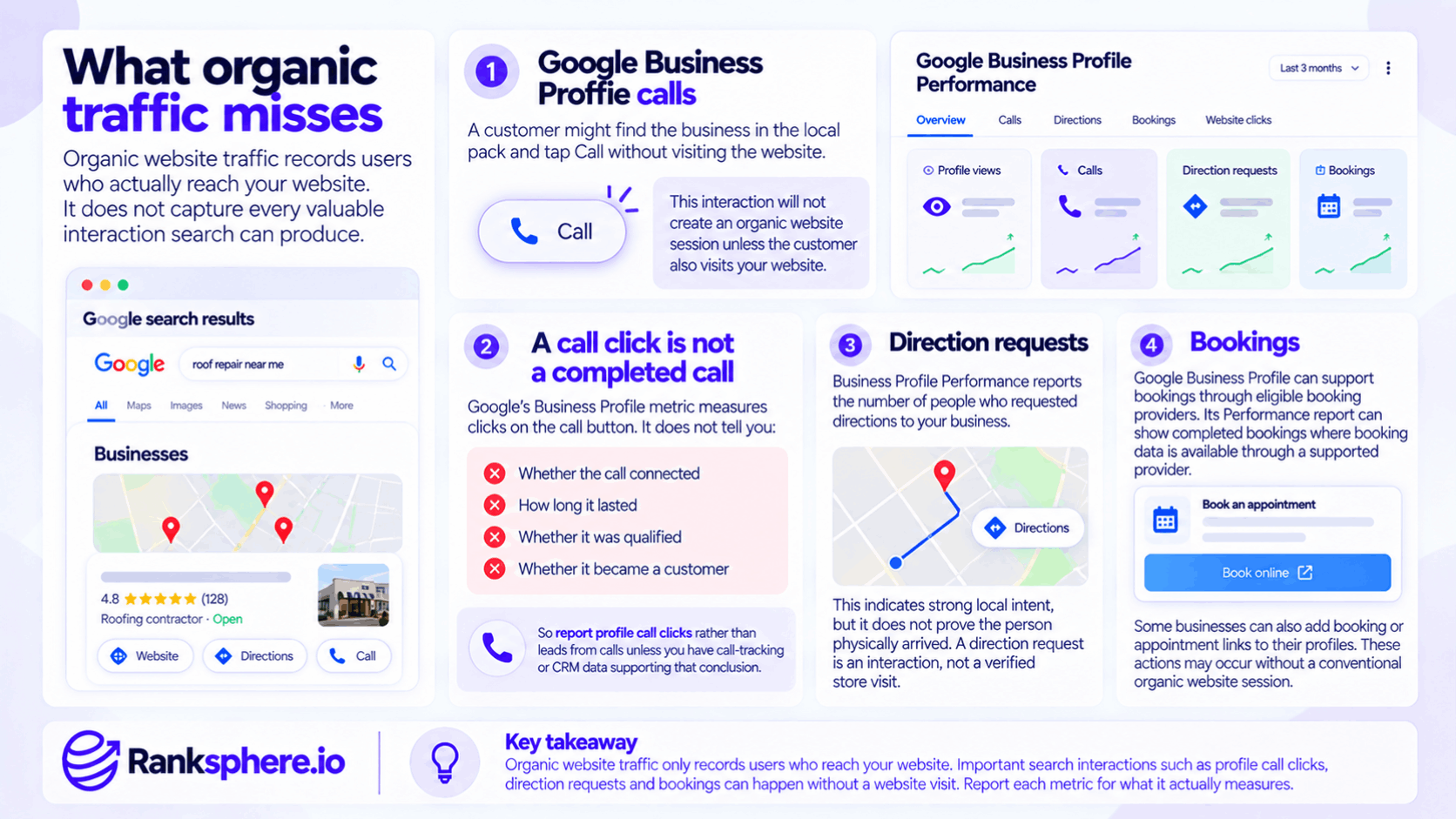
Organic website traffic records users who actually reach the website.
It does not capture every valuable interaction search can produce.
For a local business, this matters a great deal.
Google Business Profile calls
A customer might find the business in the local pack and tap:
Call
without visiting the website.
Google Business Profile Performance records the number of times users click the call button.
That interaction will not create an organic website session unless the customer separately visits the website.
A call click is not a completed call
Be precise when reporting this.
Google's Business Profile metric measures:
clicks on the call button.
It does not tell you:
- Whether the call connected
- How long it lasted
- Whether it was qualified
- Whether it became a customer
So report:
Profile call clicks
rather than:
Leads from calls
unless you have call-tracking or CRM data supporting that conclusion.
Direction requests
Business Profile Performance also reports the number of people who requested directions to the business.
That indicates strong local intent.
But it does not prove:
the person physically arrived.
A direction request is an interaction.
Not a verified store visit.
Bookings
Google Business Profile can also support bookings through eligible booking providers.
Google says its Performance report can show completed bookings where booking data is available through a supported provider.
Some businesses can also add booking or appointment links to their profiles.
Again, those actions may occur without a conventional organic website session.
Google Business Profile messaging is no longer available
Older SEO reporting frameworks sometimes include:
GBP messages
as a current profile action.
That is outdated.
Google discontinued Business Profile chat and call history on 31 July 2024.
Customers can still:
- Call
- Visit websites
- Request directions
- Use other supported profile actions
but the old Business Profile messaging feature is no longer available.
Organic traffic and Google Business Profile website clicks
A person may click the website button on your Google Business Profile.
Google Business Profile Performance separately records:
Website clicks
from the profile.
Once the visitor reaches your site, Analytics will classify the session according to the traffic information it receives.
Without campaign tagging, it can be difficult to distinguish that traffic cleanly from other Google-originated visits.
That is why UTMs can be useful.
Tag Google Business Profile links with UTMs
Adding UTM parameters to Business Profile links can make profile-sourced website traffic easier to identify in Analytics.
For example, you might use a consistent scheme based on:
- Source
- Medium
- Campaign
GA4 supports manual campaign parameters such as:
- utm_source
- utm_medium
- utm_campaign
to identify traffic sources and campaigns.
The important part is consistency.
Do not invent a UTM scheme casually
For example, if you use:
utm_medium=organic
GA4's channel rules may still classify the visit as Organic Search because the medium matches organic.
If you use a custom medium that does not match a standard channel rule, the session may appear somewhere else.
So define the tracking structure deliberately.
The goal is not merely:
“add UTMs.”
It is:
“create a stable attribution convention the reporting team understands.”
Tag appointment links where appropriate
Where the Business Profile allows you to add your own booking or appointment URL, that link can also be tagged so you can identify sessions reaching the booking journey from the profile.
Google allows eligible businesses to add appointment and reservation links directly to their profiles.
Be careful not to add tracking parameters where a third-party booking provider does not support them.
Organic traffic is only one part of local SEO
For a local business, search can create value in several places.
A customer might:
- See the business in the local pack
- Read reviews
- Tap Call
- Never visit the website
Or:
- Search a service
- Visit the website
- Read a page
- Call later
Or:
- See the brand repeatedly in Google
- Remember the name
- Return later through a branded search
Organic sessions only capture part of that.
That does not make organic traffic unimportant.
It means the metric should sit inside a wider measurement framework.
Can organic traffic fall while enquiries rise?
Yes.
But do not assume that relationship automatically means SEO improved.
For example, it is possible that:
- Local-pack visibility increased
- More customers used the profile's call button
- Fewer needed to visit the website
In that scenario:
website sessions could fall while profile interactions rise.
But the same organic-traffic decline could also result from:
- Ranking losses
- Reduced search demand
- Seasonality
- Tracking failures
- Competitor changes
- New SERP features
- Search-intent changes
Investigate before assigning a cause.
Check profile actions before diagnosing local traffic declines
If a local client's organic sessions fall, check:
- Profile call clicks
- Website clicks
- Direction requests
- Bookings where supported
alongside:
- Search Console clicks
- Impressions
- Rankings
- Conversions
Google Business Profile Performance provides several of these profile-level interaction metrics separately from website analytics.
That helps distinguish:
fewer website visits
from:
less search demand overall.
Zero-click search
Zero-click search describes searches where the user does not ultimately click through to an external website.
This can happen because the search result itself provides enough information.
For a local business, that might include:
- Phone number
- Opening hours
- Directions
- Reviews
For informational searches, it could involve:
- Featured results
- AI-generated answers
- Other SERP features
In those situations, organic website traffic does not capture the full search exposure.
Zero-click visibility is not automatically valuable
A search impression with no click may still provide:
- Brand exposure
- Information
- Local discovery
But do not automatically turn that into:
“zero-click traffic generated brand awareness.”
Without additional evidence, you know the search appearance occurred.
You do not necessarily know what the user remembered or did later.
AI Overviews and organic traffic
AI Overviews can produce both:
- Impressions without clicks
- Actual website clicks
If someone clicks an external link from an AI Overview, Search Console counts it under its normal click methodology, while GA4 currently classifies the resulting Google traffic within Organic Search.
So avoid saying:
“AI visibility produces no organic traffic.”
Sometimes it does.
The more accurate distinction is:
AI visibility can occur without a website visit, but AI features can also send organic traffic.
Organic traffic can decline because the SERP changed
A page can hold roughly the same ranking while receiving fewer clicks.
Possible reasons include:
- AI Overviews
- Local packs
- Ads
- Featured snippets
- Other SERP features
If Search Console shows:
- Similar impressions
- Similar position
- Lower clicks
check whether the results page has changed.
Do not immediately rewrite the page.
The traffic decline may be partly a search-interface change rather than a content problem.
Organic traffic can decline because demand changed
Suppose a heating company compares:
July
with:
January.
Traffic may fall dramatically even if rankings remain excellent.
That is not necessarily SEO failure.
Seasonal businesses should use:
- Year-on-year comparisons
- Query-level demand
- Search Console impressions
alongside raw sessions.
Branded and non-branded organic search
The distinction between branded keywords and non-branded search can make organic reporting more useful.
For example:
Branded
Bellwood Dental
Non-branded
dentist near me
The first shows explicit brand demand.
The second represents broader service discovery.
But be careful about where you perform the split.
GA4 does not provide complete organic keyword data
Most organic Google search keywords are not passed into GA4 as normal traffic-source keyword data.
Google notes that most Google searches occur over HTTPS, resulting in organic keyword information typically appearing as:
(not provided).
So do not pretend you can perfectly divide GA4 Organic Search sessions into:
- Branded
- Non-branded
using ordinary Analytics keyword data.
Use Search Console for branded vs non-branded query analysis
Search Console is the better source for query-level Google organic performance.
You can then combine Search Console with GA4 by:
- Landing page
- Country
- Device
through the official Search Console integration.
A sensible reporting model is:
Search Console
Branded vs non-branded:
- Impressions
- Clicks
- CTR
- Position
GA4
Organic behaviour:
- Sessions
- Users
- Key events
- Landing-page performance
Do not force one platform to answer a question it was not designed to answer.
Segment organic traffic by landing page
Landing-page analysis is one of the most useful ways to understand organic traffic.
Instead of reporting:
Organic sessions: 8,420
ask:
Which pages received them?
For example:
Service pages
Potentially higher commercial intent.
Location pages
Local discovery.
Guides
Informational discovery and earlier-stage traffic.
Homepage
Often includes a larger branded component.
The same number of sessions can have very different value depending on where users land.
Measure conversions, not only sessions
Organic traffic is an input.
A business outcome may be:
- Contact-form submission
- Phone click
- Booking
- Quote request
- Purchase
Those should normally carry more weight than:
session count.
A campaign generating:
5,000 sessions and 20 enquiries
may be less valuable than one generating:
2,000 sessions and 80 enquiries.
Traffic volume alone does not tell you which is better.
GA4 key events
In GA4, important business actions can be marked as key events.
Useful examples for a local site may include:
- Form submissions
- Appointment completions
- Meaningful phone-button clicks
But distinguish:
website phone clicks
from:
Business Profile call clicks.
They are different interactions recorded by different systems.
Website phone taps
If somebody visits the website and clicks a:
tel:
link, GA4 can be configured to track that event.
That is useful.
But it still does not prove:
- The call connected
- The caller qualified
- Revenue resulted
Use call-tracking or CRM information if you need that level of measurement.
Business Profile actions belong beside website conversions
A strong local SEO report may therefore show:
Website
- Organic sessions
- Form submissions
- Phone taps
- Bookings
Google Business Profile
- Call clicks
- Direction requests
- Website clicks
- Supported bookings
Search visibility
- Impressions
- Clicks
- Local coverage
That provides much more context than:
organic traffic +12%.
Ranksphere's white-label reports bring profile actions and website performance into one document, allowing those different parts of local search performance to be viewed together rather than treating website sessions as the entire result.
Organic traffic and Search Console clicks will not match exactly
This deserves its own section because it causes constant confusion.
Suppose Search Console reports:
3,000 organic Google clicks
while GA4 reports:
2,600 Organic Search sessions.
That does not automatically mean tracking is broken.
Search Console measures clicks.
GA4 measures sessions.
One user can generate multiple clicks within one session, and Analytics may also miss visits where its tracking code never loads or data collection is prevented. Google's own measurement documentation explains why click and session totals should not be expected to reconcile exactly.
Check discrepancies when they become unusually large
Normal differences are expected.
A dramatic new gap deserves investigation.
Check:
- Analytics tag implementation
- Consent settings
- Redirects
- Landing-page tracking
- URL parameters
- Date ranges
Do not chase mathematical equality.
Look for unexpected changes in the relationship.
Organic traffic and direct traffic
Someone can discover a business through SEO and return later through:
Direct
For example:
- Search “family solicitor Leeds”
- Read the firm's guide
- Remember the business name
- Type the URL directly next week
GA4 may attribute that later session differently depending on the traffic and attribution context.
Organic traffic therefore does not perfectly represent every customer journey influenced by organic search.
That is an attribution limitation.
Not a reason to claim all direct traffic as SEO.
Organic traffic and branded return visits
Likewise, somebody could first discover the company via a non-branded result and later search:
Bellwood Dental
before booking.
The final visit is still Organic Search, but the branded query represents a different stage in the journey.
This is why branded keywords should be analysed separately in Search Console when acquisition is the question.
Organic traffic is not automatically new-customer traffic
A returning client can search:
Bellwood Dental
and create an Organic Search session.
An existing customer can search:
dentist near me
too.
Therefore:
Organic Search ≠ new customer acquisition
and:
Non-branded search ≠ guaranteed new customer
Reporting should reflect that limitation.
Should organic traffic be the headline local SEO KPI?
Usually not by itself.
For a local business, more useful headline measures may include:
- Qualified enquiries
- Bookings
- Website conversions
- Business Profile interactions
- Local visibility
Organic traffic remains important.
But it is better treated as part of the journey than the final business outcome.
When organic traffic is still extremely useful
Do not dismiss it.
Organic traffic is valuable for understanding:
- Which landing pages attract search visitors
- Whether discovery is growing
- What content generates visits
- How search users behave after arriving
- Which pages convert
The problem is not the metric.
The problem is treating it as:
the complete value of SEO.
Organic traffic trends
Look at trends rather than one isolated month.
Useful comparisons include:
- Month over month
- Year over year
- Rolling averages
Year-on-year comparison is particularly useful where demand is seasonal.
For example:
A landscaping business may naturally receive much more search traffic in spring than winter.
Comparing:
April vs March
may tell you less than:
April this year vs April last year.
Do not celebrate traffic without relevance
Organic sessions can rise because the website begins ranking for irrelevant informational queries.
For example, a local solicitor may gain thousands of visitors from an international legal-information article.
That might look impressive.
If none of those visitors can become customers, the commercial value may be minimal.
Always ask:
Which queries and landing pages created the growth?
Do not dismiss informational traffic automatically
The opposite is also true.
A useful informational page can support:
- Early-stage discovery
- Links
- Brand recognition
- Later conversions
Not every visit needs to convert immediately.
Evaluate the page against its actual purpose.
Common organic-traffic mistakes
- Treating Organic Search sessions as the complete value of local SEO.
- Assuming a traffic decline automatically means SEO performance declined.
- Claiming a traffic decline is automatically caused by stronger local-pack visibility.
- Ignoring Business Profile calls, directions, website clicks and supported bookings.
- Reporting Profile call-button clicks as completed phone calls.
- Treating direction requests as confirmed physical visits.
- Including Business Profile messaging as a current interaction even though Google discontinued chat in 2024.
- Failing to tag first-party Business Profile website or appointment links where useful.
- Adding UTMs without understanding how the chosen source and medium affect GA4 channel classification.
- Comparing Search Console clicks directly with GA4 sessions and expecting them to match.
- Trying to classify all GA4 organic sessions as branded or non-branded from keyword data that Analytics does not receive.
- Ignoring landing-page performance.
- Reporting sessions without conversions or business outcomes.
- Treating AI Overview visibility as always zero-click even though AI features can send organic traffic.
- Assuming every traffic increase represents better commercial performance.
Organic traffic best practices
- Report organic traffic alongside conversions and business outcomes.
- Use Search Console for search-query performance and GA4 for on-site behaviour.
- Segment by landing page rather than reporting only the total session count.
- Analyse branded and non-branded queries in Search Console where that distinction matters.
- Use UTM parameters consistently on appropriate first-party Business Profile links so the traffic can be identified more clearly.
- Report Google Business Profile interactions alongside website performance for local clients.
- Label call-button clicks and direction requests accurately rather than turning them into confirmed leads or visits.
- Check SERP features, rankings, demand and profile interactions before diagnosing a traffic decline.
- Remember that Google's AI Overviews and AI Mode clicks currently fall within GA4's Organic Search channel.
- Compare like-for-like periods where seasonality matters.
- Use traffic as a diagnostic and acquisition metric, not the sole definition of SEO success.
Example
“Consider a hypothetical dental practice called Bellwood Dental.
Its practice manager sees that organic sessions are lower than the same period last year.
The immediate conclusion is:
SEO must be performing worse.
The team does not assume that is true.
It checks several datasets.
They review:
- Organic clicks
- Impressions
- Important queries
- Landing pages
They review:
- Call-button clicks
- Website clicks
- Direction requests
- Supported booking activity
They review:
- Organic sessions
- Landing pages
- Form submissions
- Website phone-button clicks
The picture is more complicated than the session graph suggested.
The profile is generating a larger share of direct Google interactions, while some customers still reach the website through organic search.
The website itself also has phone links that were never configured as Analytics events, so part of its conversion behaviour had previously been invisible in reporting.
The team adds appropriate event tracking and uses consistent UTM parameters on the first-party Business Profile website link so that profile-originated site visits are easier to analyse.
The report is then rebuilt.
Instead of leading with:
Organic sessions
it shows:
- Impressions
- Search clicks
- Local coverage
- Organic sessions
- Form submissions
- Website phone interactions
- Bookings
- Call-button clicks
- Website clicks
- Direction requests
The team does not claim:
“Traffic fell because local SEO improved.”
That would require stronger evidence.
Nor does it invent a percentage increase in enquiries.
The useful conclusion is more measured:
organic website sessions were only one part of the customer journey, and looking at them alone had hidden other search-driven interactions.
That is the right way to report organic traffic for a local business.
Organic traffic tells you how much unpaid search is reaching the website. It does not tell you the full value of Search. For local SEO especially, website visits need to be read alongside Search Console visibility, Google Business
Profile interactions and actual conversions so that a customer who calls directly from Google does not disappear from the story simply because they never opened the site.”
See also
- Conversion rate — measuring what visitors do after reaching the website
- Google Business Profile performance — profile-level views and customer interactions
- Zero-click search — search journeys that do not end with a website visit
- UTM parameters — identifying traffic from specific links and campaigns
- Branded vs non-branded keywords — separating explicit brand demand from broader search discovery
- Google Analytics 4 — measuring sessions, users and on-site behaviour